
JuliusBrussee/
caveman

🪨 why use many token when few token do trick — Claude Code skill that cuts 65% of tokens by talking like caveman
105k
1 add
VibePulse puts agent usage, live working status, and NEEDS YOU prompts on an always-on AMOLED screen. A Python service on your Mac or Windows PC reads local Claude Code and Codex data, then serves plain status to the panel over your LAN. The panel can show quota, active agents, burn rate, and GitHub pulse, and it can answer supported prompts with a tap when you opt in. Optional encrypted relays let the panel and computer stay on different Wi‑Fi networks.
Builders who want Claude Code or Codex status on a shelf screen and a tap-to-answer path for supported prompts.
You can see when an agent is stuck or running low on quota without switching windows, and answer supported prompts from the panel.
Shows Claude and Codex weekly usage, reset countdowns, burn rate, and value multiple on swipeable pages.
Turns the whole screen into a full-screen alert when an agent is waiting on input, with optional tap-to-answer support.
Shows which agents are currently working, including provider, model, and effort, on every page.
Reads Claude Code and Codex session data on the computer and serves simple JSON to the ESP32 panel over the LAN.
Supports separate encrypted interaction and live-status relays for setups where the panel and computer do not share a LAN.
Includes simulator fixtures, host tests, and firmware checks so you can verify the same screens on a computer before flashing hardware.
git clone https://github.com/niclasvestlund-YT/vibepulse.git
cd vibepulse
claude "Set up VibePulse for me: help me fill in secrets.h, build and flash the board over USB, and start the tokenserver on this computer."
git clone https://github.com/niclasvestlund-YT/vibepulse.git
cd vibepulse
codex "Set up VibePulse for me: help me fill in secrets.h, build and flash the board over USB, and start the tokenserver on this computer."
cp secrets.h.example secrets.h   # fill in WiFi + your Mac's hostname (2 min)
. ~/esp/esp-idf/export.sh
idf.py set-target esp32s3
idf.py build
idf.py -p /dev/cu.usbmodem101 flash
python3 -m pip install -r requirements-discovery.txt
python3 tools/tokenserver/tokenserver.py

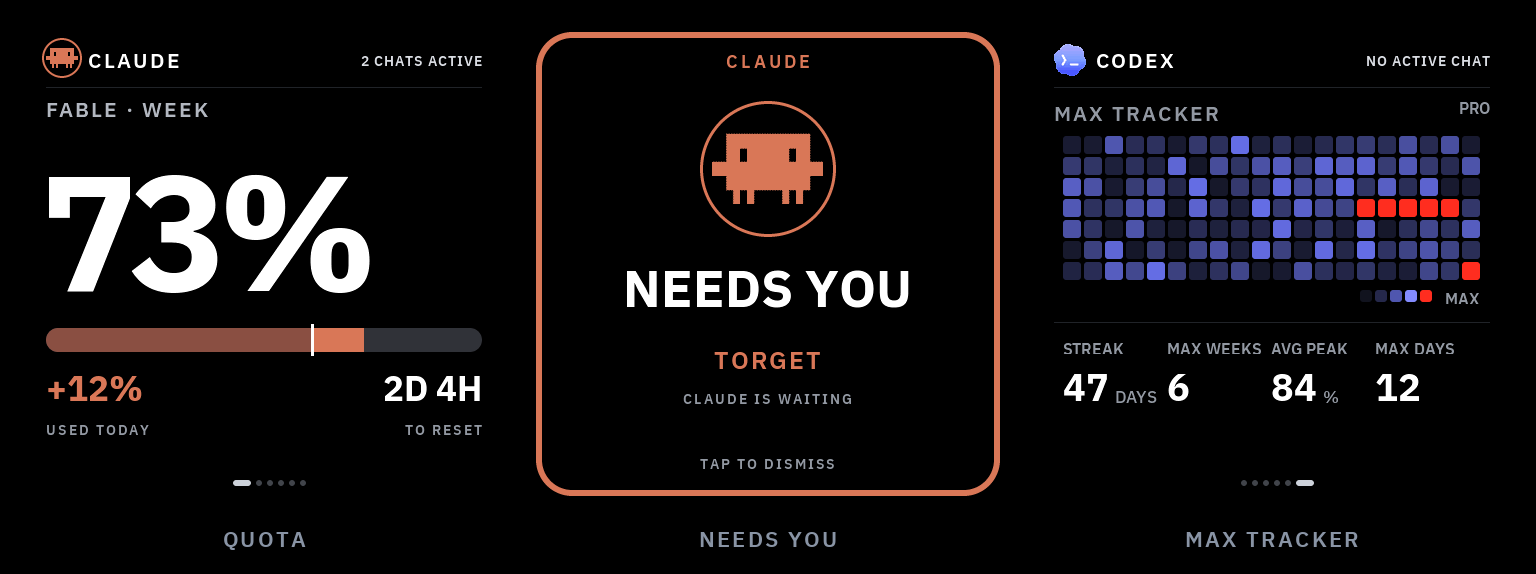
A little always-on screen for your shelf that shows what your AI coding agents are doing — taps you on the shoulder when one is stuck waiting for you, and (if you want) lets you answer it with a tap on the glass. It packs too: one command moves it onto whatever WiFi you are on today, and one button-hold on the panel opens its own settings on the glass.
Claude Code and Codex usage, live agent activity, and a full-screen
NEEDS YOU alert you can answer with a tap. A three-second hold on the
panel's one user button opens SETTINGS on the glass — update the firmware,
teach it a new network, or read its address. A ~$30 ESP32-S3 panel plus a
core, pure-stdlib Python service on your Mac or Windows PC. Local mode needs no
VibePulse account and keeps agent activity on your LAN. The optional
numbers-only relay can carry quota data across isolated WiFi; a separate,
default-off encrypted interaction relay can carry supported Needs You
decisions without requiring the panel and computer to share a LAN. A third,
independent Live agent status relay can keep the Claude/Codex activity rows
current across ordinary internet WiFi. Every cloud feature is off by default;
only the encrypted interaction/status relay adds the pinned Python
cryptography dependency.
When you run coding agents all day, two things are invisible:
Both answers already exist, buried in a terminal you're not looking at. VibePulse moves them onto a screen you can't miss: one glance from across the room, no window to switch to, no menu bar to squint at.
Status: v1.1.0. The core shelf-screen loop is real and physically exercised on macOS and Windows: see quota, see an agent waiting, and answer a supported prompt on the glass. The Windows core, physical answer loop and persistent sign-in/sleep/reboot lifecycle were verified at the v1.0.0 host runtime and are not re-claimed for a later one. v1.1.0 adds SETTINGS on the glass, an honest warm-up, and crash evidence in the firmware; the firmware side is CI-built and waits for the next flash session. Optional integrations remain opt-in, and every platform claim stays tied to its recorded evidence.
VibePulse is built for vibecoders — people who build with Claude Code or Codex. You do not need to read this whole page:
secrets.h, and the
table under Independent switches. A 3 s KEY3
hold opens SETTINGS on the glass — UPDATE, WIFI and ABOUT today; the
on-glass feature switches are specified but not built yet (see the spec
in docs/superpowers/specs/). Sound has no verified backend yet.The first release after 1.0 gives the panel a menu and a memory. A three-second KEY3 hold opens SETTINGS on the glass (UPDATE, WIFI, ABOUT), so the maintenance window is chosen rather than guessed. The service answers the panel at once after a restart while the first history scan runs, labelling the volume counters as placeholders instead of letting the glass go STALE. A panic now leaves an ELF coredump in flash and a reboot ledger in NVS, every device poller backs off from a dead service, and the logging configuration is pinned by a configure-time guard. The host quarantines a corrupt state file instead of wiping it, says why the Claude probe is idle, names the keychain failure, typesets any model id, and the whole tokenserver directory now reads in English. Never a number it did not measure, still.
| Gate | Result |
|---|---|
Host gate (./test/run.sh), tokenserver suite on ubuntu, macOS and Windows, both Workers, snapshot tool | PASS on every merged PR and on merged main |
| ESP32-S3 firmware build | PASS in CI — a build, not a flash |
| SETTINGS, warm-up placeholders, coredump, reboot ledger, poller backoff on the physical panel | NOT YET FLASHED — torget-home-01 runs v1.0.0-25-g054db68; the run sheet is docs/flash-session-2026-09.md |
| Windows v1 host claim (core, physical answer loop, lifecycle) | Pinned to v1.0.0's runtime bee5d8c — not re-run for this release |
The coredump partition is new in the table, and OTA never writes the table:
one USB idf.py -p <port> partition-table-flash is needed before a dump can
land, and the boot log says so until then.
Read the v1.1.0 notes · Windows v1 evidence · Full changelog · Compare v1.0.0...v1.1.0
Contributing or validating another host? Read CONTRIBUTING.md, the host support matrix, and SECURITY.md before sharing logs or test evidence.
Six core pages, swipe or auto-rotate, plus the always-present value-multiple
page (it shows the dollar total once agents log priced usage, but the
multiple itself stays dashed — SET YOUR PLAN COST — until you pick a named
plan tier or state your exact cost) and an optional, compile-time-gated
GitHub project pulse. Every image below is an exact 480×480 frame — the
simulator renders
the same pixels as the panel.
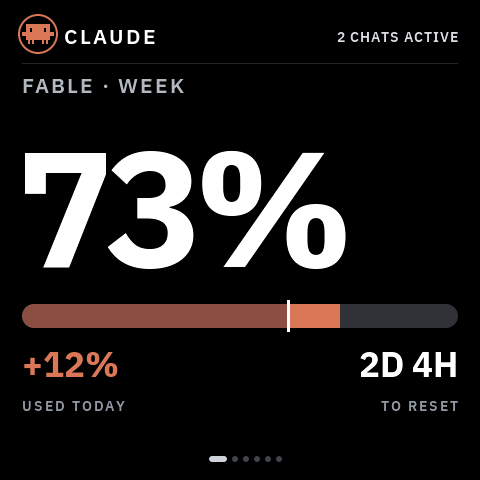 |
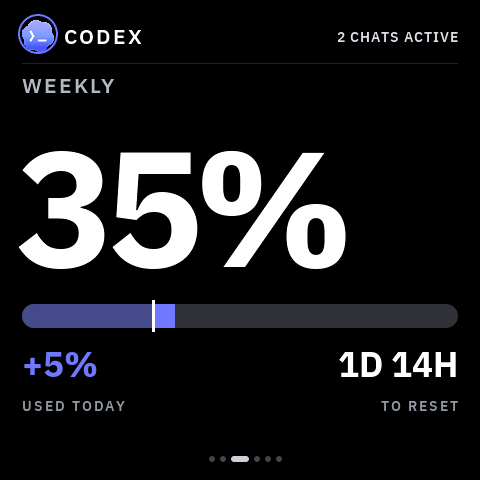
Usage — Claude's weekly and heaviest-model-weekly quota, plus Codex's weekly quota. Each with a reset countdown and how much you've burned today. |
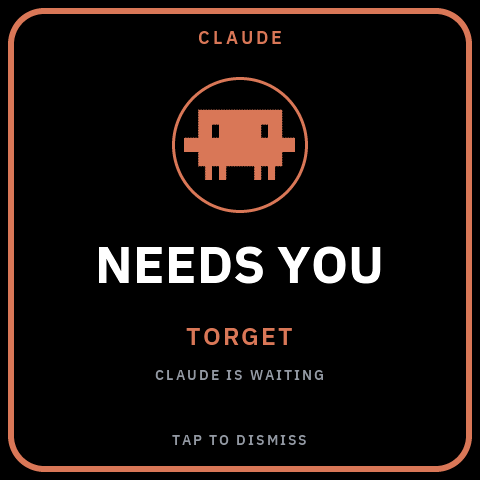 |
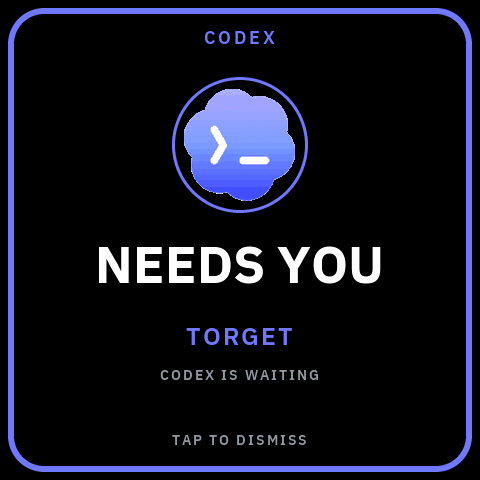
NEEDS YOU — when an agent blocks on your input, the whole screen turns into the alert, in that provider's colour, naming the project it's waiting on. Tap to dismiss — or, with the opt-in Needs You bridge, tap to answer it without switching windows (see below). |
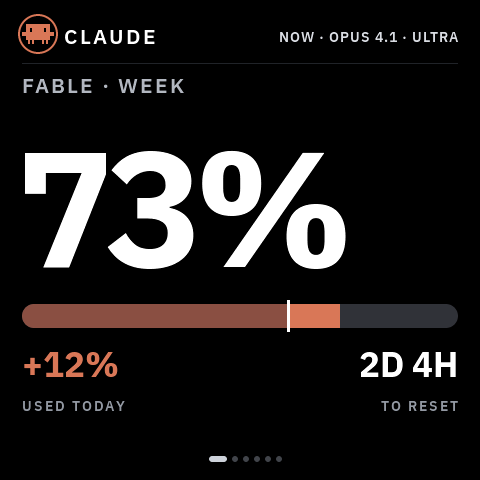 |
Live agent monitor — the header shows which agents are working right
now, with model and effort, on every page. |
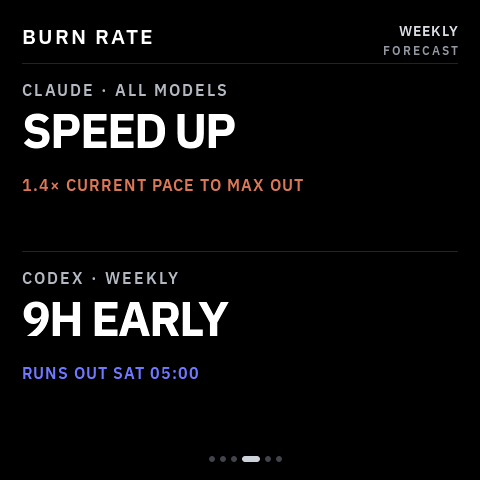 |
Burn rate — a forecast per provider: on pace, running out early (and when), or how much head-room is left at reset. |
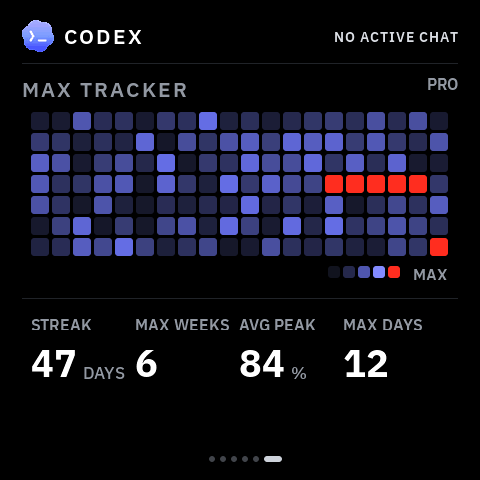 |
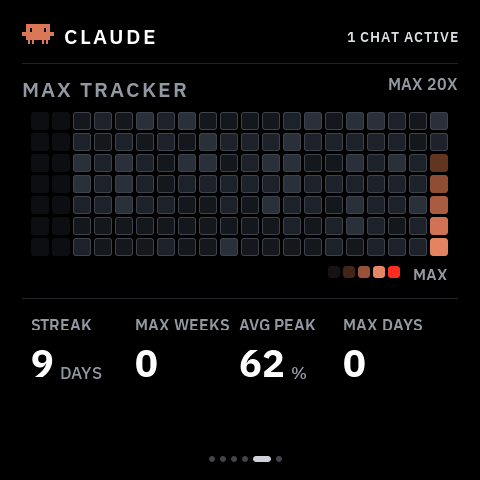
Max Tracker — a GitHub-style heatmap of your daily quota peaks, with coding streaks and max counters, per provider. Red cells are days you maxed out. |
Both providers get equal treatment — same pages, same alert, their own accent colour:
Codex weekly quota
Codex NEEDS YOU alert
Claude Max Tracker
The panel becomes an input device. With the opt-in Needs You bridge, when Claude Code or Codex blocks on a supported question or permission, the takeover appears and a tap answers it in the same live session — no window to switch to. The computer must be awake and the tokenserver must be running. Direct mode uses the LAN. The separate encrypted interaction relay works when the panel and computer use unrelated ordinary internet Wi-Fi: both sides make outbound HTTPS connections, so there is no router reconfiguration, inbound port, public Mac, or VPN. Cloudflare handles only fixed-size ciphertext; see the privacy and setup guide.
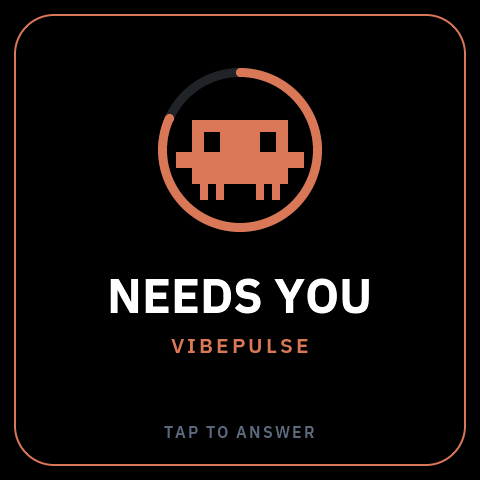 | 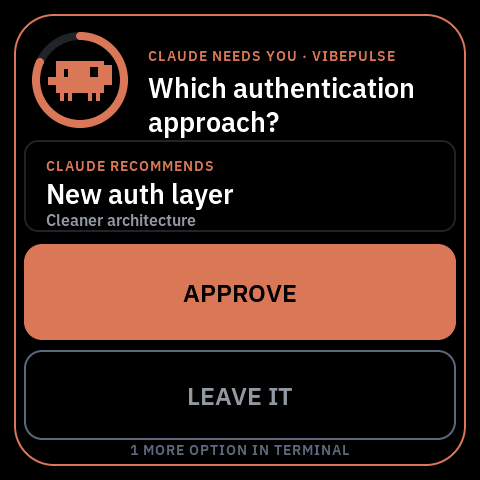 | 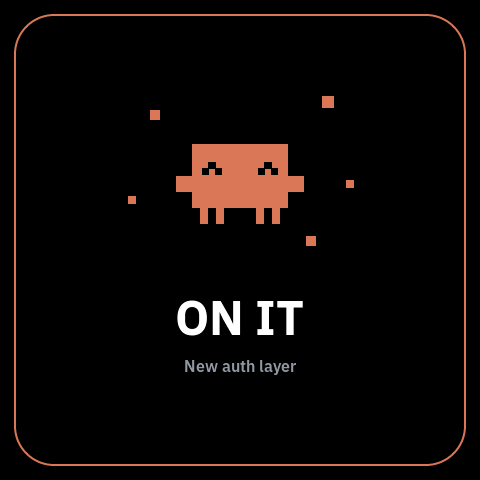 |
Attract → decision → done. A held prompt surfaces as a mascot in a depleting countdown ring; a tap reveals it; APPROVE commits the agent's explicitly recommended option (or LEAVE IT hands it back to the computer), and the flow closes on a short "ON IT" beat. The panel signs every verdict with a key shared only with your computer — it can answer a prompt that computer was already going to ask about, and nothing more. Walking away always costs nothing: an unanswered prompt just falls back to the terminal. Setup is in docs/agent-setup.md.
For Codex, only its narrow safe-command tier can show ALLOW ONCE. Unknown, mutating, secret-bearing, or text that does not fit stays on the computer; silence never means approval. Recommended questions are equally strict: Codex must mark one of two or three options itself. VibePulse never guesses.
After a firmware or Codex-bridge change, use the canonical physical smoke test in docs/agent-setup.md. A pass requires visible APPROVE, a real panel tap, and the matching answered result back in Codex. A waiting screen, timeout, LEAVE IT, or computer fallback is not a pass.
VibePulse is open source, so installing one part never silently enables another. Each row is an independent switch and every interaction/cloud choice starts off:
| Switch | What it does | Default |
|---|---|---|
| Claude interactions | Lets Claude Code questions and permissions reach the panel | Off |
| Codex interactions | Lets supported Codex questions and permissions reach the panel | Off |
| Numbers relay | Publishes only quota, reset, Max Tracker, and optional public GitHub numbers | Off |
| Interaction relay | End-to-end encrypted question/verdict mailbox for unrelated WiFi | Off |
| Live agent status relay | End-to-end encrypted Claude/Codex activity rows for unrelated WiFi | Off |
| GitHub | Shows one public repository's page and/or star notification | Off |
Installing the Codex plugin does not enable Codex interactions. Setup asks
whether to enable Claude, Codex, both, or neither, and whether bounded detail
may reach the panel. The old --interactions is a legacy alias for Claude only;
use the explicit setup command for new installations. The numbers relay and
interaction relay are different privacy choices and neither is enabled by the
plugin. Installing the Codex plugin does not enable the encrypted interaction
relay or the live agent status relay.
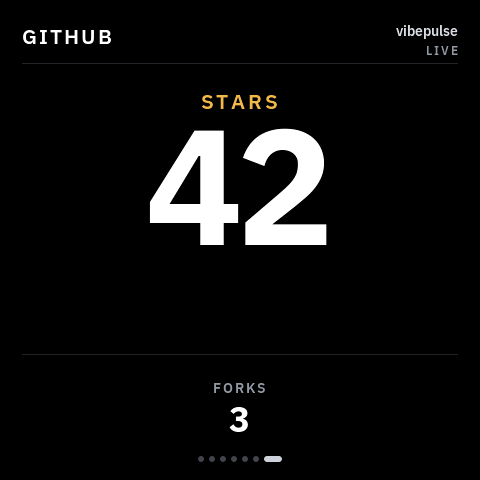
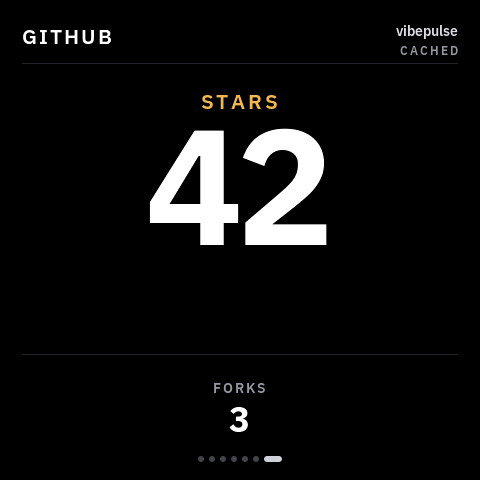
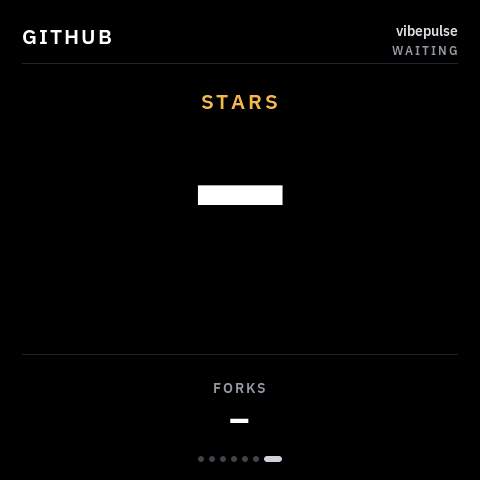
One public owner/repository can add a deliberately sparse seventh page:
the current star count is the hero and forks are the only secondary metric.
The same raster covers every data provenance, so the glass never lies about
freshness:
Live
Cached / stale
Waiting (no data)
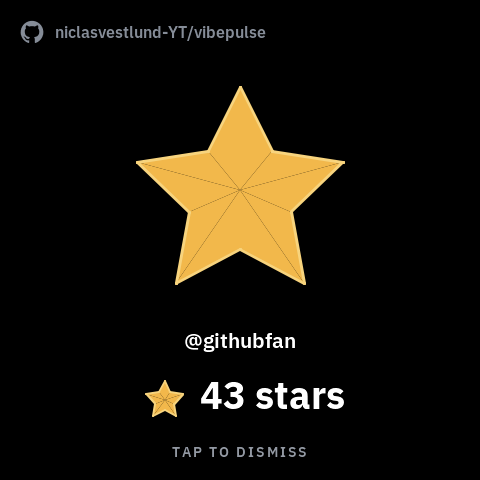
The page and star moments are independent switches. A new star can therefore
briefly take over the current VibePulse view even when the GitHub page is not
in rotation. It covers the previous page with a quiet black stage, shows a
large filled star, the repository, the stargazer when GitHub supplies one,
the new total, and TAP TO DISMISS; otherwise it returns to the exact
previous page after two minutes.
The computer service polls GitHub's public API and republishes a small, validated LAN payload. The ESP32 never talks to GitHub, and a GitHub timeout or rate limit cannot stall the Claude/Codex endpoints. Configure it with:
python3 tools/tokenserver/tokenserver.py --github-repo owner/repository
On Windows, persist the same source in Task Scheduler instead of relying on a foreground shell:
.\tools\tokenserver\install-windows-task.ps1 `
  -GithubRepo "owner/repository"
Then opt into TK_GITHUB_SCREEN_ENABLED and/or
TK_GITHUB_NOTIFICATIONS_ENABLED in your gitignored secrets.h. Both are
off by default. No GitHub token is required for a public repository.
TK_GITHUB_SOUND_ENABLED is a separate default-off gate for the 258 ms
A5-to-C#6 chime. The sequence and failure-isolated playback contract are in
place, but the current target intentionally registers no codec backend until
the physical speaker and display-DMA budget have passed device testing. A
missing or failed sound backend never delays the popup or any network path.
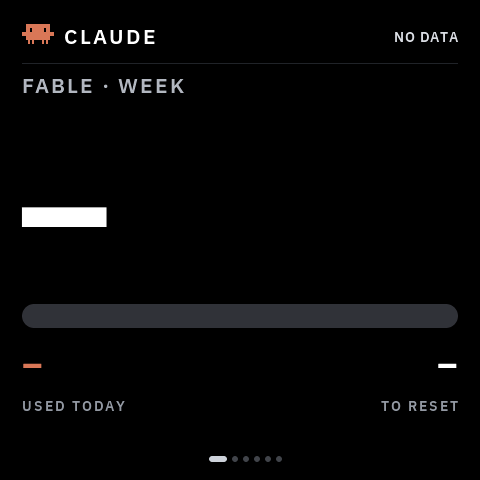 |
Before the first successful fetch, and whenever a source is missing, you get
dashes — never a placeholder On current firmware a wall-powered panel also protects itself against the
specific failure where Wi-Fi still looks associated but application HTTP has
stopped. Once the quota feed has worked at least once, and only when an
independent numbers relay is configured, 60 seconds without a fresh response
recycles Wi-Fi and wakes the quota task, which waits for a new IP before
retrying. If no real success follows within another 45 seconds, the device restarts once to clear
wedged HTTP/TLS state. A reboot is disarmed until a new real success, so a real
internet outage cannot become a restart loop. LAN-only installations never
perform this automatic recovery just because their computer is asleep.
After that controlled restart, the panel sends a fixed content-free recovery
marker on local requests. Run Claude only, or Codex only, and the other half simply shows dashes. |
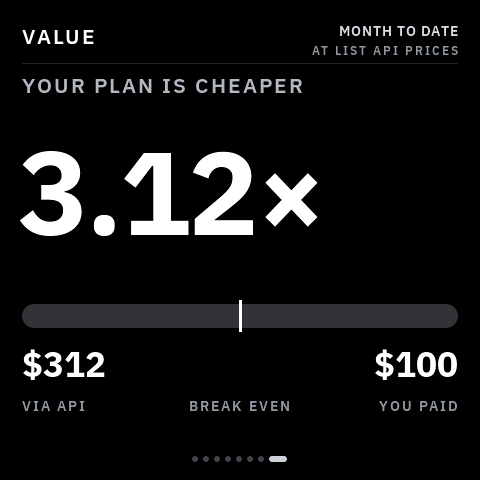 |
The usage pages answer how much have I spent?. The value multiple answers the question you actually have every month: it prices the tokens your agents already logged at list API rates and divides by what you pay. It's its own page on the swipeable strip, alongside GitHub — neither replaces the other. |
python3 tools/tokenserver/tokenserver.py --claude-plan max5x --plan claude=100
The equivalent persistent Windows setup is explicit per provider and never guesses what you pay:
.\tools\tokenserver\install-windows-task.ps1 `
  -ClaudePlan max5x -ClaudePlanCostUsd "100" `
  -CodexPlan pro -CodexPlanCostUsd "20"
It counts cache tokens, which is the whole point — a real record here reads 2 input and 4 output against 23 655 cache-read, so pricing only input and output understates it by 577x.
Rates are not hand-maintained: they are generated from a public price
catalogue by tools/tokenserver/update_prices.py and committed, so the
server stays offline and refreshing is one command. An unknown model degrades
the figure to a dash rather than being silently free.
      your computer                          your shelf
┌────────────────────────────┐          ┌──────────────┐
│ ~/.claude/projects/*.jsonl │          │              │
│ ~/.codex/sessions/*.jsonl  │ ───────► │   ESP32-S3   │
│ rate-limit headers         │          │    AMOLED    │
└────────────────────────────┘          └──────────────┘
     tokenserver.py :8737           plain JSON over your LAN,
     pure Python stdlib                polled every 30 s
A tiny Python service on your Mac or Windows PC reads your local Claude Code / Codex logs and rate-limit headers, and serves plain numbers over your LAN. The screen polls it every 30 seconds. Your OAuth token never leaves the computer; the screen only ever receives percentages, counts and coarse status.
The computer must be on for fresh local data. It does not have to stay in the same house when a relay is enabled, but it does have to run the tokenserver so there is something to publish. A phone hotspot is fine after it has been taught to the panel; captive portals and 5 GHz-only networks are not.
The startup/doctor health check also guards Claude's saved usage credential.
GET / exposes only claudeCredential.status and whole minutes remaining—
never an access or refresh token—and warns 30 minutes before expiry. This
matters because Claude Desktop can remain logged in after the separate
credential readable by VibePulse has aged out; stale Fable data is never
reported as current. Read that guard together with claudeProbe and the
/api/tokens stale flags: a successful probe plus a fresh model-week flag
means the current source is live even if the saved fallback is expired. That
is a future recovery risk, not a reason to restart the tokenserver.
Codex plugin 0.1.7 turns the trusted SessionStart hook into a real bounded
health check. It reads only the two loopback JSON endpoints, follows no
redirects, times out in under a second, and injects one content-free class into
the new task:
| Startup class | What it proves | First action |
|---|---|---|
HEALTHY | Provider data and recent direct panel polling are fresh | None |
HEALTHY AFTER DEVICE SELF-RECOVERY | The same, after the bounded HTTP-stall restart | Keep observing past the stale window; this is evidence, not a physical PASS |
PROVIDER DATA STALE | Claude and/or Codex source data is stale | Run setup doctor and tokenserver smoke; inspect the named provider |
DEVICE PATH STALE / PANEL LAN WAITING | Host data is fresh but direct glass polling is stale or unconfirmed | Check panel power, network, discovery, and firmware before restarting a healthy host |
SERVICE VERSION DRIFT | The loaded plugin and live tokenserver came from different source revisions | Repair all integrations from one durable checkout and start a new task |
SERVER UNAVAILABLE / LOCAL API DEGRADED | The local service or its diagnostic contract is unavailable | Run setup doctor and tokenserver smoke |
The hook diagnoses; it never approves, flashes, refreshes credentials, or silently rewrites service configuration. Firmware self-recovery remains bounded and fail-closed, while host repair remains an explicit setup action.
Four things. All four are required for the core — your usage on the glass.
No VibePulse account, no cloud service, no API key — you sign in to
Claude Code or Codex as you already do, and nothing else. The service on
your computer needs only
Git and Python; the Windows host runbook has the
winget commands and download links for both. Putting the firmware on the
board is the one step that needs more, and row 1 says what.
| You need | Because | |
|---|---|---|
| 1. A screen | One of the boards below, a USB-C cable, and its own USB power supply. Flashing it also needs the ESP-IDF 5.5 toolchain with CMake and Ninja, one time | a computer USB port usually cannot feed the running AMOLED; the firmware is built from source until the browser installer lands |
| 2. A computer | A Mac or a Windows PC with Git and Python 3.11+, awake whenever you want fresh numbers | the VibePulse service runs here and reads your agents' local usage |
| 3. An agent on that computer | Claude Code and/or Codex, installed and signed in. Either alone is fine | that is where the numbers come from |
| 4. WiFi | A 2.4 GHz network that both the screen and the computer can reach | the ESP32-S3 cannot see 5 GHz; the optional relay lifts the same-network rule later |
Flashing the firmware currently also needs ESP-IDF 5.5 on the computer — see Setup. A browser-based installer is planned so that this step disappears.
| Board | Display | Status |
|---|---|---|
| Waveshare ESP32-S3-Touch-AMOLED-2.16 (~$30) | 480×480 AMOLED, touch. Also on the board: an IMU, and an ES8311 codec with amplified speaker output; whether a speaker is fitted is unconfirmed, and neither is verified on the unit | Display, touch, and Wi-Fi verified on a real unit (spec/hardware-capabilities.yaml is the source of every such claim). Every frame in this README is an exact 480×480 render of the pixels it shows. No soldering. Same board Clawdmeter uses, so if you already own one you are 10 minutes away. |
More boards are added here as they pass on a real unit, never from a
datasheet. What the current board can and cannot do is recorded in
spec/hardware.md.
| Computer | Status | Autostart |
|---|---|---|
| macOS | Supported. Daily development and physical panel reviews. macOS ships an older Python; brew install python gives you 3.11+ | launchd |
| Windows | Supported. v1 core, the physical answer loop, and the sign-in/sleep/reboot lifecycle verified on a real PC | Task Scheduler |
| Linux | Not yet. Tracked in #2 | — |
"Supported" means the computer service; it does not claim that every developer builds or flashes the firmware from that OS. The evidence behind each row is maintained in Host platform support. Windows installation and recovery use the Windows host runbook, and release candidates go through the reproducible Windows validation gate. "Supported" also does not mean every later candidate has passed the physical Windows loop: the v1 runtime's latest sanitized checkpoint is a **[FULL PASS](docs/superpo
Sign in to join the discussion.
No comments yet. Be the first to say what this is good for.
🪨 why use many token when few token do trick — Claude Code skill that cuts 65% of tokens by talking like caveman

The best-benchmarked open-source AI memory system. And it's free.

Orca is the ADE for working with a fleet of parallel agents. Run any coding agent with your own subscription. Available on desktop, mobile and remote runtime.

A cross-platform desktop All-in-One assistant for Claude Code, Codex, OpenCode, OpenClaw, Grok Build & Hermes Agent. Only official website: ccswitch.io

Never stop coding. Free MIT AI gateway: one endpoint, 352 providers (150+ free), 1200+ models Kimi, Claude, GPT, Gemini, GLM, DeepSeek, MiniMax. Works with Claude Code, Codex, Cursor, OpenCode, Cline & Copilot. Quota-aware auto-fallback, RTK+Caveman compression saves 15-95% tokens, MCP/A2A, Desktop/PWA. Built by 550+ contributors

Compress tool outputs, logs, files, and RAG chunks before they reach the LLM. 20% fewer tokens for coding agents, 60-95% fewer tokens for JSON, same answers. Library, proxy, MCP server.