Unofficial D&D Claude Dungeon Master
with Cinematic Display Companion — Couch Co-op Edition
Ruleset: D&D 5e — 2014 (SRD 5.1) by default; 2024 (SRD 5.2) opt-in per campaign. Choose at /dm:dnd new time; legacy campaigns are auto-prompted to migrate (with backup) on first load. See the Ruleset section for mechanic differences and dataset details.
Claude runs the game. You play. The TV shows the story. Your phone is your controller.
An unofficial D&D 5e (2014 ruleset / SRD 5.1) Dungeon Master skill for Claude Code — persistent campaigns, full 5e mechanics, and an optional cinematic display companion that streams typewriter narration, dice rolls, and live character stats to any screen — TV via Chromecast, tablet, phone, or second monitor — while players submit their actions from a phone or tablet.
Built for groups who want a real DM experience without needing one at the table.
What This Is
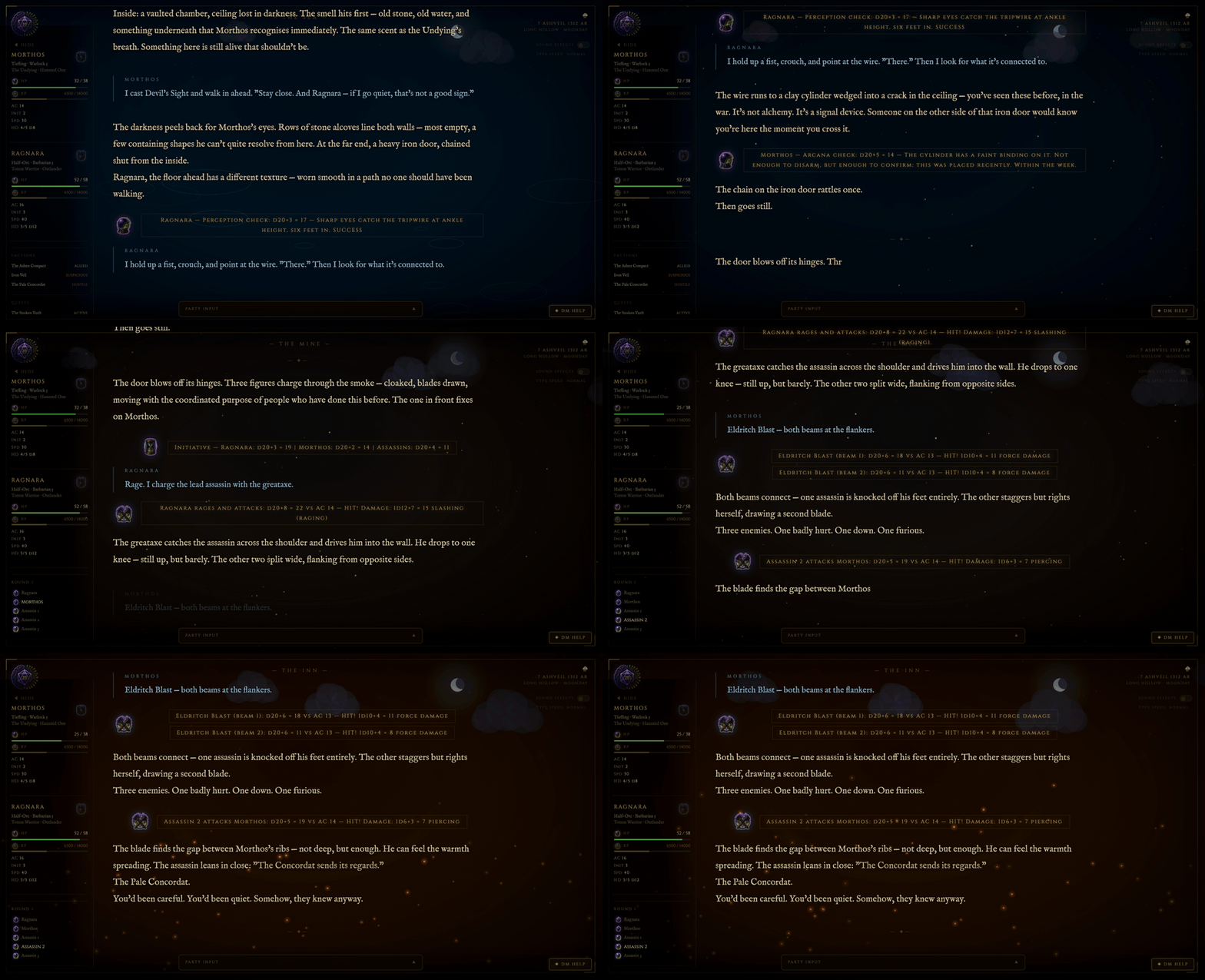
You run /dm:dnd load my-campaign in Claude Code. Claude becomes your DM — rolling dice, voicing NPCs, tracking HP and XP, and running combat. If you have a TV or tablet nearby, the cinematic display companion puts the narration on screen in real time — typewriter effect, atmospheric backgrounds that shift with the scene, a dynamic sky canvas, and a live party stat sidebar. Open it on any device on your network and everyone at the table can follow along. Players submit their actions from their phones; Claude picks them up automatically and runs the next turn.
There are two ways to play, and they serve different needs:
Improvised campaigns — Claude generates the world from scratch and auto-creates a committed three-act narrative arc from the setting, factions, and threats it just built. The arc gives the story a defined shape without scripting what happens — beats are defined by consequence ("what changes") not by event, so Claude stays flexible on how each beat lands while committing to the fact that it must. The arc advances across sessions, can be revised when players redirect the story, and continues into a new arc when all six beats resolve. This is Claude as a full creative collaborator: world-builder, improv partner, and story architect in one.
Structured campaigns — Use /dm:dnd import to drop in a pre-written source (official WotC modules, published third-party campaigns, or a custom DM-written document in PDF, markdown, DOCX, or plain text format). Claude reads and chunks the source, extracts the structure type (linear, hub-and-spoke, or faction-web), and builds all campaign files automatically — acts, chapters, key story beats, telegraph scenes, NPCs, factions, locations, and quest hooks. The campaign runs with enforced deterministic structure: required beats must land in each chapter, Claude telegraphs before delivering them, and steers with world pressure rather than walls when players drift. Drop in the Lost Mine of Phandelver and Claude will run it chapter by chapter with the same twelve DM standards applied to every scene.
Both modes share the same DM engine. The twelve applied behavioral standards are enforced as hard constraints in every session regardless of which mode you're in — improvised or structured, the DM improvises within situations, lets choices matter, makes every NPC a person, and controls pace deliberately.
It also manages a deep web of campaign data without overloading the LLM — coherent and complete, without burning tokens on context that isn't needed yet:
- DM instructions — split across three files with staggered load timing; core rules always in the system prompt, script syntax and command procedures loaded once at session start
- Campaign data — NPC roster indexed at load, full entries pulled only when a character becomes relevant; quest hooks and worldbuilding text in cold storage until called for
- Imported modules — a published book is kept as a lazily-loaded corpus, not inlined: the act/chapter tree, quest/location bank, and per-chapter source text load on demand, so a long module runs chapter by chapter without sitting whole in context
- Session history — archived as continuity summaries, not raw transcripts; full campaign history available for reference without front-loading token weight
- Compaction resilience — a compact Live State Flags block in
state.md anchors faction stances, player cover, and NPC dispositions; re-read at any claim to keep world continuity grounded in source files rather than Claude's increasingly lossy impression of them
- Autosave — continuity (state flags, relationship graph, session tail) is checkpointed behind the scenes at scene boundaries and on a turn cadence, so a context compaction never loses your place; toggle with
/dm:dnd autosave on|off, with an optional Stop hook for a deterministic per-turn backstop
A campaign can run dozens of sessions deep — with coherent recall of past events, NPC attitudes, and long-tail consequences — without the context bloat that forces other implementations to summarize, forget, or reset.
It is not an official Wizards of the Coast product. It uses Claude as the DM engine. It takes the rules seriously and the storytelling even more seriously.
Using a different LLM?
This skill is built specifically for Claude Code. If you want to run the same framework on a different model — local inference, OpenRouter, or any OpenAI-compatible endpoint — check out open-tabletop-gm, the model-agnostic version extracted from this repo. It trades some Claude-specific integration depth for broader model support and includes a probe tool for benchmarking narration quality across models.
If you'd rather skip the install entirely and play in a browser, neuralinitiative.ai is the hosted version — same design DNA, sign in with Google, top up an account balance, play. Trades self-hosting (and lower per-session cost) for zero setup and a more refined GUI.
If you're on Claude Code, you're in the right place.
Features
 Persistent campaigns — state, NPCs, quests, and characters survive across sessions in plain markdown files
 Two campaign modes — improvised (Claude generates world + dynamic arc) or structured (import pre-written material and enforce its beats)
 Dynamic narrative arc — auto-generated at
 /dm:dnd new from the world's threat, factions, and setting; three acts, six beats defined by consequence not event; arc tracked across sessions, revised when players redirect the story, continued into a new arc when complete Campaign relationship graph — typed-edge graph alongside the markdown campaign files, with verbatim source-anchors on every edge;
 scene-context query auto-pulled at /dm:dnd load to surface who-knows-whom in the current scene without re-reading full NPC files; designed to hold long-session continuity when context compaction strips files out of scope. Background research and the A/B replay study that motivated it: docs/research/graph/ Campaign import —
 /dm:dnd import accepts PDF, markdown, DOCX, or plain text; extracts structure type, acts, chapters, key beats, telegraph scenes, NPCs, factions, and quest hooks; builds all campaign files automatically and keeps the full source as a lazily-loaded corpus so even a long module loads chapter by chapter Portable characters — bring your character into any campaign; level up, grow your stat tree, and carry your inventory and loot — or start fresh each time
 Full D&D 5e mechanics — initiative, attacks, saving throws, spell slots, XP, levelling up, short/long rests
 Atmospheric DM — dark fantasy tone, distinct NPC voices, hidden rolls, a world that reacts to choices
- Cinematic display companion — typewriter narration on your TV, scene-reactive backgrounds, dynamic sky canvas, live party sidebar; cast, mirror, or open on any screen on your network
 Dynamic sky canvas — sun arc, moon, twinkling stars, and cloud density rendered in real time from world time data; transitions with time of day and weather
 Player input from the companion UI — players submit actions from phone/tablet with a one-tap send and a live Your move → Sent → ✓ DM has your move → narrating status strip; Claude picks them up automatically in autorun mode
- Enforced roll handling — choose at game start whether players roll their own d20s (DM calls for the roll and waits) or the DM rolls openly; per-character override from the phone; the DM never silently auto-rolls a PC
- Reading controls — per-player text-size stepper (legible across the room from a Chromecast) and a narration-length slider that sets the DM's per-turn word budget
 Autorun / taxi mode — Claude drives the turn loop without DM input; a pie countdown shows the next auto-fire window
 LAN party support — serve the companion over your local network; every device in the room sees the same display
- TLS / HTTPS — self-signed cert generation included; required for full browser feature support over LAN
- 17 scene types — auto-detected from narration keywords — tavern, dungeon, ocean, crypt, arcane, glacier, and more
- Clickable character sheets — tap any sidebar card to open a full character sheet modal (attacks, features, inventory); works on phones and tablets via LAN
- SRD spell/feature lookup — click any spell or feature name in a character sheet to view its full description; bundled 5e dataset with supplemental entries for non-SRD content (Xanathar's, Tasha's, subclass features); wikidot fallback link shown for anything not in the local data
- DM Help button — click the ◈ button on the display for an on-demand contextual hint or warning; generated from the current scene without per-turn token overhead
 Tutor / learning mode — enable per-session for automatic hint blocks after every scene, decision point, and roll; ideal for players new to D&D
- Browser-side sound effects — 12 SFX types synthesized on demand via numpy and played through Web Audio API; works on any device with the tab open, including phones over LAN
- Couch co-op — multiple characters, shared display, turn order visible to everyone in the room
- Combat tracker — auto-rolled initiative,
▶ turn pointer, HP bars, inline dice math sent to display
 Helper scripts — dice rolling, ability scores, combat, character stat derivation, conditions/tracker, calendar, SRD data sync, SRD lookup, supplemental data builder
How It Works
Claude Code CLI ──→ /dm:dnd commands ──→ campaign files (~/.claude/dnd/)
state.md · world.md · npcs.md
session-log.md · characters/
Display pipeline (autorun mode):
Players (phone/tablet) ──→ Companion UI ──→ Flask SSE server (localhost:5001)
↓
autorun_wait.py
↓
Claude processes turn
↓
send.py / push_stats.py ──→ TV display
The Flask server receives narration text, player actions, dice results, and character stats via HTTP POST. It broadcasts everything in real time to connected browsers via Server-Sent Events. The browser renders narration as a typewriter effect over a scene-reactive gradient background with a live character sidebar. In autorun mode Claude polls for player submissions and processes each turn automatically.
Prerequisites
- Claude Code CLI installed
- Python 3.10+
pip3 install flask flask-cors numpy cryptography (display companion; numpy required for sound effects, cryptography for LAN TLS)pip3 install pymupdf (campaign import from PDF — column-aware extraction so multi-column modules segment into chapters correctly; falls back to poppler's pdftotext if absent)
Installation
Install it as a Claude Code plugin:
/plugin marketplace add neuralinitiative/claude-dnd-skill
/plugin install dm@neural-initiative
Then invoke it as /dm:dnd (plugin skills are namespaced plugin:skill — the dm plugin provides the dnd skill), or just describe what you want once a campaign is loaded. Update with /plugin update dm.
# Optional — install the display-companion dependencies (one-time).
# Core gameplay works without these; they power the live screen + audio.
pip3 install flask flask-cors numpy cryptography
Upgrading from a v1 standalone install? As of v2.0.0 the skill is
plugin-only — the old ~/.claude/skills/dnd standalone (/dnd) is replaced by
the plugin (/dm:dnd). Your campaigns and characters are untouched — they
live under ~/.claude/dnd/ (or $DND_CAMPAIGN_ROOT), entirely separate from
the skill code. Install the plugin above, then run the one-time helper to carry
over device pairings / TLS certs and retire the old install:
python3 <plugin>/skills/dnd/scripts/migrate_v1_to_v2.py. Full guide:
MIGRATING.md.
Versioning & updates
The skill tracks releases via a top-level VERSION file and per-release notes in CHANGELOG.md. The current version is in VERSION; significant changes — new commands, new mechanics, behavior changes — get a CHANGELOG entry.
To check for updates:
/dm:dnd update --check # shows local vs. remote version + commit diff, no pull
/dm:dnd update # pulls if you're behind (fast-forward only; refuses on dirty tree)
Plugin installs update through the plugin manager — run /plugin update dm instead. /dm:dnd update detects a plugin install and points you there rather than git-pulling under the manager's tracked state.
The --check output includes both sides' version strings so you can see at a glance whether you've fallen behind. After updating, restart Claude Code so the new SKILL.md and command procedures load.
The skill follows semantic versioning: MAJOR.MINOR.PATCH. Breaking changes that require campaign-data migration bump MAJOR; new opt-in features bump MINOR; bug fixes bump PATCH. Active campaigns continue to work across MINOR/PATCH bumps without action.
Quick Start
Improvised campaign — Claude builds the world and generates a narrative arc:
/dm:dnd new my-campaign         # generates world seed, factions, NPCs, dynamic story arc
/dm:dnd character new           # create a character
/dm:dnd load my-campaign        # start a session
Structured campaign — import a pre-written or published module:
/dm:dnd import my-campaign path/to/module.pdf   # extract structure and build campaign files
/dm:dnd load my-campaign                        # start a session — Claude enforces the arc
Once loaded, type naturally — no /dm:dnd prefix needed. The DM interprets everything as in-game action.
Campaign Commands
| Command | Description |
|---|
/dm:dnd new <name> | Create a new campaign — generates world seed, NPCs, starting location, and dynamic narrative arc |
/dm:dnd import <name> <source> | Import a pre-written campaign from PDF, markdown, DOCX, or plain text; extracts structure and builds all campaign files |
/dm:dnd load <name> | Load an existing campaign and enter DM mode |
/dm:dnd save | Write session events to log, update state and character files |
/dm:dnd end | Save session, append recap, stop display companion |
/dm:dnd abandon | Exit without saving — discards all unsaved changes from this session |
/dm:dnd list | List all campaigns with last session date and count |
/dm:dnd recap | In-character 3–5 sentence recap of the last session |
/dm:dnd world | Display world lore |
/dm:dnd quests | Show active quests and open threads |
/dm:dnd arc status | Show the current narrative arc, completed beats, and steering notes |
/dm:dnd arc advance <beat> | Mark a beat complete and update arc tracking (dynamic arcs only) |
/dm:dnd arc revise | Revise outstanding beats when a player choice significantly redirects the story |
/dm:dnd arc new | Generate a new arc from the consequences of a completed one |
/dm:dnd autorun on [seconds] | Enable autorun mode — Claude drives the turn loop automatically |
/dm:dnd autorun off | Return to manual mode |
/dm:dnd tutor on | Enable tutor / learning mode for this session |
/dm:dnd tutor off | Disable tutor / learning mode |
/dm:dnd data sync | Rebuild bundled SRD dataset from upstream sources (only needed for new upstream content) |
/dm:dnd data status | Show current dataset record counts and upstream SHA |
/dm:dnd update | Pull latest skill changes from origin/main (refuses on dirty tree, fast-forward only) |
/dm:dnd update --check | Show local-vs-remote version and commit-diff without pulling |
/dm:dnd path [<new>|reset] | View or relocate campaign storage via DND_CAMPAIGN_ROOT |
/dm:dnd graph init | Initialize the campaign relationship graph (proposes seed nodes + edges; asks for approval) |
/dm:dnd graph scene-context --place <id> [--present id1,id2] | Focused subgraph for the current scene; primary in-session query |
/dm:dnd graph add-edge --from <id> --to <id> --type T --since N | Record a relationship shift mid-session |
/dm:dnd graph close-edge --id <id> --at-session N | Mark an edge as ended (alliance broke, NPC moved away, etc.) |
/dm:dnd graph extract [--last-session-only] | Run a Haiku pass over session-log to propose new edges (review-then-apply) |
Narrative Arc System
Both campaign modes use the same six-beat three-act structure tracked in state.md. The arc type determines how it's populated and enforced.
Structural foundations
The dynamic arc draws from several overlapping frameworks in story structure and tabletop adventure design:
- Three-act structure — the classical division of setup, confrontation, and resolution, present in dramatic theory from Aristotle through modern screenwriting. The six beats are two per act, giving each phase a complicating turn rather than a flat arc through it.
- Dan Harmon's Story Circle — an 8-step story engine (derived from Campbell's Hero's Journey) that emphasizes a character crossing into an unfamiliar situation, finding something, paying a price to take it, and returning changed. The Midpoint Shift and All Is Lost beats are direct reflections of this — the moment the story reveals its actual shape, and the cost the protagonist must pay before they can act on it.
- Beats as consequences, not events — the key adaptation for tabletop play. In a scripted story, a beat is a scene ("the hero finds the letter"). In a tabletop arc, a beat is a consequence ("the party realizes the threat was built to outlast any single person"). Dozens of different scenes could deliver the same consequence. This gives the DM genuine flexibility while keeping the story's shape committed.
- Hub-and-spoke adventure structure — used by the structured arc type for non-linear published modules. Players approach each spoke location in any order; each spoke has its own chapter beats; the central convergence point doesn't open until all required spokes resolve. This matches how most well-designed published campaigns are actually constructed and lets Claude enforce beats at chapter granularity without forcing a linear path.
Improvised (type: dynamic)
Generated automatically at /dm:dnd new from the world's threat, factions, and Three Truths. Beats are defined by what_changes — the narrative consequence that must land — not by a specific event. This gives the DM flexibility on how each beat arrives while committing to that it must.
| Act | Beat | What it marks |
|---|
| 1 | Inciting Incident | The threat becomes personal |
| 1 | Complication | The problem is bigger than it first appeared |
| 2 | Midpoint Shift | What the party thought they were doing changes |
| 2 | All Is Lost | A genuine setback — something fails or collapses |
| 3 | Final Confrontation | The decisive moment the campaign turns on |
| 3 | Resolution | What's different about the world and characters after |
Arc beats are tracked at /dm:dnd end and marked complete via /dm:dnd arc advance. When a major player choice redirects the story, /dm:dnd arc revise updates outstanding beats to fit the new direction. When all six beats resolve, /dm:dnd arc new generates a new arc from the consequences of the first — same world, new story question.
Structured (type: structured)
Populated by /dm:dnd import from the source material. Acts contain chapter-level key beats, telegraph scenes (setup scenes that naturally constrain choices toward each beat), and branching notes. Claude telegraphs before delivering any required beat, steers with world pressure rather than hard walls when players drift, and marks beats complete as each chapter resolves.
The two arc types are mutually exclusive per campaign and fully compatible with all other systems — combat, XP, NPC attitudes, and display all behave identically regardless of arc type.
Character Commands
| Command | Description |
|---|
/dm:dnd character new | Create a character — guided point buy or rolled stats |
/dm:dnd character sheet [name] | Display a character sheet |
/dm:dnd level up [name] | Level up a character — applies class features, HP roll |
Character Creation
The creation flow walks through:
- Name, race, class, background
- Point buy (validates against 27-point budget) or rolled (3 arrays of 4d6kh3 to choose from)
- Racial bonuses applied automatically
- Derived stats calculated via
character.py
- Starting equipment assigned by class + background
- Sheet written to `characters/<