
JuliusBrussee/
caveman

🪨 why use many token when few token do trick — Claude Code skill that cuts 65% of tokens by talking like caveman
105k
1 add
reseed keeps your agent skills in one library and copies them into each project where they are needed. It supports skills from your own folders or GitHub repos, plus a TUI for browsing and project-level add, remove, and sync actions. It also includes a skill that teaches an agent how to use reseed.
Builders who want one skill library that can be shared across agent-driven projects.
You can keep skills organized in one place and sync the right ones into each project instead of managing copies by hand.
Stores skills in one directory that can itself be a git repo for sharing or versioning.
Pulls skills from `user/repo[/path]` references and places them into your library.
Copies skills into `.agents/skills/` by default, or `.claude/skills/` when configured for Claude Code.
Lets you browse the library and add or remove skills from the current project interactively.
Re-copies skills from the library into a project so changes flow through after edits.
Includes `skills/reseed/SKILL.md`, which teaches an agent how to use reseed for you.
curl -fsSL https://raw.githubusercontent.com/nattergabriel/reseed/main/install.sh | sh
reseed init ~/my-skills-library
reseed install pbakaus/impeccable/.agents/skills --into impeccable
reseed sync
curl -sL https://raw.githubusercontent.com/nattergabriel/reseed/main/skills/reseed/SKILL.md -o ~/.claude/skills/reseed/SKILL.md --create-dirs
reseed add <skills...>  # add skills or whole folders to the project
reseed remove <skills...>  # remove skills from the project
reseed list  # list library contents
reseed status  # show skills installed in the project

A CLI tool for managing and distributing agent skills across projects


reseed manages your agent skills across projects. Keep all your skills in one central library, pull in open source ones from GitHub, and add exactly what each project needs. Instead of global skills that bloat every project, skills live in each project so every teammate has access to them.
If you find reseed useful, a ⭐ helps others discover it.
macOS and Linux:
curl -fsSL https://raw.githubusercontent.com/nattergabriel/reseed/main/install.sh | sh
Windows: download the binary from the latest release and add it to your PATH.
Your library is a directory where all your skills live. It can be any folder on your machine (and can itself be a git repo to version and share your collection). From there, you install skills into any project's .agents/skills/ directory.
Using Claude Code? Run reseed config dir .claude/skills once so skills install into .claude/skills/ instead.
Point reseed at a folder to use as your library. This only needs to be done once.
reseed init ~/my-skills-library
Write your own skills (any folder with a SKILL.md file) or install open source ones straight from GitHub with a user/repo[/path] reference. Organize your library however you like: subfolders at any depth are fine, and --into puts installed skills where you want them.
reseed install pbakaus/impeccable/.agents/skills --into impeccable
Running reseed without any args opens an interactive TUI where you can browse your library, and add or remove skills from the current project.
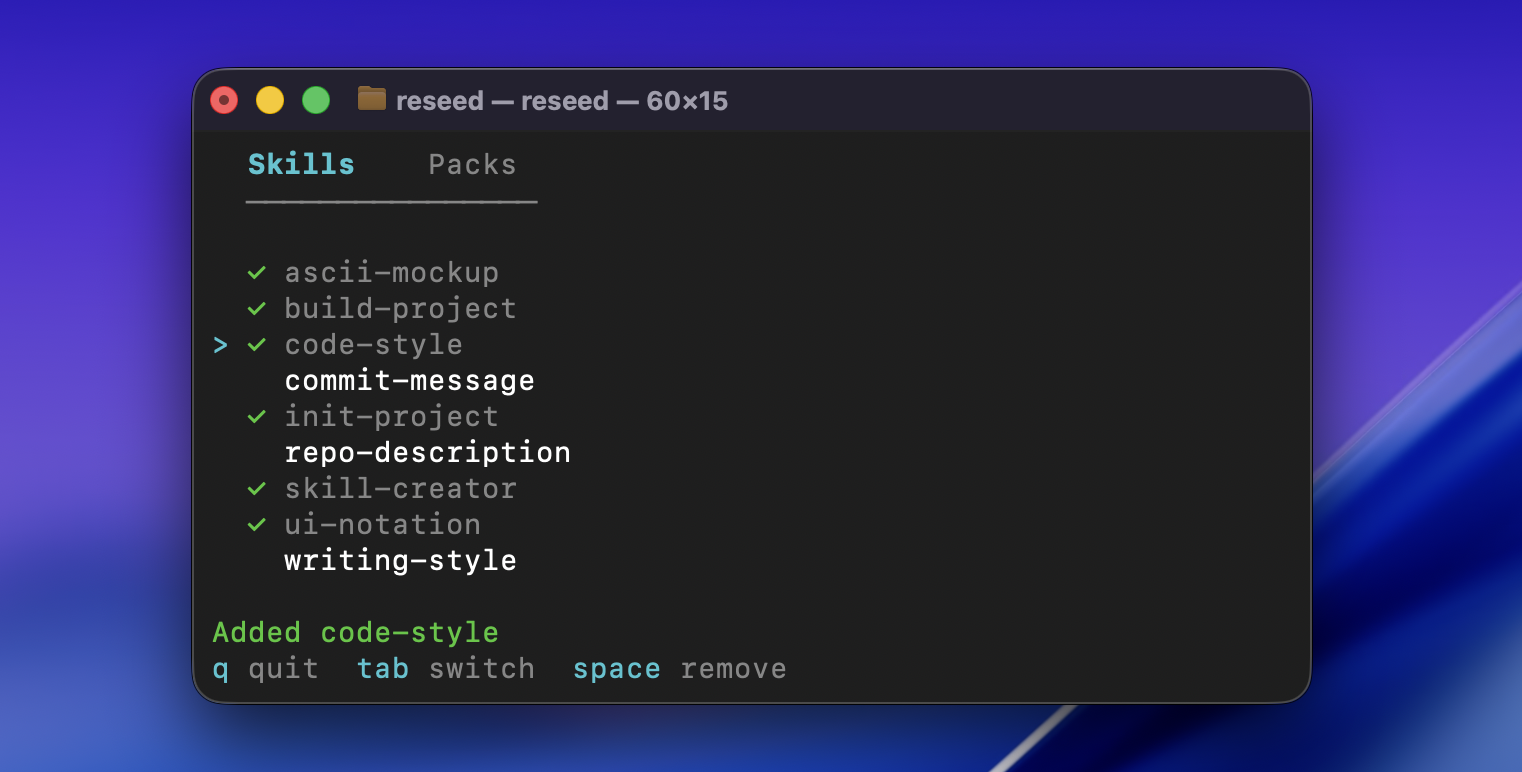
Re-copy skills from your library into the current project to pick up any changes:
reseed sync
This repo includes a skill that teaches your agent how to use reseed on your behalf. Copy it into your agent's global skills directory so it's available across all your projects:
curl -sL https://raw.githubusercontent.com/nattergabriel/reseed/main/skills/reseed/SKILL.md -o ~/.claude/skills/reseed/SKILL.md --create-dirs
All operations available in the TUI also work as standalone commands for scripting and automation:
reseed add <skills...>  # add skills or whole folders to the project
reseed remove <skills...>  # remove skills from the project
reseed list  # list library contents
reseed status  # show skills installed in the project
For the full walkthrough, see the quickstart guide. Browse the docs for details on every command.
Requires Go 1.24+ and golangci-lint. Run make setup to enable pre-commit hooks. If you have ideas or suggestions, open an issue, happy to hear them.
MIT. Free to use, modify, and distribute.
Sign in to join the discussion.
No comments yet. Be the first to say what this is good for.
🪨 why use many token when few token do trick — Claude Code skill that cuts 65% of tokens by talking like caveman

The best-benchmarked open-source AI memory system. And it's free.

Orca is the ADE for working with a fleet of parallel agents. Run any coding agent with your own subscription. Available on desktop, mobile and remote runtime.

A cross-platform desktop All-in-One assistant for Claude Code, Codex, OpenCode, OpenClaw, Grok Build & Hermes Agent. Only official website: ccswitch.io

Never stop coding. Free MIT AI gateway: one endpoint, 352 providers (150+ free), 1200+ models Kimi, Claude, GPT, Gemini, GLM, DeepSeek, MiniMax. Works with Claude Code, Codex, Cursor, OpenCode, Cline & Copilot. Quota-aware auto-fallback, RTK+Caveman compression saves 15-95% tokens, MCP/A2A, Desktop/PWA. Built by 550+ contributors

Compress tool outputs, logs, files, and RAG chunks before they reach the LLM. 20% fewer tokens for coding agents, 60-95% fewer tokens for JSON, same answers. Library, proxy, MCP server.