
JuliusBrussee/
caveman

🪨 why use many token when few token do trick — Claude Code skill that cuts 65% of tokens by talking like caveman
105k
1 add
`napi` analyzes your codebase and writes dependency manifests locally, then opens an interactive graph viewer in your browser. It can also flag complexity and coupling issues, and extract symbols into separate files for refactoring.
Builders who want local architecture maps, dependency audits, and refactoring help for their codebases.
You can understand and reshape a codebase with local dependency graphs instead of manually tracing files and symbols.
Maps files, symbols, and dependencies from source code into a local manifest.
Flags files and symbols that exceed complexity, size, or coupling thresholds.
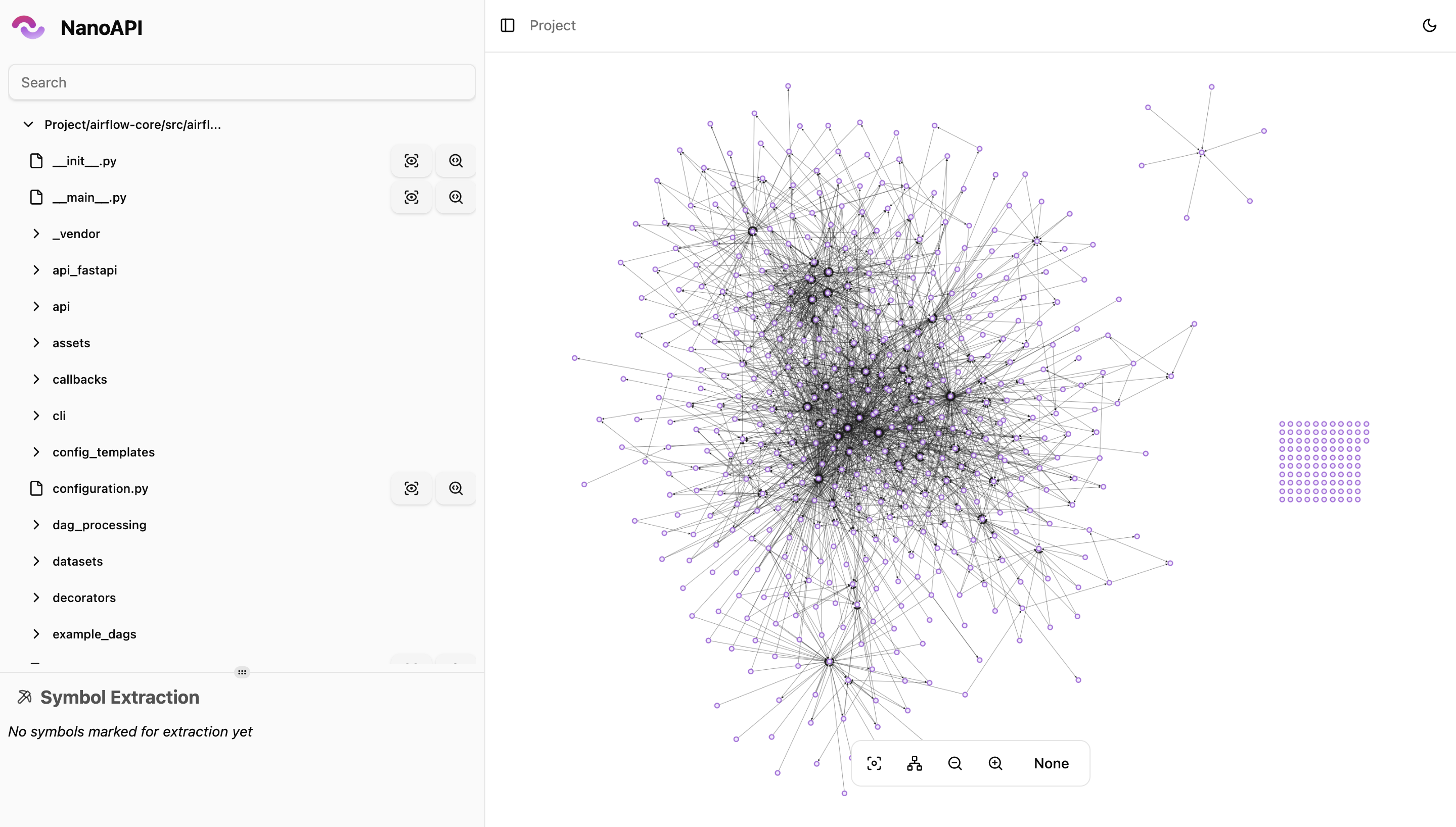
Serves Cytoscape.js graphs in the browser for project, file, and symbol views.
Pulls functions, classes, or other symbols into standalone files from a manifest.
Can use OpenAI, Google, or Anthropic models to label dependencies.
Can generate manifests on every push so architecture changes are tracked over time.
Keeps manifests in `.napi/manifests/` and works without sending code to a server.
curl -fsSL https://raw.githubusercontent.com/nanoapi-io/napi/refs/heads/main/install_scripts/install.sh | bash
# 1. Initialize your project (creates .napirc)
napi init

# 2. Generate a dependency manifest
napi generate

# 3. Open the visualizer in your browser
napi view
napi is a fully offline CLI that analyzes your codebase's architecture --
dependencies, complexity, and structure -- then lets you visualize and refactor
it, all without sending your code anywhere.
It generates dependency manifests from your source code, stores them locally, and serves an interactive graph visualizer directly from the CLI.
| Language | Status |
|---|---|
| Python | ✅ Supported |
| C# | ✅ Supported |
| C | ✅ Supported |
| Java | ✅ Supported |
| C++ | 🚧 In Progress |
| PHP | 🚧 In Progress |
| JS/TS | 🚧 In Progress |
curl -fsSL https://raw.githubusercontent.com/nanoapi-io/napi/refs/heads/main/install_scripts/install.sh | bash
Or download a binary directly from GitHub Releases.
Use WSL to run napi. Native Windows support is in progress.
# 1. Initialize your project (creates .napirc)
napi init

# 2. Generate a dependency manifest
napi generate

# 3. Open the visualizer in your browser
napi view
That's it. Your manifest is saved locally in .napi/manifests/ and the
visualizer opens at http://localhost:3000.
napi initInteractive setup that creates a .napirc configuration file in your project
root.
Prompts you for:
napi init
napi generateAnalyzes your codebase and generates a dependency manifest. The manifest captures every file, symbol, dependency, and metric (lines, complexity, coupling).
Manifests are saved as JSON files in .napi/manifests/ with the naming pattern
{timestamp}-{commitSha}.json.
# Interactive (prompts for branch/commit if not in git)
napi generate

# Non-interactive (for CI)
napi generate --branch main --commit-sha abc1234 --commit-sha-date 2026-01-01T00:00:00Z
Options:
--branch -- Git branch name (auto-detected if omitted)--commit-sha -- Git commit hash (auto-detected if omitted)--commit-sha-date -- Commit date in ISO 8601 format (auto-detected if
omitted)--labelingApiKey -- API key for AI labeling (overrides global config)napi viewStarts a local web server and opens an interactive dependency visualizer in your browser.
napi view
napi view --port 8080
The viewer provides:
napi extractExtracts specific symbols from your codebase into separate files using a local manifest.
# Extract a function from a specific file
napi extract --symbol "src/auth/login.py|authenticate"

# Extract multiple symbols
napi extract --symbol "src/models.py|User" --symbol "src/models.py|Session"

# Use a specific manifest (defaults to latest)
napi extract --symbol "src/main.py|run" --manifestId 1712500000000-a1b2c3d
Output is written to {outDir}/extracted-{timestamp}/.
napi set apiKeyConfigure API keys for AI-powered dependency labeling. Keys are stored in the global config (not in your project).
napi set apiKey
Prompts for:
All manifests are stored in .napi/manifests/ relative to your project root.
Each manifest is a self-contained JSON file:
{
  "id": "1712500000000-a1b2c3d",
  "branch": "main",
  "commitSha": "a1b2c3d4e5f6...",
  "commitShaDate": "2026-04-07T10:00:00Z",
  "createdAt": "2026-04-07T10:01:00Z",
  "manifest": {}
}
Add .napi/ to your .gitignore or commit it to track architecture history in
version control -- your choice.
Generate manifests automatically on every push:
# .github/workflows/napi.yml
name: Generate Manifest
on: [push]
jobs:
  manifest:
    runs-on: ubuntu-latest
    steps:
      - uses: actions/checkout@v4

      - name: Install napi
        run: curl -fsSL https://raw.githubusercontent.com/nanoapi-io/napi/refs/heads/main/install_scripts/install.sh | bash

      - name: Generate manifest
        run: napi generate --branch ${{ github.ref_name }} --commit-sha ${{ github.sha }} --commit-sha-date "$(git log -1 --format=%cI)"
.napircProject-level configuration created by napi init:
{
  "language": "python",
  "python": { "version": "3.10" },
  "project": {
    "include": ["src/**/*.py"],
    "exclude": [".git/**", "**/__pycache__/**", "napi_out/**"]
  },
  "outDir": "napi_out",
  "labeling": {
    "modelProvider": "openai",
    "maxConcurrency": 5
  }
}
Stored in your OS config directory (~/.config/napi/config.json on Linux,
~/Library/Application Support/napi/config.json on macOS). Managed via
napi set apiKey.
{
  "labeling": {
    "apiKeys": {
      "openai": "sk-...",
      "google": "AIza...",
      "anthropic": "sk-ant-..."
    }
  }
}
Requires Deno v2.4+.
# Install dependencies
deno install --allow-scripts

# Run CLI in dev mode
deno task dev

# Run viewer dev server (hot-reload)
deno task dev:viewer

# Build viewer for production
deno task build:viewer

# Compile binary (includes viewer)
deno task compile

# Run tests
deno task test

# Lint
deno lint

# Format
deno fmt
We welcome contributions from the community. Please read our contributing guide for details on how to get involved.
napi is licensed under the
Sustainable Use License.
NanoAPI is a fair-source project. Because of this, we feel it would be unethical to keep any donations to ourselves. Instead, here is how we will handle donations:
We will post regular updates on how much money is in the pool and how it is being distributed.
Sign in to join the discussion.
No comments yet. Be the first to say what this is good for.
🪨 why use many token when few token do trick — Claude Code skill that cuts 65% of tokens by talking like caveman

The best-benchmarked open-source AI memory system. And it's free.

Orca is the ADE for working with a fleet of parallel agents. Run any coding agent with your own subscription. Available on desktop, mobile and remote runtime.

A cross-platform desktop All-in-One assistant for Claude Code, Codex, OpenCode, OpenClaw, Grok Build & Hermes Agent. Only official website: ccswitch.io

Never stop coding. Free MIT AI gateway: one endpoint, 352 providers (150+ free), 1200+ models Kimi, Claude, GPT, Gemini, GLM, DeepSeek, MiniMax. Works with Claude Code, Codex, Cursor, OpenCode, Cline & Copilot. Quota-aware auto-fallback, RTK+Caveman compression saves 15-95% tokens, MCP/A2A, Desktop/PWA. Built by 550+ contributors

Compress tool outputs, logs, files, and RAG chunks before they reach the LLM. 20% fewer tokens for coding agents, 60-95% fewer tokens for JSON, same answers. Library, proxy, MCP server.