

JuliusBrussee/
caveman

🪨 why use many token when few token do trick — Claude Code skill that cuts 65% of tokens by talking like caveman
105k
1 add
Binder stores structured records as a graph of entities, with types, fields, references, and an immutable transaction history. Markdown files stay in sync with the database, so edits in the editor, CLI, or agent all update the same underlying data. It also adds autocomplete, validation, and MCP access for tools that need typed read and write access.
Builders who want their agent, editor, and scripts to work from the same local knowledge base.
You can keep shared project memory in one place and update it from Markdown, the CLI, or an agent without re-entering context.
Defines records as entities with reusable types and fields in `.binder/types.yaml` and `.binder/fields.yaml`.
Maps entities to Markdown files through navigation rules so file edits and database updates stay in sync.
Records every change as an immutable transaction with undo, redo, and replay to past states.
Lets you search, query, create, and update records from the terminal or scripts.
Lets AI agents query and write Binder data through an MCP server with an audit trail.
Provides LSP-based validation, autocomplete, and navigation in editors such as VS Code, IntelliJ, and Neovim.
Starts a local server with a record browser and JSON API for custom UI and integrations.
Runs shell commands on committed transactions through `.binder/config.yaml`.
npm install -g @binder.do/cli
bun install -g @binder.do/cli
binder init


Local-first, accessible from your editor, scripts, agents, and browser.


What it's for • Getting Started • How it works • Features • Working with Binder • Roadmap
[!WARNING]
This project is currently in early development.
Internal data structures, configuration formats, and APIs are subject to breaking changes.
Data loss is possible. Do not use for critical data without independent backups.
Binder is a perfect storage for all sorts of tools and automation built with agents. It especially excels when you need programmatic access and agent or human in the loop. Things like:
binder http gives you an API and a record browser. Drop in server.ts for your own routes.1. Install Binder
npm install -g @binder.do/cli
bun install -g @binder.do/cli
2. Set up a workspace
binder init
The setup wizard will prompt you to pick a blueprint: a starter schema for common use cases like project management or personal notes.
3. Editor extension
Adds autocomplete for field names and valid values, inline validation, and syncs file edits back to the database on save.
Install the Binder plugin. Activates automatically in any Binder workspace.
require('lspconfig').configs.binder = {
  default_config = {
    cmd = { 'binder', 'lsp' },
    filetypes = { 'markdown', 'yaml' },
    root_dir = require('lspconfig.util').root_pattern('.binder'),
  },
}
require('lspconfig').binder.setup({})
Binder stores your data as a graph of entities: each one a flexible collection of field-value pairs classified by a type like Task, Decision, or Contact. Fields are defined once and reused across types. References link entities directly, forming the graph. Types and fields are defined in .binder/types.yaml:
items:
  - key: Task
    fields:
      - title: { required: true }
      - status: { only: [pending, active, complete] }
      - priority
      - partOf: { only: [Milestone] }
      - requires: { only: [Task] }
Editors, scripts, and agents all write to the same data. When something goes wrong, you need to know what changed and undo it. Binder records every change as an immutable transaction, attributed to its source. Full history, undo and redo, replay to any past state.
Markdown files are a view over this graph. Navigation rules define where each entity lives on disk. Change a field value and Binder moves the file automatically:
items:
  - where: { type: Task, status: { op: in, value: [pending, active] } }
    path: tasks/{priority} {key}
  - where: { type: Task, status: complete }
    path: archive/tasks/{key}
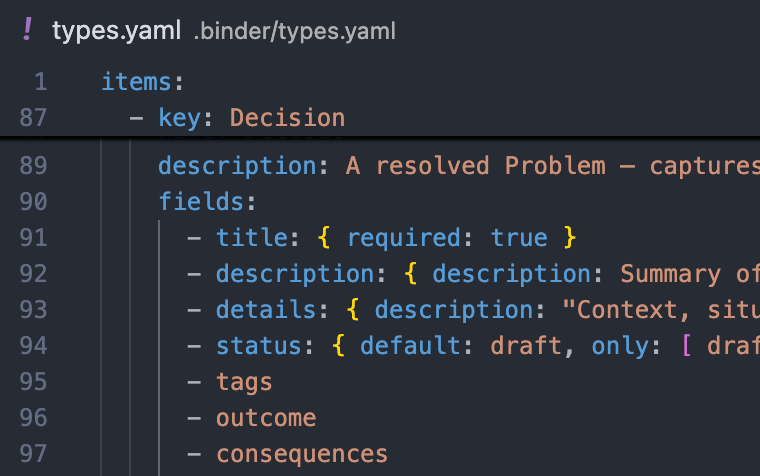 Data models - define your types and fields in a simple YAML schema. Easy to write, easy to evolve. |
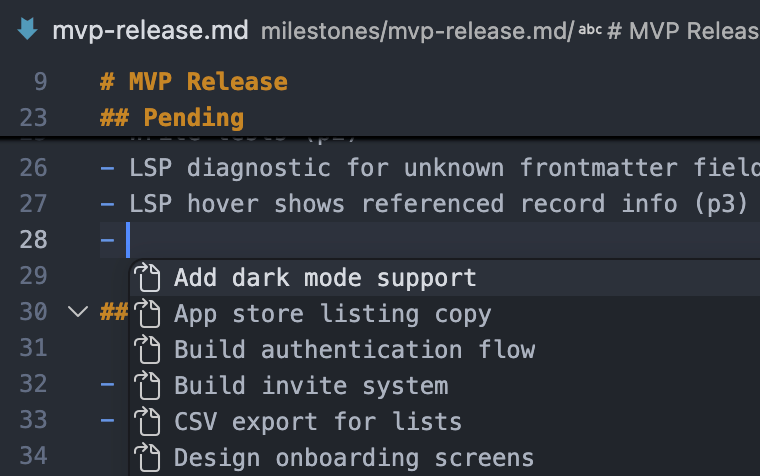 Autocomplete - links, field names, and valid values completed as you type. |
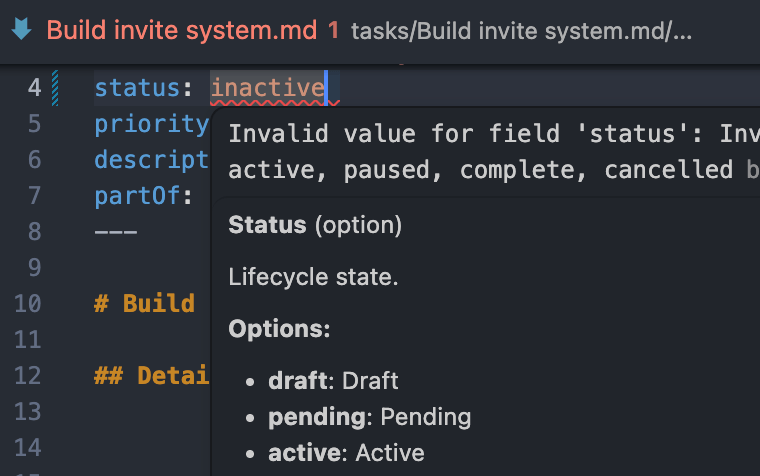 Editor integration - data validation, navigation, autocomplete in your favorite editor. |
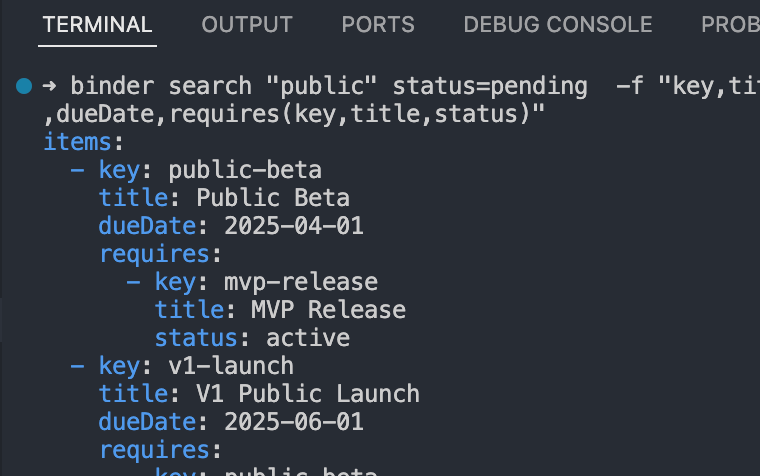 CLI - search, query, and create from the terminal or script. |
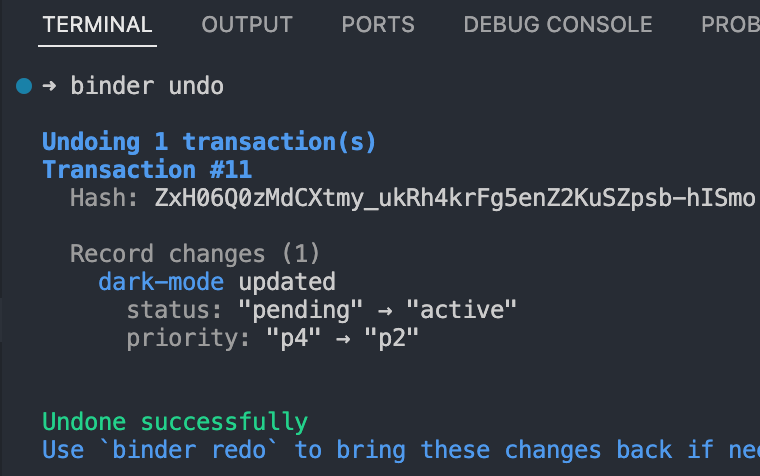 Transaction log - every change recorded and attributed to its source. Audit history, undo mistakes, replay any past state. |
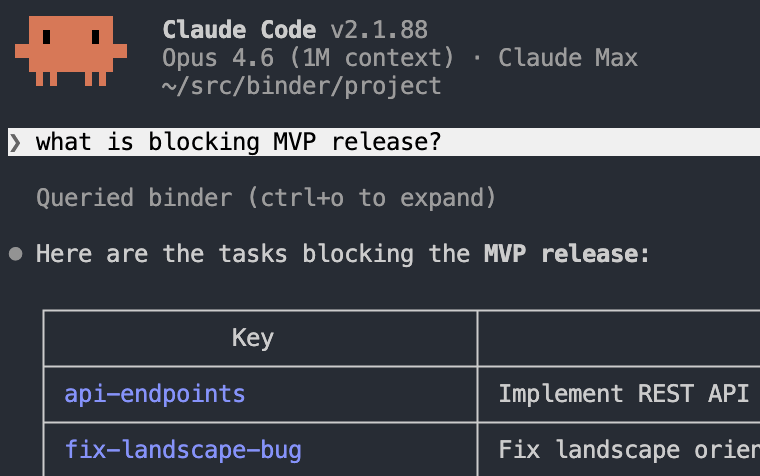 AI agents - query, create, and update entities via MCP with full audit trail. |
Same data, different surfaces. Use whichever fits the task.
Open any Markdown file in your coding editor to read, adjust, and review. Binder's LSP provides validation, autocomplete, and navigation across all entity files.
Install the VS Code extension to get started, or see Getting Started for WebStorm/IntelliJ and Neovim setup.
For autonomous work: querying context, capturing decisions, writing new entities. Agents can use the CLI directly or connect via MCP for a typed read/write API.
Add to .mcp.json to enable MCP:
{
  "mcpServers": {
    "binder": {
      "type": "stdio",
      "command": "binder",
      "args": ["mcp"]
    }
  }
}
For pipelines, batch operations, reports, or embedding Binder in your own apps and libraries. Query, create, and update records without parsing Markdown. Changes write back to files automatically.
$ binder search type=Task status=active -f "title,status,priority,partOf(title,status)"
items:
  - title: Add dark mode support
    status: active
    priority: p2
    partOf:
      title: MVP Release
      status: active
Pipe to any tool:
$ binder search type=Task status=active -q | jq '.items[] | .key + ": " + .title'
"setup-auth: Set up authentication"
"fix-layout-bug: Fix layout orientation bug"
Create and update without opening a file:
$ binder create Task dark-mode title="Add dark mode support" status=active priority=p2 partOf=mvp-release
$ binder update dark-mode status=complete
Embed Binder directly. Use it in a one-off script, a long-running service, a library, or any Node/Bun app:
import { open, isErr } from "@binder/repo/local";

const repo = await open("/path/to/workspace"); // omit to run from cwd
if (isErr(repo)) throw repo.error;
const { data: kg } = repo;

const r = await kg.search({ filters: { type: "Task", status: "complete" } });
if (!isErr(r)) for (const t of r.data.items) console.log("-", t.title);

await kg.close();
Workspace scripts. As a convenience, files in .binder/scripts/ (.ts, .js, .mjs, .sh) become first-class subcommands:
$ binder weekly-report          # runs .binder/scripts/weekly-report.ts
$ binder run weekly-report      # equivalent, never shadowed by built-ins
For browser UIs, webhooks, and integrations. binder http starts a local server with a record browser at http://127.0.0.1:4000, plus a JSON API:
GET /api/schema - types and fieldsGET /api/records?type=Task&status=active - query recordsGET /api/records/:key - fetch onePOST /api/transactions - apply a transactionBring your own UI with --static <dir>, or drop one at .binder/web/ for zero config. The built-in record browser is the fallback.
Drop a server.ts next to your static files to add custom routes, built on Hono. Source files aren't served.
import { Hono } from "hono";
import type { ServerModule } from "@binder.do/cli";

const mod: ServerModule = ({ kg }) => {
  const app = new Hono();
  app.get("/api/stats", async (c) => {
    const r = await kg.search({ filters: { type: "Task" } });
    return c.json({ tasks: "data" in r ? r.data.length : 0 });
  });
  return app;
};
export default mod;
→ See HTTP server docs for the full reference.
Run a shell command on every committed transaction. The transaction is piped to stdin as JSON. Declare them in .binder/config.yaml:
hooks:
  - name: notify-slack
    command: ./scripts/notify-slack.sh
  - name: audit
    command: jq -c . >> .binder/audit.log
Binder is early-stage and actively shaped by feedback. Found a bug or have an idea? Open an issue. All input welcome.
Sign in to join the discussion.
No comments yet. Be the first to say what this is good for.
🪨 why use many token when few token do trick — Claude Code skill that cuts 65% of tokens by talking like caveman

The best-benchmarked open-source AI memory system. And it's free.

Orca is the ADE for working with a fleet of parallel agents. Run any coding agent with your own subscription. Available on desktop, mobile and remote runtime.

A cross-platform desktop All-in-One assistant for Claude Code, Codex, OpenCode, OpenClaw, Grok Build & Hermes Agent. Only official website: ccswitch.io

Never stop coding. Free MIT AI gateway: one endpoint, 352 providers (150+ free), 1200+ models Kimi, Claude, GPT, Gemini, GLM, DeepSeek, MiniMax. Works with Claude Code, Codex, Cursor, OpenCode, Cline & Copilot. Quota-aware auto-fallback, RTK+Caveman compression saves 15-95% tokens, MCP/A2A, Desktop/PWA. Built by 550+ contributors

Compress tool outputs, logs, files, and RAG chunks before they reach the LLM. 20% fewer tokens for coding agents, 60-95% fewer tokens for JSON, same answers. Library, proxy, MCP server.