
DietrichGebert/ponytailPlugins
Makes your AI agent think like the laziest senior dev in the room. The best code is the code you never wrote.
138k
1 add
This repository packages Azure-focused skills, plugins, and hook configs for several agent clients. It connects those clients to Azure workflows so you can ask questions, use Azure services, and run related development tasks without leaving your editor or CLI.
Builders who want their agent to help them work with Azure services from their editor or terminal.
You can install one Azure bundle and use the same workflow pieces across multiple agent clients.
Installs Azure skills for supported clients such as Claude Code, Copilot CLI, Cursor, Gemini CLI, and VS Code.
Connects agent tools to Azure through an MCP server, including cloud-specific configuration for sovereign clouds.
Provides hook configurations for clients that support lifecycle scripts around agent actions.
Includes marketplace and plugin manifest files for different clients and install scopes.
winget install --id Git.Git -e --source winget
brew install git
winget install --id OpenJS.NodeJS.LTS -e --source winget
brew install node
/plugin update azure@claude-plugins-official
GitHub Copilot for Azure is a set of extensions for Visual Studio, VS Code, and Claude Code designed to streamline the process of developing for Azure. You can ask it questions about your Azure services or get help with tasks related to Azure management and development, all from within your IDE.
Learn more about GitHub Copilot for Azure, and get the extension:
Before installing the plugin, ensure the following tools are installed:
Git is required to add the marketplace plugin. If it is not installed, you will see an error like:
Failed to add marketplace: Failed to fetch GitHub marketplace microsoft/azure-skills: Error: spawn git ENOENT
Windows (winget):
winget install --id Git.Git -e --source winget
macOS (Homebrew):
brew install git
Node.js is required for the Azure MCP server. If it is not installed, you may see errors such as:
'npx' is not recognized as an internal or external commandnpx: command not foundnpx failed to connect to azureWindows (winget):
winget install --id OpenJS.NodeJS.LTS -e --source winget
macOS (Homebrew):
brew install node
The GitHub Copilot for Azure extension installs skills when the extension activates. At that point, you may see a toast notification like the following (if you don't see it, you can use the manual commands below):
To manually install skills from the Command Palette, the following commands are available:
@azure: Install Azure Skills Globally — installs to your home directory (for example ~ on macOS/Linux or %UserProfile% on Windows), available in all workspaces@azure: Install Azure Skills Locally — installs to the current workspace folder, workspace-scoped@azure: Uninstall Azure Skills Globally — removes globally installed skillsTo install the Azure plugin into Copilot CLI:
/plugin marketplace add microsoft/azure-skills/plugin install azure@azure-skills/plugin update azure@azure-skillsTo install the Azure plugin into Claude Code, either:
/plugin install azure@claude-plugins-official, or/plugin and search for "azure" in the marketplace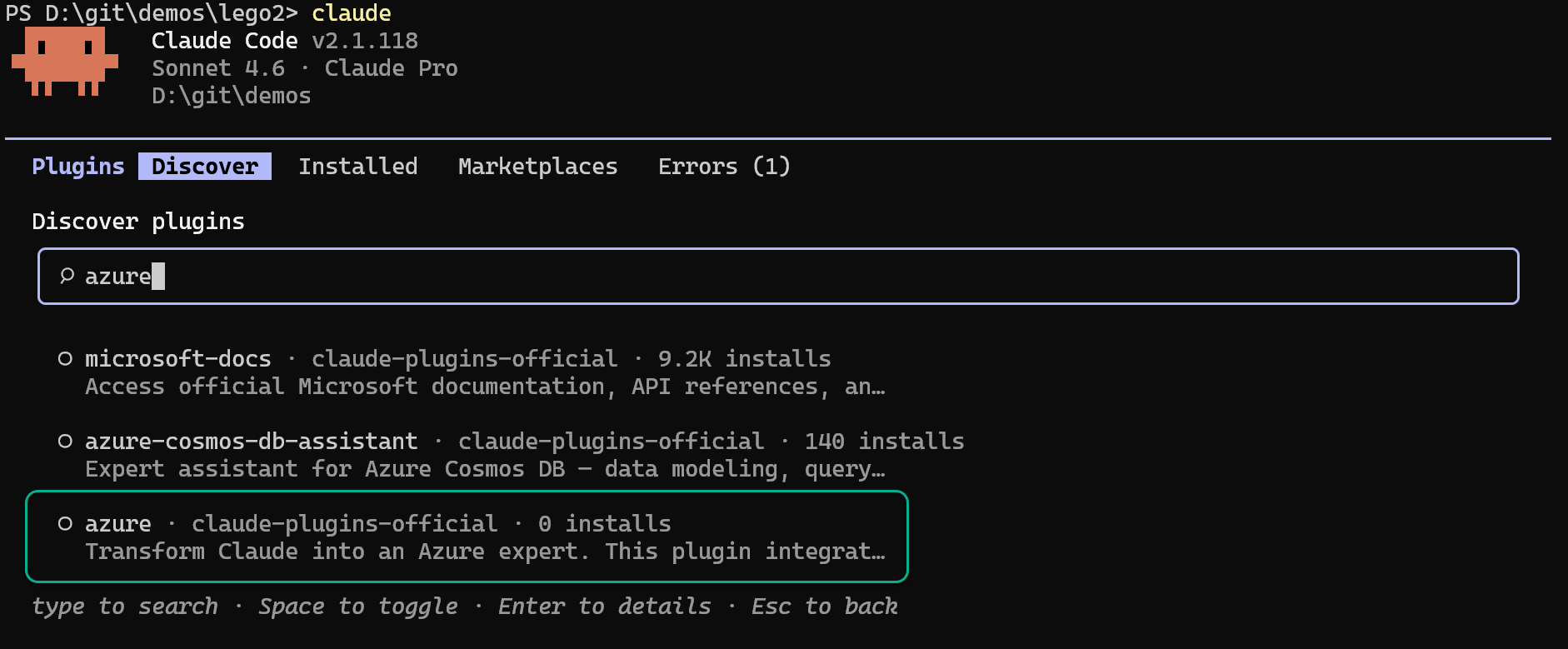
To update the plugin:
/plugin update azure@claude-plugins-official
By default, the Azure MCP server connects to the Azure Public Cloud. If you use a sovereign cloud (Azure China Cloud or Azure US Government), you need to configure the MCP server to use the appropriate cloud environment.
After installing the plugin from the marketplace, the skills are installed in ~/.copilot/installed-plugins/ on macOS/Linux (or %USERPROFILE%\.copilot\installed-plugins\ on Windows). Edit the <skill_installation_dir>/azure-skills/azure/.mcp.json file in the installed plugin directory to add the --cloud argument:
Note: If you are developing locally using
copilot --plugin-dir ./output, editoutput/.mcp.jsonin your local build output instead.
Azure China Cloud:
{
  "mcpServers": {
    "azure": {
      "command": "npx",
      "args": ["-y", "@azure/mcp@latest", "server", "start", "--cloud", "AzureChinaCloud"]
    }
    // Keep the other MCP server configurations in this file as they are.
  }
}
Azure US Government:
{
  "mcpServers": {
    "azure": {
      "command": "npx",
      "args": ["-y", "@azure/mcp@latest", "server", "start", "--cloud", "AzureUSGovernment"]
    }
    // Keep the other MCP server configurations in this file as they are.
  }
}
Before starting the MCP server, ensure your local CLI tools are authenticated against the correct cloud:
| Cloud | Azure CLI | Azure PowerShell | Azure Developer CLI |
|---|---|---|---|
| China | az cloud set --name AzureChinaCloud && az login | Connect-AzAccount -Environment AzureChinaCloud | azd config set cloud.name AzureChinaCloud && azd auth login |
| US Government | az cloud set --name AzureUSGovernment && az login | Connect-AzAccount -Environment AzureUSGovernment | azd config set cloud.name AzureUSGovernment && azd auth login |
For more details, see Connect to sovereign clouds in the Azure MCP Server documentation.
| Client | Skills | MCP Servers | Hooks | Marketplace | Manifest | Status |
|---|---|---|---|---|---|---|
| Copilot CLI | ✅ | ✅ | ✅ (hooks/copilot-hooks.json) | ✅ .plugin/ | .plugin/plugin.json | ✅ Onboarded |
| Claude Code | ✅ | ✅ | ✅ (hooks/claude-hooks.json) | .claude-plugin/marketplace.json (exists only in azure-skills repo) | ✅ plugin/.claude-plugin/plugin.json | ✅ Onboarded |
| VS Code Extension | ✅ (.agents folder) | ✅ | ✅ hooks/copilot-hooks.json (.agents folder) | Extension-based | Extension-based | ✅ Onboarded |
| IntelliJ | ✅ (.agents folder) | ✅ | ❌ Not supported by client | Extension-based | Extension-based | ✅ Skills Onboarded 🔜 Hooks Support ETA - End of April 2026 |
| Gemini CLI | ✅ | ✅ | ❌ Not supported by us | No marketplace | gemini-extension.json | ✅ Onboarded |
| Cursor | ✅ | ✅ | plugin/hooks/cursor-hooks.json | .cursor-plugin/marketplace.json (exists only in azure-skills repo) | ✅ plugin/.cursor-plugin/plugin.json | ✅ Onboarded. Hooks testing - WIP |
| Codex | ✅ | ✅ | ❌ Not yet supported by client (currently supports Bash-only) | Claude-style marketplace | ✅ plugin/.claude-plugin/plugin.json | ✅ Onboarded as local plugin (curated marketplace requires public MCP) |
| Eclipse | ❌ Not supported by client | ✅ | ❌ Not supported by client | Extension-based | Extension-based | ⚠️ MCP only |
You can use this repository to:
See CONTRIBUTING.md for detailed guidelines on how to contribute, including local development setup.
Sign in to join the discussion.
No comments yet. Be the first to say what this is good for.
Makes your AI agent think like the laziest senior dev in the room. The best code is the code you never wrote.

Graphs that teach > graphs that impress. Turn any code into an interactive knowledge graph you can explore, search, and ask questions about. Works with Claude Code, Codex, Cursor, Copilot, Gemini CLI, and more.

OmO: Just type "mass ulw" keyword with your prompt. Now you are the master of graph engineering.
Persistent Context Across Sessions for Every Agent – Captures everything your agent does during sessions, compresses it with AI, and injects relevant context back into future sessions. Works with Claude Code, OpenClaw, Codex, Gemini, Hermes, Copilot, OpenCode + More
Opinionated Oxlint rules for rejecting low-evidence TypeScript and JavaScript patterns
Teams-first Multi-agent orchestration for Claude Code