

JuliusBrussee/
caveman

🪨 why use many token when few token do trick — Claude Code skill that cuts 65% of tokens by talking like caveman
105k
1 add
mirrord runs your local process through a live Kubernetes pod so it uses real environment variables, DNS, network paths, and file access from the cluster. It ships as a CLI, VS Code extension, and IntelliJ plugin, and it works with AI coding agents as well as human builders.
Builders who want to test and debug code against real Kubernetes services from their editor or terminal.
You can verify changes against live cluster behavior in seconds without deploying your app first.
Starts your process locally but routes its network and environment through a selected pod in the cluster.
Copies incoming traffic from the pod to your local process and sends outgoing traffic back through the pod.
Reads real env vars, DNS, service responses, and file access so your code sees the cluster as it is.
Works from `mirrord exec` in the terminal and from VS Code and IntelliJ integrations.
Designed to work with Claude Code, Cursor, Codex CLI, Gemini CLI, Copilot, and Windsurf.
Lets you disable selected capabilities like `CAP_NET_RAW` or `CAP_SYS_PTRACE` when needed.
brew install metalbear-co/mirrord/mirrord
curl -fsSL https://raw.githubusercontent.com/metalbear-co/mirrord/main/scripts/install.sh | bash
# Using nix-env (legacy)
nix-env -iA nixpkgs.mirrord

# Using nix profile (recommended)
nix profile install nixpkgs#mirrord
choco install --pre mirrord
mirrord exec <process command> --target <target-path>
mirrord exec node app.js --target pod/my-pod




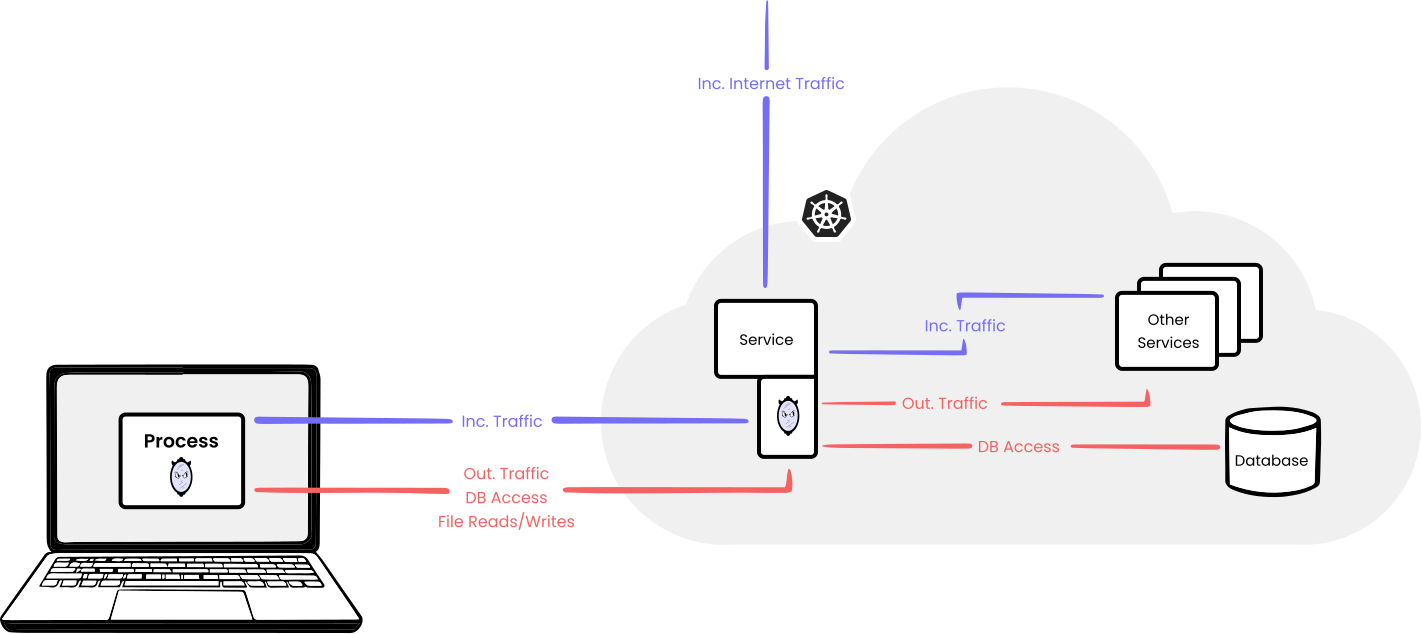
mirrord runs your local process inside a live Kubernetes cluster. It works the same way for developers and for AI coding agents (Claude Code, Cursor, Codex, Copilot, Windsurf): your code runs on your machine, but mirrord routes its traffic, files, and environment variables through a target pod in the cluster.
That covers both halves of the software development loop. Read live cluster context while writing the code (real env vars, real service responses, real queue contents) so the change is grounded in what's actually deployed. Then run the code against those same services and data to confirm it works end-to-end.
You get the feedback of a deploy in seconds, without the deploy, and without disrupting the cluster for anyone else. mirrord ships as a VS Code extension, IntelliJ plugin, and CLI tool. Read more.
Adopted by: monday.com, SurveyMonkey, Cadence, CoLab, Daylight Security, Zooplus, and others.
mirrord uses your machine's default kubeconfig for access to the Kubernetes API.


You can use either
brew install metalbear-co/mirrord/mirrord
or
curl -fsSL https://raw.githubusercontent.com/metalbear-co/mirrord/main/scripts/install.sh | bash
or using Nix (not official, community maintained):
# Using nix-env (legacy)
nix-env -iA nixpkgs.mirrord

# Using nix profile (recommended)
nix profile install nixpkgs#mirrord
or on Windows using Chocolatey:
choco install --pre mirrord
mirrord exec <process command> --target <target-path>
e.g.
mirrord exec node app.js --target pod/my-pod
When you select a pod to impersonate, mirrord launches a pod on the same node as the pod you selected. The new pod is then used to connect your local process and the impersonated pod: it mirrors incoming traffic from the pod to your process, routes outgoing traffic from your process through the pod, and does the same for file reads, file writes, and environment variables. You can read more about it here.
Container run inside the pod launched by mirrord requires additional Linux capabilities:
CAP_NET_ADMIN and CAP_NET_RAW - for modifying routing tablesCAP_SYS_PTRACE - for reading target pod environmentCAP_SYS_ADMIN - for joining target pod network namespaceHowever, you can disable any subset of those in the configuration. This will possibly limit mirrord functionalities or even make it unusable in some setups.
MIRRORD_AGENT_DISABLED_CAPABILITIES=CAP_NET_RAW,CAP_SYS_PTRACE mirrord exec node app.js --target pod/my-pod
mirrord works first-class with Claude Code, Cursor, Codex CLI, Gemini CLI, and other AI coding agents, letting them run and verify generated code against real cluster services without deploying.
For setup guides and ready-made workflow skills, see metalbear-co/skills or the mirrord for AI Agents page.
Our FAQ is available here. If you have a question that's not on there, feel free to ask in our Discussions or on Slack.
Contributions are very welcome. Start by checking out our open issues, and by going through our contributing guide. We're available on Slack for any questions.
Join our Slack for questions, support and fun.
We always appreciate hearing how mirrord has made a difference for our users.
Check out our ADOPTERS.md to see how others are using mirrord —
and open a pull request to add your organization if you’d like to share how mirrord has been useful to you.
We take our community seriously and we are dedicated to providing a safe and welcoming environment for everyone. Please take a few minutes to review our Code of Conduct.
Sign in to join the discussion.
No comments yet. Be the first to say what this is good for.
🪨 why use many token when few token do trick — Claude Code skill that cuts 65% of tokens by talking like caveman

The best-benchmarked open-source AI memory system. And it's free.

Orca is the ADE for working with a fleet of parallel agents. Run any coding agent with your own subscription. Available on desktop, mobile and remote runtime.

A cross-platform desktop All-in-One assistant for Claude Code, Codex, OpenCode, OpenClaw, Grok Build & Hermes Agent. Only official website: ccswitch.io

Never stop coding. Free MIT AI gateway: one endpoint, 352 providers (150+ free), 1200+ models Kimi, Claude, GPT, Gemini, GLM, DeepSeek, MiniMax. Works with Claude Code, Codex, Cursor, OpenCode, Cline & Copilot. Quota-aware auto-fallback, RTK+Caveman compression saves 15-95% tokens, MCP/A2A, Desktop/PWA. Built by 550+ contributors

Compress tool outputs, logs, files, and RAG chunks before they reach the LLM. 20% fewer tokens for coding agents, 60-95% fewer tokens for JSON, same answers. Library, proxy, MCP server.