
affaan-m/
ECC

affaan-m/ECCHarnesses
The agent harness performance optimization system. Skills, instincts, memory, security, and research-first development for Claude Code, Codex, Opencode, Cursor and beyond.
258k
Pilot Shell wraps Claude Code and Codex in a shared engineering harness. It installs rules, skills, agents, hooks, memory, and workflows so agent work follows the same review and verification path across projects. The system includes a local Console for reviewing plans, diffs, evidence, and session state, plus workflows like `/spec`, `/build`, `/fix`, and `/prd`. It is built to keep context durable, enforce quality gates, and prove the result with tests, builds, and runtime checks.
Builders who use Claude Code or Codex and want a shared system for context, review, and verification.
You can keep agent work grounded in project context and verify the result before calling it done.
Saves project history, decisions, and useful findings so later sessions can pick up context without re-explaining everything.
Uses hooks, stop guards, reviews, and test or build checks to catch unfinished work before it is handed off.
Provides `/spec`, `/build`, `/fix`, and `/prd` for planning, implementation, bug fixing, and requirement shaping.
Offers a local Console for reviewing plans, diffs, annotations, progress, evidence, and session recovery.
Supports tests, builds, browser checks, CLI/API runs, and device checks to prove the system works.
Installs Claude Code and Codex-specific assets while keeping shared sources in Pilot-managed files.
curl -fsSL https://raw.githubusercontent.com/maxritter/pilot-shell/main/install.sh | bash
export VERSION=11.0.2
curl -fsSL https://raw.githubusercontent.com/maxritter/pilot-shell/main/install.sh | bash
curl -fsSL https://raw.githubusercontent.com/maxritter/pilot-shell/main/uninstall.sh | bash
# Also remove external tools that Pilot recorded as originally Pilot-installed
curl -fsSL https://raw.githubusercontent.com/maxritter/pilot-shell/main/uninstall.sh | bash -s -- --remove-tools

# Also delete Pilot memories, sessions, logs, configuration, and unknown files
curl -fsSL https://raw.githubusercontent.com/maxritter/pilot-shell/main/uninstall.sh | bash -s -- --purge-data

Professional context and harness engineering around the coding agents you already use.
Persistent knowledge. Enforced quality. Runtime proof.




Install • Features • Docs • Blog • Website • Changelog
curl -fsSL https://raw.githubusercontent.com/maxritter/pilot-shell/main/install.sh | bash
macOS · Linux · Windows (WSL2) — installs in under 2 minutes.

[!TIP] Pilot's open design companion: Open Claude Design connects Claude Design to the coding agent you already use, with codebase-grounded creation and conflict-aware synchronization. Pilot installs it together with Impeccable, so product context, visual iteration, deterministic checks, and engineering verification work as one design layer.
Claude Code and Codex CLI write code fast — but production-grade software still needs durable context, disciplined implementation, quality control, and proof that the finished system works.
Pilot Shell is a professional context and harness engineering system—not a collection of rules and skills. It coordinates the complete engineering process around the model:
/spec, /build, /fix, and /prd add durable artifacts and explicit lifecycle contracts without becoming routing rules for ordinary requestsRules, skills, and persistent memory are coordinated parts of this harness. They supply context; they are not the product by themselves. For a longer practitioner’s explanation, read How to build production-ready software assisted with AI tools.
At least one AI agent: Pilot Shell supports Claude Code (primary — full feature coverage) and Codex through Codex CLI or the ChatGPT desktop app (all workflows, fewer platform features). Install at least one before running the Pilot installer:
npm or brew version, uninstall it first. Requires a Claude subscription — Max 5x or 20x for solo, Team Premium for teams, Enterprise for organizations.Terminal (Recommended on macOS): Zentty works especially well with Pilot Shell — its worklanes keep parallel agents and dev servers in separate contexts and show you when a pane needs attention. Any modern terminal works: Ghostty, iTerm2, or the built-in macOS/Linux terminal.
Works with any existing project. Pilot Shell integrates with Claude Code and Codex CLI or ChatGPT desktop, using their built-in concepts (rules, hooks, skills, subagents, MCP) to improve your experience:
curl -fsSL https://raw.githubusercontent.com/maxritter/pilot-shell/main/install.sh | bash
Installs globally on macOS, Linux, and Windows (WSL2). After installation, run claude or codex directly. On macOS, you can instead restart ChatGPT desktop and open the project there. Pilot Shell loads automatically in either Codex client. Run pilot update to check for updates.
If you encounter an issue or unfixed bug in the latest version, you can always go back to a previous version (see releases):
export VERSION=11.0.2
curl -fsSL https://raw.githubusercontent.com/maxritter/pilot-shell/main/install.sh | bash
Removes Pilot's runtime, Console, statusline, hooks, managed skills/rules/agents, MCP entries, settings injections, and shell aliases. Claude Code, Codex, project files, shared external tools, and user data are preserved:
curl -fsSL https://raw.githubusercontent.com/maxritter/pilot-shell/main/uninstall.sh | bash
The interactive uninstaller asks separately whether to remove proven Pilot-owned external tools and whether to purge Pilot data, then shows the final removal preview. The prompts use the controlling terminal, so they also work with the piped command above.
Optional cleanup stays explicit:
# Also remove external tools that Pilot recorded as originally Pilot-installed
curl -fsSL https://raw.githubusercontent.com/maxritter/pilot-shell/main/uninstall.sh | bash -s -- --remove-tools

# Also delete Pilot memories, sessions, logs, configuration, and unknown files
curl -fsSL https://raw.githubusercontent.com/maxritter/pilot-shell/main/uninstall.sh | bash -s -- --purge-data
Over time, accumulated session logs and Pilot Shell's caches can slow things down. A periodic reset gives you a clean baseline:
# 1. If using Claude Code, log out first
/logout

# 2. Back up your current config (just in case)
# Using CLAUDE_CONFIG_DIR? Substitute it for ~/.claude, and back up
# "$CLAUDE_CONFIG_DIR/.claude.json" instead of ~/.claude.json.
mv ~/.claude.json ~/.claude.json.bak
mv ~/.claude       ~/.claude.bak
mv ~/.codex        ~/.codex.bak
mv ~/.pilot        ~/.pilot.bak

# 3. Reinstall Pilot Shell from the official installer
curl -fsSL https://raw.githubusercontent.com/maxritter/pilot-shell/main/install.sh | bash

# 4. Re-activate your license, then start your agent
pilot activate <your-license-key>
claude   # or: codex
Once Pilot Shell is running smoothly again, you can delete the .bak copies. Forgot your license key? Recover it in the Pilot members area.
Pilot Shell works inside Dev Containers. Copy the .devcontainer folder from this repository into your project, adapt it to your needs (base image, extensions, dependencies), and run the installer inside the container. The installer auto-detects the container environment and skips system-level dependencies like Homebrew.
For tighter isolation when working with untrusted code, combine the dev container with Claude Code's /sandbox — bubblewrap, socat, iptables, and ipset are pre-installed in the Dockerfile so it works out of the box on Linux. See Anthropic's development containers and sandboxing docs for hardening patterns (egress allowlist, managed settings, persistent volumes).
8-step installer with progress tracking, rollback on failure, and idempotent re-runs. Steps 3 and 4 are agent-conditional — they skip cleanly when the matching agent is not detected. The installer does not install Claude Code, Codex CLI, or ChatGPT itself; install at least one yourself per the prerequisites above.
~/.pilot/hooks/, Console scripts/UI → ~/.pilot/, MCP server template → ~/.pilot/.mcp.json, canonical raw sources → ~/.pilot/rules/, ~/.pilot/skills/, and ~/.pilot/agents/. Each agent's adapter consumes these sources in its own format. Always runs.$CLAUDE_CONFIG_DIR, else ~/.claude): rules, sub-agents, settings.json (three-way merged), plus the Claude post-install merges (hooks into settings, app-config MCP block, model config migration). Skipped when Claude Code CLI is not detected.~/.agents/skills/, review agents → ~/.codex/agents/, guidance → ~/.codex/AGENTS.md, a provider-derived model catalog that preserves new entries while lifting GPT-5.6 and Astra to their published context ceiling → ~/.codex/.pilot-model-catalog.json, plus merged ~/.codex/config.toml and ~/.codex/hooks.json. Skipped when neither Codex CLI nor the ChatGPT-bundled Codex binary is detected..nvmrc and project config.codex@openai-codex Claude marketplace plugin. Agent-specific dependencies still skip when their target agent is absent. Homebrew is preferred for ast-grep, with an audited pinned npm fallback for hosts without Brew.pilot admin alias and a Codex wrapper that raises a low per-process open-file soft limit without lowering a higher one.Start either agent in any project. Work directly, use the agent's native Plan/Goal tools, or invoke a Pilot workflow — these are peer choices, and the same harness stays active around each one.
# Claude Code         # Codex CLI
claude                codex
When you want repository-specific shared guidance, run /setup-rules in Claude Code or $setup-rules in Codex. It reads the codebase, discovers conventions, and prepares synchronized rules and MCP guidance; it is useful setup, not a prerequisite for using Pilot.
Use /create-skill to capture a repeatable procedure and /benchmark to measure whether guidance improves output. See Other Pilot Workflows for the full on-demand toolkit.
Pilot supports three peer paths. Choose the contract that fits the work; none is the escalation path or preferred default for another.
| Path | What it adds |
|---|---|
| Direct request | The shortest route from a clear request to implementation and verification |
| Native agent Plan/Goal tools | The planning, task, approval, and persistence model built into Claude Code or Codex |
| Pilot workflows | Durable requirements, plans, criteria, TDD loops, reviews, and verification evidence |
Pilot's four structured workflows remain available when their explicit artifact or lifecycle contract is useful.
| Workflow | Use it when | Contract |
|---|---|---|
/spec · $spec | You want ordered tasks approved before implementation | Plan against the real codebase, implement with TDD, review independently, and verify end to end |
/build · $build | The outcome is clear but the task list should evolve while building | Define acceptance criteria, build in rounds, and let an independent judge turn gaps into the next round |
/fix · $fix | Existing behavior is broken | Reproduce the defect, write the RED test, repair the root cause, run the quality gate, and audit the result |
/prd · $prd | The problem, audience, or scope is still unclear | Explore directions and produce a reviewable product requirement document |
/spec and /build are peers: choose /spec for an approved plan and /build for a goal measured by acceptance criteria. Size alone does not decide.
Requirement or goal → plan / criteria → TDD implementation → quality gates
                                            ↑                 ↓
                                            └─ review and runtime verification loop
Requirements, plans, buildouts, tasks, criteria, and verification evidence live in durable files under docs/. Stop guards keep the workflow open until the obligations pass or are reported unresolved.
Explore all workflow details →
Use these on demand; the full procedures live in the documentation.
| Workflow | Purpose |
|---|---|
/investigate · $investigate | Trace one codebase question with cited evidence and no edits |
/cleanup · $cleanup | Corroborate dead-code candidates without deleting anything |
/setup-rules · $setup-rules | Generate modular project guidance from the real codebase |
/create-skill · $create-skill | Capture and test a reusable procedure |
/benchmark · $benchmark | Measure a rule or skill against falsifiable before/after evals |
Pilot installs Open Claude Design and Impeccable as complementary parts of the harness. Open Claude Design connects the real codebase and coding agent to Claude Design's visual workspace; Impeccable adds focused refinement workflows and deterministic checks.
Ask normally—the design workflow loads in the background, keeps code and design synchronized, and feeds the result into Pilot's implementation and verification process.
The local Console at localhost:41777 makes the harness visible and steerable.
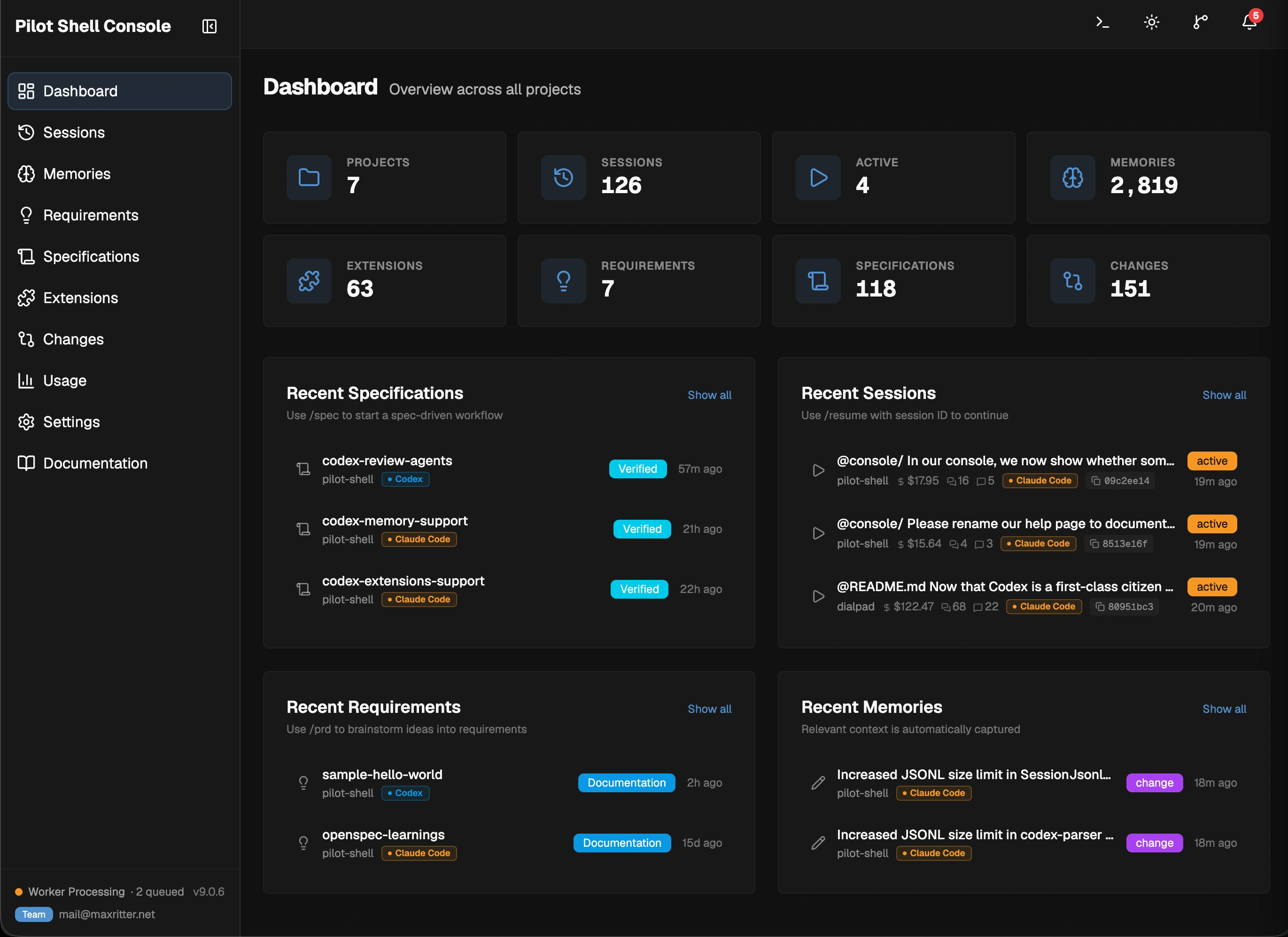
Memory capture runs automatically in the background across Claude Code and Codex. Pilot selects an available low-cost provider, handles temporary quota failures, and keeps saved findings searchable without a model call. This adds project history alongside each agent's native context.
Team sharing is optional: keep stored memory local, or let useful findings travel through your project's normal Git commits and pulls. How automatic memory works.
For full details on every component, see the Documentation.
See the full changelog at GitHub Releases.
Found a bug or missing a feature? Open an issue on GitHub.
See LICENSE.
How real engineers run Claude Code and Codex
Made with 🩵 by Max Ritter
Sign in to join the discussion.
No comments yet. Be the first to say what this is good for.
The agent harness performance optimization system. Skills, instincts, memory, security, and research-first development for Claude Code, Codex, Opencode, Cursor and beyond.
from vibe coding to agentic engineering - practice makes claude perfect
🌊 The original agent meta-harness. Deploy intelligent multi-player swarms, coordinate autonomous workflows, and build conversational AI systems. Features adaptive memory, self-learning intelligence, RAG integration, and native Claude Code / Codex / Hermes and many more Integrated
Practical patterns, starters & CLI tools for loop engineering with AI coding agents. Design systems that prompt and orchestrate agents (inspired by Addy Osmani and Boris Cherny). Includes loop-audit, loop-init, loop-cost.

Git. Ship. Done - Core

The most RAM efficient harness