
JuliusBrussee/
caveman

🪨 why use many token when few token do trick — Claude Code skill that cuts 65% of tokens by talking like caveman
105k
1 add
claude-devtools reads the session logs Claude Code already saves on your machine and rebuilds them in a visual interface. You can inspect tool calls, token usage, subagent trees, memory files, and context windows without using `--verbose` or any API key.
Builders who run Claude Code and want to see session history, tool activity, and token usage in one place.
You can debug Claude Code sessions without digging through raw JSON or opaque terminal summaries.
Opens Claude Code session logs and shows the full conversation in a navigable UI.
Expands reads, edits, bash output, and other tool calls with file paths, diffs, and formatted output.
Breaks down context usage by turn and shows where tokens went, including compaction events.
Displays nested agent activity as execution trees with traces, duration, and cost.
Surfaces Claude Code memory files from `~/.claude/projects/.../memory/` and lets you open them in an editor.
Lets you copy clean text from messages and code blocks, and export sessions to Markdown, JSON, or plain text.
Can inspect Claude Code sessions over SSH on another machine.
brew install --cask claude-devtools
Your Claude is coding blind. See everything it did.
The debugging tool for Claude Code. Read session transcripts, inspect tool calls, track token usage — directly from the Claude Code logs on your machine.











Your browser does not support the video tag.
Claude Code started hiding what it does.
Since v2.1.20, Claude Code replaced detailed output with opaque summaries. Read 3 files. Searched for 1 pattern. Edited 2 files. No file paths. No content. No line numbers. The community backlash was immediate.
But the problem goes deeper than collapsed file paths:
The only workaround is --verbose, which dumps raw JSON, internal system prompts, and thousands of lines of noise. There is no middle ground.
claude-devtools is the debugging tool for Claude Code. It reads the Claude Code logs and session transcripts already saved to ~/.claude/ on your machine, and reconstructs everything.
| What the terminal hides | What claude-devtools shows |
|---|---|
Read 3 files | Exact file paths, syntax-highlighted content with line numbers |
Searched for 1 pattern | The regex pattern, every matching file, matched lines |
Edited 2 files | Inline diffs with added/removed highlighting |
| Three-segment context bar | Per-turn token attribution across 7 categories with compaction visualization |
| Collapsed subagent output | Full execution trees per agent with tool traces, tokens, duration, cost |
| Nothing about thinking | Extended thinking content, fully visible |
--verbose JSON dump | Structured, filterable, navigable interface — no noise |
Per-project Claude memory hidden in ~/.claude/projects/.../memory/ | MEMORY.md rendered as a clickable index of layers; open any layer in your editor |
| Copy from terminal = wrapped lines, ANSI codes, broken Markdown | Real selectable text, one-click copy on every message and code block |
Zero configuration. No API keys. No wrappers. Works with every session you've ever run.
[!TIP] If claude-devtools saves you time debugging Claude Code, leaving a ⭐ on the repo is the single best way to support the project — it helps other developers find it.
brew install --cask claude-devtools
| Platform | Download | Notes |
|---|---|---|
| macOS (Apple Silicon) | .dmg | Download the arm64 asset. Drag to Applications. On first launch: right-click → Open |
| macOS (Intel) | .dmg | Download the x64 asset. Drag to Applications. On first launch: right-click → Open |
| Linux | .AppImage / .deb / .rpm / .pacman | Choose the package format for your distro |
| Windows | .exe | Standard installer. May trigger SmartScreen — click "More info" → "Run anyway" |
| Docker | docker compose up | Open http://localhost:3456. See Docker deployment |
Per-turn token attribution across 7 categories — CLAUDE.md (global, project, directory), skills, @-mentioned files, tool I/O, thinking, team overhead, user text. See exactly what's in the context window at any point.
Copying Claude Code output from the terminal mangles it — selection wraps at the terminal width, ANSI color codes leak into the clipboard, and code blocks lose their Markdown formatting. claude-devtools renders every message, tool call, and output as real selectable text with one-click copy on every code block, plus full-session export to Markdown / JSON / plain text.
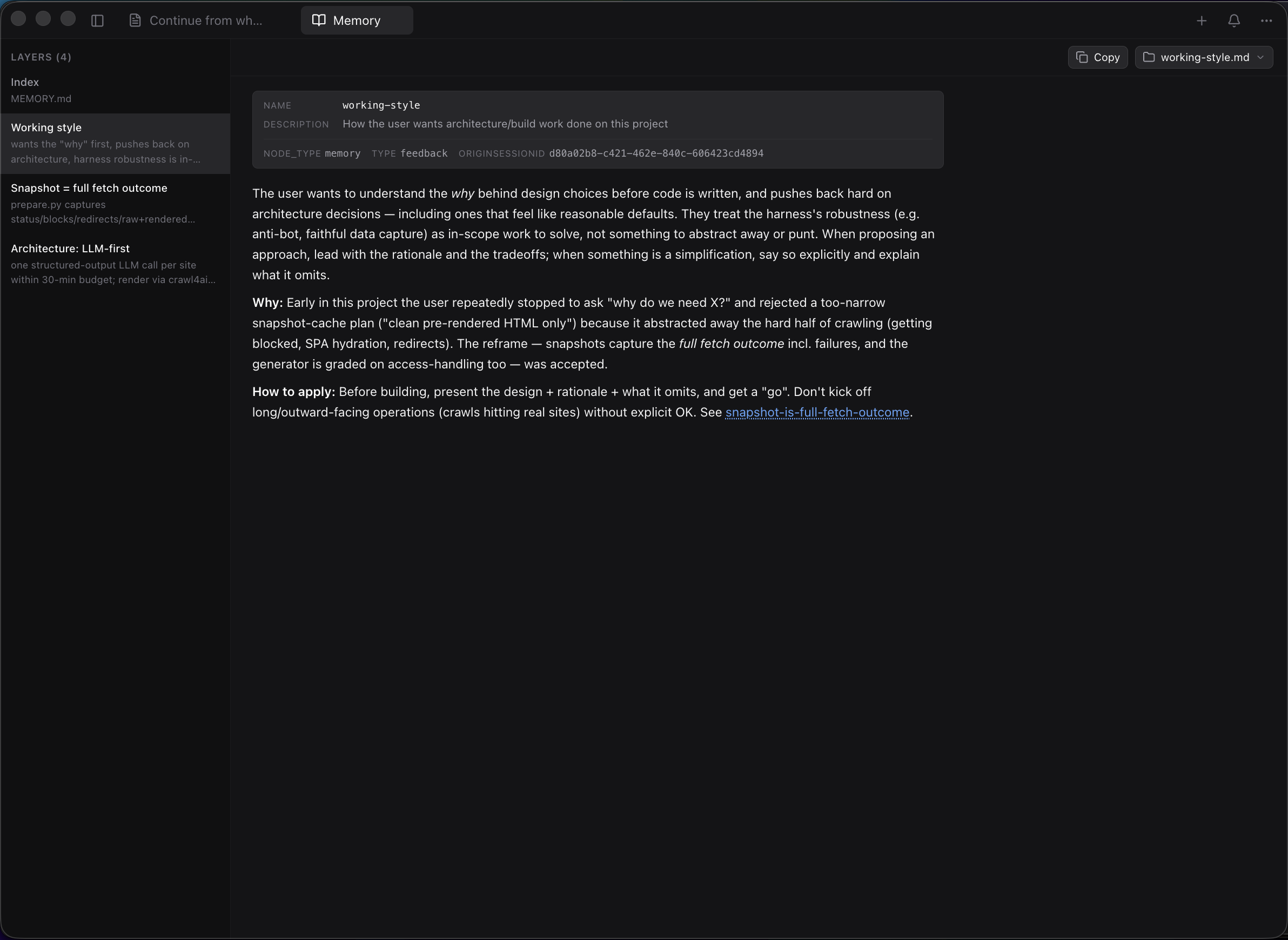
Claude Code stores per-project memory at ~/.claude/projects/<project>/memory/ — a MEMORY.md index plus one .md file per layer (working style, architecture notes, etc.). claude-devtools surfaces this as a sidebar entry that opens a dedicated pane: layer list on the left, full markdown rendering on the right with frontmatter shown as a metadata card, Obsidian-style [[wikilinks]] for cross-layer navigation, and an icon-driven "Open in…" launcher that hands any layer (or the whole memory folder) off to Finder/Explorer, Cursor, VS Code, Zed, Xcode, iTerm, Ghostty, Terminal — or copies the absolute path.
Isolated execution trees per agent with tool traces, token metrics, duration, and cost. Nested agents render recursively.
Every tool call expanded with specialized viewers — syntax-highlighted Read calls, inline Edit diffs, Bash output, and full subagent trees.
Inspect sessions on any remote machine over SSH. Reads ~/.ssh/config, supports agent forwarding and key auth.
See the moment your context hits the limit. Visualizes how context fills, compresses, and refills — so you know exactly what was lost. (Why did Claude forget? — debugging walkthrough)
System notifications for .env access, tool errors, high token usage, and custom regex patterns on any field.
Cmd+K for cross-session search. Open multiple sessions side-by-side with drag-and-drop tabs.
📖 Full documentation: claude-dev.tools/docs · Copy from Claude Code: claude-dev.tools/docs/copy-paste · JSONL format reference: claude-dev.tools/docs/jsonl-format · claude --verbose comparison: claude-dev.tools/docs/verbose-vs-devtools
claude-devtools does not wrap, modify, or interfere with Claude Code. It reads session logs that already exist on your machine. Works with sessions from the terminal, IDEs, or any tool that uses Claude Code.
Run without Electron — in Docker, on a remote server, or anywhere Node.js runs.
docker compose up
# Open http://localhost:3456
Or manually:
docker build -t claude-devtools .
docker run -p 3456:3456 -v ~/.claude:/data/.claude:ro claude-devtools
| Variable | Default | Description |
|---|---|---|
CLAUDE_ROOT | ~/.claude | Path to the .claude data directory |
HOST | 0.0.0.0 | Bind address |
PORT | 3456 | Listen port |
The standalone server has zero outbound network calls. For maximum isolation: docker run --network none -p 3456:3456 -v ~/.claude:/data/.claude:ro claude-devtools. See SECURITY.md.
Prerequisites: Node.js 20+, pnpm 10+
git clone https://github.com/matt1398/claude-devtools.git
cd claude-devtools
pnpm install
pnpm dev
| Command | Description |
|---|---|
pnpm dev | Development with hot reload |
pnpm build | Production build |
pnpm typecheck | TypeScript type checking |
pnpm test | Run all tests |
pnpm check | Full quality gate (types + lint + test + build) |
See CONTRIBUTING.md for guidelines. Please read our Code of Conduct.
IPC handlers validate all inputs with strict path containment checks. File reads are constrained to the project root and ~/.claude. See SECURITY.md.
Found this useful? ⭐ Star the repo — it’s the easiest way to help other developers discover claude-devtools.
Sign in to join the discussion.
No comments yet. Be the first to say what this is good for.
🪨 why use many token when few token do trick — Claude Code skill that cuts 65% of tokens by talking like caveman

The best-benchmarked open-source AI memory system. And it's free.

Orca is the ADE for working with a fleet of parallel agents. Run any coding agent with your own subscription. Available on desktop, mobile and remote runtime.

A cross-platform desktop All-in-One assistant for Claude Code, Codex, OpenCode, OpenClaw, Grok Build & Hermes Agent. Only official website: ccswitch.io

Never stop coding. Free MIT AI gateway: one endpoint, 352 providers (150+ free), 1200+ models Kimi, Claude, GPT, Gemini, GLM, DeepSeek, MiniMax. Works with Claude Code, Codex, Cursor, OpenCode, Cline & Copilot. Quota-aware auto-fallback, RTK+Caveman compression saves 15-95% tokens, MCP/A2A, Desktop/PWA. Built by 550+ contributors

Compress tool outputs, logs, files, and RAG chunks before they reach the LLM. 20% fewer tokens for coding agents, 60-95% fewer tokens for JSON, same answers. Library, proxy, MCP server.