
affaan-m/
ECC

affaan-m/ECCHarnesses
The agent harness performance optimization system. Skills, instincts, memory, security, and research-first development for Claude Code, Codex, Opencode, Cursor and beyond.
258k
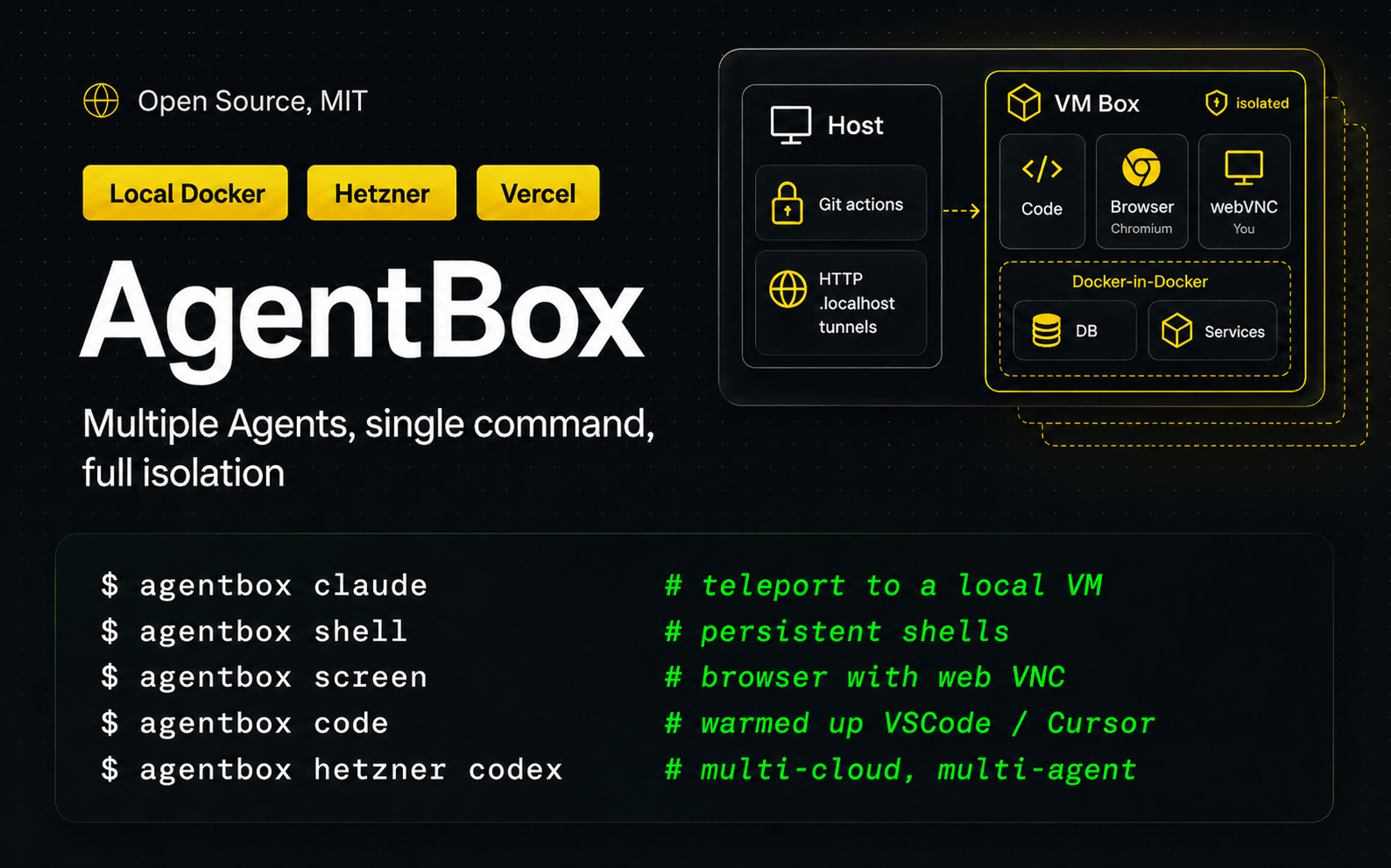
AgentBox creates isolated boxes for agent-led work, then launches tools like Claude Code and Codex inside them. It handles local Docker and several cloud backends, and gives you attachable sessions, browser access, checkpoints, and workspace sync.
Builders who want their coding agents to run in isolated VMs with shared project setup and reusable state.
You can run several agents in parallel without mixing their work with your host machine.
`agentbox create` starts a new sandboxed box, and `agentbox claude` launches Claude Code in a detachable tmux session.
It supports local Docker plus providers like Hetzner, Daytona, Vercel, E2B, DigitalOcean, and remote Docker hosts.
You can attach, open a shell, view logs, check status, and manage lifecycle actions like start, stop, pause, and destroy.
It can open a box URL, VNC screen, or VS Code/Cursor connection so you can work inside the sandbox visually.
It can capture checkpoints, start new boxes from them quickly, and preserve upper volumes across stops.
The provider surface is extensible through plugins built on `@madarco/agentbox-provider-sdk`.
npm -g install @madarco/agentbox


Run multiple agents in parallel, with a single command, on your PC, self-hosted, or in the cloud
Works with iterm2 - cmux - tmux - Herdr
agentbox claude # launch a new VM with claude and your project inside
Full Documentation
npm -g install @madarco/agentbox
agentbox install

# Launch a new VM with claude, copy all your settings and workspace
agentbox claude

# Also install required project libraries and launch your dev server
> Run setup wizard? -> Yes

# Also use a cloud:
agentbox hetzner claude # or vercel, daytona

# Ctrl+a d to detach, claude keep going, to reconnect later:
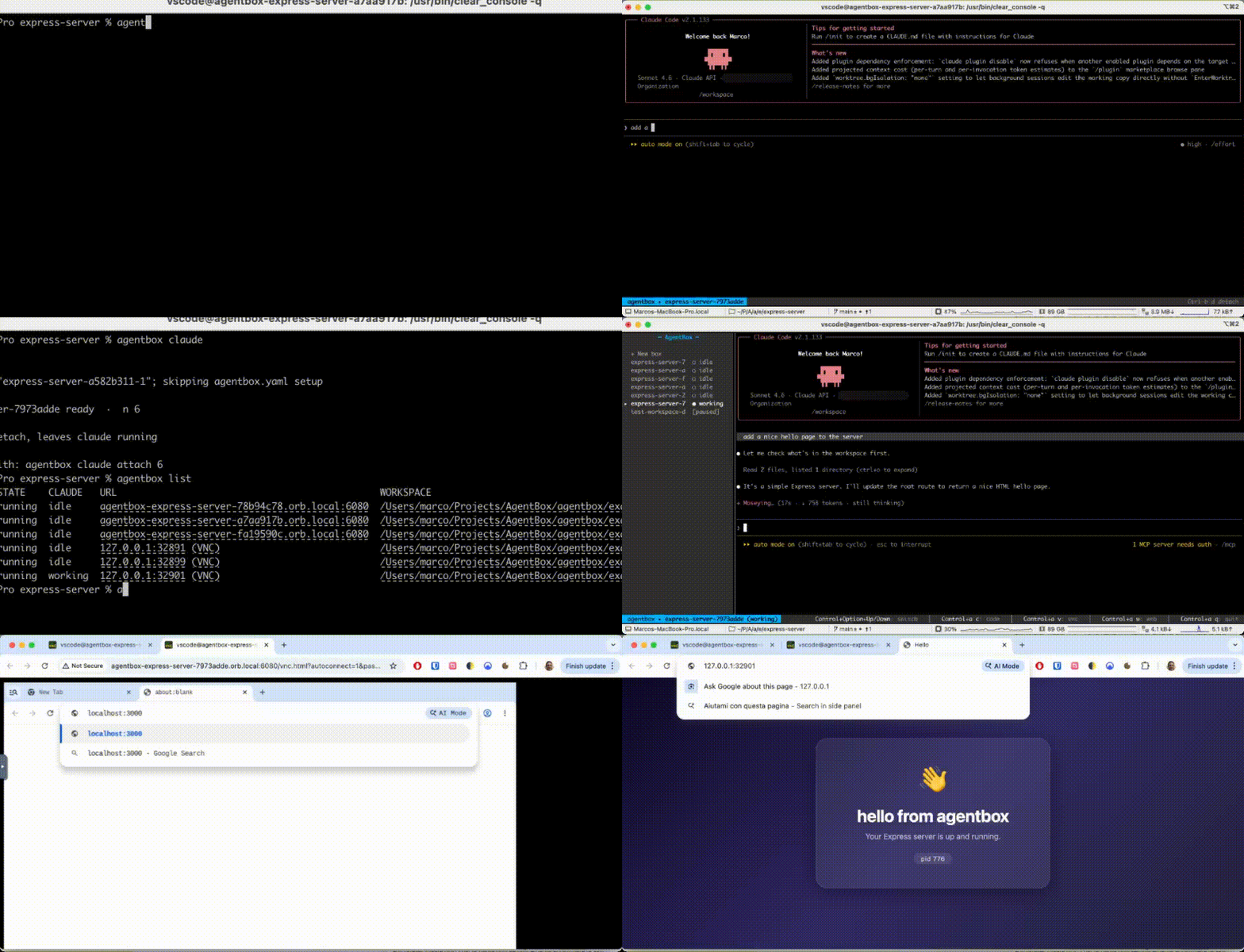
agentbox attach 1

# To open a persistent shell inside the box:
agentbox shell 1

# Create a second box:
agentbox claude
agentbox attach 2
agentbox shell 2

# Open your web project on a .local url tunnel on your pc
agentbox url 2
# Or the in-box browser via webVNC:
agentbox screen 2
# Or connect to vscode/cursor inside the box:
agentbox code 2

# See status and quickly switch between agents:
agentbox dashboard
npm -g install @madarco/agentbox
Want to help test what's coming? npm -g install @madarco/agentbox@nightly puts you on the
nightly channel — pre-release builds, with stable releases still
reaching you automatically. agentbox self-update --channel stable opts back out.
Requirements: macOS (arm64 or Intel) or Linux, Docker (Docker Desktop or OrbStack), Node >=20.10. The first agentbox create / agentbox claude builds the agentbox/box:dev image (~1 GB, one-time).
Uses portless to give box web apps the same URL from inside the box and on the host.
| local docker | remote docker | hetzner | daytona | vercel | e2b | |
|---|---|---|---|---|---|---|
| Support | ✅ | ✅ | ✅ | ⚠️ Partial | ✅ | ✅ |
| Base image | Dockerfile | Dockerfile (on the remote) | Setup script (Ubuntu) | Dockerfile | Setup script | Dockerfile (Template.build) |
| Live snapshots | ✅ | ✅ (docker commit) | ✅ | 🧪 Experimental | ✅ | ✅ |
| Private preview URLs | ✅ (portless or OrbStack) | ✅ (portless over SSH) | ✅ (portless) | ✅ (native) | ✅ (native) | ✅ (native) |
Cloud setup (optional — skip for local Docker)
agentbox install — interactive setup wizard to choose which providers to use and configure them.agentbox vercel login — interactive Vercel Sandbox token setup, saved to ~/.agentbox/secrets.envagentbox hetzner login — interactive Hetzner Cloud token setup, saved to ~/.agentbox/secrets.envagentbox daytona login — interactive Daytona API key setup, saved to ~/.agentbox/secrets.envagentbox e2b login — interactive E2B API key setup, saved to ~/.agentbox/secrets.envagentbox digitalocean login — interactive DigitalOcean Personal Access Token setup, saved to ~/.agentbox/secrets.envagentbox remote-docker doctor <host> — run boxes on a machine you already own, over SSH. No login and no token: it connects as you, using your own ~/.ssh/config. Then agentbox docker:<host> claude.agentbox prepare [--provider daytona|hetzner|vercel|e2b|digitalocean|docker:<host>] — build the image and initial snapshot (e2b builds from a Dockerfile via Template.build())agentbox hetzner claude, agentbox hetzner codex, agentbox hetzner create, etc.<box> is optional almost everywhere — it defaults to the box for the current project, or use its short index (1, 2, …), name, or id prefix.
Create & run
agentbox create — Create and start a new agent box (Docker container with FUSE overlay)agentbox claude — Create a sandboxed box and launch Claude Code in a detachable tmux sessionAccess
agentbox url — Open a box's web app URL in the browser (even with no expose: service)agentbox screen — Open a box's VNC (noVNC) viewer in the browseragentbox code — Open a box in VS Code or Cursor via the Dev Containers extensionagentbox shell — Open an interactive bash shell in a boxagentbox open — Open a box's merged workspace in Finderagentbox logs — Print recent log lines from a box service; -f to streamagentbox dashboard — Box list + the selected box's live agent sessionInspect
agentbox list (ls) — List boxes in current project or -g for allagentbox status — Show service + task status from a box's agentbox-ctl daemonagentbox top — Live resource monitor (cpu/mem/pids/disk) for a box, project, or all boxesLifecycle
agentbox start — Start a stopped box (docker start + re-mount the FUSE overlay)agentbox stop — Stop a box (preserves the upper volume, node_modules included)agentbox destroy (rm) — Destroy a box and discard its upper volumeagentbox pause / agentbox unpause — Freeze / resume a box (sub-second)Sync & state
agentbox download — Download a box's /workspace back into your host workspace (gitignore-aware)agentbox cp <src> [dst] — Copy individual files between host and box (like docker cp; direction picked by name: prefix)agentbox checkpoint (alias checkpoints) — List and manage project checkpoints (warm box state to start new boxes from); bare command lists, checkpoint create capturesAdvanced
agentbox wait — Block until the box reports all autostart units readyagentbox prune — Clean up orphan state records (and with --all, orphan docker resources)agentbox self-update — Update agentbox, wipe the box image so it rebuilds, reload the relayagentbox config — Read / write layered config (global, per-project, workspace defaults:)agentbox relay — Manage the host relay process (status / stop / start / restart)agentbox app — Control the macOS menu-bar app process (status / start / stop / restart); install it with agentbox install appRun agentbox <command> --help for command-specific options.
Full documentation lives at agent-box.sh/docs:
git clone https://github.com/madarco/agentbox && cd agentbox
pnpm install && pnpm build
node apps/cli/dist/index.js --help
The full development workflow, stack, end-to-end smoke tests, and teardown live in docs/development.md.
The macOS tray app lives in the sibling repo ../agentbox-tray. When you have it checked out next to this repo, these scripts build and run your local dev build (ad-hoc signed, at ../agentbox-tray/AgentBoxTray.app) — separate from the notarized copy agentbox install app puts in /Applications:
pnpm tray:dev        # rebuild the dev .app and relaunch it (the one you'll use most)
pnpm tray:build      # just rebuild (scripts/make-app.sh)
pnpm tray:start      # launch the dev build
pnpm tray:stop       # quit any running instance
pnpm tray:restart    # quit + relaunch the dev build
Note:
agentbox app start|restarttargets the installed/Applicationscopy, not this dev build. Use thepnpm tray:*scripts while iterating on the tray here; runagentbox install appto refresh/Applicationsfrom the current CLI build.
AgentBox's provider surface is open — you can run agents on your own cloud/infra by shipping a provider plugin (its own npm package built on @madarco/agentbox-provider-sdk), with no changes to AgentBox. Build and test against the bundled example provider locally:
# build the SDK, then build + register the example provider
pnpm --filter @madarco/agentbox-provider-sdk build
cd examples/agentbox-provider-example && npm install && npm run build
node ../../apps/cli/dist/index.js plugin add .      # register it
node ../../apps/cli/dist/index.js doctor            # shows the provider's group

# verify the SDK artifact in isolation (packs + installs the tarball, asserts exports)
pnpm --filter @madarco/agentbox-provider-sdk pack:test
Full guide: Build a provider (and the authoring reference docs/provider-plugins.md). Reference packages: examples/agentbox-provider-sample (stub) and examples/agentbox-provider-example (a real, Vercel-backed provider).
Bug reports, docs fixes, and provider work are welcome — see CONTRIBUTING.md. First-time contributors sign a one-line CLA on their first pull request. Security issues go through SECURITY.md, not a public issue.
Marco D'Alia - @madarco - Linkedin
MIT. See LICENSE.
Sign in to join the discussion.
No comments yet. Be the first to say what this is good for.
The agent harness performance optimization system. Skills, instincts, memory, security, and research-first development for Claude Code, Codex, Opencode, Cursor and beyond.
from vibe coding to agentic engineering - practice makes claude perfect
🌊 The original agent meta-harness. Deploy intelligent multi-player swarms, coordinate autonomous workflows, and build conversational AI systems. Features adaptive memory, self-learning intelligence, RAG integration, and native Claude Code / Codex / Hermes and many more Integrated
Practical patterns, starters & CLI tools for loop engineering with AI coding agents. Design systems that prompt and orchestrate agents (inspired by Addy Osmani and Boris Cherny). Includes loop-audit, loop-init, loop-cost.

Git. Ship. Done - Core

The most RAM efficient harness