
JuliusBrussee/
caveman

🪨 why use many token when few token do trick — Claude Code skill that cuts 65% of tokens by talking like caveman
105k
1 add
Labtasker queues independent experiment tasks, runs them through workers, and keeps each task’s args, status, errors, and results together. It supports parallel workers, priority changes, cancellation, retries, and recovery after interruptions. It also includes a CLI, Python API, and an agent skill so a coding agent can operate the workflow end to end.
Builders who run parallel inference, evaluation, or ablation jobs and want to hand the queue work to an agent.
You can run many experiment jobs in parallel, restart safely after failures, and inspect results without rerunning finished work.
Run the same queue with multiple workers across processes or machines.
Automatically retry failed tasks and resume unfinished work after a worker stops.
Store task args, metadata, status, errors, and structured results in one place.
Submit tasks, run workers, and list task status from the command line or Python code.
Let compatible agents submit tasks, design workers, inspect progress, and recover failed work through documented interfaces.
python -m pip install labtasker
uv add labtasker
Labtasker is a small, Python-native task queue for running independent ML inference, evaluation, and experiment jobs in parallel.


Documentation: https://luocfprime.github.io/labtasker/
LLM Documentation: https://luocfprime.github.io/labtasker/latest/llms.txt
Source Code: https://github.com/luocfprime/labtasker
Labtasker distributes independent ML jobs across multiple processes and machines. It adds dynamic control, failure recovery, and structured Task records without requiring each project to build its own task system.
The key features are:
[!TIP] Hand Labtasker operations over to your coding agent. Install the bundled Agent Skill, then let your agent handle the Labtasker workflow end to end through its documented interfaces. You only need to tell your agent which Tasks to run and how they should run in parallel.
Labtasker requires Python 3.11 or newer. Install the complete package for local use:
python -m pip install labtasker
Or add it to a uv project:
uv add labtasker
The labtasker package installs matching Client and Server releases. You can
also install labtasker-client and labtasker-server separately when they run
in different environments.
Suppose an existing evaluation program accepts a checkpoint, benchmark task, and seed:
python evaluate.py \
  --checkpoint checkpoints/model.pt \
  --task pick-cube \
  --seed 0
Submit each evaluation case as a Labtasker Task:
labtasker task submit \
  --name pick-cube-seed-0 \
  --args '{"checkpoint":"checkpoints/model.pt","task":"pick-cube","seed":0}' \
  --route robotwin
Then run the existing program through a command Worker:
labtasker loop --route robotwin -- \
  python evaluate.py \
    --checkpoint '%{checkpoint}' \
    --task '%{task}' \
    --seed '%{seed}'
Start one Worker process on each GPU you want to use. All Workers claim from the
same Queue and process one Task at a time. The route name robotwin labels which
Worker implementation can run the submitted Task.
To save evaluation metrics as the Task result, report them from the evaluation program:
import labtasker

# TODO: Replace this with metrics from your actual evaluator.
labtasker.finish(metrics, skip_if_no_labtasker=True)
Inspect progress and results at any time:
labtasker task list
labtasker task list --status succeeded
labtasker task list --status failed
Follow Run your first experiment for a complete tutorial with copyable code and expected results. Use a Python Worker when a model should remain loaded while the Worker processes multiple Tasks.
Labtasker is designed for independent ML jobs such as:
Labtasker becomes useful when several processes share the work, you need to resume after an interruption without rerunning completed jobs, or you need to add, cancel, or reprioritize jobs during a run.
Labtasker is deliberately designed to be conceptually simple and easy to hand over to agents.
Labtasker also includes an Agent Skill that helps compatible coding agents submit Tasks, design Workers, inspect progress, and recover failed work through the documented interfaces.
Labtasker WebUI is a separately installed browser interface for Labtasker v2. Track Queue progress, filter Tasks, compare result fields in custom columns, and save views for each experiment.
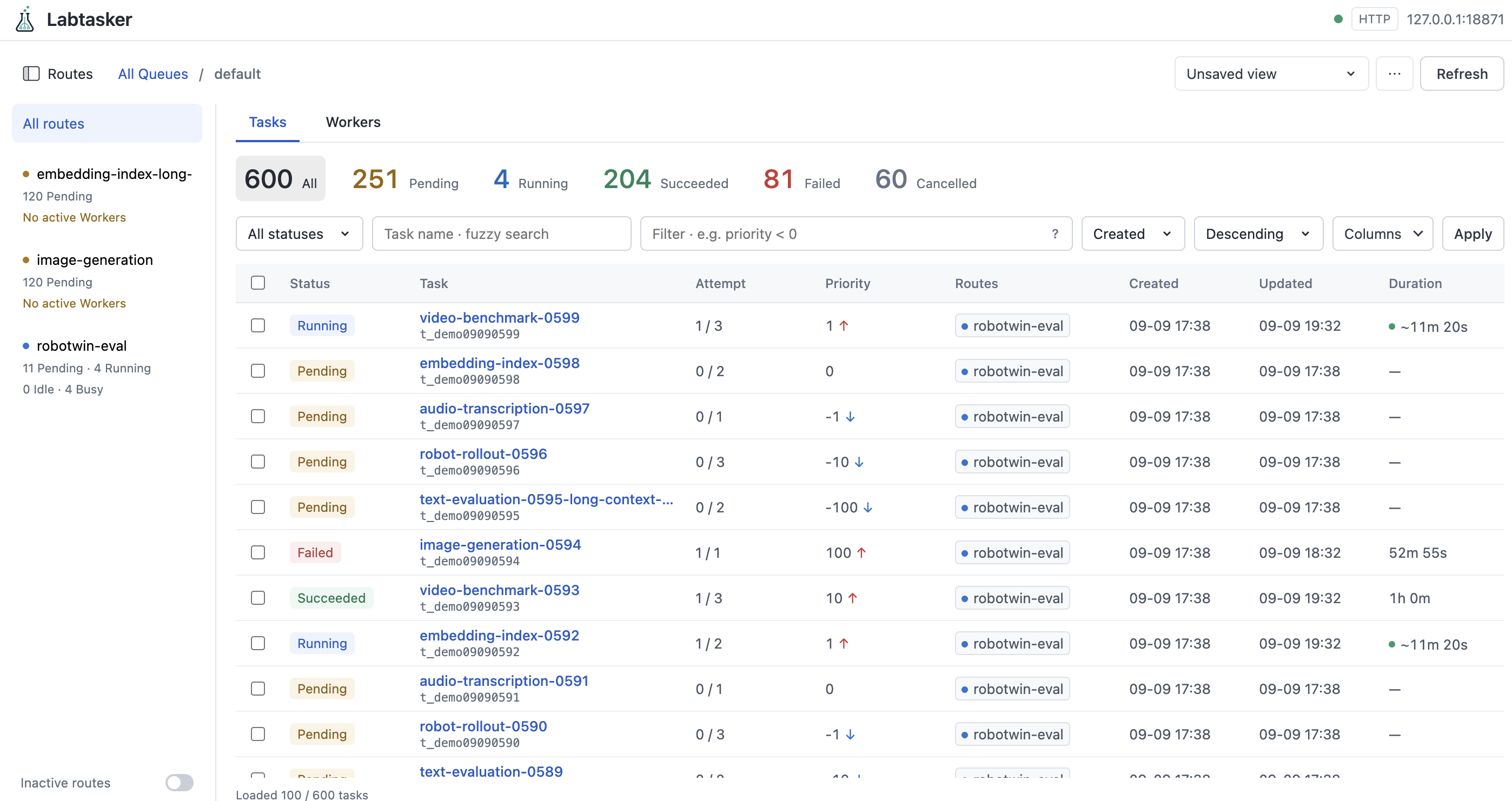
uvx labtasker-webui
Open http://127.0.0.1:8080 and connect to an existing HTTP Server or a running local project. See Use the Web UI for connection steps and Task controls.
uv sync --all-packages --group dev --frozen
uv run pytest
uv run zensical build --clean
See Development for repository boundaries and the full validation commands.
Apache-2.0.
Sign in to join the discussion.
No comments yet. Be the first to say what this is good for.
🪨 why use many token when few token do trick — Claude Code skill that cuts 65% of tokens by talking like caveman

The best-benchmarked open-source AI memory system. And it's free.

Orca is the ADE for working with a fleet of parallel agents. Run any coding agent with your own subscription. Available on desktop, mobile and remote runtime.

A cross-platform desktop All-in-One assistant for Claude Code, Codex, OpenCode, OpenClaw, Grok Build & Hermes Agent. Only official website: ccswitch.io

Never stop coding. Free MIT AI gateway: one endpoint, 352 providers (150+ free), 1200+ models Kimi, Claude, GPT, Gemini, GLM, DeepSeek, MiniMax. Works with Claude Code, Codex, Cursor, OpenCode, Cline & Copilot. Quota-aware auto-fallback, RTK+Caveman compression saves 15-95% tokens, MCP/A2A, Desktop/PWA. Built by 550+ contributors

Compress tool outputs, logs, files, and RAG chunks before they reach the LLM. 20% fewer tokens for coding agents, 60-95% fewer tokens for JSON, same answers. Library, proxy, MCP server.