
JuliusBrussee/
caveman

🪨 why use many token when few token do trick — Claude Code skill that cuts 65% of tokens by talking like caveman
105k
1 add
Aikito manages a local Git workspace that holds shared instructions, skills, MCP configs, subagents, and durable notes for coding agents. You sync the workspace into each agent’s expected format, keep memory in plain Markdown, and review changes before they are applied.

Builders who want their coding agents to share instructions and memory across projects and machines.
You can keep agent setup, reusable knowledge, and project notes in one place instead of copying them across tools and repos.
Keeps agent resources in one Git-managed workspace and syncs them into each agent’s configuration format.
Stores notes as plain Markdown with Git history so agents can retrieve useful context and preserve verified decisions.
Works with several agent and CLI setups, including Claude Code, Codex, OpenCode, Copilot CLI, Grok Build, and others.
Lets you preview existing agent configuration with `aikito adopt` before importing or changing anything.
Shows what is synced with `aikito status` and lists memory with `aikito show memory`.
Provides a browser view with `aikito web` for read-only inspection of the workspace.
uv tool install aikito
brew install lsaint/tap/aikito
pipx install aikito
aikito init workspace ~/aikito
aikito sync --dry-run
aikito sync
aikito status

Multi-Agent · Multi-Project · Multi-OS · Multi-Machine






Aikito keeps coding-agent instructions, skills, MCP definitions, subagents, and durable memory in one Git-managed workspace, shared across agents and projects.
Aikito governs the workspace, agents maintain the memory, and you oversee it all.
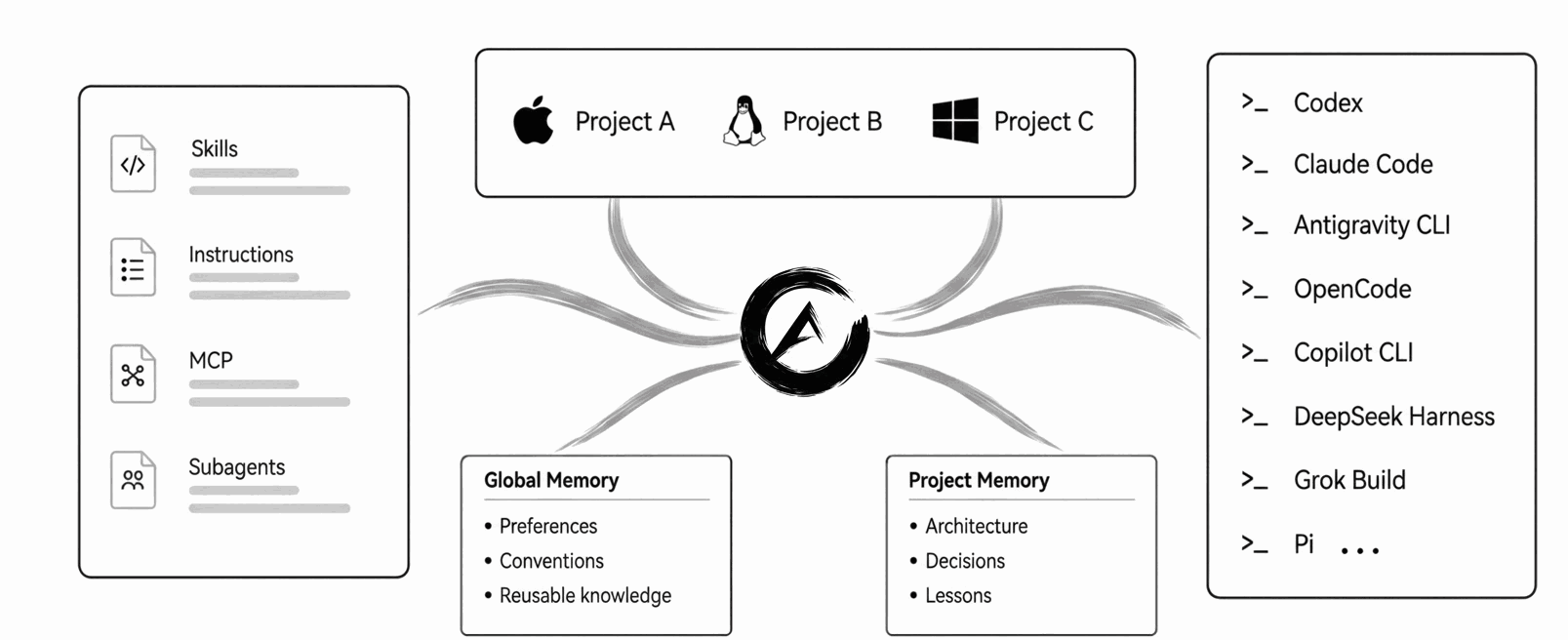
AI agent resources fragment in three directions:
Aikito keeps the source files in one personal workspace and connects selected resources to each agent and project. No database, daemon, vector store, or hosted service is required.
The bundled durable-memory skill guides agents to retrieve useful notes, retain verified conclusions, and update stale knowledge. Notes are plain Markdown with Git history.
For example, a writing preference belongs in global memory, while an API retry decision belongs to its project. A project normally connects to global memory and its own notes; these scopes organize context, not filesystem access permissions.
New workspaces enable the workflow by default; synchronization connects it to agents. See memory usage and opt-out and why memory needs a maintainer.
Install and configure Aikito from https://github.com/lsaint/aikito. Read the README,
templates/skills/aikito/SKILL.md, and any linked documentation relevant to the setup, then follow their safety requirements to initialize the workspace, synchronize resources withaikito sync, and verify the result withaikito status. Before importing or changing any existing Agent configuration, show me the planned changes and conflicts and wait for my approval. When setup is complete, summarize what is ready and guide me through the next step, including whether to register my first code project. Do not register a project without my confirmation.
Cross-platform with uv (recommended):
uv tool install aikito
Or with Homebrew (macOS / Linux):
brew install lsaint/tap/aikito
Or with pipx:
pipx install aikito
Initialize and synchronize your workspace:
aikito init workspace ~/aikito
aikito sync --dry-run
aikito sync
aikito status
Review the preview before applying synchronization. For existing configuration, see migration and safety.
On Windows, enable Developer Mode and use uv tool install aikito or the
PowerShell installation guide.
Continue with the four-step tutorial to connect your first project and verify an instruction. For other tasks, use Agent Request Examples.
aikito status shows resource state across agents. Example output from a
configured workspace (agents and counts depend on your setup):
┌───────────────────────┬──────────────┬────────┬────────────┬───────────┐
│ Agent                 │ Instructions │ Skills │ MCP Config │ Subagents │
├───────────────────────┼──────────────┼────────┼────────────┼───────────┤
│ Codex                 │ ✓            │ 2 ›    │ 0          │ 0         │
│ Claude Code           │ ✓            │ 2 »    │ 0          │ 0         │
│ Antigravity CLI       │ ✓            │ 2 »    │ 0          │ 0         │
│ OpenCode              │ ✓            │ 2 ›    │ 0          │ 0         │
│ GitHub Copilot CLI    │ ✓            │ 2 ›    │ 0          │ 0         │
│ DeepSeek Harness      │ ✓            │ 2 ›    │ 0          │ 0         │
│ Grok Build            │ ✓            │ 2 ›    │ 0          │ 0         │
│ Pi                    │ ✓            │ 2 ›    │ –          │ –         │
└───────────────────────┴──────────────┴────────┴────────────┴───────────┘

✓ all synced · 8 agents · 2 skills · 0 notes across 1 scopes
aikito show memory lists retained knowledge by scope. This separate example
shows one global note and two notes for project example:
┌─────────┬───────────────────┬──────────────────────────────┬───────┬──────┐
│ Scope   │ Note File         │ Title                        │ Index │ Link │
├─────────┼───────────────────┼──────────────────────────────┼───────┼──────┤
│ Global  │ writing-style     │ Keep explanations concise    │ ✓     │ –    │
├─────────┼───────────────────┼──────────────────────────────┼───────┼──────┤
│ example │ api-retry-policy  │ Retry external APIs safely   │ ✓     │ ✓    │
│ example │ release-checklist │ Release verification steps   │ ✓     │ ✓    │
└─────────┴───────────────────┴──────────────────────────────┴───────┴──────┘
Global notes hold cross-project knowledge; project notes hold local decisions. See memory operations for the full workflow.
Use synchronization troubleshooting to investigate
missing links, conflicts, or drift. Prefer a browser view? Run
aikito web for the local, read-only Console.
Aikito uses plain files and Git, with no background service required.
Already have agent configuration? Run aikito adopt for a read-only import
preview. Review the plan before applying it; see
adoption and backups.
Your workspace is a local Git repository. Review it for secrets and private data before publishing; removing a secret in a later commit does not erase it from history. Read the safety model and report vulnerabilities through the Security Policy.
Chat Distiller can turn browser AI conversations into Markdown notes in your Aikito Inbox. See the capture and review workflow.
Browse the full documentation site for more.
If you find Aikito useful, you can support its development.
Sign in to join the discussion.
No comments yet. Be the first to say what this is good for.
🪨 why use many token when few token do trick — Claude Code skill that cuts 65% of tokens by talking like caveman

The best-benchmarked open-source AI memory system. And it's free.

Orca is the ADE for working with a fleet of parallel agents. Run any coding agent with your own subscription. Available on desktop, mobile and remote runtime.

A cross-platform desktop All-in-One assistant for Claude Code, Codex, OpenCode, OpenClaw, Grok Build & Hermes Agent. Only official website: ccswitch.io

Never stop coding. Free MIT AI gateway: one endpoint, 352 providers (150+ free), 1200+ models Kimi, Claude, GPT, Gemini, GLM, DeepSeek, MiniMax. Works with Claude Code, Codex, Cursor, OpenCode, Cline & Copilot. Quota-aware auto-fallback, RTK+Caveman compression saves 15-95% tokens, MCP/A2A, Desktop/PWA. Built by 550+ contributors

Compress tool outputs, logs, files, and RAG chunks before they reach the LLM. 20% fewer tokens for coding agents, 60-95% fewer tokens for JSON, same answers. Library, proxy, MCP server.