
HKUDS/
Vibe-Trading

HKUDS/Vibe-TradingOther
"Vibe-Trading: Your Personal Trading Agent"
33k
StashBase is a desktop app that helps you turn local files into linked Markdown wiki pages for agent work. It keeps your source files in place, adds semantic and keyword search, and lets Claude Code, Codex, or other MCP clients read the prepared context through the app.
Builders who want their agent to search local documents, notes, and research as a wiki instead of raw folders.
You can give your agent a local knowledge base with linked pages, searchable source text, and MCP access to the same library.
Creates or improves `wiki/index.md` and related Markdown pages from the files in a folder, with links back to the originals.
Indexes extracted text from PDFs, DOCX files, images, and recordings so you can find relevant material by topic as well as exact words.
Configures MCP access for Wiki Agent, Claude Code, Codex, and external MCP clients so they can read the library and use bounded file operations.
Leaves original files in place and stores wiki pages as normal Markdown files you can open outside the app.
Uses OCR and audio or video transcription sidecars so scanned and recorded material can become searchable context.
Lets you inspect source files, wiki pages, and agent conversation in the same workspace while updating the pages as you learn more.
brew install --cask liliu-z/stashbase/stashbase
sudo apt install build-essential binutils cmake curl git nasm pkg-config python3 python3-venv xz-utils
pnpm check
Turn your local files into a Wiki for your agents.





StashBase is an open-source, local-first app that helps your agents find and reuse context across personal notes, research libraries, project docs, and knowledge bases.
Build linked Markdown Wiki Pages from your sources, make difficult formats searchable, and work with Wiki Agent, Claude Code, Codex, or other MCP clients. Your original files stay in place, and the Wiki Pages remain ordinary files you own.
Browse local sources and work with an Agent in the same workspace. This demo uses the bundled guides to answer “How do I use StashBase?”
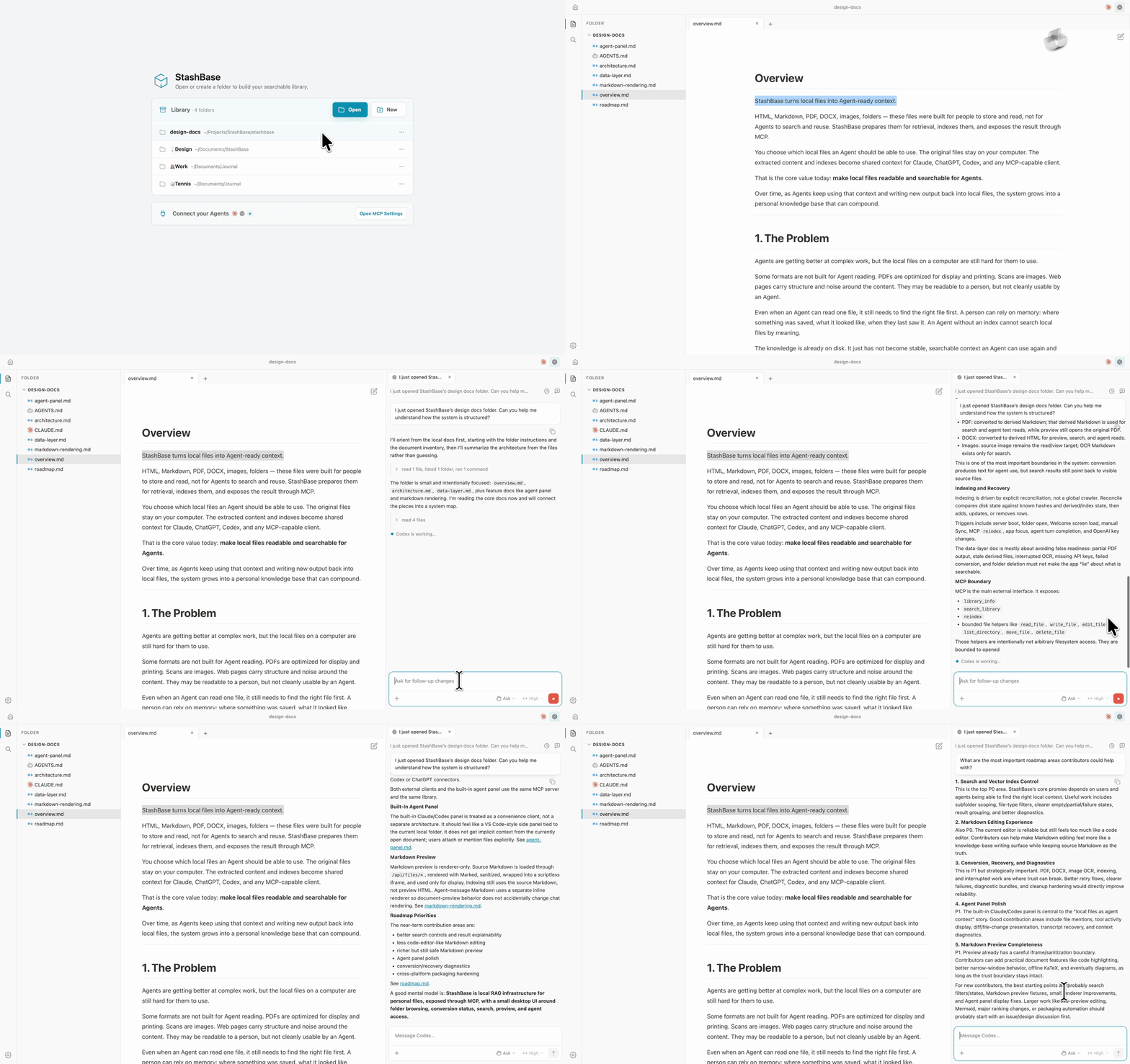
Giving an Agent access to a folder is a starting point. Useful evidence may be buried in a long document, use different words from your question, or live in a scan or recording. StashBase helps turn that material into reusable context:
macOS 12+ (Apple Silicon) and Windows 10+ (x64) are the primary platforms. Linux x86_64 Debian 12+ / Ubuntu 22.04+ is community-supported.
On macOS, install with Homebrew:
brew install --cask liliu-z/stashbase/stashbase
Or download the latest release:
| Platform | Download |
|---|---|
| macOS Apple Silicon | StashBase-*-mac-arm64.dmg |
| Windows x64 | StashBase-*-win-x64.exe |
| Linux x86_64 | StashBase-*-linux-amd64.deb or .AppImage |
See Installation for platform steps, updates, and troubleshooting.
Choose your material. Open your own folder, or explore the Gallery in the app and choose Make a copy to download and open a ready-made Wiki.
Choose an Agent. Wiki Agent is included and selected initially; sign in to StashBase to use its included model allowance. You can also select Claude Code or Codex and use your own provider account.
Build and use the Wiki. In a Chat scoped to your folder, try:
Build a Wiki from the sources in this folder. Create an overview, organize the main topics, and link back to the source files.
Then ask a question about the material, open its sources beside the Chat, and ask the Agent to improve the pages as you learn more.
A Build Wiki request creates or improves wiki/index.md and, when useful,
pages beside it, preserving Sources outside wiki/. Building or updating
these pages is an explicit Agent request; opening a folder does not
schedule automatic Wiki maintenance.
The first folder offers setup for search by meaning. You can use StashBase sign-in with included monthly credits or your own OpenAI/OpenRouter key. Choose Not now to continue with keyword search. This setup is independent of building Wiki Pages and can be completed later in Settings.
See Using StashBase for search, transcription, and everyday file workflows. You can also ask Chat “How do I use StashBase?”
Start with a real folder that already has a Wiki built from it. Gallery entries include starter prompts, and entries with a build request let you copy it for your own material.
For example, How to Start a Startup brings together Stanford CS183B lecture transcripts and a founder playbook. Use it to explore questions about startup ideas, product-market fit, and growth.
Your own starting point might be a research collection, project documents, or personal notes. Build an overview of the topics, decisions, and sources, then use it with your Agent as the work continues.
Sources and Wiki Pages stay in ordinary local folders. Extracted text and search indexes are app-managed data. Removing a folder from the Library clears StashBase's state for it without deleting your files.
Local browsing, editing, preview, and keyword search need no cloud account. OCR and optional audio/video transcription run locally. Hosted search by meaning sends relevant text to the selected embedding provider for indexing and queries for retrieval.
Wiki Agent runs locally, with prompts and necessary model context sent through StashBase's hosted model gateway. Claude Code and Codex use their own provider accounts. Local-first means you retain your files and control which folders join the Library; model-backed features can still use cloud services.
StashBase configures its MCP connection automatically for Wiki Agent and for Claude Code or Codex used in the built-in Chat. You can review tool calls and file edits in the app.
To use an external MCP client, keep StashBase running and copy the connection configuration from Settings → MCP into that client. It can search the library, read prepared source content, and use bounded file operations within the authorized folders.
See MCP Configuration for client examples, transports, and access settings.
For contributors and developers running StashBase locally from source.
Install Node.js 24+, pnpm, and Python 3.10+. On Ubuntu / Debian, install the native build tools used by the packaged sidecars:
sudo apt install build-essential binutils cmake curl git nasm pkg-config python3 python3-venv xz-utils
git clone https://github.com/liliu-z/stashbase
cd stashbase
pnpm install
pnpm setup:python

# Build the renderer and run Electron
pnpm build:web
env -u ELECTRON_RUN_AS_NODE pnpm electron

# Development mode
env -u ELECTRON_RUN_AS_NODE pnpm dev

# Optional: include the local PDF/OCR extractor sidecar
pnpm build:python-extract-sidecar
The launch commands above use POSIX shell syntax to clear an inherited
ELECTRON_RUN_AS_NODE. On Windows, clear that variable in your shell before
running pnpm electron or pnpm dev.
Before opening a PR:
pnpm check
Packaging is release-only and runs from a validated release tag. Maintainers should follow the release pipeline instead of creating ad hoc distributable builds.
StashBase is also an experiment in human-directed, AI-first development. Humans own product direction and trust decisions; AI helps connect design, implementation, review, and evidence. The Project Maintenance Model describes that working loop.
Small focused PRs are preferred. Open an issue before larger changes so scope and direction can be discussed first.
Early alpha. Feedback and contributions are welcome, especially around Agent workflows, search quality, preparation and recovery, and cross-platform reliability.
Report an issue or join the Discord community for support and discussion.
StashBase is an independent open-source project built by Li Liu, bringing vector-retrieval experience to making local knowledge useful to Agents.
Licensed under Apache 2.0.
Sign in to join the discussion.
No comments yet. Be the first to say what this is good for.
"Vibe-Trading: Your Personal Trading Agent"

OpenHuman is an open source personal AI for Mac, Windows and Linux — local-first memory, agent orchestration, and deep research.

Your Personal AI Assistant; easy to install, deploy on your own machine or on the cloud; supports multiple chat apps with easily extensible capabilities.
User-friendly AI Interface (Supports Ollama, OpenAI API, ...)
AIPOCH Open-Science is an open-source, local-first, model-agnostic AI research workbench for macOS, Windows, and Linux, with scientific agents, Python/R notebooks, data connectors, and reproducible provenance.
🤯 LobeHub is your Chief Agent Operator, organizing your agents into 7×24 operations by hiring, scheduling, and reporting on your entire AI team.