
DietrichGebert/ponytailPlugins
Makes your AI agent think like the laziest senior dev in the room. The best code is the code you never wrote.
138k
1 add
This plugin extends Herdr’s agent sidebar with model, context, prompt-cache, and quota data for supported agent CLIs. It keeps Herdr’s native layout behavior, adds configurable rows and meters, and can refresh or repair managed setup through Herdr actions.
Builders who use Herdr and want quota and context visible while they work with Claude Code, Codex, Grok, and similar agents.
You can see remaining quota, context, and cache state without leaving Herdr or re-checking each agent by hand.
Shows model, context, cache, TTL, and short or long quota values in the Herdr sidebar.
Uses a `gauges` layout with a meter beside each quota number, or switches to packed and stacked views.
Supports Claude, Codex, Grok, Agy, OpenCode, Pi, OMP, and Devin through their available usage sources.
Provides Herdr actions to refresh data and repair managed configuration.
Lets you change field order, row gap, brand colors, percentages, and low-quota alerts from the settings pane.
git clone https://github.com/levi-qiao/herdr-agent-quota.git
cd herdr-agent-quota
./install.sh
git pull --ff-only
./install.sh
Model, context, prompt-cache usage, and subscription quota in Herdr's Agent sidebar.


| gauges (default) | narrow |
|---|---|
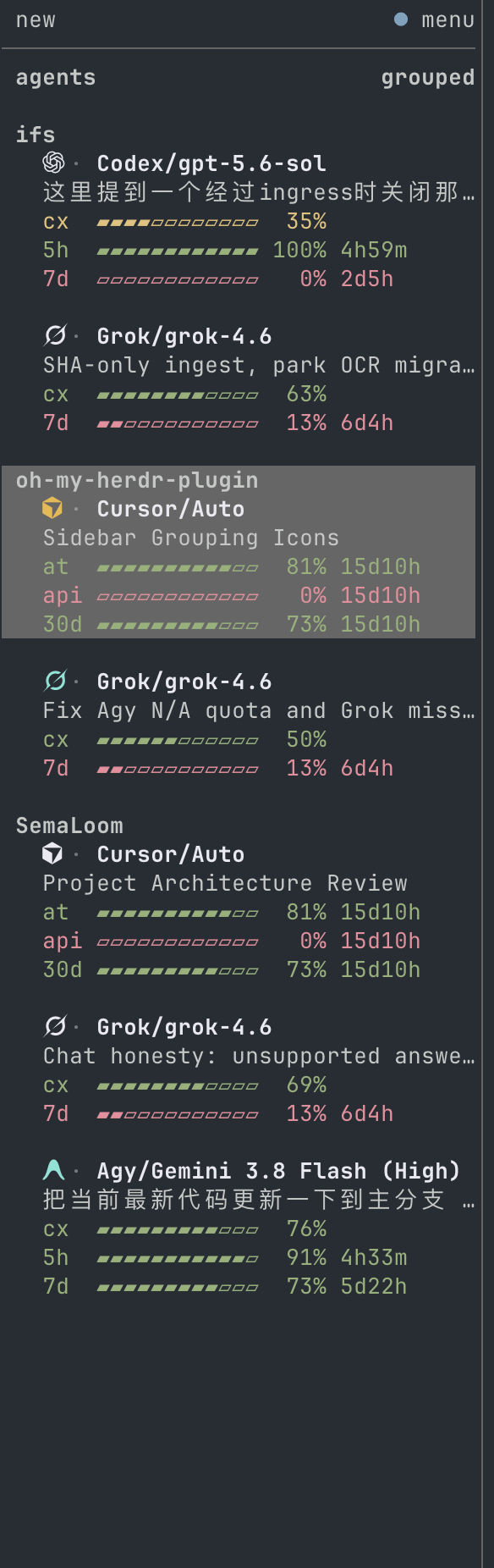 |  |
The plugin preserves Herdr's native machine/workspace/tab row, custom styles,
and worktree grouping. The branded provider/model line is the agent identity;
the native agent row is omitted so grok does not sit above Grok/grok-4.6.
Optional quota ordering and low-quota notifications are disabled by default.
Empty fields collapse; percentages can show remaining or used quota.
The default layout is gauges: a meter beside each quota number. Bars fill
to the printed number, and cx, 5h, 7d, and 30d all follow
quota-percent. Labels are three characters so those periods align; a
provider-named window too long for that column keeps a plain row instead of
a truncated bar. Cache shares a line with TTL or no cached when space allows.
Meters size to the connected Herdr endpoint's sidebar — indent and scrollbar
included — and disappear when the width is too narrow. A resize takes effect
on the next refresh or pane
event (prefix+shift+r). Under gauges the cx row takes a severity
colour of its own, on the same muted green/amber/red scale as 5h and
7d: colour always reads the headroom left — amber below 50% of the
context left, red below 20%. Switch layout, fields, and percentages from
the settings pane.
Requires Herdr 0.9.0+, the Rust toolchain pinned in rust-toolchain.toml,
macOS or Linux, and a supported agent CLI.
git clone https://github.com/levi-qiao/herdr-agent-quota.git
cd herdr-agent-quota
./install.sh
To enable a subset, use ./install.sh --agent claude,codex,omp.
Existing sessions need restarting only when newly installed hooks or Herdr
integrations must be loaded.
Upgrade from the repository directory:
git pull --ff-only
./install.sh
Upgrades retain saved preferences, repair managed configuration, refresh quota, and restore background updates automatically. No cache deletion or watcher management is required. Changes to the Herdr server connection are adopted by the watcher automatically.
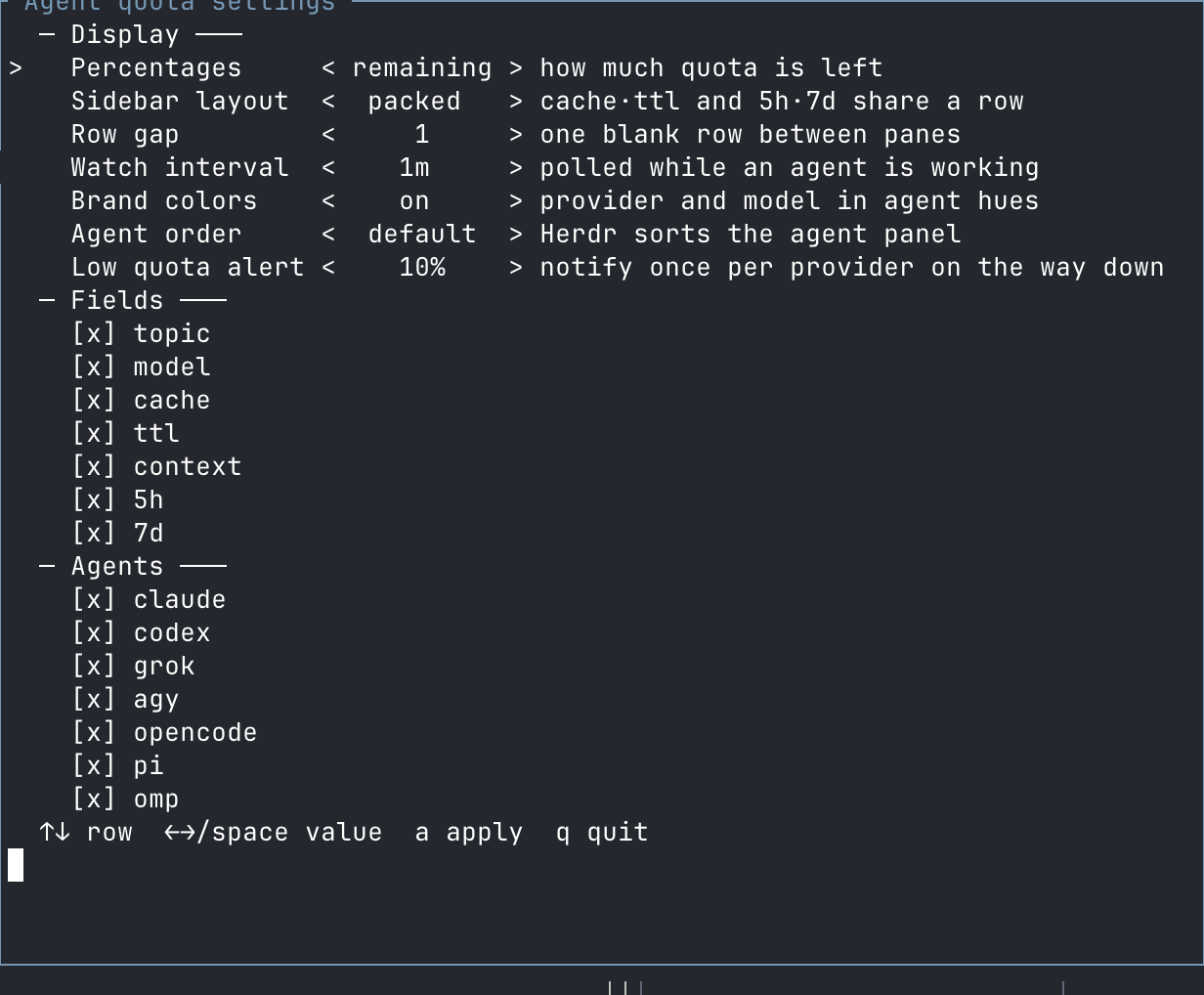
Press prefix+shift+q, or run the following if that key is already assigned:
herdr plugin pane open --plugin herdr-agent-quota --entrypoint settings --focus
| Setting | Options |
|---|---|
| Percentages | Remaining or used; colors always indicate remaining headroom |
| Layout | gauges (default) adds a meter beside each quota number; packed groups related fields; stacked gives each field a row |
| Row gap | Zero or one blank line between agents |
| Watch interval | 30 seconds–1 hour; default 60 seconds |
| Fields | Provider, topic, model, cache, TTL, context, short/long quota |
| Brand colors | On or off |
| Agent order | Herdr default or lowest remaining quota first |
| Low quota alert | Off or a threshold from 1% to 100% |
| Agents | Claude, Codex, Grok, Agy, OpenCode, Pi, OMP, Devin |
Use arrows or Space to edit, a to apply, and q to close.
Installer options are also available through ./install.sh --help.
| Agent | Quota source | Attribution |
|---|---|---|
| Codex | Codex app-server; 5h and/or 7d | Current login in the plugin's CODEX_HOME |
| Grok | CLI billing endpoint; 7d or 30d | Current CLI credentials |
| Devin | CLI usage endpoint; 1d and 7d | Current CLI credentials |
| Claude Code | StatusLine; 5h and 7d | Exact session observation |
| Agy / Antigravity | StatusLine; 5h and 7d | Exact session and identifiable model pool |
| OpenCode | OpenCode Go usage endpoint | Go credential; confirmed PAYG routes have no subscription quota |
| Pi | Canonical Codex quota | Only when the recorded account matches |
| OMP | omp usage --json --provider <id> | Reported account matching the session's credential pin |
Quota windows retain their provider's meaning. Model, context, and cache data
come from the identified session when available. ttl≈ marks an estimated
prompt-cache lifetime, not a guaranteed expiry. Topic extraction uses only the
named pane's visible screen and preserves the last topic when it scrolls away.
All supported working agents participate in one background watcher. Requests are debounced for 60 seconds, including a final refresh after a turn settles. OMP additionally retains its own five-minute usage cache. Idle panes sharing a verified quota source receive the same reading.
Native Codex, Grok, and Devin collectors follow the plugin's current login, not separate accounts for each pane. Claude/Agy do not report a reliable serving account ID, so their observations are not shared across sessions. Unknown identity or model-pool attribution does not produce a guessed quota. Failed requests preserve the last verified reading for that same account; they do not turn failures into zero usage.
| Symptom | Check |
|---|---|
| Session data is missing | Run herdr integration status; load missing integrations before restarting the affected agent |
| Claude/Agy quota is missing | Send a turn so the session's StatusLine produces an observation |
| OMP quota is missing | Check omp usage --json --redact --provider <id> |
| Devin quota is missing | Check the CLI login and DEVIN_CREDENTIALS_FILE if customized |
| Rows are missing | Run the configure action below to repair managed configuration |
The gauges meter disappears on a narrow sidebar | Expected below ~24 columns; widen the sidebar and refresh |
gauges still uses the old width after a resize | Refresh with prefix+shift+r; there is no live resize publish path |
Cache details stay on two lines under gauges | Widen the sidebar until the combined row fits |
herdr plugin action invoke refresh --plugin herdr-agent-quota
herdr plugin action invoke configure --plugin herdr-agent-quota
Uninstall everything with ./uninstall.sh, or remove a subset with
./uninstall.sh --agent grok. Configuration changes are reversible; user-owned
settings and other agents remain intact.
See CONTRIBUTING.md for development and validation, SECURITY.md for data handling and vulnerability reports, and CHANGELOG.md for release notes. Dated investigations are indexed in docs/README.md.
MIT. Not affiliated with Herdr or the supported AI providers.
Sign in to join the discussion.
No comments yet. Be the first to say what this is good for.
Makes your AI agent think like the laziest senior dev in the room. The best code is the code you never wrote.

Graphs that teach > graphs that impress. Turn any code into an interactive knowledge graph you can explore, search, and ask questions about. Works with Claude Code, Codex, Cursor, Copilot, Gemini CLI, and more.

OmO: Just type "mass ulw" keyword with your prompt. Now you are the master of graph engineering.
Persistent Context Across Sessions for Every Agent – Captures everything your agent does during sessions, compresses it with AI, and injects relevant context back into future sessions. Works with Claude Code, OpenClaw, Codex, Gemini, Hermes, Copilot, OpenCode + More
Opinionated Oxlint rules for rejecting low-evidence TypeScript and JavaScript patterns
Teams-first Multi-agent orchestration for Claude Code