

JuliusBrussee/
caveman

🪨 why use many token when few token do trick — Claude Code skill that cuts 65% of tokens by talking like caveman
105k
1 add
Claude Status Bar adds a one-line usage display to Claude Code so you can see rate-limit bars, reset times, model, context window, and cache age without opening another window. It also supports a macOS floating HUD, style and theme switching, and a daemon fast mode for lower overhead.
Builders who use Claude Code and want rate limits, context, and cache state in view while they work.
You can check how much Claude Code usage you have left without leaving your terminal.
Shows the same 5h and 7d Claude Code rate-limit numbers, plus reset countdowns and end-of-window projections.
Shows the active model and how full the context window is on the status line.
Shows how long the prompt cache stays warm so you know when the next turn will cost full price.
Adds an always-on-top floating panel for the Claude desktop app on macOS.
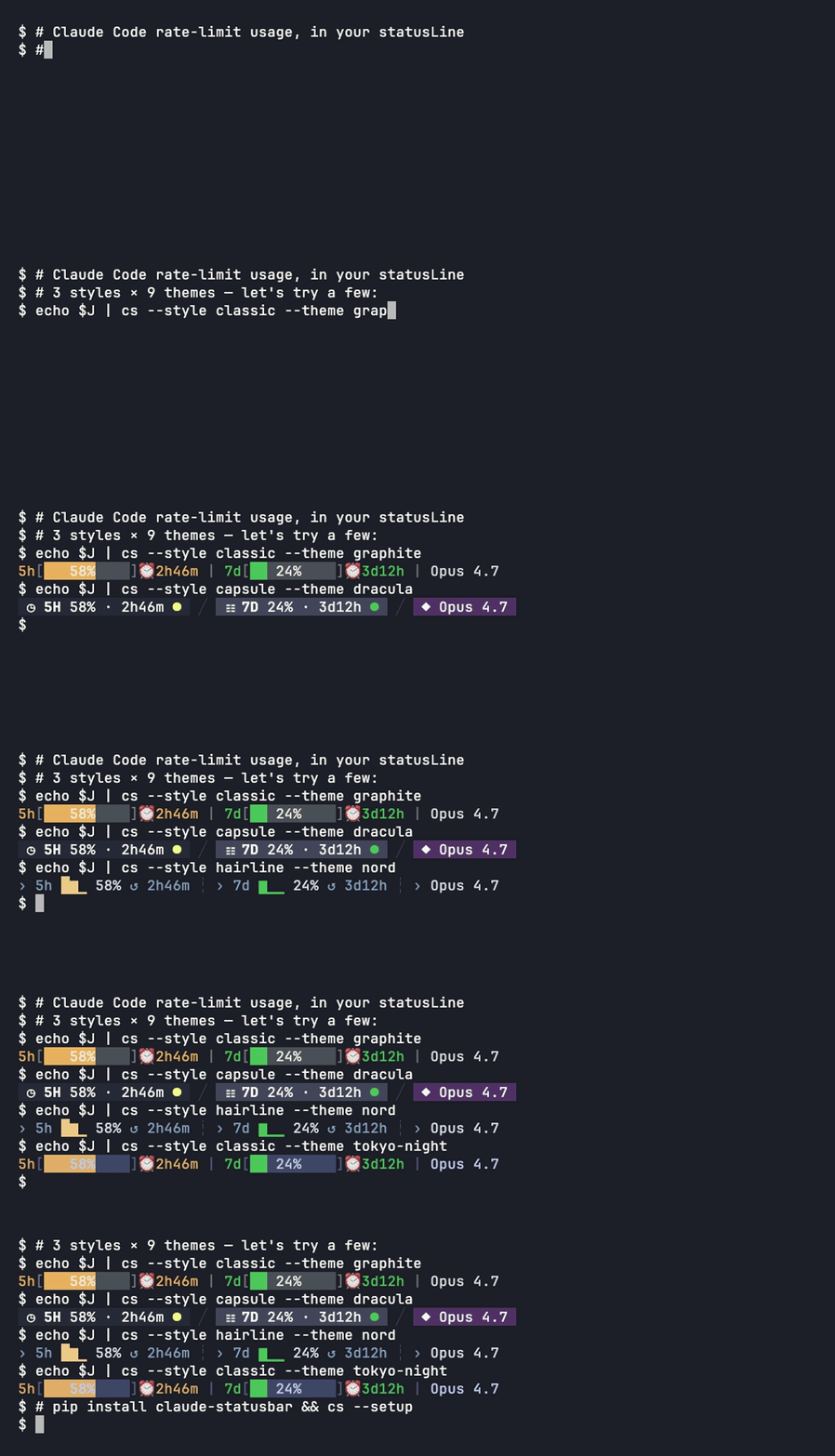
Offers 3 styles and 9 themes, switchable with commands.
Uses a native cache reader and background workers to keep refreshes light.
pyinstaller packaging/cs.spec --noconfirm
mv dist/cs/cs dist/cs/cs-python
go build -trimpath -ldflags='-s -w' -o dist/cs/cs packaging/native/main.go
python scripts/benchmark_native.py dist/cs/cs
python scripts/benchmark_daemon.py dist/cs/cs
curl -fsSL https://raw.githubusercontent.com/leeguooooo/claude-code-usage-bar/main/install.sh | bash
pip install claude-statusbar     # or: uv tool install / pipx install
cs --setup                       # wires the statusLine hook + installs the skill
pip install 'claude-statusbar[hud]'   # adds PyObjC (macOS GUI deps)
cs hud install                        # launchd: auto-start on login + keep-alive
Your Claude Code usage, at a glance. 5h / 7d rate-limit bars, reset countdowns, model, context window, and prompt-cache freshness — inline in Claude Code's status line, or a floating HUD on the desktop app.





English · 简体中文 · Install · Documentation
[!IMPORTANT] macOS standalone users should upgrade to v3.32.5 now. Older onefile releases could leave a new ~11 MB PyInstaller
_MEI*runtime directory on every one-second refresh that was killed during startup. Re-running the installer switches to an onedir bundle and safely removes inactive leftovers:curl -fsSL https://raw.githubusercontent.com/leeguooooo/claude-code-usage-bar/main/install.sh | bash
Claude Code tells you almost nothing about where you stand against your rate limits.
claude-statusbar puts the numbers that matter on one quiet line at the bottom of your
terminal — so you never switch context to a separate window to answer "how much have I
got left, and when does it reset?"
→NN%), not a local guess.Opus 4.8 · 350k/1M).cache 4m23s) so you know when the next turn pays full price.statusLine in the terminal, or an always-on-top floating HUD for the Claude desktop app (macOS).pip package. Auto-updates.Display ticks stay at one second; data collection follows its own schedule:
| Data | Refresh policy |
|---|---|
| Countdown and elapsed time | Recomputed from timestamps on each render |
| Context, model and session cost | Latest statusLine input |
| Transcript activity | Reuse unchanged snapshots; read only appended tail bytes, with a bounded rebuild after replacement or truncation |
| Git dirty / ahead / behind | Shared per worktree, 30-second cache, one refresh at a time |
| Configuration and language progress | Reload when file metadata changes |
| Balance and optional model caps | Shared per account, background refresh; failures are cached |
The native reader is included in macOS arm64 and Linux x86_64 release archives.
Pip/uv installations continue to use the Python client. Existing cs render
commands keep working; binary upgrades take effect on the next invocation.
Optional model-specific weekly limits can be enabled with
cs config set show_per_model true. This explicitly enables read-only OAuth
credential access (~/.claude/.credentials.json, or the macOS login Keychain)
and background requests to Anthropic's undocumented usage endpoint. No token
is logged or stored in a cache. Requests are account-scoped, cached for five
minutes, and disabled by default; unsupported responses hide the segment.
Relay/no-quota sessions never request these limits. The segment appears on
its own line below the main usage row, using the same battery and projection.
For source builds, wrap the PyInstaller bundle before packaging:
pyinstaller packaging/cs.spec --noconfirm
mv dist/cs/cs dist/cs/cs-python
go build -trimpath -ldflags='-s -w' -o dist/cs/cs packaging/native/main.go
python scripts/benchmark_native.py dist/cs/cs
python scripts/benchmark_daemon.py dist/cs/cs
Both benchmarks use temporary fixtures, not live sessions or credentials.
The first checks the cache-hit CPU budget; the second exercises 16 concurrent
sessions, warm-cache routing, worker count, Git deduplication and freshness.
The daemon also writes aggregate timing and worker counters to
~/.cache/claude-statusbar/scheduler.json (no payloads or tokens).
One line — no Python, no pip. Downloads a prebuilt standalone binary for your platform (macOS Apple Silicon, Linux x86_64) and wires up the status line:
curl -fsSL https://raw.githubusercontent.com/leeguooooo/claude-code-usage-bar/main/install.sh | bash
Security-conscious? Download and read it first — the header lists exactly what it touches. On platforms without a prebuilt binary it falls back to pip.
On macOS this one line does everything — it wires the terminal statusLine and, if the
Claude desktop app is installed, registers the floating desktop HUD to auto-start on login. The
macOS binary bundles the HUD, so there's no separate pip install '[hud]' and no extra config.
Prefer pip / uv, or want the desktop HUD extra? Install the Python package:
pip install claude-statusbar     # or: uv tool install / pipx install
cs --setup                       # wires the statusLine hook + installs the skill
Restart Claude Code and the bar appears at the bottom. Other paths (skill-only, plugin marketplace, Codex/AgentParty bridge) are in the install guide.
Deep dive: Is that
cache 4m23sline actually accurate? — how the prompt-cache countdown is computed
cs hudThe desktop app has no status line, so cs hud adds an always-on-top floating panel with the
same official 5h / 7d usage (sampled by the desktop app itself, not an estimate) and your
active AgentParty channels.
If you used the curl … install.sh | bash one-liner above, the HUD is already installed —
the macOS binary bundles it and the installer auto-registers it when the desktop app is present.
The commands below are only for a manual/pip setup:
pip install 'claude-statusbar[hud]'   # adds PyObjC (macOS GUI deps)
cs hud install                        # launchd: auto-start on login + keep-alive
Collapsed pill → click to expand → drag anywhere; it hides when the desktop app isn't open. Full details in the Desktop HUD guide.
The default bar — classic style, graphite theme:

At a full refresh it can render up to three lines, each segment optional:
| Line | Segments |
|---|---|
| Usage | 5h / 7d rate-limit bars, reset countdowns, end-of-window projections (→NN%), model & context window, prompt-cache countdown, optional session cost or relay balance |
| Project | git worktree marker (⑂ name (3) / ⑂ trunk (3) with the repo's worktree total, its own hue, leads the line), project name, git branch, session +/− lines, duration, version |
| Mode | session effort / thinking / fast / style |
Every icon, color threshold, and toggle is documented in the segment reference. Nine themes and three styles are in styles & themes.
| Guide | What's inside |
|---|---|
| Install | Binary, PyPI, one-shot installer, skill-only, plugin, Codex bridge |
| What it shows | Full per-segment reference table |
| Styles & themes | 3 styles × 9 themes, previews, slash commands |
| Configuration | Config file, all show_* keys, env vars, JSON output, CLI cheatsheet |
Desktop HUD (cs hud) | macOS floating panel for the Claude desktop app |
| Fast mode (daemon) | Sub-1% CPU daemon, launchd / systemd auto-start |
| No-quota mode | Relay / Bedrock / Vertex layout, context battery, balance |
| AgentParty / Codex bridge | Local workspace-presence line |
| Cache countdown | Data source + how cache 4m23s is computed |
| Troubleshooting | cs doctor, common problems, upgrading |
There are a few good Claude Code usage monitors. They solve overlapping but distinct problems — pick the one that matches where you want the information.
| Tool | Lives in | Optimized for |
|---|---|---|
claude-statusbar (cs) | Claude Code's statusLine (one line at the bottom) | Glanceable while you work; zero context-switching |
| ccusage | Standalone TUI in a separate terminal window | Long-form usage analytics, cost breakdowns over weeks |
| Claude Code Usage Monitor | Standalone TUI with predictive burn-rate | Real-time burn-rate forecast for paid plans |
cs is intentionally one line of color and one decision per second. If you want a dashboard
with charts, daily/weekly aggregates, and burn-rate prediction, run a TUI in a side pane. The
two coexist nicely.
prompt-language-coach — install the
plugin to track IELTS band progress. The bar then shows your writing level and trend
automatically (no config; appears when ~/.claude/language-progress.json exists):
... | Opus 4.8(350k/1M) | EN:6.0↑ JA:5.0→
↑ improved · ↓ dropped · → no change since last session.
PRs welcome. The full contributor guide — local setup, test commands, architecture map, coding conventions, release flow — is in CONTRIBUTING.md. Security issues: SECURITY.md.
git clone https://github.com/leeguooooo/claude-code-usage-bar
cd claude-code-usage-bar
uv sync
PYTHONPATH=src uv run pytest tests/   # 900+ tests, ~3s
The render path is hot (up to 60×/min at refreshInterval: 1) — tests/test_import_perf.py
pins which modules can't be imported on the fast path. Read CONTRIBUTING.md before adding
dependencies.
Every version's changes: CHANGELOG.md · GitHub Releases.
show_cache_age widget (#9)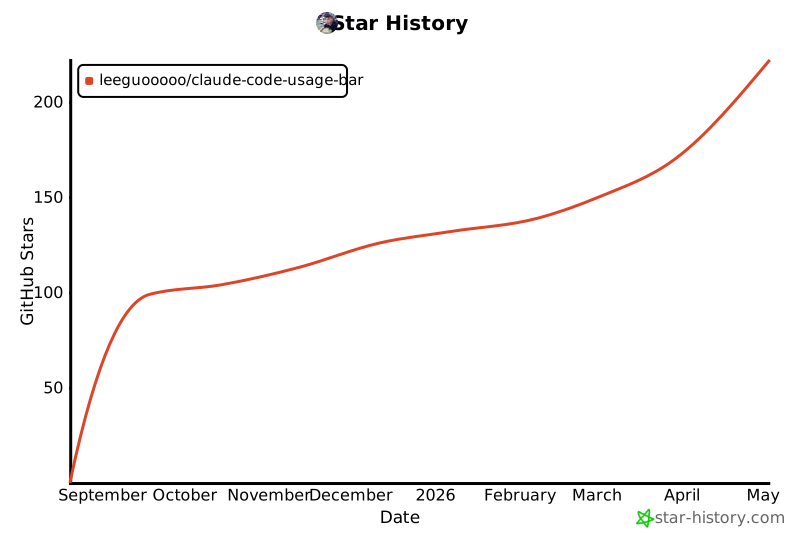
Static snapshot taken at v3.3.x; click for the live chart.
Sign in to join the discussion.
No comments yet. Be the first to say what this is good for.
🪨 why use many token when few token do trick — Claude Code skill that cuts 65% of tokens by talking like caveman

The best-benchmarked open-source AI memory system. And it's free.

Orca is the ADE for working with a fleet of parallel agents. Run any coding agent with your own subscription. Available on desktop, mobile and remote runtime.

A cross-platform desktop All-in-One assistant for Claude Code, Codex, OpenCode, OpenClaw, Grok Build & Hermes Agent. Only official website: ccswitch.io

Never stop coding. Free MIT AI gateway: one endpoint, 352 providers (150+ free), 1200+ models Kimi, Claude, GPT, Gemini, GLM, DeepSeek, MiniMax. Works with Claude Code, Codex, Cursor, OpenCode, Cline & Copilot. Quota-aware auto-fallback, RTK+Caveman compression saves 15-95% tokens, MCP/A2A, Desktop/PWA. Built by 550+ contributors

Compress tool outputs, logs, files, and RAG chunks before they reach the LLM. 20% fewer tokens for coding agents, 60-95% fewer tokens for JSON, same answers. Library, proxy, MCP server.