
JuliusBrussee/
caveman

🪨 why use many token when few token do trick — Claude Code skill that cuts 65% of tokens by talking like caveman
105k
1 add
clausona manages multiple Claude Code and Codex accounts on one machine. It changes the active profile, links shared settings like plugins and MCP servers, and reads usage and quota from each tool’s own account data. The shell wrappers run the real `claude` and `codex` commands directly, so you keep your existing workflow.
Builders who run Claude Code or Codex with more than one account and want one shared setup across them.
You can switch accounts with one command instead of logging out, relinking settings, and rebuilding your agent setup.
`clausona use <name>` changes the active Claude Code or Codex account.
MCP servers, plugins, settings, skills, hooks, and other shared files are symlinked across profiles within each tool.
`claude` and `codex` still run directly, with no proxy process or background daemon.
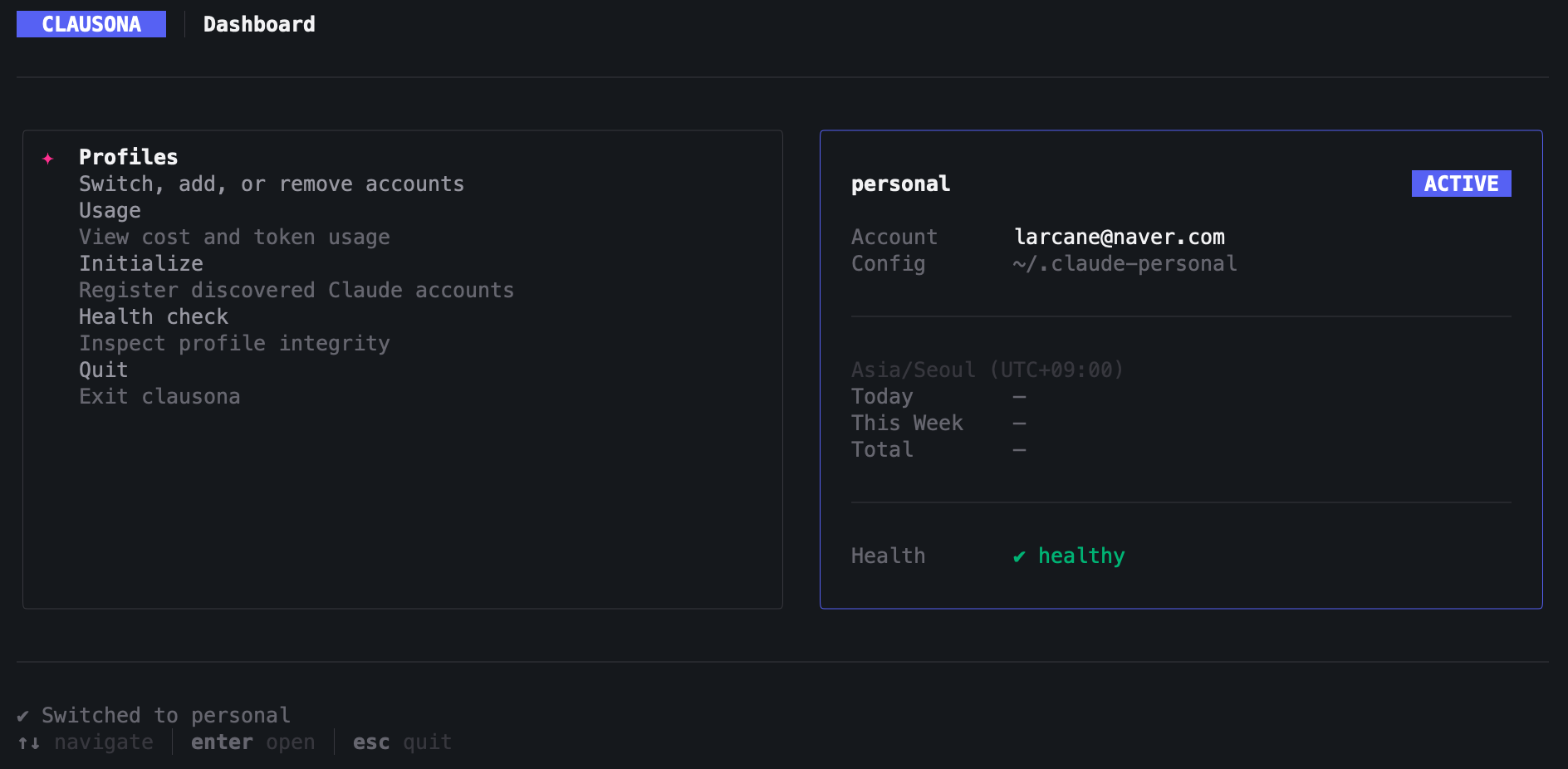
The TUI shows plan quota, session limits, cost, and token usage for each profile.
`clausona doctor` finds broken shared links and `clausona repair` rebuilds them.
`clausona init`, `clausona add`, and `clausona config` help you discover accounts, import profiles, and choose shared or separate sessions.
curl -fsSL https://github.com/larcane97/clausona/releases/latest/download/install.sh | bash
irm https://github.com/larcane97/clausona/releases/latest/download/install.ps1 | iex
Switch between multiple Claude Code and OpenAI Codex CLI accounts on one machine — plugins, MCP servers, and settings stay shared.
You have multiple Claude Code or OpenAI Codex CLI accounts (personal, work, different orgs), but switching between them on a single machine is tedious:
CLAUDE_CONFIG_DIR (Claude) or CODEX_HOME (Codex) yourself.clausona fixes both. Switch profiles with one command — your entire environment carries over.
csn use work             # switch to work account — done
csn use codex:personal   # switch to your personal codex account too
No re-login. No reinstalling plugins. Just switch and go.
csnis a shorthand alias forclausona, registered automatically on install.
clausona use <name> and you're on a different accountclaude and codex run directly and unmodified. Compatible with oh-my-claudecode, Cline, codex plugins, and any other tool in your stack.Requirements: Node.js >= 20, and at least one of:
Platforms: macOS/Linux (zsh or bash) and Windows (PowerShell 5.1+)
macOS/Linux:
curl -fsSL https://github.com/larcane97/clausona/releases/latest/download/install.sh | bash
Piping to bash does not read your shell profile, so if Node comes from a version
manager (nvm, fnm, asdf), activate it before running the command.
Windows PowerShell:
irm https://github.com/larcane97/clausona/releases/latest/download/install.ps1 | iex
clausona init             # discover existing Claude Code and Codex accounts
clausona use work         # switch to a profile (bare name if unique)
clausona use claude:work  # switch claude account (use prefix when both tools have "work")
clausona add codex:work   # add a codex profile
clausona use codex:personal  # switch codex account
clausona list             # see all profiles with plan quota and weekly usage
clausona                  # open the interactive dashboard
clausona list and the dashboard show how much of each account's plan limits are
already spent, so you can pick a profile that still has headroom.
PROFILE             ACCOUNT                      5H         7D
claude:work         you@example.com              6% 23m     46% 13h
claude:personal     you@personal.com             0%         100% 4d
codex:work          you@example.com              —          12% 5d
5H is the rolling session window, 7D the weekly one, each followed by how long
until it resets. The dashboard shows the same reading with a gauge and the precise
reset time, plus the most-consumed per-model limit.
The table adapts to the terminal: as it narrows, token counts give way first, then cost, then the reset times — the quota columns and the profile name are the last things to go, so the row never wraps into itself.
Readings come from each tool's own usage endpoint, authenticated with the credential
that tool already stored for that profile — clausona never asks for or stores a token
of its own. Results are cached for 5 minutes; --refresh forces a re-read and
--no-quota skips the network entirely.
An access token lasts 8 hours, so a profile you have not touched today would otherwise show nothing. clausona renews it on demand using the stored refresh token, which lasts about 14 days — so every account you have used in the last two weeks reports its quota, whether or not you have switched to it lately.
Renewal is lazy: a token is only renewed once it has actually lapsed (or if the endpoint
rejects it), never pre-emptively, so each profile rotates at most once per 8 hours.
--no-renew turns it off.
Two details make this safe to do on your behalf, and both are worth knowing if you touch this code:
Claude credentials stay in the macOS Keychain (or .credentials.json elsewhere) and
Codex credentials in auth.json, in place — unrelated contents of those stores, such as
Claude's mcpOAuth block, are preserved.
A dash means the reading could not be taken, and the reason is printed below the table:
| State | Meaning |
|---|---|
expired | The sign-in has lapsed past renewal (refresh token older than ~14 days, or revoked). Run clausona login <profile>. |
missing | No credential is stored for the profile. Run clausona login <profile>. |
cooldown | The endpoint returned 429. clausona pauses that tool until the window lifts. |
error | Network failure, timeout, or an unreadable response. |
Where numbers are already known, they stay on screen dimmed with their age, rather than being blanked out.
<profile> accepts either a bare name (e.g. work) when it is unique across all tools, or a tool:name prefix (e.g. claude:work, codex:work) when disambiguation is needed.
| Command | Description |
|---|---|
clausona | Interactive TUI dashboard |
clausona init | Discover and register Claude Code and Codex accounts |
clausona add <profile> [--from <path>] [--merge-sessions] | Add a profile manually |
clausona remove <profile> | Remove a profile |
clausona use [profile] | Switch active profile |
clausona run <profile> [-- args...] | Run the tool's CLI with a specific profile |
clausona list [--json] [--refresh] [--no-quota] [--no-renew] | List all profiles with plan quota and usage |
clausona usage [profile] [--period=today|week|month|all] | View cost and token usage |
clausona current [--json] | Show active profile |
clausona config <profile> --merge-sessions | --separate-sessions | Configure session mode |
clausona doctor [--json] | Check profile health |
clausona repair <profile> | Fix broken shared links |
clausona login <profile> | Re-authenticate a profile |
clausona uninstall | Uninstall clausona completely |
Shell wrappers for claude and codex are registered via eval "$(clausona shell-init)" on zsh/bash or
Invoke-Expression (& clausona shell-init | Out-String) on PowerShell:
~/.clausona/profiles.json and sets the appropriate env var (CLAUDE_CONFIG_DIR for claude, CODEX_HOME for codex) to the active profile's config directoryclaude invocation — detects usage changes via fingerprint comparison and records cost/token usage per profileclausona use work
↓
claude ← wrapper sets CLAUDE_CONFIG_DIR, then runs claude
↓
_track-usage ← on exit, records any new cost/token usage
clausona use codex:personal
↓
codex ← wrapper sets CODEX_HOME, then runs codex
When you register a new profile, clausona symlinks shared resources from your primary config directory into the new profile's config directory.
Claude profile (clausona add claude:work):
~/.claude-work/            (new claude profile)
├── .claude.json           ← own auth credentials (NOT shared)
├── projects/              ← own session history (NOT shared by default)
├── jobs/                  ← own background sessions (follows projects/)
├── teams/                 ← own team records (follows projects/)
├── mcp-servers/  →  ~/.claude/mcp-servers    (symlink to primary)
├── plugins/      →  ~/.claude/plugins        (symlink to primary)
├── settings.json →  ~/.claude/settings.json  (symlink to primary)
└── ...
Codex profile (clausona add codex:work):
~/.codex-work/             (new codex profile)
├── auth.json              ← own credentials (NOT shared)
├── sessions/              ← own conversation history (NOT shared)
├── history.jsonl          ← own input history (NOT shared)
├── state_*.sqlite         ← own state DB (NOT shared)
├── config.toml  →  ~/.codex/config.toml      (symlink to primary)
├── skills/      →  ~/.codex/skills           (symlink to primary)
├── plugins/cache/ → ~/.codex/plugins/cache   (symlink to primary)
└── ...
The private set is larger for codex (state DB, input history, logs) but the principle is the same: credentials and session data stay profile-specific; everything else is shared.
On Windows, shared directories use junctions. Shared files use symbolic links when Windows Developer Mode is enabled and otherwise fall back to same-volume hard links. If a profile is imported from another drive, enable Developer Mode so clausona can create file symbolic links across volumes.
Session separation is the default: each profile keeps its own session directory, so /resume (Claude) and codex resume (Codex) only show that profile's conversations. To share session history across claude profiles, pass --merge-sessions when adding or initializing.
For claude profiles this covers background sessions and team records too. A background
session is stored as a record in jobs/ keyed by the same session id as its transcript
under projects/, so the two are shared or separated together — sharing one without the
other would leave a record whose transcript cannot be resumed. clausona repair folds a
profile's own records into the primary before re-linking, so nothing is lost when a
profile switches to shared sessions or has its links rebuilt.
Shared links are created from the primary's contents at the time a profile is set up, so
a directory the tool introduces in a later version does not reach profiles that already
exist — the tool creates it locally instead, and the accounts silently stop sharing that
state. clausona doctor reports these as missing_shared_link; clausona repair <profile> links them.
All data stays local on your machine. clausona has no telemetry and no server of its own, and nothing is sent to a third party.
The one thing that leaves your machine is the plan-quota lookup: each profile's own
credential is sent to that profile's own provider endpoint (api.anthropic.com for
Claude, chatgpt.com for Codex) to read its limits, and to renew a lapsed token.
Nothing else is transmitted, and clausona list --no-quota skips it entirely.
~/.clausona/
├── profiles.json    # registered profiles and active selection
├── usage.json       # per-profile usage history
├── quota.json       # cached plan-quota readings (5-minute freshness)
├── locks/           # short-lived per-profile credential renewal locks
└── backups/
    ├── claude/      # backups of imported claude profile directories
    └── codex/       # backups of imported codex profile directories

~/.claude-<name>/        # claude profile config directories (created by `clausona add`)
~/.codex-<name>/         # codex profile config directories (created by `clausona add codex:<name>`)
clausona 0.1.0-beta introduces multi-tool support. On first launch, the registry at ~/.clausona/profiles.json is automatically migrated to v2 format:
work → claude:work.v1.bak suffixTo roll back: restore the .v1.bak files and install the previous clausona version.
Issues and pull requests are welcome at github.com/larcane97/clausona.
MIT
Sign in to join the discussion.
No comments yet. Be the first to say what this is good for.
🪨 why use many token when few token do trick — Claude Code skill that cuts 65% of tokens by talking like caveman

The best-benchmarked open-source AI memory system. And it's free.

Orca is the ADE for working with a fleet of parallel agents. Run any coding agent with your own subscription. Available on desktop, mobile and remote runtime.

A cross-platform desktop All-in-One assistant for Claude Code, Codex, OpenCode, OpenClaw, Grok Build & Hermes Agent. Only official website: ccswitch.io

Never stop coding. Free MIT AI gateway: one endpoint, 352 providers (150+ free), 1200+ models Kimi, Claude, GPT, Gemini, GLM, DeepSeek, MiniMax. Works with Claude Code, Codex, Cursor, OpenCode, Cline & Copilot. Quota-aware auto-fallback, RTK+Caveman compression saves 15-95% tokens, MCP/A2A, Desktop/PWA. Built by 550+ contributors

Compress tool outputs, logs, files, and RAG chunks before they reach the LLM. 20% fewer tokens for coding agents, 60-95% fewer tokens for JSON, same answers. Library, proxy, MCP server.