
obra/
superpowers

obra/superpowersSkills
An agentic skills framework & software development methodology that works.
285k
1 add
This skill helps an agent generate click-through architecture diagrams as a single HTML file, with animated data flow, tabs for named scenarios, and mode toggles for variants like dev/prod or offline/online. It is meant for workshops, design reviews, and onboarding docs where people need to follow how requests move through a system.
Builders who want their agent to turn system flows into a presentation-ready HTML diagram.
You can explain a system by letting people click through the flow instead of reading static boxes and arrows.
Generates one standalone `architecture.html` file that can be emailed, hosted, or opened locally.
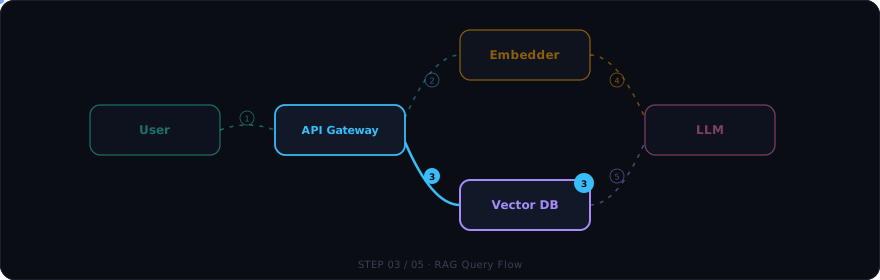
Shows named scenarios such as login, ingest, or RAG query as sequenced steps with moving data packets.
Swaps labels, ports, and payloads for variants like offline/online, dev/prod, or v1/v2.
Lets you move nodes on the canvas and saves the layout in localStorage.
Includes play, pause, step, keyboard shortcuts, and a progress bar.
Supports dark/light switching and fullscreen mode for presentations.
/plugin marketplace add konraddzbik/architecture-diagram-skill
/plugin install architecture-diagram
git clone https://github.com/konraddzbik/architecture-diagram-skill /tmp/arch-skill
cp -r /tmp/arch-skill/skills/architecture-diagram ~/.claude/skills/architecture-diagram
git clone https://github.com/konraddzbik/architecture-diagram-skill /tmp/arch-skill
cp -r /tmp/arch-skill/skills/architecture-diagram .claude/skills/architecture-diagram
gemini skills install https://github.com/konraddzbik/architecture-diagram-skill
gemini skills install https://github.com/konraddzbik/architecture-diagram-skill --scope workspace
gemini skills list
Agent Skill for Claude Code · Gemini CLI · GitHub Copilot CLI · OpenCode · Cursor
Build click-through, animated system architecture diagrams as a single HTML file.
No build step. No dependencies. One file you can email, host, or open locally.
Install · Try It · Examples · Skill Spec
Build click-through, animated system architecture diagrams as a single HTML file. Drop it into a workshop, design review, or onboarding doc and let people watch the data flow instead of reading static boxes-and-arrows.
This is an Agent Skill — a folder of instructions any compatible AI coding agent loads on demand. When you ask for an architecture diagram, this skill takes over and produces a self-contained architecture.html plus a companion architecture.md description. Works with Claude Code, Gemini CLI, GitHub Copilot CLI, OpenCode, Cursor, and any tool supporting the SKILL.md standard.
Each generated diagram includes:
RAG Query, Login, Ingest, …) and watch it play out step by stepoffline/online, dev/prod, or v1/v2 to swap node labels, ports, and payloads in placeT (preference saved in localStorage)F to expand the canvas for presentations; Escape to exitNo build step. No dependencies. One HTML file you can email, host, or open locally.
Battle-tested on a public RAG workshop (Eskadra Bielik) and several internal design reviews.
| Situation | Use this? |
|---|---|
| "Show me how the auth flow works" (interactive, for a workshop) | Yes |
| "Design the RAG pipeline before we build it" (planning a new service) | Yes |
| "Build an architecture mockup we can iterate on with the team" | Yes |
| "Visualize our microservices and how they communicate" | Yes |
| "Map out the CI/CD pipeline for onboarding docs" | Yes |
| "Show the data flow through our ETL pipeline" | Yes |
| "Draw a sequence diagram for this PR" (static, lives in markdown) | No — a Mermaid sequence diagram inline is simpler |
| "I just need a static boxes-and-arrows topology" (no flows/steps) | No — a Mermaid flowchart is enough |
The differentiator is interactivity + sequenced data flow. If the value is "click through it and watch what happens," this skill applies.
/plugin marketplace add konraddzbik/architecture-diagram-skill
/plugin install architecture-diagram
That's it. The skill activates automatically whenever you ask for an architecture diagram, system flow, RAG pipeline, etc.
The skill lives in skills/architecture-diagram/ inside this repo, so clone to a temp
dir and copy that subfolder into place (Claude Code discovers SKILL.md exactly one
level under skills/ — cloning the whole repo would nest it too deep).
Personal install (available in all your projects):
git clone https://github.com/konraddzbik/architecture-diagram-skill /tmp/arch-skill
cp -r /tmp/arch-skill/skills/architecture-diagram ~/.claude/skills/architecture-diagram
Project install (committed to a repo, shared with your team):
git clone https://github.com/konraddzbik/architecture-diagram-skill /tmp/arch-skill
cp -r /tmp/arch-skill/skills/architecture-diagram .claude/skills/architecture-diagram
gemini skills install https://github.com/konraddzbik/architecture-diagram-skill
This installs to ~/.gemini/skills/ (user-level, all projects). To install for just the current project:
gemini skills install https://github.com/konraddzbik/architecture-diagram-skill --scope workspace
Verify it loaded:
gemini skills list
If you're already in a session, reload without restarting:
/skills reload
Personal install — available in all your projects:
git clone https://github.com/konraddzbik/architecture-diagram-skill /tmp/arch-skill
cp -r /tmp/arch-skill/skills/architecture-diagram ~/.gemini/skills/architecture-diagram
Project install — committed to a repo, shared with your team:
git clone https://github.com/konraddzbik/architecture-diagram-skill /tmp/arch-skill
cp -r /tmp/arch-skill/skills/architecture-diagram .gemini/skills/architecture-diagram
Or use the cross-tool .agents/skills/ path (works in Gemini CLI, OpenCode, and other compatible tools):
git clone https://github.com/konraddzbik/architecture-diagram-skill /tmp/arch-skill
cp -r /tmp/arch-skill/skills/architecture-diagram .agents/skills/architecture-diagram
Requires GitHub CLI ≥ 2.90.0:
gh skill install konraddzbik/architecture-diagram-skill architecture-diagram
The skill is installed to .github/skills/ in your current project by default. To install it globally for all projects:
gh skill install konraddzbik/architecture-diagram-skill architecture-diagram --scope user
If you're already in a copilot session, reload without restarting:
/skills reload
Personal install — available in all your projects:
git clone https://github.com/konraddzbik/architecture-diagram-skill /tmp/arch-skill
cp -r /tmp/arch-skill/skills/architecture-diagram ~/.copilot/skills/architecture-diagram
Project install — committed to a repo, shared with your team:
git clone https://github.com/konraddzbik/architecture-diagram-skill /tmp/arch-skill
cp -r /tmp/arch-skill/skills/architecture-diagram .github/skills/architecture-diagram
Project install — committed to a repo, shared with your team:
git clone https://github.com/konraddzbik/architecture-diagram-skill /tmp/arch-skill
cp -r /tmp/arch-skill/skills/architecture-diagram .opencode/skills/architecture-diagram
Personal install — available in all your projects:
git clone https://github.com/konraddzbik/architecture-diagram-skill /tmp/arch-skill
cp -r /tmp/arch-skill/skills/architecture-diagram ~/.config/opencode/skills/architecture-diagram
Or use the Claude-compatible path (OpenCode reads .claude/skills/ too):
git clone https://github.com/konraddzbik/architecture-diagram-skill /tmp/arch-skill
cp -r /tmp/arch-skill/skills/architecture-diagram ~/.claude/skills/architecture-diagram
The skill activates automatically when you ask for an architecture diagram, system flow, RAG pipeline, etc.
git clone and zip the folder)Once installed, just describe what you want. If you don't know where to start, just type:
Prepare an architecture view of this repository.
Claude will generate an architecture.html and architecture.md in your working directory. Open the HTML in a browser to see the interactive diagram — or ask Claude to show the results right in the terminal.
The skill triggers on phrases like architecture diagram, system flow, RAG flow, agentic flow, service map, or the Polish equivalents (diagram architektury, klikany diagram).
OAuth2 login flow
Build an interactive architecture diagram for an OAuth2 login flow with PKCE. Show the redirect dance between client, authorization server, and resource API step by step. Include a dev/prod mode toggle.
RAG pipeline design
I'm designing a RAG pipeline with embedding retrieval, a reranker, and an LLM. Show me a click-through diagram I can use in a design review. Toggle between offline (Docker, local Qdrant) and online (Cloud Run, BigQuery) modes.
Event-driven microservices
Visualize an event-driven order system: API gateway → Kafka → three consumers (inventory, billing, notifications). Toggle between synchronous (REST fallback) and asynchronous (Kafka) modes.
CI/CD pipeline
Show our CI/CD pipeline: GitHub push → GitHub Actions → build → test → deploy to staging → approval gate → deploy to prod. Toggle between staging and production environments.
Data ingestion pipeline
Visualize a data pipeline: webhook events → SQS → Lambda → transform → write to Postgres + push to Elasticsearch. Show the happy path and the dead-letter-queue retry flow.
Multi-agent system
Draw an agentic AI system: user query → orchestrator agent → tool-calling agent (search, calculator, code exec) → synthesis agent → response. Show how context flows between agents.
Microservices with service mesh
Map our microservices: mobile app → API gateway → user service, product service, order service. Each talks to its own DB. Show the checkout flow and the search flow with an Istio service mesh.
If you upload an existing SOLUTION.md, OpenAPI spec, or README first, the skill will extract services, ports, and operations from it before asking clarifying questions — so the more architecture context you give it, the less it asks.
architecture-diagram-skill/
├── .claude-plugin/
│   ├── marketplace.json              # Plugin marketplace manifest
│   └── plugin.json                   # Plugin metadata
├── skills/
│   └── architecture-diagram/
│       ├── SKILL.md                  # Instructions Claude reads when activated
│       ├── assets/
│       │   ├── template.html         # The drop-in diagram template (CSS + JS + SVG)
│       │   └── css-tokens.css        # Standalone color/typography tokens for restyling
│       ├── examples/
│       │   ├── rag-eskadra-bielik.json   # Real RAG system, 5 flows, offline/online modes
│       │   ├── auth-oauth2.json          # OAuth2 + session flow, dev/prod modes
│       │   ├── event-driven.json         # Kafka fan-out, sync vs async modes
│       │   ├── cicd-pipeline.json        # GitHub Actions deploy, staging/prod modes
│       │   └── agentic-tool-calling.json # Multi-agent AI with tool calls
│       └── references/
│           ├── flow-design-patterns.md   # Layout heuristics, naming, sequencing
│           ├── component-library.md      # Copy-paste node snippets
│           └── screenshot.js             # Optional puppeteer-based layout spot-check
├── README.md
├── LICENSE
└── .gitignore
The HTML template is the heart of the skill — Claude copies it and edits a handful of clearly marked regions (title/header, mode-toggle labels, flow tabs, the .node divs, and the flows object in JS; the template's top EDIT THESE THINGS comment is the authoritative list). Everything else (player, side panel, animations, wire renderer) just works.
Template content:
Dark theme:
T). The preference is saved in localStorage. To make light the default, ask Claude to add class="light" to the <body> tag.R to reset to original positions.F to expand the canvas full-screen. Press Escape to exit.assets/css-tokens.css and ask it to swap the palette. The tokens are standalone — splice them into the template and you're done.user, orch, compute, embed, vector, seed). Add a CSS variable for a seventh if you must, but keep the count ≤ 6 or the legend becomes hard to read..html and .md). If you only want the HTML, say so explicitly.<link> tags at the top of the file for a 100% self-contained, air-gapped artifact.Found a bug, a layout pattern that doesn't work, or have an example system you'd like added? PRs welcome — especially new entries in examples/ showing real-world topologies.
When proposing changes to SKILL.md itself, please test that the description still triggers on the original phrases (architecture diagram, RAG flow, etc.) and doesn't over-trigger on static-diagram requests.
MIT — see LICENSE.
Built by @konraddzbik. Inspired by the design constraints of running real workshops where attendees need to see a system, not just read about it.
If you publish a diagram built with this skill, a link back is appreciated but not required.
Sign in to join the discussion.
No comments yet. Be the first to say what this is good for.
An agentic skills framework & software development methodology that works.

Turn any codebase, with its docs, SQL schemas, configs, and PDFs, into a queryable knowledge graph. A /graphify skill for Claude Code, Cursor, Codex, and Gemini CLI: local deterministic AST parsing, every edge explained, no vector store.

Topic in, narrated explainer video out. A Claude Code / Codex skill that turns any topic into a black-canvas motion-graphics explainer video with TTS voiceover, subtitles and a chapter progress bar. Chinese or English; every frame drawn in code with Remotion.
Public repository for Agent Skills
Open-source AI job search: scan job portals, evaluate listings into a structured A-H report with a global 1-5 score, tailor your CV, track applications — runs locally in your AI coding CLI (Claude Code, Codex, OpenCode, Antigravity…)

Production-grade engineering skills for AI coding agents.