
obra/
superpowers

obra/superpowersSkills
An agentic skills framework & software development methodology that works.
285k
1 add
This skill gives Claude Code Home Assistant-specific procedures for configuration management, automation development, and Lovelace dashboard work. It adds guidance for validation, remote access, deployment choices, and debugging so you can work on your HA setup with less rework.

Builders who use Claude Code with a Home Assistant config and want a consistent workflow for changes, tests, and deployments.
You can make Home Assistant changes with the right syntax, verify them before applying them, and avoid unnecessary restarts.
Uses git for stable changes, `scp` for fast iteration, and chooses reload or restart based on what changed.
Creates modern Home Assistant automation YAML, then tests it by triggering, checking logs, and inspecting traces.
Builds Lovelace dashboards with tablet-friendly layouts, card choices, and Jinja2 template patterns.
Works with SSH and `hass-cli` for managing a Home Assistant instance when live MCP tools are not available.
Ships as a Claude Code plugin with marketplace manifests so it can be installed and updated from the repo.
/plugin marketplace add komal-SkyNET/claude-skill-homeassistant
/plugin install home-assistant-manager@claude-skill-homeassistant
cd /path/to/your/homeassistant/config
mkdir -p .claude/skills
cd .claude/skills
git clone git@github.com:komal-SkyNET/claude-skill-homeassistant.git home-assistant-manager-repo
ln -s home-assistant-manager-repo/skills/home-assistant-manager home-assistant-manager
cd /path/to/your/homeassistant/config
mkdir -p .claude/skills/home-assistant-manager
cd .claude/skills/home-assistant-manager
curl -L https://github.com/komal-SkyNET/claude-skill-homeassistant/archive/main.tar.gz | tar xz --strip-components=2 claude-skill-homeassistant-main/skills/home-assistant-manager
# Test SSH access
ssh root@homeassistant.local "ha core info"
# Your HA config should be a git repository
cd /config
git init
git remote add origin your-repo-url

# Claude should be run from this directory
# Add Context7 for official HA documentation
claude mcp add --transport http context7 https://mcp.context7.com/mcp \
  --header "CONTEXT7_API_KEY: your_api_key"
Expert-level Home Assistant configuration management with efficient deployment workflows, remote CLI access, automation verification, and comprehensive Lovelace dashboard development.



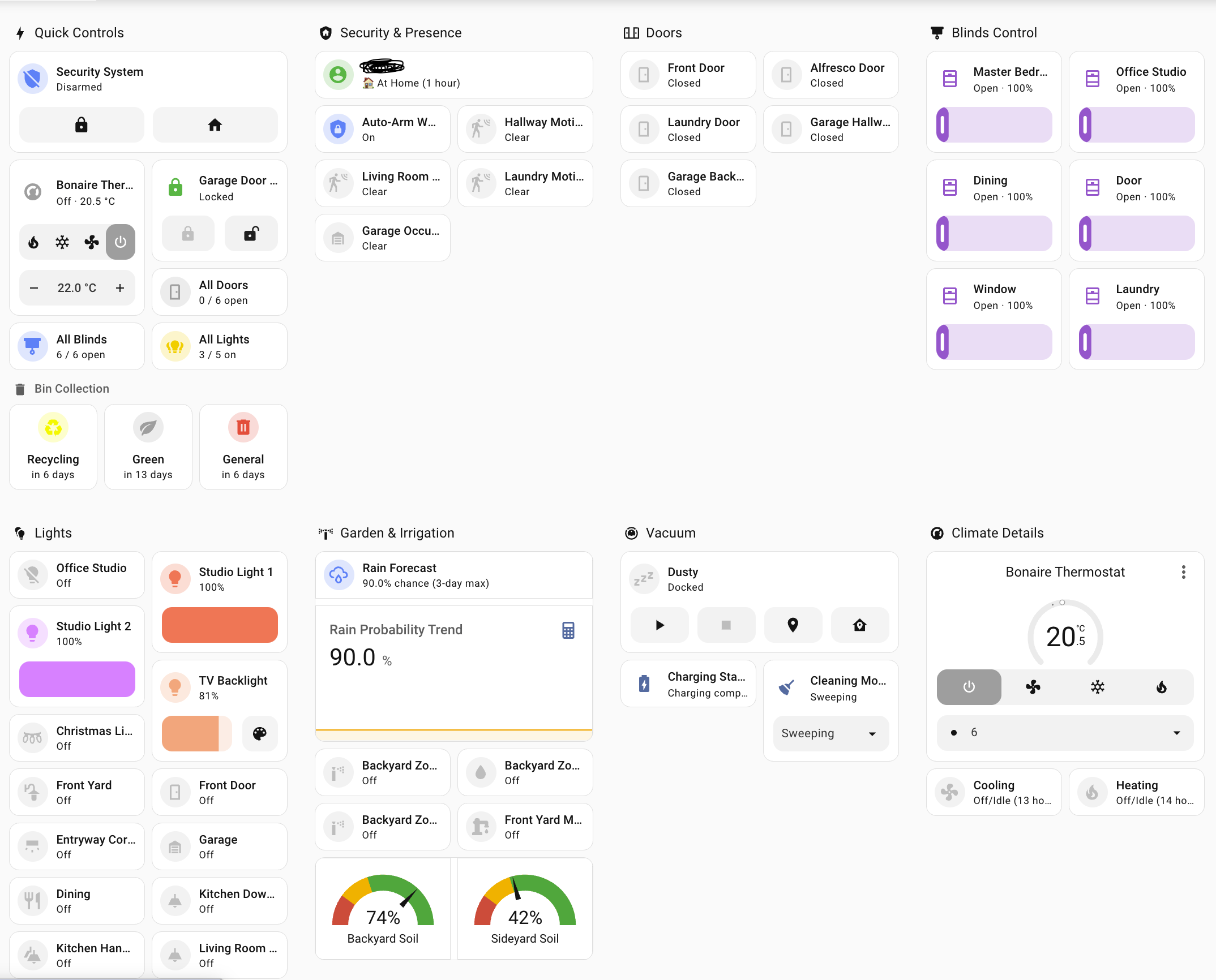 Example tablet-optimized dashboard built using this skill - touch-friendly controls, color-coded status, and responsive grid layout
Verify Claude can see and use this skill:
https://github.com/user-attachments/assets/a215df83-ce84-4ed2-bb93-f3a3ee0c43e8
Shows Claude recognizing the skill and loading Home Assistant expertise
Watch the complete workflow in action - end to end (3x speed):
https://github.com/user-attachments/assets/eab53b18-ae2b-4d43-b1e4-e45bf9357099
Complete automation development cycle including deployment, testing, log analysis, and git workflow
This Claude Code skill transforms Claude into a Home Assistant expert that helps you:
scp for instant testing, commit to git when stablehass-clitriggers:/conditions:/actions:, action: not service: — instead of the deprecated syntax LLMs tend to emitautomation.trigger-skips-conditions gotchamode: restart vs singleThey solve different problems, and they compose:
mcp_server integration or community ha-mcp) give Claude live tools — read entity state, call services, control devices. They don't teach Claude how to work on your config.Without the skill, an MCP-equipped Claude can flip your lights but will still happily restart HA on an unvalidated config or write deprecated automation YAML. Without MCP, the skill falls back to SSH/hass-cli. Together is best: the skill explicitly prefers MCP tools for live state and service calls when available.
/config directoryhass-cli installed (pipx install homeassistant-cli)HASS_SERVER, HASS_TOKENThis repo is also a self-hosted plugin marketplace, so you can install it with two slash commands — no manual cloning required:
/plugin marketplace add komal-SkyNET/claude-skill-homeassistant
/plugin install home-assistant-manager@claude-skill-homeassistant
Run these from anywhere — they install the plugin (and its skill) globally for Claude Code, so it's available whenever you open a Home Assistant config repo. Update later with /plugin marketplace update claude-skill-homeassistant followed by /plugin update home-assistant-manager.
cd /path/to/your/homeassistant/config
mkdir -p .claude/skills
cd .claude/skills
git clone git@github.com:komal-SkyNET/claude-skill-homeassistant.git home-assistant-manager-repo
ln -s home-assistant-manager-repo/skills/home-assistant-manager home-assistant-manager
cd /path/to/your/homeassistant/config
mkdir -p .claude/skills/home-assistant-manager
cd .claude/skills/home-assistant-manager
curl -L https://github.com/komal-SkyNET/claude-skill-homeassistant/archive/main.tar.gz | tar xz --strip-components=2 claude-skill-homeassistant-main/skills/home-assistant-manager
After installing via the plugin marketplace, run /plugin to confirm home-assistant-manager is listed and enabled. With the manual options, the skill should appear when you start Claude Code in your Home Assistant repository. Either way, Claude will automatically load the skill and apply the expertise.
User: "Create an automation that sends a notification when the front door
       is left open for more than 5 minutes"

Claude: [Uses skill to]:
1. Create automation YAML with proper syntax
2. Deploy via scp for testing
3. Reload automations (no restart needed)
4. Manually trigger to test
5. Check logs for execution
6. Verify notification received
7. Commit to git when working
User: "Create a dashboard for my 11-inch tablet in the living room
       with lights, thermostat, and door status"

Claude: [Uses skill to]:
1. Create new dashboard file in .storage/
2. Register in lovelace_dashboards
3. Use 3-column grid layout (optimal for 11")
4. Add Mushroom cards for touch-friendly controls
5. Create template card with door counting
6. Deploy via scp for instant preview
7. Iterate on layout based on feedback
8. Commit when finalized
User: "My automation has a TypeError about comparing str and int"

Claude: [Uses skill to]:
1. Check logs for exact error message
2. Identify template needs | int filter
3. Fix the template syntax
4. Deploy via scp
5. Trigger manually to verify
6. Check logs confirm no errors
7. Commit the fix
This skill provides expertise in three core areas:
hass-cli commands with environment variablesha CLI commandsWe welcome contributions from the Home Assistant community! This skill has been developed through real-world usage and we want to keep improving it.
🎯 Focus on Home Assistant-specific expertise:
✅ GOOD contributions:
❌ AVOID generic contributions:
Add to the "Common Template Patterns" section:
**Your Pattern Name:**
```jinja2
{% set entities = [...] %}
{{ your_template_logic }}
Use case: Explain when to use this Example output: Show what it produces
#### 2. Dashboard Card Examples

Add to "Real-World Examples":

```markdown
### Your Card Name
```json
{
  "type": "...",
  ...
}
Best for: Device type, use case Features: What makes this example useful
#### 3. Pitfall Solutions

Add to "Common Pitfalls":

```markdown
**Problem X: Brief description**
- **Symptom:** What the user sees
- **Cause:** Root cause explanation
- **Fix:** Step-by-step solution
If proposing workflow changes:
git checkout -b feature/your-contribution-nameskills/home-assistant-manager/SKILL.mdPRs are reviewed for:
claude-skill-homeassistant/
├── .claude-plugin/
│   ├── plugin.json       # Plugin manifest
│   └── marketplace.json  # Self-hosted marketplace listing this plugin
├── skills/
│   └── home-assistant-manager/
│       ├── SKILL.md              # Main skill content with YAML frontmatter
│       ├── dashboard.png
│       └── reference/
│           ├── automations.md    # Modern syntax, modes, blueprints, traces — on demand
│           └── dashboards.md     # Lovelace deep-dive, loaded on demand
├── README.md              # This file
└── LICENSE                # MIT License
This repo doubles as a Claude Code plugin and a self-hosted marketplace (see Installation), and the skill itself follows the official Claude skills specification:
SKILL.md contains YAML frontmatter with name and descriptionFor the skill to work optimally, ensure your environment has:
# Test SSH access
ssh root@homeassistant.local "ha core info"
# Install hass-cli
pipx install homeassistant-cli

# Set environment variables (add to ~/.bashrc or ~/.zshrc)
export HASS_SERVER=http://homeassistant.local:8123
export HASS_TOKEN=your_long_lived_access_token

# Test hass-cli
hass-cli state list
# Your HA config should be a git repository
cd /config
git init
git remote add origin your-repo-url

# Claude should be run from this directory
# Add Context7 for official HA documentation
claude mcp add --transport http context7 https://mcp.context7.com/mcp \
  --header "CONTEXT7_API_KEY: your_api_key"
MIT License - See LICENSE file for details.
Komal Venkatesh Ganesan
If you find this skill helpful for managing your Home Assistant setup, consider supporting its development:
claude-skillMade with ❤️ for the Home Assistant community
Sign in to join the discussion.
No comments yet. Be the first to say what this is good for.
An agentic skills framework & software development methodology that works.

Turn any codebase, with its docs, SQL schemas, configs, and PDFs, into a queryable knowledge graph. A /graphify skill for Claude Code, Cursor, Codex, and Gemini CLI: local deterministic AST parsing, every edge explained, no vector store.

Topic in, narrated explainer video out. A Claude Code / Codex skill that turns any topic into a black-canvas motion-graphics explainer video with TTS voiceover, subtitles and a chapter progress bar. Chinese or English; every frame drawn in code with Remotion.
Public repository for Agent Skills
Open-source AI job search: scan job portals, evaluate listings into a structured A-H report with a global 1-5 score, tailor your CV, track applications — runs locally in your AI coding CLI (Claude Code, Codex, OpenCode, Antigravity…)

Production-grade engineering skills for AI coding agents.