
JuliusBrussee/
caveman

🪨 why use many token when few token do trick — Claude Code skill that cuts 65% of tokens by talking like caveman
105k
1 add
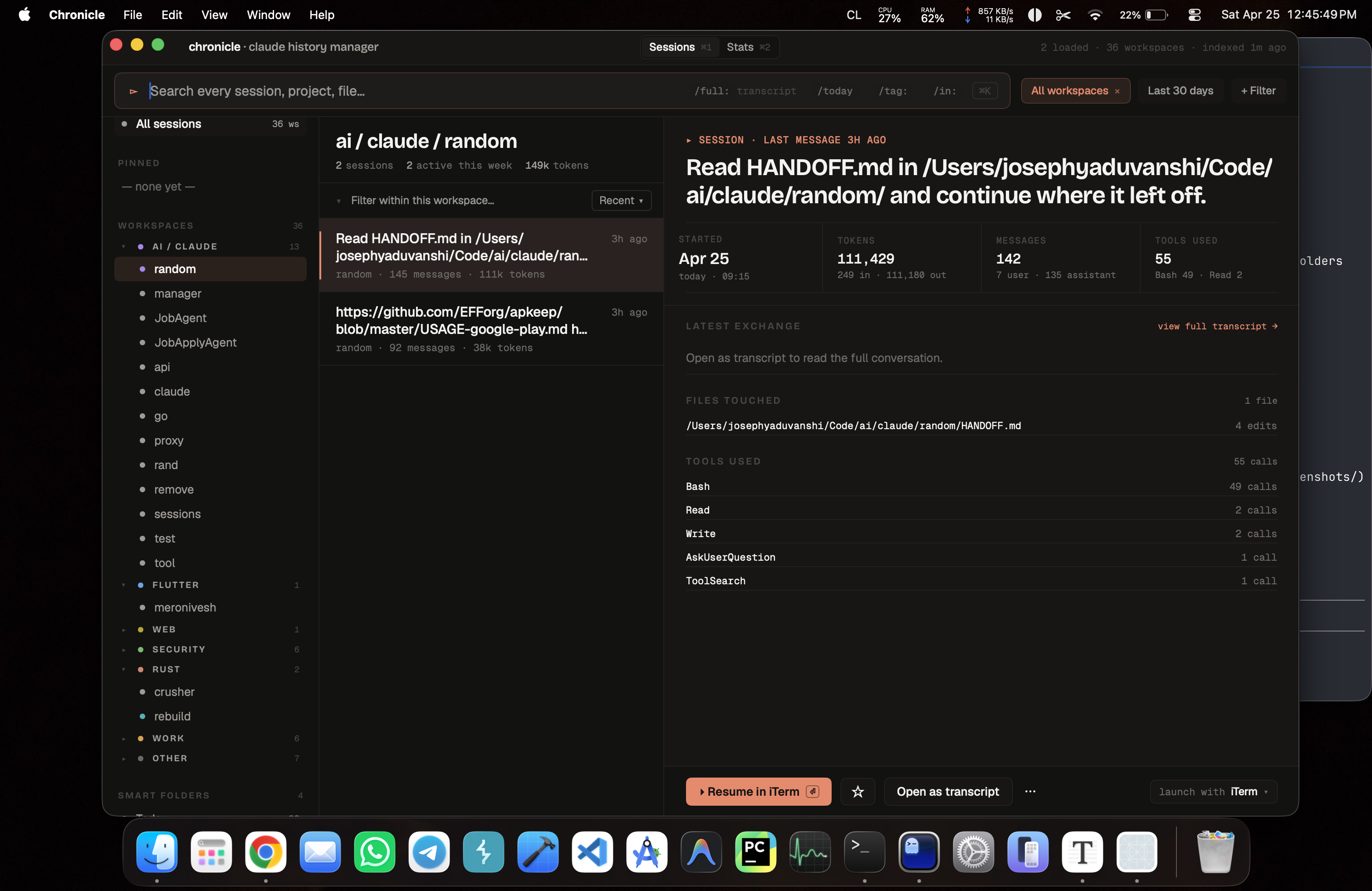
Chronicle reads session files from Claude Code, Codex CLI, and Gemini CLI, then indexes them into a local SQLite database for search and browsing. It shows sessions in a macOS app, with pins, tags, stats, and resume actions for terminal workflows.
Builders who want to search, organize, and reopen Claude Code, Codex CLI, or Gemini CLI sessions from a Mac.
You can find the right past session quickly and resume it in your terminal without digging through JSONL files.
Reads Claude Code JSONL, Codex JSONL, and Gemini session files directly from each provider's storage and stores the results in local SQLite.
Supports title search, full-text transcript search, tags, workspace filters, model filters, and date-based smart folders.
Lets you pin, tag, archive, rename, add notes, and move sessions to trash without changing the source transcript files.
Launches a selected session back into Claude, Codex, or Gemini in Ghostty, iTerm, Terminal.app, Alacritty, WezTerm, or kitty.
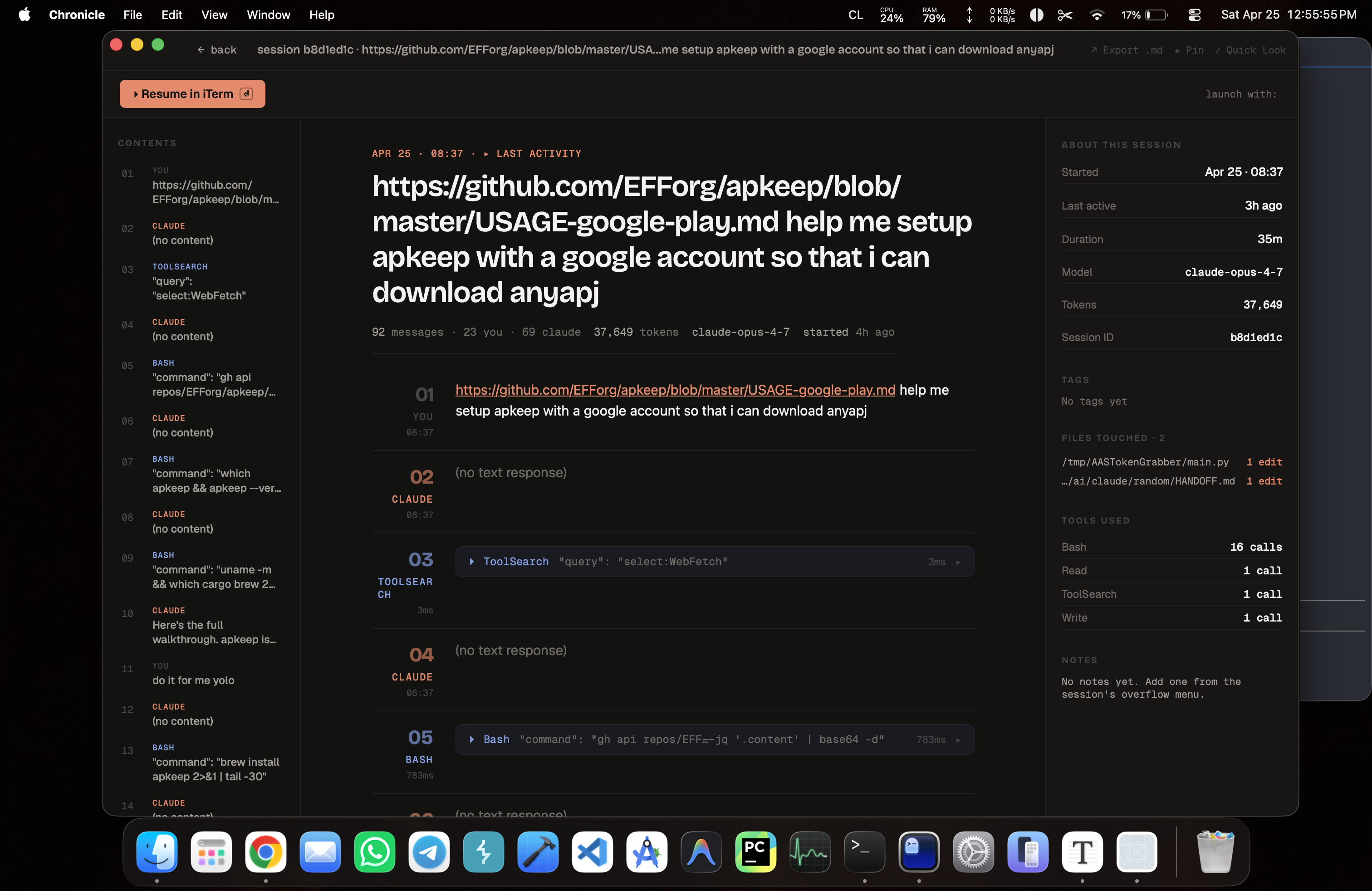
Shows rendered transcripts with collapsible tool calls, message navigation, and metadata like model, duration, tokens, and files touched.
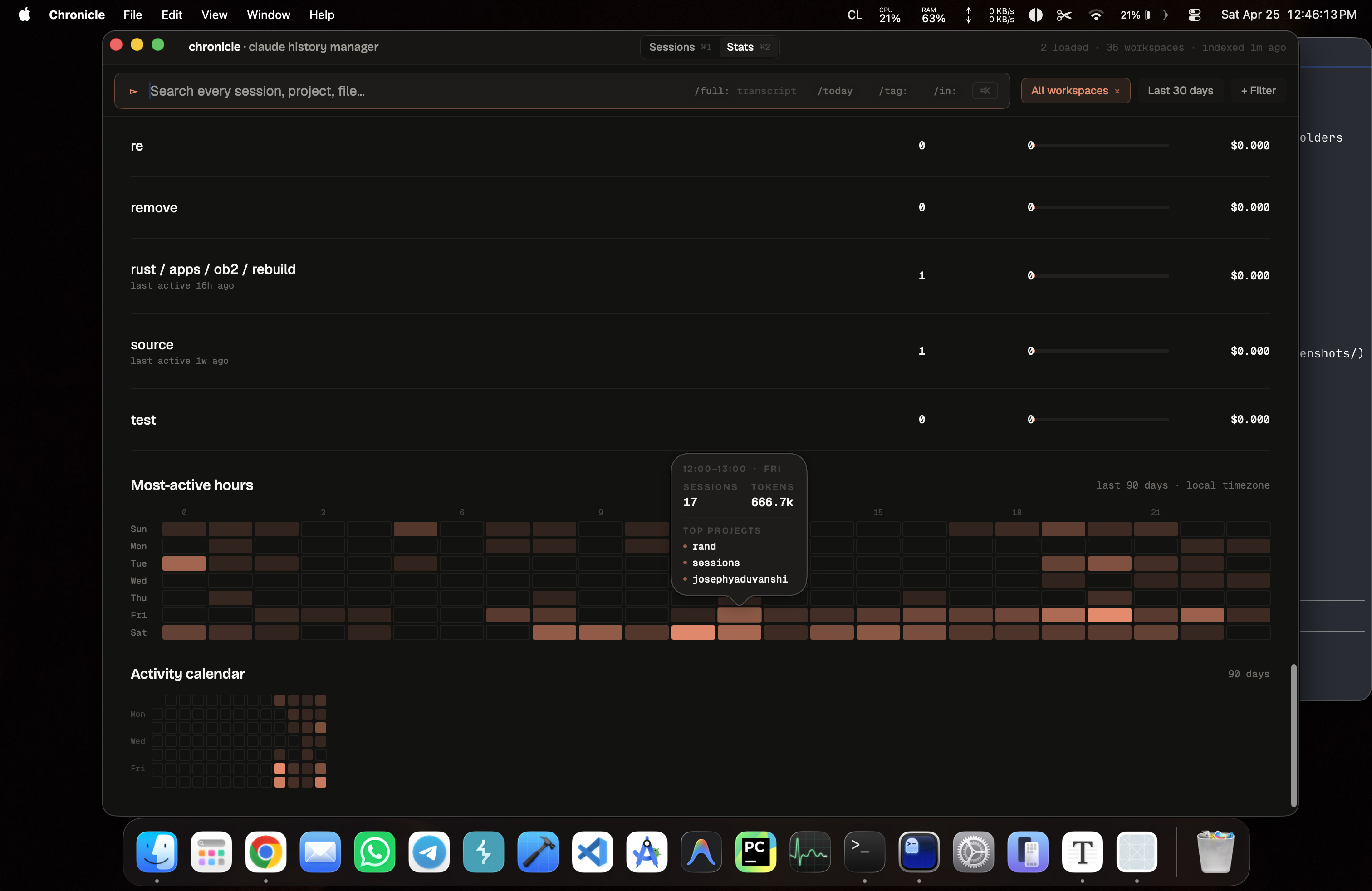
Includes per-project usage stats, token estimates, and activity heatmaps from the same local database.
Provides a global hotkey menubar dropdown for recent, live, and pinned sessions.
Syncs pins, tags, notes, custom titles, and smart folders through a JSON file in iCloud Drive while keeping transcripts local.
brew tap josephyaduvanshi/chronicle
brew install --cask chronicle
brew update                              # refreshes the tap; the tap auto-bumps on every release
brew upgrade --cask chronicle
brew install --cask chronicle --force # overwrites the manual install + registers it with brew
xattr -cr /Applications/Chronicle.app
xattr -cr /Applications/Chronicle.app
chronicle list                       # workspaces with session counts + last activity
chronicle sessions [-w <workspace>]  # sessions in a workspace, newest first
chronicle search "EXC_BAD_ACCESS"    # substring search across every transcript
chronicle show <session-id>          # print a transcript (use --format raw for JSONL)
A native macOS browser for your CLI coding-assistant session history — Claude Code, Codex CLI, and Gemini CLI.
Reads each provider's session storage directly. Per-provider data isolation. Indexes everything into local SQLite. Resumes any session in one keystroke.








If this saves you from grepping JSONL files at 1am, star the repo. Thanks.
Install • Linux CLI • First launch • How it works • Features • Privacy • Shortcuts • Configuration • FAQ • License
Three CLI coding assistants, three different transcript formats, all sitting in different corners of your home directory. Claude Code writes JSONL under ~/.claude/projects/. Codex CLI writes JSONL under ~/.codex/sessions/. Gemini CLI writes single JSON files under ~/.gemini/tmp/. After a few weeks of real use, those folders are unreadable, ungreppable, and the only way to find the session where you actually solved that one bug is to remember which workspace you were in and scroll through ls -lt. Chronicle reads all three, indexes every session into a local SQLite database, and gives you somewhere to actually look at them. Per-provider data isolation: switching providers swaps every list, count, and stat, so a Claude pin doesn't leak into your Codex sidebar. Pin the ones that matter. Tag the ones you're tracking. Resume any of them in one keystroke, in whichever terminal you prefer.
Transcripts never leave the Mac they were written on.
brew tap josephyaduvanshi/chronicle
brew install --cask chronicle
The cask handles the download, the drag into /Applications, and the Gatekeeper unquarantine step in one go. To update later:
brew update                              # refreshes the tap; the tap auto-bumps on every release
brew upgrade --cask chronicle
If you previously installed Chronicle by dragging the .app manually and now want Homebrew to take over, add --force:
brew install --cask chronicle --force # overwrites the manual install + registers it with brew
If brew install reports a 404 on the DMG, your local tap cache is stale — run brew update first.
Tap source: josephyaduvanshi/homebrew-chronicle.
For the lowest-friction install without Homebrew. Download Chronicle-<version>.pkg from the latest GitHub Release, double-click, follow the prompts. The installer drops Chronicle.app in /Applications/ and strips the Gatekeeper quarantine via a postinstall script. macOS will warn that the package isn't signed by an identified developer; right-click the .pkg and choose Open the first time.
Download Chronicle-<version>.dmg from the release page, mount it, drag Chronicle.app onto the Applications shortcut, then run:
xattr -cr /Applications/Chronicle.app
Grab Chronicle-<version>.zip from the latest GitHub Release.
Unzip and drag Chronicle.app into /Applications/.
Strip the Gatekeeper quarantine attribute so macOS will launch the ad-hoc-signed binary:
xattr -cr /Applications/Chronicle.app
Open Chronicle. The first launch indexes ~/.claude/projects/ (about 60 to 90 seconds for a few thousand sessions). If the sidebar stays empty, grant Full Disk Access in System Settings > Privacy & Security > Full Disk Access and relaunch.
If you skip the xattr step, Chronicle still launches but shows an in-app card with the same one-liner and a copy-to-clipboard button.
[!NOTE] Chronicle is ad-hoc signed, not notarized. Apple notarization needs a paid Developer ID ($99/year) which this project doesn't carry yet. The binary you download is bit-for-bit what the GitHub Actions workflow builds from
main, and the release page lists the SHA256 if you want to verify. See First launch on macOS below for exactly which dialogs you'll see and how to dismiss them once.
There's also a small companion chronicle CLI for Linux (and macOS) that reads the same ~/.claude/projects/ tree directly without the SQLite indexer. Useful on remote Linux dev boxes where the GUI app can't run.
# Pick the right architecture (x86_64 or aarch64). Replace 0.1.4 with the
# version you want from the releases page.
VERSION=0.1.4
ARCH=$(uname -m); case "$ARCH" in aarch64|arm64) ARCH=aarch64 ;; *) ARCH=x86_64 ;; esac

curl -fsSL "https://github.com/josephyaduvanshi/claude-history-manager/releases/download/v${VERSION}/chronicle-${VERSION}-linux-${ARCH}.tar.gz" \
  | tar xz -C /tmp
sudo install -m 0755 /tmp/chronicle /usr/local/bin/chronicle
chronicle --version
Verify the SHA256 if you want — the release page lists chronicle-<version>-linux-<arch>.tar.gz.sha256 next to each tarball.
The CLI exposes four commands:
chronicle list                       # workspaces with session counts + last activity
chronicle sessions [-w <workspace>]  # sessions in a workspace, newest first
chronicle search "EXC_BAD_ACCESS"    # substring search across every transcript
chronicle show <session-id>          # print a transcript (use --format raw for JSONL)
It's Foundation-only Swift, statically linked against the Swift stdlib, single-file. No daemon, no SQLite, no FTS index — it reads the JSONL files on demand and stays out of your way.
Chronicle is ad-hoc signed, not notarized. That's a one-time UX cost, not a quality cost. Here's exactly what each install method asks of you the first time, and never again.
| Install method | What macOS shows on first launch | What you do | What it costs you |
|---|---|---|---|
brew install --cask chronicle | Nothing — Homebrew runs the .pkg, the .pkg's postinstall strips the quarantine attribute on /Applications/Chronicle.app, and the app opens clean. | Just brew install --cask chronicle. | One Gatekeeper warning on the installer the very first time you run a .pkg from this project; future tap updates don't re-prompt. |
Download .pkg | "macOS cannot verify the developer of this package." | Right-click the .pkg → Open → Open in the second dialog. | One extra click. |
Download .dmg | "Apple could not verify Chronicle is free of malware." | Run xattr -cr /Applications/Chronicle.app in Terminal once, or right-click Chronicle.app → Open → Open. | One extra click or one shell command. |
Download .zip | Same as .dmg. | Same as .dmg. | Same. |
Why does this happen? Apple's Gatekeeper trusts binaries signed with a paid Developer ID and notarized by Apple's servers. Chronicle is signed with an ad-hoc key (no developer account on this project yet), so macOS asks you to confirm once that you trust the source. After that confirmation, the binary launches normally forever.
Privacy note. The Gatekeeper warning is not a malware detection — Apple just hasn't notarized this build. The app's source is in this repository, the GitHub Actions workflow at .github/workflows/release.yml builds the binary you download, and every release lists a .shasums file so you can verify the bytes if you care.
If you want zero-friction installs and are willing to spend $99/year, see issue #1 for the notarization roadmap.
Chronicle is a pure Swift Package. No Xcode project, no signing setup, no Brewfile. If you have a recent Xcode toolchain installed, you have everything you need.
git clone https://github.com/josephyaduvanshi/claude-history-manager.git
cd claude-history-manager
swift build -c release
.build/release/Chronicle
Running the raw binary works for hacking on it. For a real .app bundle (the kind macOS treats like a normal application, with a Dock icon and proper Info.plist), use the GitHub Actions workflow at .github/workflows/release.yml as a template, or copy the binary into a hand-rolled bundle alongside Resources/Info.plist.in.
Chronicle is a SwiftUI app on top of two boring layers. Parsers read each provider's transcript format. Claude and Codex use JSON Lines (one event per line); Gemini uses a single JSON file per session. The parser pulls out title, message count, token usage, model, tools used, and timestamps, then writes that into SQLite via GRDB. A file-system watcher reindexes only the files whose size or mtime actually changed, so a warm cache for 35 workspaces and 440 sessions reopens in around 75 milliseconds.
Full-text search hits an FTS5 virtual table that's built lazily the first time you type /full:. Everything else (the menubar, the stats dashboard, the heatmaps, the smart folders) runs against the same in-process SQLite handle. There's no daemon, no background process, no helper binary. When the app isn't running, nothing is running.
Bootstrap was originally 35 fsyncs (one per workspace). It's now 1 fsync inside a single SAVEPOINT, with workspace metadata cached and file_mtime stored as a REAL epoch with a 50ms tolerance window so we don't reparse files just because APFS rounded a timestamp differently.
Title search runs against indexed metadata for instant results. Type /full: error handling to drop into FTS5 transcript search. Combine filters with /today, /tag:client-work, /in:flutter, /model:opus, and free text in any order. The query bar parses left-to-right, so /in:rust /tag:bug panic means "Rust workspaces, tagged bug, with the word panic anywhere in the title".
Every provider stores sessions under a different layout. Claude Code uses ~/.claude/projects/ with the project path encoded as a folder name like -Users-you-Code-flutter-myapp. Codex writes rollouts to ~/.codex/sessions/<year>/<month>/<day>/rollout-*.jsonl and groups by each session's cwd. Gemini writes chats to ~/.gemini/tmp/<project-dir>/chats/session-*.json. Chronicle decodes all three back into real paths, then buckets each workspace into one of nine categories: AI/CLAUDE, FLUTTER, SECURITY, RUST, GO, PYTHON, WEB, WORK, OTHER. Each category gets its own hue in the sidebar and click-to-collapse headers, so the workspace list stays scannable even when you have 35 of them.
Built-in: Today, This week, Used git push, Errored sessions, Long sessions. You can also save any combined query as a custom folder. The combined filter takes workspace, tag, token range, date range, flags (pinned, archived, has-notes), and free text, all in one folder definition.
Right-click any session to pin it, tag it with a color hue, archive it, or move it to Trash with a 30-day undo window. Renaming sticks. Notes stick. Nothing is destructive without a confirmation, and nothing touches the underlying JSONL files.
Markdown-rendered conversation with Splash-highlighted code blocks, collapsible tool calls, and a TOC sidebar listing every message and tool call in the session. The right-hand metadata pane shows started-at, duration, model (the actual model — gpt-5.4, gemini-3-flash-preview, claude-sonnet-4-5, etc., not the API host), total tokens, files touched, and tools used. Files Touched is extracted from each provider's actual tool calls (Claude's Write/Edit, Codex's apply_patch and read-shaped exec_command, Gemini's write_file).
Per-project tokens and an estimated cost using the standard pricing tiers. An hour-by-weekday activity heatmap so you can see when you actually work. A 90-day calendar heatmap with hover popovers showing the top three workspaces and total tokens for each day. Both heatmaps are fed by the same in-process SQLite so they update without an extra query layer.
Resume in <Terminal> launches the selected session in Ghostty, iTerm, Terminal.app, Alacritty, WezTerm, or kitty. The launcher routes to the right CLI for the session's provider: claude --resume <uuid> for Claude, codex resume <uuid> for Codex (subcommand, not a flag), gemini --resume <uuid> for Gemini. Pick a default terminal in Settings, or override per-session from the action bar dropdown. The launcher uses the right invocation for each terminal (e.g. ghostty --working-directory=..., AppleScript for iTerm) and degrades gracefully if a terminal isn't installed.
Heads up: when you click "Resume in Ghostty", Ghostty pops a one-time-per-click "Allow Ghostty to execute ..." confirmation. That's a Ghostty security gate (discussion #10203) that can't be turned off in config. The other terminals don't have this prompt.
Open in <Editor> launches alongside the terminal: VS Code, Cursor, Zed, or Xcode. Detection resolves the installed .app bundle first, then falls back to a CLI shim on PATH. Same per-session override pattern as the terminal launcher.
Press ⌘⇧O from anywhere on the system. A 480px popover drops down from the menubar showing live, recent, and pinned sessions, with ⌘1 through ⌘9 to launch any visible row. The same global hotkey toggles it closed. ⌘⇧⏎ resumes the most-recently-modified session in your default terminal without opening any UI at all.
A green pulse marks sessions any of the three CLIs is currently writing to. Polled every two seconds against the watched directories for the active provider. Useful when you have three terminals running at once and need to figure out which one is the active conversation.
Pins, tags, archive flags, smart folders, custom titles, and notes sync via a single JSON file at ~/Library/Mobile Documents/com~apple~CloudDocs/Chronicle/chronicle-sync.json. Every record carries the provider it belongs to, so a Codex pin on Mac A doesn't show up under Claude on Mac B. Transcripts stay on the device they were generated on. The sync model is last-write-wins per record with a small per-tag merge so two of your own machines stay consistent. It is not designed for collaborative editing, which Chronicle doesn't support.
Press ⌘Y on any selected session for a 300x480 popover preview of the first ~40 lines of the transcript, no full window open. Same gesture as Finder's Quick Look. Esc dismisses.
Check for updates… in the app menu fetches the appcast from the latest GitHub Release and, if a newer version is available, downloads, verifies, and swaps the running bundle in place via Sparkle. Each release zip is signed with an EdDSA private key held only in CI; the matching public key is embedded in the app, so a tampered download fails verification and is rejected before it touches your /Applications folder. No background polling — the only outbound network call the app makes is the one you trigger by clicking that menu item.
Chronicle runs entirely on your Mac. The app reads ~/.claude/projects/, ~/.codex/sessions/, and ~/.gemini/tmp/ for session data, and writes a single SQLite database to ~/Library/Application Support/Chronicle/chronicle.sqlite. That's it. Transcripts are not uploaded, summarized, embedded, or sent to any external service.
When you turn iCloud sync on, Chronicle writes one file inside your iCloud Drive: ~/Library/Mobile Documents/com~apple~CloudDocs/Chronicle/chronicle-sync.json. That file contains tags, pin flags, archive flags, custom titles, notes, and smart-folder definitions. It does not contain transcripts, message bodies, file paths beyond the workspace name, or any session content. If you want to see exactly what's in there, open the file. It's plain JSON.
There is no telemetry, no crash reporter, no analytics, no "anonymous usage data". The only outbound network call the app makes is the GitHub Releases check, and only when you click Check for updates....
| Shortcut | Action |
|---|---|
⌘K | Focus the global search field |
⌘1 | Switch to the Sessions tab |
⌘2 | Switch to the Stats tab |
⌘Y | Quick Look the selected session |
⌘, | Open Settings |
⌘⇧O | Toggle the menubar dropdown from anywhere |
⌘⇧⏎ | Resume the most-recently-modified session in your default terminal |
↑ / ↓ | Move the selection in any list |
⏎ | Resume the selected session in the default terminal |
⌘⏎ | Open the terminal picker for the selected session |
⌘1-⌘9 (in menubar) | Launch the Nth visible row |
⎋ | Dismiss the menubar dropdown or any sheet |
Settings (⌘,) is grouped into four panes:
Appearance. Seven named themes, all with full custom palettes — not just light/dark inversions of the same base.
| Theme | Mode | Vibe |
|---|---|---|
| Dark Chronicle | dark | Default. Coral on near-black, the look you see in the screenshots above. |
| Github | light | GitHub Light feel. Blue accent, clean white surfaces. |
| Gothic | dark | Deep purple on near-black. Blood-red highlights. |
| Newsprint | light | Sepia and cream. Warm brown accent. Reads like a paperback. |
| Night | dark | True midnight blue. Cobalt accent. Cold and surgical. |
| Pixyll | light | Tufte-flavored white. Red accent. Sharp narrow rules. |
| Whitey | light | Near-monochrome. Coral accent stays. The minimal end of the spectrum. |
Plus eight coral accent presets and a custom color picker (these only apply to Dark Chronicle and Whitey, the two themes designed around coral). Three density modes: compact, comfortable, spacious. Density affects row height, padding, and the metadata pane's font size.
Sync. Toggle iCloud Drive sync on or off. Shows last-pull and last-push timestamps. Sync now forces a pull-then-push round trip. Surfaces the last error inline if a write failed (usually because iCloud Drive is paused or the user isn't signed in).
Terminal. Pick the default terminal for resume actions. Detects which of Ghostty, iTerm, Terminal.app, Alacritty, WezTerm, and kitty are installed and only shows the available ones.
Editor. Pick the default editor for Open in <Editor> actions: VS Code, Cursor, Zed, or Xcode. Same install-detection logic as Terminal.
Preferences live in UserDefaults under the chronicle.* keys. The SQLite database lives at ~/Library/Application Support/Chronicle/chronicle.sqlite. Removing the support folder gives you a clean re-index on next launch.
Chronicle uses SwiftUI features and font APIs (variable-font width and optical sizing on Font.custom) that ship in macOS 15. Backporting to 14 means rewriting the type system and dropping a few visual touches. macOS 15 has been out long enough to be widely adopted, so the trade isn't worth it. If you're not on macOS 15, this won't even launch.
Drag Chronicle.app from /Applications/ to the Trash, then remove the database and preferences:
rm -rf ~/Library/Application\ Support/Chronicle
defaults delete com.chronicle.app
If you turned on iCloud sync and want to wipe the cloud copy too, delete ~/Library/Mobile Documents/com~apple~CloudDocs/Chronicle/.
All on your Mac, in a few different places:
~/.claude/projects/, ~/.codex/sessions/, and ~/.gemini/tmp/ are the source-of-truth transcripts each CLI writes. Chronicle reads these but never writes to them.~/Library/Application Support/Chronicle/chronicle.sqlite is Chronicle's own index, plus your pins, tags, notes, custom titles, and smart-folder definitions. Every record carries which provider it belongs to so the three datasets stay separate.~/Library/Mobile Documents/com~apple~CloudDocs/Chronicle/chronicle-sync.json is only present if you turned on iCloud sync. Metadata only — no transcripts.No. Chronicle reads from ~/.claude/projects/, ~/.codex/sessions/, and ~/.gemini/tmp/, writes to its own Application Support folder, and shells out to launch terminals. None of that works under the App Sandbox. If a future App Store release happens, sandboxing is on the table; for now, the binary is plain and unsandboxed.
Yes. Toggle it on in Settings > Sync. Only metadata syncs (tags, pins, notes, custom titles, smart-folder definitions). Transcripts stay on the device they were generated on, because they live under each CLI's own folder and those CLIs write per-machine. Every synced record carries the provider it belongs to, so a Codex pin doesn't show up under Claude on the other Mac.
Notarization requires a paid Apple Developer ID ($99/year). This project doesn't have one yet. Until that changes, Chronicle ships ad-hoc signed and you'll need to run xattr -cr /Applications/Chronicle.app once on first install. The firs
Sign in to join the discussion.
No comments yet. Be the first to say what this is good for.
🪨 why use many token when few token do trick — Claude Code skill that cuts 65% of tokens by talking like caveman

The best-benchmarked open-source AI memory system. And it's free.

Orca is the ADE for working with a fleet of parallel agents. Run any coding agent with your own subscription. Available on desktop, mobile and remote runtime.

A cross-platform desktop All-in-One assistant for Claude Code, Codex, OpenCode, OpenClaw, Grok Build & Hermes Agent. Only official website: ccswitch.io

Never stop coding. Free MIT AI gateway: one endpoint, 352 providers (150+ free), 1200+ models Kimi, Claude, GPT, Gemini, GLM, DeepSeek, MiniMax. Works with Claude Code, Codex, Cursor, OpenCode, Cline & Copilot. Quota-aware auto-fallback, RTK+Caveman compression saves 15-95% tokens, MCP/A2A, Desktop/PWA. Built by 550+ contributors

Compress tool outputs, logs, files, and RAG chunks before they reach the LLM. 20% fewer tokens for coding agents, 60-95% fewer tokens for JSON, same answers. Library, proxy, MCP server.