🎨 Best DeepSeek Harness Design Plugin. The open-source Claude Design alternative. 🖥️ Local-first desktop app. 🖼️ Your coding agent becomes the design engine: prototypes, landing pages, dashboards, slides, images & video — real files, HTML/PDF/PPTX/MP4 export. 🤖 Claude Code / Codex / Cursor / DeepSeek Harness / OpenCode & 20+ CLIs via BYOK.
Galway bus tracker with Compose and SwiftUI
GalwayBus is a city bus tracking app built with Kotlin Multiplatform. It shares one Compose Multiplatform UI across Android, iOS, and Desktop, while the backend serves schedule and realtime transit data through Ktor.
Builders who want a real Kotlin Multiplatform app example with Android, iOS, and Desktop targets.
You can study a complete multiplatform transit app instead of piecing together separate platform samples.
What it does
Shared multiplatform UI
A single Compose Multiplatform interface is used across Android, iOS, and Desktop.
Live transit views
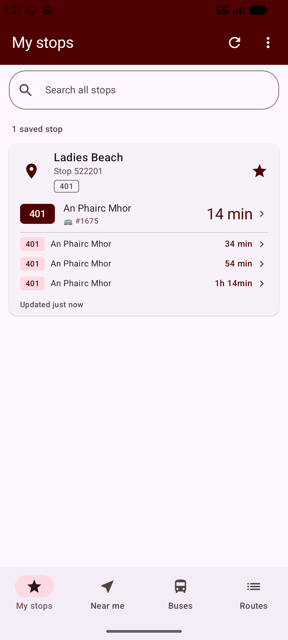
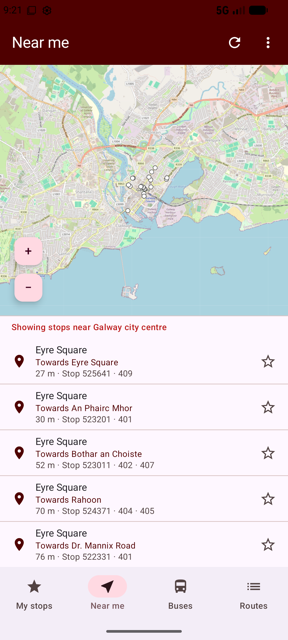
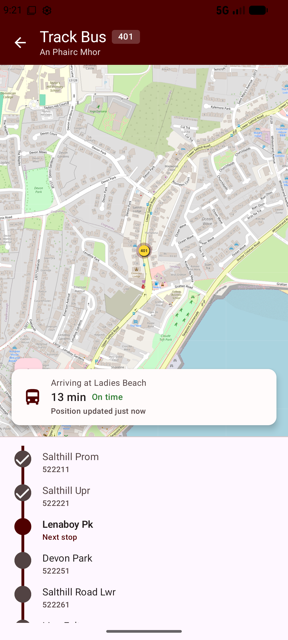
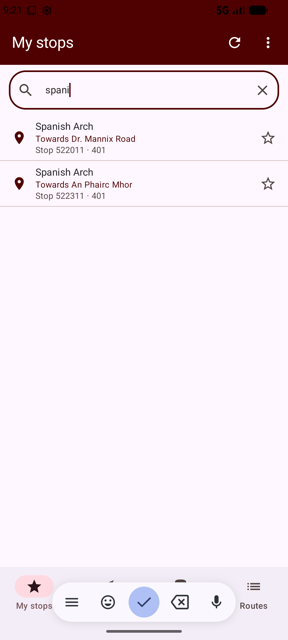
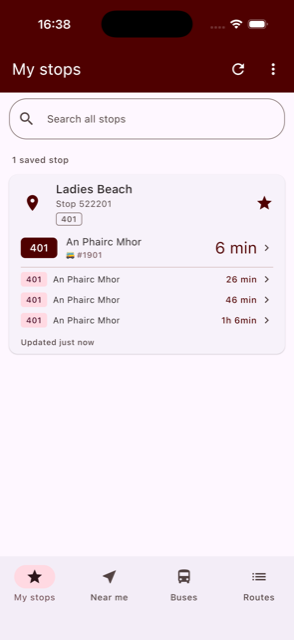
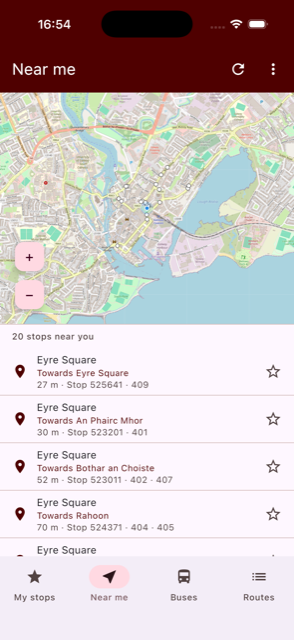
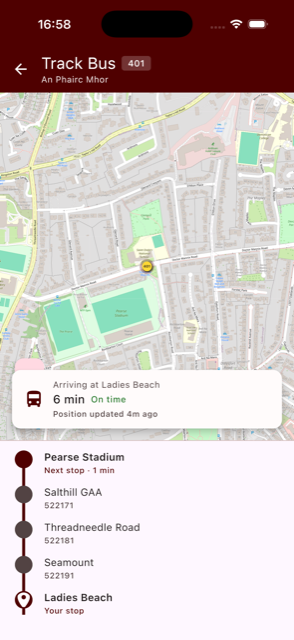
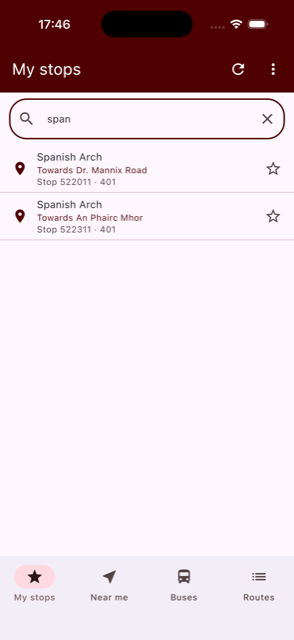
Shows saved-stop departures, nearby stops, live bus tracking, and network-wide stop search.
Ktor-backed data service
Uses a Ktor service to serve GTFS schedule data and GTFS-Realtime updates.
Platform entry points
Includes separate `androidApp` and `iosApp` entry points, with SwiftUI support mentioned in the iOS app.
Desktop and web targets
Includes `desktopApp` and `webApp` modules alongside the mobile apps.
README
GalwayBus
GalwayBus shows live bus times for Galway city: real-time departures for your saved stops, stops near you, live on-map bus tracking with a journey timeline, and network-wide stop search. A single Compose Multiplatform UI is shared across Android, iOS and Desktop (JVM), backed by a Ktor service that serves GTFS schedule and GTFS-Realtime data.
Screenshots
Android (Jetpack Compose)
![]() | ![]() | ![]() | |
| Saved stops | Near me | Live tracking | Stop search |
iOS (Compose Multiplatform)
![]() | ![]() | ![]() | |
| Saved stops | Near me | Live tracking | Stop search |
The same Compose Multiplatform UI also runs on Desktop (JVM).
Kotlin Multiplatform
This project also acted as an initial platform I used when starting to explore Kotlin Multiplatform capabilities. I also wrote a number of posts about some of my experiences using KMP in the project.
- SwiftUI meets Kotlin Multiplatform!
- Introduction to Multiplatform Persistence with SQLDelight
- Using Google Maps in a Jetpack Compose app
- Using Google Maps in a Jetpack Compose app - Part 2!
- Scanning bus stop codes with ML Kit and Vision in the GalwayBus Compose Multiplatform app
Code organisation
-
/iosApp contains an iOS application. Even if you’re sharing your UI with Compose Multiplatform, you need this entry point for your iOS app. This is also where you should add SwiftUI code for your project.
-
/shared is for code that will be shared across your Compose Multiplatform applications. It contains several subfolders:
- commonMain is for code that’s common for all targets.
- Other folders are for Kotlin code that will be compiled for only the platform indicated in the folder name. For example, if you want to use Apple’s CoreCrypto for the iOS part of your Kotlin app, the iosMain folder would be the right place for such calls. Similarly, if you want to edit the Desktop (JVM) specific part, the jvmMain folder is the appropriate location.
Running the apps
Use the run configurations provided by the run widget in your IDE's toolbar. You can also use these commands and options:
- Android app:
./gradlew :androidApp:assembleDebug - Desktop app:
- Hot reload:
./gradlew :desktopApp:hotRun --auto - Standard run:
./gradlew :desktopApp:run
- Hot reload:
- iOS app: open the /iosApp directory in Xcode and run it from there.
Running tests
Use the run button in your IDE's editor gutter, or run tests using Gradle tasks:
- Android tests:
./gradlew :shared:testAndroidHostTest - Desktop tests:
./gradlew :shared:jvmTest - iOS tests:
./gradlew :shared:iosSimulatorArm64Test
Full set of Kotlin Multiplatform / Compose / SwiftUI samples
- PeopleInSpace (https://github.com/joreilly/PeopleInSpace)
- GalwayBus (https://github.com/joreilly/GalwayBus)
- Confetti (https://github.com/joreilly/Confetti)
- BikeShare (https://github.com/joreilly/BikeShare)
- FantasyPremierLeague (https://github.com/joreilly/FantasyPremierLeague)
- ClimateTraceKMP (https://github.com/joreilly/ClimateTraceKMP)
- GeminiKMP (https://github.com/joreilly/GeminiKMP)
- MortyComposeKMM (https://github.com/joreilly/MortyComposeKMM)
- StarWars (https://github.com/joreilly/StarWars)
- WordMasterKMP (https://github.com/joreilly/WordMasterKMP)
- Chip-8 (https://github.com/joreilly/chip-8)
- FirebaseAILogicKMPSample (https://github.com/joreilly/FirebaseAILogicKMPSample)
- OnDeviceAI (https://github.com/joreilly/OnDeviceAI)
Files in the repo
- .github
- androidApp
- desktopApp
- fastlane
- gradle
- iosApp
- kotlin-js-store
- mcp-server
- screenshots
- shared
- webApp
- .gitignore
- build.gradle.kts
- debug.jks
- gradle.properties
- gradlew
- gradlew.bat
- README.md
- renovate.json
- settings.gradle.kts
Discussion (0)
Ask about usage, or say what you built with itSign in to join the discussion.
No comments yet. Be the first to say what this is good for.
More other
"Vibe-Trading: Your Personal Trading Agent"
OpenHuman is an open source personal AI for Mac, Windows and Linux — local-first memory, agent orchestration, and deep research.

Your Personal AI Assistant; easy to install, deploy on your own machine or on the cloud; supports multiple chat apps with easily extensible capabilities.
User-friendly AI Interface (Supports Ollama, OpenAI API, ...)
AIPOCH Open-Science is an open-source, local-first, model-agnostic AI research workbench for macOS, Windows, and Linux, with scientific agents, Python/R notebooks, data connectors, and reproducible provenance.


