
JuliusBrussee/
caveman

🪨 why use many token when few token do trick — Claude Code skill that cuts 65% of tokens by talking like caveman
105k
1 add
jc is a macOS window for orchestrating multiple Claude Code sessions across projects. It keeps each session’s notes, terminal, and layout together so you can send the next message, move to another session, and come back without reconstructing context.
Builders who use Claude Code across several projects and want a single session switcher.
You can keep Claude Code working in one project while you draft and switch to another without losing session context.
Shows every running session across projects in one picker, with markers for active, dormant, disabled, and new sessions.
Uses a project TODO.md with a `### WAIT` marker so you can draft the next instruction, then send it with Cmd-Enter.
Restores each session’s pane layout, cursor position, and terminal scrollback when you switch back.
Runs Claude Code in an embedded terminal inside the app window.
Lets you open project files, jump to symbols and headings, and search lines from inside the app.
Starts new sessions, resumes existing ones, and tracks session state in TODO.md and local config files.
# Build and run as macOS .app bundle
./make.sh

# Or run directly via cargo
cargo run -p jc-app

# Register a project directory
cargo run -p jc-app -- .
Orchestrate multiple Claude Code sessions across projects.
Draft, send, and switch — all from one window.




Why · Getting Started · Keybindings · Design · Architecture
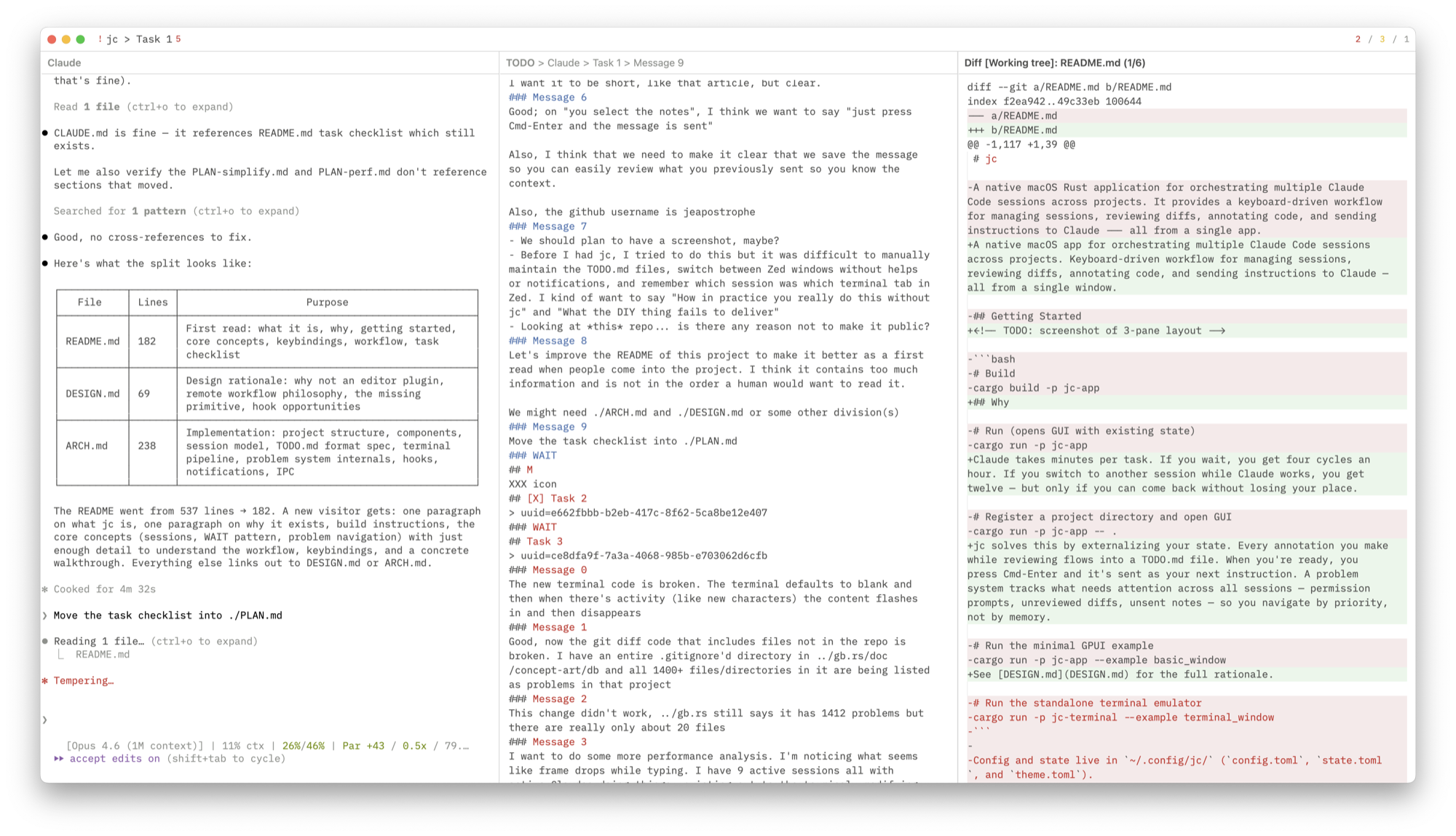
Claude takes minutes per task. If you wait, you get four cycles an hour. If you switch to another session while Claude works, you get twelve — but only if you can come back without losing your place.
jc keeps your place outside your head. Each session's notes live in the project's TODO.md, under a ### WAIT marker: you type the next instruction there whenever you think of it, and Cmd-Enter sends it and files it into the message log. Coming back to a session means reading what you already wrote, not reconstructing it.
Switching is cheap. Cmd-P lists every session in every project; each session keeps its own pane layout, cursor position, and terminal scrollback, restored on switch-back. A red * marks the sessions whose Claude terminal has printed something since you last had it on screen, so the picker tells you where the work moved while you were elsewhere. Desktop notifications stay out of the way — only a blocked session (permission prompt, API error) interrupts you, and only when jc isn't the front app.
See DESIGN.md for the full rationale.
# Build and run as macOS .app bundle
./make.sh

# Or run directly via cargo
cargo run -p jc-app

# Register a project directory
cargo run -p jc-app -- .
Config and state live in ~/.config/jc/ (config.toml, state.toml, theme.toml).
A project is a code repository registered with jc. Each project has one or more sessions — ongoing Claude Code conversations. Sessions are defined in the project's TODO.md:
# Claude
## Refactor auth module
> uuid=abc123-def456-...
### Message 0
first instruction sent to claude
### Message 1
second instruction
### WAIT
Notes for next message go here.
The ### WAIT marker separates what you've sent from what you're drafting. Everything below WAIT is draft text — jc never treats it as log, even if it contains a quoted ### Message N heading. When you send (Cmd-Enter), the draft becomes a numbered message and WAIT moves below it — so you have the recent history of what you asked.
The log is bounded: each send keeps the 25 most recent messages of that session and drops the rest, so a long-running session settles into a sliding window (### Message 76 through ### Message 100). jc applies the same bound to every session when it starts, so sessions you have not touched in a while get collected too; the first time it shortens a file it leaves a TODO.md.bak beside it.
One exception: truncation stops at a message still waiting on a @jc(...) scheduled send, so it can never cancel one. That session's log stays as long as it needs to until the send fires. Numbers are never reused, so a message keeps the number it was sent under. jc never sends TODO.md to Claude — messages are delivered to the session terminal and Claude resumes from its own transcript — so dropping old entries costs it no context.
jc mints the session UUID itself. A new session launches claude --session-id <uuid> under a freshly generated v4 UUID that is written to TODO.md at the same moment; existing sessions are resumed on startup with claude --resume <uuid>. If Claude has since garbage-collected a session's transcript, jc relaunches it with --session-id under the same UUID instead — you lose the conversation, but the heading, its message log, and its WAIT notes stay exactly where they were. /clear is handled transparently — the UUID in TODO.md is rewritten in place, with no terminal relaunch.
Per-session metadata lives on > lines under the heading. > uuid= and > last= are managed by jc; add > dangerous by hand to spawn that session's claude with --dangerously-skip-permissions (takes effect on next spawn). See ARCH.md for the full list.
The > uuid= line, not the heading text, is what identifies a session — everything jc writes into TODO.md is addressed by it. Rename a heading to whatever you like, and give two headings the same name if that is what you want; sends and scheduled deliveries still land on the right one.
The Cmd-P session picker marks each session with a single character:
| Marker | Meaning |
|---|---|
red * | This session's Claude terminal has printed output since you last had it on screen |
green > | The session you're on now |
yellow ~ | In TODO.md but not running — pick it to adopt |
grey ~ | Disabled ([D]) |
blue + | A registered project with no sessions yet |
Sessions sort activity-first, then by recency; the session you're on sorts last, since you're already there. The marker clears when you switch away from a session, so it always means "since you last had it on screen", and the session you're currently on never shows one.
The window has 1, 2, or 3 panes (Cmd-1/2/3). Any of the five views can go in any pane via Cmd-O.
| View | Description |
|---|---|
| Claude Terminal | Claude Code CLI in an embedded terminal. |
| General Terminal | Separate shell per session for running tests, inspecting output. |
| Code Viewer | Syntax-highlighted source with tree-sitter outline navigation. |
| TODO Editor | Markdown editor for session notes. Drafting area below WAIT, message history above. |
| Global TODO | View of ~/.claude/TODO.md. |
Per-session pane layouts are saved and restored on session switch.
Press Cmd-? for the in-app overlay.
| Key | Action |
|---|---|
| Cmd-1 / 2 / 3 | Set pane layout |
| Cmd-[ / ] | Focus previous / next pane |
| Cmd-O | Open picker (pane views + project files) |
| Cmd-Shift-O | Drill-down picker (symbols / TODO headings) |
| Cmd-P | Session picker (all projects) |
| Cmd-Shift-P | Project actions |
| Cmd-F | Search lines in current editor |
| Cmd-S | Save file |
| Cmd-Enter | Send draft below WAIT to the Claude terminal |
| Cmd-. | Jump to WAIT |
| Cmd-` | Next session (round-robin across all projects) |
| Cmd-Alt-↑/↓ | Scroll other pane by lines |
| Cmd-Alt-PageUp/PageDown | Scroll other pane by pages |
| Cmd-? | Keybinding help |
| Cmd-W / Cmd-M / Cmd-Q | Close window / minimize / quit |
| Key | Action | View |
|---|---|---|
| Cmd-R | Reload from disk | Code |
| Cmd-C / Cmd-V | Copy / Paste | Terminal |
| Cmd-= / - / 0 | Font size +/-/reset | Terminal |
| Key | Action |
|---|---|
| Enter | Confirm |
| Escape / Ctrl-C | Cancel |
| ↓ / Ctrl-N | Next |
| ↑ / Ctrl-P | Previous |
| PageDown / PageUp | Move 10 items |
| Cmd-Shift-Backspace | Toggle session disabled (session picker) |
### Message N, and stamps > last=.* in the picker.M = modified, R = recently opened), or jump straight to one of the five pane views.jc . from a repo to register a project. A second jc . routes to the running instance over the IPC socket.*), a brand-new session (+), and Claude transcripts on disk that TODO.md doesn't know about (~).[D] on a session's heading, so it stays in TODO.md but no longer starts with jc.PRs welcome. Preferably have your Claude open one against mine — I don't accept human-authored code.
Don't Wait for Claude — Article explaining the workflow philosophy behind jc
PLAN.md — Task checklist
DESIGN.md — Design principles, why not an editor plugin, remote workflow philosophy
ARCH.md — Implementation details: session lifecycle, terminal pipeline, hooks, TODO.md format
Sign in to join the discussion.
No comments yet. Be the first to say what this is good for.
🪨 why use many token when few token do trick — Claude Code skill that cuts 65% of tokens by talking like caveman

The best-benchmarked open-source AI memory system. And it's free.

Orca is the ADE for working with a fleet of parallel agents. Run any coding agent with your own subscription. Available on desktop, mobile and remote runtime.

A cross-platform desktop All-in-One assistant for Claude Code, Codex, OpenCode, OpenClaw, Grok Build & Hermes Agent. Only official website: ccswitch.io

Never stop coding. Free MIT AI gateway: one endpoint, 352 providers (150+ free), 1200+ models Kimi, Claude, GPT, Gemini, GLM, DeepSeek, MiniMax. Works with Claude Code, Codex, Cursor, OpenCode, Cline & Copilot. Quota-aware auto-fallback, RTK+Caveman compression saves 15-95% tokens, MCP/A2A, Desktop/PWA. Built by 550+ contributors

Compress tool outputs, logs, files, and RAG chunks before they reach the LLM. 20% fewer tokens for coding agents, 60-95% fewer tokens for JSON, same answers. Library, proxy, MCP server.