

DietrichGebert/ponytailPlugins
Makes your AI agent think like the laziest senior dev in the room. The best code is the code you never wrote.
138k
1 add
Claude Delegator is a Claude Code plugin that adds five specialist prompts and MCP connections for Codex or Gemini. Claude can send the right tasks to an architect, plan reviewer, scope analyst, code reviewer, or security analyst, then synthesize the result back into the conversation.
Builders who use Claude Code and want their agent to hand off architecture, review, and security questions to Codex or Gemini.
You can keep working in Claude Code while complex tasks get delegated to the right specialist automatically.
Provides architect, plan reviewer, scope analyst, code reviewer, and security analyst prompts.
Routes requests through MCP to Codex or Gemini instead of keeping everything inside Claude.
Supports advisory read-only analysis and workspace-write implementation work.
Uses trigger and model-selection rules so Claude can pick the right expert for the request.
Preserves chained task context with `threadId` so follow-up turns can continue the same work.
Includes dedicated commands to install and uninstall the plugin and its rules.
/plugin marketplace add jarrodwatts/claude-delegator
/plugin install claude-delegator
/claude-delegator:setup
claude mcp list
printf '{"jsonrpc":"2.0","id":"health","method":"initialize","params":{}}\n' | node ${CLAUDE_PLUGIN_ROOT}/server/gemini/index.jsGPT expert subagents for Claude Code. Five specialists that can analyze AND implement—architecture, security, code review, and more.

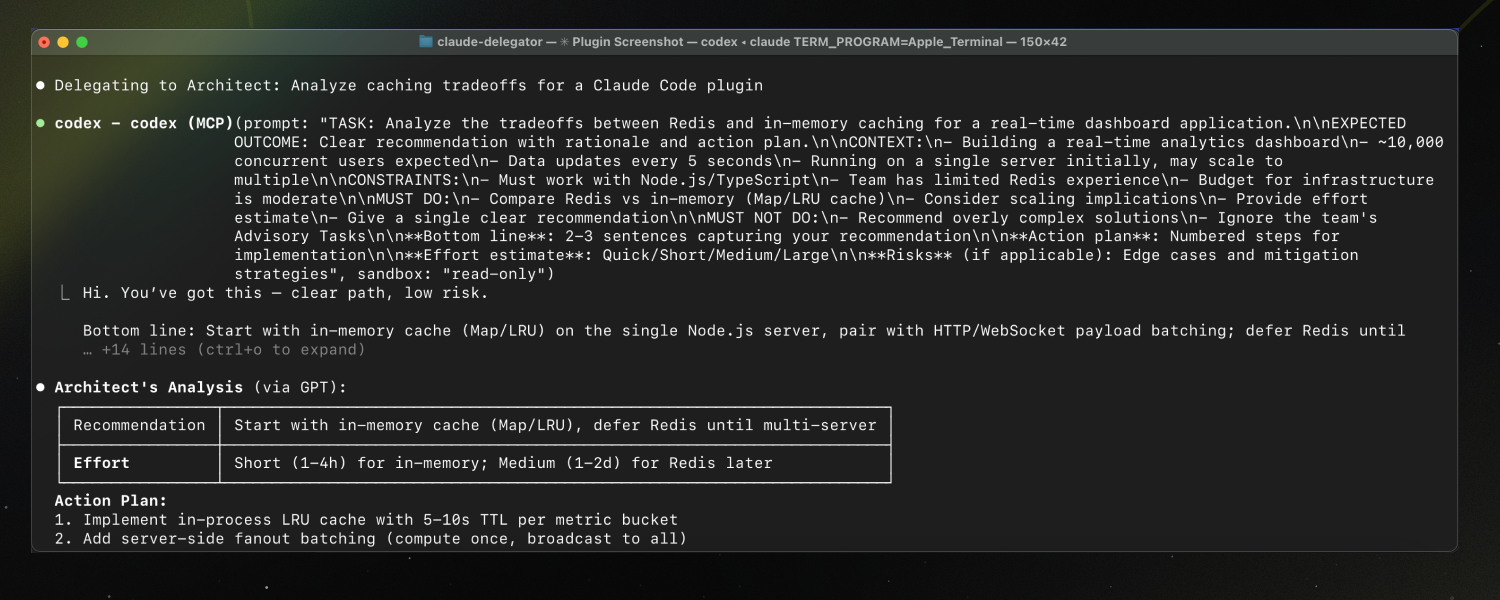
Inside a Claude Code instance, run the following commands:
Step 1: Add the marketplace
/plugin marketplace add jarrodwatts/claude-delegator
Step 2: Install the plugin
/plugin install claude-delegator
Step 3: Run setup
/claude-delegator:setup
Done! Claude now routes complex tasks to GPT experts automatically.
Note: Requires Codex CLI or Gemini CLI. Setup guides you through installation.
Claude gains a team of GPT and Gemini specialists via native MCP. Each expert has a distinct specialty and can advise OR implement.
Note: You can use either provider (GPT or Gemini), or both. The plugin will automatically detect which one is configured and route tasks accordingly.
| What You Get | Why It Matters |
|---|---|
| 5 domain experts | Right specialist for each problem type |
| GPT or Gemini | Use your preferred model provider |
| Dual mode | Experts can analyze (read-only) or implement (write) |
| Auto-routing | Claude detects when to delegate based on your request |
| Synthesized responses | Claude interprets expert output, never raw passthrough |
| Expert | What They Do | Example Triggers |
|---|---|---|
| Architect | System design, tradeoffs, complex debugging | "How should I structure this?" / "What are the tradeoffs?" |
| Plan Reviewer | Validate plans before you start | "Review this migration plan" / "Is this approach sound?" |
| Scope Analyst | Catch ambiguities early | "What am I missing?" / "Clarify the scope" |
| Code Reviewer | Find bugs, improve quality | "Review this PR" / "What's wrong with this?" |
| Security Analyst | Vulnerabilities, threat modeling | "Is this secure?" / "Harden this endpoint" |
You: "Is this authentication flow secure?"
                    ↓
Claude: [Detects security question → selects Security Analyst]
                    ↓
        ┌───────────────────────────────┐
        │  mcp__codex__codex            │
        │  (or mcp__gemini__gemini)     │
        │  → Security Analyst prompt    │
        │  → Expert analyzes your code  │
        └───────────────────────────────┘
                    ↓
Claude: "Based on the analysis, I found 3 issues..."
        [Synthesizes response, applies judgment]
Key details:
prompts/)threadId for chained tasksFor chained implementation steps, the expert preserves context across turns:
Turn 1: mcp__*__* → returns threadId
Turn 2: mcp__*__*-reply(threadId) → expert remembers turn 1
Turn 3: mcp__*__*-reply(threadId) → expert remembers turns 1-2
Use single-shot (codex or gemini only) for advisory tasks. Use multi-turn for implementation chains and retries.
Every expert supports two modes based on the task:
| Mode | Sandbox | Use When |
|---|---|---|
| Advisory | read-only | Analysis, recommendations, reviews |
| Implementation | workspace-write | Making changes, fixing issues |
Claude automatically selects the mode based on your request.
Set global defaults in ~/.codex/config.toml instead of passing parameters on every call:
sandbox_mode = "workspace-write"
approval_policy = "on-failure"
Per-call parameters override these defaults. See Codex CLI docs for all config options.
If /setup doesn't work, register the MCP server(s) manually:
# For Codex (GPT)
# Idempotent: safe to rerun
claude mcp remove codex >/dev/null 2>&1 || true
claude mcp add --transport stdio --scope user codex -- codex -m gpt-5.3-codex mcp-server

# For Gemini
# Idempotent: safe to rerun
claude mcp remove gemini >/dev/null 2>&1 || true
claude mcp add --transport stdio --scope user gemini -- node ${CLAUDE_PLUGIN_ROOT}/server/gemini/index.js
Verify with:
claude mcp list
printf '{"jsonrpc":"2.0","id":"health","method":"initialize","params":{}}\n' | node ${CLAUDE_PLUGIN_ROOT}/server/gemini/index.js
Expert prompts live in prompts/. Each follows the same structure:
Edit these to customize expert behavior for your workflow.
You need at least one of the following providers configured:
npm install -g @openai/codexnpm install -g @google/gemini-cliAuthentication:
codex logingemini once and complete the sign-in flow (or set GOOGLE_API_KEY)| Command | Description |
|---|---|
/claude-delegator:setup | Configure MCP server and install rules |
/claude-delegator:uninstall | Remove MCP config and rules |
| Issue | Solution |
|---|---|
| MCP server not found | Restart Claude Code after setup |
| Provider not authenticated | Codex: run codex login. Gemini: run gemini once to complete sign-in (or set GOOGLE_API_KEY) |
| Tool not appearing | Run claude mcp list and verify registration |
| Expert not triggered | Try explicit: "Ask GPT to review..." or "Ask Gemini to review..." |
git clone https://github.com/jarrodwatts/claude-delegator
cd claude-delegator

# Test locally without reinstalling
claude --plugin-dir /path/to/claude-delegator
See CONTRIBUTING.md for guidelines.
Expert prompts adapted from oh-my-opencode by @code-yeongyu.
MIT — see LICENSE
Sign in to join the discussion.
No comments yet. Be the first to say what this is good for.
Makes your AI agent think like the laziest senior dev in the room. The best code is the code you never wrote.

Graphs that teach > graphs that impress. Turn any code into an interactive knowledge graph you can explore, search, and ask questions about. Works with Claude Code, Codex, Cursor, Copilot, Gemini CLI, and more.

OmO: Just type "mass ulw" keyword with your prompt. Now you are the master of graph engineering.
Persistent Context Across Sessions for Every Agent – Captures everything your agent does during sessions, compresses it with AI, and injects relevant context back into future sessions. Works with Claude Code, OpenClaw, Codex, Gemini, Hermes, Copilot, OpenCode + More
Opinionated Oxlint rules for rejecting low-evidence TypeScript and JavaScript patterns
Teams-first Multi-agent orchestration for Claude Code