
obra/
superpowers

obra/superpowersSkills
An agentic skills framework & software development methodology that works.
285k
1 add
HyperShots gives your agent a repeatable way to build App Store screenshot sets from a brief. It scaffolds panel HTML, renders deterministic frames and text, translates per locale, and validates the final PNGs against store rules.
Builders who want Claude Code or Codex to create App Store screenshot sets from a brief.
You can ship store-ready screenshot PNGs without hand-tuning every frame, locale, and size.
Renders device frames, canvases, fonts, and text with HTML/CSS and headless Chrome so the pixel geometry stays exact.
Extracts strings with `data-i18n`, injects them atomically, and auto-fits headlines so translated panels keep the same layout.
Generates cutout sticker assets and can apply a protected style grade while keeping frames and text pixel-exact.
Checks dimensions, alpha, ICC profile, and panel count before upload so rejected assets are caught locally.
Creates an App Store-style review page and outputs PNGs in the folder structure used by fastlane deliver.
npx skills add hypersocialinc/hypershots
Beautiful App Store screenshots — perfect to spec, shipped end to end. Deterministic HTML where Apple has rules, generative AI where it sells.
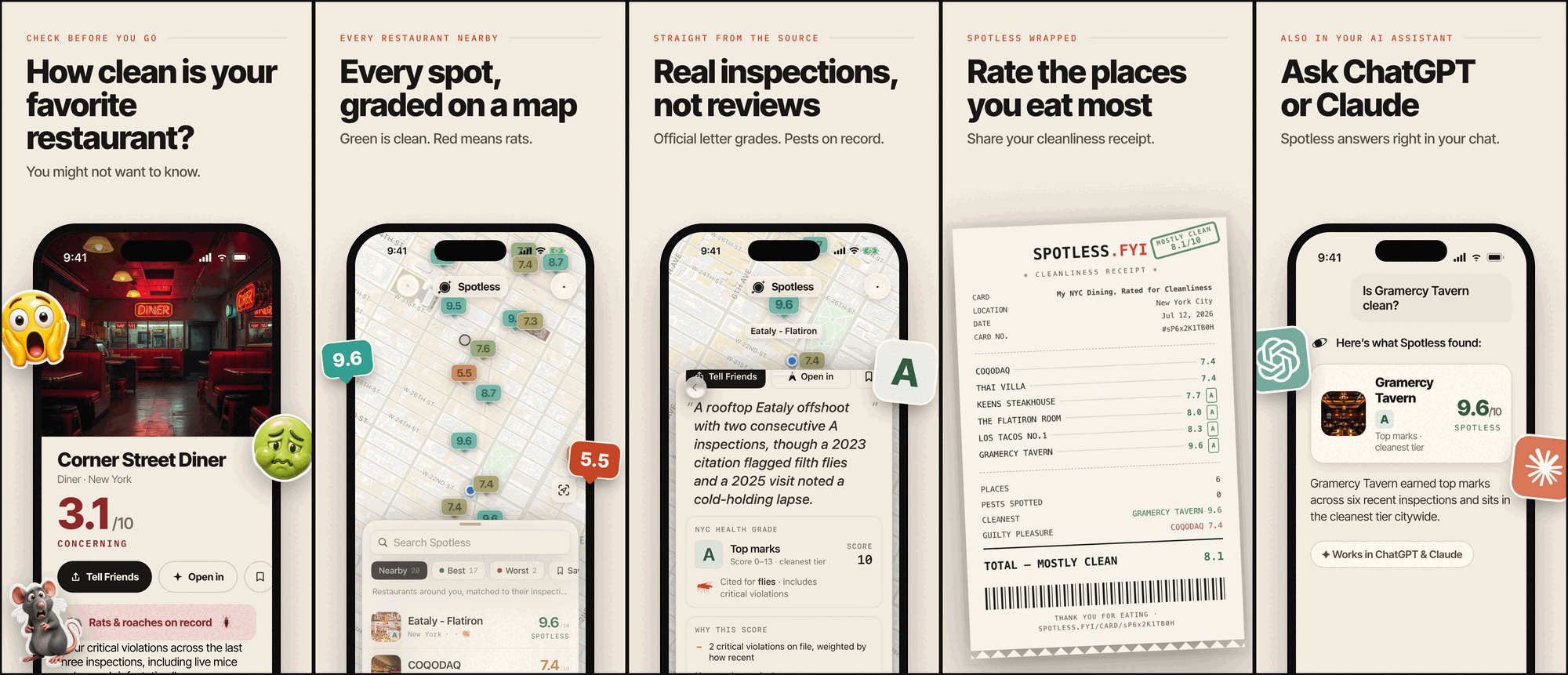
This set was submitted to the App Store with Spotless v1.0 (July 2026).
npx skills add hypersocialinc/hypershots
One command — it detects your agent (Claude Code, Codex & friends) and installs interactively. Non-interactive/CI form: add --skill hypershots --agent claude-code (or --agent codex; the skill ships agents/openai.yaml).
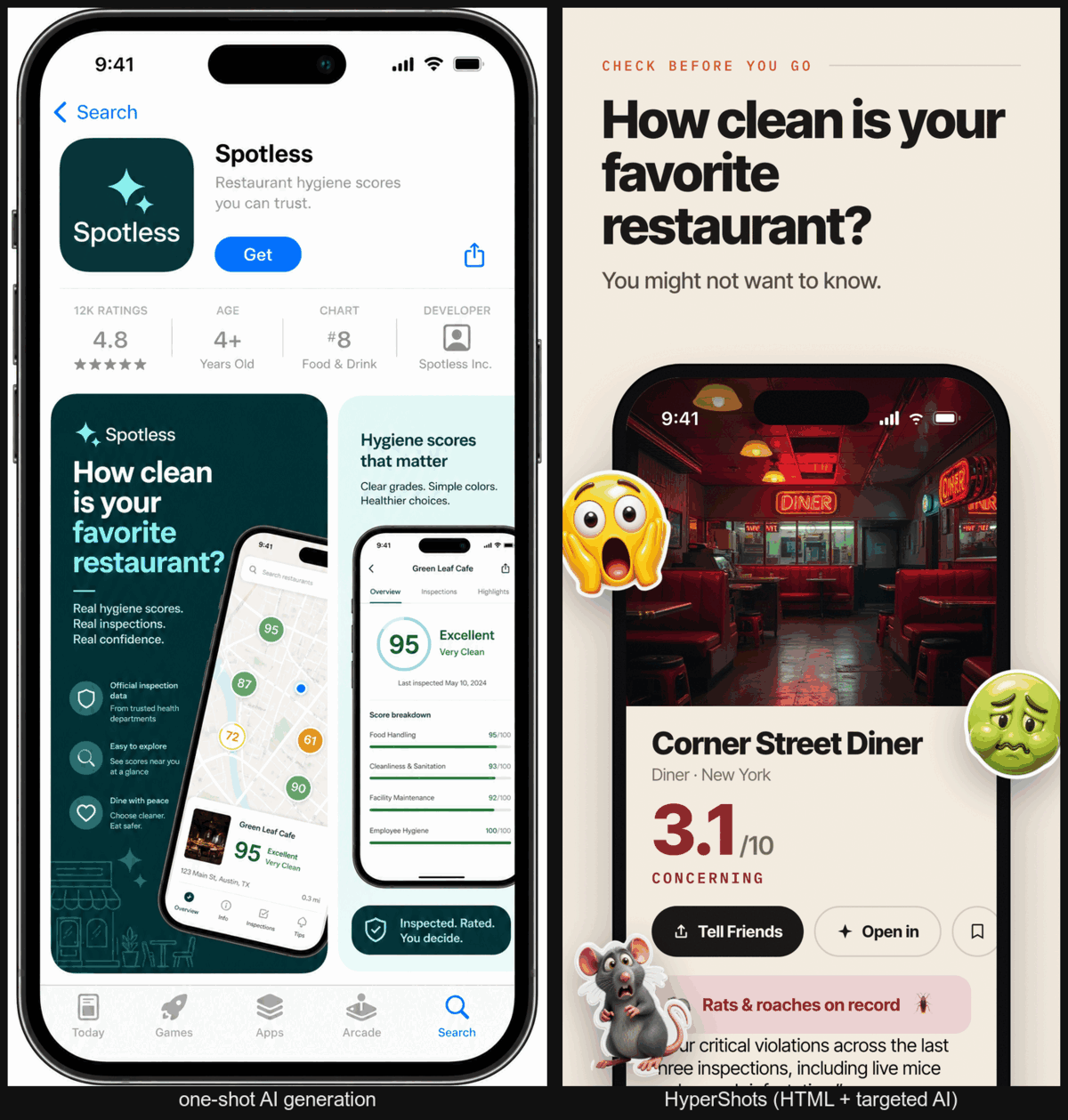
Device frames and store canvases are pure geometry — an agent expresses them perfectly in CSS arithmetic, while an image model only approximates them: asked for a marketing panel, one-shot generation drew a picture of the App Store, with warped nested frames, melted small text, and a 1024×2048 canvas Apple doesn't accept. HyperShots is deterministic everywhere Apple has rules — frame, fonts, copy, exact pixels, locales — and generative only where it helps: cutout sticker assets and an optional style grade. The half you must get right is arithmetic; the half that sells is the only part left to the model.
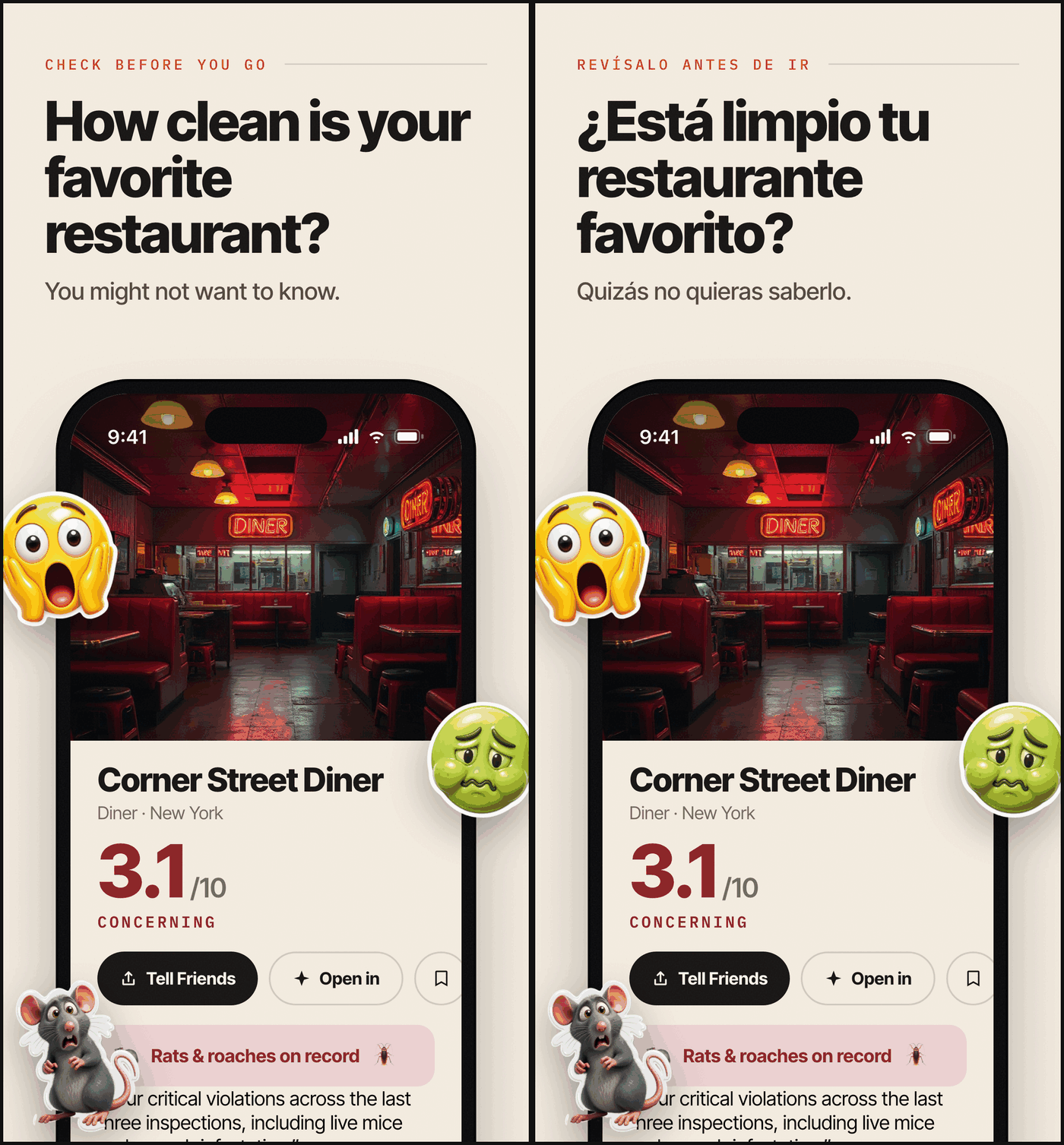
One command per locale: string extraction via data-i18n markers, atomic injection (missing or unused keys are fatal), auto-fit headlines that shrink until they clear the device — same layout, translated copy, re-validated output.
$ npx skills add hypersocialinc/hypershots --skill hypershots --agent claude-code

you>  Make App Store screenshots for my app. Captures are in ./captures.

agent> bash <skill>/scripts/scaffold.sh .shots
       # asks the brief questionnaire: positioning, panel count,
       # headlines, stickers, device profile, locales — then authors
       # bespoke panel HTML and a theme layer from your brand

agent> bash <skill>/scripts/render.sh .shots iphone-6.9 en
       rendered panel-1 -> .shots/out/iphone-6.9/en/panel-1.png (target 1290x2796)
       ...
       OK: 5 panels rendered for iphone-6.9/en

agent> bash <skill>/scripts/validate.sh .shots iphone-6.9 en
       PASS panel-1.png 1290x2796 alpha:no profile:ok
       PASS panel-2.png 1290x2796 alpha:no profile:ok
       PASS panel-3.png 1290x2796 alpha:no profile:ok
       PASS panel-4.png 1290x2796 alpha:no profile:ok
       PASS panel-5.png 1290x2796 alpha:no profile:ok
       VALIDATED: 5 panels, 1290x2796, store-compliant

agent> node <skill>/scripts/make-review.mjs .shots
       # opens an App Store-style review page — give feedback by panel number
The rendered PNGs in out/ upload to App Store Connect as-is.
| Deterministic (HTML/CSS + headless Chrome) | Generative (opt-in, via genmedia/fal.ai) |
|---|---|
| Device frame geometry (Dynamic Island, bezels, screen aspect) | Cutout sticker assets: GPT Image 2 → BiRefNet v2 background removal → transparent PNG |
Vendored fonts (@font-face, no network race) | Photographic backgrounds |
| Exact store canvas from per-profile CSS variables | Optional whole-panel style grade (GPT Image 2 edit, set-consistent via a style anchor) |
Per-locale copy with data-i18n markers + auto-fit | Protected mode: frame and text regions are masked, then re-composited from the clean render — AI never ships your typography |
validate.sh: dimensions, alpha, ICC profile, panel count |
| Device class | Exact px (portrait) | Notes |
|---|---|---|
| iPhone 6.9″ | 1290×2796 or 1320×2868 | The only required iPhone size; Apple auto-scales it down. Default profile. |
| iPhone 6.5″ | 1284×2778 or 1242×2688 | Legacy slot, still accepted (the Spotless set shipped it). |
| iPad 13″ | 2064×2752 or 2048×2732 | Required only if the app ships an iPad build. |
Plus the asset rules: PNG, flattened (no alpha), untagged or sRGB ICC, max 10 per device size per localization — validate.sh checks all of it after every render, so a set that renders green cannot be rejected for asset specs.
.strings); no bespoke panel layout, generated assets, or spec validation.What no surveyed tool combines: a hard validator (dimensions, alpha, ICC, count — enforced, not documented), translate mode with auto-fit as a first-class gear, the cutout-sticker pipeline (generate → background-removal → transparent PNG), and the protected style grade (mask + re-composite, so graded panels keep pixel-exact frames and text).
FAL_KEY — optional and consent-gated: only generated assets and the style grade need it. Everything else works without any AI at all.references/store-specs.md; good first PR.transparent-video for the alpha-video bridge.How do I capture the app screenshots that go inside the frame?
That's upstream of HyperShots — use fastlane snapshot or your simulator tooling, then point the brief at the captures.
How do I upload the finished set?
fastlane deliver — and the skill ships the runbook: skills/hypershots/references/fastlane-deliver.md (out/ → fastlane/screenshots/ mapping, the working lane, the first-version gotchas). HyperShots produces exactly the assets a deliver lane consumes (out/<profile>/<locale>/panel-*.png).
Can I use it without any AI? Yes. The deterministic half is standalone: bring your own PNGs or plain emoji instead of generated stickers, skip the style grade, and nothing ever needs a fal key.
License? MIT. Vendored fonts (Inter Tight, IBM Plex Mono) are SIL OFL 1.1.
MIT © 2026 HyperSocial Incorporated · fonts under the SIL Open Font License 1.1
Sign in to join the discussion.
No comments yet. Be the first to say what this is good for.
An agentic skills framework & software development methodology that works.

Turn any codebase, with its docs, SQL schemas, configs, and PDFs, into a queryable knowledge graph. A /graphify skill for Claude Code, Cursor, Codex, and Gemini CLI: local deterministic AST parsing, every edge explained, no vector store.

Topic in, narrated explainer video out. A Claude Code / Codex skill that turns any topic into a black-canvas motion-graphics explainer video with TTS voiceover, subtitles and a chapter progress bar. Chinese or English; every frame drawn in code with Remotion.
Public repository for Agent Skills
Open-source AI job search: scan job portals, evaluate listings into a structured A-H report with a global 1-5 score, tailor your CV, track applications — runs locally in your AI coding CLI (Claude Code, Codex, OpenCode, Antigravity…)

Production-grade engineering skills for AI coding agents.