

JuliusBrussee/
caveman

🪨 why use many token when few token do trick — Claude Code skill that cuts 65% of tokens by talking like caveman
105k
1 add
This project tracks Claude Code and Codex activity as it happens, then shows it in a web dashboard with analytics, kanban boards, timelines, alerts, and live transcripts. The data flows from native hooks into an Express and SQLite backend, then out to the React UI over WebSockets.
Builders who use Claude Code, Codex, or Cursor and want a shared view of agent activity.
You can see what your agents are doing live instead of piecing it together from scattered logs.
Records agent sessions, tool usage, and subagent orchestration as events arrive.
Shows agents and sessions by status in board views with filters and live updates.
Displays token usage, tool frequency, activity heatmaps, and chronological event timelines.
Sends browser notifications, sound cues, and webhook alerts for events and stuck activity.
Lets you inspect and edit Claude Code and Codex configs, skills, rules, hooks, and plugins.
Includes a local MCP server plus plugins, skills, and subagents for dashboard actions.
Packages the app for macOS and Windows and includes Docker, Kubernetes, Helm, and Terraform files.
git clone https://github.com/hoangsonww/Claude-Code-Agent-Monitor.git
cd Claude-Code-Agent-Monitor
npm run setup
npm run install-hooks
# Development (hot reload on both server and client)
npm run dev

# Production (single process, built client)
npm run build && npm start
npm run mcp:start              # stdio (default — for MCP host integration)
npm run mcp:start:http         # HTTP + SSE server on port 8819
npm run mcp:start:repl         # interactive CLI with tab completion
ccam mcp stdio                 # stable launcher used by bundled plugins
npm run seed
npm run desktop:install        # install Electron + electron-builder into desktop/ (preflights native deps; prints setup help on failure)
npm run desktop:dmg:arm64      # macOS: fast single-arch DMG (Apple Silicon)
npm run desktop:win            # Windows: NSIS installer .exe (run on Windows)
A professional dashboard to track and visualize your Claude Code and Codex agent sessions, tool usage, and subagent orchestration in real-time. Built with Node.js, Express, React, and SQLite, it integrates directly with Claude Code and Codex via their native hook systems for seamless session tracking and analytics.
































































[!TIP] See also: README-CN.md (中文版本), README-VN.md (Phiên bản tiếng Việt), README-KO.md (한국어 버전), and README-ES.md (versión en español) for localized documentation with region-specific tips and best practices.
[!NOTE] Need task-first help? The GitHub Wiki is the practical handbook for everyday use, team operations, troubleshooting, CLI/MCP automation, and deployment recipes. The localized static Wiki remains the English, Vietnamese, Chinese, Korean, and Spanish product and architecture tour; exact technical contracts stay in
docs/.
Track sessions, monitor agents in real-time, visualize tool usage, and observe subagent orchestration through a professional dark-themed web interface. Integrates directly with Claude Code & Codex via their native hook systems.
graph LR
    A["Claude Code<br/>Session"] -->|hooks fire on<br/>tool use / stop| B["Hook Handler<br/>(Node.js script)"]
    B -->|HTTP POST| C["Dashboard Server<br/>(Express + SQLite)"]
    C -->|WebSocket<br/>broadcast| D["Dashboard UI<br/>(React + Tailwind)"]
    style A fill:#6366f1,stroke:#818cf8,color:#fff
    style B fill:#1a1a28,stroke:#2a2a3d,color:#e4e4ed
    style C fill:#1a1a28,stroke:#2a2a3d,color:#e4e4ed
    style D fill:#10b981,stroke:#34d399,color:#fff
In addition to the real-time monitoring dashboard, it also includes a local MCP server implementation in mcp/ that exposes a catalog of tools for introspecting and managing the dashboard itself, making it easy to integrate dashboard operations directly into your Claude Code & Codex workflows. There is also an agent extension layer, which provides Claude Code & Codex plugins, skills, and subagents for dashboard interaction, analytics, and workflow intelligence.
The UI ships with built-in locale switching for English (en), Chinese (zh), Vietnamese (vi), Korean (ko), and Spanish (es). A custom language dropdown prevents the selector from crowding the sidebar as more locales are added. Language resources are loaded by namespace and persisted through browser storage for stable user preference across refreshes.
flowchart LR
    A["User selects language<br/>en / zh / vi / ko / es"] --> B["i18next detector<br/>localStorage -> navigator"]
    B --> C["Resolved language<br/>fallback: en"]
    C --> D["Namespace resources<br/>common/nav/dashboard/..."]
    D --> E["React useTranslation hooks"]
    E --> F["Localized UI + accessibility labels"]
For full architecture and operational guidance, see docs/I18N.md.
Comes with a sleek dark theme, responsive design, and intuitive navigation to explore your agent activity:
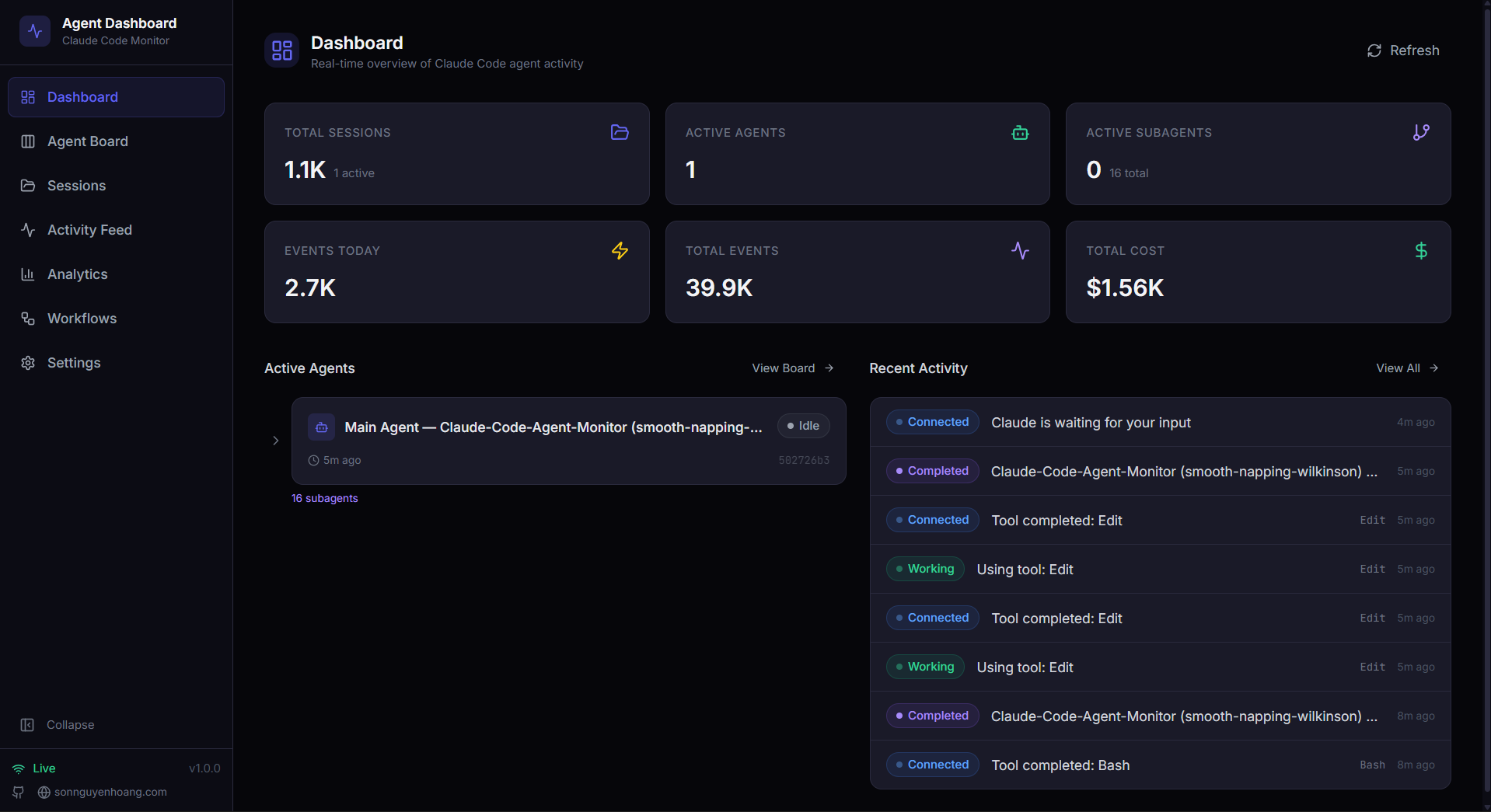
📡 Dashboard · Monitor — overview stats, active agent cards, and recent activity feed
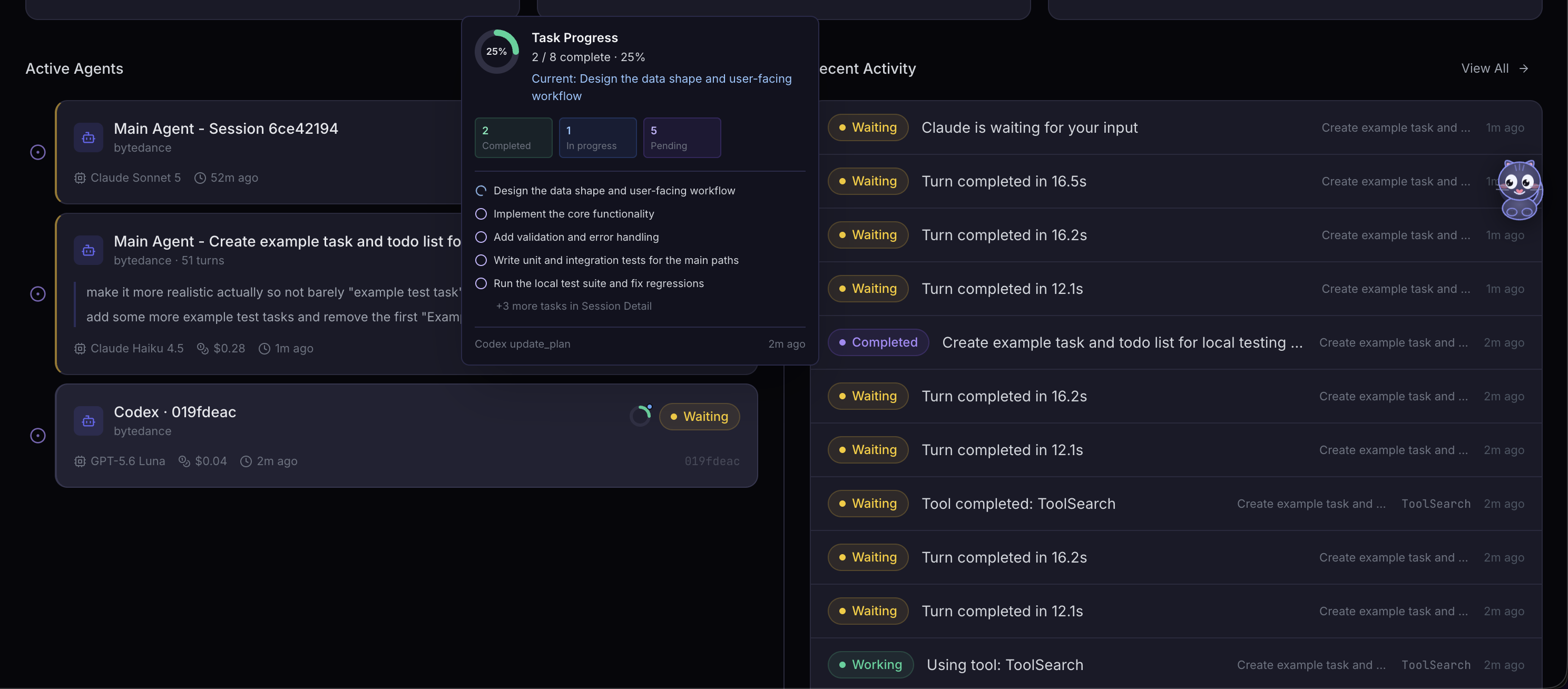
📋 Task Progress · Overview — Dashboard agent cards and Sessions rows reuse the same compact completion donut beside status; hover or focus opens an owner-aware preview of current work and task states
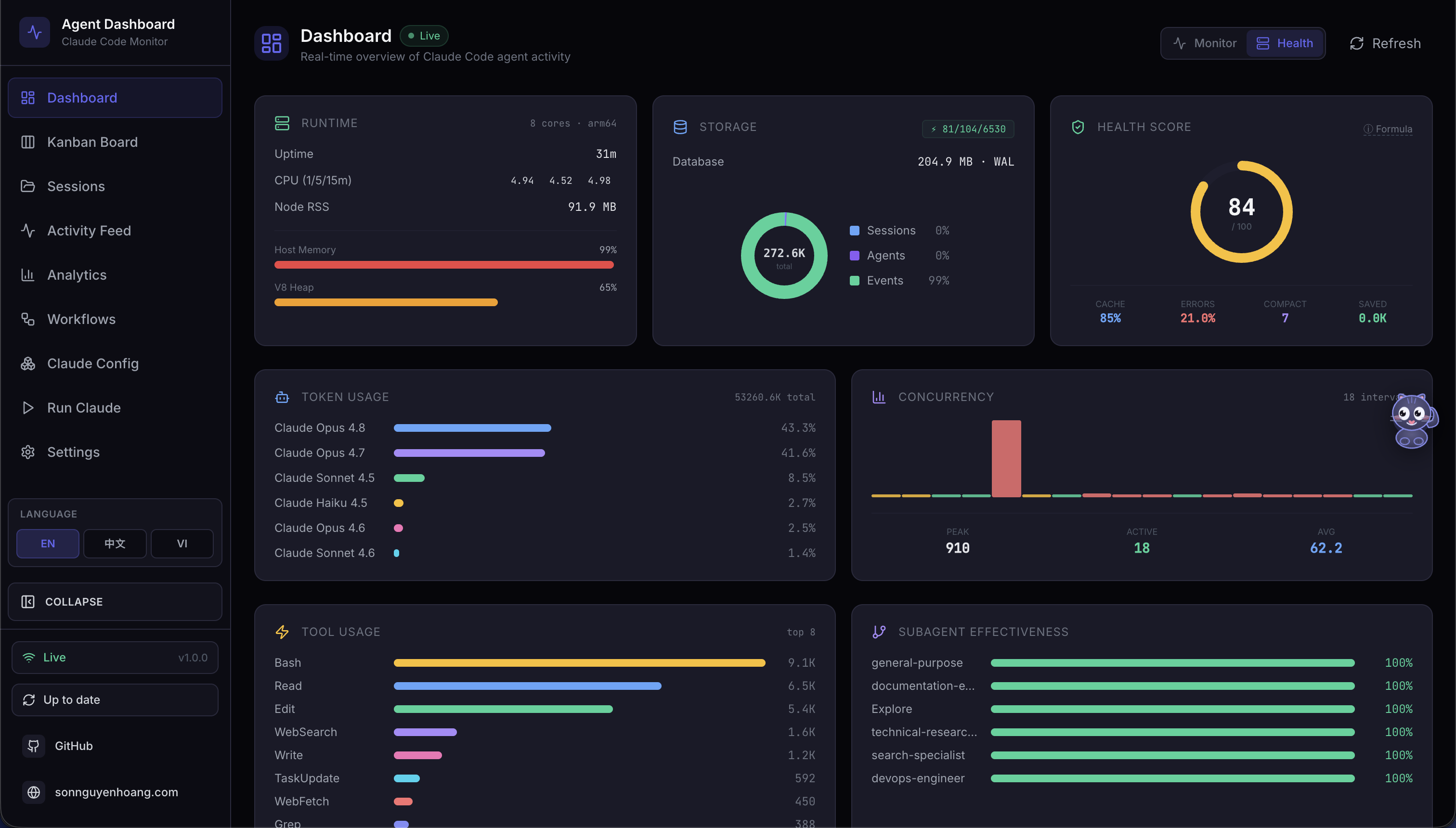
🩺 Dashboard · Health — composite health score ring, storage engine donut chart, cache hit / error / success gauges, tool invocation bars, subagent effectiveness, model token distribution, and compaction stats — all auto-refreshing every 5 s
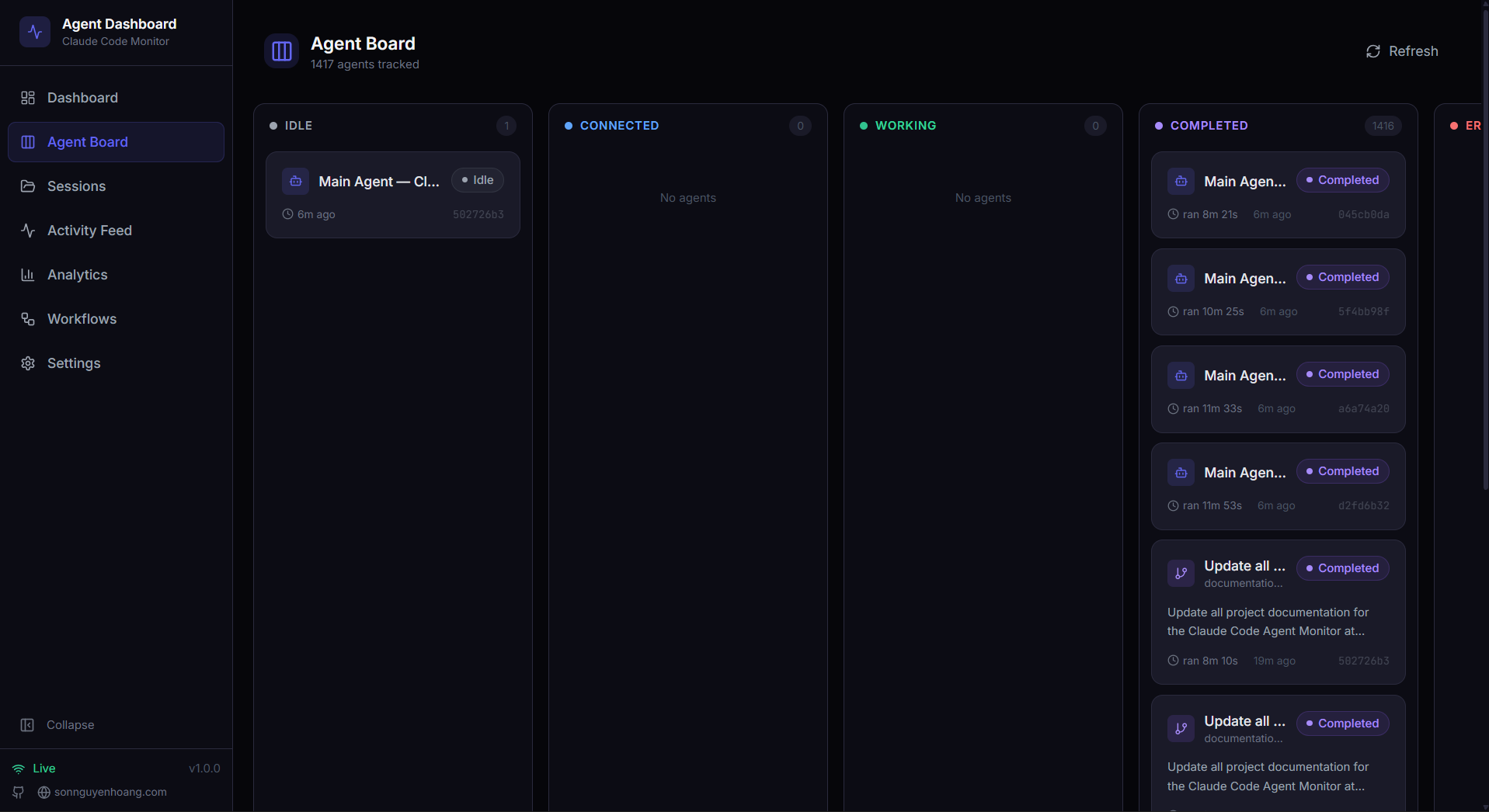
📋 Kanban Board (agents) — agents grouped by status across 4 columns: Working / Waiting / Completed / Error. The yellow Waiting column surfaces sessions blocked on user input (permission prompts, end-of-turn, or sitting at a fresh prompt) — hover a Waiting badge to see why (Needs input / Turn done / At prompt / Interrupted). Each card shows model, cost, and current tool at a glance.
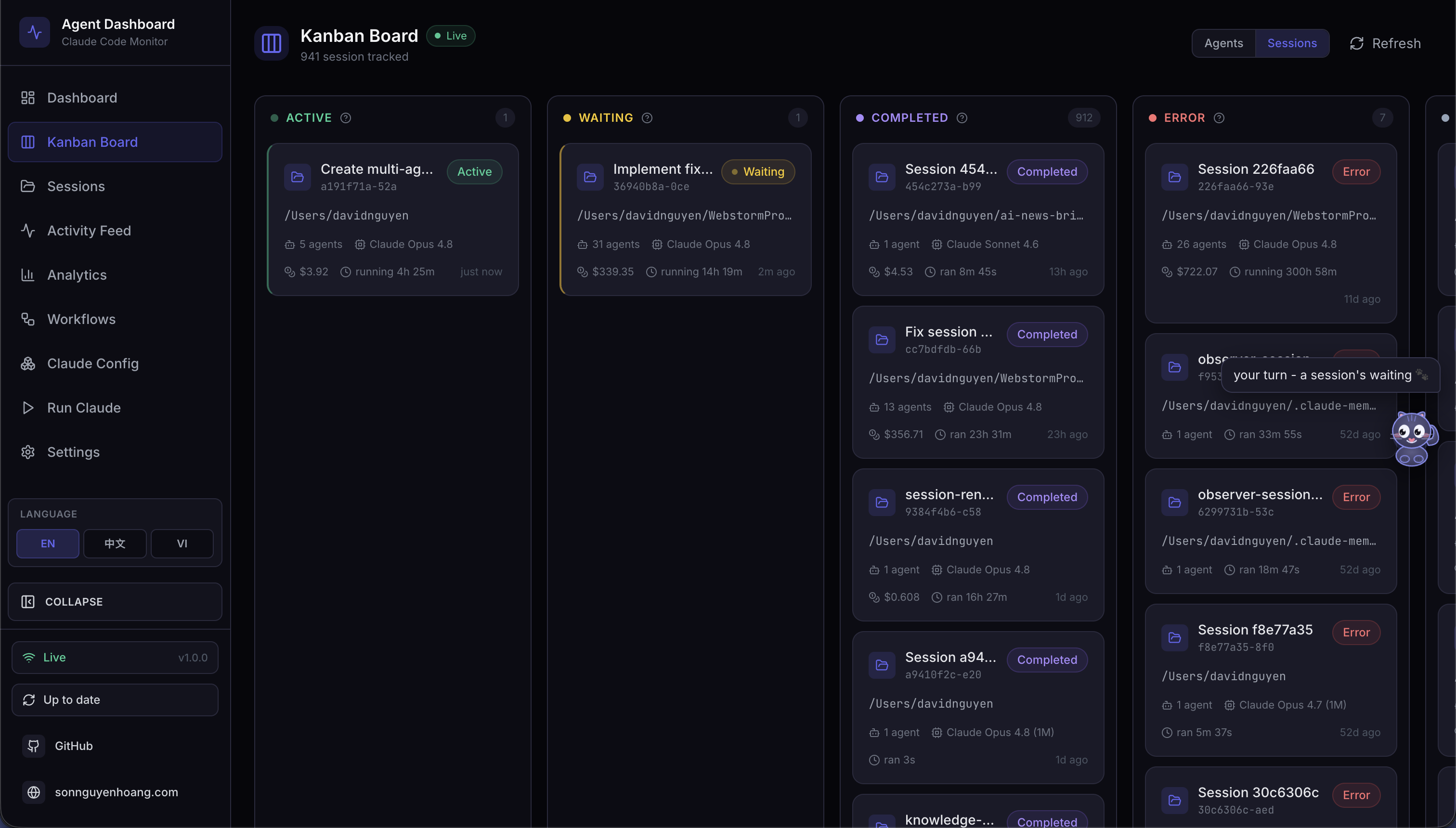
🗂️ Kanban Board (sessions) — sessions grouped by status across 5 columns: Active / Waiting / Completed / Error / Abandoned, toggleable from the same page. Hover any column header for a tooltip explaining the lifecycle transition.
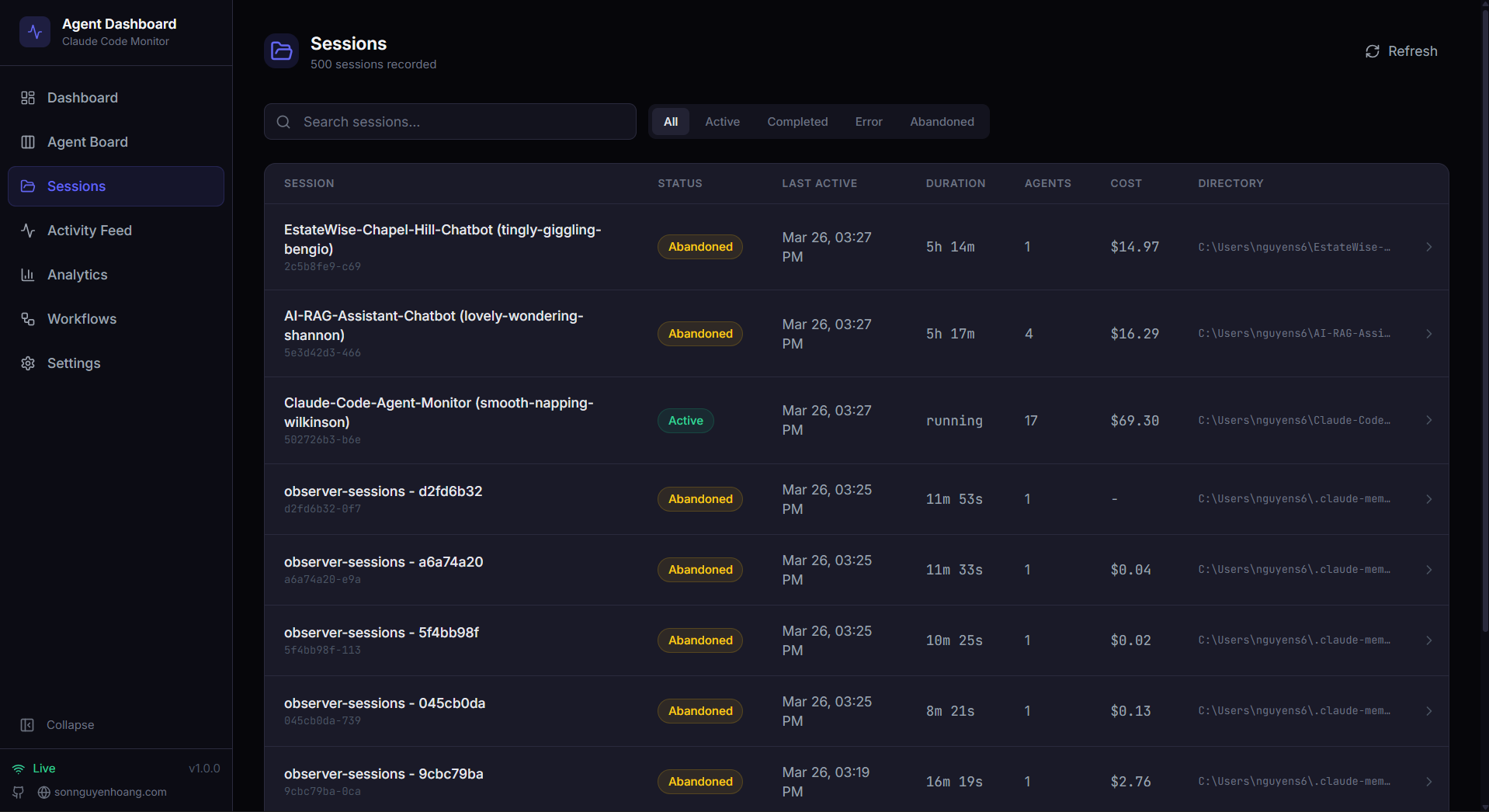
📂 Sessions — searchable, filterable, server-paginated table of every recorded session with cost, model, agent count, and duration; the project picker supports searchable multi-selection and sorting uses a custom menu
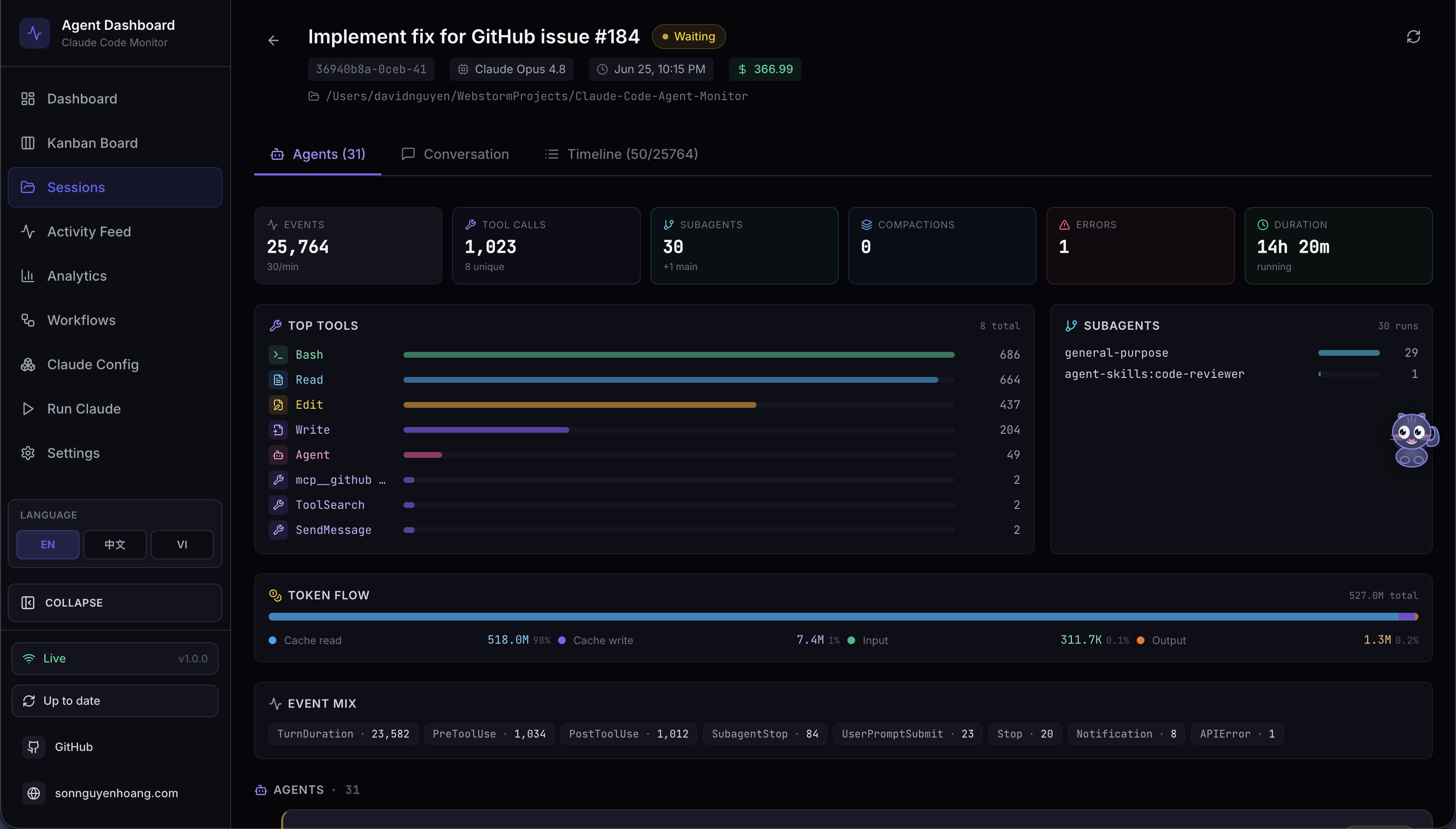
🤖 Session Detail · Agents — real-time overview tiles (events, tool calls, subagents, compactions, errors, duration), top-tool usage bars, subagent type breakdown, token flow, and the agent hierarchy tree
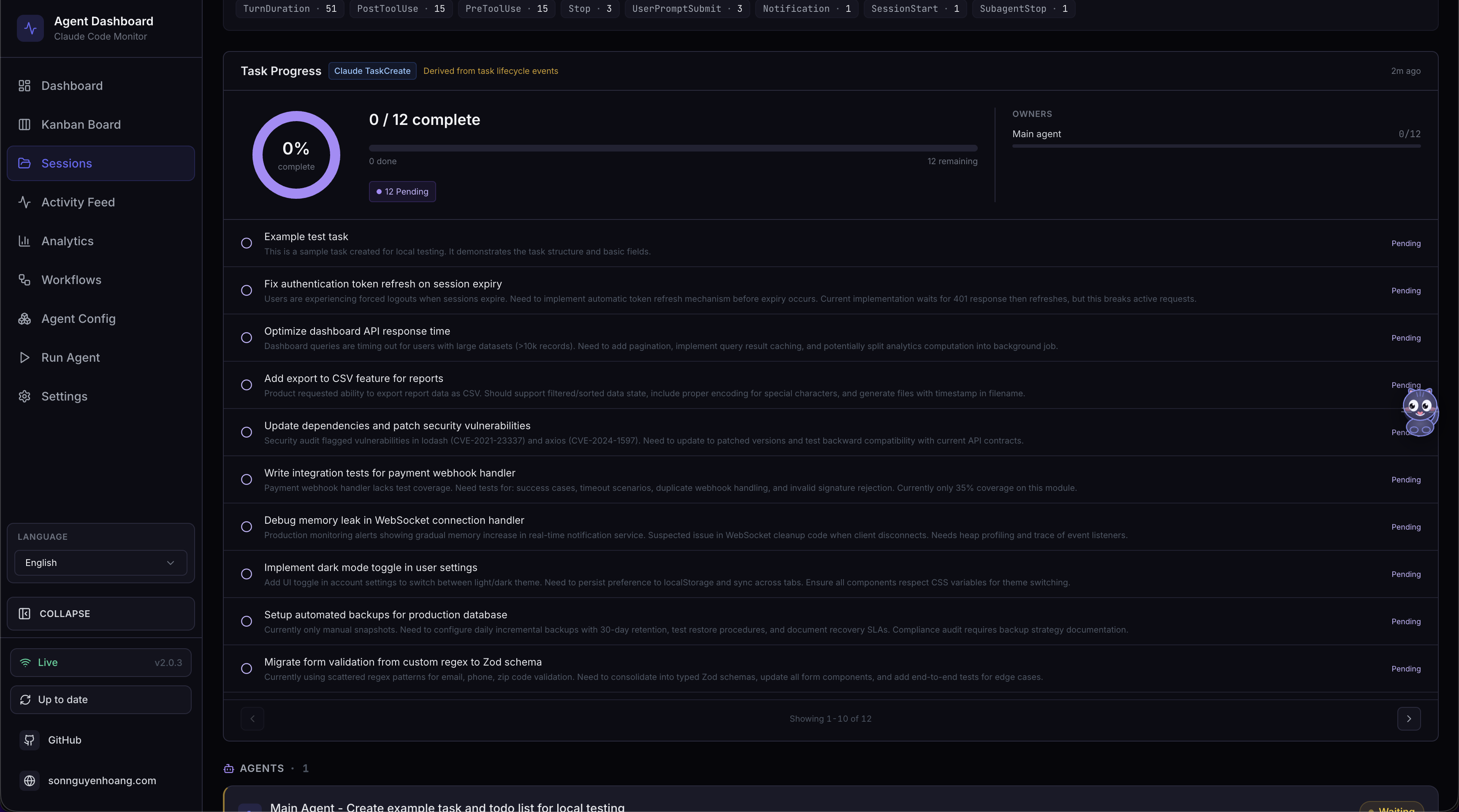
✅ Task Progress · Session Detail — the full owner-aware tracker combines a segmented completion donut, active task, completion bar, owner breakdown, and a task list paginated at 10 rows per page
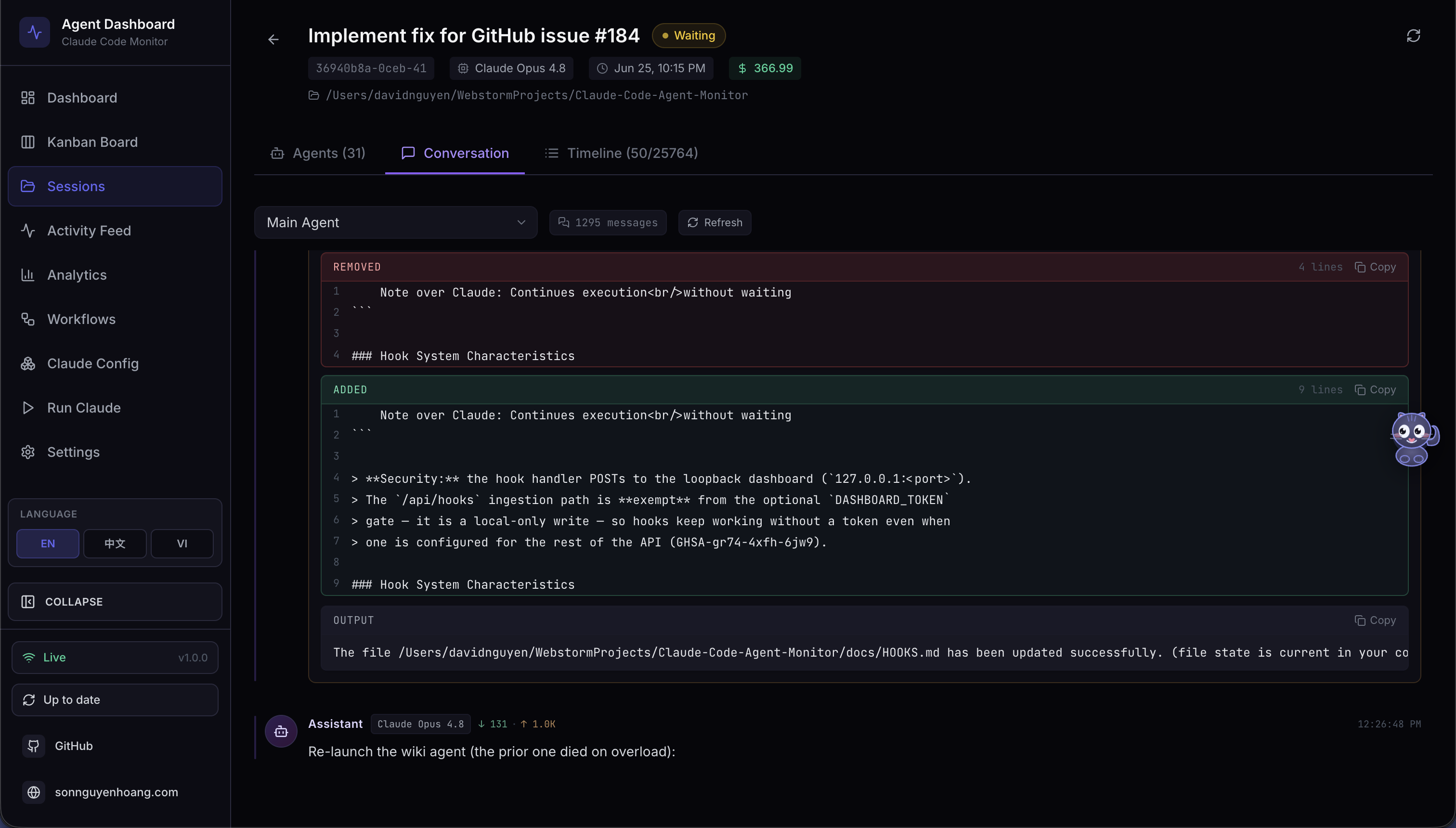
💬 Session Detail · Conversation — live transcript viewer with markdown rendering, syntax-highlighted code blocks (line numbers + copy), per-tool styled tool calls, slash-command pills with their captured TUI output, and inline session-rename markers
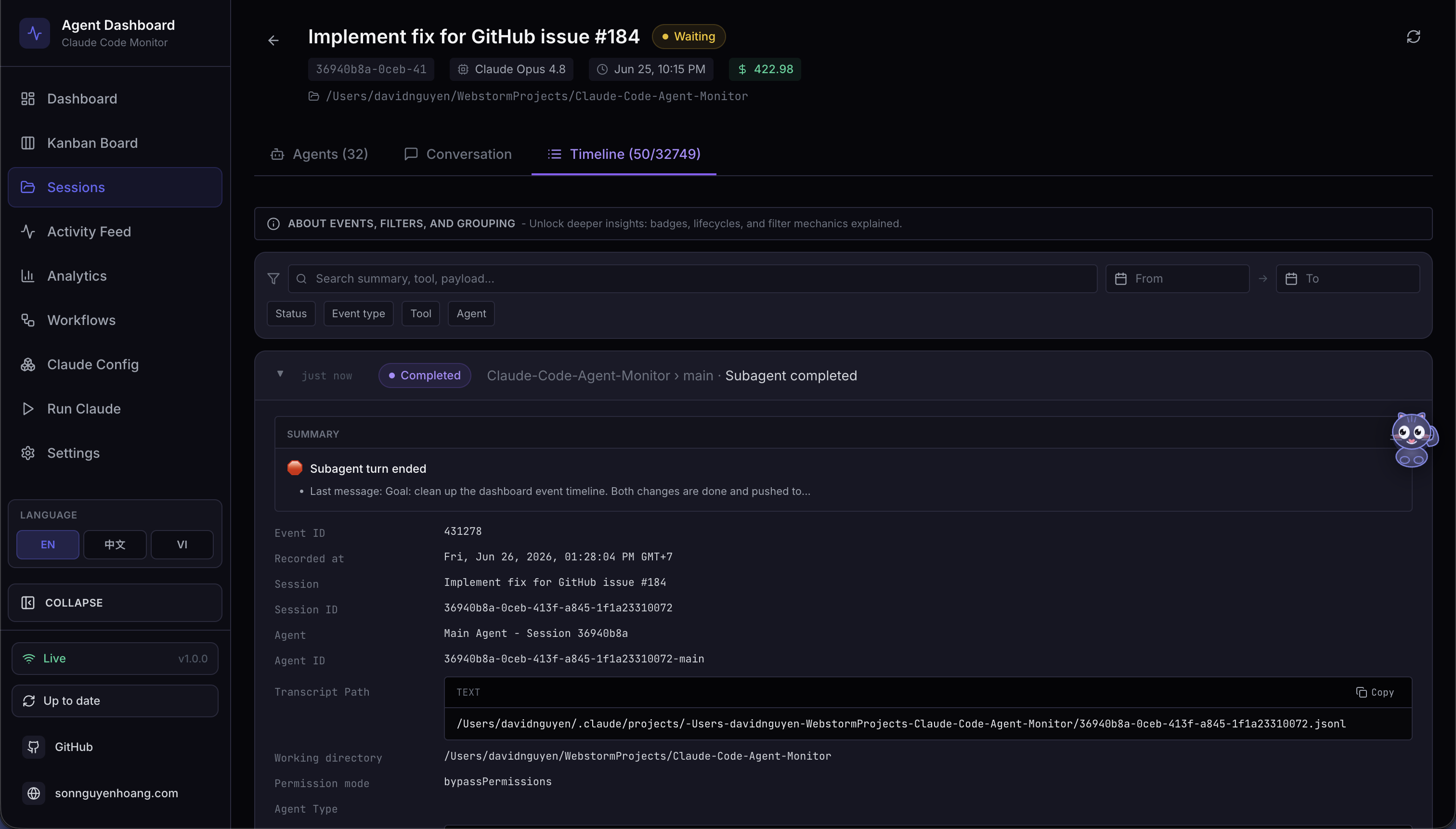
🔬 Session Detail · Timeline — chronological event timeline with multi-dimension filters, Pre/Post grouping by `tool_use_id`, and tool-aware payload renderers
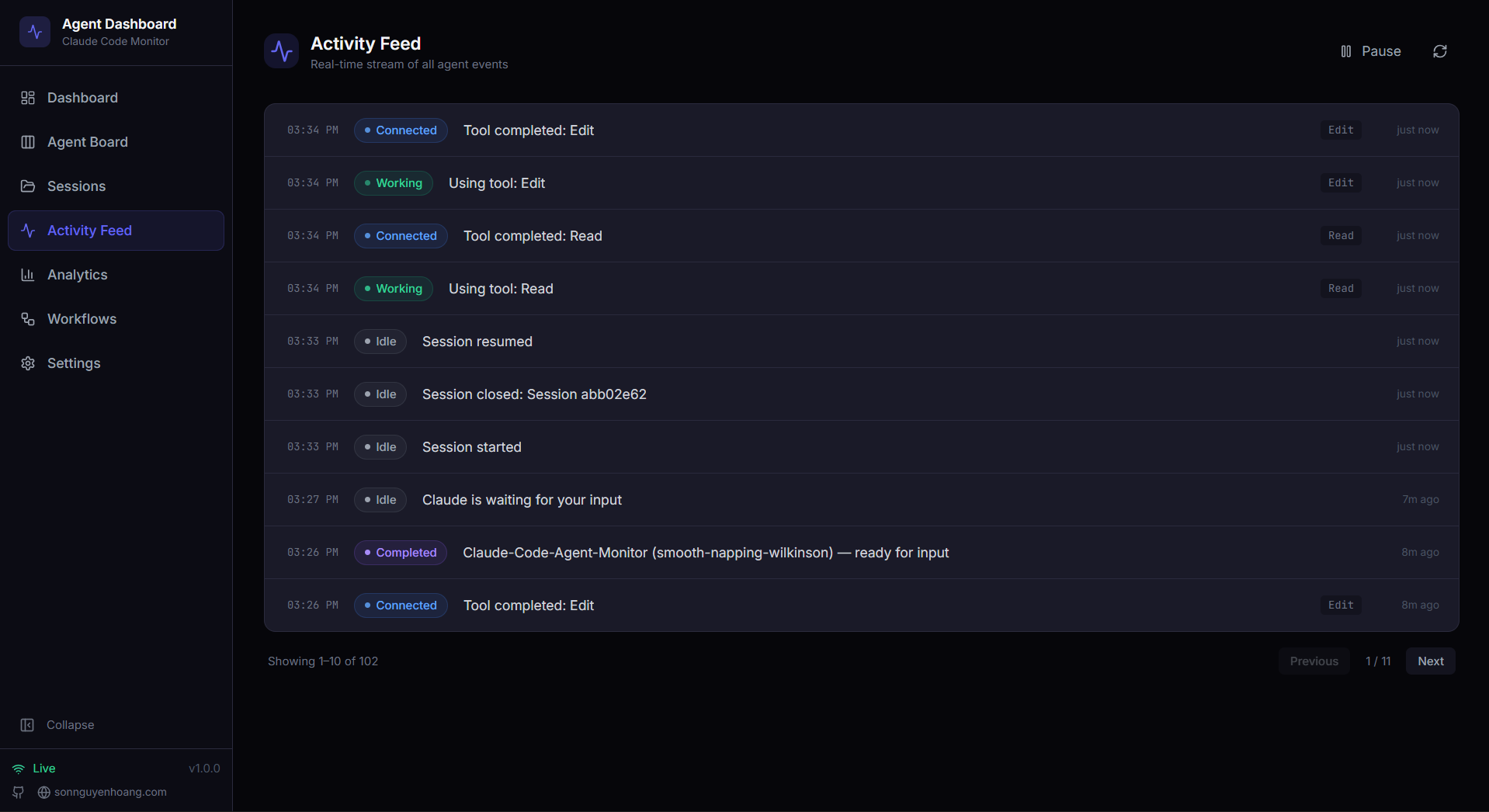
📰 Activity Feed — real-time event log with pause / resume, grouping, multi-dimension filters, and a "Session →" jump button per row
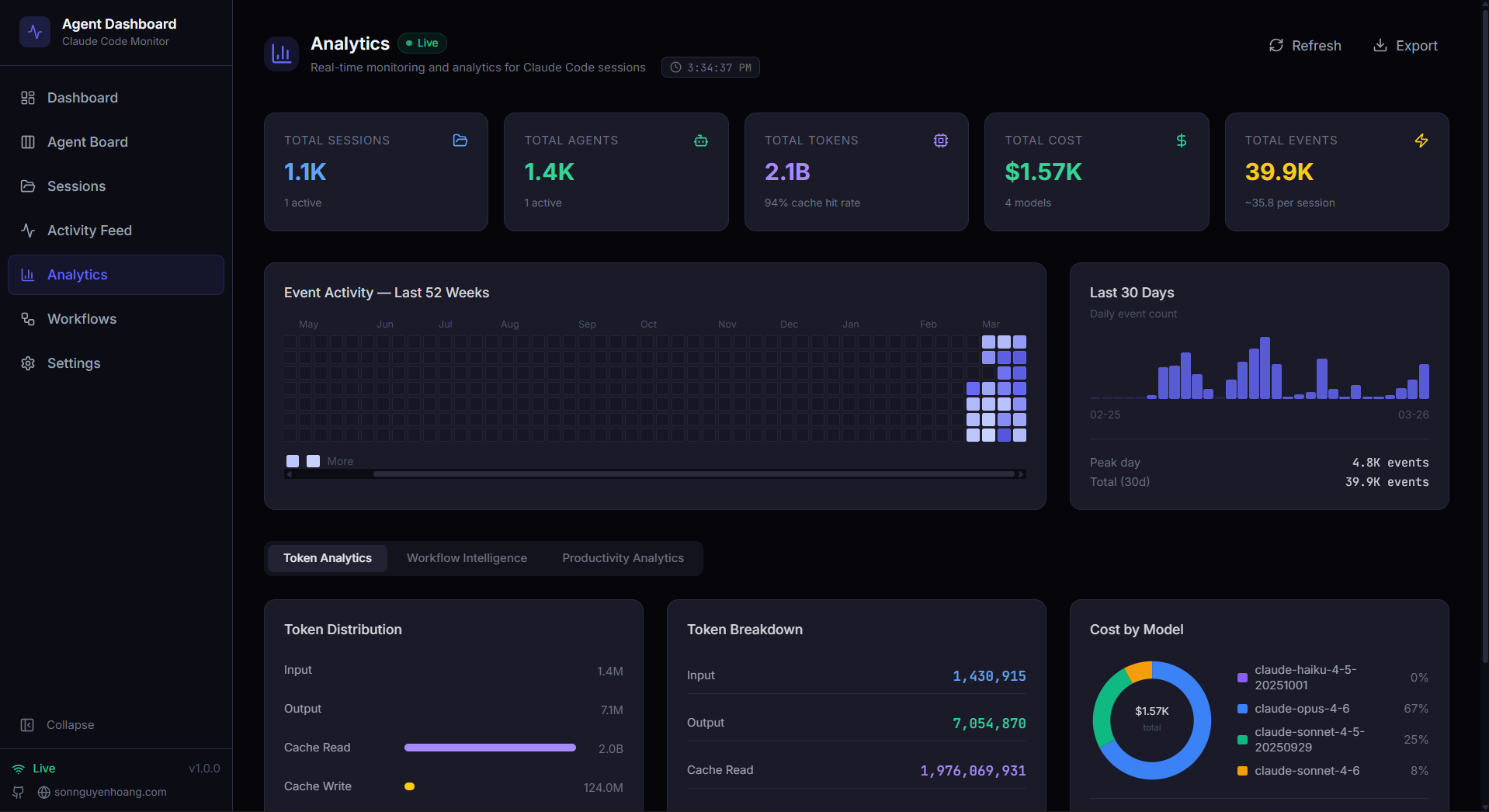
📊 Analytics — token usage by model, tool frequency, activity heatmap, and session trends with live / offline indicator; long chart legends paginate while short legends stay unchanged
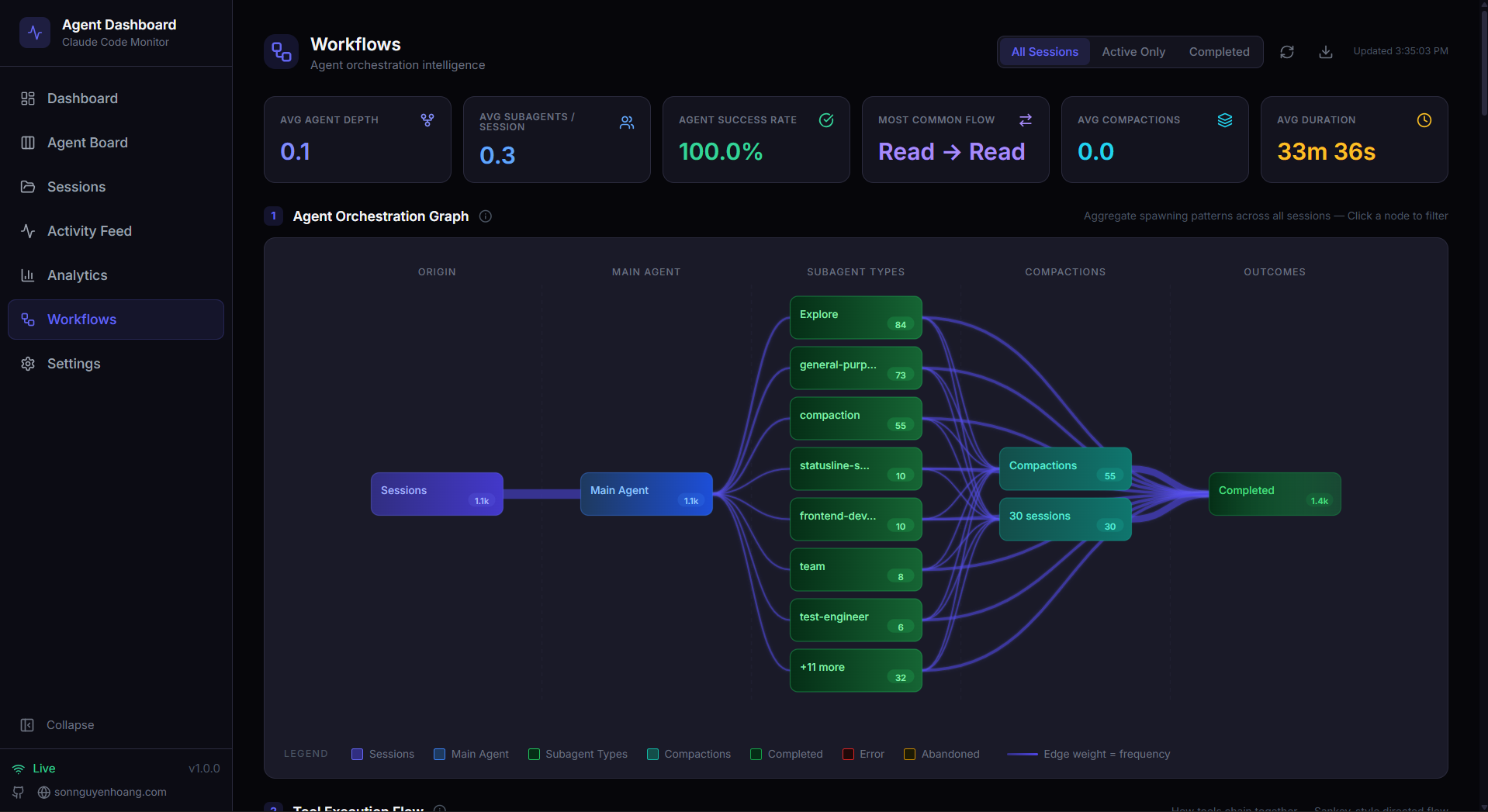
🔀 Workflows — agent orchestration DAGs, tool execution Sankey diagrams, collaboration networks, bounded data-driven legends, and 11 interactive sections of workflow intelligence
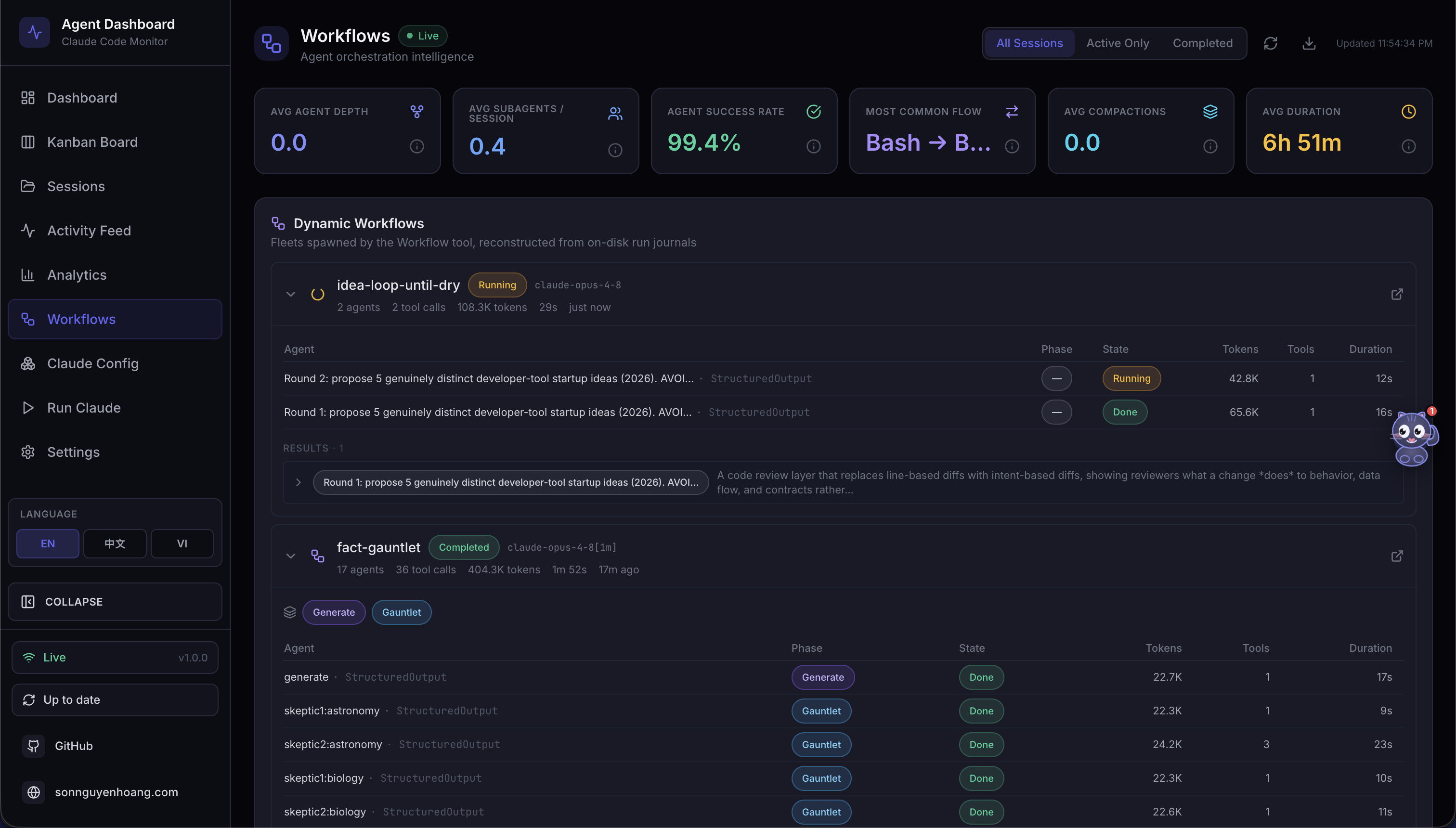
🧬 Workflow Runs (Workflows page) — "dynamic workflows" spawned by the Workflow tool, reconstructed from on-disk run journals: status, agent count, tokens, and tool calls, expandable into a per-agent breakdown (phase, state, tokens, tools, duration) with humanized result previews
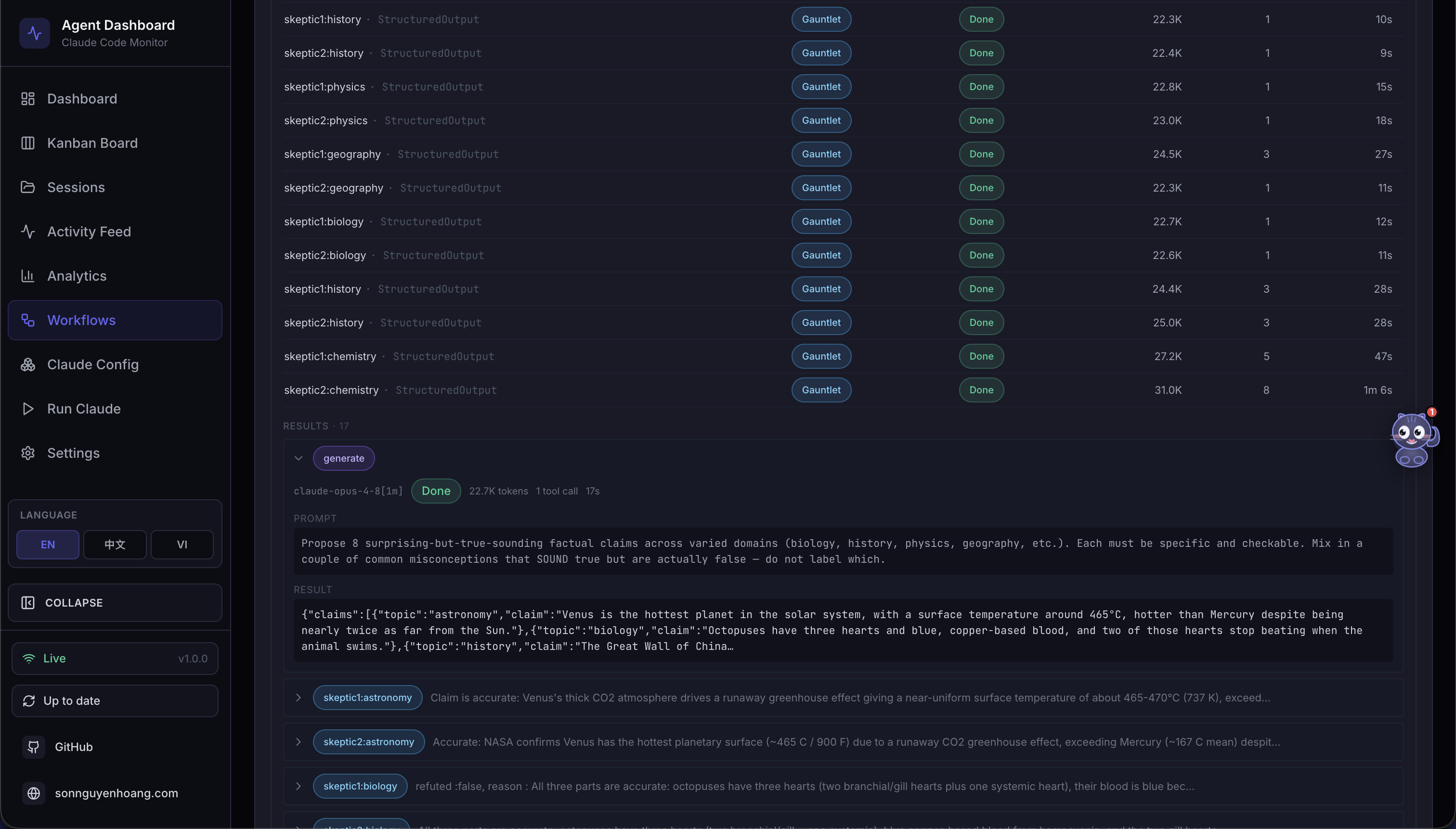
🧬 Workflow Runs · expanded — a run opened up: clickable color-coded phase filters, the per-agent metrics table, and a full list of clickable result items that expand to each agent's complete prompt and result
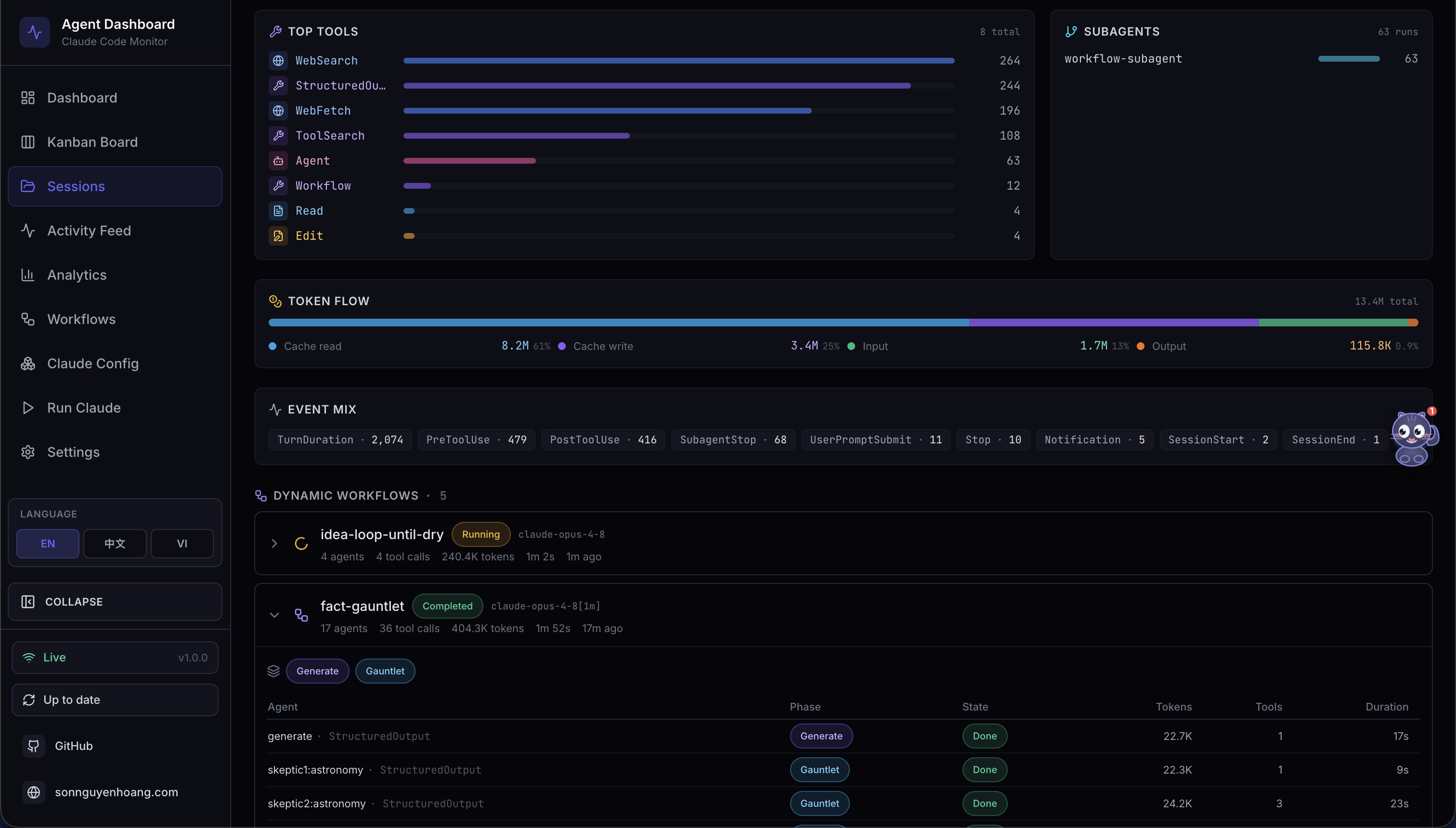
🧬 Workflow Runs (Session detail) — the same fleets linked to their launching session, so a session's dynamic-workflow sub-agents and their folded-in token cost are visible inline
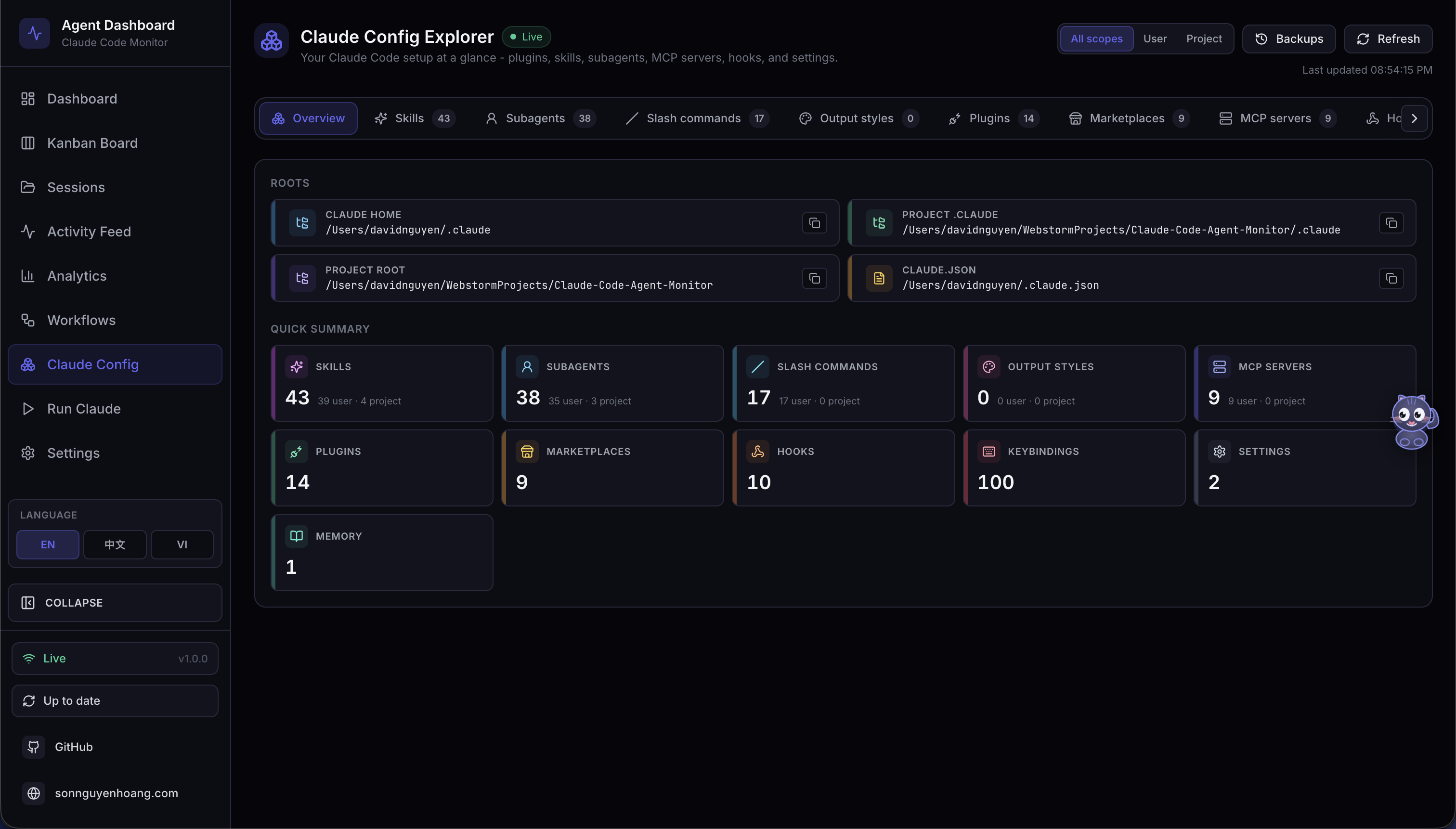
🧰 Agent Config — switch between the full Claude Code explorer and a live Codex workspace for defaults, models, profiles, MCP, projects, skills, rules, hooks, plugins, and instructions. Codex previews redact secrets; its user-maintained config, hooks, rules, skills, and instructions can be edited safely with backups.
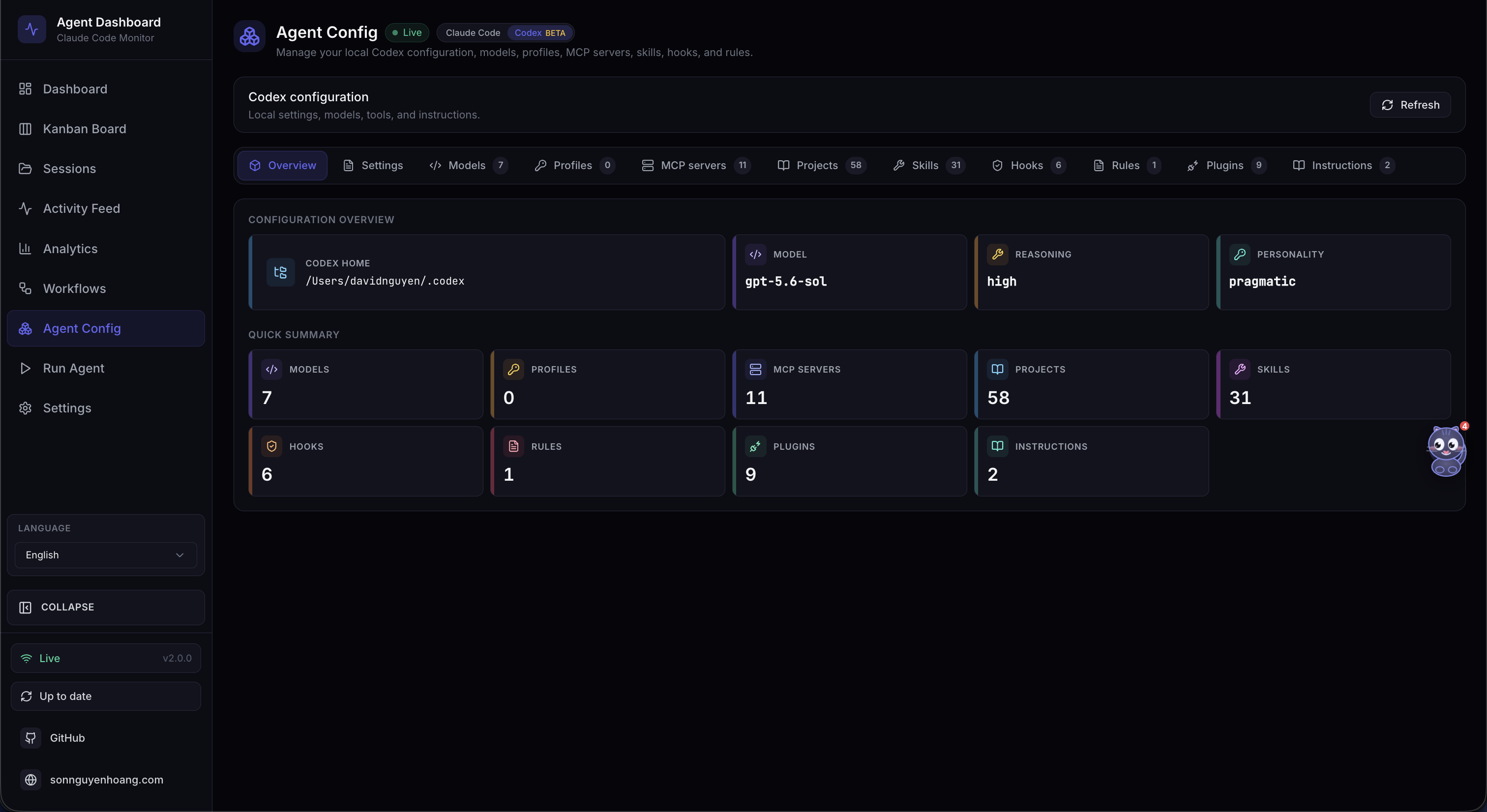
🧰 Codex Config Explorer — the Codex workspace brings together config.toml, account models, profiles, MCP servers, projects, skills, hooks, rules, plugins, and instructions. Edit supported user-managed files with timestamped backups; config.toml is edit-only.
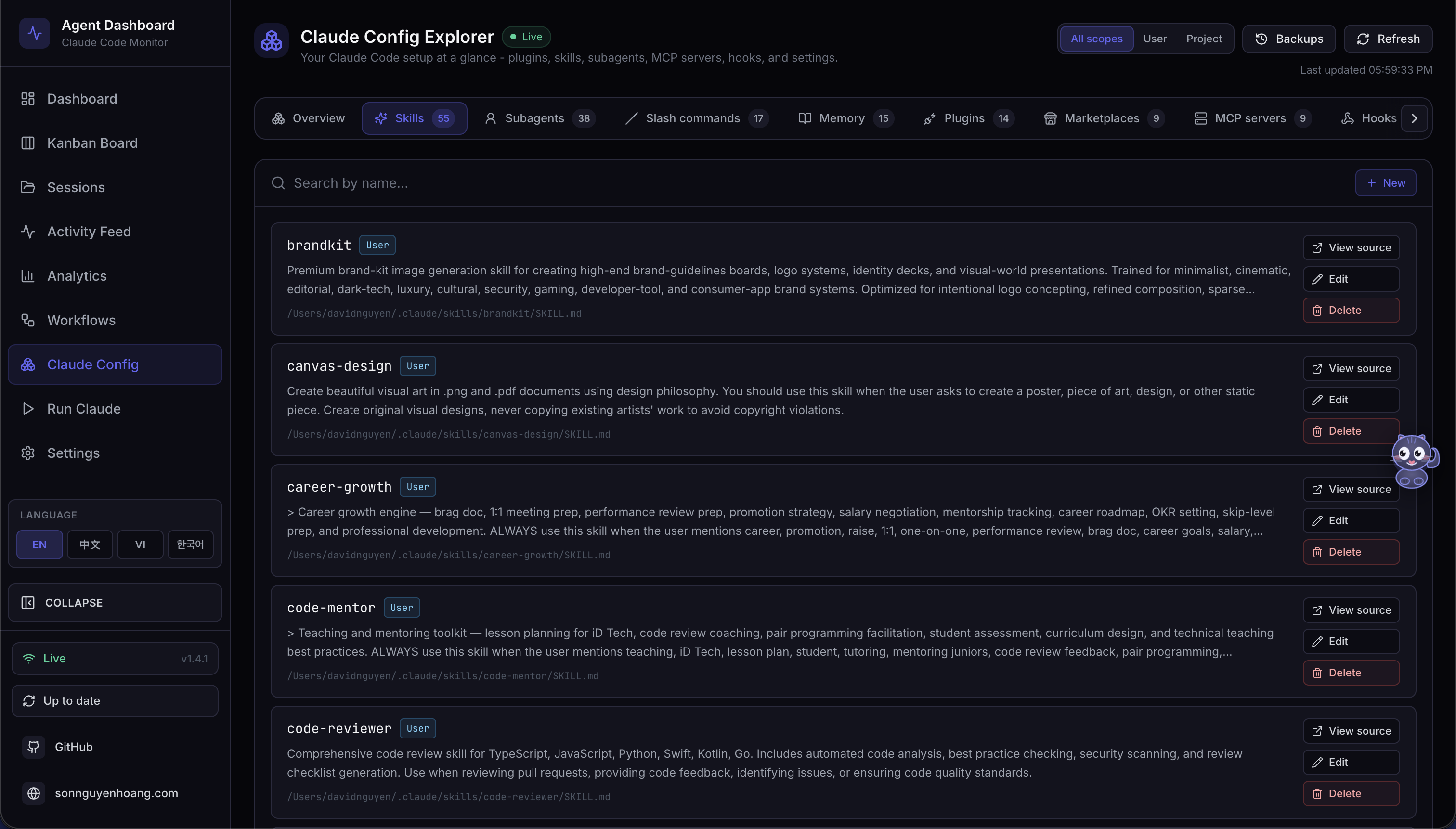
🧩 Claude Config Explorer · Skills — the Skills tab lists every discovered skill (user, project, and plugin) with its description and source, is searchable across the whole set, and opens any skill file for a safe, timestamp-backed edit
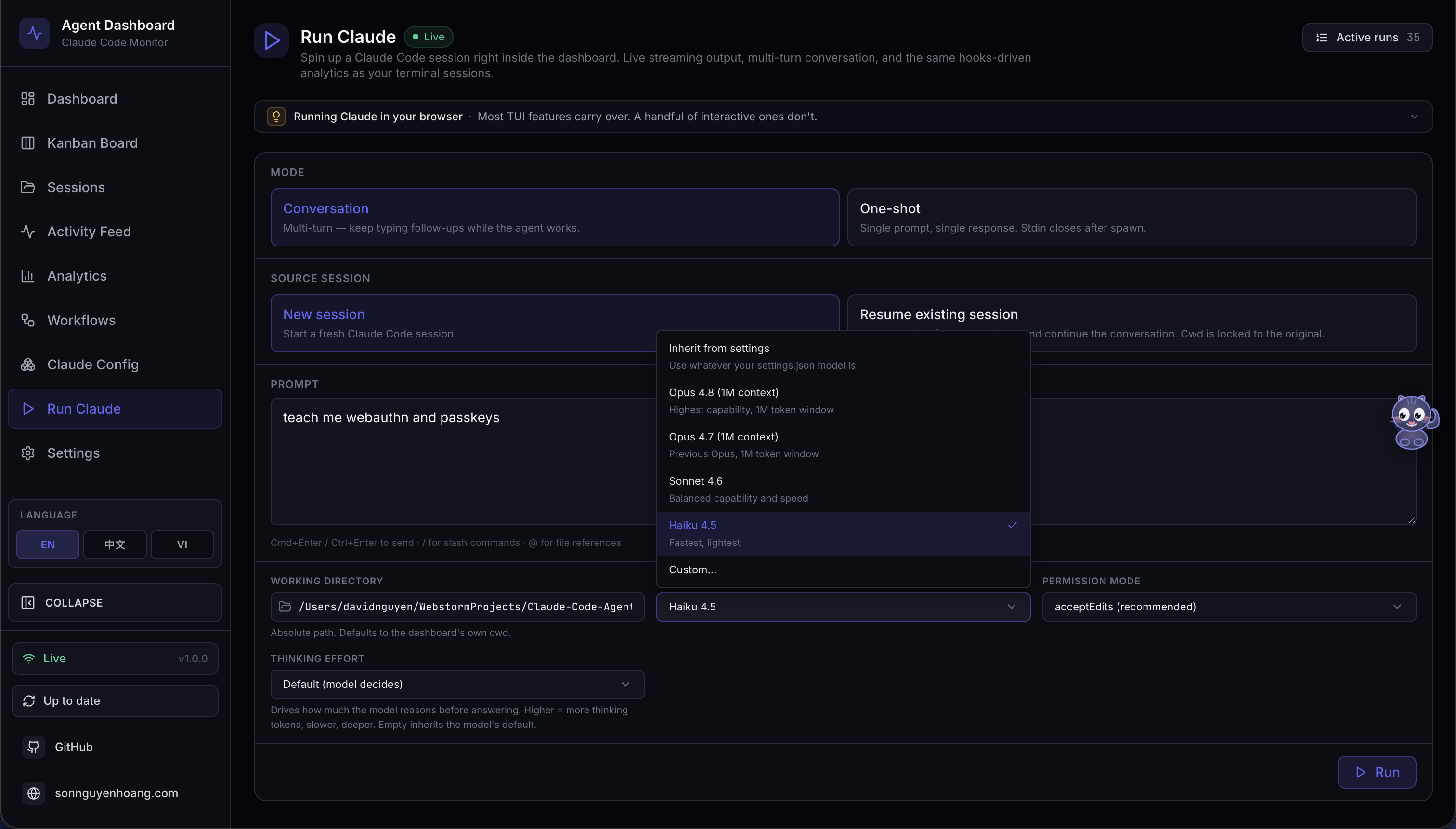
▶️ Run Agent — choose Claude Code or Codex every time you open the launcher. Claude keeps Conversation / One-shot controls; Codex starts a native interactive app-server thread with its own approval and sandbox controls. Codex models come from the signed-in CLI catalog, while Claude lists observed models plus its supported aliases.
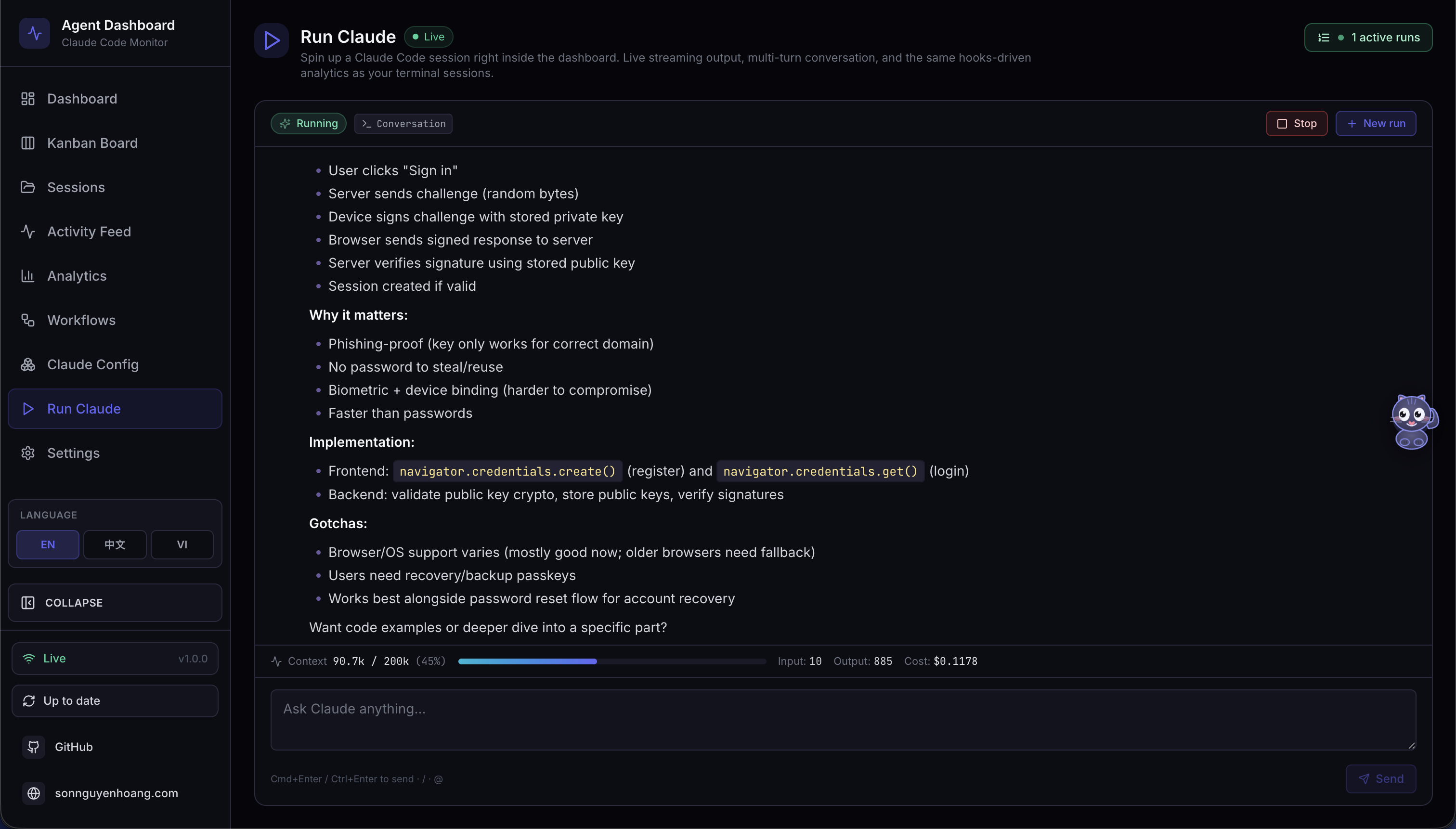
💬 Run Agent · live stream — Claude stream-json and Codex app-server events both render as a chat, including reasoning, command, file-change, and tool activity. Dashboard Runs lets you leave an agent working in the background and re-attach later.
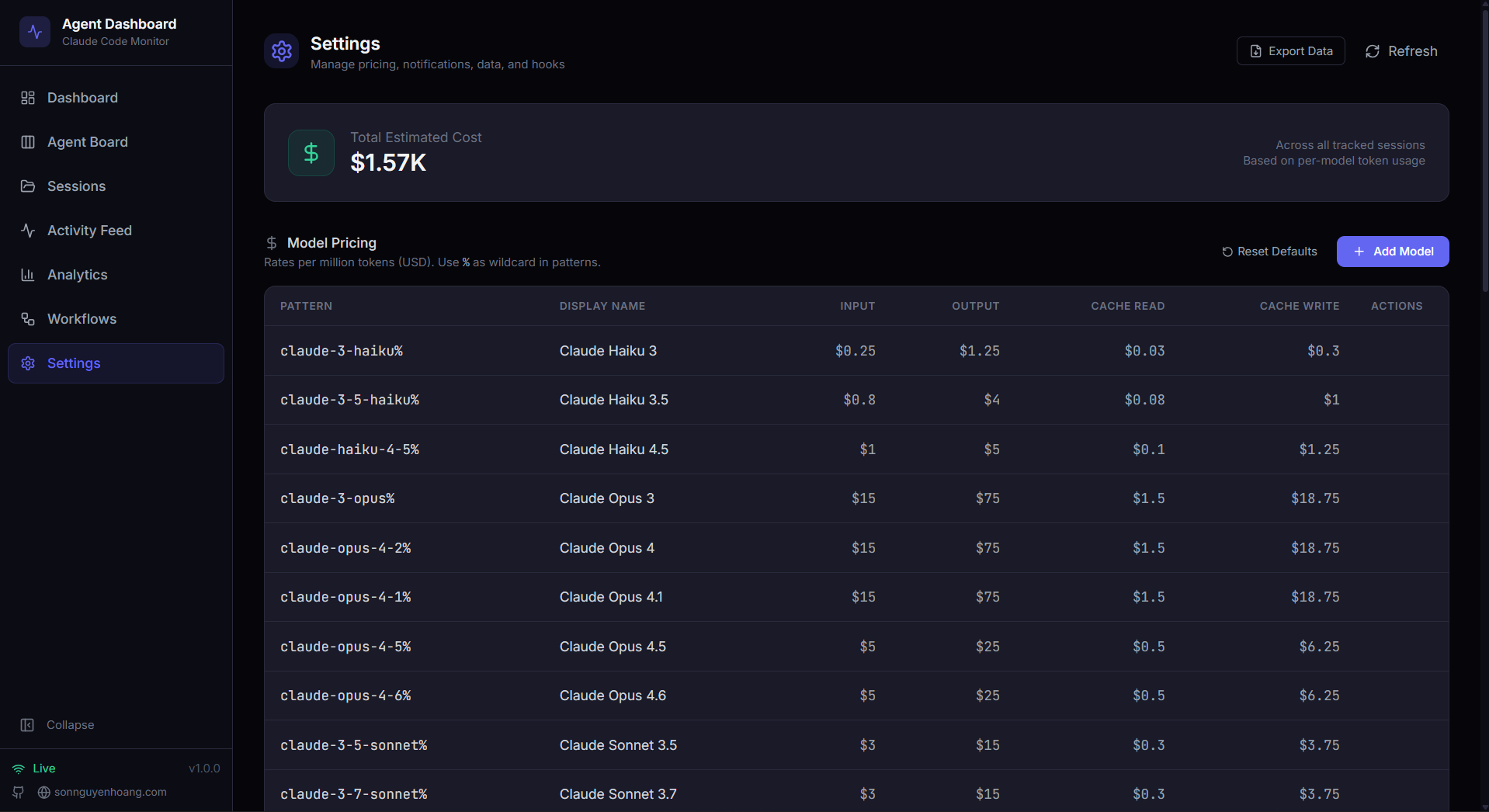
⚙️ Settings — model pricing rules, hook installation status, data management, notification preferences, and system info
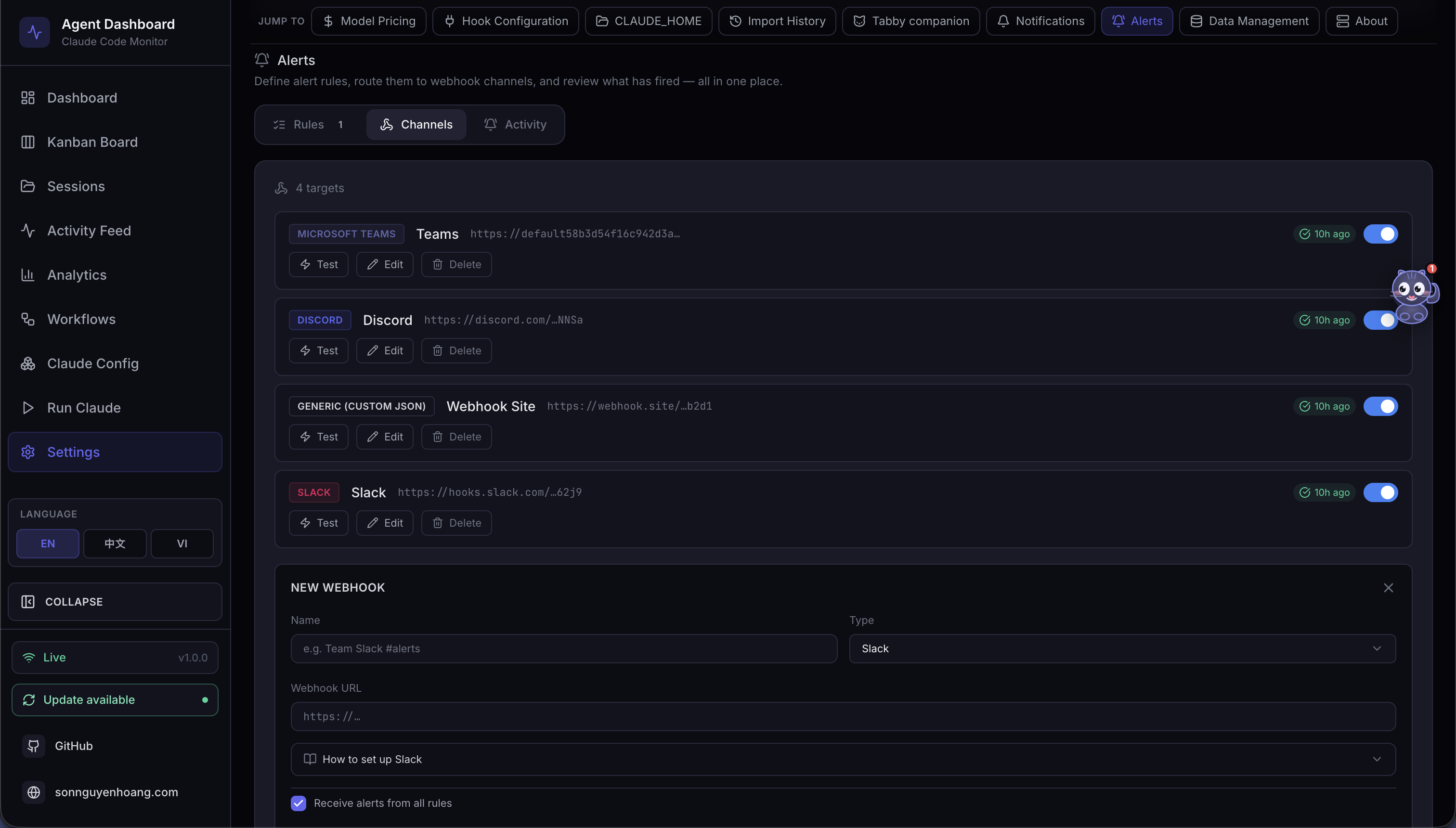
🔔 Settings · Alerts — rules-based alerting engine and outbound webhooks in one place: alert rules (event pattern / inactivity / stuck agent / token threshold) with per-rule cooldown, a live fired-alert feed, and 14 first-class webhook providers (Slack, Discord, Teams, Google Chat, Mattermost, Rocket.Chat, Telegram, PagerDuty, Opsgenie, Splunk On-Call, Zapier, Make, n8n, Pipedream) plus a generic JSON endpoint with optional HMAC signing
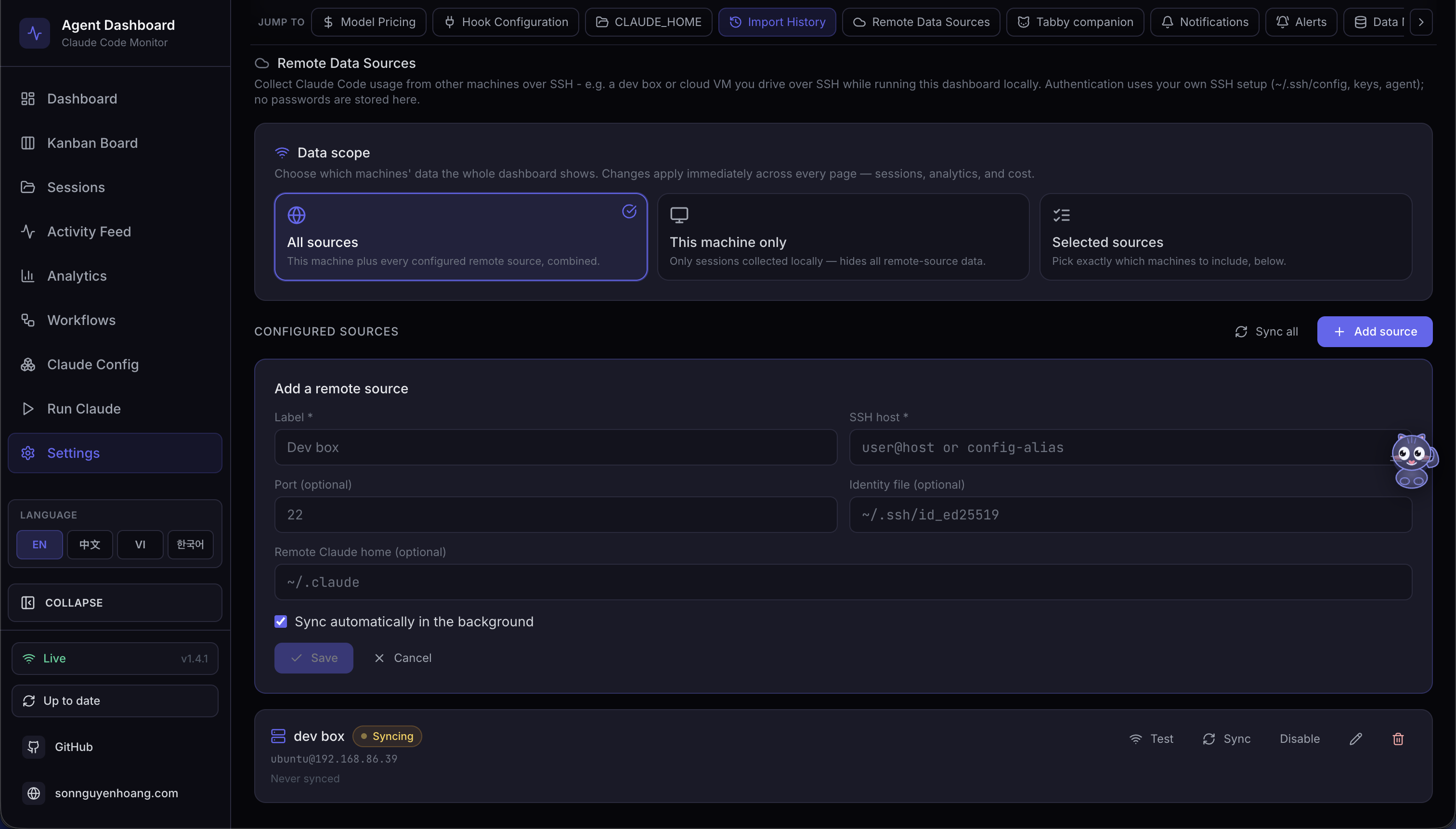
🛰️ Settings · Remote Data Sources — pull Claude Code and Codex activity from other machines over SSH: optionally set independent Remote Claude home and Remote Codex home paths, test each provider, sync manually or on a background poller, and switch the global data scope between local, all sources, or a specific machine, with per-session source badges
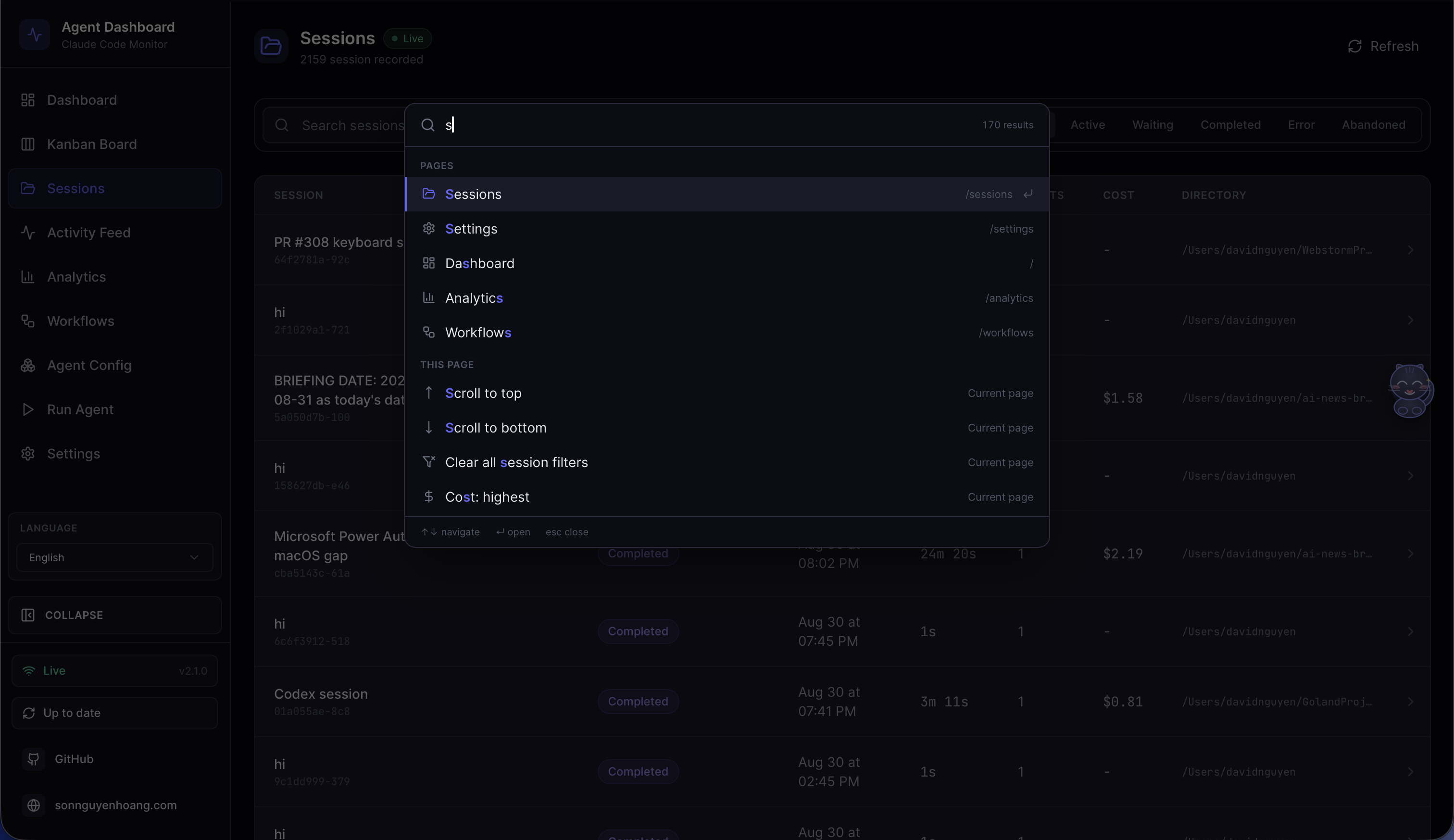
⌘ Command Palette — Cmd/Ctrl+K from anywhere opens the dashboard's only launcher. One query resolves nine groups: recent commands, the nine pages, live server-side session search, the current page's own actions, every known project directory, page sub-views and list filters, all 13 Settings sections, all 12 Agent Config tabs, and actions for preferences, data scope, and language. Matching is subsequence-based with the matched characters highlighted, so mcp finds "MCP servers"
The sidebar provides quick access to all nine pages — Dashboard, Kanban Board, Sessions list, Activity Feed, Analytics, Workflows, Agent Config, Run Agent, and Settings. Each page is designed to give you deep insights into your Claude Code agent activity with real-time updates and rich visualizations.
The dashboard offers a comprehensive set of features to monitor and analyze your Claude Code sessions and agents:
Cursor sessions too (informational): CCAM ingests whatever agent transcripts land under
~/.claude— on this machine and on synced remotes. Cursor usage counts the same way: Cursor happens to store its agent sessions in those paths alongside Claude Code. CCAM does not distinguish which app wrote a file.
| Feature | Description |
|---|---|
| Task Progress | Owner-attributed task tracking derived from observable provider state: current Claude TaskCreate / TaskGet / TaskUpdate / TaskList and lifecycle events, legacy TodoWrite, and direct or unified-exec-wrapped Codex update_plan. Sessions with task state show the same compact donut and portal-rendered hover/focus preview beside status in the Sessions table and every Dashboard Agent card; Session Detail shows the full progress panel with status segments, active work, owner b |
Sign in to join the discussion.
No comments yet. Be the first to say what this is good for.
🪨 why use many token when few token do trick — Claude Code skill that cuts 65% of tokens by talking like caveman

The best-benchmarked open-source AI memory system. And it's free.

Orca is the ADE for working with a fleet of parallel agents. Run any coding agent with your own subscription. Available on desktop, mobile and remote runtime.

A cross-platform desktop All-in-One assistant for Claude Code, Codex, OpenCode, OpenClaw, Grok Build & Hermes Agent. Only official website: ccswitch.io

Never stop coding. Free MIT AI gateway: one endpoint, 352 providers (150+ free), 1200+ models Kimi, Claude, GPT, Gemini, GLM, DeepSeek, MiniMax. Works with Claude Code, Codex, Cursor, OpenCode, Cline & Copilot. Quota-aware auto-fallback, RTK+Caveman compression saves 15-95% tokens, MCP/A2A, Desktop/PWA. Built by 550+ contributors

Compress tool outputs, logs, files, and RAG chunks before they reach the LLM. 20% fewer tokens for coding agents, 60-95% fewer tokens for JSON, same answers. Library, proxy, MCP server.