What Is Heym?
Heym is an AI-native automation platform built from the ground up around LLMs, agents, and intelligent tooling. Wire together AI agents, vector stores, web scrapers, HTTP calls, and message queues on a visual canvas — then deploy instantly via Docker.
Unlike platforms that started as classic trigger-action automation and layered AI on later, in Heym AI is the execution model.
Explore the product site at heym.run.
🎬 Product Tour
One e-commerce sales campaign, followed end to end: workflow generation with the AI Assistant, human review, board execution, structured data, dashboards, traces, RAG, MCP, analytics, and team collaboration.
Build, Observe, Call
| Build | Observe | Call |
|---|
| Create workflows from a visual canvas, natural language, voice, templates, or Agent skills. | Inspect executions with run history, LLM traces, evals, logs, OpenTelemetry export, and real USD cost tracking. | Invoke the same workflow from the canvas, REST execution endpoints, SSE streaming, MCP clients, or a public Portal chat UI. |
No Enterprise Gatekeeping
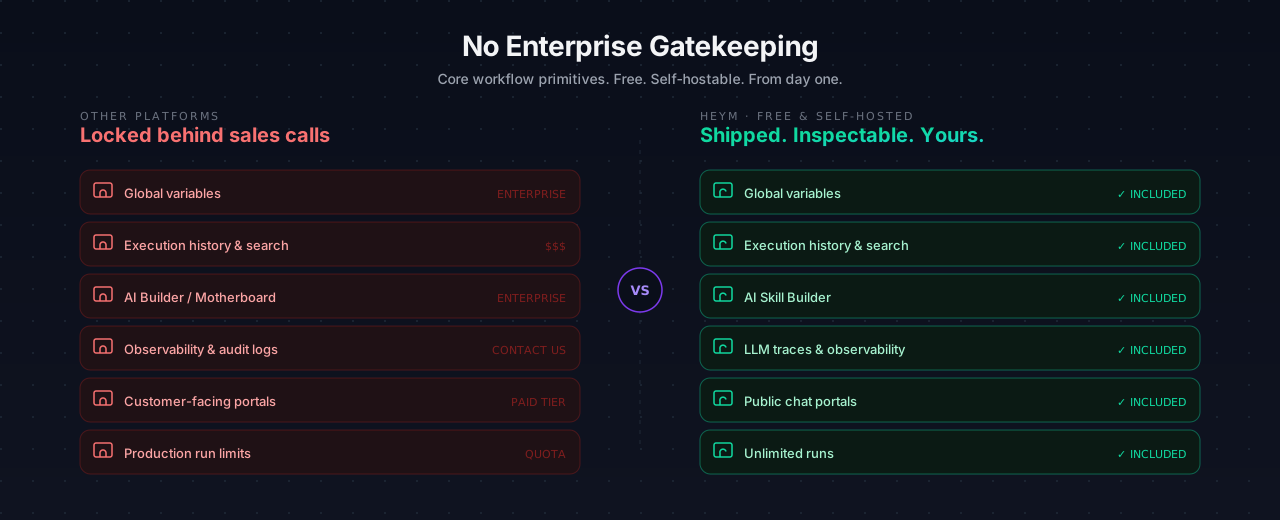
Many automation platforms turn essential production features into upgrade pressure: global variables, execution history and search, insights, AI Builder / Motherboard capabilities, observability, audit-style logs, team controls, scaling, or customer-facing portals.
Heym takes the opposite position. These are core workflow primitives, not enterprise bait. They ship in the free self-hostable product because serious AI automation should be inspectable, shareable, observable, and deployable from day one without any kind of weird production run limits.
Our enterprise offering is for commercial licensing, deployment help, dedicated support, and additional security layers. It is not a strategy for hiding core workflow and AI-native capabilities behind a sales call, now or later.
Product Demos
The demos below illustrate an agent–subagent layout instead of a purely step-by-step, single-thread agent chain. For a request like “How do I get from Berlin to Frankfurt?” and “What should I eat there?”, subagents can work on those parts in parallel. That tends to finish faster, keeps each model turn focused (less context bloat), and avoids pressuring one model to produce two large, unrelated answers in a single reply.
You can still answer with two separate LLM calls (one per question) or run several calls in sequence and merge the results in a final step—those patterns work—but for this kind of multi-part ask they are usually slower than parallel subagents behind an orchestrator.
Generate Workflows from Natural Language
Describe the agents, orchestration pattern, and user-facing result you want; Heym builds the workflow on the canvas.
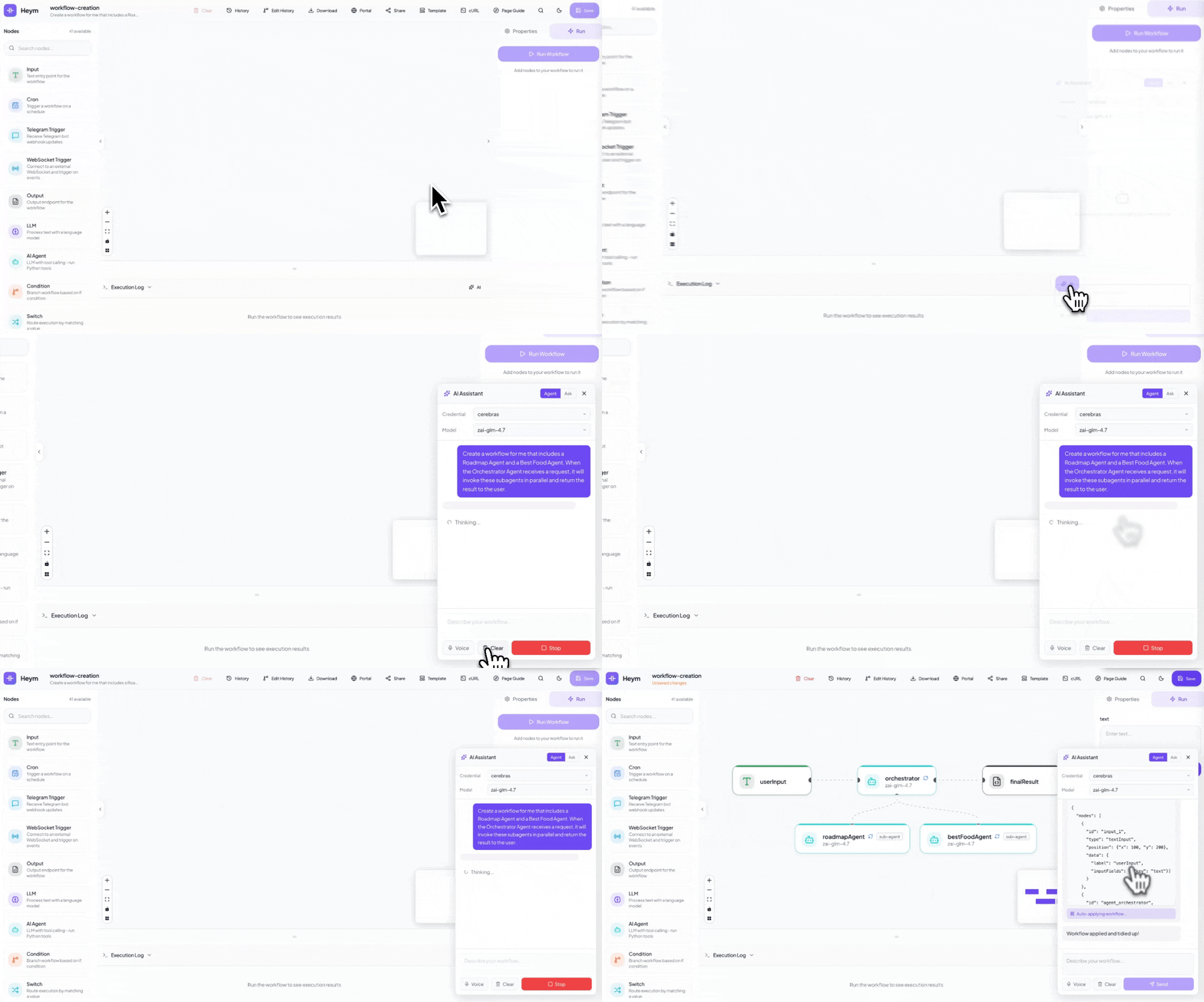
Example prompt
Create a workflow for me that includes a Roadmap Agent and a Best Food Agent. When the Orchestrator Agent receives a request, it will invoke these subagents in parallel and return the result to the user.
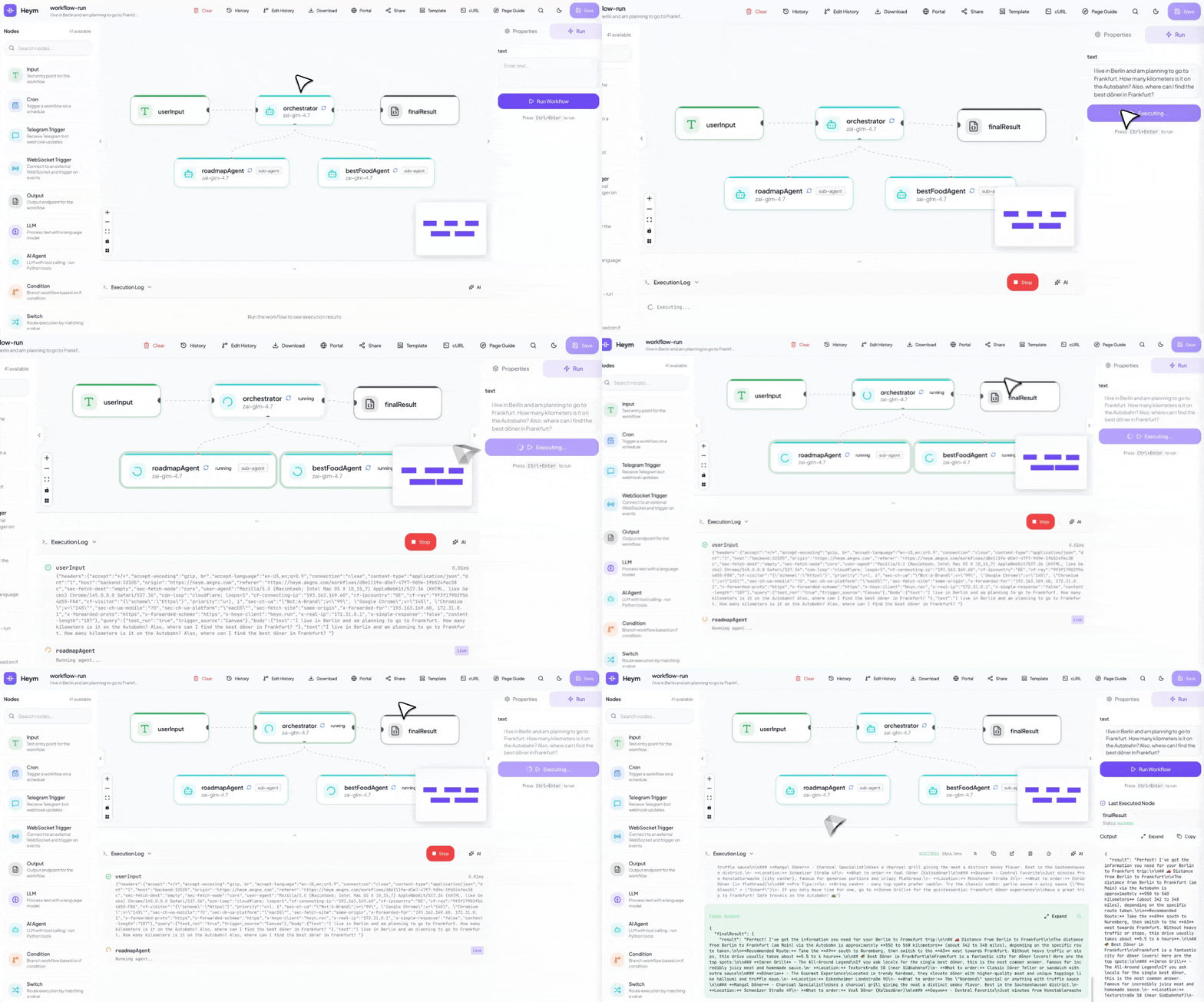
Running Workflows
Execute the workflow directly from the canvas and inspect each step as results move through the graph.
Create Skills for Agents
Create agent skills from natural language, preview the generated SKILL.md, and attach them to the agent.
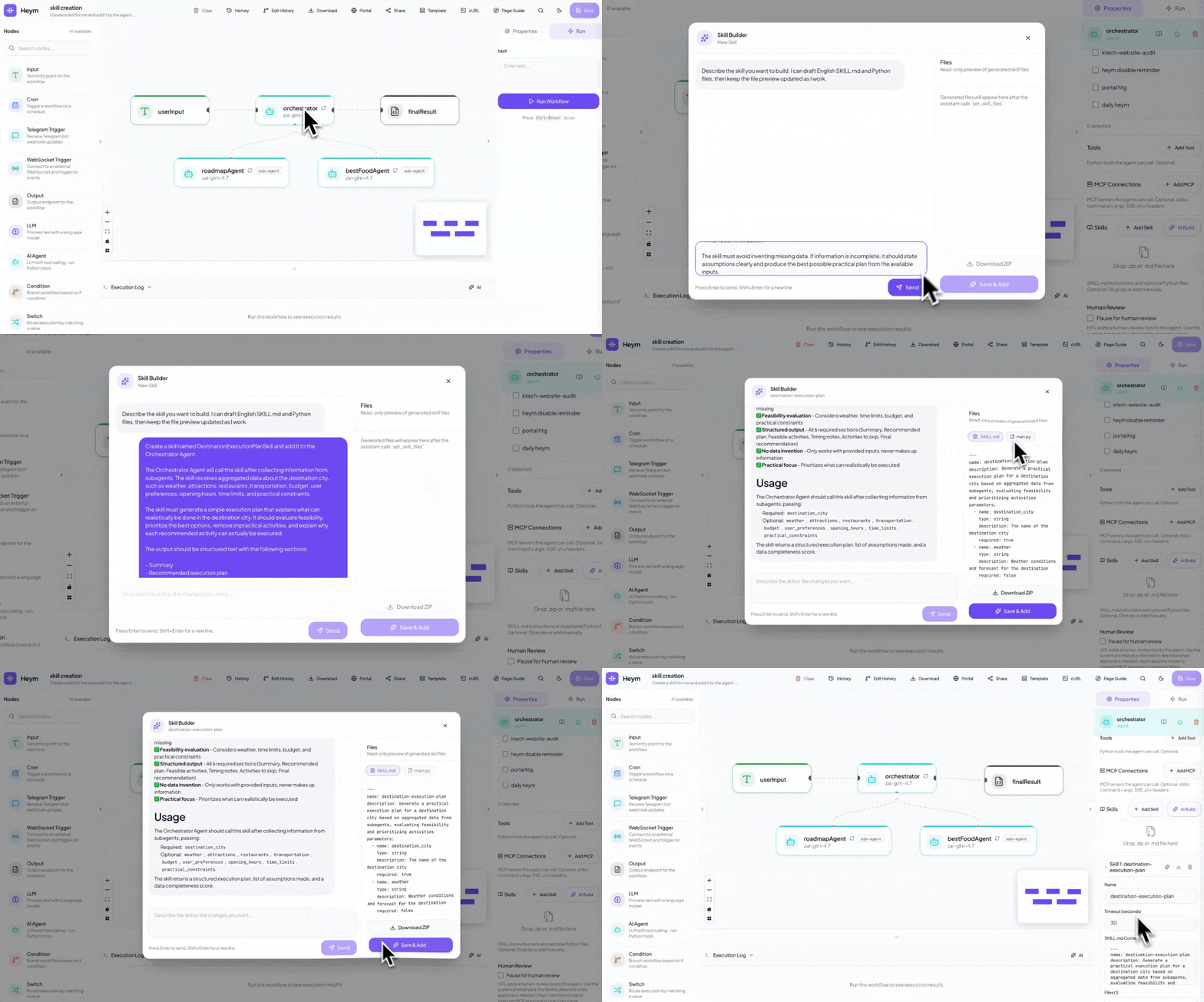
Example prompt
Create a skill for me and add it to the agent. The Orchestrator Agent will call this skill after receiving information from the subagents, and the skill will create a simple execution plan explaining what can actually be done in the destination city.
Call Workflows from Chat
Turn a workflow into a chat experience so users can invoke the orchestration with a natural request.
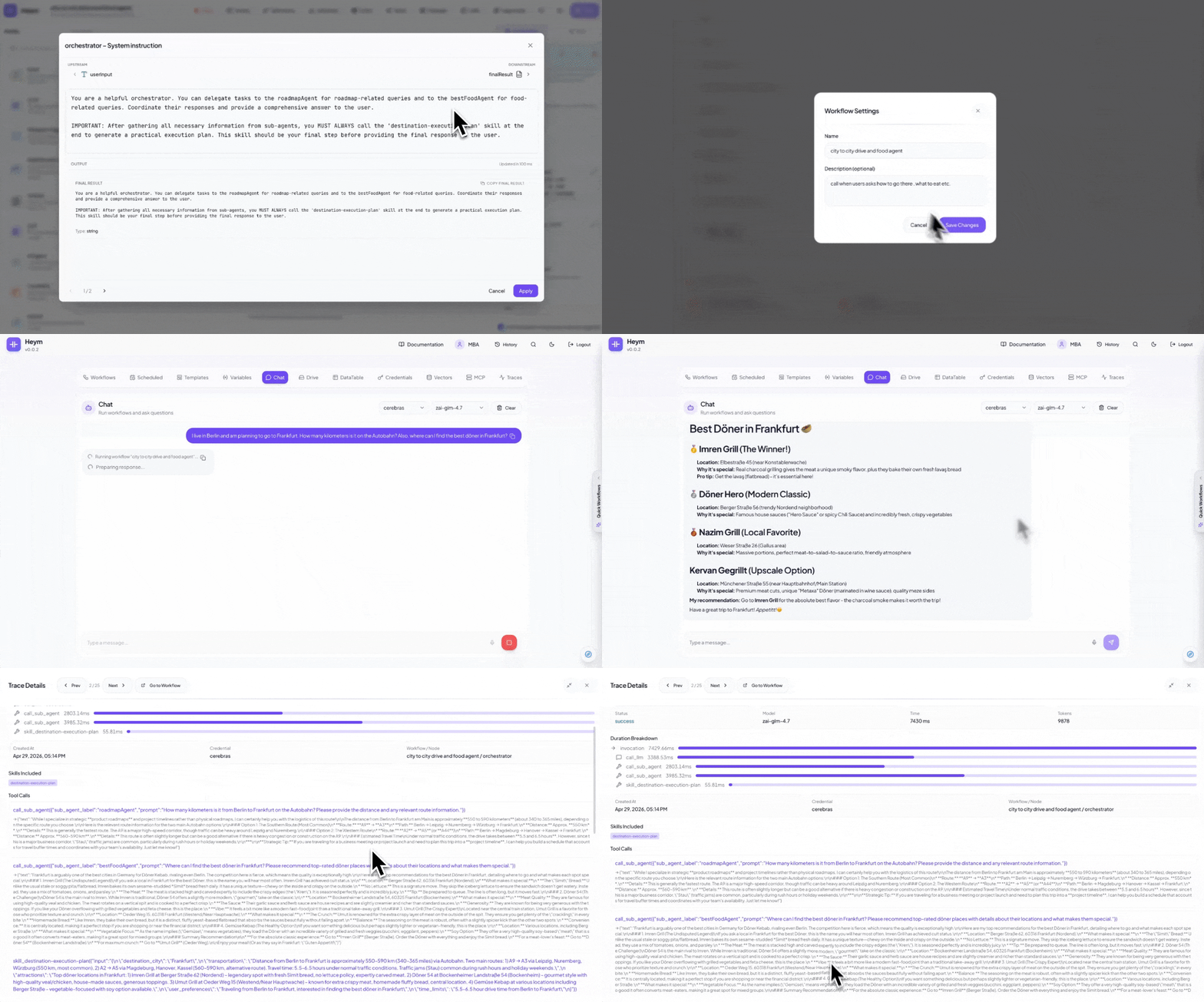
Example prompt
I live in Berlin and am planning to go to Frankfurt. How many kilometers is it on the Autobahn? Also, where can I find the best doner in Frankfurt?
📸 Screenshots
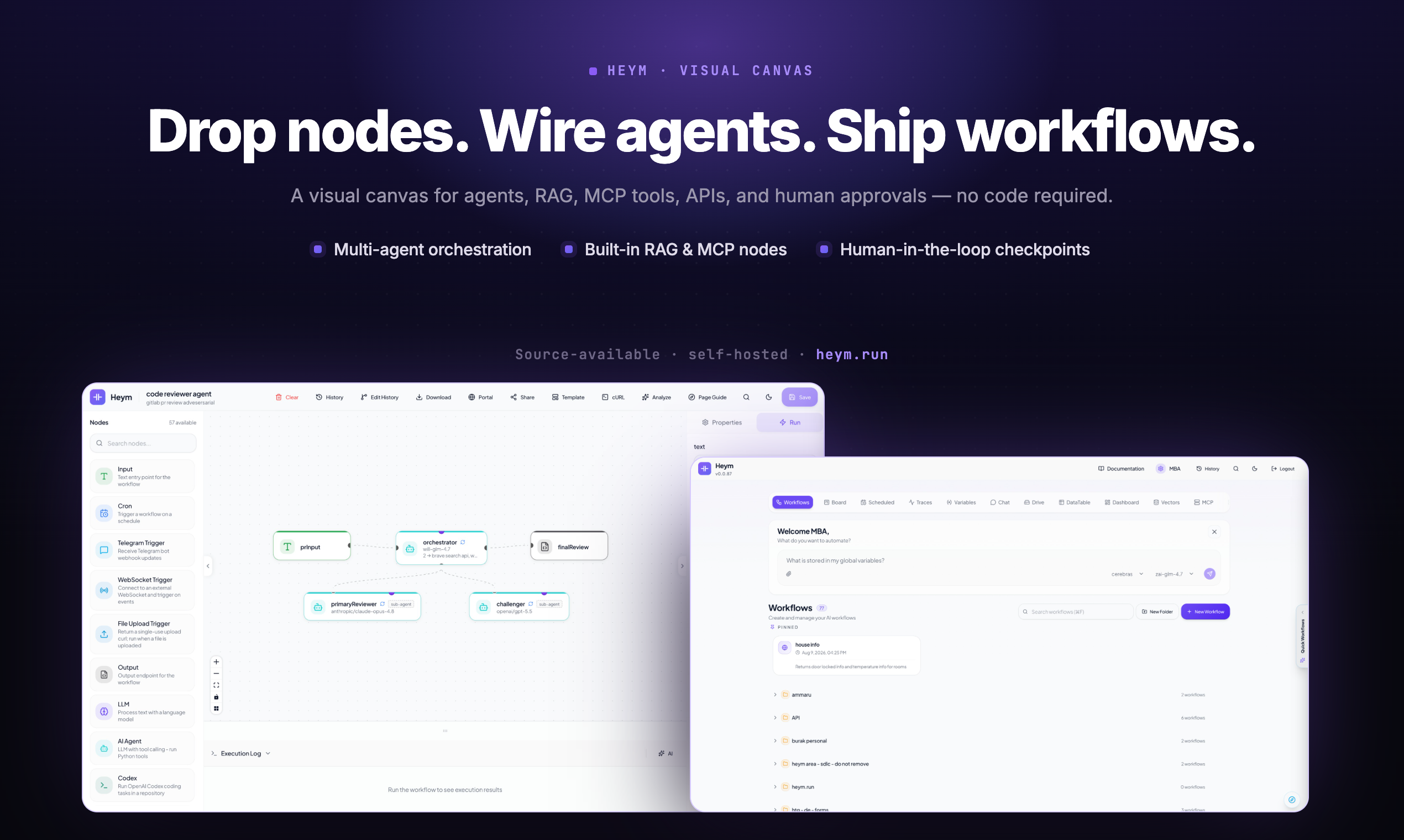
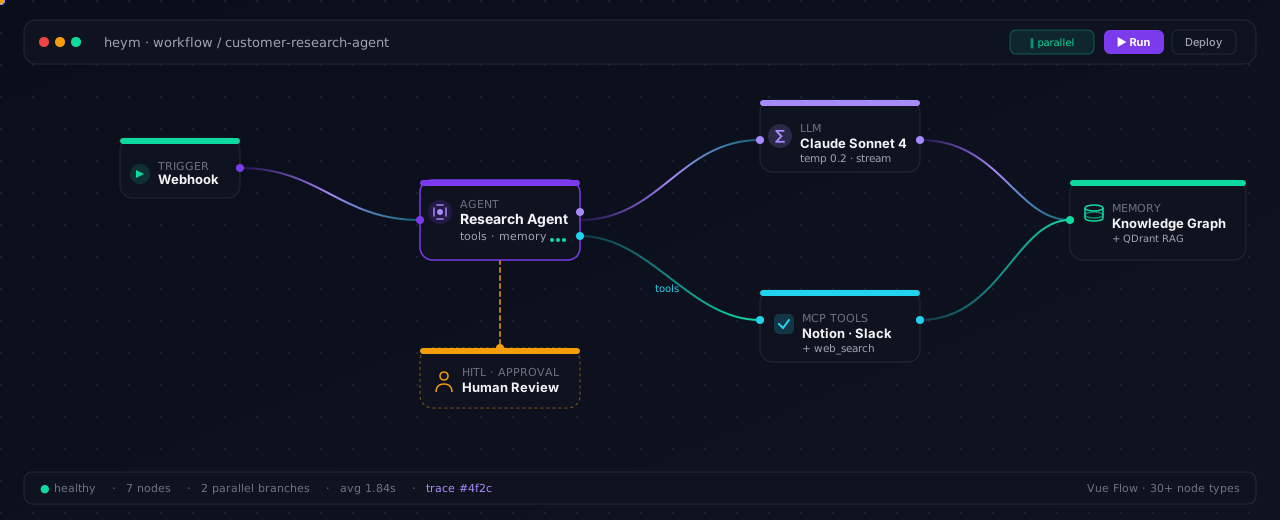
Visual Canvas — Multi-agent orchestration, RAG and MCP nodes, human-in-the-loop checkpoints
|
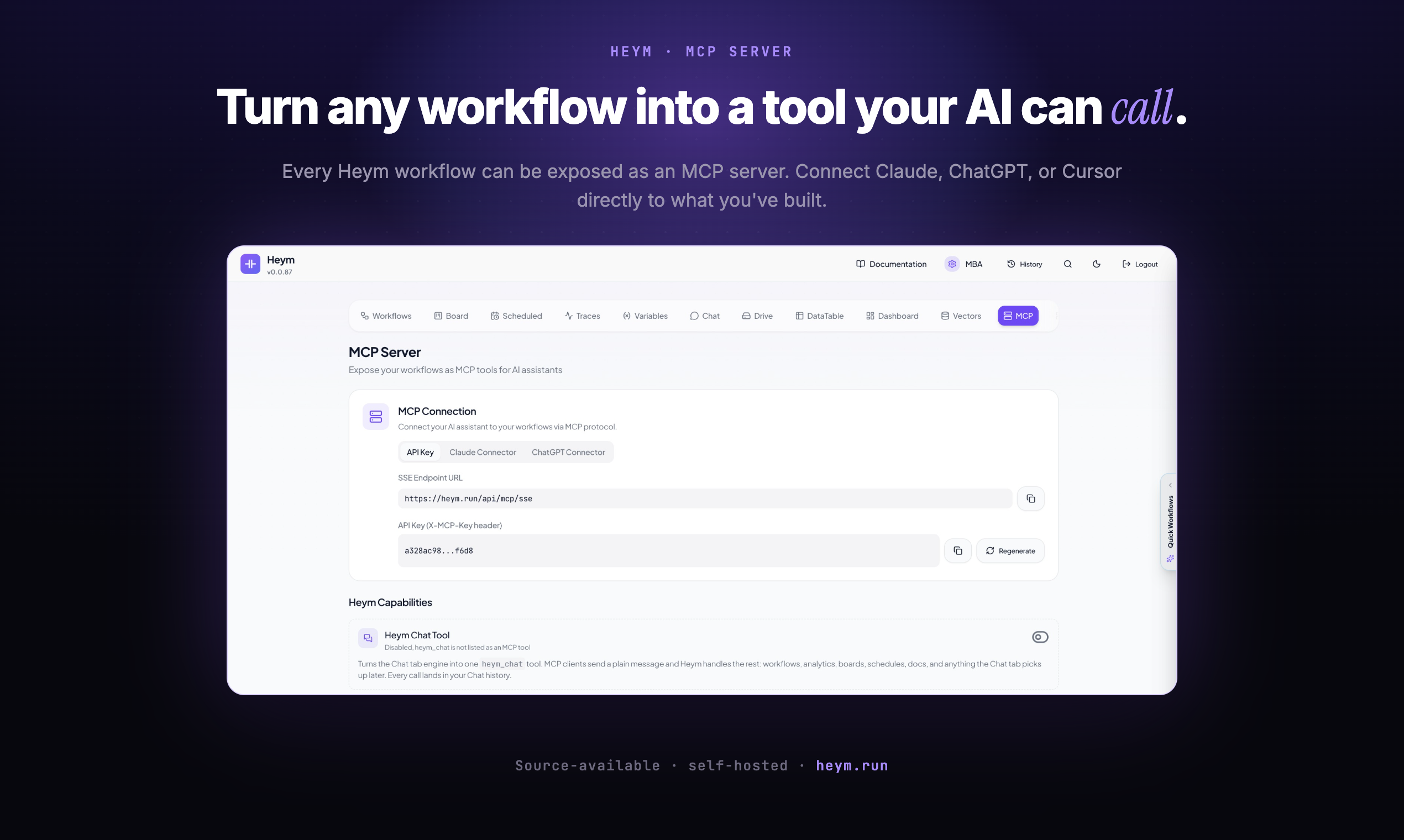
MCP Server — Expose any workflow as a tool for Claude, ChatGPT, or Cursor
|
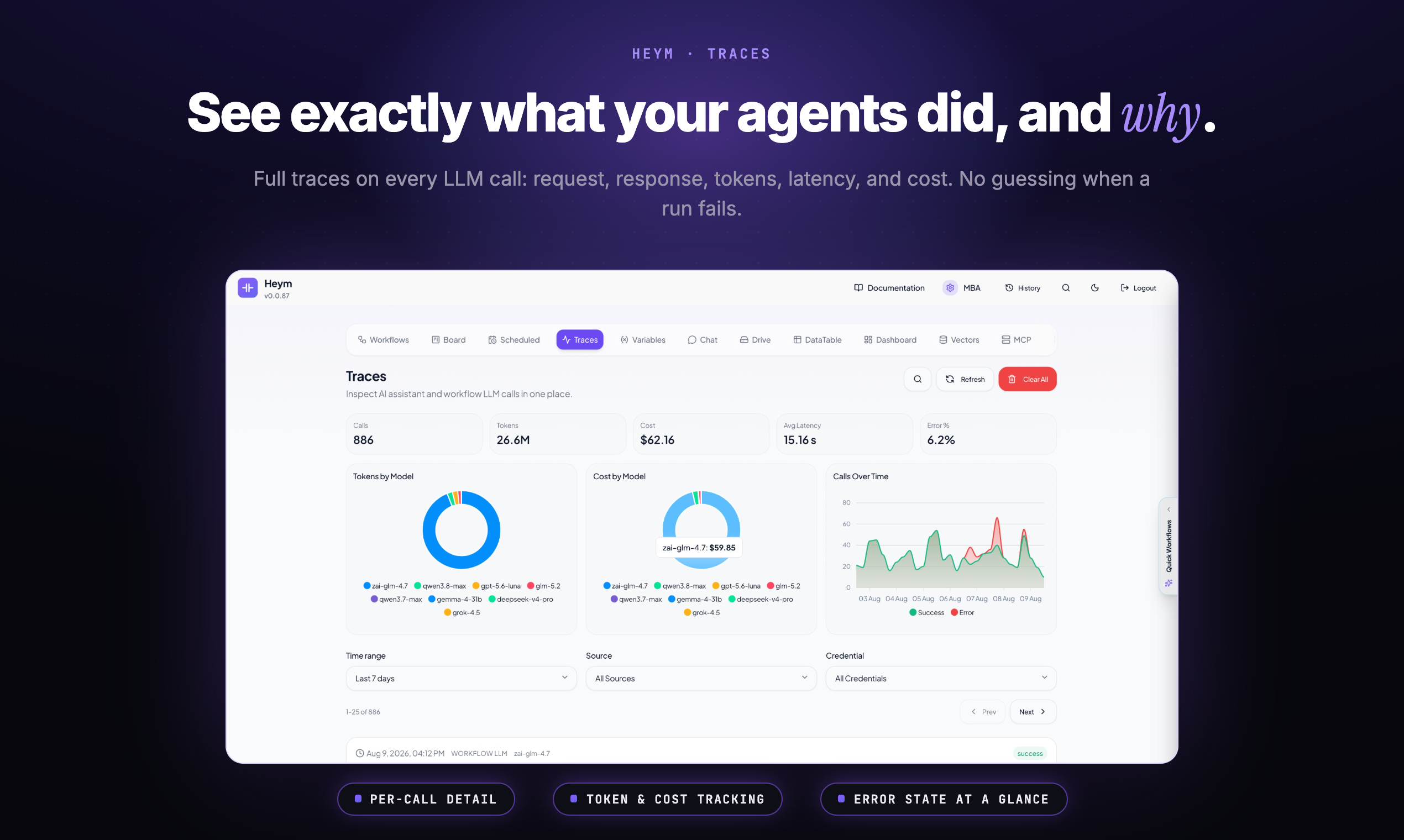
Traces — Every LLM call with request, response, tokens, latency, and cost
|
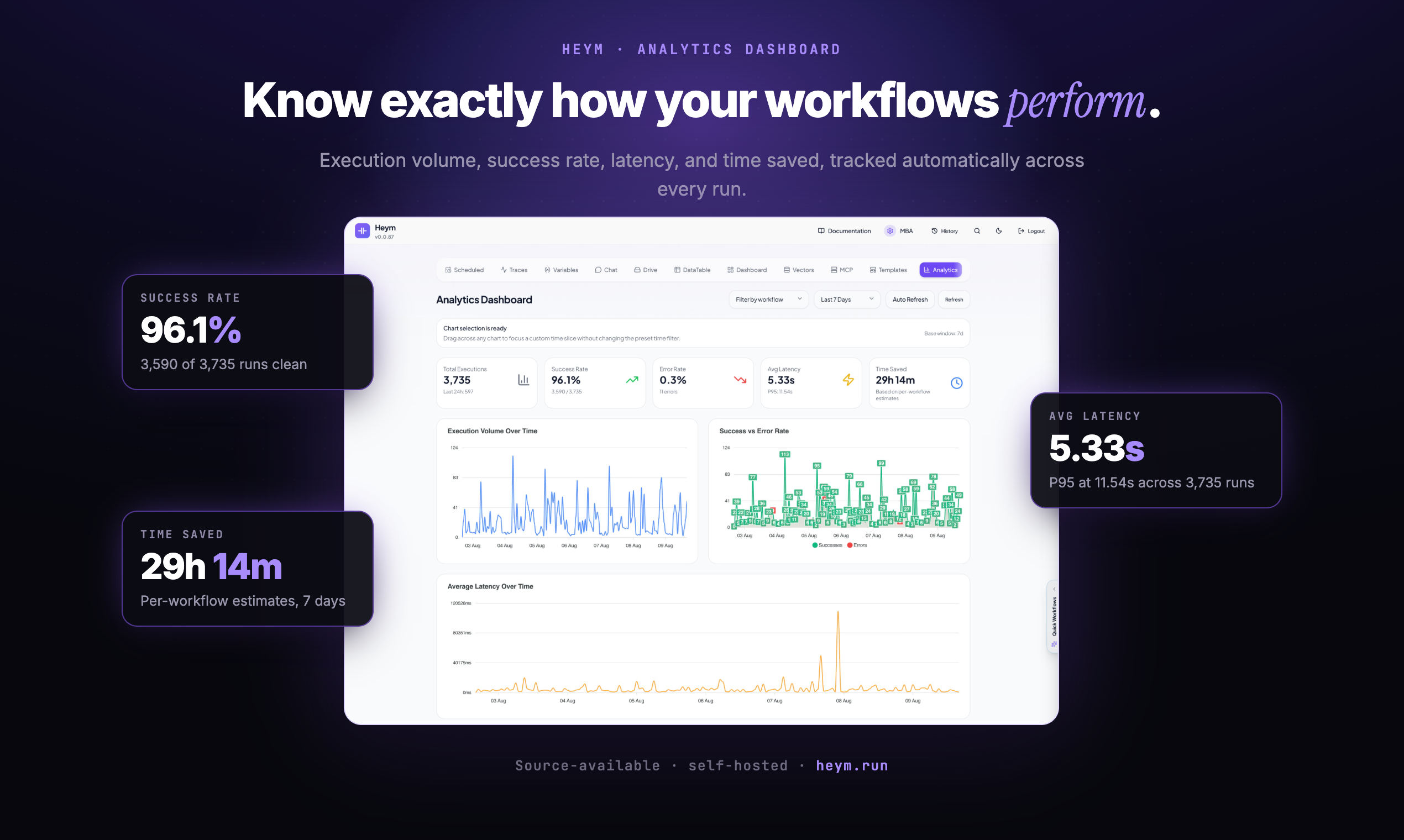
Analytics — Execution volume, success rate, latency, and time saved per workflow
|
✨ Key Capabilities
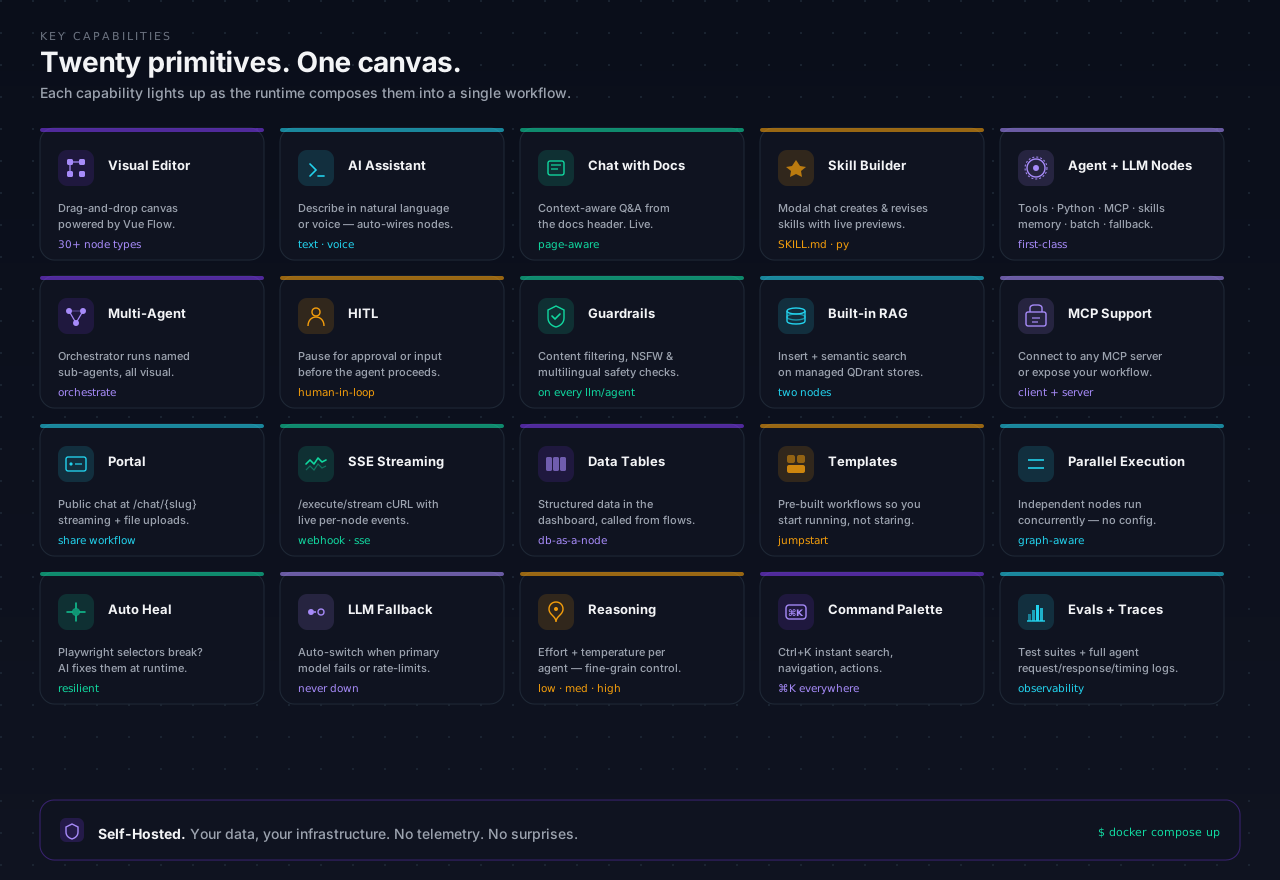
- Visual Workflow Editor — Drag-and-drop canvas powered by Vue Flow with a broad node library
- AI Assistant — Describe what you want in natural language (or voice) and the assistant generates and wires nodes on the canvas automatically
- Chat with Docs — Ask context-aware questions directly from the documentation header while the current article path is prioritized in the prompt
- AI Skill Builder — Create new Agent skills or revise existing ones from a modal chat with live
SKILL.md and Python file previews
- LLM & Agent Nodes — First-class LLM node and a full Agent node with tool calling, canvas node tools, sandboxed Python tools, MCP connections, skills, optional persistent memory (per-node knowledge graph with background extraction), and LLM Batch API mode with live status branches for supported providers
- Multi-Agent Orchestration — One agent orchestrates named sub-agents and sub-workflows, all wired visually
- Human-in-the-Loop (HITL) — Pause agent execution to request user approval or input before proceeding
- Guardrails — Content filtering, NSFW protection, and multilingual safety checks on LLM and Agent nodes
- Built-In RAG — Insert documents and run semantic search against managed vector stores (Qdrant or built-in Postgres/pgvector) in two nodes
- MCP Support — Connect Agent nodes to any MCP server as a client; expose your workflows as an MCP server for Claude, Cursor, and other clients
- OIDC SSO Login: Let teams sign in through Keycloak, Okta, Entra ID, Auth0, Google, or any OpenID Connect provider
- Load Distribution — Run two or more Heym instances against one database and split background workflow execution between them by percentage, configured from Settings → Instances. Postgres is the only channel between the instances; no broker, and no direct connection between them, is required
- Portal — Turn any workflow into a public chat UI at
/chat/{slug} with streaming responses and file uploads
- Webhook SSE Streaming — Generate ready-to-run cURL commands for
/execute or /execute/stream, with per-node start messages and live node event output in the terminal
- Live Execution Canvas — Open any running production execution from History or a Kanban card and watch the existing run continue node by node on the animated canvas with incremental Debug logs
- Data Tables — Manage structured data directly in the dashboard and reference it from workflows
- Workflow Analyzer — Run-aware AI feedback that generates a shared Markdown report with improvement areas, purpose, and step-by-step behavior
- Workflow-Powered Dashboards — Build custom chart dashboards where every widget is backed by its own hidden Heym workflow
- Agentic Kanban Board — Cards are persistent agentic jobs; moving a card into a column runs that column's ordered workflow chain with the card's full context (content, comments, history, previous outputs), and results are written back to the card
- Templates — Start from pre-built workflow templates to get up and running quickly
- Parallel Execution — Independent nodes run concurrently based on the graph structure, no configuration needed
- Auto Heal — Playwright selectors break? AI automatically detects and fixes them at runtime
- LLM Fallback — Automatic model fallback when the primary LLM fails or is unavailable
- Reasoning Support — Configure reasoning effort and temperature per Agent node for fine-grained control
- Command Palette — Ctrl+K for instant search, navigation, and workflow actions
- Evals — Define test suites and run them against any workflow with one click
- LLM Traces — Full observability for every agent call: requests, responses, tool calls, and timing
- Alerts — Threshold rules over a time window on error count, run duration, LLM spend, and execution count, built in an AI-fillable wizard that backtests the condition before you save it and can run any workflow when it fires
- LLM Cost Tracking — Per-trace token counts (input / output) with real-time USD cost calculation, historical analytics with time-range filtering, and a synced pricing table covering all major models
- Self-Hosted — Your data, your infrastructure
Full Feature Set
For a complete list of all features with short descriptions, see Full Feature Set. It covers Getting Started, every node type, reference topics (Expression DSL, workflow structure, webhooks, SSE streaming, AI Assistant, Chat with Docs, Portal, security, etc.), and all dashboard tabs (Workflows, Templates, Variables, Chat, Credentials, Vectorstores, MCP, Traces, Alerts, Analytics, Evals, Teams, Logs and more).
⭐ Stay Up To Date
Heym is built for developers who want control and enterprise teams that need a trusted path to production. Star Heym ⭐ on GitHub to follow releases and help more builders discover it.
🎯 Why Heym?
| Capability | Heym | n8n | Zapier | Make.com |
|---|
| Built-in LLM node | ✅ | ✅ | ✅ | ✅ |
| LLM Batch API + status branches | ✅ | partial¹⁵ | ❌¹⁵ | partial¹⁵ |
| AI Agent node (tool calling) | ✅ | ✅ | ✅ | ✅ |
| Agent persistent memory (knowledge graph) | ✅ | limited¹¹ | limited¹¹ | limited¹¹ |
| Multi-agent orchestration | ✅ | ✅ | limited | limited |
| Coding agent nodes (Codex, OpenCode) | ✅ | ❌²¹ | ❌²¹ | ❌²¹ |
| Human-in-the-Loop (HITL) | ✅ | ✅⁵ | limited⁶ | limited⁷ |
| LLM Guardrails | ✅ | ✅⁸ | ✅⁸ | limited⁸ |
| Automatic context compression | ✅ | ❌ | ❌ | ❌ |
| Built-in RAG / vector store | ✅ | ✅ | limited¹ | plugin² |
| WebSocket read / write | ✅ | limited¹² | ❌¹³ | ❌¹⁴ |
| Natural language workflow builder | ✅ | limited³ | ✅ | ✅ |
| Workflow Analyzer | ✅ | ❌¹⁸ | ❌¹⁸ | ❌¹⁸ |
| Open an in-flight run on the live canvas | ✅ | limited²⁰ | limited²⁰ | ❌²⁰ |
| Workflow-powered dashboards | ✅ | partial¹⁹ | partial¹⁹ | partial¹⁹ |
| Agentic Kanban board | ✅ | ❌²² | ❌²² | ❌²² |
| MCP (Model Context Protocol) | ✅ | ✅ | ✅ | ✅ |
| Skills system for agents | ✅ | ❌ | ❌ | ❌ |
| Built-in file drive (share links, teams) | ✅ | limited²³ | limited²³ | ❌²³ |
| Browser automation node (Playwright) | ✅ | limited²⁴ | limited²⁴ | ❌²⁴ |
| Auto Heal (Playwright) | ✅ | ❌ | ❌ | ❌ |
| Data Tables | ✅ | ✅ | ✅ | ❌ |
| Workflow Templates | ✅ | ✅ | ✅ | ✅ |
| LLM trace inspection | ✅ | limited⁴ | ❌ | ✅ |
| OpenTelemetry tracing export | ✅ | ✅¹⁷ | ❌¹⁷ | ❌¹⁷ |
| LLM token cost tracking (USD) | ✅ | ❌¹⁶ | ❌¹⁶ | limited¹⁶ |
| Metric alerts (errors, duration, cost, run count) | ✅ | limited²⁵ | limited²⁵ | limited²⁵ |
| Built-in evals for AI workflows | ✅ | ✅ | ❌ | ❌ |
| Parallel DAG execution | ✅ | limited⁹ | ❌ | ❌ |
| Self-hostable, source-available | ✅ MIT + Commons Clause | ✅ fair-code¹⁰ | ❌ | ❌ |
| Expression DSL for dynamic data | ✅ | ✅ | limited | ✅ |
Table footnotes
-
Zapier Agents support "Knowledge Sources" (upload docs, connect apps) but no user-exposed vector store or control over embeddings/chunking
-
Make.com has Pinecone and Qdrant modules but no native one-click RAG node — you assemble the pipeline manually
-
n8n's AI Workflow Builder is cloud-only beta with monthly credit caps, not available for self-hosted
-
n8n shows intermediate steps (tool calls, results) but full prompt/response tracing requires third-party tools like Langfuse
-
n8n pauses AI tool calls for review through chat, email, and collaboration channels, but it is centered on tool approval rather than snapshotting and editing the whole execution state
-
Zapier Human in the Loop supports approvals and data collection inside Zaps, but it doesn't resume from a captured agent/runtime snapshot the way Heym checkpoints do
-
Make Human in the Loop is available as an Enterprise app with review requests and adjusted/approved/canceled outcomes, but it is plan-limited and less tightly coupled to agent state
-
n8n ships a dedicated Guardrails node, Zapier ships AI Guardrails across its AI products, and Make documents agent rules plus review flows but not a comparable standalone guardrails feature, so Make is marked limited
-
n8n executes sequentially by default; parallel execution requires sub-workflow workarounds
-
n8n uses the Sustainable Use License — free to self-host for internal use, commercial redistribution restricted
-
First-class per-agent knowledge graph with prompt injection and post-run LLM merge is uncommon; other platforms typically rely on external vector DB or manual memory patterns, hence limited
-
n8n's official docs cover HTTP Webhook and HTTP Request nodes plus Code/custom/community extensibility, but I couldn't find a first-party WebSocket trigger/send node, so n8n is marked limited
-
Zapier's official docs cover inbound webhooks and outbound webhook/API requests over HTTP only, not native WebSocket trigger or send steps
-
Make's official docs cover Webhooks modules and HTTP(S) request modules, but I couldn't find a native WebSocket trigger or send module
-
As of April 22, 2026, n8n's official docs document HTTP batching and loop/wait patterns rather than a native LLM batch-status branch, Zapier's official ChatGPT app docs list no triggers and only a generic API Request beta, and Make's official OpenAI integration page exposes batch actions like create/watch completed but not a first-class status-branching LLM node, so n8n/Make are marked partial and Zapier is marked unavailable for this specific pattern
-
n8n has no native LLM token cost tracking; community workaround workflows exist (e.g. "Token Estim8r") but require manual installation and post-execution API calls — an open feature request exists as of May 2026. Zapier exposes no per-execution token count or USD cost to users; AI steps consume tasks only, with no model pricing table. Make switched to a credits model in August 2025 that partially reflects token consumption for Make-hosted AI, but third-party connections using your own API key are billed as 1 operation = 1 credit with no token counting, and there is no per-execution USD breakdown by model
-
Heym emits native OpenTelemetry spans (one per workflow run, one per node, plus Agent tool spans) over OTLP/HTTP to any compatible backend, with W3C trace-context propagation and no instrumentation code, configured via HEYM_OTEL_* env vars and disabled by default. n8n has a documented OpenTelemetry tracing setup for workflow and node executions (blog.n8n.io). Zapier and Make.com do not document OpenTelemetry export of their workflow/scenario executions as of June 2026
-
Heym Workflow Analyzer runs the workflow when possible, reads the execution result, and generates a shared editable Markdown report covering improvement areas, purpose, and step-by-step behavior. n8n AI Workflow Builder can create/refine/debug workflows, Zapier AI troubleshooting explains errored runs, and Make scenario history/agent reasoning exposes run details, but their public docs do not describe the same shared run-aware workflow analysis document
-
n8n Insights, Zapier Zap History/Task Usage, and Make Scenario History are monitoring/history surfaces. They do not document custom dashboard widgets backed by arbitrary workflow logic like Heym's Dashboard tab, where each widget can fetch, transform, retrieve, or generate data through its own hidden workflow
-
n8n All executions lists running executions and can load previous execution data into the editor, while Zapier run statuses exposes a running editor state. Make Scenario History documents run details and logs. Their public docs, checked July 18, 2026, do not describe Heym's exact combination: open an arbitrary in-flight production run from History or a Kanban card, restore its current snapshot, and keep receiving node animation and Debug logs on the same canvas.
-
Heym's Codex and OpenCode Go nodes run a real coding agent CLI in an isolated workspace against a GitHub repository — clone, edit, diff, push a branch, open a pull request — as a first-class workflow step. As of July 20, 2026, no competitor documents an equivalent: n8n's OpenAI node covers chat/assistant API calls and native Codex support remains a community request, Zapier's own blog documents the reverse direction (Codex driving Zapier tools through Zapier MCP), and Make's OpenAI modules expose completions/assistants/batch actions only
-
Heym's Board tab is a built-in agentic Kanban board whose columns execute workflows and whose cards carry context, conversation history, execution state, and runs. n8n, Zapier, and Make only integrate with third-party kanban apps (Kanban Tool, Wekan, NocoDB); none documents a built-in board that runs its own automations, as of July 20, 2026
-
Heym's Drive tab stores workflow/skill-generated files with public or password-protected share links, team sharing, and bulk ZIP/share/delete actions. n8n keeps execution binary data internally (optionally on S3-compatible external storage) with no user-facing file drive; Zapier's Files by Zapier holds files only for the duration of a Zap run and Storage by Zapier holds small text values; Make's data stores hold structured records and its file handling passes files between apps without persistent built-in storage
-
Heym's Playwright node is first-party browser automation with visual steps, AI-generated steps, and a full-code mode. n8n offers only community packages with a still-open feature request for native browser automation nodes; Zapier Agents can browse and read pages but Zapier documents no scripted browser-automation step; Make documents HTTP modules and third-party scraping apps rather than a native browser module, as of July 20, 2026
-
Heym Alerts are user-defined thresholds evaluated over a time window across four metrics — error count, run duration (max/avg/p95), LLM token or USD spend, and execution count — built in a wizard that backtests the condition before saving and can run a workflow when it fires. The competitors notify per failed run rather than on a windowed threshold, and none documents user-set duration or cost alerts. n8n Insights displays failure rate and run time average (dashboard on Pro and above) but sets no thresholds and sends no alerts; n8n's alerting path is the per-execution error workflow. [Zapier](https://help.zapier.com/hc/en-us/a