Overview
Claude Usage Tracker is a lightweight, native macOS menu bar application that provides real-time monitoring of your Claude AI usage limits. Built entirely with Swift and SwiftUI, it offers a clean, intuitive interface to track your 5-hour session window, weekly usage limits, and Opus-specific consumption.
Key Capabilities
- Multi-Provider Support: Track OpenAI Codex usage alongside Claude — per-profile provider selection, built on a registry so more providers can follow
- Dynamic Island (Beta): A minimal notch HUD showing what Claude Code is doing in real time — current tool, session status, and a pulse when Claude needs your input
- Multi-Profile Support: Manage unlimited Claude accounts with isolated credentials and settings
- Terminal Launchers: Install a
claude-<profile> command per profile — each opens Claude Code with that profile's own login while plain claude follows the active profile
- Multi-Profile Display: Monitor all profiles simultaneously in the menu bar
- Claude Code Integration: Sync CLI accounts and auto-switch credentials when changing profiles
- Real-Time Monitoring: Track session, weekly, and per-model usage (Fable, Opus, Sonnet, Design), API console usage, and API costs per profile
- Usage History: Interactive charts tracking session, weekly, and billing data over time
- Global Shortcuts: System-wide keyboard shortcuts (no Accessibility permission)
- Headless Mode: Works on headless Macs via Remote Desktop
- Customizable Interface: 5 icon styles + 3 color modes (Multi-Color/Greyscale/Single Color) + per-element statusline colors + remaining/used percentage toggle
- Smart Automation: Auto-start sessions, auto-switch profiles, threshold notifications
- Developer Tools: Terminal statusline integration with model, context, profile display, weekly/extra usage segments, pace markers, per-element colors, and color modes
- Privacy-First: Credentials in the macOS Keychain, local storage, minimal anonymous analytics (version-only heartbeat), no cloud sync
- Native Performance: Lightweight Swift/SwiftUI design for macOS
What's New
-
v3.3.0 (2026-08-29): Multi-provider architecture with OpenAI Codex support (#229) — per-profile provider selection on a registry pattern (docs/ADDING_A_PROVIDER.md); per-profile terminal launchers — claude-<profile> commands with isolated CLAUDE_CONFIG_DIR logins and automatic usage tracking after one /login; keychain migration finally works on shipped Developer ID builds (#292); popover shows over full-screen apps (#298); Dynamic Island targets the built-in notch (#294); Cloudflare challenges no longer masquerade as expired credentials (#277); macOS 26 multi-profile crash fixes; transient E1000 on profile switch eliminated; obsolete peak-hours indicator removed (#308); Vietnamese localization — 14 languages total. Thanks to 8 community contributors.
-
v3.2.0 (2026-07-12): Dynamic Island (Beta) — live Claude Code activity HUD at the notch; Fable per-model tracking via the new limits[] usage format; credentials moved to the macOS Keychain (GHSA-mfxh-xpwm-23c7); profile switching overhaul (no more forced re-logins); usage history storage fix (silent settings loss on macOS 26); macOS 26/27 crash and sign-in fixes; localization parity across all 13 languages. Huge thanks to 9 community contributors.
-
v3.1.0 (2026-04-14): Peak hours indicator with flame icon and countdown popover, right-click context menu on menu bar icons, per-element statusline color customization (#208), weekly & extra usage segments in statusline (#177), active profile indicator in multi-profile mode, Nix installation option (#211), 3 new languages (Brazilian Portuguese, Turkish, Ukrainian) bringing total to 12, 13 bug fixes including popover crash on profile switch, app hang on launch, and E3000 unauthorized errors
-
v3.0.3 (2026-03-10): 6-tier pace system with colored pace markers, 3 color modes (Multi-Color/Greyscale/Single Color), label toggles, 24-hour time format, terminal-matching preview colors
-
v3.0.2 (2026-03-10): API cost tracking with daily chart, browser-based authentication, rate limit header usage for CLI OAuth, auto-sizing popover, session key expiry tracking
-
v3.0.1 (2026-03-08): Popover settings tab, multi-display CPU fix
-
v3.0.0 - Major Release (2026-03-08): Headless mode, usage history charts, global shortcuts, auto-switch profiles, borderless settings, 6 new statusline components, Simplified Chinese
-
v2.3.0 – Multi-profile menu bar display, remaining percentage toggle
-
v2.2.0 – Multi-profile management, CLI integration, Korean language
-
v2.0.0 – Apple code signing, automatic updates, Keychain security
View Full Release History
Getting Started
Prerequisites
Before installing Claude Usage Tracker, ensure you have:
- macOS 14.0 (Sonoma) or later - Check: Apple menu → About This Mac
- Active Claude AI account - Sign up at claude.ai
Authentication (choose one method):
- Easiest: Claude Code installed and logged in - App automatically uses CLI credentials (v2.2.2+)
- Browser Sign-In: Sign in via the built-in browser — session key extracted automatically (v3.0.2+)
- Manual: Web browser access to extract session key from claude.ai (Chrome, Safari, Firefox, etc.)
Note: For terminal statusline integration, you'll still need to manually configure a session key even if using Claude Code OAuth
Installation
Option 1: Homebrew (Recommended)
brew install --cask hamed-elfayome/claude-usage/claude-usage-tracker
Or tap first, then install:
brew tap hamed-elfayome/claude-usage
brew install --cask claude-usage-tracker
Note: Starting with v2.0.0, the app is officially signed with an Apple Developer certificate. No security workarounds needed!
To update:
brew upgrade --cask claude-usage-tracker
Or use the built-in automatic update feature (Settings → Updates).
To uninstall:
brew uninstall --cask claude-usage-tracker
Option 2: Nix
Test the app:
nix-shell -p claude-usage-tracker
Install it using home-manager:
home.packages = with pkgs; [
claude-usage-tracker
];
Option 3: Direct Download
Download Claude-Usage.zip
- Download the
.zip file from the link above
- Extract the zip file (double-click or use Archive Utility)
- Drag
Claude Usage.app to your Applications folder
- Double-click to launch - that's it!
v2.0.0+ Note: The app is now officially signed with an Apple Developer certificate. You can install and run it like any other Mac application - no security warnings or workarounds needed.
Automatic Updates: Once installed, the app will automatically check for updates and notify you when new versions are available (Settings → Updates).
Option 4: Build from Source
# Clone the repository
git clone https://github.com/hamed-elfayome/Claude-Usage-Tracker.git
cd Claude-Usage-Tracker

# Open in Xcode
open "Claude Usage.xcodeproj"

# Build and run (⌘R)
Quick Start Guide
Option A: Automatic Setup with Claude Code (Easiest)
New in v2.2.2: If you have Claude Code installed and logged in, the app works automatically!
-
Install Claude Code (if not already installed)
-
Launch Claude Usage Tracker
- The app automatically detects your Claude Code Account
- No manual configuration needed!
-
Verify It's Working
- Click the menu bar icon
- You should see your usage statistics immediately
Option B: Browser Sign-In (v3.0.2+)
If you don't use Claude Code, sign in directly through the app:
- Click the menu bar icon and select "Settings"
- Navigate to "Personal Usage" tab
- Click "Sign in to Claude.ai" — an embedded browser opens
- Log in with your Claude.ai credentials (email, Google SSO, etc.)
- Session key is extracted automatically — the app validates and saves it
- Select your organization from the list and confirm
Option C: Manual Setup with Session Key
If you prefer manual configuration:
Step 1: Extract Your Session Key
-
Open Claude AI
- Navigate to claude.ai in your browser
- Make sure you're logged in
-
Open Developer Tools
- Chrome/Edge: Press
F12 or Cmd+Option+I (macOS) / Ctrl+Shift+I (Windows)
- Safari: Enable Developer menu in Preferences → Advanced, then press
Cmd+Option+I
- Firefox: Press
F12 or Cmd+Option+I (macOS) / Ctrl+Shift+I (Windows)
-
Navigate to Cookies
- Go to: Application tab (Chrome/Edge) or Storage tab (Firefox)
- Expand: Cookies → https://claude.ai
- Find:
sessionKey cookie
- Copy: The value (starts with
sk-ant-sid01-...)
Step 2: Configure Session Key
- Click the menu bar icon and select "Settings"
- Navigate to "Personal Usage" tab
- Expand "Advanced: Manual Session Key"
- Paste your session key and click "Test Connection"
- Select your organization from the list
- Review and click "Save Configuration"
Step 3: Verify It's Working
- Check Menu Bar: You should see the Claude Usage icon in your menu bar
- Click the Icon: Popover appears showing your usage statistics
- View Data: Session usage, weekly usage, and reset timers should display
Success! The app is now monitoring your Claude usage.
Next Steps
- Customize Icon: Go to Settings → Appearance to choose your preferred menu bar style
- Enable Notifications: Settings → Notifications to get threshold alerts
- Auto-Start Sessions: Settings → Session Management to enable automatic session initialization
- Terminal Integration: Settings → Claude Code to set up statusline (requires session key configuration)
- Keyboard Shortcuts: Settings → Shortcuts to configure global hotkeys
Advanced Configuration
Manual Session Key Setup
If you prefer to configure the session key manually instead of using the setup wizard:
# Create session key file
echo "sk-ant-sid01-YOUR_SESSION_KEY_HERE" > ~/.claude-session-key

# Set secure permissions (important for security)
chmod 600 ~/.claude-session-key
After creating the file, launch the app and it will automatically detect the session key.
Multi-Profile Management
New in v2.2.0: Claude Usage Tracker now supports unlimited profiles, allowing you to manage multiple Claude accounts seamlessly with automatic credential switching.
New in v3.0.0: Auto-switch profiles when session limit reached, usage history tracking, and global keyboard shortcuts!
Features
Profile Management
- Unlimited Profiles: Create as many profiles as needed for different Claude accounts
- Multi-Profile Display: Show all profiles in the menu bar at once
- Toggle between Single mode (active profile only) and Multi mode (all profiles)
- Each profile displays with its own icon style and settings
- Click any profile icon to view its usage details
- Independent refresh rates per profile
- Fun Auto-Names: Profiles auto-generate with names like "Quantum Llama", "Sneaky Penguin", "Turbo Sloth"
- Custom Names: Rename profiles to whatever you prefer
- Quick Switching: Switch profiles instantly via popover dropdown or settings sidebar
- Profile Badges: Visual indicators show which profiles have Claude.ai credentials and CLI accounts
Claude Code CLI Integration
- One-Click Sync: Sync your currently logged-in Claude Code account to a profile
- Automatic Switching: When you switch profiles, CLI credentials automatically update
- Credential Display: View masked access tokens and subscription type
- Smart Re-Sync: Credentials automatically refresh before profile switches to capture CLI changes
- Per-Profile CLI: Each profile can have its own Claude Code account or share the system account
Per-Profile Settings
Each profile has isolated settings:
- Credentials: Separate Claude.ai session keys, API keys, and organization IDs
- Appearance: Independent icon styles and monochrome mode
- Refresh Interval: Custom refresh rates (5-300 seconds)
- Auto-Start Sessions: Enable/disable per profile
- Notifications: Independent threshold alerts (75%, 90%, 95%)
- Usage Data: Tracked separately per profile
Profile Switcher
Access profile switcher in multiple places:
- Popover Header: Dropdown menu with profile badges
- Settings Sidebar: Active profile picker with visual indicators
- Manage Profiles Tab: Full profile management interface
How to Use
-
Create Profiles:
- Go to Settings → Manage Profiles
- Click "Create New Profile"
- Auto-generates a fun name or enter your own
-
Configure Credentials:
- Switch to desired profile in sidebar
- Go to Claude.AI / API Console / CLI Account tabs
- Enter credentials (isolated per profile)
-
Sync Claude Code (Optional):
- Log in to Claude Code in terminal
- Open Settings → CLI Account
- Click "Sync from Claude Code"
- Now when you switch profiles, CLI credentials auto-update!
-
Switch Profiles:
- Click popover dropdown
- Or use settings sidebar picker
- CLI credentials apply automatically
OpenAI Codex Profiles (v3.3.0+)
Profiles aren't Claude-only anymore. When creating a profile, pick OpenAI Codex as its provider to track your Codex rate limits in the same menu bar:
- Reads your existing
~/.codex/auth.json login (or paste credentials in Settings → Codex Account)
- Maps Codex's 5-hour and weekly rate windows onto the familiar session/weekly rows
- Refreshes expired tokens automatically and writes them back atomically with
0600 permissions
- Anthropic-only integrations (statusline, auto-start, Dynamic Island) hide themselves for Codex profiles
Want another provider? The architecture is additive — see docs/ADDING_A_PROVIDER.md.
Per-Profile Terminal Launchers (v3.3.0+)
Run different Claude Code accounts side by side without touching environment variables:
- Open Settings → General on the profile you want and click Install Launcher
- Run
claude-<profile> in any terminal — it opens Claude Code with that profile's own CLAUDE_CONFIG_DIR, so sign in once with /login
- The app detects the new login and links it to the profile automatically — usage tracking follows that account from then on
Plain claude keeps following the active profile, exactly as before. Removing a launcher never deletes its login.
Features
Installation & Updates
- Official Apple Code Signing: Professionally signed application - installs like any Mac app
- Automatic Updates: Built-in update system powered by Sparkle framework
- One-Click Installation: No security workarounds or manual approvals needed
- Update Notifications: Get notified when new versions are available
Usage Tracking & Monitoring
- Real-time monitoring of 5-hour session, weekly limits, and Opus-specific usage
- API console usage tracking with monthly cost dashboard and daily cost chart
- Per-API-key cost breakdown with model-level detail
- Extra usage cost tracking for Claude Extra subscribers
- Color-coded indicators (adaptive green/orange/red) based on consumption levels
- Smart countdown timers for session and weekly resets with 3-way display (time, remaining, or both)
Menu Bar & Interface
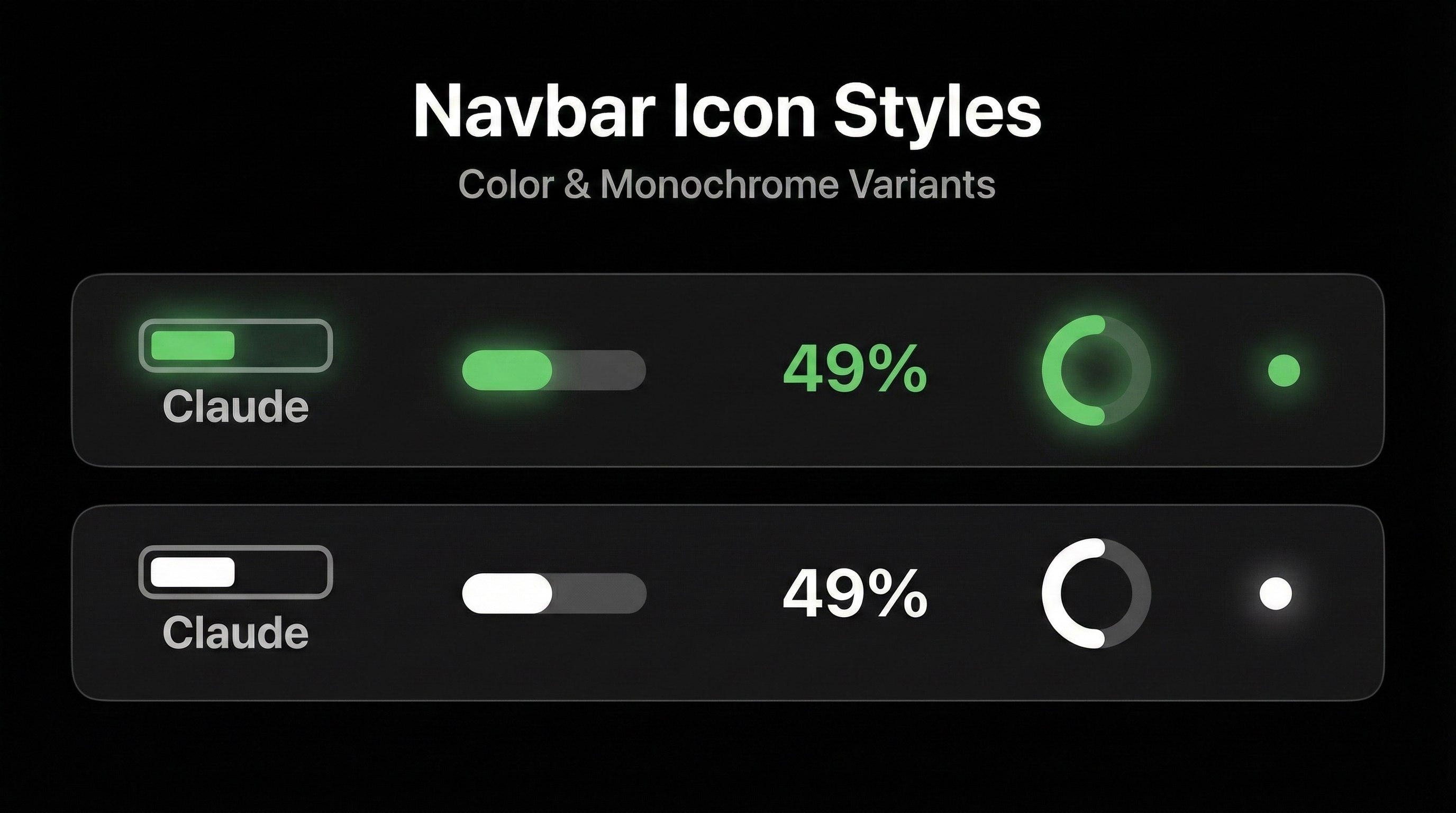
- 5 Customizable Icon Styles: Battery, Progress Bar, Percentage Only, Icon with Bar, Compact
- Multi-Metric Icons: Display separate icons for session, weekly, and api usage simultaneously
- 3 Color Modes: Multi-Color (threshold-based), Greyscale (adapts to appearance), Single Color (custom hex)
- 6-Tier Pace System: Pace markers colored by projected usage (green/teal/yellow/orange/red/purple)
- Interactive Popover: One-click access with detachable floating window capability
- Live Status Indicator: Real-time Claude system status from status.claude.com
- Multi-Language Support: 14 languages (English, Spanish, French, German, Italian, Portuguese, Brazilian Portuguese, Japanese, Korean, Simplified Chinese, Traditional Chinese, Turkish, Ukrainian, Vietnamese)
- Adaptive colors for light/dark mode
Automation & Intelligence
- Auto-Start Sessions: Automatically initialize new sessions when usage resets to 0%
- Auto-Switch Profiles: Automatically switch to next profile at session limit
- Wake-from-Sleep Refresh: Auto-refresh after waking with debounce
- Smart Notifications: Threshold alerts at 75%, 90%, 95% + custom thresholds with sound picker
- Network Monitoring: Auto-detect connectivity changes and handle offline scenarios
- Launch at Login: System-level auto-start option
- Configurable Refresh: Set intervals from 5 to 120 seconds
- Session reset and auto-start confirmations
Developer Integration
- Dynamic Island (Beta): Live Claude Code activity at the notch — session status, current tool, needs-input pulse, multi-session support; passive read-only hooks (the HUD can never approve or answer for you); floating pill on displays without a notch
- Claude Code Terminal Statusline: Real-time usage in your terminal
- Customizable components: directory, git branch, model name, context window, profile name, usage percentage, progress bar, pace marker, reset timer
- 3 color modes: Multi-Color, Greyscale, Single Color (custom hex) for statusline
- Pace marker: 6-tier colored marker on progress bar showing projected usage pace
- Label toggles: Show/hide "Ctx:", "Usage:", "Reset:" prefixes
- 24-hour time: Optional 24-hour format for reset time
- Terminal-matching preview with ANSI-equivalent colors
- Instant rendering via usage cache (no startup delay)
- One-click automated installation
- Live preview before applying changes
Security & Privacy
- macOS Keychain Storage: All per-profile credentials (session keys, API keys, CLI OAuth tokens) stored in the macOS data-protection Keychain — never in cleartext on disk (GHSA-mfxh-xpwm-23c7)
- Automatic Migration: Seamless, verified migration from old storage methods — no re-login required
- Apple Code Signed: Verified by Apple for enhanced security and trust
- Advanced Error Handling: Professional error system with user-friendly recovery
- Robust Validation: Session key and API endpoint validation
- Local storage with no cloud sync
- Minimal anonymous analytics (version-only heartbeat every 24h — no PII, no credentials)
- HTTPS-only communication with Claude API
Advanced Capabilities
- Multi-screen support
- First-run guided setup wizard
- Protocol-based modular architecture
- Persistent settings with App Groups
- Comprehensive test coverage
Usage
Menu Bar Interface
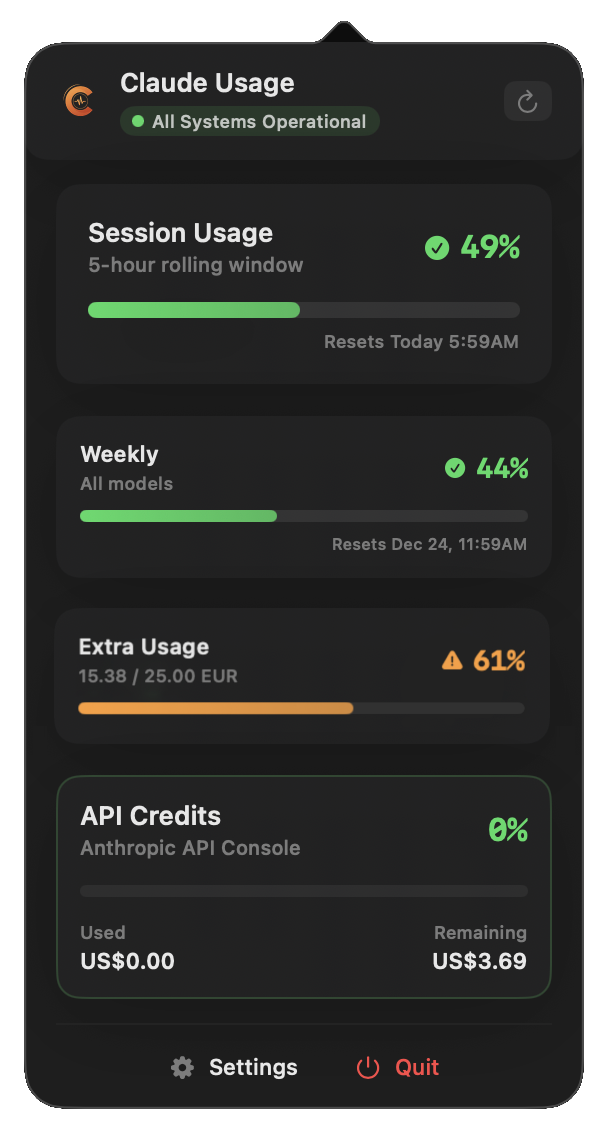
Click the menu bar icon to access:
- Session Usage: 5-hour rolling window percentage and reset time
- Weekly Usage: Overall weekly consumption across all models
- Opus Usage: Weekly Opus-specific usage (if applicable)
- API Cost: Monthly cost with daily chart and per-key breakdown (if Console configured)
- Quick Actions: Refresh and Settings
Settings
Access comprehensive settings through the menu bar popover → Settings button. The app features a modern sidebar interface with profile switcher and organized tabs:
Profile-Specific Settings
Profile Switcher (Sidebar)
- Quick Profile Selection: Dropdown to switch between profiles instantly
- Profile Badges: Visual indicators for Claude.ai 🔵 and CLI ✅ credentials
- Active Profile Display: Shows currently selected profile
Claude.AI (Credentials)
Configure your Claude.ai personal account:
- Browser Sign-In: Sign in via embedded browser to extract session key automatically (v3.0.2+)
- 3-Step Setup Wizard: Guided session key configuration
- Non-destructive connection testing
- Visual organization selector
- Configuration summary with preview
- Manual Key Entry: Advanced option under disclosure group for direct session key input
- Smart Updates: Organization preserved when re-entering same key
API Console (Credentials)
Configure API console usage tracking:
- Browser Sign-In: Sign in via embedded browser for Anthropic Console (v3.0.2+)
- API Session Key: Set your API authentication key (manual fallback)
- Organization ID: Configure organization for API tracking
- Dual Tracking: Monitor both web and API usage simultaneously
- API Billing: View API console spend, prepaid credits, and monthly cost breakdown
- Session Key Expiry: Visual status indicator showing when your session key expires
CLI Account (Credentials)
Sync Claude Code CLI credentials:
- One-Click Sync: Copy currently logged-in Claude Code account to profile
- Credential Display: View masked access token and subscription type
- Auto-Switch: Credentials automatically update when changing profiles
- Remove Sync: Unlink CLI account from profile
Appearance
Customize menu bar icon per profile:
- Icon Style Selection: Choose from 5 different display modes





%2C%E6%97%A5%E6%9C%AC%E8%AA%9E%2C%ED%95%9C%EA%B5%AD%EC%96%B4%2C%E7%AE%80%E4%BD%93%E4%B8%AD%E6%96%87%2C%E7%B9%81%E9%AB%94%E4%B8%AD%E6%96%87%2CT%C3%BCrk%C3%A7e%2C%D0%A3%D0%BA%D1%80%D0%B0%D1%97%D0%BD%D1%81%D1%8C%D0%BA%D0%B0%2CTi%E1%BA%BFng%20Vi%E1%BB%87t)

%2C~6%20MB%2CNative%20Swift%20%2F%20SwiftUI%2COfficially%20Signed)