
JuliusBrussee/
caveman

🪨 why use many token when few token do trick — Claude Code skill that cuts 65% of tokens by talking like caveman
105k
1 add
Gemini CLI is a command-line agent for working with Gemini in your terminal. It can read and edit files, run shell commands, fetch web content, and connect to MCP servers for extra tools. It also supports custom context files, reusable commands, checkpointing, and headless mode for scripted workflows.
Builders who want Gemini in the terminal for coding, review, and automation.
You can use one terminal agent for interactive work, scripted tasks, and tool-connected workflows without leaving your shell.
Run `gemini` to chat with Gemini in the terminal and let it use built-in tools like file edits, shell commands, web fetch, and search grounding.
Connect custom tools and services through MCP servers configured in `~/.gemini/settings.json`.
Use `GEMINI.md`, custom slash commands, and reusable command files to tailor how the agent behaves on your projects.
Save conversations and pick them back up later instead of starting over.
Run the CLI non-interactively with prompts and structured output for automation in scripts.
Use Gemini CLI in GitHub Actions for pull request reviews, issue triage, and on-demand help.
# Using npx (no installation required)
npx @google/gemini-cli
npm install -g @google/gemini-cli
brew install gemini-cli
sudo port install gemini-cli
# Create and activate a new environment
conda create -y -n gemini_env -c conda-forge nodejs
conda activate gemini_env

# Install Gemini CLI globally via npm (inside the environment)
npm install -g @google/gemini-cli
gemini




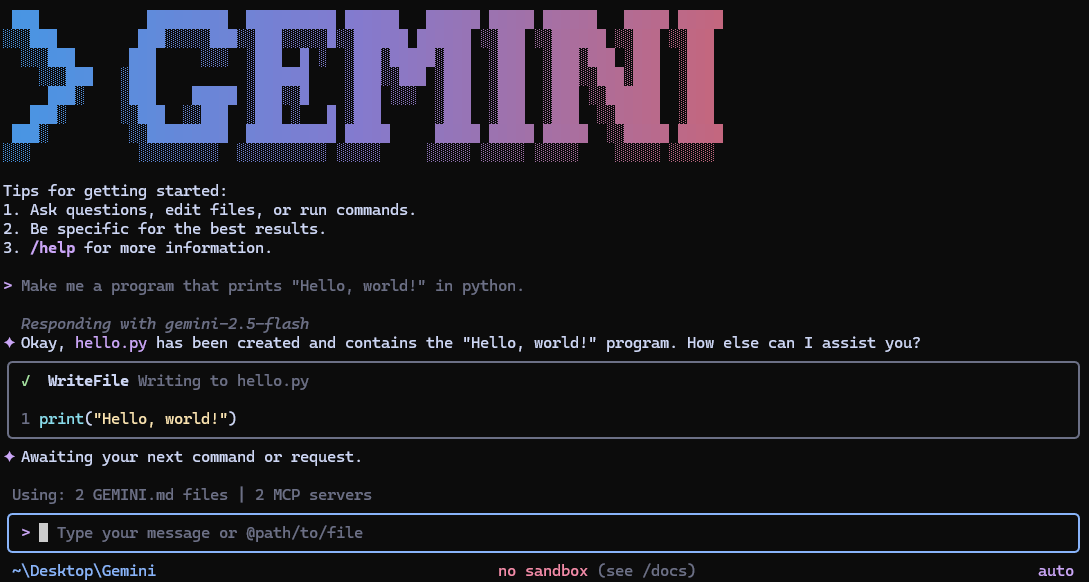
Gemini CLI is an open-source AI agent that brings the power of Gemini directly into your terminal. It provides lightweight access to Gemini, giving you the most direct path from your prompt to our model.
Learn all about Gemini CLI in our documentation.
See Gemini CLI installation, execution, and releases for recommended system specifications and a detailed installation guide.
# Using npx (no installation required)
npx @google/gemini-cli
npm install -g @google/gemini-cli
brew install gemini-cli
sudo port install gemini-cli
# Create and activate a new environment
conda create -y -n gemini_env -c conda-forge nodejs
conda activate gemini_env

# Install Gemini CLI globally via npm (inside the environment)
npm install -g @google/gemini-cli
See Releases for more details.
New preview releases will be published each week at UTC 23:59 on Tuesdays. These
releases will not have been fully vetted and may contain regressions or other
outstanding issues. Please help us test and install with preview tag.
npm install -g @google/gemini-cli@preview
preview release + any bug fixes
and validations. Use latest tag.npm install -g @google/gemini-cli@latest
nightly tag.npm install -g @google/gemini-cli@nightly
Integrate Gemini CLI directly into your GitHub workflows with Gemini CLI GitHub Action:
@gemini-cli in issues and pull requests
for help with debugging, explanations, or task delegationChoose the authentication method that best fits your needs:
✨ Best for: Individual developers as well as anyone who has a Gemini Code Assist License. (see quota limits and terms of service for details)
Benefits:
gemini
# Set your Google Cloud Project
export GOOGLE_CLOUD_PROJECT="YOUR_PROJECT_ID"
gemini
✨ Best for: Developers who need specific model control or paid tier access
Benefits:
# Get your key from https://aistudio.google.com/apikey
export GEMINI_API_KEY="YOUR_API_KEY"
gemini
✨ Best for: Enterprise teams and production workloads
Benefits:
# Get your key from Google Cloud Console
export GOOGLE_API_KEY="YOUR_API_KEY"
export GOOGLE_GENAI_USE_VERTEXAI=true
gemini
For Google Workspace accounts and other authentication methods, see the authentication guide.
gemini
gemini --include-directories ../lib,../docs
gemini -m gemini-2.5-flash
Get a simple text response:
gemini -p "Explain the architecture of this codebase"
For more advanced scripting, including how to parse JSON and handle errors, use
the --output-format json flag to get structured output:
gemini -p "Explain the architecture of this codebase" --output-format json
For real-time event streaming (useful for monitoring long-running operations),
use --output-format stream-json to get newline-delimited JSON events:
gemini -p "Run tests and deploy" --output-format stream-json
cd new-project/
gemini
> Write me a Discord bot that answers questions using a FAQ.md file I will provide
git clone https://github.com/google-gemini/gemini-cli
cd gemini-cli
gemini
> Give me a summary of all of the changes that went in yesterday
/help, /chat, etc)./bug command to report issues directly from the CLI.Configure MCP servers in ~/.gemini/settings.json to extend Gemini CLI with
custom tools:
> @github List my open pull requests
> @slack Send a summary of today's commits to #dev channel
> @database Run a query to find inactive users
See the MCP Server Integration guide for setup instructions.
We welcome contributions! Gemini CLI is fully open source (Apache 2.0), and we encourage the community to:
See our Contributing Guide for development setup, coding standards, and how to submit pull requests.
Check our Official Roadmap for planned features and priorities.
See the Uninstall Guide for removal instructions.
Built with ❤️ by Google and the open source community
Sign in to join the discussion.
No comments yet. Be the first to say what this is good for.
🪨 why use many token when few token do trick — Claude Code skill that cuts 65% of tokens by talking like caveman

The best-benchmarked open-source AI memory system. And it's free.

Orca is the ADE for working with a fleet of parallel agents. Run any coding agent with your own subscription. Available on desktop, mobile and remote runtime.

A cross-platform desktop All-in-One assistant for Claude Code, Codex, OpenCode, OpenClaw, Grok Build & Hermes Agent. Only official website: ccswitch.io

Never stop coding. Free MIT AI gateway: one endpoint, 352 providers (150+ free), 1200+ models Kimi, Claude, GPT, Gemini, GLM, DeepSeek, MiniMax. Works with Claude Code, Codex, Cursor, OpenCode, Cline & Copilot. Quota-aware auto-fallback, RTK+Caveman compression saves 15-95% tokens, MCP/A2A, Desktop/PWA. Built by 550+ contributors

Compress tool outputs, logs, files, and RAG chunks before they reach the LLM. 20% fewer tokens for coding agents, 60-95% fewer tokens for JSON, same answers. Library, proxy, MCP server.