
JuliusBrussee/
caveman

🪨 why use many token when few token do trick — Claude Code skill that cuts 65% of tokens by talking like caveman
105k
1 add
CodeBurn reads the session files your agent tools already write to disk and summarizes cost, tokens, cache use, models, projects, and tasks. It surfaces the same data in a terminal dashboard, browser dashboard, and desktop or menubar app, all from local files.

Builders who use agent tools and want a local view of cost, token usage, and project-level spend.
You can see where your AI coding budget goes without sending your session data to a third-party service.
Shows cost, token counts, cache hit rate, models, tools, projects, and tasks from local session data.
Scans sessions and Claude setup files for waste patterns like re-reads, bloated prompts, unused MCP servers, and low read:edit ratios.
Can apply config fixes, archive unused items, journal changes, and roll them back later with `codeburn act undo`.
Adds optional Claude Code hooks for soft caps, hard caps, checkpoints, and session opener warnings.
Compares one-shot rate, retry rate, self-correction, cost per call, and cache hit rate across models.
Correlates sessions with git commits to estimate whether AI work turned into shipped changes.
Provides the same local data in a TUI, browser dashboard, desktop app, macOS menubar, Windows tray, and GNOME extension.
npx codeburn
npm install -g codeburn
codeburn menubar
codeburn share --pair # opens a pairing window and prints a PIN
codeburn devices add            # find nearby devices and pair, or: add <host> --pin <pin>
codeburn devices                # combined totals by machine
codeburn devices rm <name>      # forget a device
|
|

|
See where your AI spend goes.




If CodeBurn shows you something your bill never did, star the repo so other developers find it, and consider sponsoring to keep 41 integrations honest.
Desktop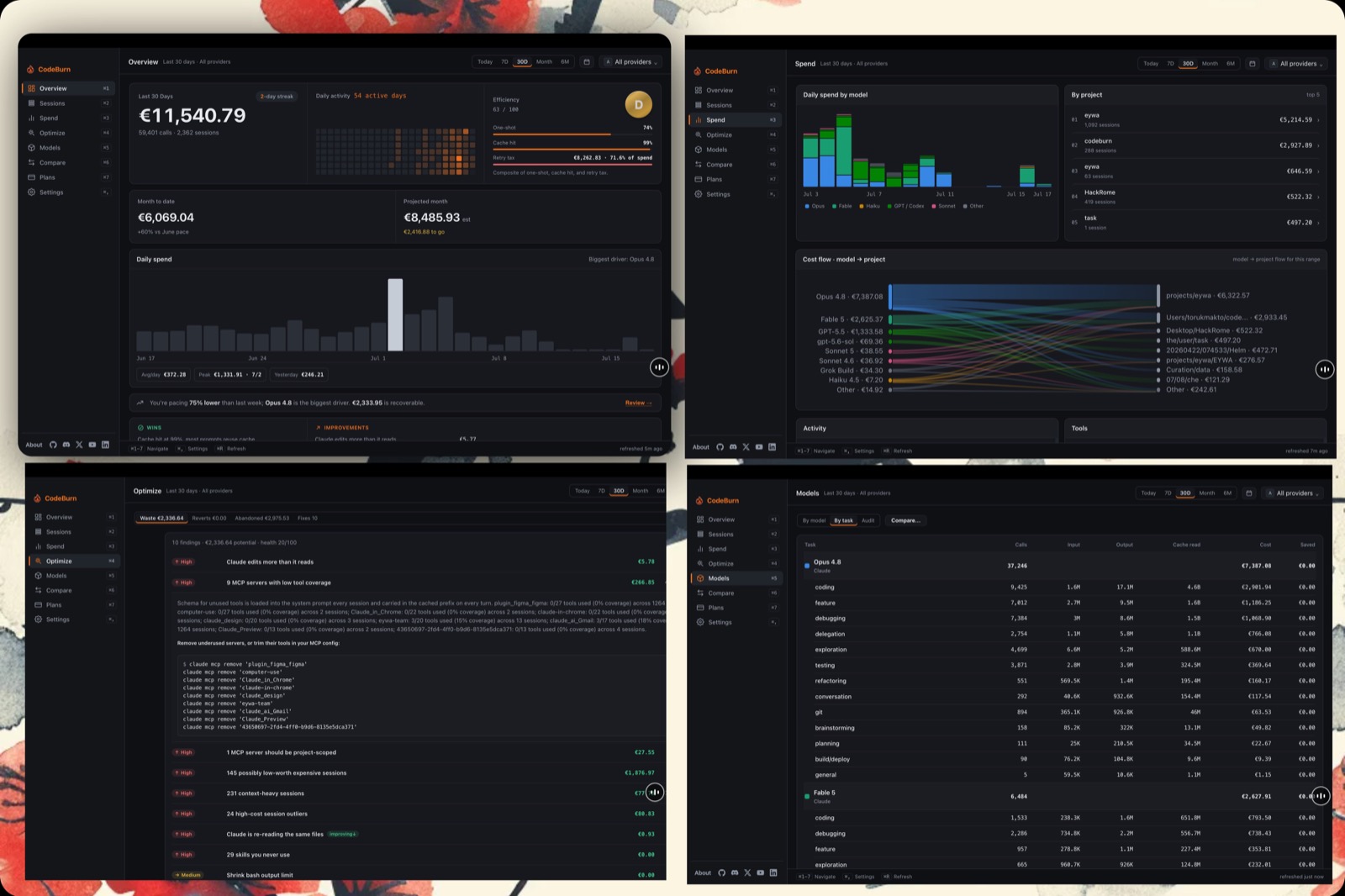 





|
Web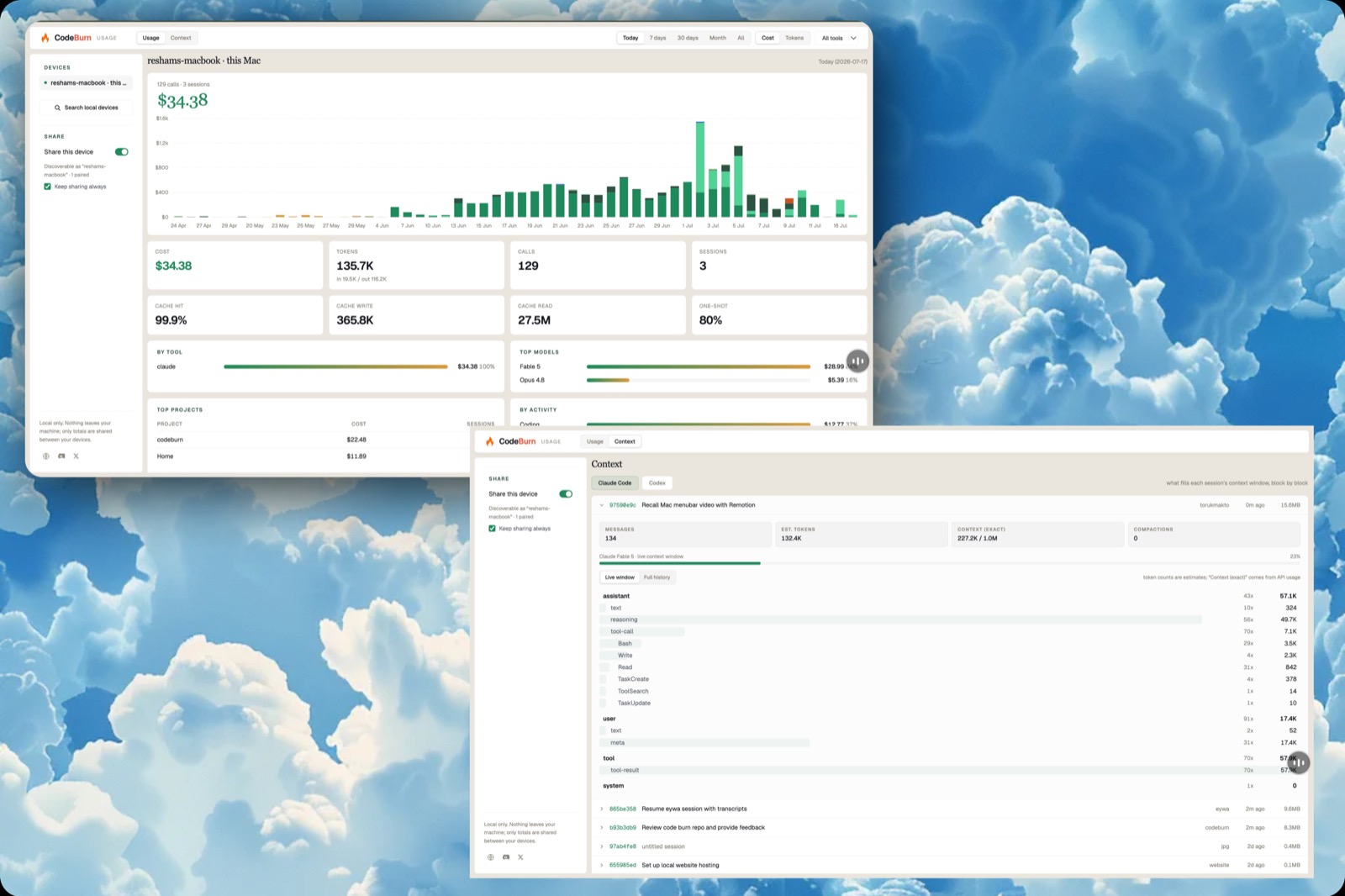 npx codeburn web
|
Terminal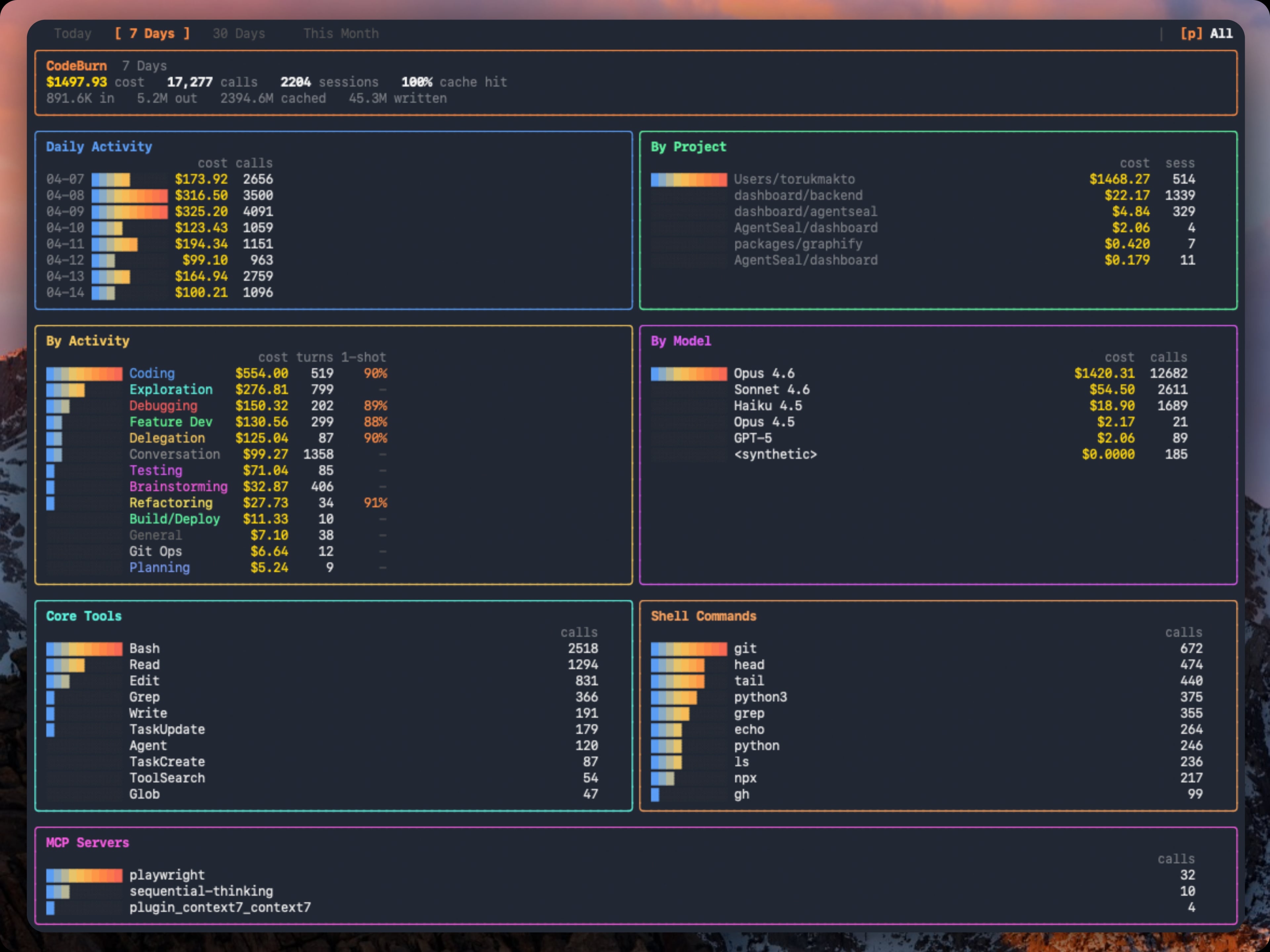 npx codeburn
|
Menubar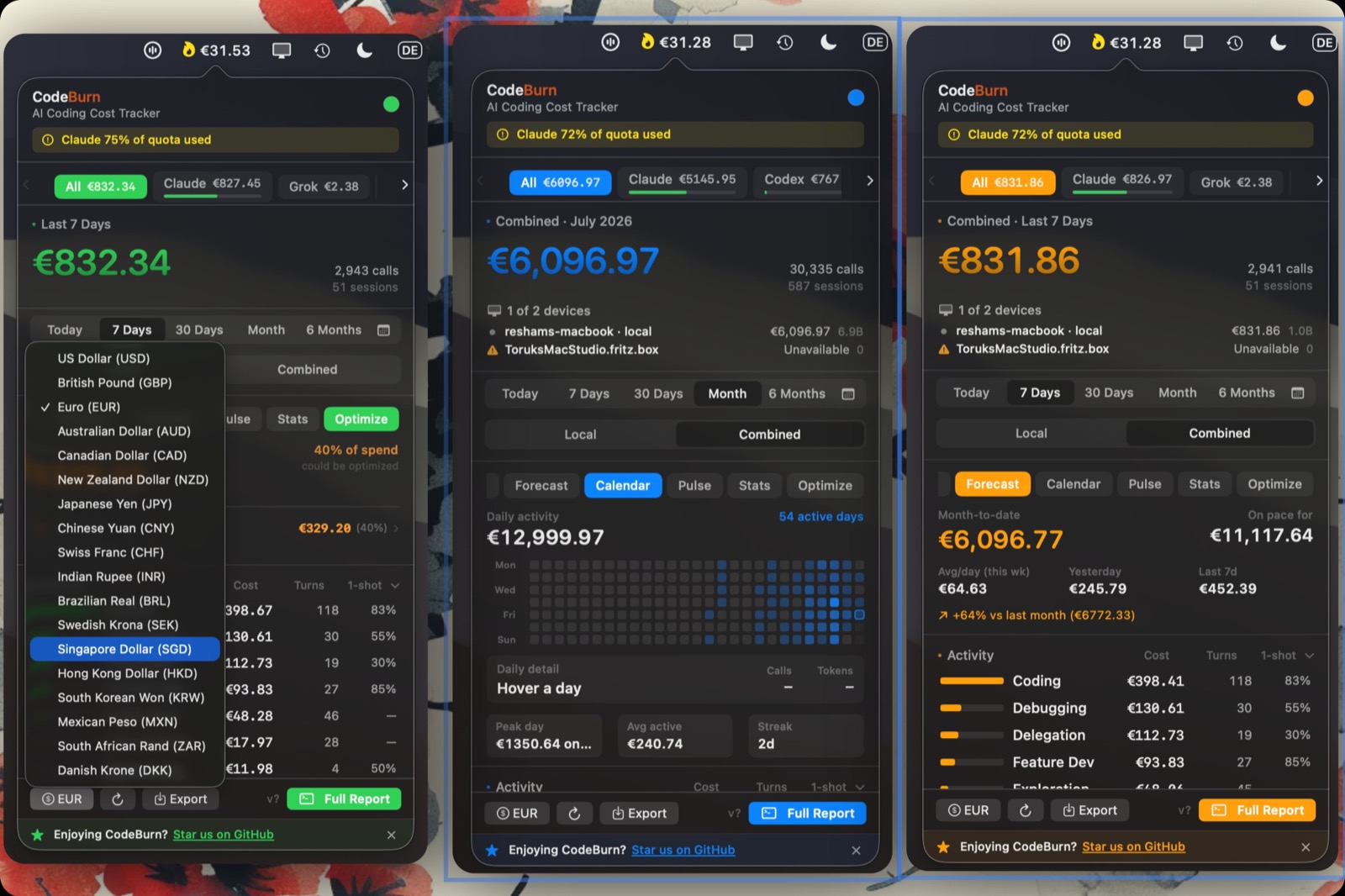 codeburn menubar
-F97316?logo=windows&logoColor=white)
|
Capacity Dock · macOS menubar and Windows tray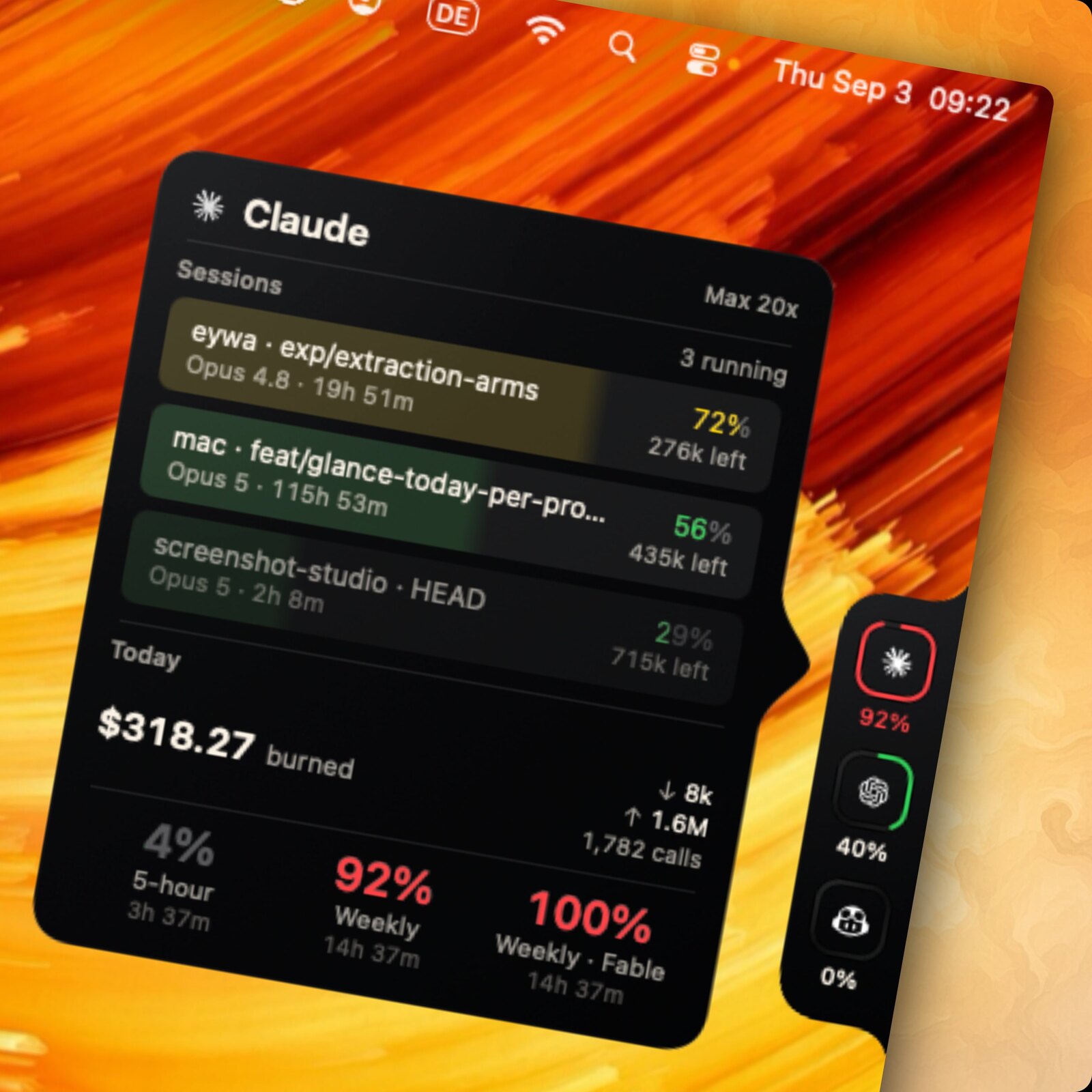 codeburn menubar
| |
One source of truth: every surface reads the session files already on your disk.
CodeBurn is a free, open-source, local-first tool that tracks AI coding token usage and cost across 41 tools and agents (Claude Code, Cursor, Codex, Gemini, Grok and more), broken down by model, project, and task.
You pay for Claude, Codex, Cursor, and a stack of other AI tools. The bill tells you the total. It never tells you that half of it went to conversation instead of code, or that an expensive model burned your budget on work a cheaper one would have one-shot.
CodeBurn does. It reads the session files your tools already write to disk and breaks down every token and dollar by task, model, tool, and project, across 41 AI tools.
Everything runs locally. No wrapper, no proxy, no API keys, nothing leaves your machine. Pricing comes from LiteLLM, refreshed daily. The optional desktop app can send an anonymous, bucketed usage report if you say yes to it; see Telemetry.
Quick start · Find waste · Apply fixes · Guard · Compare models · Track what shipped · MCP · Supported tools · Commands · Features · How it reads data · Telemetry
Run it instantly, no install needed:
npx codeburn
That opens the interactive dashboard (today by default, or the last 7 days when today has no usage yet). Arrow keys switch periods, q quits. That is the 30-second version. You now know where your AI budget goes.
Install it for a permanent codeburn command:
npm install -g codeburn
Also runs via bunx codeburn or pnpm dlx codeburn, or brew install codeburn on macOS.
Menu bar app for macOS, with your spend always in the menu bar:
codeburn menubar
The same command installs the tray app on Windows; see Windows. On Linux, a GNOME Shell extension gives it in the top panel; see Linux (GNOME).
Requires Node.js 22.13+ and at least one supported tool with session data on disk. For Cursor and OpenCode, better-sqlite3 installs automatically.
codeburn overview                                    # this month, clean tables
codeburn overview --no-color                         # plain text, ready to paste
codeburn overview --from 2026-06-01 --to 2026-06-15  # any date range
codeburn overview -p all                             # last 6 months
codeburn overview -p lifetime                        # full history (uncapped)
codeburn overview --provider claude                  # one tool only
codeburn overview prints a copy-pasteable summary of where your AI spend went: totals (cost, tokens, cache hit), a breakdown by tool and by top model, your highest-value days, top projects, a per-day table, and activity and tool usage. Pipe it anywhere (into pbcopy, a PR, Slack, or a tweet); color drops automatically when the output is not a terminal, or pass --no-color.
CodeBurn  June 2026

Totals
  Cost       $2,795.10
  Tokens     3.49B   in 23.9M / out 20.2M / cache-w 72.5M / cache-r 3.38B
  Calls      14,755   sessions 753
  Cache hit  99.3%

By tool
┌──────────┬───────────┬────────┬───────┐
│ Tool     │      Cost │ Tokens │ Share │
├──────────┼───────────┼────────┼───────┤
│ claude   │ $2,662.37 │  3.34B │   95% │
│ codex    │   $119.12 │ 128.1M │    4% │
└──────────┴───────────┴────────┴───────┘

(plus Top models, Highest-value days, Top projects, a per-day table, By activity, and Tools)
codeburn optimize                       # scan the last 30 days
codeburn optimize -p today              # today only
codeburn optimize -p week               # last 7 days
codeburn optimize --provider claude     # restrict to one provider
codeburn optimize --format json         # setup health + findings as JSON
codeburn optimize scans your sessions and your ~/.claude/ setup for waste patterns:
For Claude Code, the optimize session count, the per-session findings, coaching, and model-default recommendations use user-started (main) sessions. Subagent sidechain transcripts are excluded from that population because their delegated context and delivery behavior are structurally different, and so is the re-read finding, since a subagent starts on a fresh context. Findings about how Claude uses tools (junk reads, read:edit ratio) and every spend, MCP, and configuration-overhead finding keep counting them.
BASH_MAX_OUTPUT_LENGTH, trailing noise)~/.claude/ but never invokedCLAUDE.md files (with @-import expansion counted)git/gh delivery command is observedFindings are grouped into three classes: Fix now (CodeBurn can apply it for you), Habits
(you change how you drive the next session), and FYI (informational, the cost may be justified).
Each one says whether its savings number is measured from provider-counted usage or estimated
from a model. See docs/optimize.md for what is scanned, what --apply may write,
and how to read the health grade.
Each finding shows the estimated token and dollar savings plus a ready-to-paste fix: a CLAUDE.md line, an environment variable, or a mv command to archive unused items. Findings are ranked by urgency (impact weighted against observed waste) and rolled up into an A to F setup health grade. Repeat runs classify each finding as new, improving, or resolved against a 48-hour recent window.
You can also open it inline from the dashboard: press o when a finding count appears in the status bar, b to return.
codeburn optimize --apply             # review and apply fixes interactively
codeburn optimize --apply --dry-run   # print the plan, change nothing
codeburn optimize --apply --yes       # apply every appliable fix without prompting
codeburn act list                     # every change CodeBurn has made
codeburn act undo --last              # roll the most recent change back
codeburn act report                   # realized vs estimated savings
codeburn optimize --auto-revert       # undo the applied fixes that measured no reduction
codeburn optimize finds the waste; --apply fixes the config-class findings for you: settings values, environment variables, archiving unused agents and skills. Every change is backed up and journaled before it lands. codeburn act list shows the history and codeburn act undo <id> restores the original files (it refuses if the files changed since being applied, unless you pass --force).
The loop closes on honesty: once an applied fix is at least 3 days old, codeburn act report compares its estimated savings against what your sessions actually did, and every later codeburn optimize run lists it under Applied fixes with a plain verdict — worked, under its estimate, or did not help, with the undo command for that last case. --auto-revert undoes the ones that did nothing (never CLAUDE.md rules). Estimates get checked against reality, not just claimed.
codeburn guard install            # hooks into this project's .claude/settings.json
codeburn guard install --global   # or into ~/.claude/settings.json
codeburn guard status             # caps, install locations, flagged projects
codeburn guard uninstall          # removes cleanly, leaves your own hooks alone
Guard installs opt-in hooks into Claude Code that watch session cost while you work:
codeburn guard allow lifts it for that session only.Caps are edited in ~/.config/codeburn/guard.json (set a value to null to disable it). Add --statusline to show session cost in the Claude Code status line. Installs go through the same journal as everything else, so codeburn act undo removes them too. Hooks fail open: a broken guard never blocks a session.
codeburn compare                        # interactive model picker (default: last 6 months)
codeburn compare -p week                # last 7 days
codeburn compare -p today               # today only
codeburn compare --provider claude      # Claude Code sessions only
Which model is actually better for your work? Press c in the dashboard, or run codeburn compare. Arrow keys switch periods, b to return.
| Section | Metric | What it measures |
|---|---|---|
| Performance | One-shot rate | Edits that succeed without retries |
| Performance | Retry rate | Average retries per edit turn |
| Performance | Self-correction | Turns where the model corrected its own mistake |
| Efficiency | Cost per call | Average cost per API call |
| Efficiency | Cost per edit | Average cost per edit turn |
| Efficiency | Output tokens per call | Average output tokens per call |
| Efficiency | Cache hit rate | Proportion of input from cache |
Also compares per-category one-shot rates, delegation rate, planning rate, average tools per turn, and fast mode usage.
codeburn yield                  # last 7 days (default)
codeburn yield -p today         # today only
codeburn yield -p 30days        # last 30 days
codeburn yield -p month         # this calendar month
codeburn yield --format json    # productive/reverted/abandoned/ambiguous spend as JSON
Did the spend actually ship? codeburn yield correlates AI sessions with git commits by timestamp:
| Category | Meaning |
|---|---|
| Productive | Commits from this session landed in main |
| Reverted | Commits were later reverted |
| Abandoned | No commits near session, or commits never merged |
| Ambiguous | Session ran parallel to another and its window's commits were attributed to the tighter one |
Attribution is timestamp-window based (heuristic): each commit is credited to at most one session, the tightest window containing it. The JSON report carries methodology: "timestamp-window".
Requires a git repository. Run from your project directory.
codeburn web                    # opens http://localhost:4747 in your browser
codeburn web -p 30days          # start on a different period
codeburn web --port 8080        # pick a port (falls back to a free one if taken)
codeburn web --no-open          # start the server without opening a browser
A local web dashboard with the same task, model, tool, and project breakdowns as the TUI, rendered with charts. The usage graph follows the selected period with 15-minute, hourly, or daily buckets and can switch between per-session and per-model lines. Everything is read from disk on your machine and the server binds to localhost; nothing is uploaded.
See one total across your laptop, desktop, and work machine on the same network. On each other device, share its usage:
codeburn share --pair # opens a pairing window and prints a PIN
Then add it once from your main device (the PIN authorizes the pairing):
codeburn devices add            # find nearby devices and pair, or: add <host> --pin <pin>
codeburn devices                # combined totals by machine
codeburn devices rm <name>      # forget a device
Pairing is PIN-authorized and stays on your local network. You can also discover and pair devices straight from the browser dashboard.
codeburn menubar
One command: downloads the latest .app, installs into ~/Applications, and launches it. Re-run with --force to reinstall. The native Swift and SwiftUI app lives in mac/ (see mac/README.md for build details).
The menubar icon shows the spend period selected in Settings (Today by default; Week, Month, and 6 Months are also available). Non-today periods add a short suffix such as $42 / mo so the menu bar value stays clear. Click to open a popover with agent tabs, period switcher (Today, 7 Days, 30 Days, Month, All), Trend, Forecast, Pulse, Stats, and Plan insights, activity and model breakdowns, optimize findings, and CSV/JSON export. Refreshes every 30 seconds.
You can also set the menubar status period from Terminal:
defaults write org.agentseal.codeburn-menubar CodeBurnMenubarPeriod -string month
Allowed values are today, week, month, and sixMonths. Relaunch the app to apply external defaults changes.
Compact mode shrinks the menubar item to fit the text, dropping decimals (e.g. $110 instead of $110.20):
defaults write org.agentseal.codeburn-menubar CodeBurnMenubarCompact -bool true
Relaunch the app to apply. To revert: defaults delete org.agentseal.codeburn-menubar CodeBurnMenubarCompact.
Refresh cadence is set in Settings under Usage Refresh. Auto (the default) refreshes every 30 seconds on AC power and backs off on battery, in Low Power Mode, and while the display sleeps; fixed 1, 5, or 15 minute cadences and a Manual mode (refresh only when you open the popover or click Refresh Now) are also available. From Terminal:
defaults write org.agentseal.codeburn-menubar CodeBurnMenubarRefreshSeconds -int 300
Seconds between refreshes: 60, 300, or 900; 0 is Manual and -1 is Auto. Takes effect on the next refresh tick, no relaunch needed.
Preferred terminal decides where Full Report and Optimize open. Set it in Settings → General → Terminal, or from Terminal:
defaults write org.agentseal.codeburn-menubar CodeBurnPreferredTerminal -string iterm2
Allowed values are terminal (macOS Terminal.app, the default) and iterm2. Anything else falls back to terminal. Only terminals that can script a command into a live window are offered; if the chosen app is missing or fails to accept the command, CodeBurn tries Terminal.app and then runs the command in the background, logging each step to Console.app. Takes effect on the next launch of a command, no relaunch needed.
The recommended install is the Microsoft Store (Store ID 9P0R4ZL5XMB8), which ships the desktop app with the tray app inside it. Microsoft signs that package at submission, and the Store keeps it up to date, so the tray app leaves its own update checker switched off there.
Windows gets the same ambient view from the system tray, from the same one command:
codeburn menubar
It downloads the .msi for your CLI version, verifies its sha256, runs it through msiexec /passive, and launches the tray app. Re-run with --force to reinstall; an already-installed matching version is just launched. You can also download the .msi yourself from the latest Windows Menubar release.
Today's spend sits in the tray as a number beside the flame icon (turn it off in Settings, and the tooltip always carries it). Click for the same popover the macOS app shows: agent tabs, period switcher, Trend, Forecast, Pulse, Stats and Plan insights, activity and model breakdowns, optimize findings, and CSV/JSON export. Settings covers launch at login, the tray number, theme, and currency. It refreshes every 60 seconds while the popover is open and every 2 minutes while it is closed.
Turn on Show Capacity Dock in the tray menu for the same edge-docked quota rail the macOS menubar has: one ring per connected provider, hover for every quota window with its reset time, drag it to any screen edge. It is off by default and needs codeburn 0.9.24 or newer for codeburn quota.
The tray app reads everything through the CLI, so install that first (npm install -g codeburn). It needs codeburn 0.9.9 or newer, and shows a setup screen with the install command until it finds one. Source and build instructions are in windows/ (windows/DEVELOPMENT.md).
The .msi under the windows-v* releases and the desktop setup .exe are a developer preview. Both are unsigned, so SmartScreen prompts on first run: click "More info", then "Run anyway". The preview builds also do not update themselves. The tray app still tells you when a newer version exists and links to the release; taking it means re-running codeburn menubar --force or downloading the new build yourself.
Linux gets the same ambient view through a GNOME Shell extension (GNOME 45+): spend in the top panel, period switcher, compact mode, and daily budget alerts. It lives in gnome/:
git clone https://github.com/getagentseal/codeburn && cd codeburn/gnome
./install.sh
gnome-extensions enable codeburn@codeburn.dev
See gnome/README.md for settings and development notes. The Tauri tray app in windows/ also builds and runs on Linux, but it is experimental and unreleased there — the GNOME extension is the supported Linux surface.
Sign in to join the discussion.
No comments yet. Be the first to say what this is good for.
🪨 why use many token when few token do trick — Claude Code skill that cuts 65% of tokens by talking like caveman

The best-benchmarked open-source AI memory system. And it's free.

Orca is the ADE for working with a fleet of parallel agents. Run any coding agent with your own subscription. Available on desktop, mobile and remote runtime.

A cross-platform desktop All-in-One assistant for Claude Code, Codex, OpenCode, OpenClaw, Grok Build & Hermes Agent. Only official website: ccswitch.io

Never stop coding. Free MIT AI gateway: one endpoint, 352 providers (150+ free), 1200+ models Kimi, Claude, GPT, Gemini, GLM, DeepSeek, MiniMax. Works with Claude Code, Codex, Cursor, OpenCode, Cline & Copilot. Quota-aware auto-fallback, RTK+Caveman compression saves 15-95% tokens, MCP/A2A, Desktop/PWA. Built by 550+ contributors

Compress tool outputs, logs, files, and RAG chunks before they reach the LLM. 20% fewer tokens for coding agents, 60-95% fewer tokens for JSON, same answers. Library, proxy, MCP server.