
JuliusBrussee/
caveman

🪨 why use many token when few token do trick — Claude Code skill that cuts 65% of tokens by talking like caveman
105k
1 add
Mimi Remote connects your phone or tablet to a host computer running Codex CLI, with an optional Claude Code bridge. You can review diffs, approve prompts and actions, steer sessions, and keep the same agent thread moving across devices.
Builders who want to keep agent sessions moving on iPhone or iPad instead of restarting work at the desk.
You can continue an existing Codex or Claude Code session on mobile without rebuilding context.
Picks up existing agent sessions on iPhone or iPad so you can keep working away from your computer.
Shows thinking, waiting, failed, and complete states, plus approvals, queued turns, and interruption controls.
Lets you review diffs and manage Git actions remotely when you need to finish deeper work.
Uses `agentd` on macOS, Windows, or Linux to connect the mobile app to the host computer.
Includes an experimental Claude Code bridge that maps Claude sessions into the same mobile interface.
Uses SwiftUI layouts tuned separately for compact iPhone use and multi-column iPad work.
brew update
brew install gaixianggeng/tap/mimi-remote

codex --version
codex app-server --help
agentd up
agentd status
agentd pair
agentd doctor --fix
agentd logs -n 200
agentd up --no-pair
agentd restart
agentd restart --no-pair
agentd stop
https://github.com/gaixianggeng/mimi-remote/tree/main/packaging/skill/install-mimi-remote
brew install xcodegen

xcodegen generate \
  --spec ios/MimiRemote/project.yml \
  --project ios/MimiRemote

open ios/MimiRemote/MimiRemote.xcodeproj
bash ./scripts/ios-dev.sh build-for-testing
go test ./...
go vet ./...

# Foreground development; does not replace the Homebrew service.
go build -trimpath -o bin/agentd ./cmd/agentd
./bin/agentd setup --scan-root "$HOME/code" --browse-root "$HOME"
./bin/agentd serve
Continue your computer's agent sessions on iPhone or iPad.
An open-source, native mobile workspace for Codex and Claude Code.
Connect directly to your computer and pick up sessions across devices without rebuilding context—follow work live, continue conversations, and handle approvals.
中文文档 · iOS build guide · Project status (Chinese)





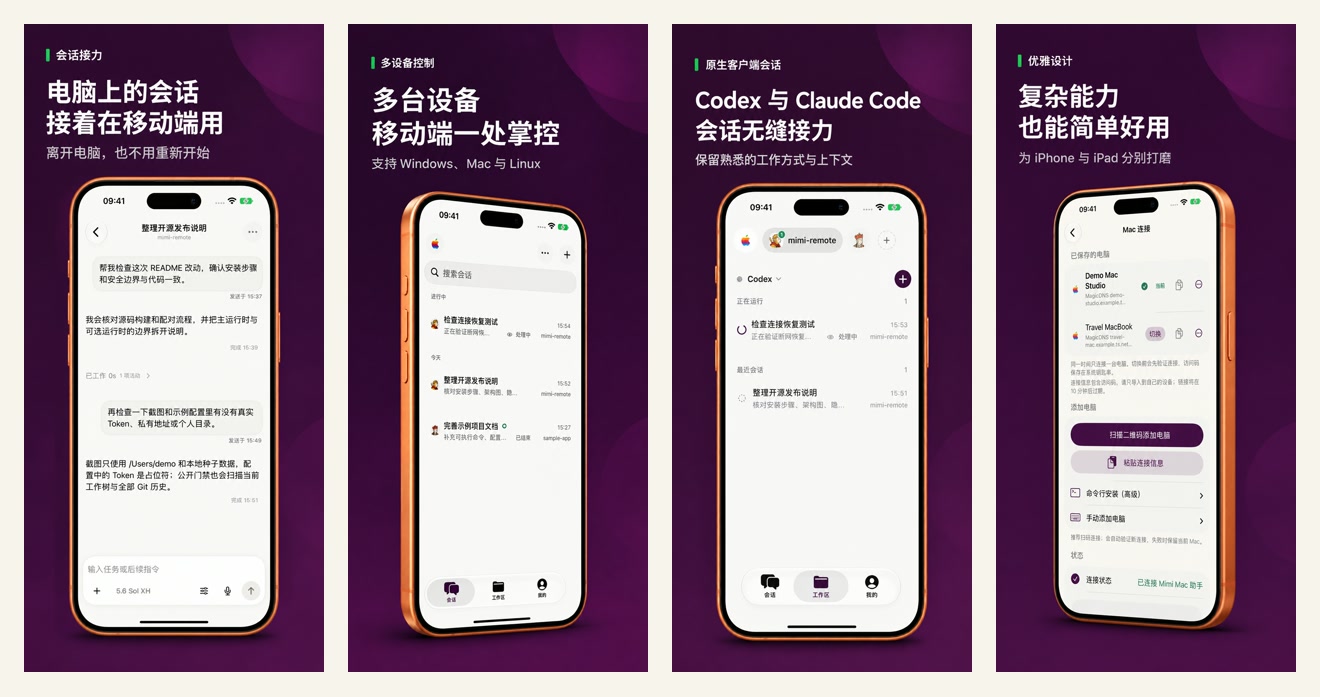
Continue computer sessions on mobile, control multiple devices, and pick up Codex or Claude Code without starting over.
Mimi Remote connects directly to your macOS, Windows, or Linux computer through Tailscale or the same local network. The project does not operate a relay, account system, or hosted session service. Your computer remains the control plane; data you intentionally send to Codex, Claude Code, GitHub, voice transcription, or MCP is still handled by those services under their own terms.
Mimi Remote is an independent third-party project. It is not affiliated with, endorsed by, or a product of OpenAI, Anthropic, or Tailscale. Codex is the primary supported runtime; the optional Claude Code bridge is experimental.
Install the public release from the App Store where available. TestFlight remains available for beta builds, and developers can build from source.
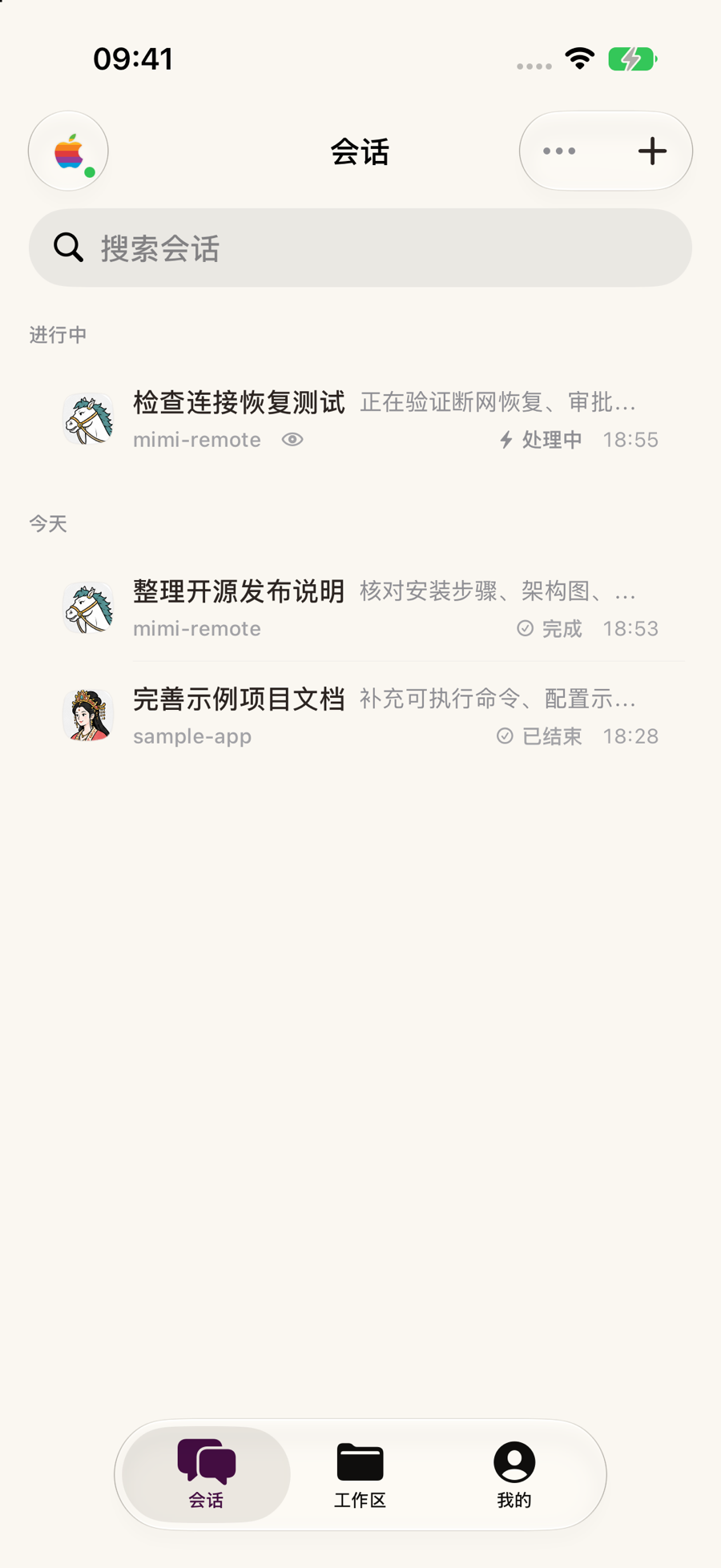
iPhone · same capabilities in one column: continue sessions, follow progress, handle approvals, control tasks.
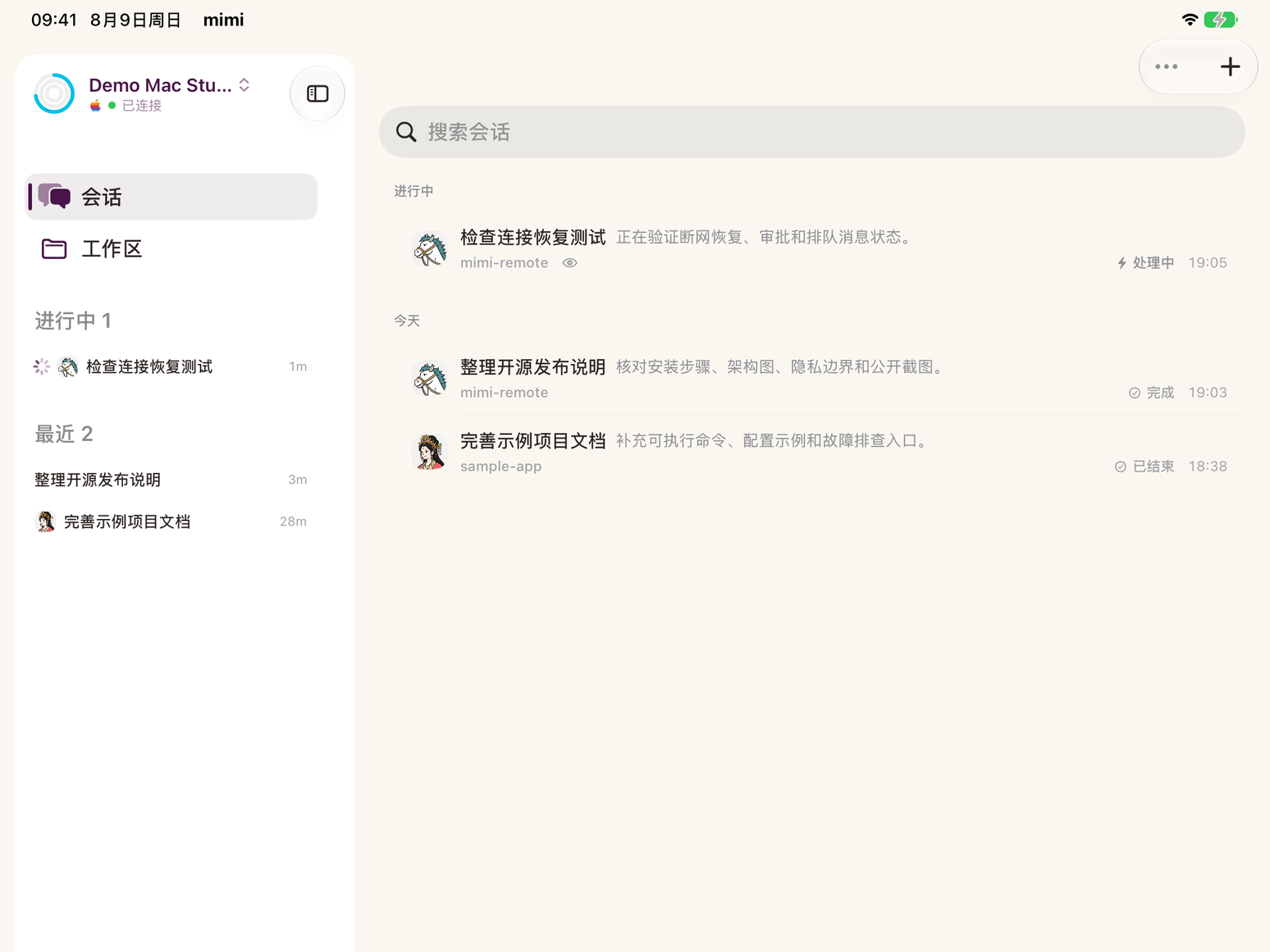
iPad · the same sessions and controls opened into a multi-column workspace with more context.
Both devices share the complete session, approval, and task-control surface; only the layout, information density, and input ergonomics change. The native SwiftUI interface tunes compact navigation, wide-screen columns, touch feedback, and transitions for each device. With Reduce Motion enabled, movement falls back to restrained fades or static feedback. These images reuse the current web/assets capture set and come from Debug-only seeded UI with demo hosts, projects, sessions, paths, and usage values—never a maintainer's live workspace or credentials. The interface uses the Simplified Chinese localization; the app also supports English.
The common need is rarely “open a terminal on a phone.” It is to leave your computer and keep the same agent session moving without explaining the context again.
When you need to finish deeper development work, advanced tools can inspect diffs, manage Worktrees, stage a file or hunk, commit, push, and open a draft pull request. None of those tools is required to use Mimi Remote.
Mimi Remote keeps the same project and session model across devices, but each surface follows the way that device is actually used. iPhone keeps one-handed navigation compact, iPad opens the same capabilities into a context-preserving multi-column workbench, and the host computer continues running the agents. The device changes the presentation, not the available capabilities.
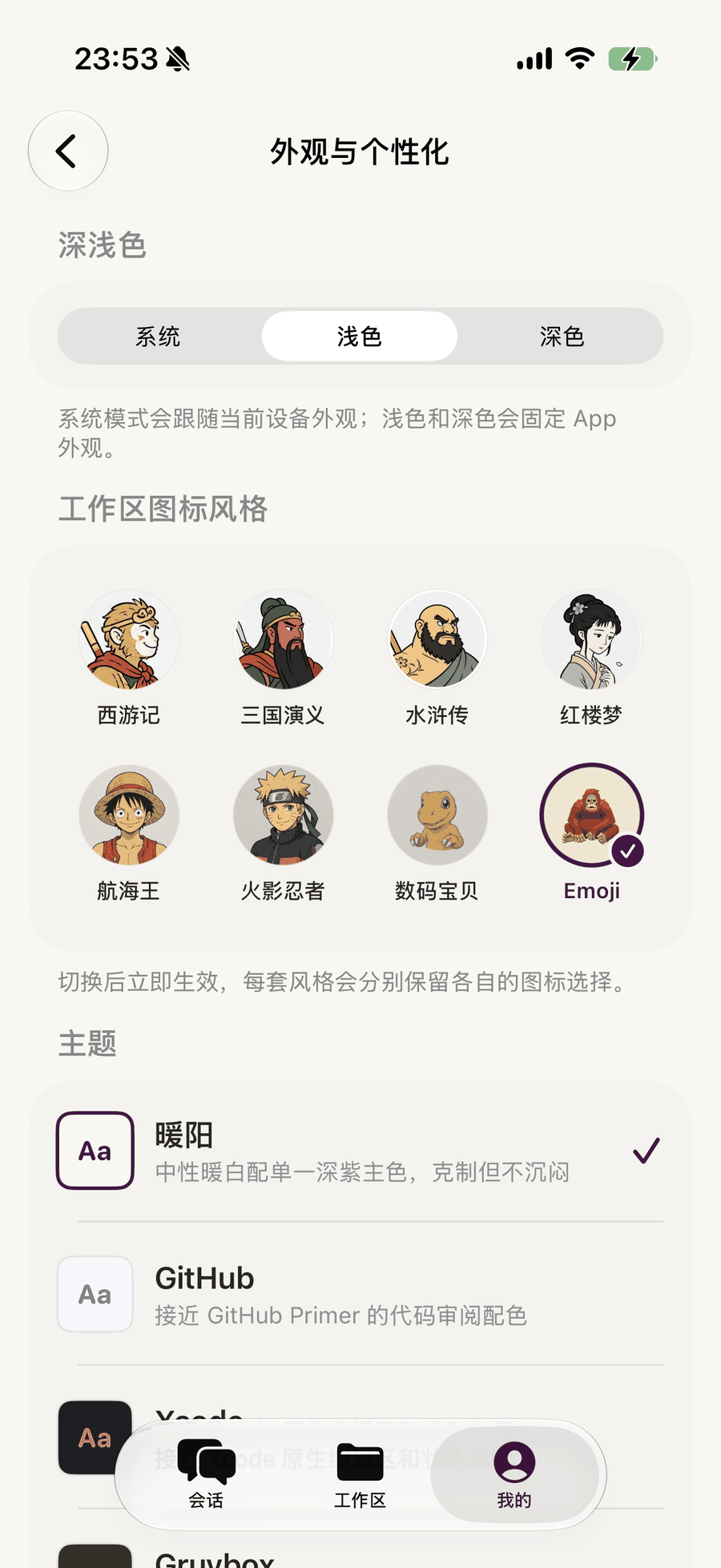
Appearance is first-class · light or dark mode, workspace icon sets, and editor-inspired themes.
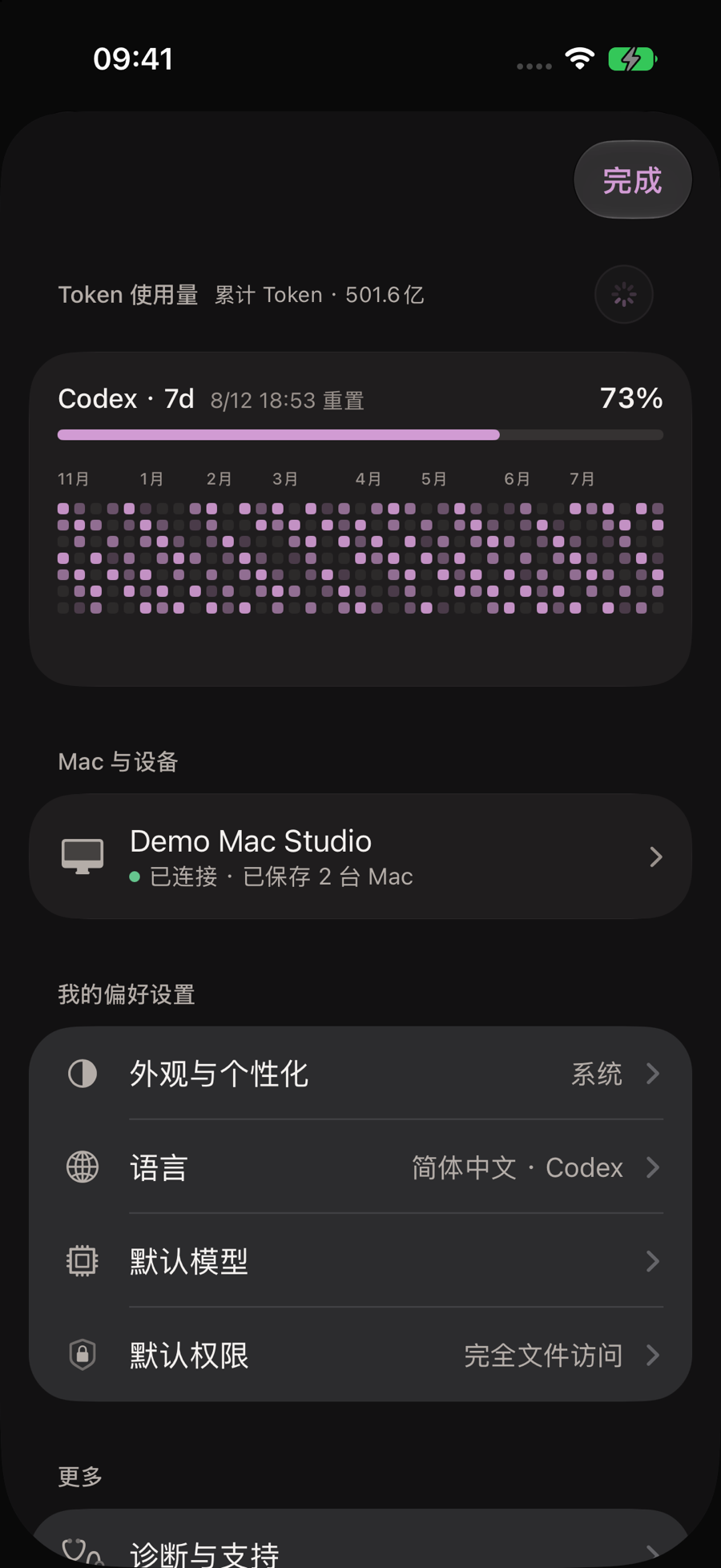
Usage and host state stay visible · token windows, connected hosts, language, model, and permissions share one home.
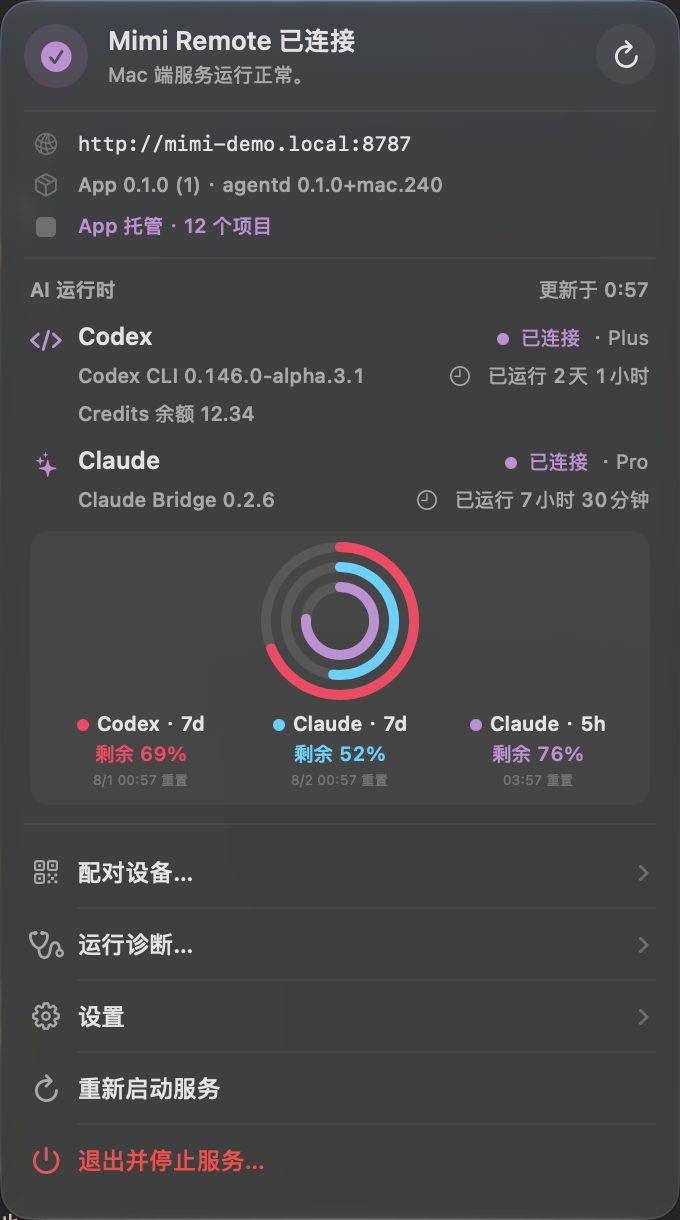
The 340-point Mac menu keeps host health, Codex and Claude runtime state, quota rings, pairing, diagnostics, and recovery actions one click away.
The hierarchy is intentional:
The mobile images above are the same current assets used by the Mimi Remote website and come exclusively from Debug-only seeded UI. The Mac menu image uses the same source tree and the public mimi-demo.local hostname; capturing it did not restart or replace the installed Mac service. None of these public screenshots contains a real token, private address, personal path, or live project content.
flowchart LR
    Mobile["iPhone / iPad<br/>Mimi Remote"]
    Gateway["Your computer<br/>agentd secure gateway"]
    Codex["Codex<br/>App Server"]
    Desktop["Codex Desktop<br/>local or SSH"]
    Claude["Claude Code<br/>experimental bridge"]

    Mobile <-->|"LAN or Tailscale<br/>live sessions and approvals"| Gateway
    Gateway <--> Codex
    Desktop <-->|"SSH app-server proxy"| Codex
    Gateway <--> Claude
This repository ships the complete link: the native iPhone/iPad app, the Go agentd gateway for macOS, Windows, and Linux, the Mac menu bar app, the Windows and Linux tray apps, and the Claude Code compatibility bridge. The mobile app connects only to your own host computer, so project files, session history, and runtime credentials stay on that computer.
agentd own a loopback-only WebSocket App Server. None of these paths uses Desktop private IPC.agentd handles authentication, workspace authorization, and runtime routing on the host computer. That computer must remain awake and privately reachable.For protocol details and exact capability boundaries, see project status and the Claude bridge architecture.
Check these before you install:
agentd gateway and does not receive or manage runtime credentials or billing. See the official Codex authentication guide. iOS 26+ keeps the full Liquid Glass and on-device Apple Speech experience; iOS 18–25 uses simpler system materials and Codex voice transcription.agentd's plain HTTP endpoint directly to the public Internet.agentd pair --qr-only) and scan the short-lived QR code in Mimi Remote.Windows 10/11 x64 is supported as an agentd host. Install and sign in to Codex CLI 0.149.1 or later as the same Windows user, then download the versioned Mimi-Remote-Setup-*.exe, .sha256, and .metadata.json files from GitHub Releases. Verify the SHA-256 before running the installer. An unsigned-release package is expected to report NotSigned and can trigger Microsoft Defender SmartScreen.
The per-user installer registers a limited Task Scheduler task and preserves configuration under %APPDATA%\mimi-remote during upgrades. agentd owns one Codex App Server at ws://127.0.0.1:4222, waits for a real protocol initialization, and stops the complete child process tree with the service. This loopback transport stays on the Windows host and does not use Desktop private IPC.
Private-LAN access is opt-in. Setup only enables it on a Private Windows network profile and limits the firewall rule to LocalSubnet; otherwise the host remains loopback-only unless Tailscale is available. See the full install, upgrade, and rollback guide for verification and recovery commands.
The Linux release includes a desktop tray with host status, Tailcat/Tailscale/LAN pairing, diagnostics, logs, and service controls. It uses theme-aware symbolic icons and StatusNotifierItem on compatible desktops; QR codes and confirmations open in your terminal. See Linux desktop tray for desktop requirements and recovery steps.
Linux uses the release archive and a per-user systemd service. Install and sign in to Codex CLI 0.149.1 or later as the same Linux user, verify the release checksums, extract the archive, and run bash ./scripts/install-linux.sh install.
By default, Linux does not require sshd, an SSH key, or changes to authorized_keys. agentd attaches to ~/.codex/app-server-control/app-server-control.sock; if it is absent, setup starts one resident Codex App Server in an independent user-systemd scope. A local terminal client launched with codex --remote unix:// and Mimi can therefore open the same Thread through the same backend, and restarting agentd does not stop that backend. An explicit AGENTD_APP_SERVER_SSH_TARGET remains available for advanced remote-host deployments.
Requirements:
For the normal setup path, download Mimi-Remote-Mac.dmg and its SHA-256 file, verify the checksum, open the DMG, drag Mimi Remote Mac to Applications, then finish first-run setup from the menu bar. The app includes agentd and the compatible Claude bridge; Homebrew, Go, Rust, and Xcode are not required for the Mac host.
For command-line installation, server use, or recovery:
brew update
brew install gaixianggeng/tap/mimi-remote

codex --version
codex app-server --help
agentd up
Before the first start, enable Remote Login and make sure ssh 127.0.0.1 true succeeds without a password prompt. agentd supplies common Homebrew, npm, and mise paths when it checks Codex through a non-interactive SSH session; agentd doctor reports any remaining runtime-path problem. agentd up creates private local configuration, connects through localhost SSH to the shared Unix App Server, waits for a real protocol initialization, and prints a short-lived pairing QR code. It prefers Tailscale when available; otherwise it enables same-LAN access and publishes the current private LAN address. See Shared SSH App Server for Desktop setup and runtime boundaries.
Useful commands:
agentd status
agentd pair
agentd doctor --fix
agentd logs -n 200
agentd up --no-pair
agentd restart
agentd restart --no-pair
agentd stop
On macOS, agentd restart uses one atomic launchd kickstart, so it is safe to trigger from a remote task hosted by the current service. Do not run brew services restart mimi-remote directly from such a task.
From an agent, automation, or retained remote log, use agentd up --no-pair / agentd restart --no-pair so the output contains no pairing QR code, endpoint, or long-lived access token. agentd up --no-pair --json returns only the version, readiness state, and safe warnings rather than the complete setup result. When pairing is needed, have the user run agentd pair --qr-only in a local terminal.
For macOS, Windows, and Linux upgrade/recovery steps, see Install, upgrade, and rollback (Chinese). Maintainers can find the daily Internal TestFlight and formal host release flow in Nightly and release (Chinese).
To let Codex perform the same install, upgrade, diagnosis, and rollback workflow with the repository's safety constraints, install the standalone Skill from:
https://github.com/gaixianggeng/mimi-remote/tree/main/packaging/skill/install-mimi-remote
Ask $skill-installer to install that GitHub path. Each GitHub Release also includes install-mimi-remote.zip and its SHA-256 file for an auditable, versioned copy.
The current source tree supports iOS/iPadOS 18 or later; App Store availability and minimum OS requirements follow the current listing for each region. Install the public release from the App Store where available, or join the Mimi Remote TestFlight for beta builds. iOS 26+ gets the full advanced visual and on-device speech experience; earlier supported systems use deliberate fallbacks for unsupported capabilities.
To build the app from source instead, use a Mac with Xcode 26 or later and install XcodeGen before generating the Xcode project:
brew install xcodegen

xcodegen generate \
  --spec ios/MimiRemote/project.yml \
  --project ios/MimiRemote

open ios/MimiRemote/MimiRemote.xcodeproj
In Xcode, select the MimiRemote scheme, your development team, and an iPhone or iPad target, then Run. Xcode's Run button always follows the destination selected in its own toolbar and is not part of the command-line automatic selector, so verify that target explicitly. On first launch, scan the QR code printed by agentd up or agentd pair. The signed QR ticket can be reused during its 10-minute lifetime and never contains the long-lived token. Manual connection is available as a fallback.
Command-line daily builds and deployments have one entry point: bash ./scripts/ios-dev.sh build|run. It deterministically leases an available, paired USB iOS device first, then a currently reachable local-network device. The fixed iPad Pro 13-inch (M5) Simulator is used only when no reachable physical device is detected; if physical devices are present but busy, the command fails instead of silently switching device classes. Explicit IOS_DEVICE_ID and IOS_DEVICE_NAME selections support either physical-device transport and fail clearly when that device is not reachable. Tests, snapshots, and CI still require the exact M5 Simulator and never fall back to iPad mini. XcodeBuildMCP stores no device or Simulator target in repository defaults; its Simulator workflow is reserved for those fixed-Simulator tasks. Run bash ./scripts/ios-dev.sh target and bash ./scripts/ios-dev.sh leases to inspect the decision and current occupancy:
bash ./scripts/ios-dev.sh build-for-testing
go test ./...
go vet ./...

# Foreground development; does not replace the Homebrew service.
go build -trimpath -o bin/agentd ./cmd/agentd
./bin/agentd setup --scan-root "$HOME/code" --browse-root "$HOME"
./bin/agentd serve
For repeated macOS testing against the installed Homebrew service, use the signed handoff pipeline instead of copying an ad-hoc Go binary into the Cellar:
bash ./scripts/restart-agentd-dev-macos.sh

# When triggered from a remote Mimi task:
bash ./scripts/restart-agentd-dev-macos.sh --no-wait
bash ./scripts/restart-agentd-dev-macos.sh --status
It signs each development build with a stable Apple Development identity, hands the replacement to an independent launchd job, verifies readiness, and rolls back automatically. At the beginning of every service start, agentd asynchronously probes configured project, scan, and browse roots; a browse root covering the current Home also probes Desktop, Documents, and Downloads so macOS Files & Folders prompts appear before the first real task. The probe never recursively reads files and never blocks the remote control plane while waiting for a click.
macOS does not provide one background-requestable permission for the entire user Home: Desktop, Documents, and Downloads are separate protected locations, while unattended access to other apps' data requires Full Disk Access. For that use case, add /opt/homebrew/opt/mimi-remote/bin/agentd once under System Settings → Privacy & Security → Full Disk Access. The first migration from an old ad-hoc build can still require one final approval.
The Claude runtime is disabled by default. When enabled, agentd supervises one resident alleycat-claude-bridge and attaches mobile WebSocket sessions to it by a stable session key. Each Claude thread owns a headless stdio JSONL process; reconnects replay missed events or reload authoritative history instead of resubmitting turn/start.
The notarized Mac DMG already includes a compatible bridge next to agentd; do not install a second copy with Cargo for that setup. Install the bridge from source only for Homebrew, Linux, or standalone development:
cargo install --git https://github.com/gaixianggeng/mimi-remote.git \
  --locked --force --bin alleycat-claude-bridge alleycat-claude-bridge

command -v alleycat-claude-bridge
Enable it explicitly in the user configuration:
{
  "claude": {
    "enabled": true,
    "bridge_bin": "",
    "args": [],
    "max_concurrent_bridges": 3,
    "env": { "TERM": "xterm-256color" }
  }
}
An empty bridge_bin selects the bridge bundled with Mimi Remote Mac. Homebrew and Linux installations must instead set the absolute path returned by command -v alleycat-claude-bridge. The configuration file contains long-lived credentials: back it up privately, update only the claude f
Sign in to join the discussion.
No comments yet. Be the first to say what this is good for.
🪨 why use many token when few token do trick — Claude Code skill that cuts 65% of tokens by talking like caveman

The best-benchmarked open-source AI memory system. And it's free.

Orca is the ADE for working with a fleet of parallel agents. Run any coding agent with your own subscription. Available on desktop, mobile and remote runtime.

A cross-platform desktop All-in-One assistant for Claude Code, Codex, OpenCode, OpenClaw, Grok Build & Hermes Agent. Only official website: ccswitch.io

Never stop coding. Free MIT AI gateway: one endpoint, 352 providers (150+ free), 1200+ models Kimi, Claude, GPT, Gemini, GLM, DeepSeek, MiniMax. Works with Claude Code, Codex, Cursor, OpenCode, Cline & Copilot. Quota-aware auto-fallback, RTK+Caveman compression saves 15-95% tokens, MCP/A2A, Desktop/PWA. Built by 550+ contributors

Compress tool outputs, logs, files, and RAG chunks before they reach the LLM. 20% fewer tokens for coding agents, 60-95% fewer tokens for JSON, same answers. Library, proxy, MCP server.