
DietrichGebert/ponytailPlugins
Makes your AI agent think like the laziest senior dev in the room. The best code is the code you never wrote.
138k
1 add
stitch-kit wires supported agents into Google Stitch and layers on skills that guide ideation, screen generation, design systems, and conversion to code. It also includes hooks and client-specific plugin manifests so the same workflow can be installed across multiple agent tools.
Builders who use Claude Code, Codex CLI, or other supported clients and want reusable UI workflow pieces.
You can move from vague UI ideas to generated screens, then into framework code, with less prompting and fewer format mistakes.
Connects your client to Google Stitch so the agent can create, inspect, and edit screens through MCP.
Adds skills for ideation, prompt shaping, design systems, variants, and screen iteration.
Converts Stitch screens, local HTML, or URLs into Next.js, React, Svelte, React Native, SwiftUI, shadcn/ui, and HTML components.
Includes AGENTS.md plus session and compacting hooks to keep Stitch context and recovery steps in place.
Ships plugin manifests and install scripts for Claude Code and Codex CLI, with detection for other supported clients.
npx @booplex/stitch-kit
/plugin marketplace add https://github.com/gabelul/stitch-kit.git
/plugin install stitch-kit@stitch-kit
npx @booplex/stitch-kit update   # update to latest
npx @booplex/stitch-kit status   # check what's installed
# 1. Add Stitch MCP (remote HTTP server — needs API key from stitch.withgoogle.com/settings)
claude mcp add stitch --transport http https://stitch.googleapis.com/mcp \
  --header "X-Goog-Api-Key: YOUR-API-KEY" -s user

# 2. Install the plugin (inside Claude Code)
/plugin marketplace add https://github.com/gabelul/stitch-kit.git
/plugin install stitch-kit@stitch-kit
git clone https://github.com/gabelul/stitch-kit.git
cd stitch-kit && bash install-codex.sh
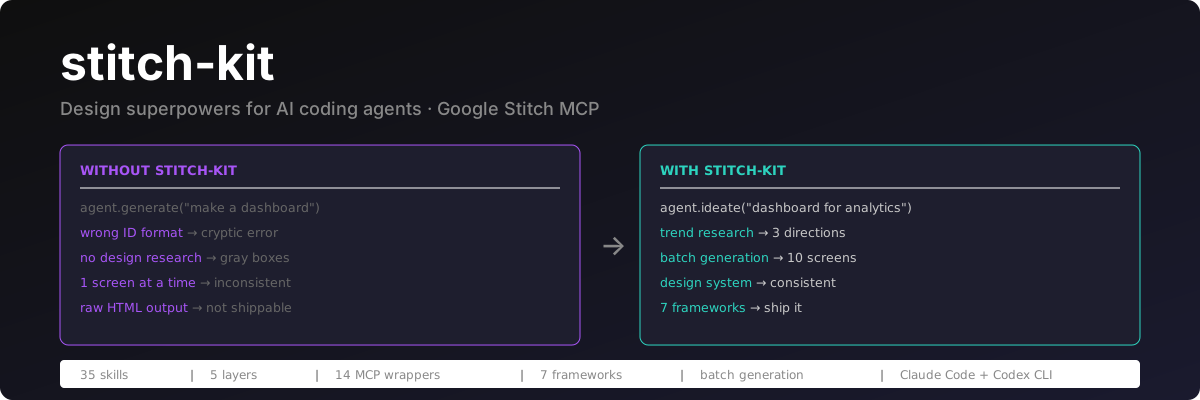
Your coding agent writes decent code and designs terrible UI. stitch-kit fixes the second half — it wires agents into Google Stitch (text prompts → genuinely beautiful screens) and teaches them to drive it properly.
I built this because I got tired of watching Claude Code generate UIs that look like a government form from 2004. Gray boxes, blue buttons, zero taste. Meanwhile Stitch generates pixel-perfect screens from text — but it's a raw MCP tool sitting there, and no coding agent knows how to use it well.
So I taught them.
All four of these came out of stitch-kit. Different briefs, genuinely different results — not one template with the hue rotated.
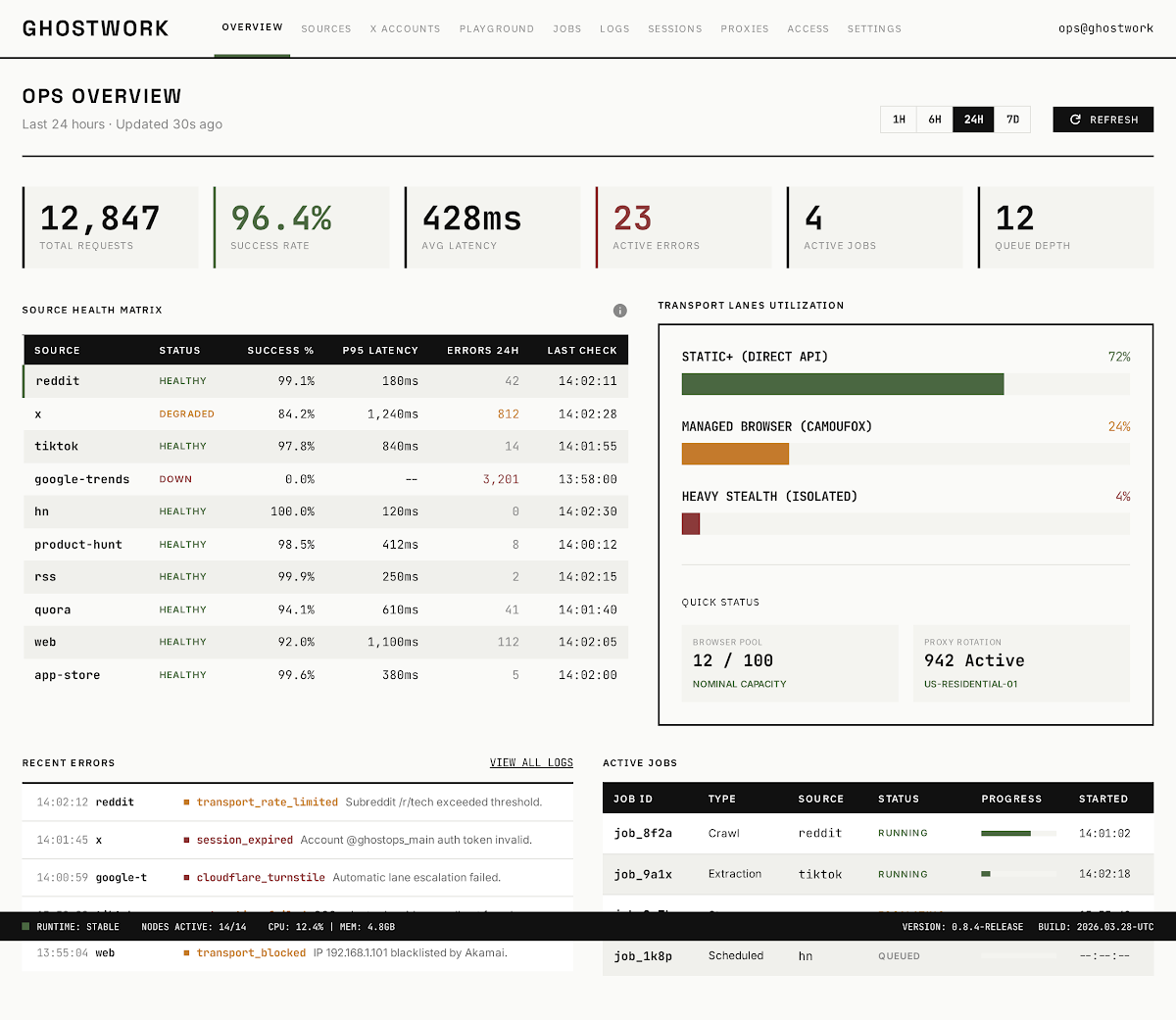 | 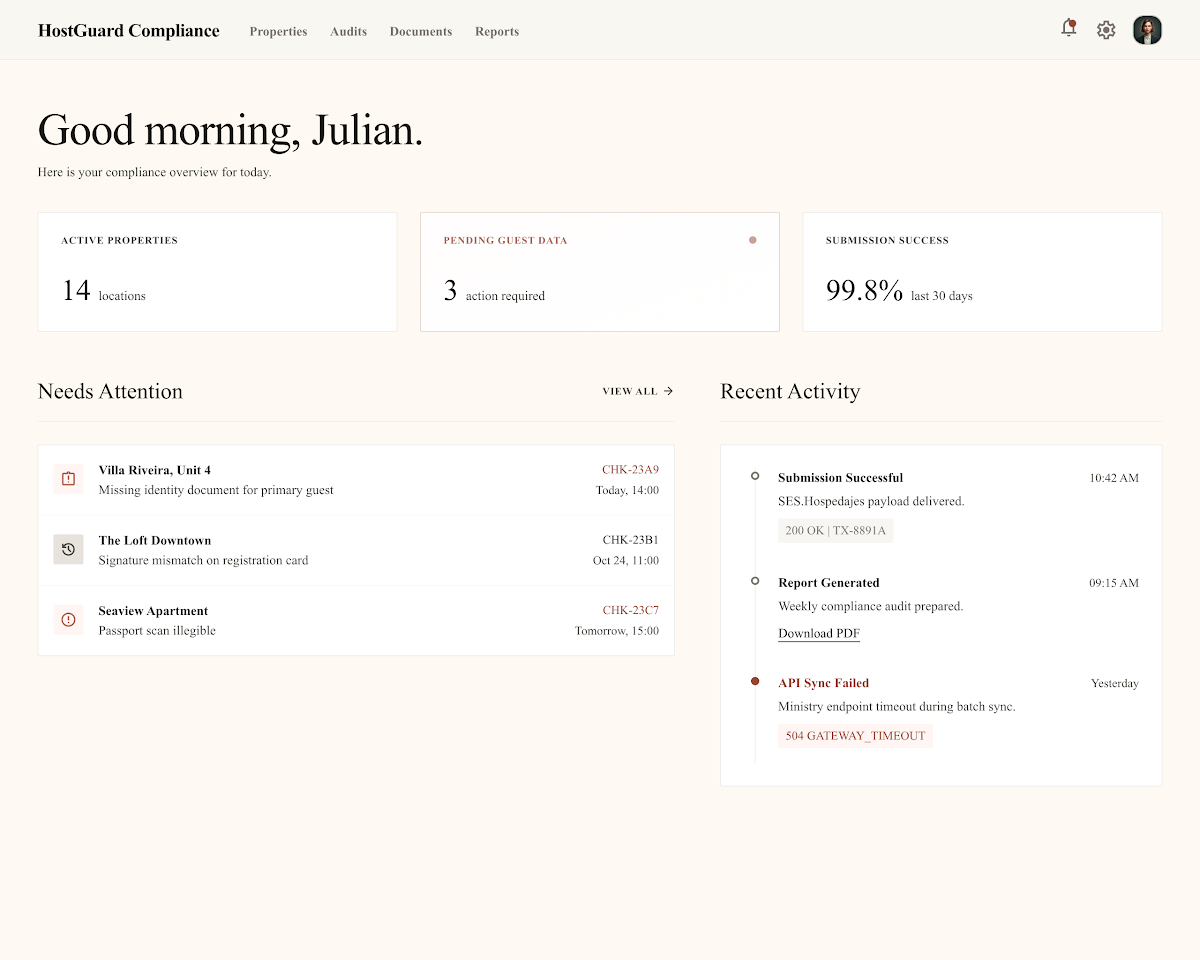 |
| Ops console · monospace, dense tables, industrial light | Compliance SaaS · serif on warm cream, generous whitespace |
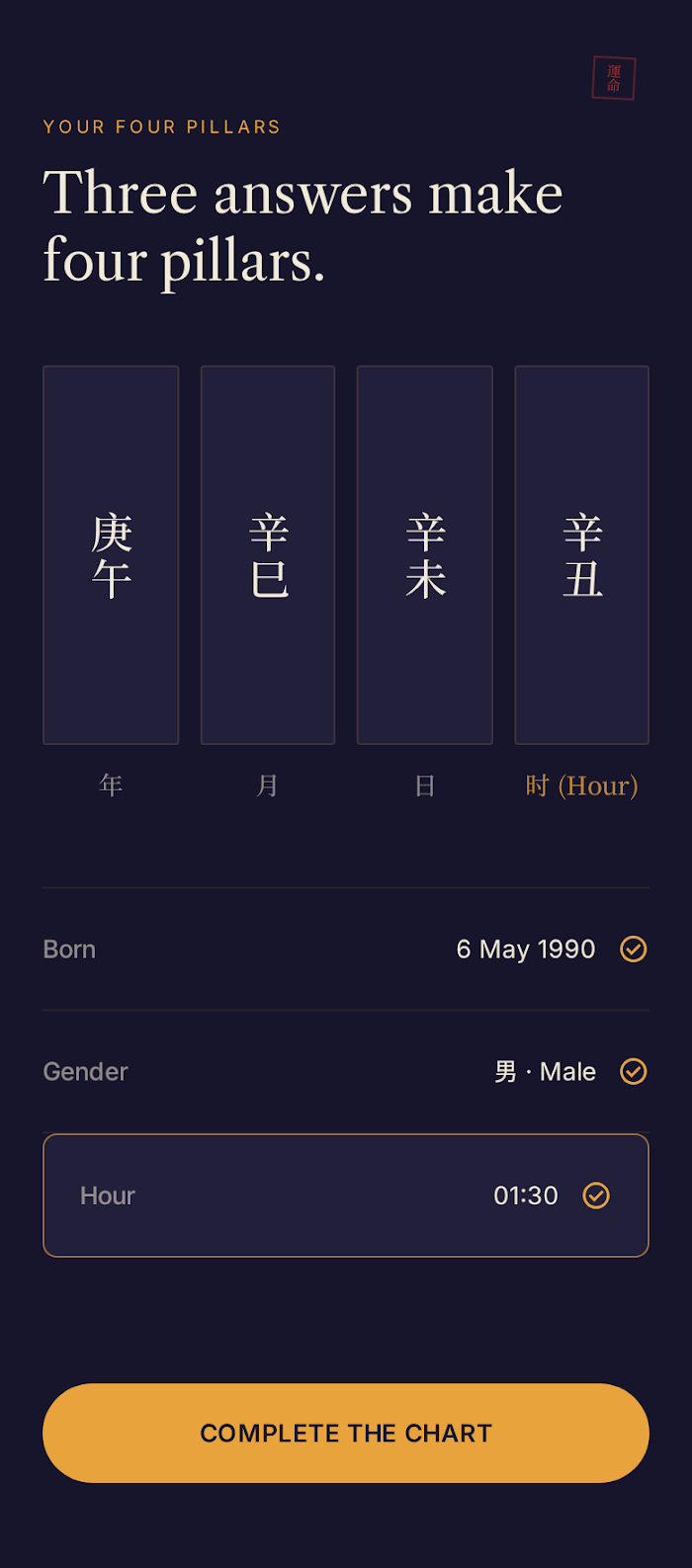 | 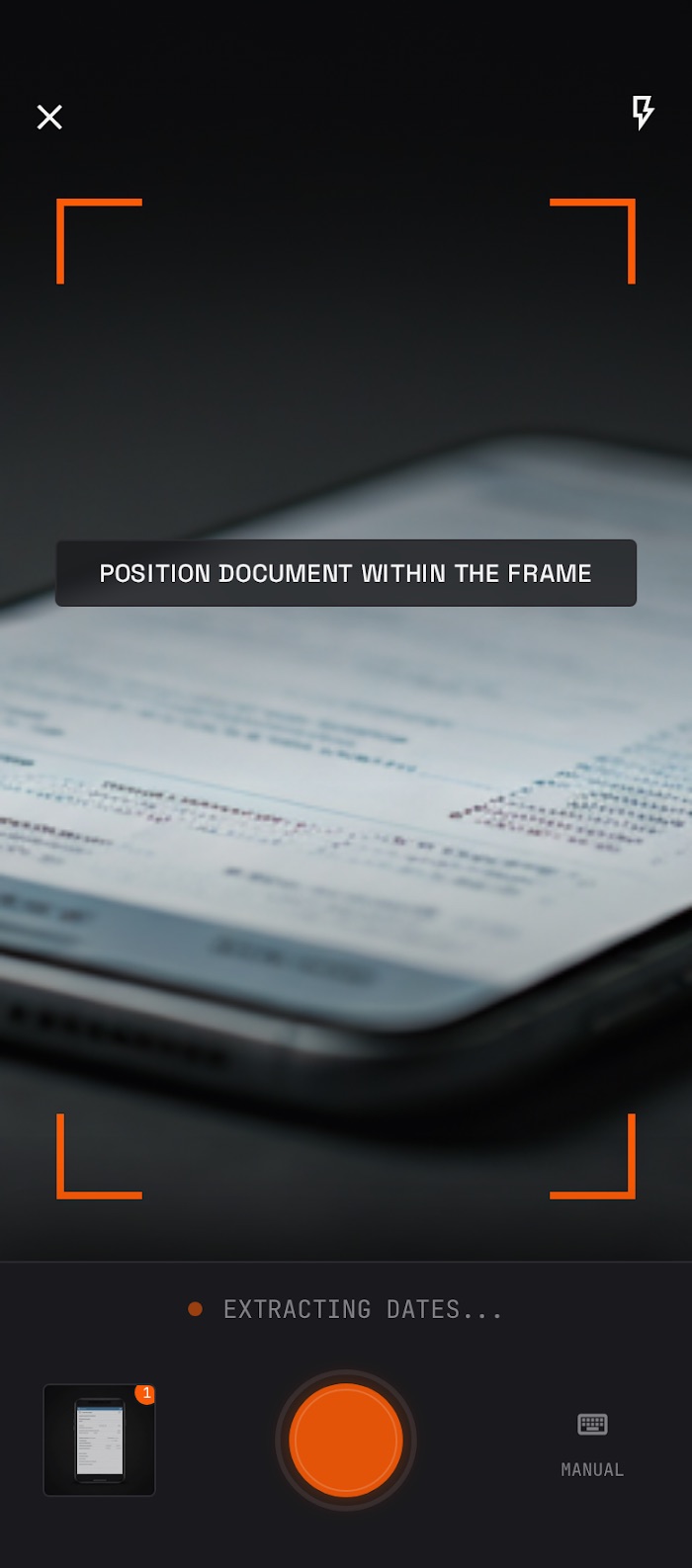 |
| Astrology app · midnight and gold, serif + CJK type | Mobile capture · dark UI over live camera, orange framing |
Generating designs needs Google Stitch. Sign in at stitch.withgoogle.com with any Google account, then grab an API key from settings. As of July 2026: no waitlist, no invite, free to use — but there are monthly generation limits and Google has signalled paid tiers, so treat the allowance as generous-but-finite. Check Stitch's own site before relying on any of that; it's their pricing to change, not mine.
Converting to code doesn't. The framework conversion skills take a local HTML file or a URL just as happily as a Stitch screen. If you already have markup and only want production components out of it, you need no Google account at all.
npx @booplex/stitch-kit
Detects every supported client you have installed — Claude Code, Codex CLI, OpenCode, Crush, Cursor, VS Code, Gemini CLI — and wires up whatever each one supports. See Works with for what that means per client.
Then, inside Claude Code, add the skills:
/plugin marketplace add https://github.com/gabelul/stitch-kit.git
/plugin install stitch-kit@stitch-kit
Two steps, not one — the npx installer handles the agent and MCP wiring, the plugin adds the 36 skills. The agent works without them, but the skills are what make the output good.
npx @booplex/stitch-kit update   # update to latest
npx @booplex/stitch-kit status   # check what's installed
# 1. Add Stitch MCP (remote HTTP server — needs API key from stitch.withgoogle.com/settings)
claude mcp add stitch --transport http https://stitch.googleapis.com/mcp \
  --header "X-Goog-Api-Key: YOUR-API-KEY" -s user

# 2. Install the plugin (inside Claude Code)
/plugin marketplace add https://github.com/gabelul/stitch-kit.git
/plugin install stitch-kit@stitch-kit
git clone https://github.com/gabelul/stitch-kit.git
cd stitch-kit && bash install-codex.sh
Then add Stitch MCP to ~/.codex/config.toml:
[mcp_servers.stitch]
url = "https://stitch.googleapis.com/mcp"

[mcp_servers.stitch.headers]
X-Goog-Api-Key = "YOUR-API-KEY"
Get your API key at stitch.withgoogle.com/settings.
Use $stitch-kit to activate the agent or $stitch-orchestrator for the full pipeline.
Compaction resilience (optional): to keep your project, screens, and PRD draft across a context compaction, stitch-kit needs the stitch-session helper on PATH — npm i -g @booplex/stitch-kit provides it, and install-codex.sh symlinks it. For automatic re-orientation after a compaction, install stitch-kit as a Codex plugin (codex plugin add) and trust its hooks. Details: docs/compaction-resilience.md.
The installer detects what you've got and wires up whatever that client supports. Not every agent takes skills, so here's the honest breakdown rather than a logo wall:
| Client | Stitch MCP | Agent | Skills |
|---|---|---|---|
| Claude Code | ✅ | ✅ | ✅ via plugin |
| Codex CLI | ✅ | ✅ | ✅ |
| OpenCode | ✅ | ✅ | ✅ |
| Crush | ✅ | — | ✅ |
| Cursor | ✅ | — | — |
| VS Code | ✅ | — | — |
| Gemini CLI | via extension | — | — |
Skills are the structured workflows — ideation, prompt engineering, ID-safe MCP wrappers, framework conversion. Agent is the Stitch-aware persona that knows the full toolset. MCP only means you get Stitch wired into the client and can drive it by hand, but none of the design intelligence — which is most of the point, so the top three are where this actually shines.
Gemini CLI handles MCP through its own extension system rather than a config file, so the installer points you at gemini extensions list instead of writing config for you.
Check what you've got with npx @booplex/stitch-kit status.
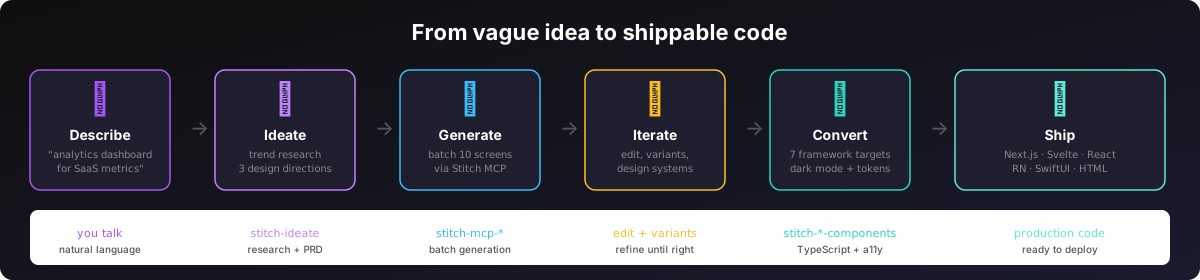
Without stitch-kit, your agent sends Stitch a half-baked prompt, gets confused by ID formats, generates one screen, hands you raw HTML, and calls it a day. With stitch-kit:
Think first — stitch-ideate does something your coding agent literally cannot: design research. It fetches trends, analyzes competitor UIs, and proposes 3 distinct design directions with real hex colors, typography pairings, and mood descriptions. It's the design buddy your agent was missing.
Generate smart — The orchestrator detects whether your request needs ideation or can go straight to generation (there's a specificity scoring system — hex colors and layout details skip ideation, vague requests trigger it). It engineers a structured prompt, sends the full PRD to Stitch, and batch-generates up to 10 screens in one call. If there are more, it auto-continues.
Iterate without starting over — Edit screens with text prompts, generate design variants, apply design systems across multiple screens for visual consistency. The agent knows which Stitch tool to reach for (and more importantly, which ID format each one expects — because apparently Google couldn't pick one).
Ship real code — Convert to production components with dark mode, TypeScript, design tokens, and ARIA. Not "here's some JSX, figure it out" — proper Server/Client component split, theme integration, accessibility baked in.
Works on any HTML, not just Stitch output. Each conversion skill takes a Stitch screen, a local HTML file, or a URL — point it at a template you bought, a page you already built, or something a different tool generated. Only the Stitch route needs an API key.
Every target gets dark mode and design tokens. The rest depends on where you're shipping: TypeScript and ARIA on the web targets, Swift and native accessibility APIs on SwiftUI, plain semantic HTML with no build step on the HTML target.
Pick your target:
| Target | Skill | What you get |
|---|---|---|
| Next.js 15 App Router | stitch-nextjs-components | Server/Client split, next-themes, TypeScript strict |
| Svelte 5 / SvelteKit | stitch-svelte-components | Runes API, scoped CSS, built-in transitions |
| Vite + React | stitch-react-components | useTheme() hook, Tailwind, no App Router overhead |
| HTML5 + CSS | stitch-html-components | No build step — PWA, WebView, Capacitor ready |
| shadcn/ui | stitch-shadcn-ui | Radix primitives, token alignment with Stitch palette |
| React Native / Expo | stitch-react-native-components | iOS + Android, useColorScheme, safe areas |
| SwiftUI | stitch-swiftui-components | iOS 16+, @Environment(\.colorScheme), 44pt targets |
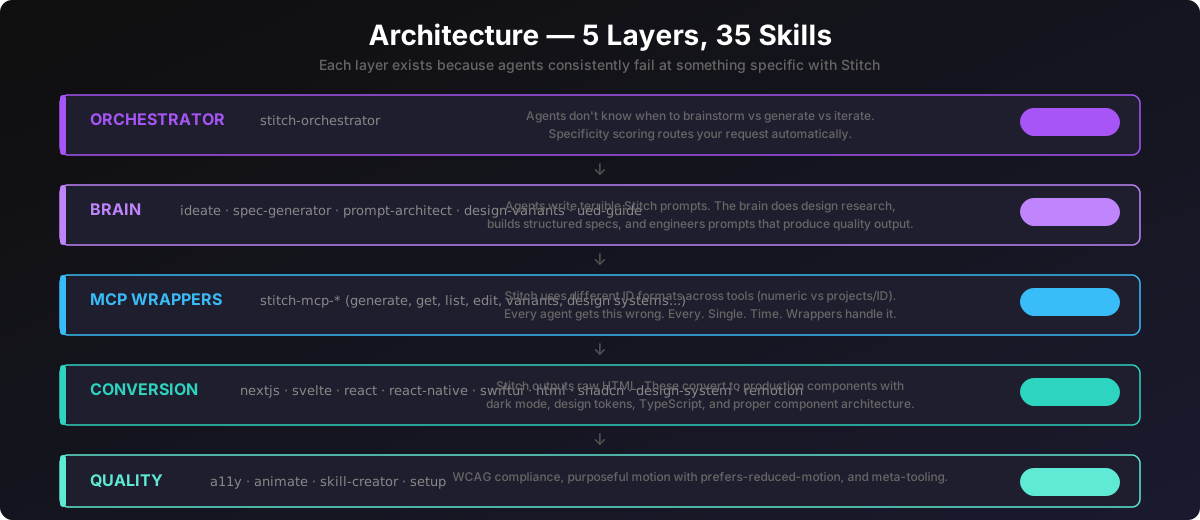
Five layers, 36 skills. Each layer exists because agents fail at something specific with Stitch, and the failures are different enough that one skill can't cover them.
The ID format thing deserves its own callout. generate_screen_from_text wants "3780309359108792857". list_screens wants "projects/3780309359108792857". Pass the wrong one and you get a cryptic error. This is the #1 reason agents fail with raw Stitch MCP, and it's why there's a dedicated wrapper skill per API tool instead of letting agents call the API directly.
Details → docs/architecture.md
skills/[skill-name]/
├── SKILL.md        — what it does, when to use it, step-by-step workflow
├── examples/       — real examples so the agent copies patterns instead of guessing
├── references/     — design contracts, checklists (loaded only when needed)
└── scripts/        — fetch helpers, validators, code generators
The examples folder is the secret weapon. Agents produce dramatically better output when they have real patterns to copy instead of hallucinating boilerplate from training data. (I learned this the hard way after watching Claude generate the same broken Tailwind config 15 times in a row.)
Google's official repo ships 15 skills across three plugins — stitch-design, stitch-build, stitch-utilities. (Checked July 2026; they move fast, so verify before taking this comparison as current.) It's a real toolkit, not a stub, and it does one whole thing stitch-kit doesn't (see the gaps below).
Raw skill counts aren't a fair comparison: Google consolidated generate/edit/variants into one skill and the four design-system operations into another, where stitch-kit keeps them as separate wrappers. Different granularity, not more capability. Here's where both cover the same ground:
| Official | stitch-kit | What's different |
|---|---|---|
design-md | stitch-design-md | Adds Section 6 — design system notes that feed back into Stitch prompts for consistent multi-screen output |
enhance-prompt | stitch-ui-prompt-architect | Two modes: (A) vague → enhanced, same as official; (B) Design Spec → structured [Context][Layout][Components] prompt. Mode B produces significantly better results. |
stitch-loop | stitch-loop | Visual verification step, explicit MCP naming, DESIGN.md integration |
stitch::react-components | stitch-react-components | Also accepts a local HTML file or URL, not just a Stitch screen |
stitch::react-native | stitch-react-native-components | Also accepts a local HTML file or URL; theirs adds a re-sync path for existing native components |
stitch::generate-design | stitch-mcp-generate-screen-from-text + -edit-screens + -generate-variants | Split into one skill per MCP tool, each enforcing the right ID format |
stitch::manage-design-system | stitch-mcp-create/update/list/apply-design-system | Same split-by-operation approach |
remotion | stitch-remotion | Common patterns (slideshow, feature highlight, user flow), voiceover, dynamic text |
shadcn-ui | stitch-shadcn-ui | Init styles support, custom registries, validation checklist |
What stitch-kit adds:
stitch-ideate — conversational design agent that researches trends, proposes directions, produces PRDs, and batch-generates all screens. No equivalent.stitch-orchestrator — end-to-end coordinator with smart ideation routing. No equivalent.stitch-ui-design-spec-generator — structured spec before prompt, which beats pure prompt enhancement. No equivalent.stitch-swiftui-components — SwiftUI isn't a target in the official repo at all.stitch-design-system — token extraction → CSS custom properties with dark mode. Their manage-design-system handles Stitch-side design systems; this one emits CSS for your codebase.stitch-a11y — a dedicated WCAG 2.1 AA audit-and-fix pass. They cover accessibility as guidance inside individual conversion skills, but there's no audit skill.stitch-animate — implements motion in components. Their taste-design specifies motion philosophy in DESIGN.md; this writes the actual animation code with prefers-reduced-motion handled.stitch-skill-creator — meta-skill for extending the plugin. No equivalent.What Google has that stitch-kit doesn't — worth knowing before you pick:
stitch::upload-to-stitch — uploads screenshots or mockups into a Stitch project. stitch-kit had a wrapper for this (upload_screens_from_images), but Google removed that tool from the live MCP API — there's no image-upload route left on the API side, so the wrapper skill is gone too. Recreate the design from a text prompt instead, or use one of the conversion skills' local-file routes if you already have markup.stitch::code-to-design — pulls an existing web app into Stitch by chaining the two skills below. stitch-kit only goes design → code; this goes code → design.stitch::extract-static-html — extracts self-contained static HTML, assets inlined, from a running appstitch::extract-design-md — generates DESIGN.md from frontend source code. stitch-kit's version reads a Stitch project instead, so same output, different input.taste-design — a stricter anti-generic DESIGN.md variant (calibrated color, asymmetric layout, deliberate motion)react-vite-dashboard — Vite dashboard generator, Web3/DeFi flavoredIf your workflow starts from an app you've already built and you want it in Stitch, use the official repo — that's the direction stitch-kit doesn't cover.
All 36 skills with descriptions, layers, and the ID format table → docs/skills-index.md
MCP API schemas (JSON Schema for the 15 Stitch tools, all wrapped) → docs/mcp-schemas/
Other tools for agents that care about quality:
Built by Gabi @ Booplex.com — because watching AI agents produce ugly UIs when beautiful tools exist was driving me nuts. Apache 2.0.
Sign in to join the discussion.
No comments yet. Be the first to say what this is good for.
Makes your AI agent think like the laziest senior dev in the room. The best code is the code you never wrote.

Graphs that teach > graphs that impress. Turn any code into an interactive knowledge graph you can explore, search, and ask questions about. Works with Claude Code, Codex, Cursor, Copilot, Gemini CLI, and more.

OmO: Just type "mass ulw" keyword with your prompt. Now you are the master of graph engineering.
Persistent Context Across Sessions for Every Agent – Captures everything your agent does during sessions, compresses it with AI, and injects relevant context back into future sessions. Works with Claude Code, OpenClaw, Codex, Gemini, Hermes, Copilot, OpenCode + More
Opinionated Oxlint rules for rejecting low-evidence TypeScript and JavaScript patterns
Teams-first Multi-agent orchestration for Claude Code