
DietrichGebert/ponytailPlugins
Makes your AI agent think like the laziest senior dev in the room. The best code is the code you never wrote.
138k
1 add
This extension adds a marketplace view to VS Code for Agent Skills. You can browse skills from GitHub repositories, search them, install them into your workspace, and open their details in a markdown-rich view. It also manages installed skills, supports custom source repositories, and can use a GitHub token for higher API limits.
Builders who want to browse, install, and manage reusable agent skills without leaving VS Code.
You can add and organize agent skills from GitHub directly inside your editor instead of copying files by hand.
Browse skills from multiple GitHub repositories in one VS Code panel.
Search skills by name or keyword and clear back to the full list.
Install a selected skill into your workspace from the marketplace or detail view.
See installed skills, open their folders, view details, or uninstall them.
Render skill docs with markdown support, including tables and code blocks.
Keep marketplace entries and installed skills in sync automatically.
Add your own GitHub repositories as skill sources through settings.
Use a personal access token to raise GitHub API rate limits.
my-skill/
├── SKILL.md          # Skill metadata and documentation
├── index.js          # Main skill implementation
├── package.json      # Dependencies (if Node.js based)
└── README.md         # Additional documentation
npm run compile    # Compile with type checking and linting
npm run package    # Build production bundle
A VS Code extension that provides a marketplace for discovering, installing, and managing Agent Skills - reusable tools and capabilities for AI agents and Claude assistants.
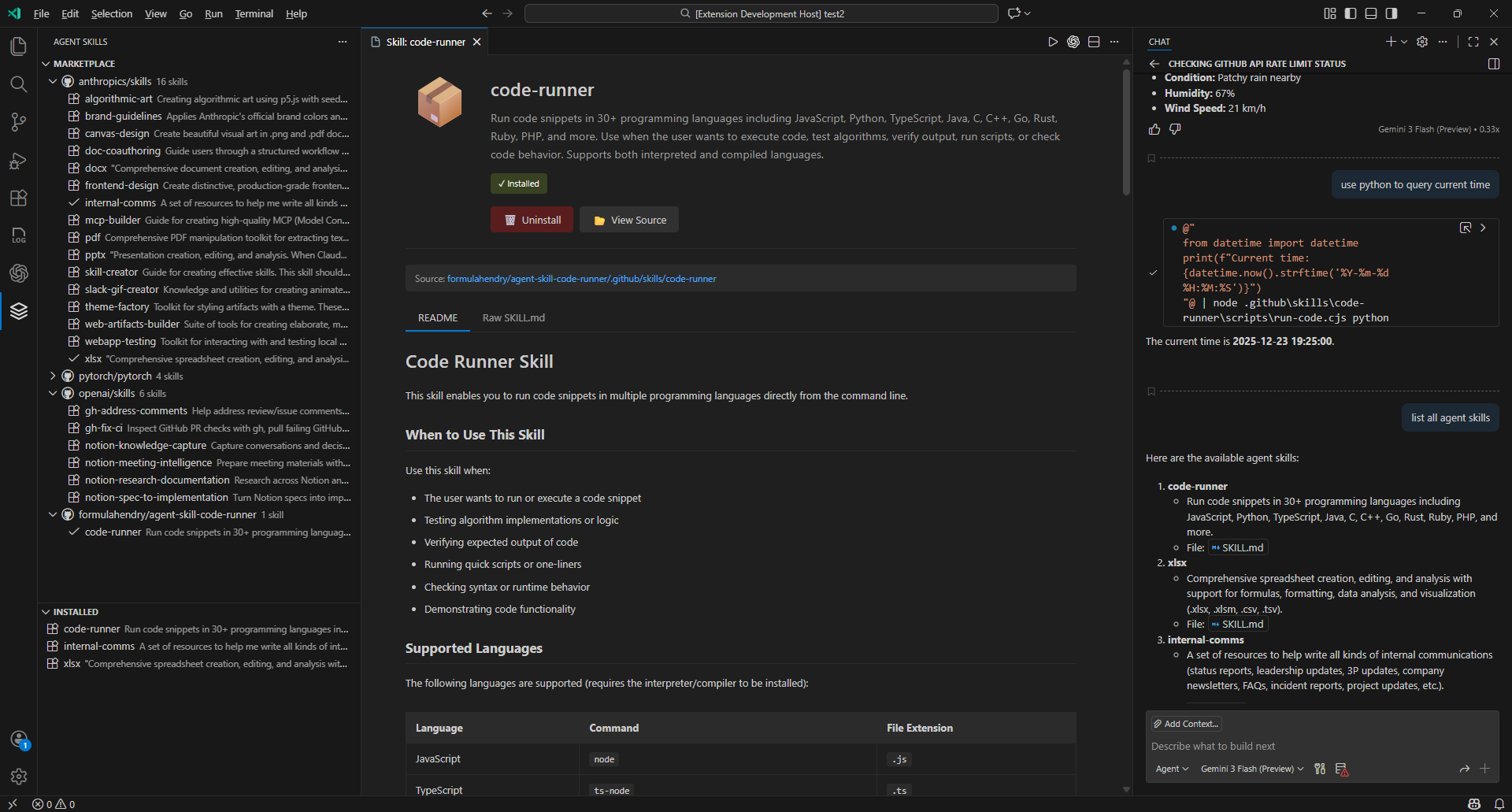
Agent Skills Marketplace interface showing the skill marketplace and installed skills views
Install: Visual Studio Code Marketplace | Open in VS Code | Open VSX Marketplace
Click the info icon (ℹ️) next to any skill in the marketplace to open a detailed view with:
You can customize the extension behavior through VS Code settings. Press Ctrl+, (or Cmd+, on Mac) and search for "Agent Skills":
Setting: agentSkills.skillRepositories
By default, the extension fetches skills from:
anthropics/skills - Official Anthropic skillsgithub/awesome-copilot - GitHub Copilot community skillspytorch/pytorch - PyTorch agent skillsopenai/skills - OpenAI curated skillsformulahendry/agent-skill-code-runner - Code runner skillAdd custom repositories by modifying this setting:
"agentSkills.skillRepositories": [
  {
    "owner": "your-username",
    "repo": "your-skills-repo",
    "path": "skills",
    "branch": "main"
  }
]
Setting: agentSkills.installLocation
Choose where to install skills in your workspace or home directory:
.github/skills (default).claude/skills.agents/skills~/.copilot/skills~/.claude/skills~/.agents/skillsGitHub Copilot CLI can also use skills installed under the user's home directory (link).
Setting: agentSkills.githubToken
For higher GitHub API rate limits (especially when fetching from many repositories), provide a personal access token:
public_repo scope"agentSkills.githubToken": "your_token_here"
Setting: agentSkills.cacheTimeout
Set how long (in seconds) to cache skill metadata (default: 3600 seconds / 1 hour)
Skills follow the Agent Skills specification. A typical skill structure:
my-skill/
├── SKILL.md          # Skill metadata and documentation
├── index.js          # Main skill implementation
├── package.json      # Dependencies (if Node.js based)
└── README.md         # Additional documentation
Each skill includes a SKILL.md file with YAML frontmatter:
---
name: My Awesome Skill
description: A brief description of what this skill does
license: MIT
compatibility: Claude 3.5 Sonnet, Claude 3 Opus
---

## Usage

Instructions on how to use this skill...

## Examples

Example code and use cases...
The extension provides these commands (accessible via Command Palette Ctrl+Shift+P):
The extension is optimized for performance:
raw.githubusercontent.com (no rate limits)markdown-it for better markdown rendering (optional)| Shortcut | Action |
|---|---|
Ctrl+Shift+X | Open Extensions panel |
Ctrl+, | Open VS Code Settings |
Ctrl+Shift+P | Open Command Palette |
To create skills compatible with this extension:
Users can then discover and install your skills through this marketplace!
Found a bug or have a feature request? Please open an issue on GitHub
MIT License - see LICENSE file for details
Contributions are welcome! Please feel free to submit pull requests or open issues.
npm install to install dependenciesnpm run watch to start the development watcherF5 in VS Code to launch the extension in debug modenpm run compile # Compile with type checking and linting
npm run package # Build production bundle
Made with ❤️ for AI and Agent enthusiasts
Sign in to join the discussion.
No comments yet. Be the first to say what this is good for.
Makes your AI agent think like the laziest senior dev in the room. The best code is the code you never wrote.

Graphs that teach > graphs that impress. Turn any code into an interactive knowledge graph you can explore, search, and ask questions about. Works with Claude Code, Codex, Cursor, Copilot, Gemini CLI, and more.

OmO: Just type "mass ulw" keyword with your prompt. Now you are the master of graph engineering.
Persistent Context Across Sessions for Every Agent – Captures everything your agent does during sessions, compresses it with AI, and injects relevant context back into future sessions. Works with Claude Code, OpenClaw, Codex, Gemini, Hermes, Copilot, OpenCode + More
Opinionated Oxlint rules for rejecting low-evidence TypeScript and JavaScript patterns
Teams-first Multi-agent orchestration for Claude Code