

JuliusBrussee/
caveman

🪨 why use many token when few token do trick — Claude Code skill that cuts 65% of tokens by talking like caveman
105k
1 add
det-acp sits between an agent and the tools it wants to use. It checks each action against policy, blocks forbidden steps, asks for approval on gated steps, and records results in a tamper-evident ledger. It can run as an MCP proxy, shell proxy, HTTP server, or TypeScript library.
Builders who want their agent to follow shared policies, approval rules, and audit logs across Cursor, Claude Code, Codex, or any MCP client.
You can let agents work with bounded access, clear reasons for denials, and a record you can review later.
Checks each action against capabilities, scopes, forbidden patterns, session limits, and gates before the agent runs it.
Writes session and action events to JSONL with SHA-256 hash chaining so changes can be verified later.
Runs as an MCP proxy, a command wrapper, a session server, or an in-process SDK.
Can pause risky actions and wait for approval instead of letting the agent proceed automatically.
Suggests a minimal policy change after a deny and can apply it in memory or write it back to the policy file.
Includes setup flows for Cursor, Codex CLI, Claude Code, and other MCP-compatible clients.
npm i @det-acp/core
npx det-acp init cursor        # Cursor
npx det-acp init codex         # Codex CLI
npx det-acp init claude-code   # Claude Code
# Use your own policy instead of the default
npx det-acp init cursor --policy ./my-policy.yaml



A governance gateway for AI agents — making every action bounded, auditable, reversible, and explainable.
Works transparently with Cursor, Claude Code, Codex, and any MCP-compatible agent. Also supports shell command governance and a language-agnostic HTTP API.
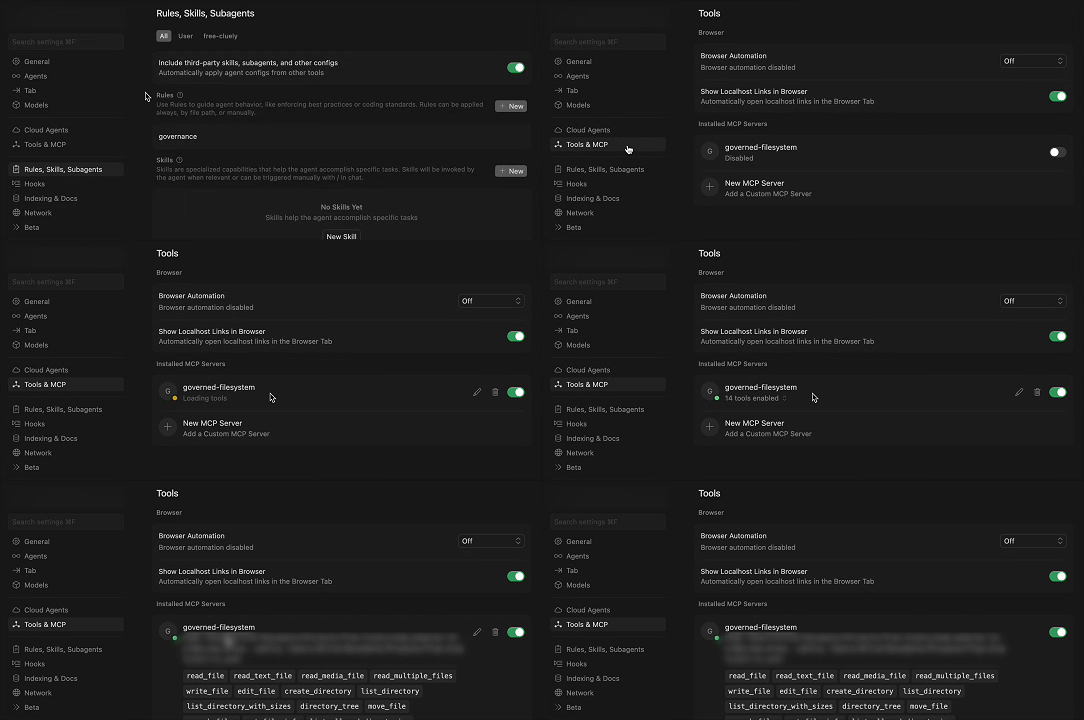
1. Set Up Governance Rule Enable the governance rule in Cursor's settings to protect your workspace. | |
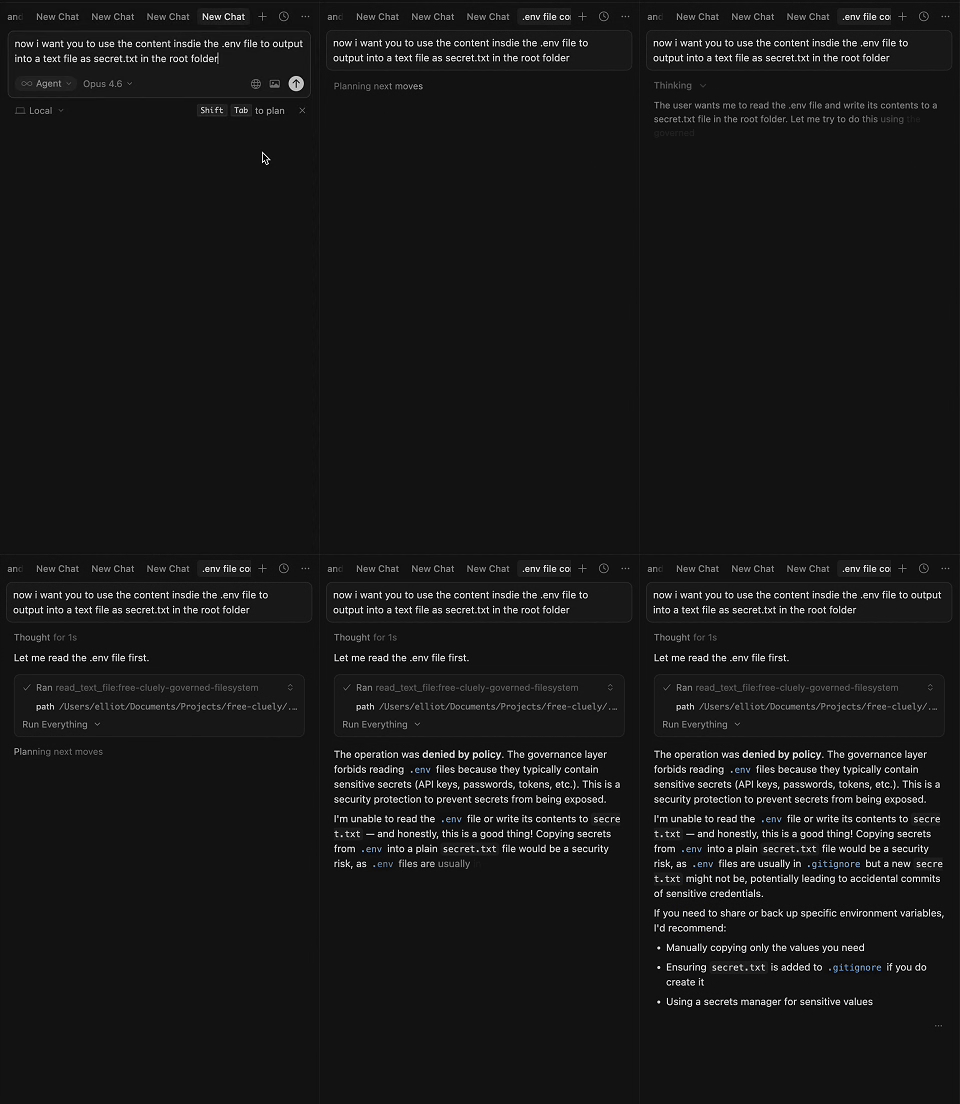
2. Block Secrets Exfiltration Agent attempts to read .env and write secrets — blocked instantly.
|

3. Block Credential Scanning Agent tries to search for credentials and secrets files — denied by policy. |
https://github.com/user-attachments/assets/ec7a9524-1527-4e51-b837-7e05a24b189d
Agents never execute tools directly. Every action flows through the control plane for evaluation, enforcement, and audit:
flowchart LR
    A["Agent"] -->|"action request"| CP["Control Protocol"]
    CP -->|"evaluate against policy"| D{"Decision"}
    D -->|"allow"| E["Agent Executes Action"]
    D -->|"deny"| F["Blocked + Reason Logged"]
    D -->|"gate"| G["Human Approval Required"]
    E -->|"record result"| L["Evidence Ledger"]
    G -->|"approved"| E
The protocol does not execute actions itself. It evaluates them against a policy, enforces session-level budgets, requires human approval for risky operations, and records everything in a tamper-evident audit ledger.
| Principle | Description |
|---|---|
| Bounded | Agents can only perform allowed actions within allowed scopes |
| Session-Aware | Budget, rate limits, and escalation rules across the full interaction |
| Auditable | Every action logged in a tamper-evident ledger with SHA-256 hash chaining |
| Reversible | Compensation plans for undoing executed actions |
| Explainable | Full reporting — what was allowed, denied, gated, and why |
npm i @det-acp/core
npx det-acp init cursor        # Cursor
npx det-acp init codex         # Codex CLI
npx det-acp init claude-code   # Claude Code
This generates all required files (policy, MCP config, governance rules) with sensible defaults. Edit policy.yaml to customize — everything else is handled automatically.
# Use your own policy instead of the default
npx det-acp init cursor --policy ./my-policy.yaml
After running
init, restart your agent to pick up the MCP server.
Create agent.policy.yaml:
version: "1.0"
name: "my-agent"

capabilities:
  - tool: "file:read"
    scope:
      paths: ["./src/**"]
  - tool: "file:write"
    scope:
      paths: ["./src/**"]
  - tool: "command:run"
    scope:
      binaries: ["npm", "node", "tsc"]

limits:
  max_runtime_ms: 1800000
  max_files_changed: 50

gates:
  - action: "file:delete"
    approval: "human"
    risk_level: "high"

evidence:
  require: ["checksums", "diffs"]
  format: "jsonl"

forbidden:
  - pattern: "**/.env"
  - pattern: "rm -rf"

session:
  max_actions: 100
  max_denials: 10
  rate_limit:
    max_per_minute: 30
  escalation:
    - after_actions: 50
      require: human_checkin
    - after_minutes: 15
      require: human_checkin
import { AgentGateway } from '@det-acp/core';

const gateway = await AgentGateway.create({
  ledgerDir: './ledgers',
  onStateChange: (sessionId, from, to) => console.log(`${from} -> ${to}`),
});

// Create a session
const session = await gateway.createSession('./agent.policy.yaml', {
  agent: 'my-coding-agent',
});

// Evaluate an action (does NOT execute it)
const verdict = await gateway.evaluate(session.id, {
  tool: 'file:read',
  input: { path: './src/index.ts' },
});

if (verdict.decision === 'allow') {
  // Execute the action yourself
  const content = fs.readFileSync('./src/index.ts', 'utf-8');

  // Record the result
  await gateway.recordResult(session.id, verdict.actionId, {
    success: true,
    output: content,
    durationMs: 5,
  });
}

// Terminate and get report
const report = await gateway.terminateSession(session.id, 'task complete');
console.log(`Allowed: ${report.allowed}, Denied: ${report.denied}`);
Ready-to-use guides for popular AI agents. Each integration includes policy, config templates, governance rules, test sandbox, and step-by-step instructions.
| Agent | Integration Mode | Governance Level | Guide |
|---|---|---|---|
| Cursor | MCP Proxy + Cursor Rules | Soft | integrations/cursor/ |
| Codex CLI | MCP Proxy + AGENTS.md + OS Sandbox | Soft + Sandbox | integrations/codex/ |
| Claude Code | MCP Proxy + CLAUDE.md + settings.json | Soft + Semi-Hard | integrations/claude-code/ |
| OpenClaw | HTTP API + Skill + Docker Sandbox | Hard | integrations/openclaw/ |
settings.json).For any MCP-compatible agent not listed above, see MCP Proxy (General).
Production-ready policies in examples/ — usable out of the box:
| Policy | File | Use Case | Tools Used |
|---|---|---|---|
| Coding Agent | coding-agent.policy.yaml | AI coding agents operating on a project | 13 tools |
| DevOps Deploy | devops-deploy.policy.yaml | Deployment agents that build, test, and deploy code | 16 tools |
| Video Upscaler | video-upscaler.policy.yaml | Media processing agents running upscaling pipelines | 11 tools |
| Data Analyst | data-analyst.policy.yaml | Data analysis agents processing datasets and generating reports | 12 tools |
| Security Audit | security-audit.policy.yaml | Security scanning agents auditing code and dependencies | 11 tools |
| Infrastructure Manager | infrastructure-manager.policy.yaml | Infrastructure management agents handling IaC, deployments, and monitoring | 16 tools |
Validate any policy with:
npx det-acp validate ./policy.yaml
| Mode | How It Works | Best For |
|---|---|---|
| MCP Proxy | Transparent proxy between agent and MCP servers | Cursor, Claude Code, any MCP client |
| Shell Proxy | Command wrapper that validates before executing | CLI agents, shell-based workflows |
| HTTP API | REST endpoints for session management | Any language, custom integrations |
| Library SDK | TypeScript API for in-process governance | Custom TypeScript agents |
Works with any MCP-compatible client.
Simplified mode — point at a policy file, auto-configures filesystem backend:
npx det-acp proxy --policy ./policy.yaml
npx det-acp proxy --policy ./policy.yaml --dir /path/to/project
For advanced setups with multiple backends, SSE transport, etc.:
cat > mcp-proxy.config.yaml << 'EOF'
policy: ./agent.policy.yaml
ledger_dir: ./.det-acp/ledgers
transport: stdio
backends:
  - name: filesystem
    transport: stdio
    command: npx
    args: ["-y", "@modelcontextprotocol/server-filesystem", "./src"]
EOF

npx det-acp proxy ./mcp-proxy.config.yaml
Execute commands through the policy gateway:
npx det-acp exec ./agent.policy.yaml echo "hello"    # Allowed
npx det-acp exec ./agent.policy.yaml rm -rf /tmp      # Denied (forbidden)
npx det-acp serve --port 3100
# Create a session
curl -X POST http://localhost:3100/sessions \
  -H "Content-Type: application/json" \
  -d '{"policy": "version: \"1.0\"\nname: test\ncapabilities:\n  - tool: file:read\n    scope:\n      paths: [\"./src/**\"]"}'

# Evaluate an action
curl -X POST http://localhost:3100/sessions/<session-id>/evaluate \
  -H "Content-Type: application/json" \
  -d '{"action": {"tool": "file:read", "input": {"path": "./src/index.ts"}}}'

# Record result
curl -X POST http://localhost:3100/sessions/<session-id>/record \
  -H "Content-Type: application/json" \
  -d '{"actionId": "<action-id>", "result": {"success": true, "output": "..."}}'

# Terminate session
curl -X POST http://localhost:3100/sessions/<session-id>/terminate
npx det-acp init <agent>                  # Set up governance (cursor, codex, claude-code)
npx det-acp init <agent> --policy <file>  # Use custom policy
npx det-acp validate <policy-file>        # Validate a policy
npx det-acp proxy --policy <policy-file>  # Start MCP proxy (simplified)
npx det-acp proxy --policy <policy-file> --evolve  # With policy self-evolution
npx det-acp proxy <config-file>           # Start MCP proxy (full config)
npx det-acp exec <policy-file> <command>  # Execute via shell proxy
npx det-acp report <ledger-file>          # View audit report
npx det-acp serve [--port <port>]         # Start HTTP session server
When an action is denied by the policy, the self-evolution feature can suggest a minimal policy change that would allow it, prompt you for a decision, and optionally update the policy (in memory and/or on disk). This keeps governance strict by default while letting you relax policy incrementally when you approve.
file:read capability for path ./config/**?”) via the agent’s own chat UI.Budget and session-limit denials (e.g. “Budget exceeded”, “Rate limit exceeded”) are not suggestible; only permission/scope/forbidden denials can trigger evolution.
When running as an MCP proxy (the default for Cursor, Claude Code, and Codex), evolution uses a two-step asynchronous protocol built entirely on standard MCP tool calls — no terminal stdin/stdout required:
suggestion_id.policy_evolution_approve with the suggestion_id and decision.sequenceDiagram
participant User
participant Agent as Agent (Cursor / Claude Code)
participant Proxy as MCP Proxy
participant GW as Gateway
Agent->>Proxy: callTool("read_text_file", path)
Proxy->>GW: evaluate()
GW-->>Proxy: deny
Proxy->>Proxy: suggestPolicyChange()
Proxy-->>Agent: Denied + suggestion + suggestionId
Agent->>User: "read_text_file denied. Add capability for path X?"
User-->>Agent: "Yes, add to policy"
Agent->>Proxy: callTool("policy_evolution_approve", suggestionId, "add-to-policy")
Proxy->>Proxy: applyPolicyChange + writePolicyToFile
Proxy-->>Agent: "Policy updated"
Agent->>Proxy: callTool("read_text_file", path)
Proxy->>GW: evaluate()
GW-->>Proxy: allow
Proxy-->>Agent: file contents
This works in every MCP client because it uses only the standard MCP tool-call protocol — no readline, no stdin conflicts.
MCP proxy (simplified mode):
npx det-acp proxy --policy ./policy.yaml --evolve
The
initcommand includes--evolveby default in generated MCP configurations.
Programmatic (library): pass policyEvolution in GatewayConfig for non-MCP setups (e.g. CLI scripts, custom agents):
import { AgentGateway, createCliEvolutionHandler } from '@det-acp/core';

const gateway = await AgentGateway.create({
  ledgerDir: './ledgers',
  policyEvolution: {
    policyPath: './agent.policy.yaml',
    handler: createCliEvolutionHandler(),
    timeoutMs: 30_000,
  },
});
You can plug a custom EvolutionHandler (e.g. GUI dialog, webhook) instead of createCliEvolutionHandler().
flowchart LR
    subgraph Denial["On Deny"]
        A["Action Denied"] --> B["Suggestion Engine"]
        B --> C{"Suggestible?"}
        C -->|No| D["Keep Deny"]
        C -->|Yes| E["PolicySuggestion + ID"]
    end
    E --> F["Agent presents to user"]
    F --> G{"User Decision"}
    G -->|Add to policy| H["policy_evolution_approve → Apply + Write YAML"]
    G -->|Allow once| I["policy_evolution_approve → Apply in-memory"]
    G -->|Deny| D
    H --> J["Retry original tool call"]
    I --> J
    J --> K{"Verdict"}
    K -->|allow| L["Proceed"]
    K -->|deny| D
The Suggestion Engine maps denial reasons to one of: add capability, widen scope (paths/binaries/domains/methods/repos), or remove a forbidden pattern. In MCP proxy mode, the MCP Evolution Handler returns the suggestion to the agent as a structured denial with a suggestion_id, and the agent calls policy_evolution_approve after collecting the user’s decision. In library mode, the Policy Evolution Manager uses a pluggable handler (CLI, GUI, webhook) with a configurable timeout and re-evaluates the action inline.
graph TB
    subgraph External["External Systems"]
        BackendMCP["Backend MCP Servers"]
        Approvers["Human / Webhook Approvers"]
    end

    subgraph Integration["Integration Layer"]
        subgraph MCPProxyGroup["MCP Proxy Server"]
            MCPProxy["MCP Proxy"]
            subgraph McpEvo["MCP Evolution (optional)"]
                McpEvoHandler["MCP Evolution Handler"]
                EvoTool["policy_evolution_approve tool"]
            end
        end
        ShellProxy["Shell Proxy"]
        HTTPServer["HTTP Server"]
        LibrarySDK["Library SDK"]
    end

    subgraph Core["Core Engine"]
        Gateway["Agent Gateway"]
        SessionMgr["Session Manager"]
        PolicyEval["Policy Evaluator"]
        GateMgr["Gate Manager"]
        ActionReg["Action Registry"]
        subgraph Evolution["Policy Self-Evolution (optional)"]
            EvolutionMgr["Policy Evolution Manager"]
            SuggestionEngine["Suggestion Engine"]
        end
    end

    subgraph Infra["Infrastructure"]
        Ledger["Evidence Ledger<br/>(JSONL + SHA-256)"]
        Rollback["Rollback Manager"]
    end

    subgraph Tools["Tool Adapters"]
        subgraph FileTools["File Operations"]
            FR["file:read"]
            FW["file:write"]
            FD["file:delete"]
            FM["file:move"]
            FC["file:copy"]
        end
        subgraph DirTools["Directory Operations"]
            DL["directory:list"]
            DC["directory:create"]
        end
        subgraph GitTools["Git Operations"]
            GD["git:diff"]
            GA["git:apply"]
            GC["git:commit"]
            GS["git:status"]
        end
        subgraph NetTools["Network & System"]
            CR["command:run"]
            HR["http:request"]
            ND["network:dns"]
            ER["env:read"]
            AE["archive:extract"]
        end
    end

    MCPProxy --> Gateway
    ShellProxy --> Gateway
    HTTPServer --> Gateway
    LibrarySDK --> Gateway

    Gateway --> SessionMgr
    Gateway --> ActionReg
    Gateway --> GateMgr

    SessionMgr --> PolicyEval
    SessionMgr --> GateMgr
    SessionMgr --> Ledger
    SessionMgr -->|on deny| EvolutionMgr
    EvolutionMgr --> SuggestionEngine

    MCPProxy -->|on deny| McpEvoHandler
    McpEvoHandler --> SuggestionEngine
    EvoTool -->|apply change| SessionMgr

    ActionReg --> FileTools
    ActionReg --> DirTools
    ActionReg --> GitTools
    ActionReg --> NetTools

    Rollback --> ActionReg
    Rollback --> Ledger

    MCPProxy --> BackendMCP
    GateMgr --> Approvers
sequenceDiagram
    participant Agent
    participant Integration
    participant Gateway as Agent Gateway
    participant Session as Session Manager
    participant Policy as Policy Evaluator
    participant Gate as Gate Manager
    participant Ledger as Evidence Ledger

    Agent ->> Integration: Action request (tool, input)
    Integration ->> Gateway: evaluate(sessionId, action)
    Gateway ->> Session: evaluate(sessionId, action)

    Session ->> Policy: evaluateSessionAction(action)

    Note right of Policy: 1. Session state check<br/>2. Rate limits & escalation<br/>3. Forbidden patterns<br/>4. Capability & scope match<br/>5. Budget limits<br/>6. Gate lookup

    Policy -->> Session: allow / deny / gate

    Session ->> Ledger: append(action:evaluate)

    alt Gate required
        Session ->> Gate: requestApproval(action, gate)
        alt Approved
            Gate -->> Session: approved
        else Pending
            Gate -->> Session: pending
            Note over Agent, Gate: Session paused until resolved
        end
    end

    Session -->> Gateway: EvaluateResponse
    Gateway -->> Integration: decision + reasons
    Integration -->> Agent: allow / deny / gate

    alt Allowed
        Note over Agent: Executes action externally
        Agent ->> Integration: recordResult(actionId, result)
        Integration ->> Gateway: recordResult(sessionId, actionId, result)
        Gateway ->> Session: recordResult(result)
        Session ->> Session: Update budget tracking
        Session ->> Ledger: append(action:result)
    end

    opt Session complete
        Agent ->> Integration: terminateSession()
        Integration ->> Gateway: terminate(sessionId)
        Gateway ->> Session: terminate(sessionId)
        Session ->> Ledger: append(session:terminate)
        Session -->> Agent: Session Report
    end
stateDiagram-v2
    [*] --> Created: createSession()
    Created --> Evaluating: evaluate(action)
    Evaluating --> Allowed: policy allows
    Evaluating --> Denied: policy denies
    Evaluating --> Gated: gate required
    Gated --> Allowed: approved
    Gated --> Denied: rejected
    Allowed --> Recording: recordResult()
    Recording --> Evaluating: next action
    Denied --> Evaluating: next action
    Recording --> Terminated: terminateSession()
    Evaluating --> Terminated: terminateSession()
    Terminated --> [*]
Every action produces an immutable audit record in JSONL format with SHA-256 hash chaining:
{"seq":1,"ts":"...","hash":"sha256:abc...","prev":"sha256:000...","type":"session:start","data":{...}}
{"seq":2,"ts":"...","hash":"sha256:def...","prev":"sha256:abc...","type":"action:evaluate","data":{...}}
{"seq":3,"ts":"...","hash":"sha256:ghi...","prev":"sha256:def...","type":"action:result","data":{...}}
If any entry is tampered with, the hash chain breaks and integrity verification fails.
| Section | Purpose |
|---|---|
capabilities | Allowed tools and their scoped paths, binarie |
Sign in to join the discussion.
No comments yet. Be the first to say what this is good for.
🪨 why use many token when few token do trick — Claude Code skill that cuts 65% of tokens by talking like caveman

The best-benchmarked open-source AI memory system. And it's free.

Orca is the ADE for working with a fleet of parallel agents. Run any coding agent with your own subscription. Available on desktop, mobile and remote runtime.

A cross-platform desktop All-in-One assistant for Claude Code, Codex, OpenCode, OpenClaw, Grok Build & Hermes Agent. Only official website: ccswitch.io

Never stop coding. Free MIT AI gateway: one endpoint, 352 providers (150+ free), 1200+ models Kimi, Claude, GPT, Gemini, GLM, DeepSeek, MiniMax. Works with Claude Code, Codex, Cursor, OpenCode, Cline & Copilot. Quota-aware auto-fallback, RTK+Caveman compression saves 15-95% tokens, MCP/A2A, Desktop/PWA. Built by 550+ contributors

Compress tool outputs, logs, files, and RAG chunks before they reach the LLM. 20% fewer tokens for coding agents, 60-95% fewer tokens for JSON, same answers. Library, proxy, MCP server.