

JuliusBrussee/
caveman

🪨 why use many token when few token do trick — Claude Code skill that cuts 65% of tokens by talking like caveman
105k
1 add
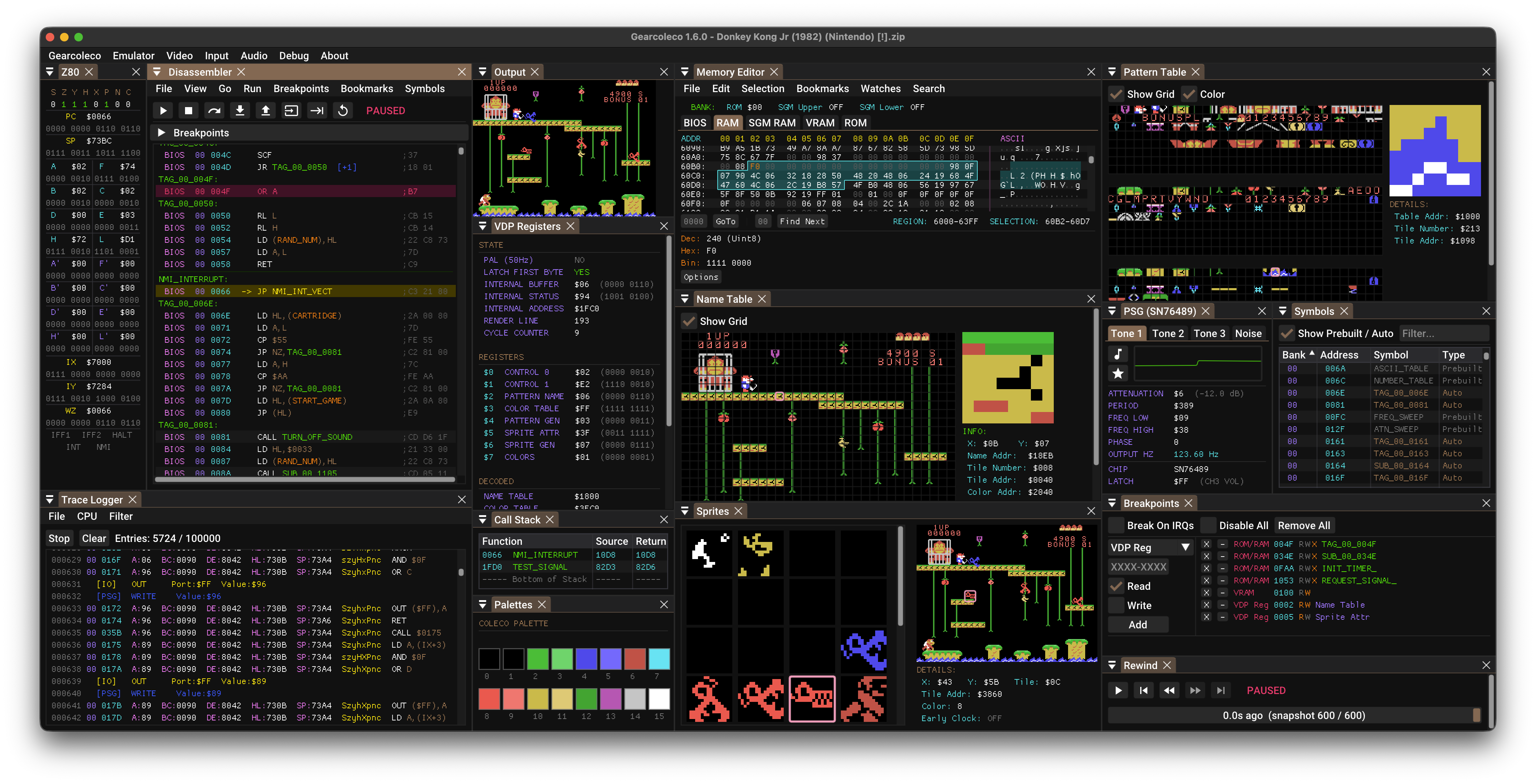
Gearcoleco emulates ColecoVision across Windows, macOS, Linux, BSD, and RetroArch. It bundles a debugger, save states, rewind, and an embedded MCP server so an agent can inspect memory, control execution, and help with debugging work.
Builders who want their agent to work inside a ColecoVision emulator while they debug or reverse engineer games.
You can debug ColecoVision games with agent access to execution control, memory, breakpoints, and hardware state.
Runs as a standalone app on Windows, macOS, Linux, and BSD, and as a libretro core for RetroArch.
Exposes tools for execution control, memory inspection, breakpoints, disassembly, hardware status, rewind, and related debugging tasks.
Includes breakpoints, memory access breaks, a trace logger, IO inspector, VRAM viewer, and code navigation.
Supports save states with preview, rewind, and run-ahead to reduce latency.
Ships `gearcoleco-debugging` and `gearcoleco-romhacking` skills for AI assistants.
Loads compressed ROMs, supports drag and drop, command-line ROM loading, and modern game controllers.
brew install sdl3
cd platforms/macos
make dist
sudo apt install build-essential libsdl3-dev
cd platforms/linux
make
sudo dnf install @development-tools gcc-c++ SDL3-devel
cd platforms/linux
make
sudo pacman -S base-devel sdl3
cd platforms/linux
make
su root -c "pkg install -y git gmake pkgconf sdl3"
cd platforms/bsd
USE_CLANG=1 gmake
su root -c "pkgin install gmake pkgconf SDL3"
cd platforms/bsd
gmake



Gearcoleco is a very accurate, cross-platform ColecoVision emulator written in C++ that runs on Windows, macOS, Linux, BSD and RetroArch, with an embedded MCP server for AI debugging and development.
This is an open source project with its ongoing development made possible thanks to the support by these awesome backers. If you find it useful, please consider sponsoring.
Don't hesitate to report bugs or ask for new features by opening an issue.
| Platform | Architecture | Download Link |
|---|---|---|
| Windows | Desktop x64 | Gearcoleco-1.6.13-desktop-windows-x64.zip |
| Desktop ARM64 | Gearcoleco-1.6.13-desktop-windows-arm64.zip | |
| macOS | Homebrew | brew install --cask drhelius/geardome/gearcoleco |
| Desktop Apple Silicon | Gearcoleco-1.6.13-desktop-macos-arm64.zip | |
| Desktop Intel | Gearcoleco-1.6.13-desktop-macos-intel.zip | |
| Linux | Ubuntu PPA | drhelius/ppa-geardome |
| Fedora RPM | drhelius/rpm-geardome | |
| Desktop Ubuntu 24.04 x64 | Gearcoleco-1.6.13-desktop-ubuntu24.04-x64.zip | |
| Desktop Ubuntu 22.04 x64 | Gearcoleco-1.6.13-desktop-ubuntu22.04-x64.zip | |
| Desktop Ubuntu 24.04 ARM64 | Gearcoleco-1.6.13-desktop-ubuntu24.04-arm64.zip | |
| MCPB | All platforms | MCP Readme |
| RetroArch | All platforms | Libretro core documentation |
| Dev Builds | All platforms | GitHub Actions |
Notes:
brew trust --tap drhelius/geardomelibsdl32c66f5911e5b42b8ebe113403548eee7 is recommended.F12. It is also recommended to disable spinners for software that don't use them.Backspace by default) or a mapped gamepad shortcut to step backwards through recent gameplay.Top+Bottom and Aspect Ratio Standard (4:3 DAR) in the Video menu.--portable, or create an empty file named portable.ini in the same directory as the application binary. On macOS, place the file next to the .app bundle.Emulator menu. When enabled, opening a ROM while another instance is running will send the ROM to the running instance instead of starting a new one.path_to_rom_file.rom it tries to load path_to_rom_file.sym. You can also load a symbol file using the GUI or the CLI. It supports SDCC/NoICE (.noi), wla-dx and vasm/generic file formats.gearcoleco [options] [rom_file] [symbol_file]
Arguments:
[rom_file] ROM file: accepts ROMs (.col, .cv, .rom, .bin) or ZIP (.zip)
[symbol_file] Optional symbol file for debugging
Options:
-f, --fullscreen Start in fullscreen mode
-w, --windowed Start in windowed mode with menu visible
--mcp-stdio Auto-start MCP server with stdio transport
--mcp-http Auto-start MCP server with HTTP transport
--mcp-router Enable compact MCP tool routing
--mcp-http-address A HTTP bind address (default: 127.0.0.1)
--mcp-http-port N HTTP port for MCP server (default: 7777)
--headless Run without GUI (requires --mcp-stdio or --mcp-http)
--portable Store configuration and user data beside the application
-v, --version Display version information
-h, --help Display this help message
Gearcoleco includes a Model Context Protocol (MCP) server that enables AI-assisted debugging through AI agents like GitHub Copilot, Claude, Codex and similar. The server provides tools for execution control, memory inspection, breakpoints, disassembly, hardware status, and more. STDIO and HTTP transports are supported, with STDIO preferred.
For complete setup instructions and tool documentation, see MCP_README.md.
Gearcoleco provides Agent Skills that teach AI assistants how to effectively use the emulator for specific tasks:
Install with npx skills add drhelius/gearcoleco. See the skills README for details.
SDL3-devel-x.y.z-VC.zip).SDL3-x.y.z) to SDL3.SDL3 folder inside platforms/windows/dependencies/ so that the include path is platforms/windows/dependencies/SDL3/include/SDL3/.platforms/windows/Gearcoleco.sln and build.xcode-select --install in the terminal for the compiler to be available on the command line.brew install sdl3
cd platforms/macos
make dist
If you are using Ubuntu 25.04 or later, you can install SDL3 directly. Use the following commands to build:
sudo apt install build-essential libsdl3-dev
cd platforms/linux
make
For older Ubuntu versions (22.04, 24.04), you need to build SDL3 from source first. Use the following commands to build both SDL3 and Gearcoleco:
sudo apt install build-essential cmake git curl jq pkg-config \
  libx11-dev libxext-dev libxrandr-dev libxcursor-dev libxfixes-dev \
  libxi-dev libxss-dev libxkbcommon-dev libwayland-dev libdecor-0-dev \
  libdrm-dev libgbm-dev libgl1-mesa-dev libegl1-mesa-dev libdbus-1-dev libudev-dev libxtst-dev
SDL3_TAG=$(curl -s https://api.github.com/repos/libsdl-org/SDL/releases/latest | jq -r '.tag_name')
git clone --depth 1 --branch "$SDL3_TAG" https://github.com/libsdl-org/SDL.git /tmp/SDL3
cmake -S /tmp/SDL3 -B /tmp/SDL3/build -DCMAKE_INSTALL_PREFIX=/usr -DSDL_TESTS=OFF -DSDL_EXAMPLES=OFF
cmake --build /tmp/SDL3/build -j$(nproc)
sudo cmake --install /tmp/SDL3/build
cd platforms/linux
make
sudo dnf install @development-tools gcc-c++ SDL3-devel
cd platforms/linux
make
sudo pacman -S base-devel sdl3
cd platforms/linux
make
su root -c "pkg install -y git gmake pkgconf sdl3"
cd platforms/bsd
USE_CLANG=1 gmake
su root -c "pkgin install gmake pkgconf SDL3"
cd platforms/bsd
gmake
doas pkg_add gmake sdl3
cd platforms/bsd
LDFLAGS=-L/usr/X11R6/lib/ USE_CLANG=1 gmake
sudo apt install build-essential
cd platforms/libretro
make
sudo dnf install @development-tools gcc-c++
cd platforms/libretro
make


Thank you to all the people who have already contributed to Gearcoleco!
Gearcoleco is licensed under the GNU General Public License v3.0 License, see LICENSE for more information.
Sign in to join the discussion.
No comments yet. Be the first to say what this is good for.
🪨 why use many token when few token do trick — Claude Code skill that cuts 65% of tokens by talking like caveman

The best-benchmarked open-source AI memory system. And it's free.

Orca is the ADE for working with a fleet of parallel agents. Run any coding agent with your own subscription. Available on desktop, mobile and remote runtime.

A cross-platform desktop All-in-One assistant for Claude Code, Codex, OpenCode, OpenClaw, Grok Build & Hermes Agent. Only official website: ccswitch.io

Never stop coding. Free MIT AI gateway: one endpoint, 352 providers (150+ free), 1200+ models Kimi, Claude, GPT, Gemini, GLM, DeepSeek, MiniMax. Works with Claude Code, Codex, Cursor, OpenCode, Cline & Copilot. Quota-aware auto-fallback, RTK+Caveman compression saves 15-95% tokens, MCP/A2A, Desktop/PWA. Built by 550+ contributors

Compress tool outputs, logs, files, and RAG chunks before they reach the LLM. 20% fewer tokens for coding agents, 60-95% fewer tokens for JSON, same answers. Library, proxy, MCP server.