
obra/
superpowers

obra/superpowersSkills
An agentic skills framework & software development methodology that works.
285k
1 add
Hermes Link Curator packages a save-link workflow for Hermes Agent. The agent fetches a URL, archives it into a local markdown vault, and the dashboard reads that vault to show list, calendar, search, tags, day pages, graph view, and JSON stats.
Builders who use Hermes Agent and want a private link archive they can browse on desktop or mobile.
You can send a URL to your agent and get back a saved, tagged, browsable archive instead of a one-off summary.
The `obsidian` skill writes archived links into `~/.hermes/profiles/<profile-name>/vault/` as daily notes and an index.
The `dashboard/` app is a standalone FastAPI site on port 8090 with list, calendar, search, tag pages, day pages, graph view, and JSON stats.
`SOUL.template.md` tells the agent to archive links rather than only summarize them.
`AGENT_GUIDE.md` and `install.sh` copy the profile pieces into a new Hermes profile and start the dashboard.
~/.hermes/profiles/<profile-name>/dashboard/
http://localhost:8090
cd ~/.hermes/profiles/<profile-name>/dashboard
./start.sh 8091
cd ~/.hermes/profiles/<profile-name>/dashboard
ARCHIVE_HOST=0.0.0.0 ./start.sh 8090
A link curator profile pack for Hermes Agent — turn any Hermes agent into a librarian. Send a URL, get it archived, tagged, summarized, and browsable in a fast Obsidian-style dashboard.
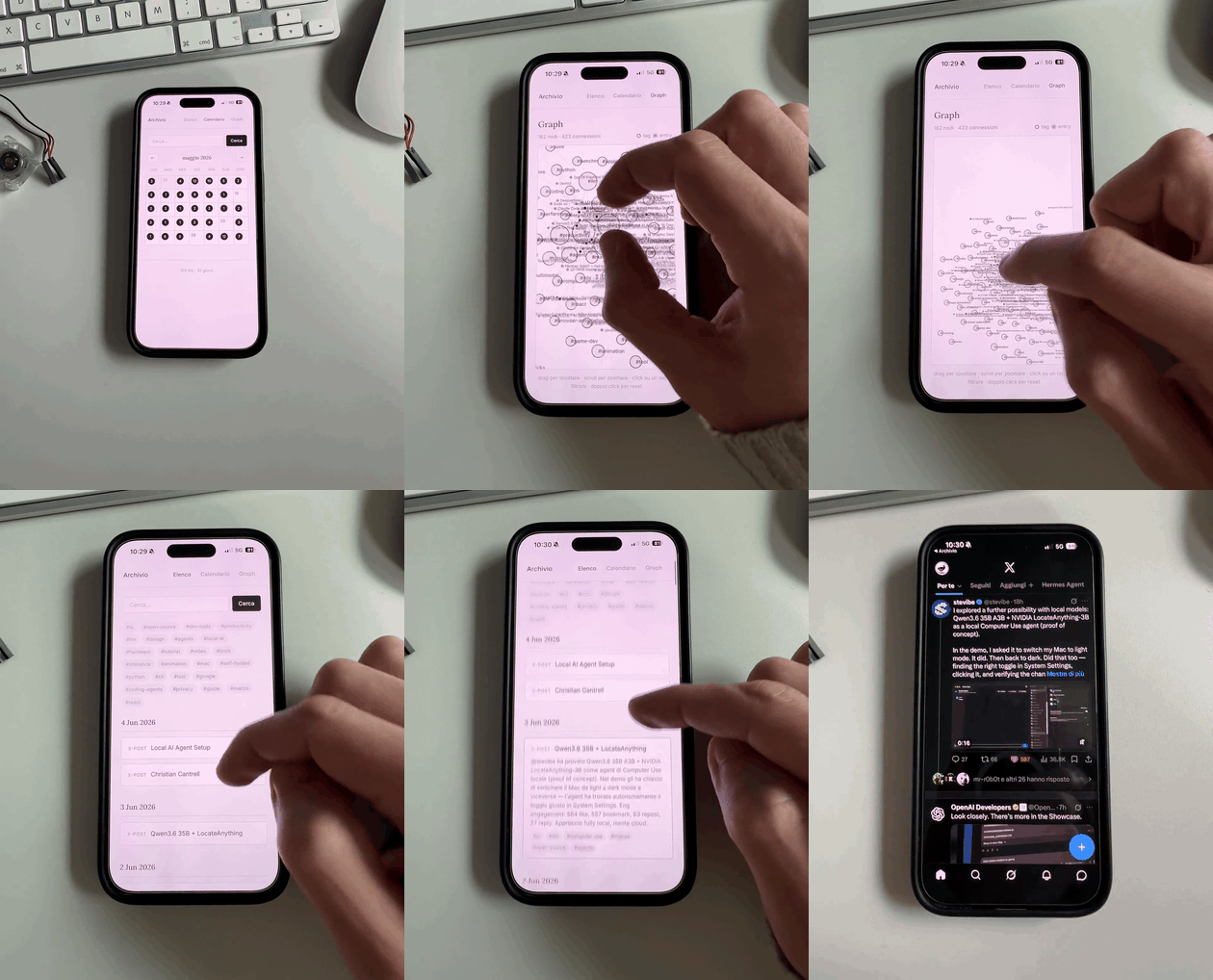
The archive is just a local web app, so it works well on desktop and mobile: list view, calendar, search, tags, day pages, graph view, and JSON stats all read from the same markdown vault.
obsidian + link-curator-dashboard) — drop into any Hermes profileThe agent receives links on Telegram, Discord, or anywhere else → fetches content → writes entries to a local markdown vault → the dashboard reads the vault and serves a search/tag/graph view.
Hermes Link Curator is designed for Unix-like environments:
You need Hermes Agent, Python 3.10+, and a Bash-compatible shell. The dashboard itself is a standard FastAPI app, but the installer and profile paths assume ~/.hermes/....
Send your Hermes agent a message like:
Install https://github.com/dodo-reach/hermes-link-curator — follow the AGENT_GUIDE.md.
The agent will read AGENT_GUIDE.md, create a new profile, copy the pieces, and start the dashboard. You can then start archiving:
archive https://github.com/some/repo
or use the dashboard at http://localhost:8090.
Prefer the manual path? Run ./install.sh from this repo — it asks one question (profile name) and does the same thing.
The installer copies the web app into your Hermes profile and starts it from:
~/.hermes/profiles/<profile-name>/dashboard/
By default it listens on:
http://localhost:8090
That means it is exposed only on the machine running Hermes. The dashboard reads the vault at ~/.hermes/profiles/<profile-name>/vault/, so every archived link appears there as markdown and in the web UI.
You can change the port when installing, or later by running:
cd ~/.hermes/profiles/<profile-name>/dashboard
./start.sh 8091
The dashboard binds to 127.0.0.1 by default. To make it reachable from your iPhone on the same private network, start it with:
cd ~/.hermes/profiles/<profile-name>/dashboard
ARCHIVE_HOST=0.0.0.0 ./start.sh 8090
Then open http://<your-mac-ip>:8090 from Safari on iPhone.
Once the dashboard is reachable from your iPhone:
Archive or Hermes Links.From then on, you can launch the archive from your Home Screen like a small private app.
For access outside your home network, use Tailscale instead of exposing the dashboard to the public internet:
ARCHIVE_HOST=0.0.0.0.http://<mac-tailscale-name>:8090 or http://<mac-tailscale-ip>:8090.The dashboard does not include authentication, so keep it behind localhost, your LAN, or Tailscale. Do not publish it directly to the open internet.
hermes-link-curator/
├── README.md                          # you are here
├── AGENT_GUIDE.md                     # instructions for the agent
├── install.sh                         # self-service installer
├── SOUL.template.md                   # paste into your profile's SOUL.md
├── skill-obsidian/                    # the save-link skill
├── skill-link-curator-dashboard/      # the dashboard maintenance skill
└── dashboard/                         # standalone FastAPI web app
Everything lives under ~/.hermes/profiles/<profile-name>/. Path auto-discovery — no env vars to set, no config files to edit:
~/.hermes/profiles/link-curator/
├── SOUL.md                            # personality + triggers
├── vault/                             # the archive (auto-created on first save)
│   ├── INDEX.md                       # master list, newest first
│   └── YYYY-MM-DD.md                  # daily notes
├── skills/note-taking/
│   ├── obsidian/                      # the save workflow
│   └── link-curator-dashboard/        # dashboard maintenance
└── dashboard/                         # the FastAPI web app
    ├── main.py
    ├── archive.py                     # vault parser
    ├── validate.py                    # integrity checker
    └── start.sh                       # launcher
The dashboard reads the vault and exposes: list, calendar, search, tag pages, day pages, a D3 force-directed tag graph, and a JSON stats endpoint.
The base install gets you archiving. Two more steps are documented in AGENT_GUIDE.md:
Built by dodo-reach as a personal system, packaged for the Hermes community. Powered by Hermes Agent by Nous Research.
MIT
Sign in to join the discussion.
No comments yet. Be the first to say what this is good for.
An agentic skills framework & software development methodology that works.

Turn any codebase, with its docs, SQL schemas, configs, and PDFs, into a queryable knowledge graph. A /graphify skill for Claude Code, Cursor, Codex, and Gemini CLI: local deterministic AST parsing, every edge explained, no vector store.

Topic in, narrated explainer video out. A Claude Code / Codex skill that turns any topic into a black-canvas motion-graphics explainer video with TTS voiceover, subtitles and a chapter progress bar. Chinese or English; every frame drawn in code with Remotion.
Public repository for Agent Skills
Open-source AI job search: scan job portals, evaluate listings into a structured A-H report with a global 1-5 score, tailor your CV, track applications — runs locally in your AI coding CLI (Claude Code, Codex, OpenCode, Antigravity…)

Production-grade engineering skills for AI coding agents.