
DietrichGebert/ponytailPlugins
Makes your AI agent think like the laziest senior dev in the room. The best code is the code you never wrote.
138k
1 add
Claude Sidebar is an Obsidian plugin that opens a full terminal for an agent CLI inside the sidebar. You can start new tabs, resume conversations, target folders or files, and switch the backend CLI from settings or the command palette.
Builders who keep their work in Obsidian and want agent CLIs available next to their notes.
You can run and switch between agent sessions inside Obsidian instead of jumping to a separate terminal.
Starts your chosen CLI automatically when you open a new tab.
Lets you run several agent sessions side by side in the sidebar.
Adds right-click actions to open an agent in a folder or send a file path to the CLI.
Lets you launch an agent with YOLO mode from the ribbon or folder menus.
Lets you open an agent in any folder on your machine and keep that project in the list for later.
Supports Claude Code, Codex, Grok Build, OpenCode, Antigravity CLI, Kimi Code, GitHub Copilot, Cursor Agent, and Pi through settings or the command palette.
cd .obsidian/plugins/claude-sidebar && \
  curl -LO https://github.com/derek-larson14/obsidian-claude-sidebar/releases/latest/download/main.js && \
  curl -LO https://github.com/derek-larson14/obsidian-claude-sidebar/releases/latest/download/manifest.json && \
  curl -LO https://github.com/derek-larson14/obsidian-claude-sidebar/releases/latest/download/styles.css
py -m pip install pywinpty
Run Claude Code (and other agent CLIs) in your Obsidian sidebar.
Built by Derek Larson - Pairs with Delegate commands →
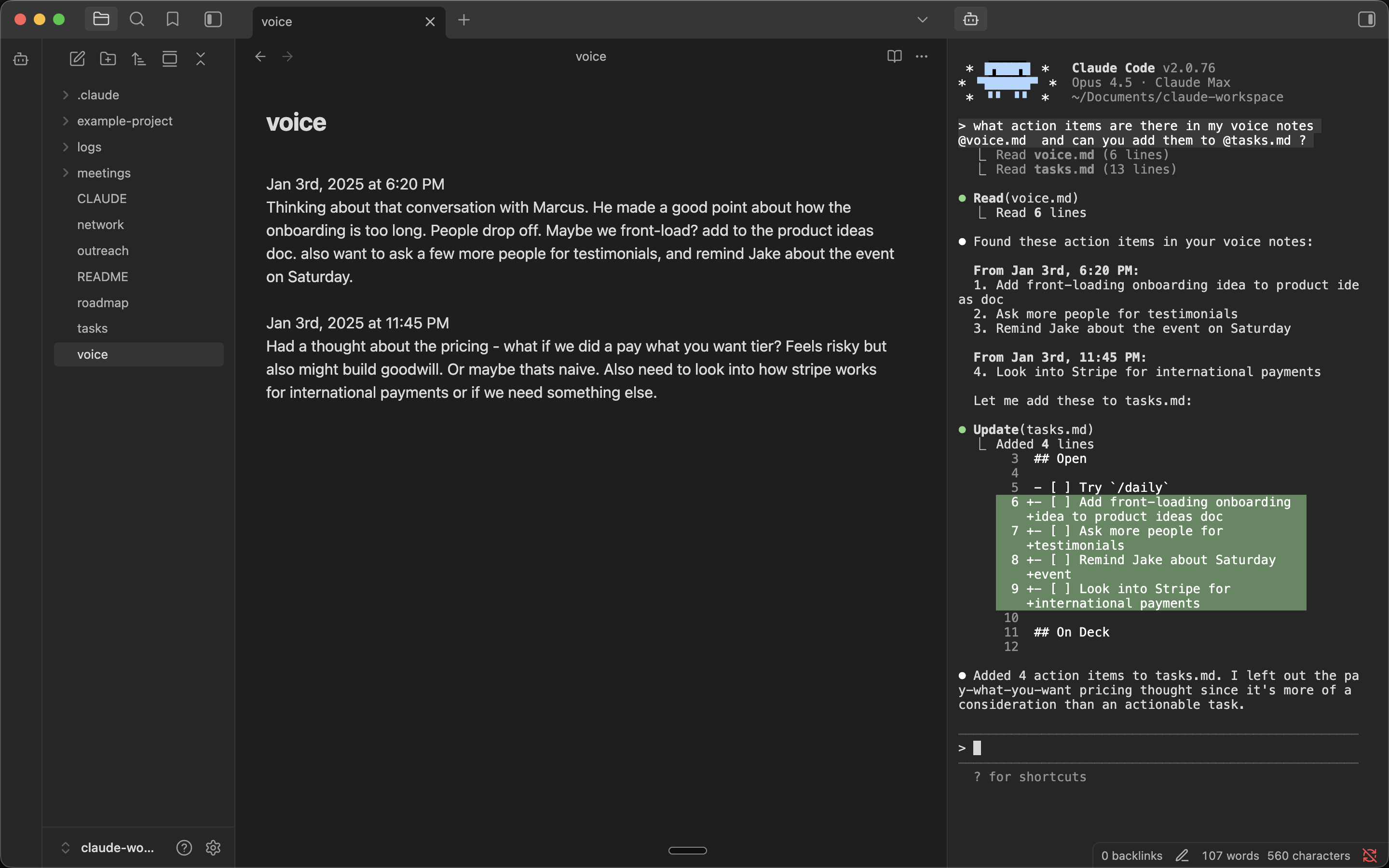
⌘1–⌘9 pick which CLI to open it withVisit the plugin listing at community.obsidian.md/plugins/claude-sidebar and click Add to Obsidian. Then in Obsidian, click Install → Enable.
Windows: See Windows Setup below.
In your vault folder, run:
mkdir -p .obsidian/plugins/claude-sidebar && cd .obsidian/plugins/claude-sidebar && \
  curl -LO https://github.com/derek-larson14/obsidian-claude-sidebar/releases/latest/download/main.js && \
  curl -LO https://github.com/derek-larson14/obsidian-claude-sidebar/releases/latest/download/manifest.json && \
  curl -LO https://github.com/derek-larson14/obsidian-claude-sidebar/releases/latest/download/styles.css
Then in Obsidian: Settings → Community Plugins → Refresh → Enable "Claude Sidebar".
In your vault folder, run:
cd .obsidian/plugins/claude-sidebar && \
  curl -LO https://github.com/derek-larson14/obsidian-claude-sidebar/releases/latest/download/main.js && \
  curl -LO https://github.com/derek-larson14/obsidian-claude-sidebar/releases/latest/download/manifest.json && \
  curl -LO https://github.com/derek-larson14/obsidian-claude-sidebar/releases/latest/download/styles.css
Then restart Obsidian or disable/re-enable the plugin.
After installing the plugin (via Community Plugins or manually), add Windows-specific dependencies:
py -m pip install pywinpty
Use py -m pip (not just pip) to avoid installing into a different Python interpreter than the one the plugin selects. If you see "pywinpty not installed" in the sidebar after installing, the error message will print the exact interpreter path — install pywinpty into that one.
cmd.exe. Configure in Settings → Claude Sidebar → Shell (Windows only — Linux/macOS always run bash):| Option | Spawns | Path translation |
|---|---|---|
| cmd.exe (default) | cmd.exe | none |
| wsl.exe (WSL) | wsl.exe | Windows paths → Linux paths via wslpath |
Use wsl.exe when your agent CLI, Node, or git toolchain lives in a WSL distro. Vault paths sent to the agent (file path command, selection context, drag-drop, image paste, wikilink references) are converted to Linux form before reaching the CLI. Translation respects a custom /etc/wsl.conf [automount] root, so paths still resolve if your C:\ mounts at /c/ instead of /mnt/c/.
https://github.com/user-attachments/assets/de98439a-8a1f-4a8a-9d02-44027d756462
Cmd+P) for all commands:
--continue)Shift+Enter for multi-line input| Platform | Status |
|---|---|
| macOS | ✅ Supported |
| Linux | ✅ Supported |
| Windows | ✅ Supported |
Want to use it on iOS or Android? See Claude Anywhere.
pty module for pseudo-terminal support (macOS/Linux)Symlink the repo into a scratch vault so edits load with no copy step. Reload after each change with Settings → Community plugins → toggle Claude Sidebar off/on:
ln -s "$PWD" /path/to/test-vault/.obsidian/plugins/claude-sidebar
To install a tested build into a real vault:
./install.sh /path/to/vault
The PTY scripts (terminal_pty.py for Unix, terminal_win.py for Windows) are embedded as base64 in main.js for Obsidian plugin directory compatibility. To rebuild after modifying:
./build.sh
Hit a bug or want to develop a new feature? Point your coding agent at CLAUDE.md in this repo. It will walk you through diagnosis, filing a report, or opening a PR.
MIT
Sign in to join the discussion.
No comments yet. Be the first to say what this is good for.
Makes your AI agent think like the laziest senior dev in the room. The best code is the code you never wrote.

Graphs that teach > graphs that impress. Turn any code into an interactive knowledge graph you can explore, search, and ask questions about. Works with Claude Code, Codex, Cursor, Copilot, Gemini CLI, and more.

OmO: Just type "mass ulw" keyword with your prompt. Now you are the master of graph engineering.
Persistent Context Across Sessions for Every Agent – Captures everything your agent does during sessions, compresses it with AI, and injects relevant context back into future sessions. Works with Claude Code, OpenClaw, Codex, Gemini, Hermes, Copilot, OpenCode + More
Opinionated Oxlint rules for rejecting low-evidence TypeScript and JavaScript patterns
Teams-first Multi-agent orchestration for Claude Code