

JuliusBrussee/
caveman

🪨 why use many token when few token do trick — Claude Code skill that cuts 65% of tokens by talking like caveman
105k
1 add
Claude Code Trace reads local Claude Code JSONL session files and shows them as browsable conversations. It supports expandable tool calls, session search, live tailing, MCP tool names, and multiple interfaces for the same data: desktop app, browser, or terminal.
Builders who use Claude Code and want a readable view of past or live sessions.
You can inspect Claude Code sessions, find the right conversation faster, and debug tool use without opening raw JSONL files.
Reads Claude Code session files from `~/.claude/projects/` and renders them as conversations.
Watches active sessions and updates the view while Claude Code is still running.
Expands tool calls so you can see what the agent asked for and what came back.
Finds sessions by user message instead of scrolling through files.
Recognizes Model Context Protocol tool calls and shows human-friendly names.
Runs as a Tauri desktop app, a browser app, or a terminal UI from the same codebase.
xattr -cr /Applications/Claude\ Code\ Trace.app
git clone git@github.com:delexw/claude-code-trace.git
cd claude-code-trace
./script/install.sh       # builds everything + installs to PATH

cctrace              # desktop app (default)
cctrace --web        # web mode (opens browser)
cctrace --tui        # terminal UI
git clone git@github.com:delexw/claude-code-trace.git
cd claude-code-trace
npm install

npm run tauri dev        # desktop app with hot reload
npm run dev:web          # web mode (opens browser)
npm run dev:tui          # TUI (starts backend + terminal UI)
docker build -t claude-code-trace .
docker run --rm -p 1421:1421 \
  -v "$HOME/.claude:/home/app/.claude:ro" \
  claude-code-trace
# then open http://localhost:1421
docker compose up --build
cctrace              # desktop app (default)
cctrace --web        # web mode (opens browser at http://localhost:1420)
cctrace --tui        # terminal UI (starts backend + TUI together)







Claude Code Trace is a Claude Code session log viewer for local JSONL files stored in ~/.claude/projects/.
Browse, tail, and inspect Claude Code conversations in real time. Claude Code Trace renders Claude Code JSONL session files as readable conversations with expandable tool calls, token counts, timestamps, MCP tool call detection, and live log tailing. It also helps you find sessions by user message. It runs as a GUI app for macOS, Linux, and Windows, a Web app or a TUI.
Use Claude Code Trace when you want to:
~/.claude/projects/Claude Code Trace is also used to support and build DovePaw Lite, a personal AI harness platform for orchestrating local agents.
Also check out Codex Trace — a session viewer for OpenAI Codex.
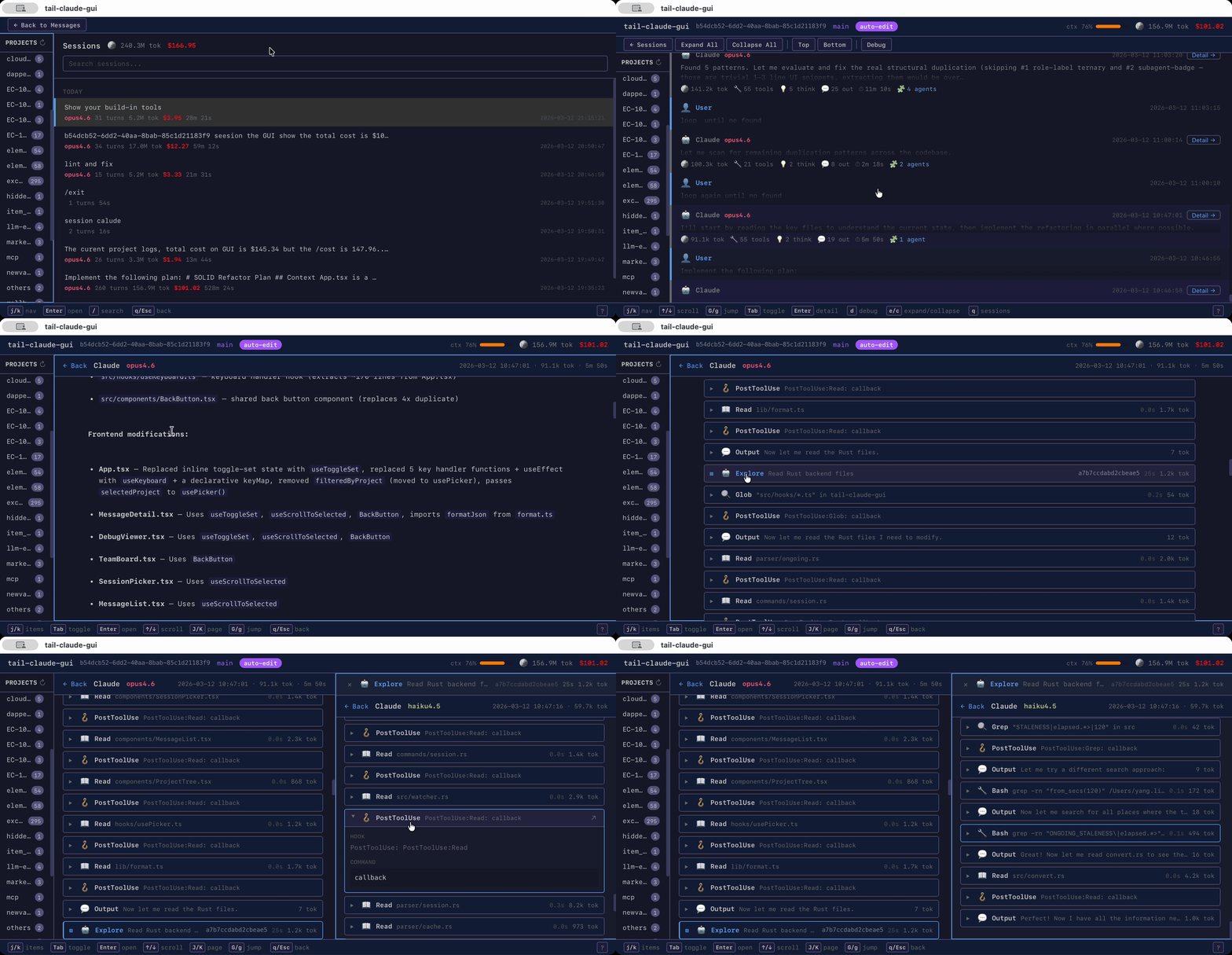
~/.claude/projects/Claude Code stores local session history as JSONL files. Those files are useful for debugging and reviewing AI coding sessions, but they are difficult to read directly. Claude Code Trace turns those JSONL logs into an interactive session viewer so you can find sessions by user message, inspect conversations, understand tool usage, and debug Claude Code workflows faster.
Unlike general observability platforms, Claude Code Trace focuses on local Claude Code session logs. It does not require sending traces to an external service.
Claude Code Trace is especially useful when building personal AI harnesses and local agent platforms. It helps inspect Claude Code sessions, understand tool usage, and debug the workflows that power projects like DovePaw Lite.
Grab the latest release from Releases:
| Platform | File |
|---|---|
| macOS | .dmg |
| Linux | .deb, .rpm, .AppImage |
| Windows | .msi, .exe |
[!IMPORTANT] macOS: The app is unsigned. After installing, remove the quarantine attribute:
xattr -cr /Applications/Claude\ Code\ Trace.app
Use this option if you want to build Claude Code Trace locally on macOS, Linux, or Windows with Rust and Node.js installed.
git clone git@github.com:delexw/claude-code-trace.git
cd claude-code-trace
./script/install.sh       # builds everything + installs to PATH

cctrace              # desktop app (default)
cctrace --web        # web mode (opens browser)
cctrace --tui        # terminal UI
git clone git@github.com:delexw/claude-code-trace.git
cd claude-code-trace
npm install

npm run tauri dev        # desktop app with hot reload
npm run dev:web          # web mode (opens browser)
npm run dev:tui          # TUI (starts backend + terminal UI)
Docker is supported for web mode only.
docker build -t claude-code-trace .
docker run --rm -p 1421:1421 \
  -v "$HOME/.claude:/home/app/.claude:ro" \
  claude-code-trace
# then open http://localhost:1421
Or with Docker Compose:
docker compose up --build
See docs/docker.md for runtime environment variables, volume layout, and troubleshooting.
xcode-select --install)libwebkit2gtk-4.1-dev libayatana-appindicator3-dev librsvg2-dev libxdo-dev libssl-devcctrace # desktop app (default)
cctrace --web # web mode (opens browser at http://localhost:1420)
cctrace --tui # terminal UI (starts backend + TUI together)
Launch Claude Code Trace to open the session picker. It automatically discovers Claude Code sessions from ~/.claude/projects/.
Select a session to view the conversation. Click messages to expand tool calls, or open the detail view for full inspection.
In desktop mode, click Open in Browser in the toolbar to switch to browser mode. This opens http://localhost:1420 in your default browser and hides the desktop window.
If you installed the pre-built .dmg, .deb, or .msi, you can also launch the desktop app directly and pass --web to the binary:
# macOS
/Applications/Claude\ Code\ Trace.app/Contents/MacOS/Claude\ Code\ Trace --web
The local HTTP API (port 11423) only answers accepted clients: every caller presents its own
signed credential, so the backend knows who is asking and any one client can be revoked without
affecting the rest. The web UI and the TUI are registered automatically (web-ui, tui); the
desktop app talks over IPC and needs nothing. Settings → Accepted clients lists them and lets you
add, reissue or revoke clients. For your own scripts, add a client there and copy its credential
(shown once), or bootstrap from the TUI's file in the config dir (~/.config/claude-code-trace;
macOS: ~/Library/Application Support/claude-code-trace, Windows: %APPDATA%\claude-code-trace):
curl -H "X-CCTrace-Token: $(cat ~/.config/claude-code-trace/clients/tui.jwt)" \
  http://127.0.0.1:11423/api/whoami
Set CCTRACE_API_AUTH=off to disable the check.
Note: The TUI is functional but has a few UX rough edges. Contributions are welcome.
MCP (Model Context Protocol) tool calls are automatically detected and displayed with human-friendly names.
For example, mcp__chrome-devtools__take_screenshot renders as MCP chrome-devtools with the summary take screenshot.
Supported MCP servers include chrome-devtools, figma, atlassian, buildkite, cloudflare, and any other server following the mcp__<server>__<tool> naming convention.
? toggles keybind hints in any view.
| Key | Action |
|---|---|
j / k | Move cursor down / up |
G / g | Jump to last / first message |
Tab | Toggle expand/collapse current message |
e / c | Expand / collapse all Claude messages |
Enter | Open detail view |
d | Open debug log viewer |
t | Open team task board when teams exist |
s / q / Esc | Open session picker |
| Key | Action |
|---|---|
j / k | Navigate items |
Tab | Toggle expand/collapse item |
Enter | Open subagent or toggle expand |
h / l | Switch panels left / right |
q / Esc | Back to list |
| Key | Action |
|---|---|
j / k | Navigate sessions |
Enter | Open selected session |
q / Esc | Back to list |
| Key | Action |
|---|---|
q / Esc | Back to list |
npm install
npm run tauri dev        # desktop app with hot reload
npm run dev:web          # web mode, no desktop window
npm run dev:tui          # TUI, starts backend + terminal UI together
npm run tauri build      # production build
npm run check            # run all checks at once
npx vitest run           # frontend tests
npm run test:e2e         # Playwright end-to-end (builds the headless backend + web UI, drives Chromium)
cargo test --manifest-path src-tauri/Cargo.toml    # Rust tests
npx tsc --noEmit         # TypeScript type check
npx oxlint               # JS/TS lint
npx oxfmt                # JS/TS format
cargo clippy --manifest-path src-tauri/Cargo.toml  # Rust lint
cargo fmt --manifest-path src-tauri/Cargo.toml     # Rust format
Push a version tag to trigger a GitHub Actions build:
git tag v0.4.0
git push origin v0.4.0
This creates a draft release with macOS, Linux, and Windows artifacts attached. Review and publish it from the Releases page.
Bug reports, feature requests, and pull requests are welcome. See Development for how to build and run locally. For significant changes, open an issue first to align on scope.
Sign in to join the discussion.
No comments yet. Be the first to say what this is good for.
🪨 why use many token when few token do trick — Claude Code skill that cuts 65% of tokens by talking like caveman

The best-benchmarked open-source AI memory system. And it's free.

Orca is the ADE for working with a fleet of parallel agents. Run any coding agent with your own subscription. Available on desktop, mobile and remote runtime.

A cross-platform desktop All-in-One assistant for Claude Code, Codex, OpenCode, OpenClaw, Grok Build & Hermes Agent. Only official website: ccswitch.io

Never stop coding. Free MIT AI gateway: one endpoint, 352 providers (150+ free), 1200+ models Kimi, Claude, GPT, Gemini, GLM, DeepSeek, MiniMax. Works with Claude Code, Codex, Cursor, OpenCode, Cline & Copilot. Quota-aware auto-fallback, RTK+Caveman compression saves 15-95% tokens, MCP/A2A, Desktop/PWA. Built by 550+ contributors

Compress tool outputs, logs, files, and RAG chunks before they reach the LLM. 20% fewer tokens for coding agents, 60-95% fewer tokens for JSON, same answers. Library, proxy, MCP server.