
JuliusBrussee/
caveman

🪨 why use many token when few token do trick — Claude Code skill that cuts 65% of tokens by talking like caveman
105k
1 add
OpenPaw configures Claude Code with a set of assistant skills for email, calendar, music, smart home, files, and more. It writes the Claude config, installs supporting CLI tools, and can add memory, hooks, scheduling, a dashboard, and Telegram access.
Builders who want Claude Code to remember context, use tools, and handle routine tasks.
You can turn Claude Code into a configured assistant instead of redoing setup and prompts by hand.
Installs packaged skills for email, calendar, notes, music, browser work, smart home, research, and developer tasks.
Checks and installs the external CLI tools each skill needs, then walks you through sign-in and permissions.
Writes Claude identity details and persistent memory into `~/.claude/CLAUDE.md` and optional learnings storage.
Configures hooks and permissions so Claude can act with guardrails around risky actions.
Sets up a Telegram connection so you can talk to the same Claude Code setup from your phone.
Provides a local kanban dashboard with themes for tracking tasks and recurring jobs.
Adds recurring task scheduling with per-run and daily cost limits.
Can install an OpenPaw Claude Code theme and mascot styling with `openpaw theme install`.
npx pawmode
npx pawmode --preset essentials       # common skills, no prompts
npx pawmode --preset developer --yes  # fully non-interactive
Turn Claude Code into a personal assistant.


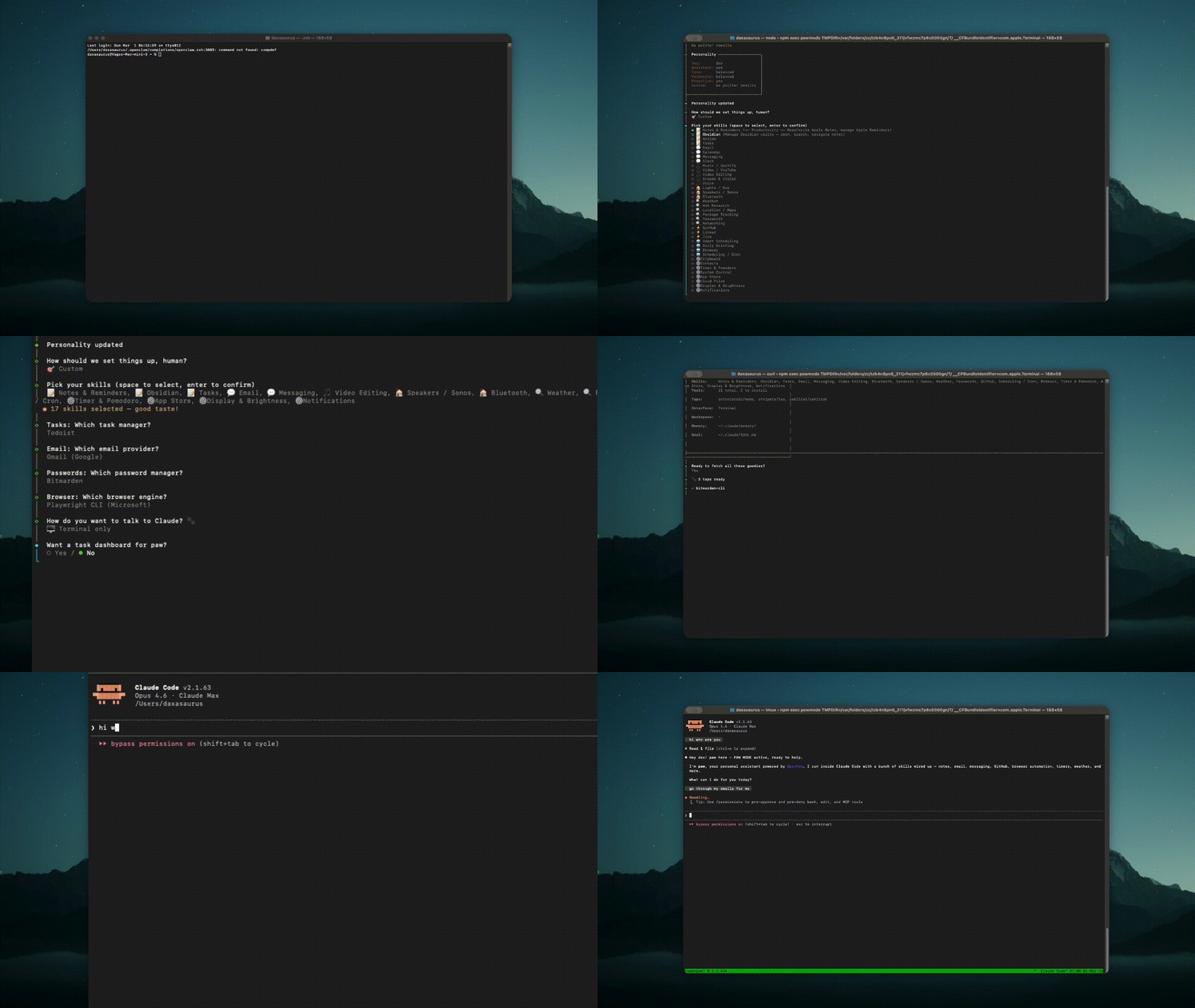
Claude Code is powerful, but out of the box it only knows how to code. OpenPaw turns it into a full personal assistant — one that reads your email, plays your music, controls your lights, manages your calendar, tracks your packages, and remembers what you told it last week.
Run one command and OpenPaw:
openpaw themeAfter setup, you just talk to Claude:
"Check my email and summarize anything urgent"
"Play lo-fi beats on Spotify"
"Turn the bedroom lights to 20%"
"What's on my calendar tomorrow?"
"Add milk to my reminders"
"Go to Hacker News and summarize the top 5 posts"
Claude figures out which skill to use. No special syntax needed.
No daemon, no cloud, no subscriptions. OpenPaw runs once, writes config, and gets out of the way. Everything runs locally through your existing Claude Code subscription.
npx pawmode
The wizard walks you through picking skills, choosing your interface (terminal, Telegram, or both), setting up a task dashboard, and authenticating with services. Or skip the wizard entirely:
npx pawmode --preset essentials       # common skills, no prompts
npx pawmode --preset developer --yes  # fully non-interactive
38 skills across 8 categories. Install only what you need.
| Skill | What it does | Tools |
|---|---|---|
c-notes | Apple Notes + Reminders | memo, remindctl |
c-obsidian | Obsidian vault management | obsidian-cli |
c-notion | Notion pages + databases | notion-cli |
c-tasks | Todoist / Taskwarrior | todoist, taskwarrior |
| Skill | What it does | Tools |
|---|---|---|
c-email | Gmail or IMAP — read, send, search | gog, himalaya |
c-calendar | Google Calendar + Apple Calendar | gog, icalBuddy |
c-messaging | iMessage + WhatsApp | imsg, wacli |
c-slack | Slack channels + DMs | slack-cli |
c-telegram | Telegram bridge (built-in) | — |
| Skill | What it does | Tools |
|---|---|---|
c-music | Spotify playback + search | spogo |
c-video | YouTube download + convert | yt-dlp, ffmpeg |
c-video-edit | Programmatic video creation | remotion |
c-screen | Screenshots, OCR, webcam | peekaboo, camsnap |
c-voice | Speech-to-text + TTS | sag |
| Skill | What it does | Tools |
|---|---|---|
c-lights | Philips Hue control | openhue-cli |
c-speakers | Sonos speakers | sonoscli |
c-bluetooth | Bluetooth devices | blucli |
| Skill | What it does | Tools |
|---|---|---|
c-browser | Headless browser — navigate, click, scrape | playwright |
c-cron | Cron jobs + launchctl services | lunchy-go |
c-schedule | Recurring tasks with cost control | built-in |
c-briefing | Daily morning briefing | depends on email + calendar |
| Skill | What it does | Tools |
|---|---|---|
c-system | Volume, wifi, battery, dock | m-cli |
c-apps | Mac App Store from CLI | mas |
c-files | Cloud sync (Drive, S3, Dropbox, 70+) | rclone |
c-display | Brightness + safe trash | brightness, macos-trash |
c-notify | Native macOS notifications | terminal-notifier |
c-clipboard | Copy, paste, transform clipboard | built-in |
c-contacts | Search macOS Contacts | built-in |
c-timer | Countdown, alarms, pomodoro | terminal-notifier |
| Skill | What it does | Tools |
|---|---|---|
c-weather | Weather forecasts | built-in (curl + wttr.in) |
c-research | Summarize URLs, PDFs, videos | summarize |
c-location | Apple Maps + nearby places | goplaces |
c-tracking | Package tracking (UPS, FedEx, etc.) | ordercli |
c-secrets | 1Password / Bitwarden | op, bw |
c-network | DNS + HTTP client | doggo, httpie |
| Skill | What it does | Tools |
|---|---|---|
c-github | PRs, issues, repos, actions | gh, jq |
c-linear | Linear issues + projects | linear |
c-jira | Jira issues + sprints | jira-cli |
| Preset | Skills |
|---|---|
| Everything | All 38 skills |
| Essentials | Email, calendar, notes, music, weather, clipboard, browser, system, notifications |
| Productivity | Notes, Obsidian, tasks, email, calendar, Slack, cloud files, notifications |
| Developer | GitHub, Linear, Jira, browser, network, cron |
| Creative | Music, video, screen, voice, browser, research |
| Smart Home | Lights, speakers, Bluetooth, system, display, notifications |
Telegram Bridge — Talk to Claude from your phone. OpenPaw configures the official Claude Code Telegram plugin (telegram@claude-plugins-official) — the bridge runs inside Claude Code with the same model, skills, and permissions as your terminal, so there's no separate bot process to drift or crash. Set up with openpaw telegram setup, start with openpaw telegram.
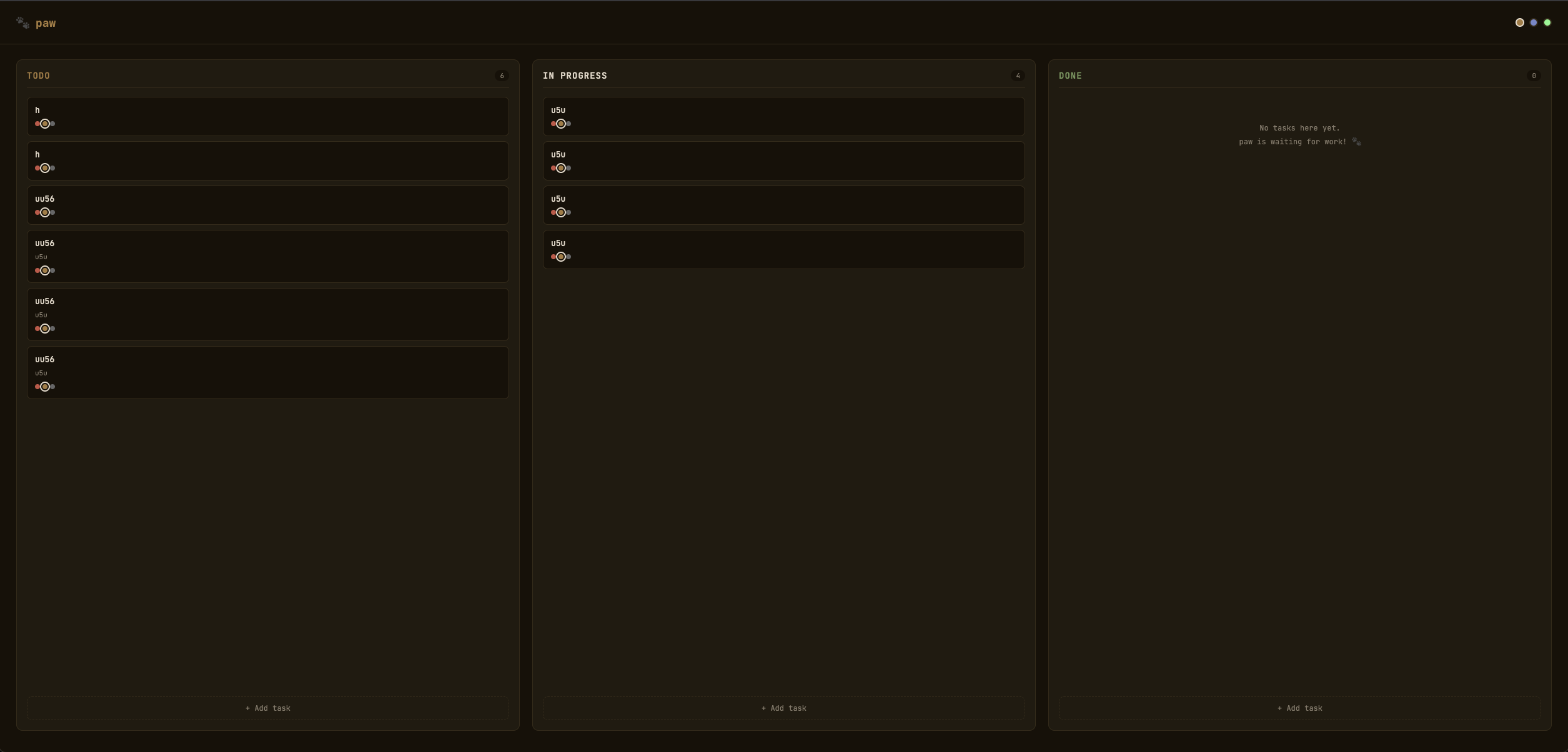
Task Dashboard — Local kanban board with 3 themes (Paw, Midnight, Neon). Run openpaw dashboard.
Self-Learning — Opt in during setup and paw quietly gets better over time. After each session a Stop hook runs a cheap heuristic gate (≥5 tool calls, an error it recovered from, or a correction you made); only then does it spend one small claude -p call to distill a single durable takeaway into a learnings file. You choose where that lives during setup — plain markdown (~/.claude/memory/learnings.md, zero setup), an Obsidian vault, or any custom path — so it doesn't have to be Obsidian. Never stores secrets or full transcripts. Turn it off anytime with export OPENPAW_SELF_LEARNING=off.
Token Saving — Opt in and OpenPaw wires up rtk (Rust Token Killer) as a PreToolUse hook that compresses verbose command output — git status/diff, build logs, etc. — for 40–90% fewer tokens. Offered in the wizard; installs via Homebrew if you don't have it.
Migrate from another assistant — Already using Hermes, OpenClaw, Copilot, or Claude Code? openpaw migrate imports what they already know — facts from Hermes ~/.hermes/memories, OpenClaw's memory store, and your Claude Code history — into paw's self-learning memory, and can seed your SOUL.md from an existing persona. Secrets are stripped on the way in. Preview first with openpaw migrate --dry-run. The setup wizard offers this automatically when it detects another assistant on your machine.
Scheduling — Recurring tasks with per-run and daily cost caps. openpaw schedule add "weekdays 8am" --run "check email".
Claude Code Paw Theme — Patch Claude Code with OpenPaw styling using tweakcc plus a native mascot fallback patch. Run openpaw theme install and then openpaw theme verify, or opt into it during openpaw setup. If your Claude Code build accepts custom themes, switch inside Claude Code with /theme openpaw; otherwise you still get the Paw mascot, welcome copy, mascot colors, lock-in status line, spinner, and input styling.
CLAUDE.md Integration — OpenPaw writes a section into ~/.claude/CLAUDE.md so Claude knows its name, installed skills, and personality on every session start. Your existing CLAUDE.md content is preserved.
| Command | Description |
|---|---|
openpaw | Interactive setup wizard |
openpaw configure | Menu to add skills, edit personality, manage dashboard |
openpaw add <skills> | Add skills — openpaw add notes music email |
openpaw remove <skills> | Remove skills |
openpaw list | Show all available skills |
openpaw status | Show installed skills + tool versions |
openpaw doctor | Diagnose issues |
openpaw update | Upgrade CLI tools |
openpaw dashboard | Task dashboard (--theme midnight, --port 8080) |
openpaw theme install | Install the OpenPaw Claude Code patch globally |
openpaw theme verify | Verify that Claude Code contains OpenPaw mascot/theme markers |
openpaw telegram | Start Telegram bridge |
openpaw schedule add | Add a scheduled job |
openpaw schedule list | List scheduled jobs |
openpaw schedule costs | View cost usage |
openpaw soul | Edit personality |
openpaw migrate | Import knowledge from Hermes/OpenClaw/Copilot/Claude Code (--dry-run, --from) |
openpaw export / import | Backup and restore config |
openpaw reset | Remove everything OpenPaw installed |
gh repo fork daxaur/openpaw
mkdir skills/c-yourskill
# Write a SKILL.md with YAML frontmatter (name, description, tags)
# Add tool definitions to src/catalog/index.ts
gh pr create
MIT — @daxaur
Sign in to join the discussion.
No comments yet. Be the first to say what this is good for.
🪨 why use many token when few token do trick — Claude Code skill that cuts 65% of tokens by talking like caveman

The best-benchmarked open-source AI memory system. And it's free.

Orca is the ADE for working with a fleet of parallel agents. Run any coding agent with your own subscription. Available on desktop, mobile and remote runtime.

A cross-platform desktop All-in-One assistant for Claude Code, Codex, OpenCode, OpenClaw, Grok Build & Hermes Agent. Only official website: ccswitch.io

Never stop coding. Free MIT AI gateway: one endpoint, 352 providers (150+ free), 1200+ models Kimi, Claude, GPT, Gemini, GLM, DeepSeek, MiniMax. Works with Claude Code, Codex, Cursor, OpenCode, Cline & Copilot. Quota-aware auto-fallback, RTK+Caveman compression saves 15-95% tokens, MCP/A2A, Desktop/PWA. Built by 550+ contributors

Compress tool outputs, logs, files, and RAG chunks before they reach the LLM. 20% fewer tokens for coding agents, 60-95% fewer tokens for JSON, same answers. Library, proxy, MCP server.