
affaan-m/
ECC

affaan-m/ECCHarnesses
The agent harness performance optimization system. Skills, instincts, memory, security, and research-first development for Claude Code, Codex, Opencode, Cursor and beyond.
258k
tachi adds a threat-modeling workflow to Claude Code. It parses an architecture file, runs a set of specialized agents for STRIDE and AI-specific risks, then writes structured results like `threats.md`, SARIF, attack trees, and a compiled security report.
Builders who want Claude Code to analyze system architecture for security risks and turn that into reusable artifacts.
You can turn an architecture description into a repeatable security review with findings, scores, diagrams, and a report.
Runs `/tachi.threat-model` to generate `threats.md`, `threats.sarif`, `threat-report.md`, and attack trees from an architecture file.
Runs `/tachi.risk-score` to add CVSS-based scoring, exploitability, scalability, reachability, and governance fields.
Runs `/tachi.compensating-controls` to compare scored threats against codebase controls and estimate residual risk.
Runs `/tachi.infographic` to create visual risk diagrams and, when configured, JPG outputs.
Runs `/tachi.security-report` to build a PDF booklet from the collected artifacts.
Maps findings to the CSA MAESTRO layers and agentic patterns for multi-agent and AI systems.
Compares a run to a previous baseline so you can see new, resolved, and unchanged findings.
git clone https://github.com/davidmatousek/tachi.git ~/Projects/tachi
~/Projects/tachi/scripts/install.sh
~/Projects/tachi/scripts/install.sh --version v4.48.0 # x-release-please-version
~/Projects/tachi/scripts/install.sh --source /path/to/tachi
Investigate this repository's architecture -- source code, config files, infrastructure
definitions, READMEs -- and create docs/security/architecture.md as a Mermaid flowchart
with all major components, data flows, protocols, and trust boundaries.
/tachi.threat-model
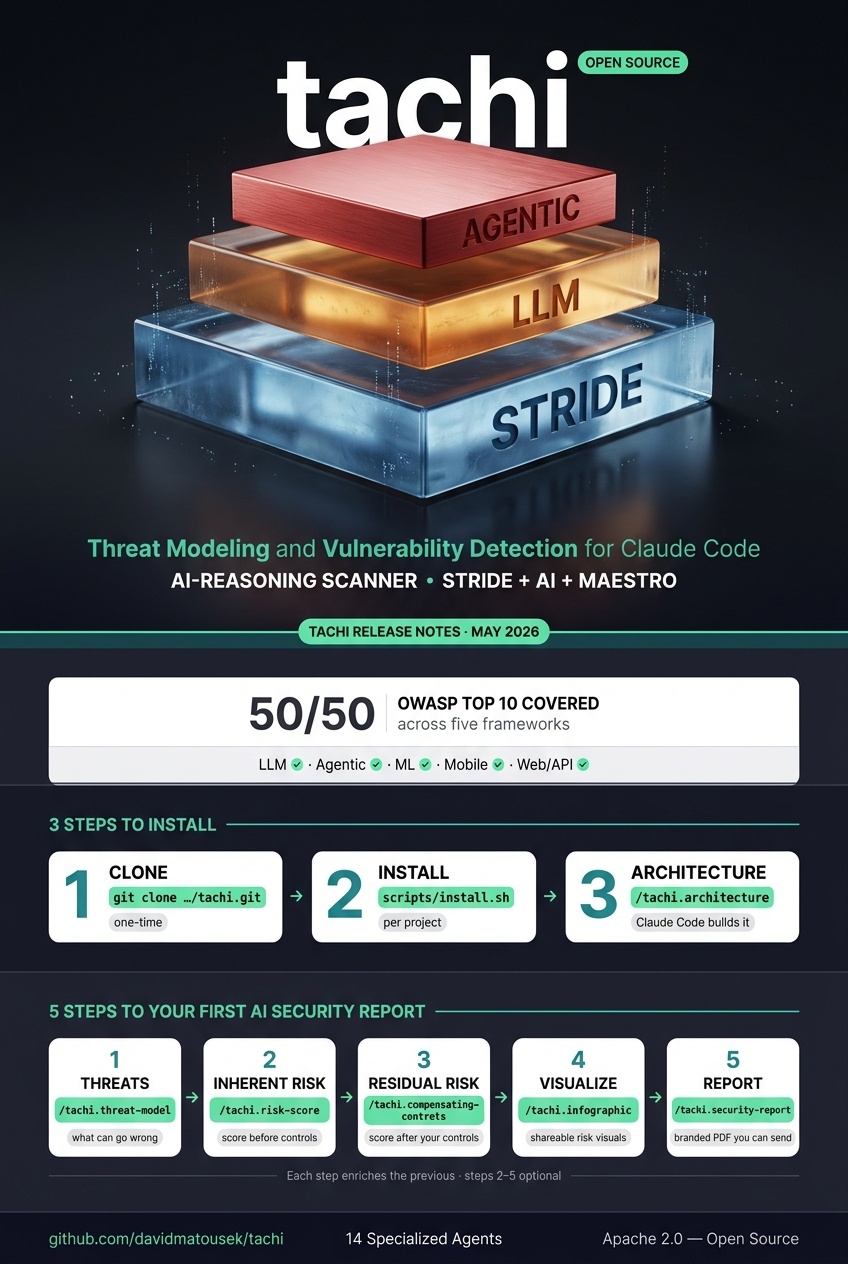
Threat Modeling and Vulnerability Detection Harness for Claude Code.
AI-Reasoning Scanner — STRIDE + AI + MAESTRO.



Get started: Quick Start | Developer Guide (full walkthrough with worked examples)
50/50 across five frameworks — every catalogued threat in each framework has a tachi detection agent.
| Framework | Coverage | Anchor |
|---|---|---|
| OWASP LLM Top 10 (2026) | 10/10 | LLM 2026 |
| OWASP Agentic Top 10 (2026) | 10/10 | Agentic 2026 |
| OWASP ML Security Top 10 (2023) | 10/10 | ML 2023 |
| OWASP Mobile Top 10 (2024) | 10/10 | Mobile 2024 |
| OWASP Web/API* (2021 + 2023) | 10/10 | Web 2021 · API 2023 |
* Web/API combined slot: OWASP Web Top 10:2021 (A01–A10) + OWASP API Security Top 10:2023 (API1–API10) — 20 items, 20/20.
Canonical matrix: docs/standards/OWASP_COVERAGE.md ·
Byte-deterministic Coverage Attestation: examples/*/sample-report/
tachi is a threat modeling and AI-reasoning vulnerability detection harness for Claude Code. SAST catches syntax-level bugs; the harness reasons over your architecture description to catch logic-level ones — broken authentication flows, missing privilege boundaries, prompt injection paths, agent autonomy gaps, cross-layer attack chains.
It runs as a new scanning column alongside SAST / SCA / Secrets, with two views of one engine:
threats.md, SARIF, narrative report, attack trees, MAESTRO classification.One command (/tachi.threat-model) dispatches 14 specialized agents and produces a complete threat model. Five post-pipeline commands enrich the results: /tachi.risk-score for quantitative scoring, /tachi.compensating-controls for codebase control analysis, /tachi.infographic for visual risk diagrams, /tachi.security-report for a professional PDF assessment booklet, and /tachi.architecture for automated architecture description generation.
tachi is built with the Agentic Oriented Development Kit (AOD Kit), a governance framework for AI agent-assisted development.
pre-commit install; starter config: .gitleaks.toml.adopter-template, see PRECOMMIT_HOOKS.md §9.5)If you're new here, start with the Welcome thread for how the board is organized.
tachi requires two external CLIs for full functionality. Both are required — typst compiles the PDF security report and @mermaid-js/mermaid-cli (mmdc) renders attack path diagrams. See ADR-022 for the rationale.
macOS:
brew install typst
npm install -g @mermaid-js/mermaid-cli
Linux (Debian/Ubuntu):
apt install typst   # or: cargo install typst-cli / dnf install typst on Fedora
npm install -g @mermaid-js/mermaid-cli
WSL (use your distro's package manager, same as Linux):
apt install typst
npm install -g @mermaid-js/mermaid-cli
/tachi.security-report aborts at preflight with a clear install command if either CLI is missing when attack-trees are present.
git clone https://github.com/davidmatousek/tachi.git ~/Projects/tachi
From your project root:
~/Projects/tachi/scripts/install.sh
To install a specific version:
~/Projects/tachi/scripts/install.sh --version v4.48.0 # x-release-please-version
If tachi is cloned to a non-default location:
~/Projects/tachi/scripts/install.sh --source /path/to/tachi
# Agents (threat analysis engine)
cp -r ~/Projects/tachi/.claude/agents/tachi/ .claude/agents/tachi/

# Commands (6 slash commands)
mkdir -p .claude/commands
for cmd in tachi.threat-model tachi.risk-score tachi.compensating-controls tachi.infographic tachi.security-report tachi.architecture; do
  cp ~/Projects/tachi/.claude/commands/$cmd.md .claude/commands/
done

# Schemas, templates, references, and brand assets
cp -r ~/Projects/tachi/schemas/ schemas/
cp -r ~/Projects/tachi/templates/ templates/
mkdir -p adapters/claude-code/agents
cp -r ~/Projects/tachi/adapters/claude-code/agents/references/ adapters/claude-code/agents/references/
cp -r ~/Projects/tachi/brand/ brand/

# Developer guide
mkdir -p docs/guides
cp ~/Projects/tachi/docs/guides/DEVELOPER_GUIDE_TACHI.md docs/guides/
See INSTALL_MANIFEST.md for the full list of distributable files.
After copying the files, restart Claude Code (close and reopen the VS Code window, or start a new CLI session) so it picks up the new agents and commands.
If you want infographic images (.jpg), set the GEMINI_API_KEY environment variable with a key from Google AI Studio. This is optional — all text-based outputs work without it.
Create docs/security/architecture.md describing your system. You can write it yourself or ask Claude Code:
Investigate this repository's architecture -- source code, config files, infrastructure
definitions, READMEs -- and create docs/security/architecture.md as a Mermaid flowchart
with all major components, data flows, protocols, and trust boundaries.
tachi auto-detects the format. Mermaid, free-text, ASCII, PlantUML, and C4 are all supported.
/tachi.threat-model
That's it. One command. tachi validates the setup, reads your architecture, dispatches 14 threat agents, and writes everything to a timestamped folder under docs/security/.
| File | Source | What It Contains |
|---|---|---|
threats.md | /tachi.threat-model | Primary threat model -- findings, coverage matrix, MAESTRO layers, risk summary |
threats.sarif | /tachi.threat-model | SARIF 2.1.0 for GitHub Code Scanning and CI/CD integration |
threat-report.md | /tachi.threat-model | Narrative report with executive summary and remediation roadmap |
attack-trees/ | /tachi.threat-model | One Mermaid attack tree per Critical/High finding |
risk-scores.md | /tachi.risk-score | Quantitative risk scores with CVSS, exploitability, scalability, reachability |
risk-scores.sarif | /tachi.risk-score | SARIF 2.1.0 with composite scores as security-severity per finding |
compensating-controls.md | /tachi.compensating-controls | Detected codebase controls, residual risk, missing control recommendations |
compensating-controls.sarif | /tachi.compensating-controls | SARIF 2.1.0 with residual risk as security-severity per finding |
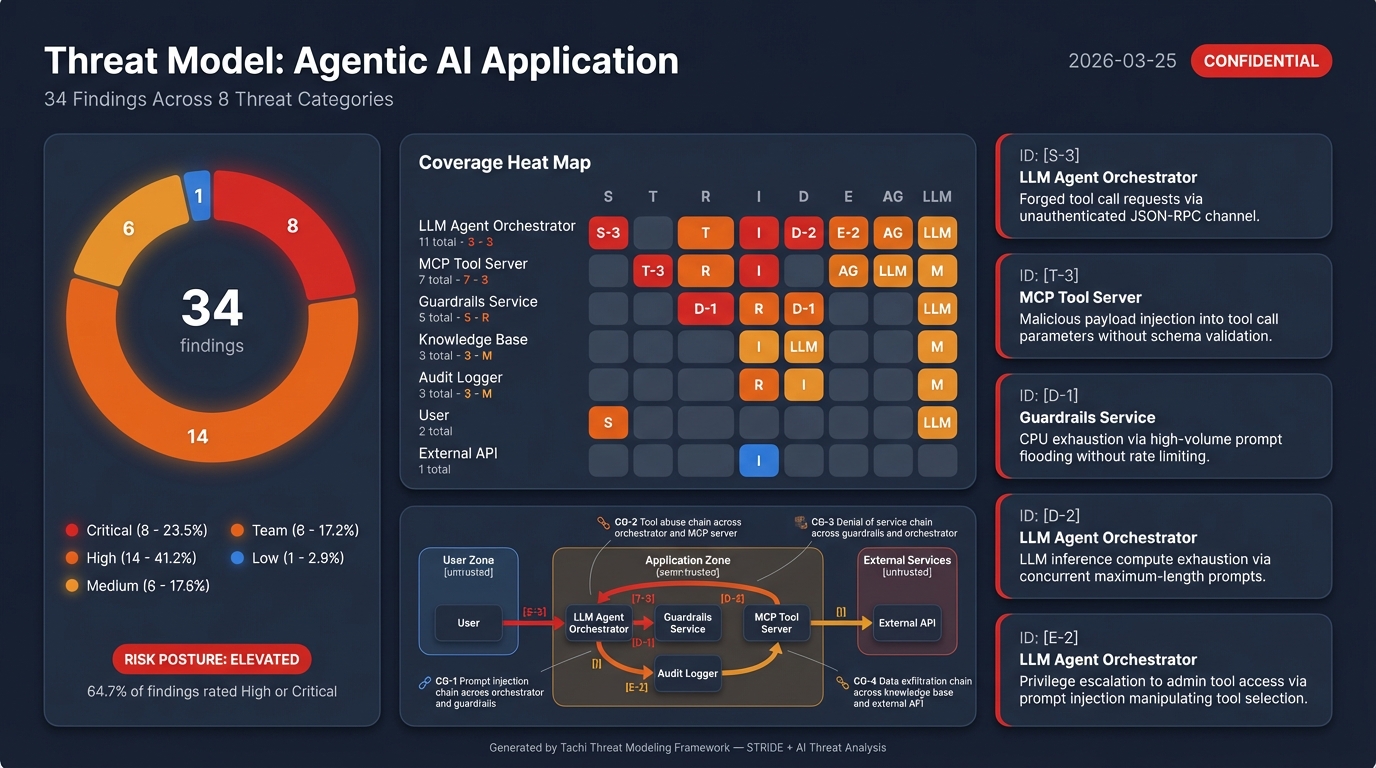
threat-baseball-card.jpg | /tachi.infographic | Baseball Card risk dashboard (requires GEMINI_API_KEY) |
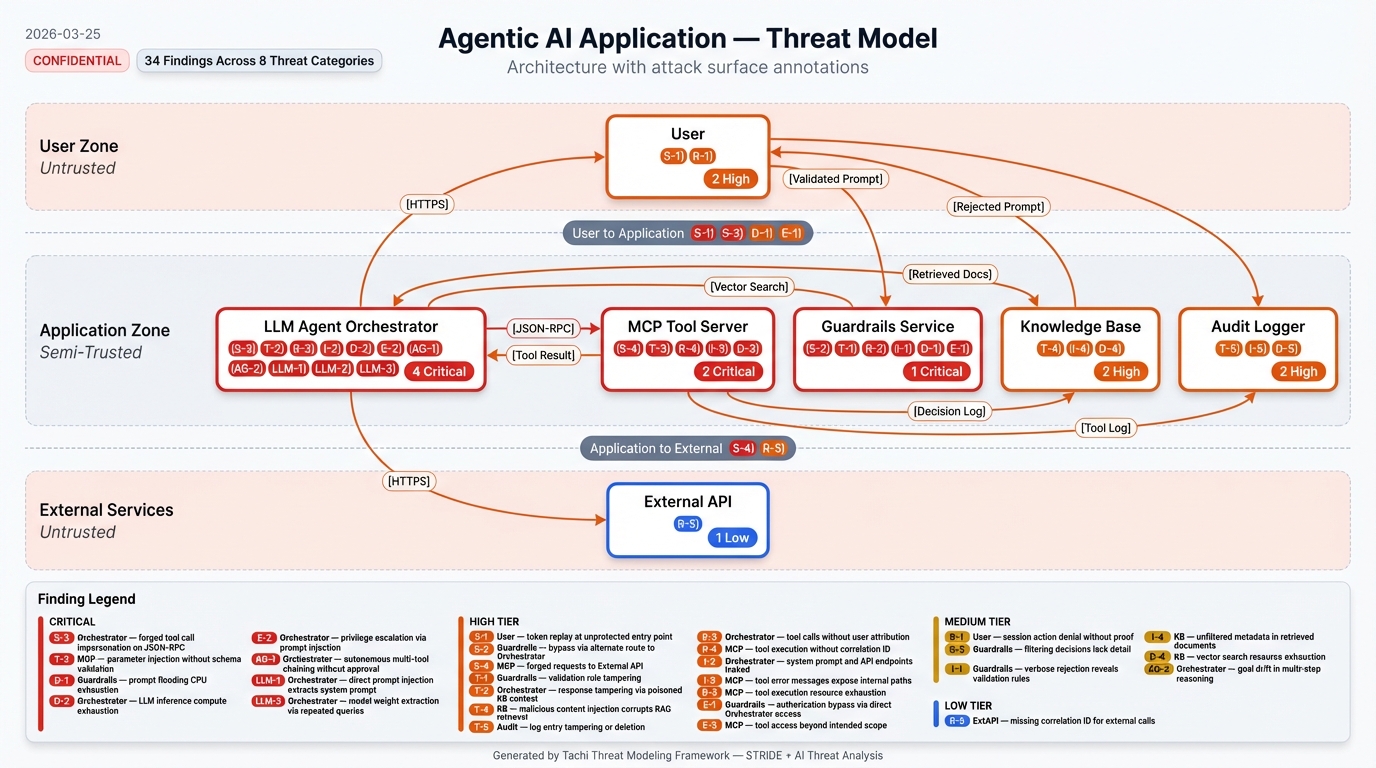
threat-system-architecture.jpg | /tachi.infographic | Annotated architecture diagram with finding legend |
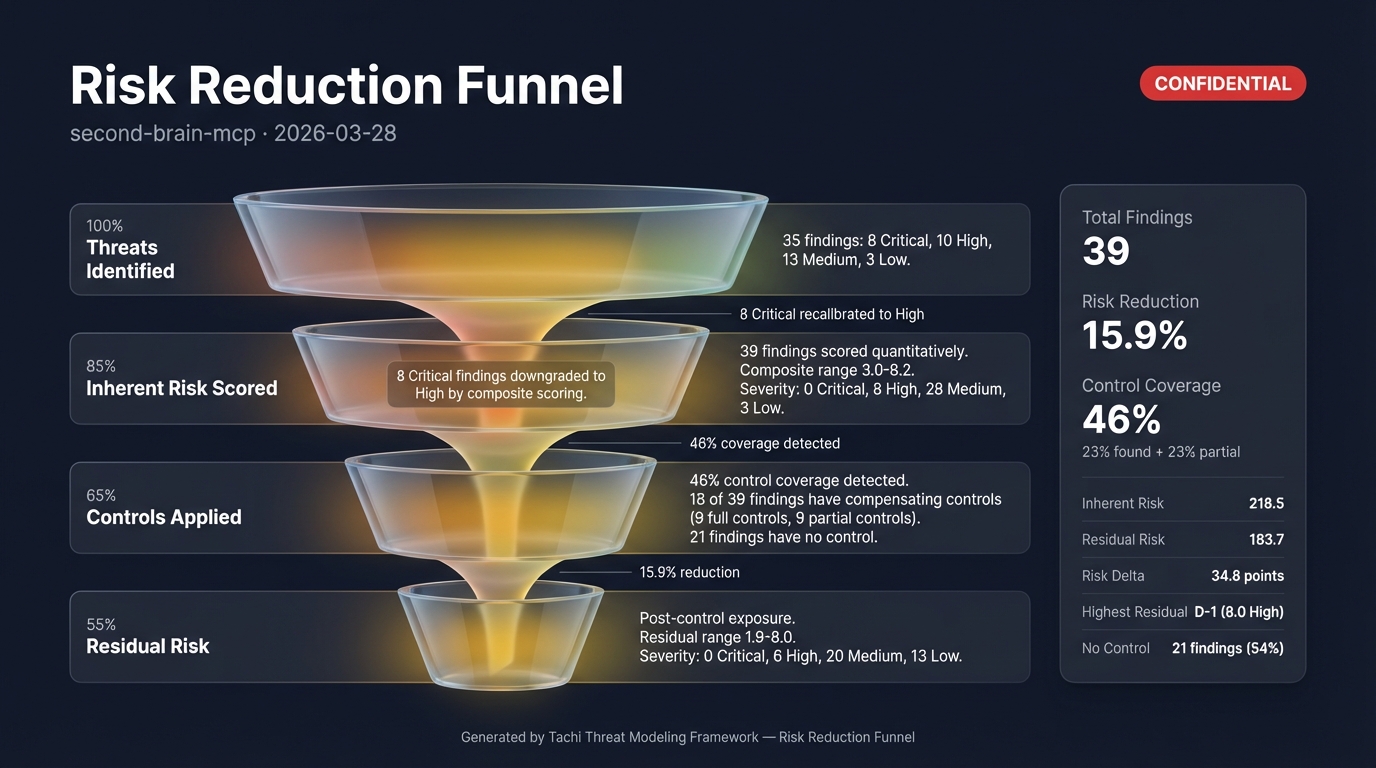
threat-risk-funnel.jpg | /tachi.infographic | Risk distribution funnel by severity |
threat-maestro-stack.jpg | /tachi.infographic | MAESTRO layer stack visualization (agentic systems only) |
threat-maestro-heatmap.jpg | /tachi.infographic | MAESTRO layer x severity heat map (agentic systems only) |
security-report.pdf | /tachi.security-report | Professional PDF booklet with all artifacts assembled |
Start with threats.md Section 7 -- Recommended Actions. Then run /tachi.risk-score for quantitative prioritization, /tachi.compensating-controls to detect existing defenses, /tachi.infographic for visual risk diagrams, and /tachi.security-report to assemble everything into a PDF booklet. Work through Critical findings first, then High.
Full Walkthrough: The Developer Guide covers the complete 5-step risk lifecycle with worked examples, advanced options, and CI/CD integration.
Runs the 5-phase threat modeling pipeline: scope, determine threats, determine countermeasures, assess, and report. Produces threats.md, threats.sarif, threat-report.md, attack-trees/, and attack-chains.md (conditional, when cross-layer chains are detected). Findings include MAESTRO layer classification for agentic AI components. Phase 3.5 cross-layer correlation detects attack chains spanning multiple MAESTRO layers with chain-breaking control recommendations. Automatically detects baseline from previous runs for delta tracking.
# Default -- uses docs/security/architecture.md
/tachi.threat-model

# Specify architecture file
/tachi.threat-model path/to/my-architecture.md

# Custom output directory
/tachi.threat-model docs/security/architecture.md --output-dir reports/security/

# Version-tagged output for a release
/tachi.threat-model docs/security/architecture.md --version v1.0.0

# Explicit baseline for delta comparison
/tachi.threat-model docs/security/architecture.md --baseline docs/security/2026-03-01/threats.md
Enriches threat model output with four-dimensional quantitative risk scores (CVSS 3.1, exploitability, scalability, reachability) and governance fields (owner, SLA, disposition, review date). Produces risk-scores.md and risk-scores.sarif.
# Score threats in the default location
/tachi.risk-score

# Score threats in a specific directory
/tachi.risk-score docs/security/2026-03-27/

# Custom output directory
/tachi.risk-score docs/security/2026-03-27/ --output-dir reports/risk/
Scans a target codebase against scored threats to detect existing security controls, calculate residual risk, and recommend missing controls. Requires /tachi.risk-score output as input. Produces compensating-controls.md and compensating-controls.sarif.
# Scan current project against risk scores in the default location
/tachi.compensating-controls

# Scan against risk scores in a specific directory
/tachi.compensating-controls docs/security/2026-03-27/

# Scan a different codebase
/tachi.compensating-controls docs/security/2026-03-27/ --target ~/Projects/my-app/

# Custom output directory
/tachi.compensating-controls docs/security/2026-03-27/ --output-dir reports/controls/
Generates visual threat infographic specifications and presentation-ready images. Auto-detects the richest data source in the output directory (prefers compensating-controls.md > risk-scores.md > threats.md). Produces spec markdown and .jpg images (images require GEMINI_API_KEY).
Templates: baseball-card, system-architecture, risk-funnel, maestro-stack, maestro-heatmap, all
# Generate all templates (auto-includes MAESTRO if data present)
/tachi.infographic

# Generate from a specific directory
/tachi.infographic docs/security/2026-03-27/

# Generate a specific template
/tachi.infographic docs/security/2026-03-27/ --template baseball-card
/tachi.infographic docs/security/2026-03-27/ --template risk-funnel

# Generate both MAESTRO templates
/tachi.infographic docs/security/2026-03-27/ --template maestro
Assembles all pipeline artifacts into a professional multi-page PDF security assessment booklet. Auto-detects available artifacts and conditionally includes pages. Requires typst CLI for PDF compilation and mmdc (Mermaid CLI) for attack path and attack chain diagram rendering (hard prerequisite per ADR-022 when diagrams are present).
Page types (conditional, based on available artifacts): Cover, Disclaimer, Table of Contents, Risk Methodology, Assessment Scope, Executive Summary, Attack Path Analysis, Attack Chain Diagrams, MAESTRO Findings, Infographic pages (full-bleed), Findings Detail, Control Coverage, Remediation Roadmap
# Generate PDF from the default location
/tachi.security-report

# Generate from a specific directory
/tachi.security-report docs/security/2026-03-27/

# Custom output path
/tachi.security-report docs/security/2026-03-27/ --output reports/assessment.pdf
tachi uses a multi-agent orchestration pattern. The orchestrator parses your architecture, identifies components and data flows, then dispatches the right combination of 14 threat agents per component:
| Component Type | STRIDE Agents | AI Agents |
|---|---|---|
| External Entity (users, APIs) | S, R | -- |
| Process (servers, agents) | S, T, R, I, D, E | LLM + AG if AI keywords detected |
| Data Store (databases, caches) | T, I, D | -- |
| Data Flow (API calls, messages) | T, I, D | -- |
AI agents activate when component names or descriptions contain keywords like "LLM", "agent", "orchestrator", "MCP", "tool server", "embedding", "RAG", etc.
After all agents report, the orchestrator deduplicates findings, runs cross-agent correlation, computes risk ratings, and generates the output suite.
For agentic AI systems, tachi maps each finding to the CSA MAESTRO seven-layer taxonomy:
| Layer | Name | Scope |
|---|---|---|
| L1 | Foundation Model | Pre-trained LLMs, inference engines |
| L2 | Data Operations | Vector stores, RAG pipelines, embeddings |
| L3 | Agent Framework | Orchestrators, tool servers, MCP |
| L4 | Deployment Infrastructure | API gateways, containers, networking |
| L5 | Evaluation and Observability | Audit logging, monitoring, anomaly detection, forensics |
| L6 | Security and Compliance | Auth, guardrails, rate limiting, encryption, IAM |
| L7 | Agent Ecosystem | Multi-agent coordination, delegation, chat UIs, API endpoints |
MAESTRO layers appear in threats.md, propagate through all downstream commands, and power the maestro-stack and maestro-heatmap infographic templates.
For multi-agent architectures, tachi's Phase 3.6 Pattern Synthesis Engine (per ADR-026) classifies findings into the six canonical CSA MAESTRO cross-cutting agentic patterns:
| Pattern | Canonical Definition |
|---|---|
agent_collusion | Multiple compromised agents coordinate to achieve malicious objectives |
emergent_behavior | Unpredictable behaviors arising from multi-agent interactions (cascades, feedback amplification, drift) |
temporal_attack | Persistent-state exploits: sleeper agents, gradual corruption, seasonal exploitation |
trust_exploitation | Inter-agent identity spoofing, reputation manipulation, trust chain attacks |
communication_vulnerability | Inter-agent message interception, protocol manipulation, routing attacks |
resource_competition | Resource monopolization, priority manipulation, coordination disruption |
Each finding receives a new agentic_pattern enum field (schema 1.4) during Phase 3.6 — gated by the multi-agent predicate (≥2 agentic/LLM components, inter-agent data flow, or explicit multi-agent keywords in the architecture description). Pattern assignments appear in threats.md Section 7 (Pattern column), Section 4b (Findings by Agentic Pattern), threat-report.md Section 7 (Agentic Pattern Analysis narrative), and SARIF maestro-pattern:<name> tags mirroring the existing maestro-layer:<L#> convention. The deterministic classification rule table and the multi-agent gate predicate live in maestro-agentic-patterns-shared.md.
Previously-uncovered patterns (Agent Collusion, Temporal Attacks, Emergent Behavior) that are not captured by any individual detection agent surface via net-new findings with the AGP-NN id prefix, generated deterministically when the architecture satisfies a rule's topology preconditions but no existing finding carries the pattern label.
When you run /tachi.threat-model on a system that already has a previous run, tachi automatically detects the baseline and computes a delta: new findings, resolved findings, unchanged findings, and updated findings. This lets you track risk posture changes over time without manual diffing.
| Category | Threat | Example |
|---|---|---|
| Spoofing | Identity impersonation | Stolen API key used to make authenticated requests |
| Tampering | Unauthorized data modification | SQL injection modifying database records |
| Repudiation | Missing accountability | User denies triggering an expensive operation, no logs exist |
| Information Disclosure | Data exposure | Error messages leaking internal architecture details |
| Denial of Service | Availability attacks | Request flooding exhausting connection pools |
| Elevation of Privilege | Unauthorized access | Regular user accessing admin endpoints |
| Category | Threat | Example |
|---|---|---|
| Prompt Injection (LLM) | Adversarial inputs hijacking LLM behavior | Hidden instructions in a document causing the LLM to leak its system prompt |
| Data Poisoning (LLM) | Corrupted training/RAG data | Attacker modifying knowledge base documents to spread misinformation |
| Model Theft (LLM) | Model extraction or unbounded consumption | Competitor reverse-engineering your fine-tuned model via API queries; cost-amplification denial-of-wallet |
| Output Integrity (LLM) | Improper handling of LLM output flowing into execution sinks | LLM-generated SQL passed to a database client without parameterization; markdown XSS in a rendered chat reply |
| Misinformation (LLM) | Factually incorrect or fabricated LLM output reaching humans/decisions | Clinical advisory LLM hallucinating drug dosages without RAG grounding |
| Agent Autonomy (AG) | Insufficient oversight | AI agent sending 500 emails without human approval |
| Tool Abuse (AG) | Tool misuse or manipulation | Malicious MCP plugin exfiltrating source code when invoked; insecure inter-agent communication |
| Human-Agent Trust Exploitation (AG) | Communication-axis trust manipulation toward human users | Wellness chatbot subtly claiming medical authority while concealing AI authorship |
tachi ships at full coverage across five OWASP frameworks (50/50 items covered). Every finding can carry an optional source_attribution field citing OWASP / MITRE ATT&CK / MITRE ATLAS / NIST AI RMF / CWE items, and the tachi.security-report PDF emits a per-architecture Coverage Attestation page aggregating coverage across cited frameworks.
| Framework | Items Covered | Detection Surface |
|---|---|---|
| OWASP Top 10 for LLM Applications 2026 | 10/10 | LLM agents (prompt-injection, data-poisoning, model-theft, output-integrity, misinformation) |
| OWASP Agentic Top 10 2026 | 10/10 | Agentic agents (agent-autonomy, tool-abuse, human-trust-exploitation) |
| OWASP ML Top 10 2023 | 10/10 | tampering + data-poisoning + model-theft enrichment for predictive ML |
| OWASP Mobile Top 10 2024 | 10/10 | spoofing + tampering + info-disclosure + privilege-escalation + repudiation enrichment for mobile |
| OWASP Top 10:2021 + API Security Top 10:2023 | 10/10 | STRIDE detection agents with cross-framework source_attribution populator wiring |
See schemas/taxonomy/ for the cross-framework crosswalk catalog (38 ATT&CK + 7 ATLAS + 41 CWE references currently cited, plus NIST AI RMF mappings).
The examples/ directory contains complete threat models across different input formats and architectures:
| Example | Input Format | Architecture | Threat Categories |
|---|---|---|---|
| Agentic App | Mermaid | LLM orchestrator + MCP tools | STRIDE + AI + MAESTRO |
| Mermaid Agentic App | Mermaid | Multi-agent system | STRIDE + AI |
| Web App | Mermaid | Traditional web application | STRIDE |
| Microservices | Mermaid | Cross-service architecture | STRIDE |
| ASCII Web API | ASCII | REST API with database | STRIDE |
| Free-text Microservice | Free-text | Event-driven microservice | STRIDE |
The agentic-app example includes a complete sample report showing every artifact the pipeline produces -- structured findings, SARIF, narrative report, attack trees, cross-layer attack chains, risk scores, compensating controls, and infographics:
| Resource | Location | Purpose |
|---|---|---|
| Interface Contract | docs/INTERFACE-CONTRACT.md | Input formats, invocation protocol, output structure |
| Output Templates | templates/tachi/ | Canonical output structures and Typst PDF templates |
| Schemas | schemas/ | Machine-readable contracts (finding.yaml, input.yaml, output.yaml, risk-scoring.yaml) |
| Taxonomy Crosswalk | schemas/taxonomy/ | Machine-readable catalog of OWASP/MITRE/NIST/CWE IDs + cross-framework crosswalk (Feature 180 F-A1) |
| Source Attribution | docs/architecture/02_ADRs/ADR-028-source-attribution-schema-extension.md | Optional source_attribution finding field (schema 1.5) citing F-A1 framework IDs — contract only (Feature 189 F-A2) |
| Threat Agents | .claude/agents/tachi/ | 14 detection agents (6 STRIDE + 5 LLM + 3 Agentic) + 7 utility agents (orchestrator, attack-tree-delta, threat-report, threat-infographic, risk-scorer, control-analyzer, report-assembler) |
| Commands | .claude/commands/ | 6 slash commands: tachi.threat-model, tachi.risk-score, tachi.compensating-controls, tachi.infographic, tachi.security-report, tachi.architecture |
| Developer Guide | docs/guides/DEVELOPER_GUIDE_TACHI.md | Full walkthrough with worked examples |
Successive threat model runs on the same architecture may produce slightly different finding counts (typically +/- 10%). This is expected behavior with LLM-based analysis.
What's consistent: Core findings across all STRIDE and AI categories. The same high-severity threats will appear in every run.
What varies: Borderline findings in the long tail -- a Medium-severity finding like "missing correlation ID on external API calls" may appear in one run but not the next, depending on how the agent reasons through the architecture.
Why this happens: Each of the 14 threat agents makes independent LLM calls. LLM output is non-deterministic by nature, so agents may surface slightly different findings on each invocation.
If you need higher consistency:
threats.md as a baseline for comparisontachi is built with the Agentic Oriented Development Kit (AOD Kit), a governance framework for AI agent-assisted development. AOD Kit provides the SDLC Triad methodology (PM + Architect + Team Lead sign-offs), quality gates, and structured workflows that govern how tachi itself is developed and maintained.
Releases are automated via release-please. When conventional commits (feat:, fix:, docs:, etc.) are merged to main, release-please creates a Release PR with auto-generated CHANGELOG entries and the next semantic version. Merging the Release PR creates the git tag and GitHub Release.
To install a specific version: install.sh --version v4.48.0
tachi uses pytest for Python script tests under tests/scripts/. To run the test suite:
pip install -r requirements-dev.txt
make test
This runs pytest tests/scripts/ --cov=scripts --cov-report=term-missing. Tests are required by Constitution Principle VI (Testing Excellence, ≥80% coverage).
We welcome contributions. See CONTRIBUTING.md for guidelines.
Apache 2.0 License. See LICENSE for details.
Sign in to join the discussion.
No comments yet. Be the first to say what this is good for.
The agent harness performance optimization system. Skills, instincts, memory, security, and research-first development for Claude Code, Codex, Opencode, Cursor and beyond.
from vibe coding to agentic engineering - practice makes claude perfect
🌊 The original agent meta-harness. Deploy intelligent multi-player swarms, coordinate autonomous workflows, and build conversational AI systems. Features adaptive memory, self-learning intelligence, RAG integration, and native Claude Code / Codex / Hermes and many more Integrated
Practical patterns, starters & CLI tools for loop engineering with AI coding agents. Design systems that prompt and orchestrate agents (inspired by Addy Osmani and Boris Cherny). Includes loop-audit, loop-init, loop-cost.

Git. Ship. Done - Core

The most RAM efficient harness