English | 中文
CiteCheck — Cross-Agent Citation Verification Skill
A portable agent skill + standalone CLI for verifying academic paper citations.
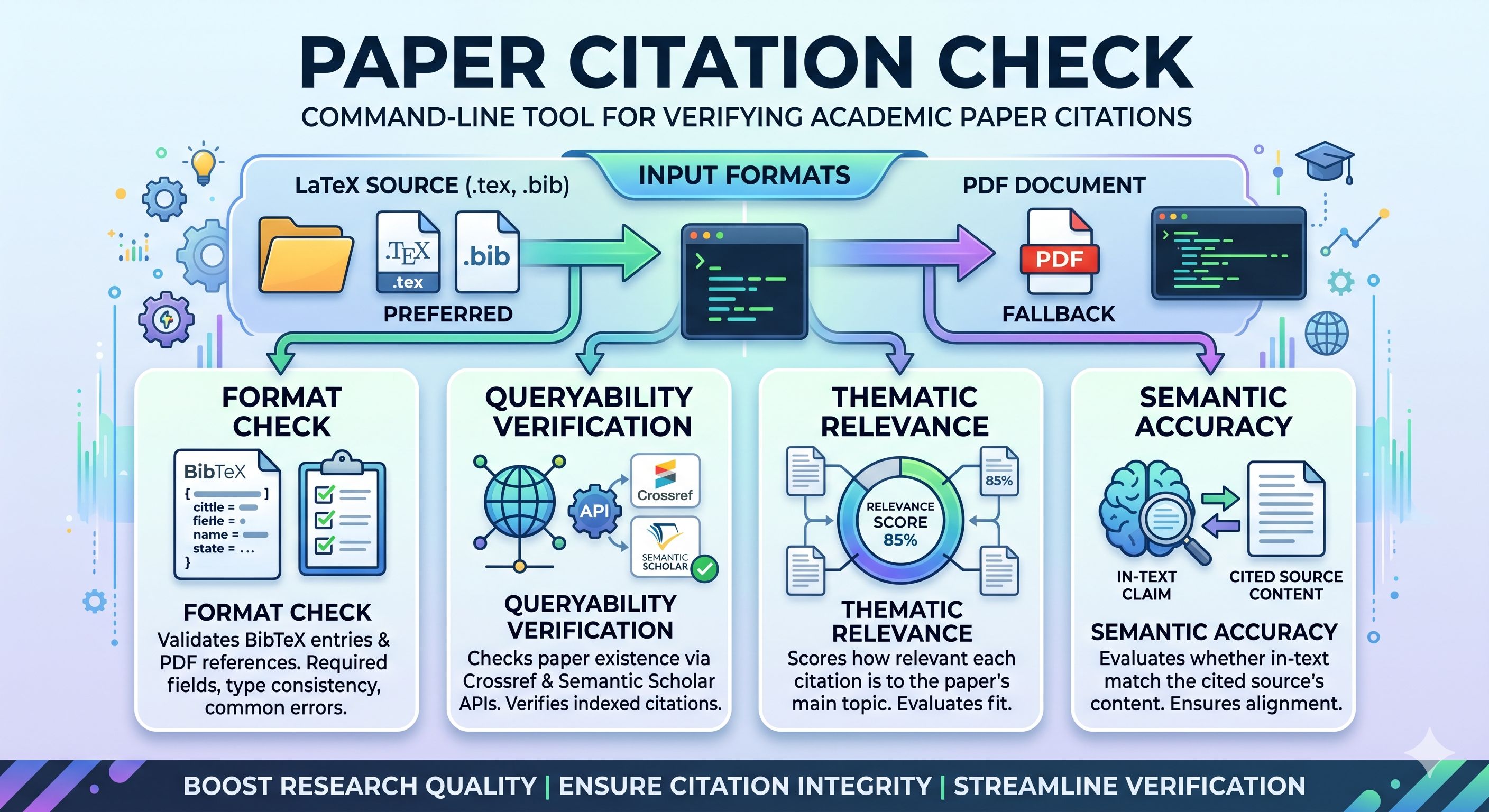
Extract references from LaTeX or PDF, validate formatting, verify existence via Crossref / Semantic Scholar / OpenAlex / PubMed / arXiv / dblp / Google Scholar / WebSearch, and score thematic / semantic relevance using cited paper abstracts — all without requiring an external LLM API key when used as a skill.



✨ What is CiteCheck?
CiteCheck is primarily a cross-agent skill that helps AI coding assistants verify citations in academic papers. It is designed to work across Claude Code, Codex, OpenClaw, Hermes, Gemini CLI, Cursor, and more — following the agentskills.io open standard.
It is also available as a standalone Python CLI for users who prefer running it directly from the terminal.
Key Design Principle: When used as a skill, thematic and semantic matching are performed directly by the host agent's own reasoning. No OpenAI API key is required. The CLI handles structured tasks (parsing, format checks, API queries) while the agent handles interpretive tasks (relevance scoring, claim verification).
🚀 Two Ways to Use
Mode 1: Agent Skill (Recommended)
Install CiteCheck as a skill for your coding agent. The agent will automatically discover and invoke it when you ask to check citations.
Step 1 — Install the skill
🟢 Easiest way — just ask your agent:
Install this skill for me: https://github.com/color4-alt/CiteCheck
Your agent will clone the repo into the correct skill directory automatically.
If you prefer to install manually:
| Agent | Install Path |
|---|
| Claude Code | ~/.claude/skills/citecheck |
| Codex CLI | ~/.codex/skills/citecheck |
| OpenClaw | ~/.openclaw/skills/citecheck |
| Hermes | ~/.hermes/skills/citecheck |
| Gemini CLI | ~/.gemini/skills/citecheck |
| Cursor | .cursor/rules/citecheck.mdc (copy skills/citecheck/SKILL.md) |
| GitHub Copilot | Append AGENTS.md to .github/copilot-instructions.md |
Step 2 — Invoke
Use natural language or a slash command with a file reference:
/citation-verification @main.tex
/citation-verification @paper.pdf
/citation-verification @path/to/latex_project/
Or simply tell your agent:
Check the citations in this paper.
Verify the references in my LaTeX project.
Are these citations accurate and relevant?
The agent will:
- Call
citecheck CLI to parse the paper and check formatting
- Query Crossref → Semantic Scholar → OpenAlex → PubMed → arXiv → dblp → Google Scholar → WebSearch to verify paper existence
- Use its own reasoning to evaluate thematic relevance and semantic accuracy
- Present a structured Markdown report
No API key needed. The agent handles steps 3–4 with its built-in LLM capabilities.
Mode 2: Standalone CLI
For users who prefer the command line or need to integrate into CI pipelines.
Step 1 — Install the Python package
pip install citecheck-cli
For PDF support:
pip install citecheck-cli[pdf]
Or install from source:
git clone https://github.com/color4-alt/CiteCheck.git
cd CiteCheck
pip install -e ".[pdf,dev]"
Step 2 — Run
# Check a LaTeX project (preferred)
citecheck path/to/latex_project/

# Check a single .tex file
citecheck main.tex

# Check a PDF (fallback)
citecheck paper.pdf -o report.md

# Skip online verification (offline mode)
citecheck main.tex --skip-verification

# Use external LLM for matching (requires --api-key)
citecheck main.tex --api-key $OPENAI_API_KEY
CLI Options
citecheck [-h] [-o OUTPUT] [--skip-verification] [--skip-semantic] [--api-key API_KEY] [-v] input

positional arguments:
  input                 Path to paper (PDF, .tex, or directory with .tex + .bib)

options:
  -o OUTPUT             Output report path (default: citation_check_report.md)
  --skip-verification   Skip all online verification (Crossref / Semantic Scholar / OpenAlex / PubMed / arXiv / dblp / Google Scholar / WebSearch)
  --skip-semantic       Skip semantic matching
  --api-key API_KEY     Optional OpenAI key for LLM matching (falls back to heuristics)
  -v, --verbose         Verbose output
📊 Workflow
Input (LaTeX / PDF)
    │
    ▼
┌─────────────────┐
│ 1. Parse Paper  │  ← Extract refs, citations, body text
└────────┬────────┘
         │
    ┌────┴────┐
    ▼         ▼
┌────────┐ ┌─────────────┐
│ LaTeX  │ │ PDF Fallback │
│(.bib)  │ │ (PyMuPDF)    │
└────────┘ └─────────────┘
         │
         ▼
┌─────────────────┐
│ 2. Format Check │  ← Validate BibTeX fields, types, venues
└────────┬────────┘
         │
         ▼
┌─────────────────────┐
│ 3. Queryability     │  ← Crossref → Semantic Scholar → OpenAlex → PubMed → arXiv → dblp → Google Scholar → WebSearch
└────────┬────────────┘
         │
         ▼
┌─────────────────────┐
│ 4. Thematic Match   │  ← Skill: agent reasoning | CLI: heuristic/LLM
└────────┬────────────┘
         │
         ▼
┌─────────────────────┐
│ 5. Semantic Match   │  ← Skill: agent reasoning | CLI: heuristic/LLM
└────────┬────────────┘
         │
         ▼
┌─────────────────────┐
│ 6. Generate Report  │  ← Markdown report with findings
└─────────────────────┘
📋 Report Output
CiteCheck generates a Markdown report containing:
- Summary: total references, format issues, verified count, average scores
- Detailed table: per-reference status for format / queryable / thematic / semantic
- Format issues: specific problems (missing author, wrong entry type, suspicious year, preprint source, etc.)
- Queryability results: verification status from Crossref / Semantic Scholar / OpenAlex / PubMed / arXiv / dblp / Google Scholar / WebSearch
- Abstract-aware semantic scoring: semantic match uses the cited paper's abstract when available
- Uncited references: entries in
.bib never referenced by \cite{} in the text
See examples/example_report.md for a full sample.
🏗️ Project Structure
CiteCheck/
├── skills/citecheck/SKILL.md      ← Agent skill entry (cross-platform)
├── .claude-plugin/plugin.json     ← Claude Code marketplace metadata
├── .codex-plugin/plugin.json      ← Codex CLI marketplace metadata
├── CLAUDE.md                      ← Project context for Claude Code
├── AGENTS.md                      ← Project context for Codex / generic agents
├── GEMINI.md                      ← Project context for Gemini CLI
├── src/citecheck/                 ← Python CLI source
│   ├── cli.py
│   ├── parser.py
│   ├── bibtex_parser.py
│   ├── pdf_parser.py
│   ├── verifier.py
│   ├── matcher.py
│   ├── models.py
│   └── reporter.py
├── references/                    ← Skill reference docs
│   ├── format-check-rules.md
│   ├── api-reference.md
│   ├── thematic-scoring-prompt.md
│   └── semantic-matching-prompt.md
├── tests/
├── examples/
└── README.md / README.zh.md
🛠️ Development
# Clone
git clone https://github.com/color4-alt/CiteCheck.git
cd CiteCheck

# Install in editable mode with dev dependencies
pip install -e ".[dev]"

# Run tests
pytest tests/ -v

# Format & lint
black src/ tests/
ruff check src/ tests/
🤝 Contributing
- Any change to
skills/citecheck/SKILL.md must remain agent-agnostic (no brand-specific language)
- Skill content should work across Claude Code, Codex, OpenClaw, Hermes, and Gemini CLI
- When adding CLI features, update both
src/citecheck/cli.py and the README
📝 Changelog
0.1.1 (2026-05-28)
Fixed
- PDF Parser: Fixed year extraction for arXiv references — arXiv IDs like
arXiv:2004.05150 were incorrectly parsed as the publication year. Now prefers year at end of citation and skips arXiv ID patterns.
- Verifier (Crossref): Added title similarity scoring, author overlap check, and false-match rejection. Crossref now evaluates all 3 candidates and rejects matches with similarity < 0.2.
Added
- New query sources: OpenAlex, PubMed, arXiv, dblp
- Skill quality improvements: externalized prompt templates, added examples, fixed self-contained references
0.1.0 (2026-05-27)
📄 License
MIT License — see LICENSE.



