

affaan-m/
ECC

affaan-m/ECCHarnesses
The agent harness performance optimization system. Skills, instincts, memory, security, and research-first development for Claude Code, Codex, Opencode, Cursor and beyond.
258k
CAS is a Rust-based workflow system for Claude Code that runs a supervisor plus multiple workers in isolated git worktrees. It also exposes an MCP server so agents can keep memory, tasks, rules, skills, and searchable context in SQLite between sessions.
Builders who want their Claude Code agents to coordinate parallel work, share context, and avoid repeated setup.
You can split work across multiple agent sessions, keep shared memory between them, and review progress from one place.
Runs one supervisor agent that plans work and multiple worker agents that execute tasks in parallel.
Gives each worker its own git worktree and branch so parallel edits do not collide.
Lets agents remember facts, tasks, rules, and skills across sessions through an MCP server.
Stores project context in SQLite with full-text search for past notes and decisions.
Supports attach, detach, list, and kill for running factory sessions.
Can record and replay agent terminal sessions.
# Install
curl -fsSL https://cas.dev/install.sh | sh

# Initialize in your project
cas init

# Launch the factory TUI
cas
curl -fsSL https://cas.dev/install.sh | sh
brew tap codingagentsystem/cas
brew install cas
git clone https://github.com/codingagentsystem/cas.git
cd cas
cargo build --release
# Binary at target/release/cas
  ██████╗ █████╗ ███████╗
 ██╔════╝██╔══██╗██╔════╝
 ██║     ███████║███████╗
 ██║     ██╔══██║╚════██║
 ╚██████╗██║  ██║███████║
  ╚═════╝╚═╝  ╚═╝╚══════╝
Multi-agent coding factory with persistent memory.


Factory · Context System · Quick Start · Installation · Architecture · Contributing
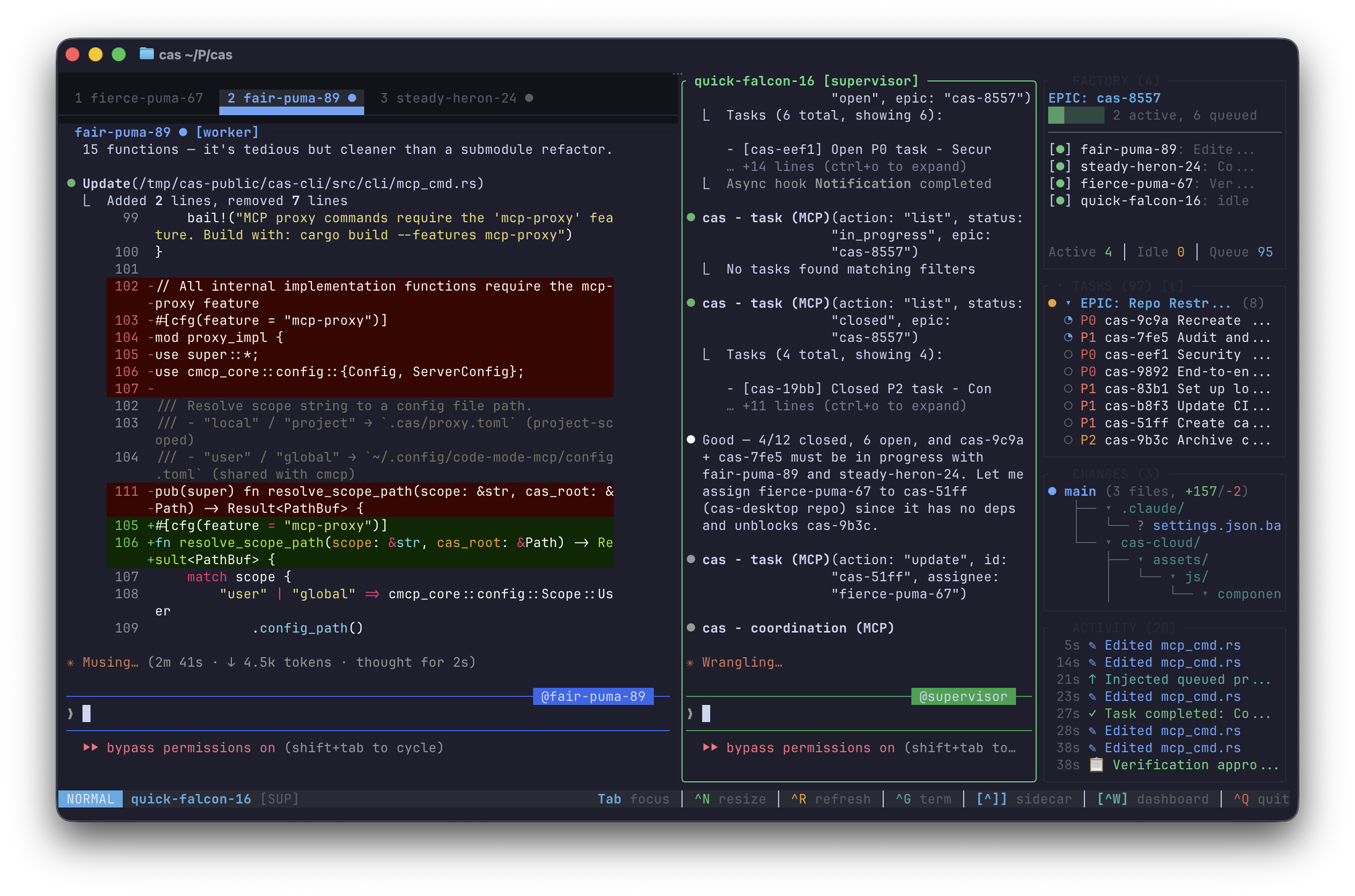
CAS is a multi-agent coding factory and persistent context system for AI agents. It has two core capabilities:
Factory — A terminal UI that orchestrates multiple Claude Code instances working in parallel on the same codebase, with a supervisor agent coordinating worker agents across isolated git worktrees.
Context System — An MCP server that gives agents persistent memory, task tracking, rules, and skills across sessions, backed by SQLite and full-text search.
Factory mode turns your terminal into a multi-agent coding operation. A supervisor agent breaks work into tasks while worker agents execute them in parallel — each in its own git worktree to avoid conflicts.
# Launch the factory TUI
cas

# Launch with 3 workers in isolated worktrees
cas -w 3
┌─────────────────────────────────────────────────────────┐
│  CAS Factory                                            │
├──────────────────────┬──────────────────────────────────┤
│                      │                                  │
│  Supervisor          │  Worker 1        Worker 2        │
│                      │                                  │
│  Plans EPICs,        │  Executes tasks  Executes tasks  │
│  breaks down work,   │  in isolated     in isolated     │
│  assigns tasks,      │  git worktree    git worktree    │
│  reviews & merges    │                                  │
│                      │                                  │
├──────────────────────┴──────────────────────────────────┤
│  Shared: CAS database (memories, tasks, rules, skills)  │
└─────────────────────────────────────────────────────────┘
| Feature | Description |
|---|---|
| Worktree isolation | Each worker gets its own git worktree and branch — parallel edits without conflicts |
| Task coordination | Supervisor assigns tasks with dependencies; workers claim, execute, and report back |
| Live TUI | Side-by-side or tabbed terminal views of all agents, with real-time status bar |
| Message passing | Push-based communication between supervisor and workers via prompt queue |
| Session management | Attach, detach, list, and kill factory sessions (cas attach, cas list, cas kill) |
| Desktop notifications | Optional alerts when tasks complete or workers hit blockers (--notify) |
| Session recording | Record terminal sessions for playback (--record) |
CAS runs as an MCP server that gives your agent persistent context across sessions — 50+ tools for memory, tasks, rules, skills, and search.
When your agent has CAS configured, it can:
# Remember something across sessions
mcp__cas__memory action=remember content="This project uses Zod for validation"

# Create and track tasks
mcp__cas__task action=create title="Implement auth" priority=1

# Search past context
mcp__cas__search action=search query="error handling patterns"

# Create a rule that auto-syncs to .claude/rules/
mcp__cas__rule action=create content="Always validate input at API boundaries"
| Feature | Description |
|---|---|
| Memory | Learnings, preferences, and observations that survive across sessions |
| Tasks | Work items with dependencies, priorities, and structured progress notes |
| Rules | Coding conventions that earn trust through use and auto-sync to your editor |
| Skills | Reusable agent capabilities with templates and usage tracking |
| Search | Fast full-text search (BM25) across all stored context |
# Install
curl -fsSL https://cas.dev/install.sh | sh

# Initialize in your project
cas init

# Launch the factory TUI
cas
curl -fsSL https://cas.dev/install.sh | sh
brew tap codingagentsystem/cas
brew install cas
git clone https://github.com/codingagentsystem/cas.git
cd cas
cargo build --release
# Binary at target/release/cas
cas                   # Launch the factory TUI
cas -w 3              # Launch with 3 workers
cas serve             # Start MCP server for Claude Code
cas init              # Initialize CAS in your project
cas attach            # Attach to a running factory session
cas list              # List running factory sessions
cas kill              # Kill a factory session
cas config list       # View all configuration options
cas doctor            # Run diagnostics
cas update            # Self-update to latest version
cas login             # Log in to CAS Cloud (optional)
cas cloud sync        # Sync data to/from cloud (optional)
Add to your Claude Code MCP config (.claude/settings.json or project .mcp.json):
{
  "mcpServers": {
    "cas": {
      "command": "cas",
      "args": ["serve"]
    }
  }
}
CAS stores all data locally in your project:
.cas/
├── cas.db          # SQLite — memories, tasks, rules, skills
├── config.yaml     # Project configuration
└── indexes/
    └── tantivy/    # Full-text search index
Storage tiers:
.cas/) — project-specific context~/.config/cas/) — cross-project preferences and learnings| Crate | Purpose |
|---|---|
cas-cli | CLI binary, MCP server, and factory TUI |
cas-factory | Multi-agent session lifecycle and coordination |
cas-factory-protocol | Message protocol between supervisor and workers |
cas-pty | PTY management for agent terminal sessions |
cas-mux | Terminal multiplexer layout and rendering |
cas-core | Core logic, hooks, and integrations |
cas-store | SQLite storage layer |
cas-search | Full-text search (BM25 via Tantivy) |
cas-mcp | MCP protocol handlers |
cas-types | Shared data types |
cas-code | Code analysis (tree-sitter) |
cas-diffs | Diff tracking and formatting |
cas-recording | Terminal session recording and playback |
ghostty_vt | Virtual terminal parser (based on Ghostty) |
CAS is configured via .cas/config.yaml in your project root. Run cas config list to see all options or cas config describe <key> for details on any setting.
CAS works fully offline. Optionally sync your context across devices:
cas login
cas cloud sync
Cloud sync is not required — all core features work locally with SQLite.
CAS is source-available under the MIT license. We welcome bug reports and feature suggestions through Issues and Discussions.
See CONTRIBUTING.md for details.
Sign in to join the discussion.
No comments yet. Be the first to say what this is good for.
The agent harness performance optimization system. Skills, instincts, memory, security, and research-first development for Claude Code, Codex, Opencode, Cursor and beyond.
from vibe coding to agentic engineering - practice makes claude perfect
🌊 The original agent meta-harness. Deploy intelligent multi-player swarms, coordinate autonomous workflows, and build conversational AI systems. Features adaptive memory, self-learning intelligence, RAG integration, and native Claude Code / Codex / Hermes and many more Integrated
Practical patterns, starters & CLI tools for loop engineering with AI coding agents. Design systems that prompt and orchestrate agents (inspired by Addy Osmani and Boris Cherny). Includes loop-audit, loop-init, loop-cost.

Git. Ship. Done - Core

The most RAM efficient harness