
tinyhumansai/
openhuman

OpenHuman is an open source personal AI for Mac, Windows and Linux — local-first memory, agent orchestration, and deep research.
40k
NoteGen is a local-first Markdown note app that lets you capture thoughts, voice, images, links, and files without organizing them up front. Later, you can group records into a Markdown note, edit the result, and keep writing in your own words.
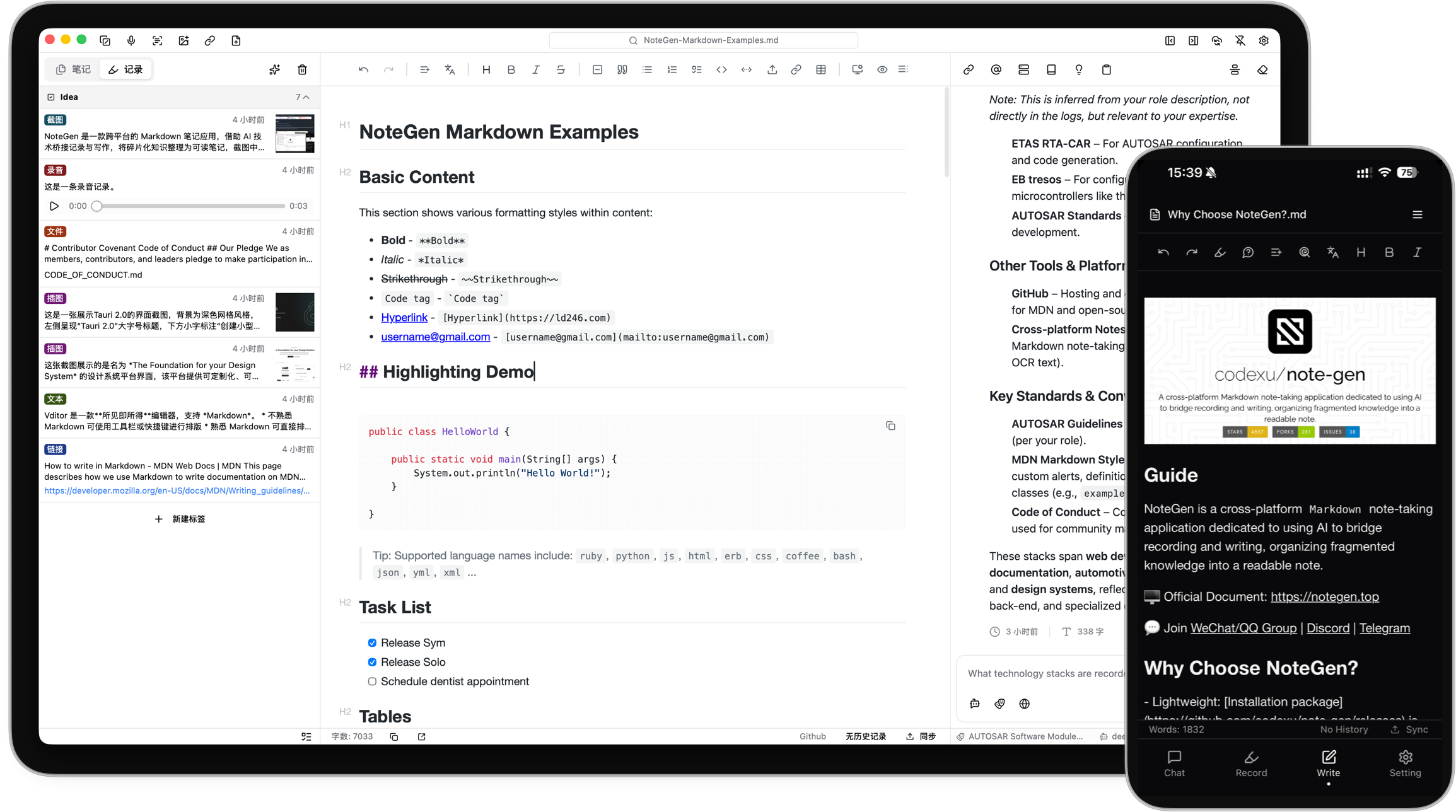
Builders who want to save raw material now and turn it into notes later.
You can collect scattered information first and shape it into structured Markdown notes when you are ready.
Save thoughts, voice recordings, screenshots, images, links, files, and todos as separate records.
Filter records by tag, time, or type, then combine them into summaries, reports, articles, or other Markdown structures.
Work with ordinary Markdown files in your chosen workspace, with source and visual editing, search, tables, tasks, math, diagrams, and file history.
Connect configured AI providers for chat, rewriting, translation, note organization, embeddings, OCR, image understanding, and agent mode.
Index local notes with semantic retrieval and text search, then use notes or the knowledge base as context for questions.
Sync notes with GitHub, GitLab, Gitee, Gitea, S3-compatible storage, or WebDAV, or keep local backups only.
Create flowcharts, mind maps, timelines, drawings, charts, and diagrams that stay editable after AI generation.
Use long-term memories, reusable prompts, MCP servers, installable Skills, and agent tools for notes and files.
Capture first. Organize later.
A local-first Markdown app that helps you collect scattered information and organize it into clear notes with AI.
Documentation · Download · Business · Donate · Discussions


感谢 Infistar.cc 无限星河赞助并为 NoteGen 提供模型服务支持!
An idea may begin as a sentence, a voice recording, a screenshot, or a link you do not have time to read yet. You should not have to choose a title, folder, and structure before saving it.
NoteGen separates capturing from organizing.
Save information as it appears. Later, select the records that belong together and organize them into a structured Markdown note. You can then review the result, add your own thinking, and continue writing.
The goal is not to let AI write everything for you. It is to make sure useful fragments do not disappear before you have time to turn them into something complete.
Capture what happened
Save a thought, voice recording, screenshot, image, link, file, or todo while it is still fresh.
Choose the material
Filter records by tag, time, or type, then select the items that belong together.
Organize the records
Choose a template or describe what you want to write. NoteGen can organize the selected material into a summary, report, article, or another Markdown structure.
Keep writing
Review the draft in the editor, change the structure, add details, and continue writing in your own words.
Your written notes remain ordinary Markdown files in the workspace you choose.
You can edit them with NoteGen, open them with another Markdown editor, keep them in Git, or move them without exporting from a proprietary format. NoteGen adds recording, AI, search, and organization around those files instead of replacing them.
The editor supports:
NoteGen connects to the AI providers and models you configure. You can use different models for chat, writing, embeddings, image recognition, OCR, and audio.
AI can help you:
AI is part of the workflow, but the result remains editable. You decide what to keep.
A note should remain useful after you finish writing it.
NoteGen can build a searchable knowledge base from your files and combine semantic retrieval with local text search. You can use a note, a group of records, or the knowledge base as context in a conversation instead of copying everything into a new prompt.
For advanced workflows, NoteGen also supports:
NoteGen includes a canvas workspace for material that is easier to understand visually.
You can create and edit:
Canvas elements remain editable after they are created, including content suggested by AI.
Notes are stored locally first. When you need them on another device, you can sync through services you already use.
Supported options include:
You can also keep local backups without enabling cloud sync.
| Platform | Status | Download |
|---|---|---|
| Windows | Beta | Download for Windows |
| macOS | Beta | Download for Apple Silicon or Intel |
| Linux | Beta | AppImage, DEB, or RPM |
| Android | Alpha · ARM64 | Download APK |
| iOS | Alpha | Join TestFlight |
GitHub Releases are also available as a fallback mirror:
View the latest GitHub Release
You do not need to configure every feature before writing your first note.
| Repository | Purpose |
|---|---|
| note-gen-docs | Official website, bilingual documentation, and download pages. |
| note-gen-server | Sync service and account management, with support for self-hosting. |
| note-gen-clipper | Browser extension for saving selected text, images, and page links to NoteGen. |
| note-gen-plugin-sdk | TypeScript API, project scaffolding, CLI, and test tools for developing NoteGen plugins. |
| note-gen-plugins | Official plugin source code and plugin marketplace publishing tools. |
NoteGen is open source and contributions are welcome.
Before opening a pull request, read the contribution guide.
You can also:
Thanks to everyone who has reported a problem, proposed an idea, improved a translation, written documentation, or contributed code.


NoteGen is tested with BrowserStack.
SiliconFlow provides model service support for the project.
We also appreciate the service support provided by:
NoteGen is released under the GNU General Public License v3.0.
Sign in to join the discussion.
No comments yet. Be the first to say what this is good for.
OpenHuman is an open source personal AI for Mac, Windows and Linux — local-first memory, agent orchestration, and deep research.

Your Personal AI Assistant; easy to install, deploy on your own machine or on the cloud; supports multiple chat apps with easily extensible capabilities.
User-friendly AI Interface (Supports Ollama, OpenAI API, ...)
🤯 LobeHub is your Chief Agent Operator, organizing your agents into 7×24 operations by hiring, scheduling, and reporting on your entire AI team.
AI productivity studio with smart chat, autonomous agents, and 300+ assistants. Unified access to frontier LLMs
Open-source, desktop-grade AI agent that gets real work done — data analysis, slides, docs, video & web research. Built on OpenClaw; runs tools on your real desktop and takes commands from your phone via WeChat, Feishu, DingTalk & Telegram.