
JuliusBrussee/
caveman

🪨 why use many token when few token do trick — Claude Code skill that cuts 65% of tokens by talking like caveman
105k
1 add
Loci gives Claude Code and Codex a shared local memory system for identity, decisions, tasks, and project context. It stores everything in plain files, loads only what is relevant, and can surface daily briefings, project history, and saved lessons across sessions.
Builders who want their agent to remember them, their projects, and their decisions across tools and restarts.
You can pick up where you left off without re-explaining your work or losing important context.
Saves identity, preferences, decisions, tasks, and notes as Markdown and JSON files on your machine.
Keeps global brain files plus per-project `.loci/` memory so lessons from one repo can inform another.
Produces morning briefings, surfaces stale tasks, and highlights repeated estimates or habits.
Runs a local dashboard and REST API for viewing and updating memory, tasks, people, projects, and notes.
Works with Claude Code and Codex first, and can be connected to other tools through global rules files.
Uses setup scripts, Claude settings, and git hooks to keep memory synced around agent actions.
Install Loci for me: https://github.com/codesstar/loci
Clone the repo, then follow docs/AI-INSTALL.md inside it.
npx create-loci
clawhub install loci-brain
git clone https://github.com/codesstar/loci.git ~/loci
cd ~/loci && ./setup.sh
You: "We compared Vercel, Railway, and self-hosted. Going with Railway
      — Vercel is too expensive at our scale, self-hosted is too much
      ops work for a two-person team."

Got it — saved your hosting decision with the tradeoffs.Morning briefing:
- You've started 3 new side projects this month but finished
none of them. Maybe ship one before starting another?
- "Write the project README" has been on your list for 12 days.
Do it today or drop it?
- You estimated the payment integration would take 2 days.
Your last 3 integrations took 2x your estimates.

The first agent-native memory system. A full brain architecture for AI.




English | 中文
Your AI doesn't remember you.
Every conversation starts from zero. You re-introduce yourself. You re-explain your project. You re-describe your preferences. The thing you spent an hour figuring out yesterday? Gone. The decision you made last week? Never happened.
And it's not just forgetting between sessions. Chat long enough and the context fills up — your AI starts repeating itself, getting confused, forgetting things you said 20 minutes ago. You restart. Everything you built up is gone.
Worse: your memories are scattered. Claude Code's auto-memory is a flat file that gets messy over time. Cursor's memory lives in .cursorrules and breaks across projects. Every tool remembers its own fragments, but nothing holds the full picture of you.
What if your AI actually knew you — and that knowledge was yours forever?
Loci gives your AI a real brain. Everything it learns about you is saved as plain Markdown files on your machine. No server, no subscription, no lock-in. Your memories belong to you.
Day 1: "I'm a frontend developer. I prefer simple solutions
over clever ones. I'm building a fitness app."
Your AI remembers. Permanently.
Week 2: Context is full. AI is slowing down. You restart.
"Pick up where I left off."
"You were building the workout tracker. You decided on
a card layout because of mobile. The exercise list is
done. Next up: the timer component. Ready?"
Month 3: You open a completely different project.
"How should I structure this?"
"Based on what I know about you: you like flat folder
structures, you always regret adding too many abstractions
early, and you prefer starting with a working prototype.
Here's what I'd suggest..."
The longer you use it, the better it knows you. Your preferences, your patterns, your growth — across every conversation, every project, every context reset. It never forgets, and it never disappears.
Your AI is no longer a stranger. It's the one assistant that actually knows who you are.
CLAUDE.md is a sticky note. Loci is a second brain.
Loci actually uses CLAUDE.md — it's one of the 30+ files in the system. The difference is everything else around it.
Loci is built for AI agents — so let yours install it. Paste this into Claude Code or Codex:
Install Loci for me: https://github.com/codesstar/loci
Clone the repo, then follow docs/AI-INSTALL.md inside it.
Your AI clones the repo, asks your name, runs the scriptable setup, connects itself to the new brain, and verifies everything works. About a minute — and the first thing your AI ever does with its new memory is set it up for you.
One command. Loci gives Claude Code and Codex one shared local brain, so decisions and tasks saved in one tool are available to the other.
npx create-loci
The installer opens a browser setup wizard, creates your brain, and lets you connect Claude Code, Codex, WorkBuddy, or a combination. Takes about 2 minutes. Prefer terminal setup? Run npx create-loci --cli.
clawhub install loci-brain
git clone https://github.com/codesstar/loci.git ~/loci
cd ~/loci && ./setup.sh
Scripting it (or you're an AI reading this)? ./setup.sh --non-interactive --name "Alex" skips the wizard — see ./setup.sh --help and docs/AI-INSTALL.md.
Note: Without Claude Code or Codex CLI, Loci only works inside the brain directory. Global cross-project memory requires a tool that supports global instruction files.
Prefer the old shell installer?
curl -fsSL https://raw.githubusercontent.com/codesstar/loci/main/install.sh | bashstill works.
Windows?
npx create-lociruns natively from PowerShell or Command Prompt. Startup context uses Node and does not require Bash. WSL/Git Bash remain supported for the optional terminal wizard and shell fallback.Want to see what a brain looks like? Check out
examples/alex/— a full brain with 3 months of history.New to Loci? Read the Getting Started Guide for a complete walkthrough.
The Method of Loci is one of the oldest memory techniques in human history. Ancient Greek orators would mentally place each point of their speech in a room of an imaginary palace. To recall, they simply walked through the palace — every room held a memory, exactly where they left it.
That's what Loci does for your AI. Every decision, every preference, every lesson you've learned — placed in its own room, ready to be recalled at the right moment.
And the seahorse? In your brain, the hippocampus is the region responsible for forming and retrieving memories. The word "hippocampus" comes from Greek: hippos (horse) + kampos (sea creature) — it literally means seahorse. Neuroscientists named it that because the structure looks like one.
Our logo is a seahorse because Loci is the hippocampus of your AI — the part that turns fleeting conversations into lasting memory.
You don't learn Loci. You just talk to your AI, and five things start happening:
Spend 30 minutes figuring something out with your AI? That knowledge is saved automatically — the decision, the reasoning, and the alternatives you rejected.
You: "We compared Vercel, Railway, and self-hosted. Going with Railway
— Vercel is too expensive at our scale, self-hosted is too much
ops work for a two-person team."
Got it — saved your hosting decision with the tradeoffs.
Next month, when you're wondering "why aren't we on Vercel?" — your AI already knows the full story. You figured it out once. You never have to figure it out again.
No command to learn. While you work inside a project, if your AI notices it's becoming real, it offers once — at the end of a conversation: "This project seems to be taking off. Want me to keep a memory for it here?"
Say yes, and Loci creates the project's own .loci/ memory inside that repo. Your brain keeps only a one-line index entry pointing to it. Project memory belongs to the project; the brain aggregates and orchestrates. Loci aggregates memory — it does not own it.
Brain (your memory hub)
├── projects/index.md
│ "Main app lives at ~/work/main-app — project memory in .loci/memory.md"
│
├── me/, tasks/, decisions/
│ your global preferences, tasks, and cross-project decisions
│
└── project repo/.loci/
memory.md short restart context
profile.md stable project details
progress/ project progress, one file per month
decisions/ the project's own decision stream
todo.json the project's development todos
Every morning, Loci reviews what changed and surfaces insights:
Morning briefing:
  - You've started 3 new side projects this month but finished
    none of them. Maybe ship one before starting another?
  - "Write the project README" has been on your list for 12 days.
    Do it today or drop it?
  - You estimated the payment integration would take 2 days.
    Your last 3 integrations took 2x your estimates.
Long session? Context window full? AI getting slow? Just save and restart.
> save everything before I restart
  Done — synced all decisions and progress to your brain.

(open a new terminal)

> picking up where I left off
  You were building the notification system. You decided on
  email + in-app (no SMS — too expensive for now). The email
  templates are done, you were about to wire up the trigger
  logic. The file is src/notifications/triggers.ts. Ready?
Not "what project are you working on?" — it knows exactly where you were, what you decided, and what file you had open.
Your skills change. Your focus shifts. Loci tracks the evolution — current state stays lean, history is preserved for when you want to reflect.
January:  "data engineer, mass-producing dashboards"
April:    "data engineer → building my own analytics product"
July:     "founder, shipped v1, first 50 users"
          evolution.md records each transition and what triggered it
| Concept | What it does | Why it matters |
|---|---|---|
| Smart saving | Extracts decisions, tasks, and insights from conversation — never saves raw chat transcripts | Your memory stays clean and searchable, not a wall of text |
| Layered loading | Loads only what's relevant to the current conversation. Archives stay out of the way until needed | Fast responses, even after months of accumulated memory |
| Cross-project memory | Each serious project keeps its own memory in its repo (.loci/memory.md + .loci/profile.md + .loci/progress/ + .loci/decisions/); your brain holds only a one-line index. Loci aggregates memory, it does not own it | Lessons stay where they belong, and your AI knows where to find them from any project |
| Daily review | Morning briefing summarizes yesterday, surfaces patterns, flags stale tasks | You start each day with full context in 10 seconds |
| Growth tracking | When your identity or goals change, old versions are archived automatically | You can look back and see how you've evolved |
| Git-native | Everything is Markdown files in a git repo. git diff shows what your AI learned. git log is your memory timeline | Full version history, works offline, you own your data |
Deep dive: How It Works — one doc that covers the entire system.
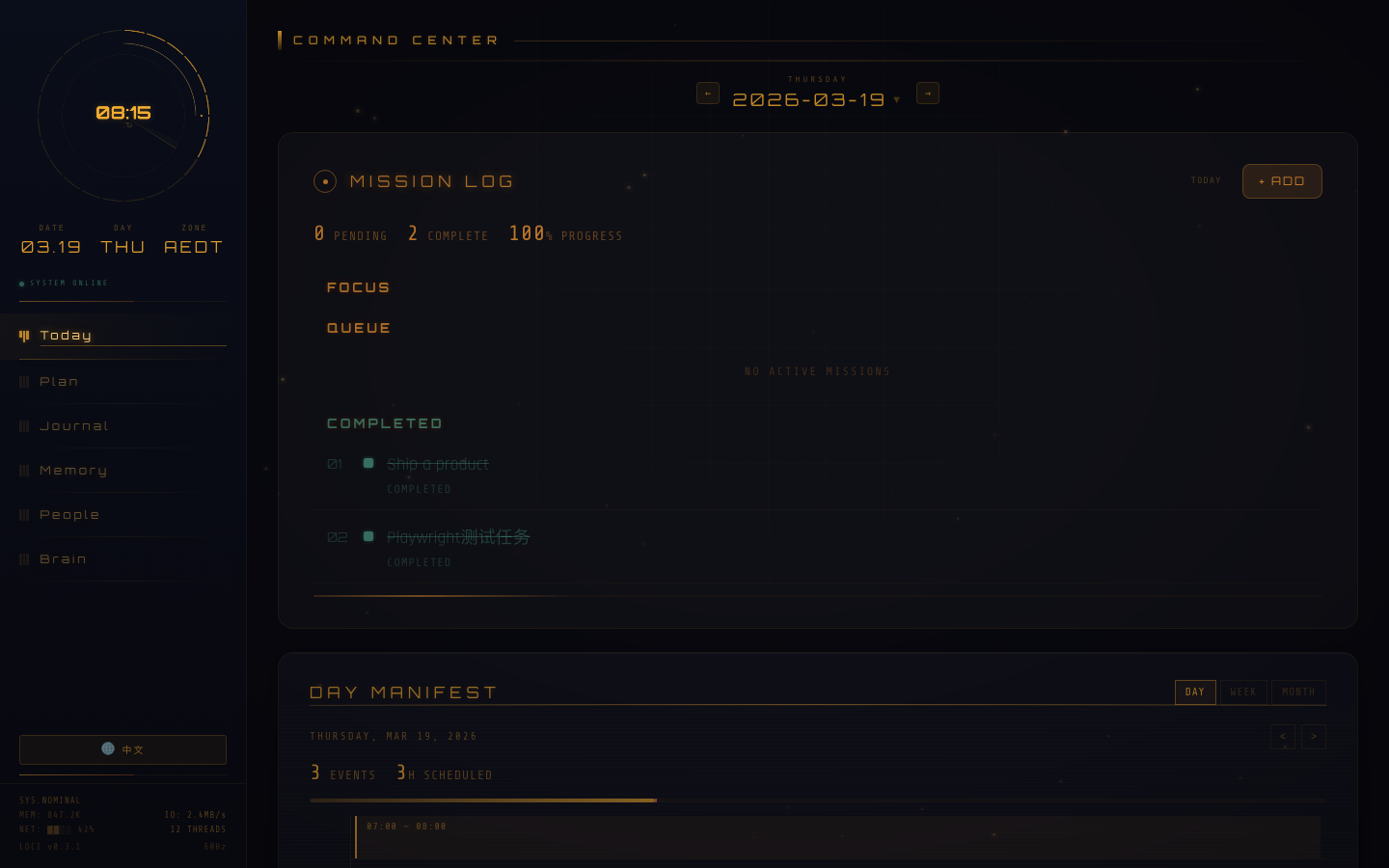
Loci includes an optional local dashboard for seeing the shape of your brain: today's work, project memory, notes, people, decisions, fragments, and the activity around them.
loci
The loci command (installed by setup) starts the server and opens the dashboard in your browser. It works from any directory — loci stop shuts it down, loci help lists the rest. Prefer doing it by hand? node .loci/dashboard/server.js from the brain directory does the same, then open:
http://localhost:8765
The dashboard reads your brain files live on every request. On a fresh install it starts out clean and empty — it fills up as your AI saves memories. The same local server exposes the API Loci's live workflows use for tasks, schedule, journal, and project todos.
The dashboard is a window into your brain, not a separate cloud system. User data stays in local Markdown and JSON files.
API docs: docs/api.md — local REST endpoints for reading and writing your brain.
Dashboard docs: docs/dashboard.md — pages, data sources, and API behavior.
Loci currently focuses on Claude Code and Codex. Both can share the same local brain: a task, decision, preference, or project context saved in one tool is available to the other.
| Platform | Status |
|---|---|
| Claude Code | Primary support |
| Codex | Primary support |
| WorkBuddy | Selectable in the web wizard; auto-detected by CLI setup |
| Cursor / Windsurf / Cline | Future adapters |
| OpenCode / Hermes | Works via the universal method below |
| OpenClaw | Experimental integration |
The brain is plain Markdown plus one block of read/write rules. Connecting a new tool just means putting that block where the tool reads its global rules — and the fastest way is to not do it yourself. Paste this to any agent you already use (Claude Code, Codex, or the new tool itself):
Help me connect Loci to <tool name>: read AGENTS.md in my brain directory,
copy the whole block between <!-- loci:start --> and <!-- loci:end --> into
<tool name>'s global rules / system instructions file, and keep every path
pointing at my brain directory.
Example: for WorkBuddy the block lands in its global memory file (~/.workbuddy/MEMORY.md); for OpenCode, in the global rules file it reads (it follows the AGENTS.md convention). Once the block is in place, that tool reads and writes the same brain as everything else.
"I stopped re-explaining my architecture" — Marcus opens his terminal Monday morning. His AI already knows the migration strategy they debated on Friday, the edge cases they found, and why they rejected the simpler approach.
"It saved me from repeating a mistake" — Priya is setting up deployment for a new service. Her AI reminds her that the last time she used that hosting provider, DNS propagation took 48 hours and broke the launch timeline. She switches providers before wasting a day.
"It told me to go to bed" — It's 11:30pm and Dev is still chasing a bug. His AI says "you've been circling the same 3 files for an hour — sleep on it" — then saves exactly where he was so tomorrow's first message picks up mid-thought.
More: User Stories — what Loci actually feels like in daily use.
| Getting Started | Setup walkthrough and first conversation |
| How It Works | Complete system overview |
| Project Overview (中文) | Positioning, architecture, and current state in one doc — Chinese only |
| User Stories | What daily use feels like |
| Commands & Structure | Directory layout, slash commands, config |
| Other Editors | Cursor, Windsurf, Cline support |
| Privacy | Data protection and what stays where |
| Roadmap | What's coming next |
Contributions welcome — bug fixes, features, docs, or just sharing how you use Loci. Please open an issue first for large changes. See CONTRIBUTING.md.
MIT. See LICENSE.
Loci is built by Callum.
If this gives your AI a better memory, consider giving it a star.
Sign in to join the discussion.
No comments yet. Be the first to say what this is good for.
🪨 why use many token when few token do trick — Claude Code skill that cuts 65% of tokens by talking like caveman

The best-benchmarked open-source AI memory system. And it's free.

Orca is the ADE for working with a fleet of parallel agents. Run any coding agent with your own subscription. Available on desktop, mobile and remote runtime.

A cross-platform desktop All-in-One assistant for Claude Code, Codex, OpenCode, OpenClaw, Grok Build & Hermes Agent. Only official website: ccswitch.io

Never stop coding. Free MIT AI gateway: one endpoint, 352 providers (150+ free), 1200+ models Kimi, Claude, GPT, Gemini, GLM, DeepSeek, MiniMax. Works with Claude Code, Codex, Cursor, OpenCode, Cline & Copilot. Quota-aware auto-fallback, RTK+Caveman compression saves 15-95% tokens, MCP/A2A, Desktop/PWA. Built by 550+ contributors

Compress tool outputs, logs, files, and RAG chunks before they reach the LLM. 20% fewer tokens for coding agents, 60-95% fewer tokens for JSON, same answers. Library, proxy, MCP server.