
JuliusBrussee/
caveman

🪨 why use many token when few token do trick — Claude Code skill that cuts 65% of tokens by talking like caveman
105k
1 add
ByteRover CLI gives agents persistent project memory through a REPL, a context tree, and cloud sync. You can curate knowledge, query it later, and share it across machines or teammates while working in your normal terminal flow.
Builders who want their coding agent to remember project context instead of re-explaining it every session.
You can keep project knowledge, revisit it later, and share it across tools without rebuilding context from scratch.
Run `brv` in a project and use the REPL to query, curate, and review context.
Store project knowledge in a structured tree that can be queried and managed over time.
Use `brv vc init`, `commit`, `branch`, `merge`, `push`, and `pull` to track context changes like code.
Start an MCP server with `brv mcp` so other agents can connect to ByteRover.
Connect and switch among many LLM providers with `brv providers connect` and `brv providers switch`.
Use `brv webui` for the dashboard or the React/Ink TUI for terminal work.
List and install hub packages and connectors with `brv hub` and `brv connectors` commands.
Push and pull shared context across machines and teammates with ByteRover Cloud.
curl -fsSL https://byterover.dev/install.sh | sh
npm install -g byterover-cli
brv --version
cd your/project
brv
/curate "Auth uses JWT with 24h expiry" @src/middleware/auth.ts
/query How is authentication implemented?

Interactive REPL CLI for AI-powered context memory





ByteRover CLI (brv) gives AI coding agents persistent, structured memory. It lets developers curate project knowledge into a context tree, sync it to the cloud, and share it across tools and teammates.
Run brv in any project directory to start an interactive REPL powered by your choice of LLM. The agent understands your codebase through an agentic map, can read and write files, execute code, and store knowledge for future sessions.
📄 Read the paper for the full technical details.
Or download our self-hosted PDF version of the paper here.
Key Features:
brv webui)All benchmarks are run using the production byterover-cli codebase in this repository - no separate research prototype.
We evaluate on two long-term conversational memory benchmarks:
LoCoMo - 96.1% overall accuracy (1,982 questions, 272 docs).
LongMemEval-S - 92.8% overall accuracy (500 questions, 23,867 docs).
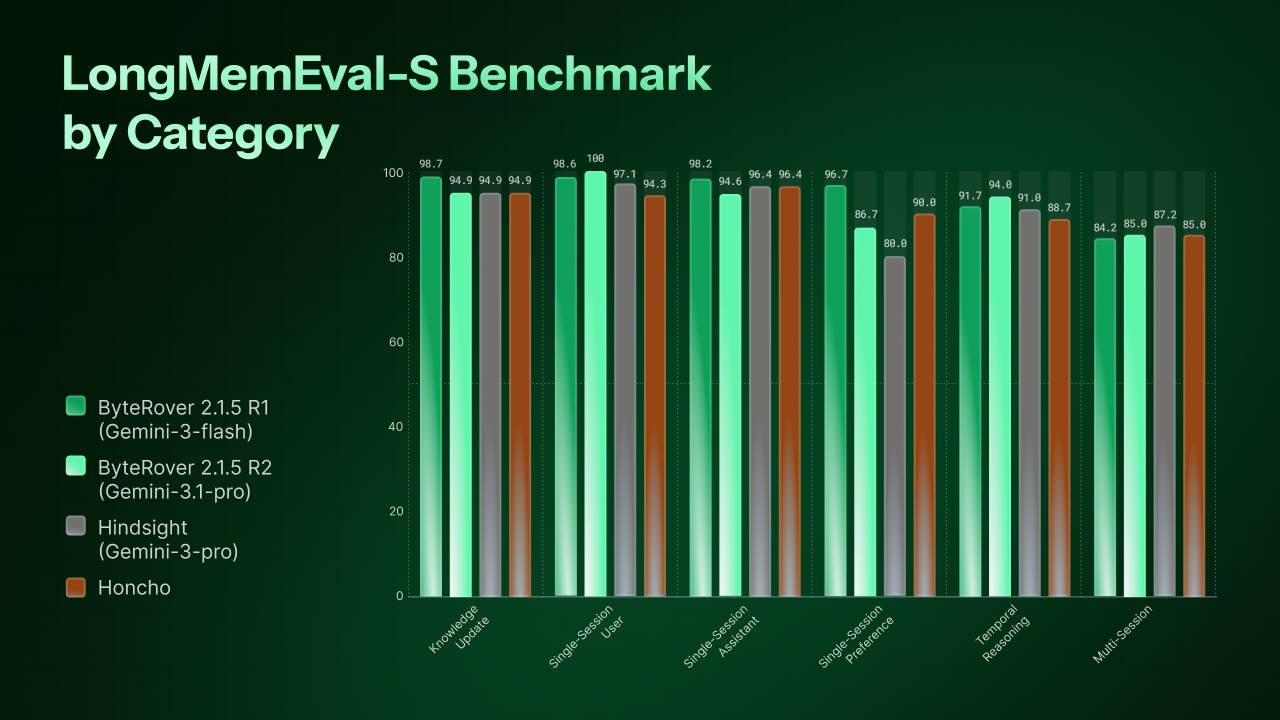
All metrics are LLM-as-Judge accuracy (%). See the paper, or self-hosted PDF for full details.
No Node.js required - everything is bundled.
curl -fsSL https://byterover.dev/install.sh | sh
Supported platforms: macOS ARM64, macOS x64 (Intel), Linux x64, Linux ARM64.
Requires Node.js >= 20.
npm install -g byterover-cli
brv --version
cd your/project
brv
The REPL auto-configures on first run - no setup needed. Type / to discover all available commands:
/curate "Auth uses JWT with 24h expiry" @src/middleware/auth.ts
/query How is authentication implemented?
ByteRover Cloud is a hosted platform for teams to sync, share, and manage context knowledge across projects and machines. Everything works locally by default - Cloud adds collaboration and persistence without changing your workflow.

Sign in from the dashboard, or run brv login with an API key.
Most users only need brv webui. The commands below are for advanced users and automation. Run brv --help for the full, up-to-date reference.
brv                  # Start interactive REPL
brv webui            # Open the ByteRover dashboard (primary UI)
brv status           # Show project and daemon status
brv curate           # Add context to knowledge storage
brv curate view      # View curate history
brv query            # Query context tree and knowledge
brv review pending   # List pending review operations
brv review approve   # Approve curate operations
brv review reject    # Reject curate operations
brv push             # Legacy — migrate or snapshot context to cloud
brv pull             # Legacy — restore context from cloud snapshot
Use
brv vc push/brv vc pullfor version-controlled sync going forward.
brv vc init              # Initialize version control for context tree
brv vc status            # Show version control status
brv vc add               # Stage files for the next commit
brv vc commit            # Save staged changes as a commit
brv vc log               # Show commit history
brv vc branch            # List, create, or delete branches
brv vc checkout          # Switch branches
brv vc merge             # Merge a branch into the current branch
brv vc clone             # Clone a ByteRover space repository
brv vc push              # Push commits to ByteRover cloud
brv vc pull              # Pull commits from ByteRover cloud
brv vc fetch             # Fetch refs from ByteRover cloud
brv vc remote            # Show current remote origin
brv vc remote add        # Add a named remote
brv vc remote set-url    # Update a remote URL
brv vc config            # Get or set commit author
brv vc reset             # Unstage files or undo commits
brv providers list       # List available LLM providers
brv providers connect    # Connect to an LLM provider
brv providers switch     # Switch active provider
brv providers disconnect # Disconnect a provider
brv model list           # List available models
brv model switch         # Switch active model
brv hub list             # List available hub packages
brv hub install          # Install a hub package
brv hub registry add     # Add a custom registry
brv hub registry list    # List registries
brv hub registry remove  # Remove a registry
brv connectors list      # List connectors
brv connectors install   # Install a connector
brv space list       # Deprecated — use web dashboard
brv space switch     # Deprecated — use brv vc clone
brv ships with operational defaults that suit most users. The brv settings command group lets you inspect and override these values.
brv settings                    # List all settings with current and default values
brv settings list               # Alias for `brv settings`
brv settings get <key>          # Show current and default for one key
brv settings set <key> <value>  # Update one key (restart required)
brv settings reset <key>        # Restore one key to its default (restart required)
Available keys:
| Key | Default | What it controls |
|---|---|---|
agentPool.maxSize | 10 | Maximum concurrent active projects (one agent process per project) |
agentPool.maxConcurrentTasksPerProject | 5 | Parallel brv curate / brv query tasks within a single project |
llm.iterationBudgetMs | 600000 | Wall-clock budget for the agentic loop on one task, in milliseconds |
llm.requestTimeoutMs | 120000 | Wall-clock budget for one direct LLM HTTP request, in milliseconds |
taskHistory.maxEntries | 1000 | Number of task records brv query-log view retains per project |
Raise llm.iterationBudgetMs when a single brv curate or brv query on a slow local LLM (Ollama on CPU, heavy quantization, cold model load) routinely hits the default 10-minute cap on legitimate work. Lower it on cloud providers when you want a stuck task to surface as an error faster instead of waiting out the full budget. The cap is enforced per task, not per request.
llm.requestTimeoutMs bounds one HTTP request to the LLM. A frozen Ollama or LM Studio connection aborts at this boundary and the retry layer treats it as a transient error rather than wasting the full iteration budget. The setting must satisfy llm.requestTimeoutMs <= llm.iterationBudgetMs; the daemon rejects writes that violate the rule and falls back to defaults for both keys when the file violates it at startup. Suggested presets:
| Profile | llm.requestTimeoutMs | llm.iterationBudgetMs |
|---|---|---|
| Cloud | 120000 (2 min) | 600000 (10 min) |
| Local LLM, fast GPU | 300000 (5 min) | 1200000 (20 min) |
| Local LLM, CPU / heavy quantization | 900000 (15 min) | 3600000 (60 min) |
Settings persist in settings.json under the brv global data directory:
$XDG_DATA_HOME/brv/settings.json (defaults to ~/.local/share/brv/settings.json)~/Library/Application Support/brv/settings.json%LOCALAPPDATA%/brv/settings.jsonSet the BRV_DATA_DIR environment variable to override the directory.
Changes apply after brv restart. The daemon reads the file once at startup and does not observe file changes during runtime. This keeps every running agent on the same configuration for the lifetime of the daemon.
Example session:
$ brv settings list
KEY                                       CURRENT  DEFAULT  RESTART?
agentPool.maxSize                         10       10       yes
agentPool.maxConcurrentTasksPerProject    5        5        yes
taskHistory.maxEntries                    1000     1000     yes

$ brv settings set agentPool.maxSize 20
Setting saved. Run `brv restart` to apply.

$ brv settings get agentPool.maxSize
20  (default: 10)
Every command supports --format json for scripting. Validation errors (unknown key, value out of range) exit with code 1 and a message naming the key.
brv mcp              # Start MCP server
brv login            # Authenticate to ByteRover
brv logout           # Disconnect and clear credentials
brv locations        # List registered projects
brv restart          # Restart daemon
brv debug            # Debug mode
Run brv --help for the full command reference.
ByteRover CLI supports 20 LLM providers out of the box. Connect and switch providers from the dashboard, or use brv providers connect / brv providers switch.
| Provider | Description |
|---|---|
| Anthropic | Claude models |
| OpenAI | GPT models |
| Gemini models | |
| Groq | Fast inference |
| Mistral | Mistral models |
| xAI | Grok models |
| Cerebras | Fast inference |
| Cohere | Command models |
| DeepInfra | Open-source model hosting |
| DeepSeek | DeepSeek V3 and R1 reasoning models |
| OpenRouter | Multi-provider gateway |
| Perplexity | Search-augmented models |
| TogetherAI | Open-source model hosting |
| Vercel | AI SDK provider |
| Minimax | Minimax models |
| Moonshot | Kimi models |
| GLM | GLM models |
| GLM Coding Plan | GLM models on Z.AI Coding Plan subscription |
| OpenAI-Compatible | Any OpenAI-compatible API |
| ByteRover | ByteRover's hosted models |
Vocabulary
- Worktree link — a subdirectory pointer to a parent project (
brv worktree)- Source — a read-only reference to another project's knowledge (
brv source)- Origin — where an indexed search result came from (
localvsshared)
ByteRover can run from a linked subdirectory without creating a nested .brv/.
projectRoot: the directory that owns .brv/config.jsonworktreeRoot: the linked worktree directory, or projectRoot when unlinkedclientCwd: the shell cwd where you ran brvWhen you run brv query or brv curate from a linked worktree, implicit defaults use worktreeRoot so scope stays stable even if clientCwd drifts deeper into the package. Explicit relative paths that you pass yourself, such as brv curate -f ./src/auth.ts, still resolve from clientCwd to match normal shell behavior.
Use brv worktree add from the project root to register a subdirectory (or sibling) as a worktree. This creates a .brv pointer file in the target directory that redirects to the parent project — the same pattern git uses for git worktree. Use brv worktree remove to unregister, and brv worktree list to inspect. To search another project's knowledge from here, use brv source add <path> (with brv source list / brv source remove to inspect or detach).
Visit docs.byterover.dev for full guides on setup, integrations, and advanced usage.
| Topic | Description |
|---|---|
| Getting Started | Installation, first run, and basic usage |
| Cloud Sync | Push/pull workflows and team sharing |
| Version Control | Context tree branching, commits, and collaboration |
| LLM Providers | Provider setup and model configuration |
| AI Agent Integrations | Using ByteRover with Cursor, Claude Code, Windsurf, etc. |
| Hub & Connectors | Skills, bundles, and the connector ecosystem |
| CLI Reference | Run brv --help |
We welcome contributions! See our Contributing Guide for development setup, coding standards, and the PR workflow.
ByteRover CLI is built and maintained by the ByteRover team.
Elastic License 2.0. See LICENSE for full terms.
Sign in to join the discussion.
No comments yet. Be the first to say what this is good for.
🪨 why use many token when few token do trick — Claude Code skill that cuts 65% of tokens by talking like caveman

The best-benchmarked open-source AI memory system. And it's free.

Orca is the ADE for working with a fleet of parallel agents. Run any coding agent with your own subscription. Available on desktop, mobile and remote runtime.

A cross-platform desktop All-in-One assistant for Claude Code, Codex, OpenCode, OpenClaw, Grok Build & Hermes Agent. Only official website: ccswitch.io

Never stop coding. Free MIT AI gateway: one endpoint, 352 providers (150+ free), 1200+ models Kimi, Claude, GPT, Gemini, GLM, DeepSeek, MiniMax. Works with Claude Code, Codex, Cursor, OpenCode, Cline & Copilot. Quota-aware auto-fallback, RTK+Caveman compression saves 15-95% tokens, MCP/A2A, Desktop/PWA. Built by 550+ contributors

Compress tool outputs, logs, files, and RAG chunks before they reach the LLM. 20% fewer tokens for coding agents, 60-95% fewer tokens for JSON, same answers. Library, proxy, MCP server.