

JuliusBrussee/
caveman

🪨 why use many token when few token do trick — Claude Code skill that cuts 65% of tokens by talking like caveman
105k
1 add
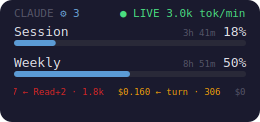
Claude Usage Widget shows your Claude Code limits in a transparent always-on-top overlay, with a popup for deeper usage, cost, forecast, and history views. It reads Claude Code’s usage data directly, can also poll local Codex usage if you opt in, and keeps its state in `config.json`.
Builders who use Claude Code and want live usage, cost, and limit tracking on their desktop.
You can keep track of session and weekly usage without opening Claude Code or re-checking limits by hand.
Shows session and weekly Claude Code utilization in an always-on-top desktop widget.
Adds Codex 5h and weekly usage rows when you enable the `codex` provider.
Shows per-turn cost, model cost breakdowns, burn-rate forecasts, and projected spend.
Sends threshold, burn, anomaly, and budget notifications with optional webhooks.
Includes 11 themes and two OSD view modes that persist in config.
Provides `--json`, `--once`, `--export`, `--statusline`, and a localhost `/usage` API for scripts and status bars.
pip install --user --upgrade claude-usage-widget
claude-usage              # launches the OSD overlay (foreground)
claude-usage --detach     # …or run it in the background and free the shell (Linux/macOS; on Windows use Start-Process or pythonw)
claude-usage --version    # 0.12.5
systemctl --user enable --now claude-usage
brew tap bozdemir/tap
brew install claude-usage-widget
git clone https://github.com/bozdemir/claude-usage-widget.git
cd claude-usage-widget
pip install -e .
python3 main.py
A cross-platform desktop widget that displays your Claude Code usage limits in real time. Always-on-top OSD overlay showing session and weekly utilization — built with PySide6 (Qt), so a single pip install works on Linux, macOS, and Windows.




Always-on-top OSD: session + weekly utilisation, reset timers, live token-per-minute badge, subagent counter, and a scrolling per-turn cost ticker along the bottom.
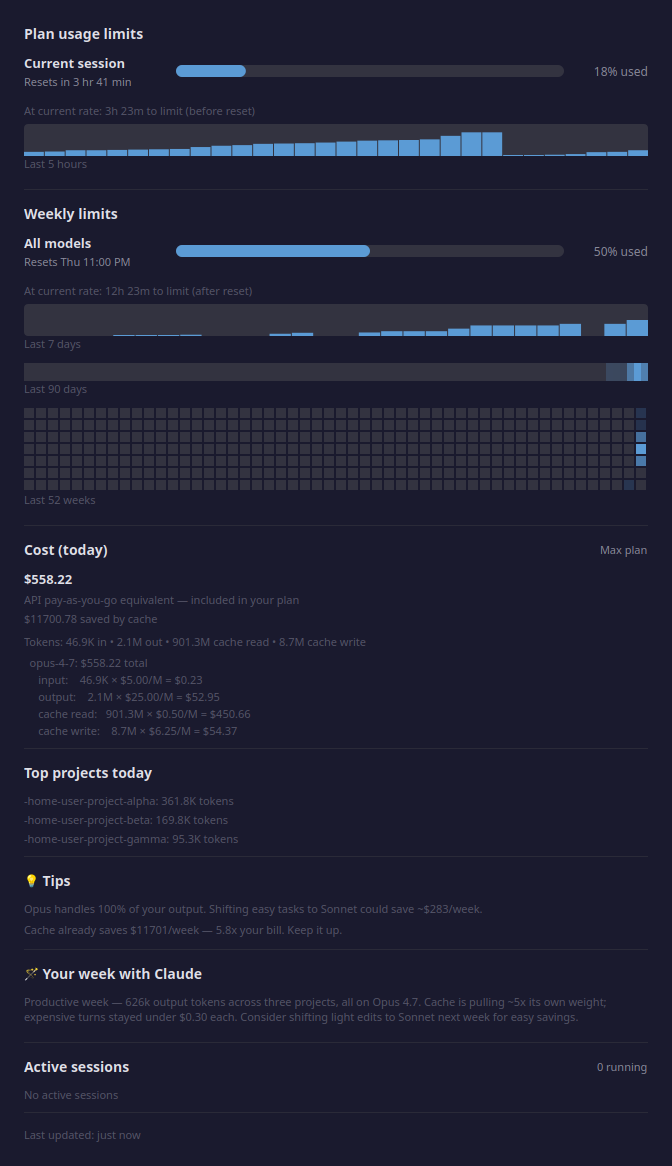
Click the OSD to open the detail popup: forecasts, 5h/7d sparklines, 90-day heatmap, 52-week GitHub-style calendar, per-model cost breakdown with Anthropic-published rates, top projects, tips, and a Claude-authored weekly summary.
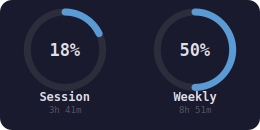
Two layouts, switch with right-click → OSD View ▸. Selection persists to ~/.config/claude-usage/config.json so a restart keeps it.
| Bars — default, includes the scrolling ticker | Gauge — circular rings, car-dashboard vibe |
|  |
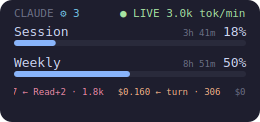
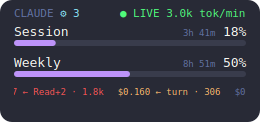
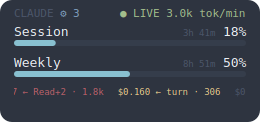
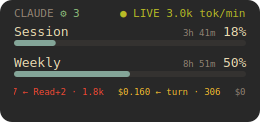
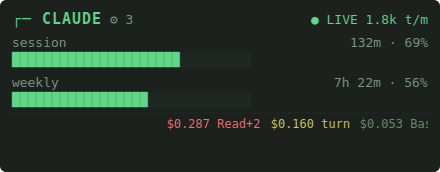
11 built-in palettes — 5 classics + 6 Claude-designed skins. Right-click the OSD → Theme ▸ to switch instantly; the choice persists to ~/.config/claude-usage/config.json.
Classics (dark):
| default | catppuccin-mocha | dracula |
|  |  |
| nord | gruvbox-dark | |
 |  |
Claude-designed skins:
| terminal htop vibe, green-on-black | dashboard Bloomberg-terminal cool blue | hud car-dashboard amber |
 | 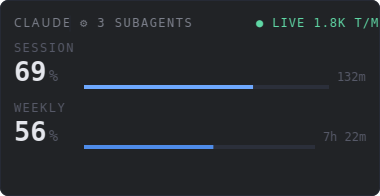 | 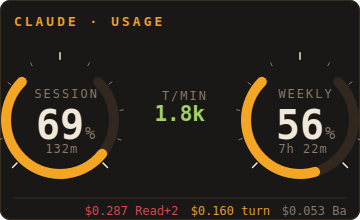 |
| receipt (light) thermal-paper cream + red | strip cool mint on mono-gray | brutalist (light) white, heavy rules, crimson |
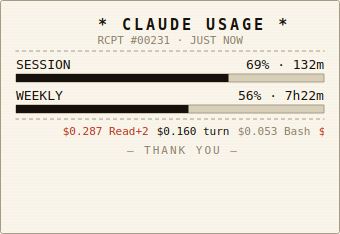 |  | 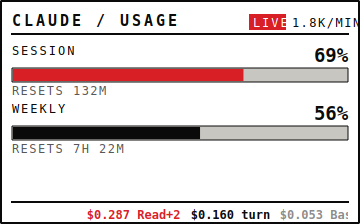 |
Gauge variants for every theme are available at screenshots/osd-gauge-<theme>.png.
pip install -- no apt/brew/system libraries required, Qt is bundled/api/oauth/usage endpoint (the same data the Claude UI shows)"codex" to the providers config and the widget shows Codex 5h/weekly rows beneath Claude's (extra bars in bars view, a 2×2 ring grid in gauge), rendered natively in all 11 themes. Auto-hides when the Codex CLI is missing or logged out; off by default. See Second provider: OpenAI Codex.● LIVE 5.3k tok/min badge on the OSD while a Claude Code session is actively writing, derived from the conversation JSONLs$0.156 ← Bash · 116), colour-coded by quartile within the visible window so the tape always stays visually varied. Toggle via right-click → "Show cost ticker" or set "show_ticker": false in config.json."show_news": true in config.json.CLAUDE title gets a ⚙ N counter next to it showing how many are currently writing. Hidden when zero so single-session use isn't cluttered.refresh_seconds / refresh_max_seconds)osd_position, osd_x/osd_y)cache_control changes with a concrete $ savings estimate▲42% / ▲SPIKE / ▲STORM) plus a debounced, once-per-episode notification when your 5-hour window burns abnormally fast or a single turn / retry-loop spikes tokens. The badge renders on the 5 classic themes for now; notifications and the burn_alert webhook fire on all 11monthly_budget_usd to see month-to-date + projected end-of-month spend in the popup and get a once-per-month heads-up when you're on track to exceed ithttp://127.0.0.1:8765/usage for tmux / polybar / waybar integrations (prompt previews redacted at the serialization boundary)--json, --once, --field, --export csv|json (with --days N, default 30) for scripts and status bars, plus --statusline for Claude Code's built-in statusLineclaude-usage launch (login item, script, double-click) detects the running one via a per-user lock file and exits cleanly instead of stacking a duplicate OSD; a lock left behind by a crashed instance is reclaimed automatically.CLAUDE_CODE_OAUTH_TOKEN environment variable first, then ~/.claude/.credentials.json, then the macOS Keychainpip install --user --upgrade claude-usage-widget
claude-usage # launches the OSD overlay (foreground)
claude-usage --detach # …or run it in the background and free the shell (Linux/macOS; on Windows use Start-Process or pythonw)
claude-usage --version # 0.12.5
That's it — no apt, no brew, no PyGObject, no rumps. pip pulls in just two pure-Python wheels (PySide6-Essentials, which ships Qt, and certifi for HTTPS), so the widget is self-contained with zero system libraries.
Add claude-usage --detach to your desktop environment's autostart (KDE/GNOME: Autostart settings — make sure the entry points at the venv/pip path that actually has the widget installed), or use a systemd user service:
# ~/.config/systemd/user/claude-usage.service
[Unit]
Description=Claude Usage Widget
After=graphical-session.target

[Service]
ExecStart=%h/.local/bin/claude-usage
Restart=on-failure

[Install]
WantedBy=graphical-session.target
systemctl --user enable --now claude-usage
The single-instance guard makes double-starts harmless — a second launch just exits.
If you prefer brew over pip:
brew tap bozdemir/tap
brew install claude-usage-widget
git clone https://github.com/bozdemir/claude-usage-widget.git
cd claude-usage-widget
pip install -e .
python3 main.py
| Action | Effect |
|---|---|
| Left-click | Open the details popup |
| Left-click drag | Move the OSD |
| Right-click | Open context menu (Details, Refresh, OSD Opacity, OSD View, OSD Position, Theme, Minimize/Restore, Show cost ticker, Show news ticker, Always on top, version, Quit) |
| Scroll up / down | Resize (0.6x -- 4.0x) |
~/.config/claude-usage/config.json so a restart keeps it<version> -- a dim, disabled line showing the running build's version; when a newer release is published an ↑ Update available: <tag> banner appears at the top of the menu, under the usage summary (click to copy the pip install --upgrade command)<time> ago -- a dim, non-clickable line showing how long since the last successful refreshIf your Claude Code statusLine command dumps its rate-limit payload to a JSON file, the widget can use it as a zero-cost data source — Claude Code rewrites the statusline continuously during an active session, so the file carries the same numbers as /api/oauth/usage at seconds freshness and no API spend. Point statusline_cache_path at a file shaped like:
{
  "captured_at": "2026-07-11T22:52:05+09:00",
  "rate_limits": {
    "five_hour": {"used_percentage": 54, "resets_at": 1783795800},
    "seven_day": {"used_percentage": 46, "resets_at": 1784026800}
  }
}
With this configured the widget uses it two ways:
2 × refresh_seconds, the /api/oauth/usage call is skipped and only forced through at most once per usage_endpoint_min_seconds. The endpoint is a low-budget resource shared with Claude Code itself; the forced calls keep the model-scoped/overage fields fresh and pick up consumption from headless claude -p runs, which never render a statusline.Producing the file is up to your statusline script (it receives the payload from Claude Code on stdin and can tee the relevant part out). Expired windows in a stale dump are clamped to zero, and a missing/garbled file just disables the feature for that refresh.
Run OpenAI Codex alongside Claude Code? The widget can show its usage too, right beneath Claude's — no separate menu-bar app. Add "codex" to providers in config.json:
{
    "providers": ["claude", "codex"]
}
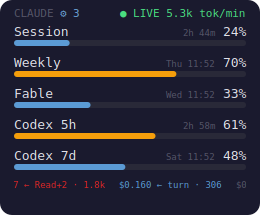
You get two extra rows in bars view — Codex 5h and Codex 7d — or a second pair of rings (a 2×2 grid) in gauge view, styled to match whichever of the 11 themes you're on.
codex app-server (account/rateLimits/read) — the same numbers codex reports itself. No scraping, no account data stored or logged.codex_poll_seconds (default 300 s), with an on-disk cache served in between; the read is hard-bounded so a stalled codex can never hang a refresh.codex CLI is missing, logged out, or returns no rate-limit data. POSIX-only for now (Linux/macOS).The default providers is ["claude"], so existing users see no change.
All settings are optional. Copy config.json.example to config.json and edit the values you want to change:
cp config.json.example config.json
{
    "daily_message_limit": 200,
    "weekly_message_limit": 1000,
    "daily_token_limit": 5000000,
    "weekly_token_limit": 25000000,
    "refresh_seconds": 60,
    "refresh_max_seconds": 300,
    "osd_opacity": 0.75,
    "osd_scale": 1.0
}
| Setting | Default | Description |
|---|---|---|
refresh_seconds | 60 | Base poll interval — how often to fetch new data from the API (seconds) |
refresh_max_seconds | 300 | Max poll interval when the API rate-limits/errors; the interval backs off exponentially toward this cap and snaps back to refresh_seconds on the next clean refresh |
statusline_cache_path | "" | Path to a statusLine-dumped rate-limit JSON file (see Statusline-fed rate limits). Empty = disabled. |
usage_endpoint_min_seconds | 300 | With statusline_cache_path set: while the dump is seconds-fresh, /api/oauth/usage is called at most once per this many seconds. |
osd_opacity | 0.75 | OSD background opacity (0.15--1.0) |
providers | ["claude"] | Add "codex" to also poll the local OpenAI Codex CLI (codex app-server) and show its 5h/weekly usage beneath Claude's — an extra ring row in gauge view, two extra bars in bars view. POSIX-only. |
codex_poll_seconds | 300 | How often (seconds) to spawn the codex app-server RPC; an on-disk cache is served in between. |
daily_message_limit | 200 | Daily message limit for local tracking in the popup |
weekly_message_limit | 1000 | Weekly message limit for local tracking in the popup |
daily_token_limit | 5000000 | Daily token limit for local tracking |
weekly_token_limit | 25000000 | Weekly token limit for local tracking |
claude_dir | ~/.claude | Path to the Claude Code data directory |
theme | default | Color theme for the OSD and popup. One of default, catppuccin-mocha, dracula, nord, gruvbox-dark, terminal, dashboard, hud, receipt, strip, brutalist |
show_ticker | true | Whether the scrolling per-turn cost ticker is painted at the bottom of the OSD. Toggle at runtime via right-click → "Show cost ticker". |
show_news | false | Whether the live Anthropic/Claude news headline strip is shown on the OSD. Off by default because it makes outbound calls to a 3rd-party feed. Toggle at runtime via right-click → "Show news ticker". |
osd_position | top-right | Where the OSD anchors: top-left, top-right, bottom-left, bottom-right, or custom. Set from right-click → "OSD Position", or automatically to custom when you drag the overlay. |
osd_x / osd_y | null | Exact screen coordinates used only when osd_position is custom. Written automatically on drag. |
osd_scale | 1.0 | OSD zoom level (0.6–4.0). Updated automatically when you scroll the mouse wheel over the OSD, so it reopens at the same size. |
osd_minimized | false | Whether the OSD is in its collapsed thin-strip form. Written automatically via right-click → "Minimize / Restore". |
osd_visible | true | Whether the OSD overlay is shown. Written on quit so the widget reopens in the same visible/hidden state. |
osd_always_on_top | true | Keep the OSD pinned above other windows. Set to false (or right-click → "Always on top") to let it sit as a normal background desktop widget. |
osd_view_mode | bars | OSD layout: bars (progress bars + cost ticker) or gauge (circular rings). |
notifications_enabled | true | Whether desktop notifications fire when usage crosses a threshold. |
notify_thresholds | [0.75, 0.90] | Utilisation fractions that fire a notification when first crossed. |
api_server_enabled | false | Enable the opt-in localhost JSON API (/usage, /healthz). |
api_server_host / api_server_port | 127.0.0.1 / 8765 | Bind address and port for the localhost API. |
webhooks | {} | Map of event → URL (threshold_crossed, daily_report, anomaly, budget_projection, burn_alert). |
peak_awareness_enabled | true | Show an unobtrusive "reduced 5h limit" hint in the popup during Anthropic's weekday peak window. Tune the window with peak_start_hour (5), peak_end_hour (11, exclusive), peak_timezone (America/Los_Angeles), peak_weekdays ([0,1,2,3,4], Mon–Fri). |
monthly_budget_usd | 0.0 | Monthly spend cap (USD). Set > 0 to show month-to-date + projected spend in the popup and a once-per-month alert when projected to exceed it. 0 disables the feature (and its extra month-wide scan). |
budget_notify_enabled / budget_notify_ratio | true / 1.0 | Whether the budget projection notification fires, and at what fraction of the cap (0.9 warns at 90%). |
burn_alerts_enabled | true | Real-time OSD badge + debounced notification when the 5h window burns fast or a turn / retry-loop spikes tokens. Tune with burn_warn_pct_per_min (2.0), burn_crit_pct_per_min (5.0), burn_window_seconds (600), spike_token_multiplier (4.0), spike_min_tokens (20000), spike_baseline_min_turns (5), retry_storm_turns (3), retry_storm_window_seconds (120), burn_alert_cooldown_seconds (900). |
Keys omitted from config.json fall back to built-in defaults, so config.json.example is an intentionally minimal starter listing only the most commonly changed keys. Everything else in the table above — the opt-in providers (Codex), statusline/endpoint tuning, the burn / peak / budget alerts, the localhost API, webhooks, and the auto-persisted OSD state — simply uses its default until you add it.
The widget ships with 11 built-in color themes — 5 classics plus 6 Claude-designed skins. Select one by adding "theme": "<name>" to your config.json:
{
    "theme": "dracula"
}
Available themes (gallery above):
Classics (dark):
Sign in to join the discussion.
No comments yet. Be the first to say what this is good for.
🪨 why use many token when few token do trick — Claude Code skill that cuts 65% of tokens by talking like caveman

The best-benchmarked open-source AI memory system. And it's free.

Orca is the ADE for working with a fleet of parallel agents. Run any coding agent with your own subscription. Available on desktop, mobile and remote runtime.

A cross-platform desktop All-in-One assistant for Claude Code, Codex, OpenCode, OpenClaw, Grok Build & Hermes Agent. Only official website: ccswitch.io

Never stop coding. Free MIT AI gateway: one endpoint, 352 providers (150+ free), 1200+ models Kimi, Claude, GPT, Gemini, GLM, DeepSeek, MiniMax. Works with Claude Code, Codex, Cursor, OpenCode, Cline & Copilot. Quota-aware auto-fallback, RTK+Caveman compression saves 15-95% tokens, MCP/A2A, Desktop/PWA. Built by 550+ contributors

Compress tool outputs, logs, files, and RAG chunks before they reach the LLM. 20% fewer tokens for coding agents, 60-95% fewer tokens for JSON, same answers. Library, proxy, MCP server.