
DietrichGebert/ponytailPlugins
Makes your AI agent think like the laziest senior dev in the room. The best code is the code you never wrote.
138k
1 add
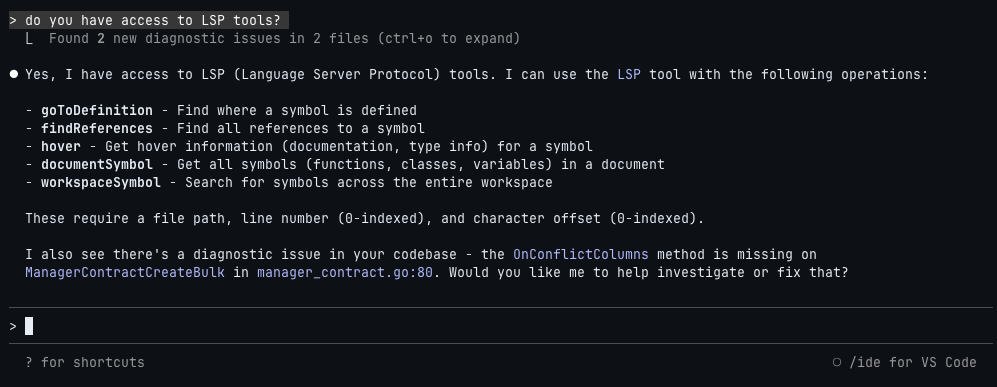
This repository packages language server plugins for Claude Code so the assistant can use definition lookup, references, hover, symbols, implementation search, and call hierarchy. It also enables automatic diagnostics for supported files. Each language has its own plugin directory with the LSP config and hook files needed to start and manage the server.
Builders who use Claude Code and want their agent to understand and inspect code in many languages.
You can get IDE-like navigation and diagnostics inside Claude Code instead of re-explaining code structure by hand.
Claude Code gets built-in LSP actions like go to definition, find references, hover, document symbols, workspace symbols, implementation lookup, and call hierarchy.
Supported servers run in the background and report errors and warnings as you work.
The collection covers Bash, C/C++, C#, Clojure, Dart, Elixir, Gleam, Go, Java, Kotlin, Lua, Nix, OCaml, PHP, Python, Ruby, Rust, Swift, Terraform, TypeScript/JavaScript, YAML, and Zig.
You can add the marketplace once, then install individual language plugins from Claude Code with `/plugin install ...`.
Each plugin uses its own `.lsp.json` file and optional hooks to start the right server and handle setup.
claude
/plugin marketplace add boostvolt/claude-code-lsps
/plugin
brew install bash-language-server
npm install -g bash-language-server
brew install llvm
xcode-select --install
A collection of Language Server Protocol (LSP) plugins for Claude Code.
[!NOTE] LSP Integration: If you're on v2.0.69 through v2.0.x, LSP integration is broken due to a race condition (#14803, #13952). This has been fixed in v2.1.0+. Please upgrade to the latest version.
The Language Server Protocol provides IDE-like intelligence to Claude Code. On startup, Claude Code automatically starts LSP servers from installed plugins and exposes them to Claude in two ways:
LSP Tool - A builtin tool with 9 operations mapping directly to LSP commands:
| Operation | Description |
|---|---|
goToDefinition | Find where a symbol is defined |
findReferences | Find all references to a symbol |
hover | Get hover info (docs, type info) for a symbol |
documentSymbol | Get all symbols (functions, classes, variables) in a document |
workspaceSymbol | Search for symbols across the entire workspace |
goToImplementation | Find implementations of an interface/abstract method |
prepareCallHierarchy | Get call hierarchy item at a position |
incomingCalls | Find all functions/methods that call the function at a position |
outgoingCalls | Find all functions/methods called by the function at a position |
Automatic Diagnostics - Real-time error and warning detection similar to the VS Code integration, but operating independently. These diagnostics tend to be faster and more comprehensive than the VS Code equivalent.
| Plugin | Language | Extensions | LSP |
|---|---|---|---|
| bash-language-server | Bash/Shell | .sh .bash .zsh .ksh | bash-language-server |
| clangd | C/C++/Objective-C | .c .h .cpp .hpp .cc .cxx .hxx .m .mm | clangd |
| clojure-lsp | Clojure | .clj .cljs .cljc .edn | clojure-lsp |
| dart-analyzer | Dart/Flutter | .dart | Dart SDK |
| elixir-ls | Elixir | .ex .exs | elixir-ls |
| gleam | Gleam | .gleam | gleam |
| gopls | Go | .go | gopls |
| intelephense | PHP | .php .phtml | Intelephense |
| jdtls | Java | .java | jdtls |
| kotlin-lsp | Kotlin | .kt .kts | kotlin-lsp |
| lua-language-server | Lua | .lua | lua-language-server |
| nixd | Nix | .nix | nixd |
| ocaml-lsp | OCaml | .ml .mli | ocaml-lsp |
| omnisharp | C# | .cs .csx | OmniSharp |
| pyright | Python | .py .pyi | pyright |
| rust-analyzer | Rust | .rs | rust-analyzer |
| solargraph | Ruby | .rb .rake .gemspec | Solargraph |
| sourcekit-lsp | Swift | .swift | sourcekit-lsp |
| terraform-ls | Terraform | .tf .tfvars | terraform-ls |
| vtsls | TypeScript/JavaScript | .ts .tsx .js .jsx .mjs .cjs | vtsls |
| yaml-language-server | YAML | .yaml .yml | yaml-language-server |
| zls | Zig | .zig .zon | zls |
claude
/plugin marketplace add boostvolt/claude-code-lsps
Install individual plugins:
/plugin install bash-language-server@claude-code-lsps
/plugin install clangd@claude-code-lsps
/plugin install clojure-lsp@claude-code-lsps
/plugin install dart-analyzer@claude-code-lsps
/plugin install elixir-ls@claude-code-lsps
/plugin install gleam@claude-code-lsps
/plugin install gopls@claude-code-lsps
/plugin install intelephense@claude-code-lsps
/plugin install jdtls@claude-code-lsps
/plugin install kotlin-lsp@claude-code-lsps
/plugin install lua-language-server@claude-code-lsps
/plugin install nixd@claude-code-lsps
/plugin install ocaml-lsp@claude-code-lsps
/plugin install omnisharp@claude-code-lsps
/plugin install pyright@claude-code-lsps
/plugin install rust-analyzer@claude-code-lsps
/plugin install solargraph@claude-code-lsps
/plugin install sourcekit-lsp@claude-code-lsps
/plugin install terraform-ls@claude-code-lsps
/plugin install vtsls@claude-code-lsps
/plugin install yaml-language-server@claude-code-lsps
/plugin install zls@claude-code-lsps
Or browse and install interactively:
/plugin
Each plugin will attempt to auto-install its LSP server on first use. If auto-install fails, use the manual instructions below.
brew install bash-language-server
Or via npm:
npm install -g bash-language-server
brew install llvm
Or via Xcode Command Line Tools:
xcode-select --install
Supports C, C++, Objective-C (.m), and Objective-C++ (.mm) files.
brew install omnisharp/omnisharp-roslyn/omnisharp-mono
Or via dotnet:
dotnet tool install -g csharp-ls
Install Dart SDK:
brew tap dart-lang/dart
brew install dart
Or install Flutter (includes Dart):
# See https://docs.flutter.dev/get-started/install
Ensure dart is in your PATH.
brew install elixir-ls
Requires Elixir to be installed:
brew install elixir
go install golang.org/x/tools/gopls@latest
Ensure ~/go/bin is in your PATH.
brew install jdtls
Or download manually from Eclipse JDT Language Server.
Requires Java 21+ runtime.
brew install JetBrains/utils/kotlin-lsp
Or download from GitHub releases.
Requires Java 17+.
opam install ocaml-lsp-server
Requires opam to be installed:
brew install opam
opam init
npm install -g intelephense
pip install pyright
gem install solargraph
brew install rust-analyzer
Or via rustup:
rustup component add rust-analyzer
sourcekit-lsp is bundled with Xcode. Install Xcode from the App Store:
# Verify installation
xcrun --find sourcekit-lsp
Or install a Swift toolchain from swift.org/install.
npm install -g @vtsls/language-server typescript
brew install yaml-language-server
Or via npm:
npm install -g yaml-language-server
my-lsp/
├── .claude-plugin/
│   └── plugin.json
├── .lsp.json
└── hooks/
    ├── hooks.json
    └── check-my-lsp.sh
The .lsp.json file configures the language server:
{
  "language-id": {
    "command": "lsp-server-command",
    "extensionToLanguage": {
      ".ext": "language-id"
    }
  }
}
Required Fields
| Field | Type | Description |
|---|---|---|
command | string | Command to start the LSP server |
extensionToLanguage | object | Maps file extensions to language IDs |
Optional Fields
| Field | Type | Description |
|---|---|---|
args | string[] | Arguments passed to the command |
transport | string | Communication method: "stdio" (default) or "socket" |
env | object | Environment variables to set when starting the server |
initializationOptions | object | Options passed during LSP initialization |
settings | object | Server-specific settings via workspace/didChangeConfiguration |
workspaceFolder | string | Workspace folder path for the server |
startupTimeout | number | Max time to wait for server startup (milliseconds) |
shutdownTimeout | number | Max time to wait for graceful shutdown (milliseconds) |
restartOnCrash | boolean | Whether to automatically restart the server if it crashes |
maxRestarts | number | Max restart attempts before giving up (default: 3) |
.lsp.json:
{
  "go": {
    "command": "gopls",
    "extensionToLanguage": {
      ".go": "go"
    }
  }
}
.claude-plugin/plugin.json:
{
  "name": "gopls",
  "description": "Go language server",
  "version": "1.0.0",
  "author": {
    "name": "Your Name"
  },
  "license": "MIT",
  "repository": "https://github.com/boostvolt/claude-code-lsps"
}
hooks/hooks.json (optional auto-install):
{
  "hooks": {
    "SessionStart": [
      {
        "hooks": [
          {
            "type": "command",
            "command": "bash ${CLAUDE_PLUGIN_ROOT}/hooks/check-gopls.sh",
            "timeout": 30
          }
        ]
      }
    ]
  }
}
MIT
Sign in to join the discussion.
No comments yet. Be the first to say what this is good for.
Makes your AI agent think like the laziest senior dev in the room. The best code is the code you never wrote.

Graphs that teach > graphs that impress. Turn any code into an interactive knowledge graph you can explore, search, and ask questions about. Works with Claude Code, Codex, Cursor, Copilot, Gemini CLI, and more.

OmO: Just type "mass ulw" keyword with your prompt. Now you are the master of graph engineering.
Persistent Context Across Sessions for Every Agent – Captures everything your agent does during sessions, compresses it with AI, and injects relevant context back into future sessions. Works with Claude Code, OpenClaw, Codex, Gemini, Hermes, Copilot, OpenCode + More
Opinionated Oxlint rules for rejecting low-evidence TypeScript and JavaScript patterns
Teams-first Multi-agent orchestration for Claude Code