ObsidianOS: Work
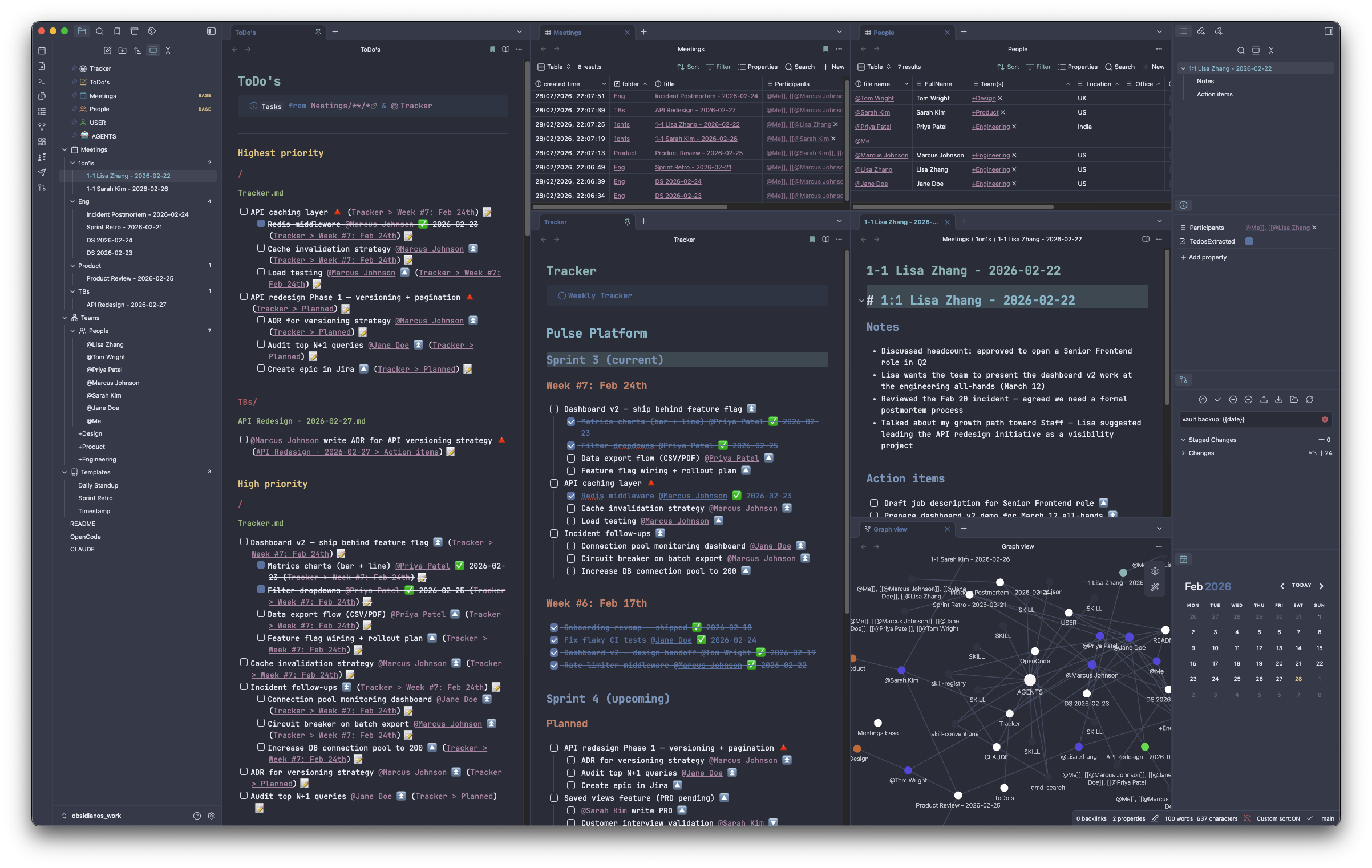
An Obsidian vault wired with AI agent skills — an Agentic Operating System for Thinkers.
Sneak Peek
Slash commands that run inside your vault, powered by any AI agent:
/meeting wrap pending → Gmail → triage → cache → participants → todos
/mail-transcripts → Drain Gemini transcript emails into Notes:
/organize-meetings → Triage Meetings/_inbox/ into the right folder
/cache-notes → Embed AI meeting transcripts
/fill-participants → Resolve names to [[@Person]] wikilinks
/followup-todos → Extract action items as plain markdown bullets
/note-status → Verify notes are fully processed
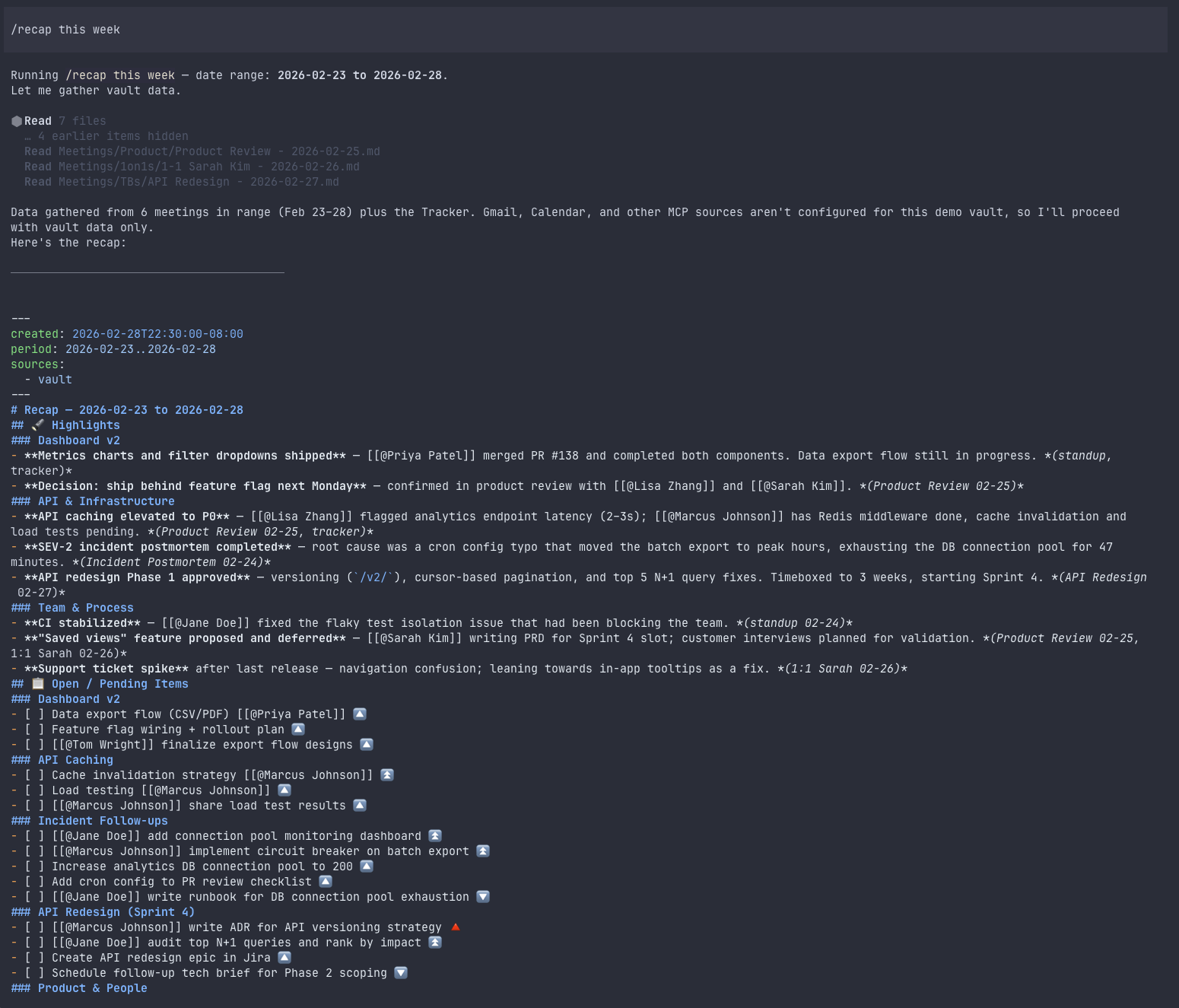
/recap → Weekly summary from email, Slack, Jira & vault
/vault-health → Audit unresolved links and orphans
/commit → Stage & commit with inferred intent
/sync-upstream-obsidianos → Pull updates from upstream ObsidianOS
Agent-agnostic — works with Cursor, Claude Code, OpenCode, or any MCP-compatible client. Clone it, fill in USER.md, and go.
Compatible agents
| Agent | Support level | Notes |
|---|
| Cursor IDE | Full | Loads .cursor/rules/ and .cursor/mcp.json automatically |
Cursor CLI (cursor) | Full | Same engine in background/headless mode |
| Claude Code | Full | Reads AGENTS.md + CLAUDE.md natively; see CLAUDE.md for QMD MCP setup |
| OpenCode / Crush | Full | Reads OpenCode.md; see OpenCode.md for QMD MCP setup |
| OpenClaw | Full | Workspace skills in skills/ (symlink to .agents/skills/); config in ~/.openclaw/openclaw.json |
| Other MCP-compatible clients | Partial | Can use the QMD MCP server; agent instructions won't auto-load |
Skills
| Skill | What it does |
|---|
/meeting | Create or wrap up meeting notes (from Google Calendar or manual) |
/cache-notes | Fetch & embed AI meeting transcripts as Obsidian callouts |
/fill-participants | Resolve names in notes to [[@Person]] wikilinks |
/followup-todos | Extract action items as plain markdown bullets (no Tasks checkboxes) |
/recap | Weekly recap from emails, Slack, Jira, and vault notes |
/note-status | Verify meeting notes are fully processed (Notes, Cache, Participants, Todos) |
/commit | Stage and commit — accepts file/folder scope, free-text intent, or amend |
/sync-upstream-obsidianos | Pull structural updates from upstream ObsidianOS |
defuddle | Clean markdown from URLs via Defuddle CLI |
json-canvas | JSON Canvas (.canvas) authoring |
obsidian-bases | Obsidian Bases (.base) views, filters, formulas |
obsidian-cli | Vault operations via the obsidian CLI (Obsidian must be running) |
obsidian-markdown | Obsidian Flavored Markdown conventions |
/mail-transcripts | Drain Gmail AI-transcript notifications into meeting Notes: |
/organize-meetings | Triage Meetings/_inbox/ into the right subfolder (qmd + memory) |
otter-fetch | Otter.ai transcript sub-skill (used by cache-notes / fill-participants) |
/people-stubs | Batch-create @Name.md stubs from unresolved [[@*]] links |
/onboard-person | Create/enrich a @Name.md from external sources (ATS / profile) |
/last-1on1 | Flag overdue 1:1s by recency |
/vault-health | Audit unresolved links, orphans, dead-ends, and sync conflicts |
/migrate-tags | Migrate body #hashtags to frontmatter tags: lists |
/workspace-mode | Switch between named Obsidian Workspace layouts |
/sprint-retro | Synthesize a Sprint Retro draft from vault sources |
Each skill supports multiple sub-commands and arguments — see AGENTS.md for the full reference. Skill proxies: .cursor/skills, .claude/skills, .opencode/skills, and repo-root skills/ are symlinks to .agents/skills/ so Cursor, Claude Code, OpenCode, and OpenClaw share one canonical tree.
Core pipeline vs optional modules
| Tier | Skills | When you need them |
|---|
| Core — meeting wrap | /meeting, /mail-transcripts, /organize-meetings, /cache-notes, /fill-participants, /followup-todos, /note-status, /commit | Processing Gemini (or Otter) meeting transcripts end-to-end |
| Vault maintenance | /people-stubs, /vault-health, /migrate-tags | Growing vault hygiene |
| People & teams | /onboard-person, /last-1on1 | HR-style people files and 1:1 tracking |
| Integrations | /recap, otter-fetch | Weekly recaps; Otter.ai (manual JSON workflow) |
| Workflow modules | /sprint-retro, /workspace-mode | Scrum teams; saved Obsidian Workspace layouts |
| Authoring / tools | defuddle, json-canvas, obsidian-bases, obsidian-cli, obsidian-markdown | Building notes, canvases, and bases |
| Upstream sync | /sync-upstream-obsidianos | Pulling template updates into a fork |
Meeting wrap pipeline
The main workflow chains skills in sequence. /meeting wrap pending runs the full batch; /meeting wrap <path> runs a single note.
/mail-transcripts → link Gemini Docs from Gmail into Notes:
/organize-meetings → move _inbox/ stubs to the right Meetings/ subfolder
/note-status pending → discover notes missing a wrap step (Meetings.base Pending view)
/cache-notes → fetch Docs/Otter → embed ## 🤖 AI Notes callouts
/fill-participants → resolve Participants: frontmatter
/followup-todos → propose plain-bullet follow-ups (user confirms)
/commit → one commit for the batch
Dependency matrix (core pipeline)
| Capability | Required for | Setup |
|---|
| Obsidian running | Bases queries, obsidian property:*, batch pending discovery | Open the vault; enable Bases (core) |
| Obsidian CLI | note-status, cache-notes, organize-meetings, last-1on1 | Install from Obsidian download; verify obsidian is on PATH |
Meetings.base / People.base | Pending, CachePending, Inbox, OneOnOnes views | Shipped in repo — open in Obsidian to index |
Google Workspace CLI (gws) | Calendar, Docs, Gmail transcript drain | § 3 below — Gmail modify scope for /mail-transcripts |
| Python 3 | .scripts/gmail_ai_transcripts_to_meetings.py | System python3 (no extra packages) |
| QMD | /recap, /organize-meetings similarity, date scans | § 4 below — optional if you only use Bases + single-file wrap |
[!NOTE]
Google Workspace skills use gws in the terminal, not MCP. Calendar/Docs workflows are read-only; /mail-transcripts also writes meeting notes and marks Gmail messages read (modify scope).
Prerequisites
- Cursor IDE or CLI (or any agent that supports MCP — see Compatible agents)
- Node.js v24+ (matches CI; v20 may work but is untested)
- Python 3 — for
/mail-transcripts batch script
- Obsidian with Bases enabled — required for the meeting wrap pipeline
- Obsidian CLI — required for Bases queries and frontmatter mutations in batch skills
- Google Workspace CLI (
gws) — optional for Calendar/Docs-only workflows; required for /mail-transcripts
- QMD — optional; recommended for
/recap and /organize-meetings similarity search
Setup
1. Clone and install
git clone https://github.com/benoror/obsidianos_work.git
cd obsidianos_work
npm install
2. Fill in your identity
Edit USER.md with your name, email, timezone, and aliases. This is the single source of truth that all skills reference — no other file needs your personal info.
3. Google Workspace CLI (optional / required for Gmail automation)
Required for /meeting (list today’s Calendar events), /cache-notes / /fill-participants (read Gemini Google Docs), /recap (Gmail + Calendar), and /mail-transcripts (Gmail → vault sync).
- Install
gws — pick one:
- GitHub Releases (pre-built binary)
brew install googleworkspace-clinpm install -g @googleworkspace/cli
- Authenticate (browser flow):
gws auth login
Use readonly scopes for Calendar/Docs/Drive if you only read transcripts manually. For /mail-transcripts, include Gmail modify so the script can mark processed messages read (users.messages.modify).
- Command examples for agents are in .agents/skills/_shared/google-workspace-cli.md.
Gmail transcript automation (/mail-transcripts)
Optional but recommended if Gemini emails you Google Doc links after meetings:
- Create a Gmail label named exactly
🤖-ai-transcripts (includes the robot emoji).
- Filter Gemini “Notes: …” or “Document shared with you: … Notes by Gemini” messages into that label and keep them in Inbox (the script query is
label:🤖-ai-transcripts in:inbox).
- Customize routing in
.scripts/gmail_ai_transcripts_to_meetings.py — edit resolve_path() to match your Meetings/ folder layout (defaults target Meetings/Engineering/…).
- Run
/mail-transcripts or let /meeting wrap call it as step 1.
Full setup details: .agents/skills/mail-transcripts/SETUP.md.
[!NOTE]
Google Workspace is not exposed via MCP in this vault — agents run gws in the terminal. Cursor loads QMD from .cursor/mcp.json only.
4. QMD vault search (optional)
Required for /recap and vault-wide search. QMD indexes your markdown files for keyword and semantic search.
npx qmd collection add . --name my_vault
npx qmd embed
The npx qmd mcp server (configured in .cursor/mcp.json) will serve searches from this index. Re-run npx qmd embed after adding significant new content.
5. Vault structure
The vault ships with these directories already in place:
Meetings/                      Meeting notes (subfolders per team/project)
Meetings/_inbox/               Untriaged stubs from /mail-transcripts
Meetings/Engineering/Scrum/    Daily standups, sprint ceremonies (example layout)
Meetings/One-on-ones/          1:1 notes
Meetings/Interviews/           Interview notes
Teams/People/                  Person files: @Name.md (example: @Me, @Jane Doe)
Teams/                         Team files: +TeamName.md
Templates/                     Obsidian templates
Meetings.base / People.base    Bases views (Pending, Inbox, OneOnOnes, …)
memory/                        Optional agent memory (see feedback_meeting-routing.md.example)
Example people files @Me.md, @Jane Doe.md, and @Alex Kim.md ship with the template. Replace or extend them as you onboard real colleagues. Add subfolders under Meetings/ to match your org (the defaults use Meetings/Engineering/).
6. Open in Obsidian + Cursor
Open the vault folder in both Obsidian (for viewing/editing notes) and Cursor (for running agent skills). Cursor will auto-load MCP servers from .cursor/mcp.json (this repo ships QMD only) and the rules from .cursor/rules/. Install and log in to gws separately for Google Workspace features.
In Obsidian, hide non-vault folders from the file explorer: go to Settings → Files & Links → Excluded files and add node_modules.
Obsidian plugins
The vault works with vanilla Obsidian, but these community plugins power specific features. Install whichever you need from Settings → Community plugins → Browse.
Required
| Plugin | ID | Used by |
|---|
| Tasks | obsidian-tasks-plugin | ToDo's.md queries, task checkboxes & priorities elsewhere in the vault |
| Update modified date | frontmatter-modified-date | Auto-updates modified: in YAML frontmatter when you edit a note |
Recommended
| Plugin | ID | What it adds |
|---|
| Natural Language Dates | nldates-obsidian | Type @today or @next Monday to insert date links — handy for task due dates |
| Calendar | calendar | Sidebar calendar widget for navigating daily/meeting notes by date |
| Dataview | dataview | Query engine for vault data — tables, lists, and tasks from frontmatter and inline fields |
| Open Tab Settings | open-tab-settings | Tab deduplication and placement control — prevents the same note from opening twice |
Optional (cosmetic / workflow)
These are not required by any skill but improve the day-to-day experience:
Optional (agent skills: Obsidian CLI + Bases)
Required for the meeting wrap pipeline — not optional if you use /meeting wrap, /note-status pending, or /cache-notes all:
The defuddle skill uses the Defuddle CLI (npm install -g defuddle), not an Obsidian plugin.
Updates
If you forked or cloned this repo into a private vault, you can pull structural updates (skills, rules, shared conventions) without overwriting your personal data.
# First time — add the upstream remote
git remote add upstream <url-to-this-repo>

# Pull updates (auto-configures merge driver on first run)
./.scripts/sync-upstream.sh

# Preview what's new without merging
./.scripts/sync-upstream.sh --preview
You can also run /sync-upstream-obsidianos from any supported agent — it wraps the same script with an interactive preview and merge flow.
Personal paths are protected during merges via .gitattributes — your USER.md, Tracker.md, .env, .cursor/mcp.json, Meetings/, Teams/, Templates/, and Recaps/ are always kept as-is. Edit .gitattributes to add or remove protected paths.
Project structure
.agents/skills/       Skill definitions (SKILL.md + supporting scripts)
.agents/rules/        Shared rules (single source of truth for all agents)
.claude/skills/       Symlink → .agents/skills (Claude Code discovery)
.cursor/rules/        Cursor rules (auto-injected by glob; point to .agents/rules/)
.cursor/mcp.json      MCP configuration (QMD vault search)
.cursor/skills/       Symlink → .agents/skills (Cursor)
.opencode/skills/     Symlink → .agents/skills (OpenCode)
skills/               Symlink → .agents/skills (OpenClaw workspace skills)
AGENTS.md             Agent reference: skills, conventions, vault layout
CONTRIBUTING.md       How to add skills, run tests, and avoid personal data
CLAUDE.md             Claude Code instructions + MCP setup
OpenCode.md           OpenCode / Crush instructions + MCP setup
USER.md               Vault owner identity (fill in after cloning)
Templates/            Obsidian note templates
License
MIT




