
obra/
superpowers

obra/superpowersSkills
An agentic skills framework & software development methodology that works.
285k
1 add
Dispatch keeps your main Claude Code session lean by turning it into a coordinator instead of the place where all the thinking happens. You describe the work once, and the skill creates a checklist, sends it to background workers, and relays questions and results back to you. It can use different models and worker CLIs, including Claude, Codex, and Cursor, as long as they are configured in `~/.dispatch/config.yaml`. That makes it useful when you want parallel code work, reviews, or audits without constantly restarting sessions.
Builders who use Claude Code and want to split work across background agents while keeping one main session in control.
You can run several coding tasks in parallel without filling your context window or re-explaining work.
Creates checklist-based plans from `/dispatch` prompts and hands them to background workers in fresh contexts.
Workers can ask questions back through IPC, and the dispatcher surfaces them so work can continue without losing context.
Lets you map names like `opus`, `sonnet`, `gemini`, or `codex` to different backends in config.
Can fan out several tasks at once, including worktree-based runs for isolated changes.
Running `/dispatch` with no arguments loads `~/.dispatch/config.yaml` so later dispatches do not need extra prompts.
npx skills add bassimeledath/dispatch -g     # user-level (all projects)
npx skills add bassimeledath/dispatch        # project-level (team-shared)

Dispatch 10x's Claude Code's effective context window size. Instead of filling your session with implementation, /dispatch turns it into a lightweight orchestrator — work fans out to background agents, each with their own full context window.
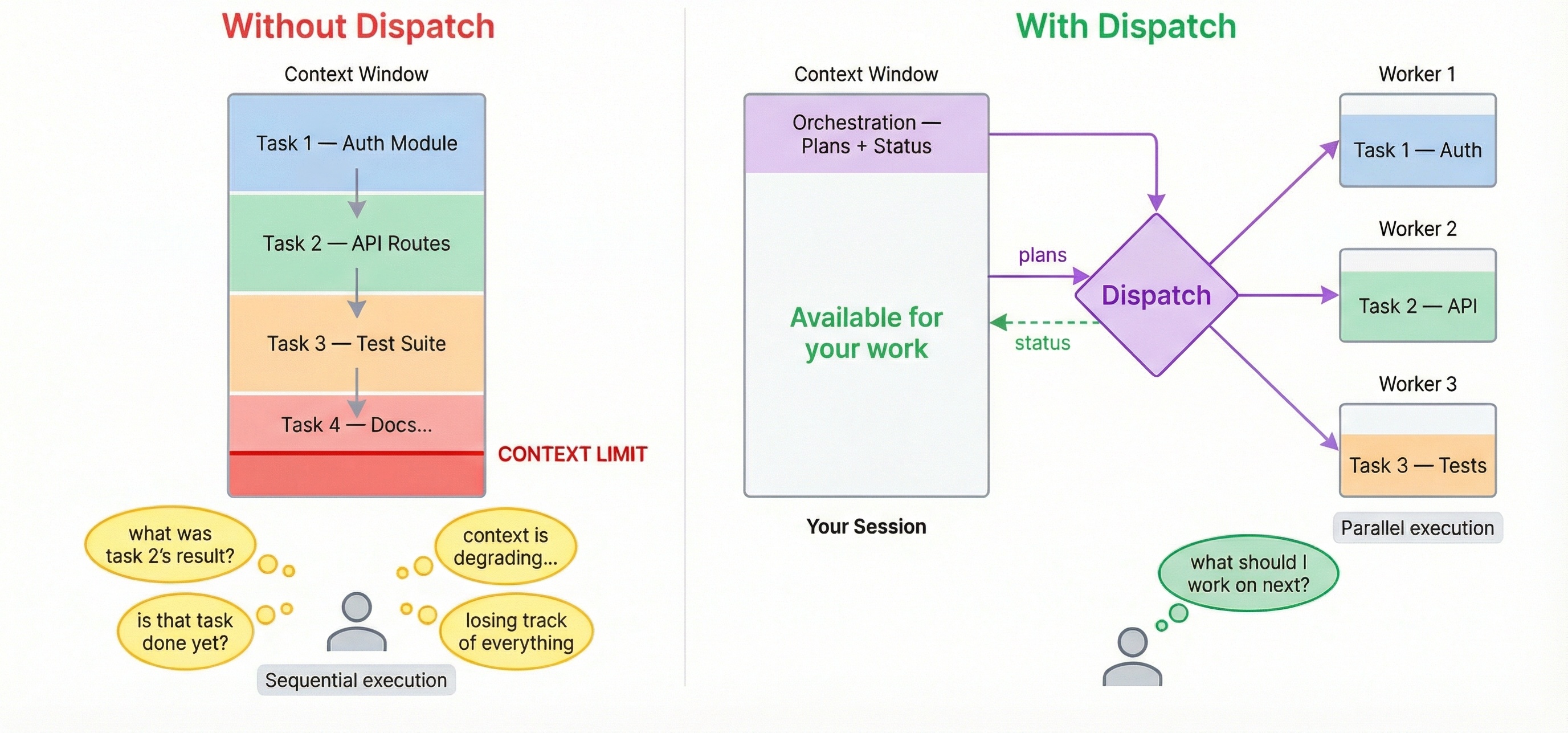
Without dispatch: You ask Claude to review code, refactor a module, write tests, and update docs. Each task fills the context window. By task 3, Claude is losing track. By task 5, you're starting a new session.
With dispatch: You describe all 5 tasks. Workers execute in parallel with fresh contexts. Your main session stays lean. Questions surface to you when needed — no polling, no context lost.
/dispatch use sonnet to find better design patterns for the auth module
Dispatch inverts the usual model: the main session becomes a mediator, not the thinker. It writes a checklist and hands it off. The actual implementation — reading code, reasoning about edge cases, writing tests — happens in fresh worker contexts that each get their own full window. Your main session's context is preserved for orchestration.
With claude --background, multiple terminals, or fire-and-forget agent runners — you are the orchestrator. You track what's running, check on progress, notice failures, and context-switch between outputs.
With dispatch, the AI dispatcher tracks all workers, surfaces questions, reports completions, handles errors, and offers recovery. Your job reduces to: (a) describe what you want, (b) answer questions when asked.
When a /dispatch worker gets stuck, it doesn't silently fail or hallucinate. It asks a clarifying question — the dispatcher surfaces it to you, you answer, and the worker continues without losing context. No restart, no re-explaining, no lost work.
Worker is asking: "requirements.txt doesn't exist. What feature should I implement?"
> Add a /health endpoint that returns JSON with uptime and version.

Answer sent. Worker is continuing.
The moment a worker is dispatched, your session is immediately free. Dispatch another task. Ask a question. Write code. Workers run in parallel and results arrive as they complete.
Mix models per task. Claude for deep reasoning, GPT for broad generation, Gemini for speed. Reference any model by name — if it's not in your config, /dispatch auto-discovers and adds it. If multiple models are named in one prompt, dispatch uses the last one mentioned. If no model is specified, dispatch confirms your default before proceeding.
/dispatch use opus to review this PR for edge cases
/dispatch use gemini to refactor the config parser — it's getting unwieldy
Requires Claude Code as your host session. Dispatch is a skill that runs inside Claude Code — the host plans tasks and spawns workers. Other CLIs like Cursor and Codex work as workers only (background agents that execute subtasks).
npx skills add bassimeledath/dispatch -g     # user-level (all projects)
npx skills add bassimeledath/dispatch        # project-level (team-shared)
/dispatch task descriptionExample — pre-launch sweep for a fullstack SaaS app:
/dispatch we launch Thursday, need a full pre-launch sweep:

1) security audit the auth flow (JWT, sessions, password reset) and the
   stripe payment integration. use opus, do it in a worktree

2) performance - load test the top 5 API endpoints, find N+1 queries,
   check db indexes on users/orders/products tables. sonnet in a worktree

3) frontend audit - accessibility (WCAG 2.1 AA), bundle size, flag any
   components missing error boundaries. dispatch sonnet

4) generate OpenAPI specs for every endpoint that's missing one. use gemini

5) error handling audit - find uncaught exceptions, missing try/catch,
   inconsistent error response formats across all API routes. sonnet, worktree

ask me if anything is unclear. security is highest priority - flag
anything critical immediately
Dispatch reads the prompt, creates 5 plans, and fans out:
All 5 workers dispatched with their monitors. Here's the summary:

Security (worktree):
  ● security-audit — Opus 4-6 (worktree): Full auth + payment security review

Performance (worktree):
  ● perf-audit — Sonnet 4-6 (worktree): API load testing + DB index review

Frontend (single worker):
  ● frontend-audit — Sonnet 4-6: Accessibility, bundle size, error boundaries

Docs (single worker):
  ● api-docs — Gemini 2.5 Flash: Generate missing OpenAPI specs

Error handling (worktree):
  ● error-handling — Sonnet 4-6 (worktree): Uncaught exceptions + error format audit

All running in background. Five workers, three models, three worktrees —
your session wrote five checklists and is idle. Dispatch more work or say
"status" anytime.
Run /dispatch with no arguments at the beginning of a session to pre-load your config:
/dispatch
This reads ~/.dispatch/config.yaml into the dispatcher's context so subsequent dispatches are faster and don't need confirmation prompts. It's a good habit to add as a Claude Code memory so you remember to do it each session:
"Run /dispatch at the start of each session to warm up the config."
On first run, /dispatch auto-detects your CLIs (claude, agent, codex), discovers available models, and generates ~/.dispatch/config.yaml. No manual config needed.
Three sections in ~/.dispatch/config.yaml:
Backends — CLI commands for each provider:
backends:
  claude:
    command: >
      env -u CLAUDE_CODE_ENTRYPOINT -u CLAUDECODE
      claude -p --dangerously-skip-permissions
  cursor:
    command: >
      agent -p --force --workspace "$(pwd)"
  codex:
    command: >
      codex exec --full-auto -C "$(pwd)"
Models — one line each, mapped to a backend:
models:
  opus:            { backend: claude }
  sonnet:          { backend: claude }
  gpt-5.3-codex:  { backend: codex }
  gemini-3.1-pro:  { backend: cursor }
Aliases — named shortcuts with optional role prompts:
aliases:
  security-reviewer:
    model: opus
    prompt: >
      You are a security-focused reviewer. Prioritize OWASP Top 10.
Host (required):
claude)Workers (optional — for multi-model dispatch):
agent)codex)Skills CLI (recommended):
npx skills update
This updates all installed skills to their latest versions. Run npx skills check first to see what's changed.
Symlinked to a local clone? If your .claude/skills/dispatch is a symlink to a local git checkout, just pull:
cd /path/to/your/dispatch && git pull
Changes are picked up immediately — Claude Code hot-reloads skills from disk.
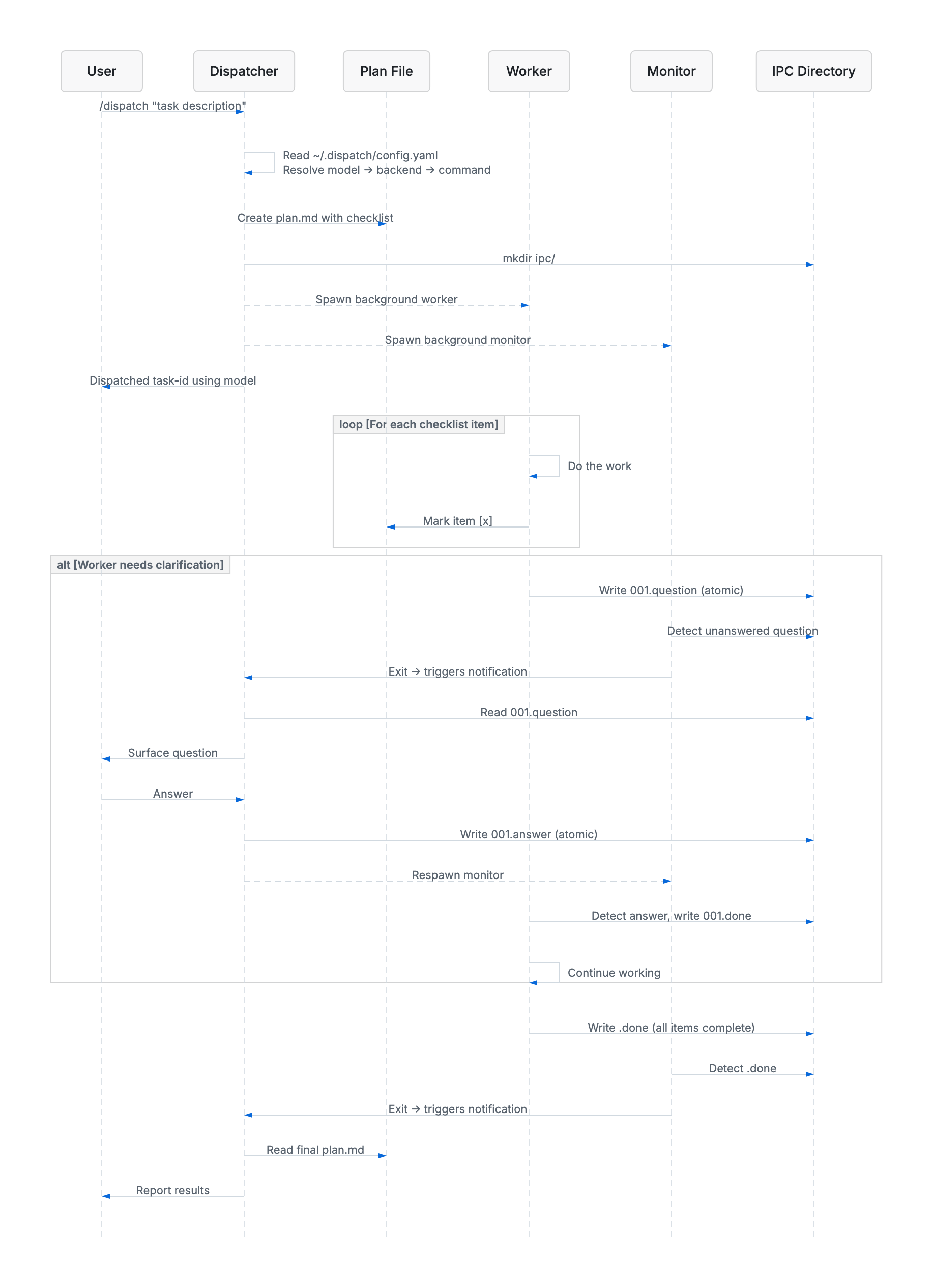
The dispatcher reads your config, creates a checklist plan, then spawns a background worker and monitor. The worker executes each item and checks it off. If it needs clarification, it writes a question to the IPC directory — the monitor detects it and notifies the dispatcher, which surfaces it to you and relays your answer back, all without the worker losing context.
MIT
Sign in to join the discussion.
No comments yet. Be the first to say what this is good for.
An agentic skills framework & software development methodology that works.

Turn any codebase, with its docs, SQL schemas, configs, and PDFs, into a queryable knowledge graph. A /graphify skill for Claude Code, Cursor, Codex, and Gemini CLI: local deterministic AST parsing, every edge explained, no vector store.

Topic in, narrated explainer video out. A Claude Code / Codex skill that turns any topic into a black-canvas motion-graphics explainer video with TTS voiceover, subtitles and a chapter progress bar. Chinese or English; every frame drawn in code with Remotion.
Public repository for Agent Skills
Open-source AI job search: scan job portals, evaluate listings into a structured A-H report with a global 1-5 score, tailor your CV, track applications — runs locally in your AI coding CLI (Claude Code, Codex, OpenCode, Antigravity…)

Production-grade engineering skills for AI coding agents.