
JuliusBrussee/
caveman

🪨 why use many token when few token do trick — Claude Code skill that cuts 65% of tokens by talking like caveman
105k
1 add
AMQ gives agents a shared local mailbox for messages, replies, threads, receipts, and status. It works through the filesystem, so builders can inspect, debug, and version the queue like normal files. The repo also includes launch and wake workflows, cross-project routing, and companion bridge and keepalive commands. It is designed to sit under orchestrators and agent CLIs, not replace them.
Builders who want agent sessions to pass messages, hand off work, and keep context across terminals and projects.
You can coordinate multiple agent sessions without re-explaining work or copying updates by hand.
Uses Maildir-style tmp/new/cur directories for atomic, crash-safe message writes.
Supports send, reply, list, drain, threading, kinds, priorities, and delivery receipts.
`amq wake` can notify terminals when new messages arrive and track wake state.
Routes messages across peer repositories and keeps reply routing and project metadata intact.
`amq setup` writes local queue config and `amq launch` starts or resumes declared agent sessions.
Includes `amq-bridge` for two-host handoff and optional adapter hooks for external systems.
`amq doctor` and related commands report queue health, backlog, DLQ state, and integration hints.
brew install avivsinai/tap/amq
curl -fsSL https://raw.githubusercontent.com/avivsinai/agent-message-queue/main/scripts/install.sh | bash
amq --version
npx skills add avivsinai/agent-message-queue -g -y
curl -fsSL https://raw.githubusercontent.com/avivsinai/agent-message-queue/main/scripts/install.sh | bash -s -- --skill
amq setup



A local, file-based interoperability bus for agent sessions and adapters.
AMQ manages the conversation: agent-to-agent messaging, thread continuity, cross-session and cross-project routing, handoff state, and operational visibility. It does not try to own task decomposition, worktree management, dependency scheduling, or scheduler execution; Claude Code teams, Codex, Kanban, Symphony, and similar orchestrators stay one layer above it.
Start here: Getting started — install, start two agents, send one message.
Modern AI-assisted development often involves multiple agents working on the same codebase. But without coordination:
AMQ gives agents a local interoperability bus: they can send messages, reply in threads, share status, and optionally consume adapter-emitted events through the same queue primitives. The core product stays intentionally small: file-based messages first, lightweight adapters second.
cat, debug with grep, version with git.amq wake injects terminal notifications when messages arrive.amq doctor --ops shows queue depth, sibling-session backlogs, DLQ state, presence freshness, and integration hints.amq-bridge hops signed envelopes between two local AMQ roots (apply-file today; HTTPS courier when an operator provisions a rendezvous).AMQ Core stays a local CLI. These stay out of the amq binary and out of v1
product claims (see two-host fleets and
bridge protocol):
amqamq, ACP v2, or --always-approve in committed launch plans--root / argv / env / executableCross-host mail is companion amq-bridge (alias send / local apply / same-thread reply), not Core. The proven hop is amq-bridge apply-file on the destination host. The HTTPS courier stays implemented for an operator-provided rendezvous; AMQ does not ship a hosted relay. See amq-bridge.
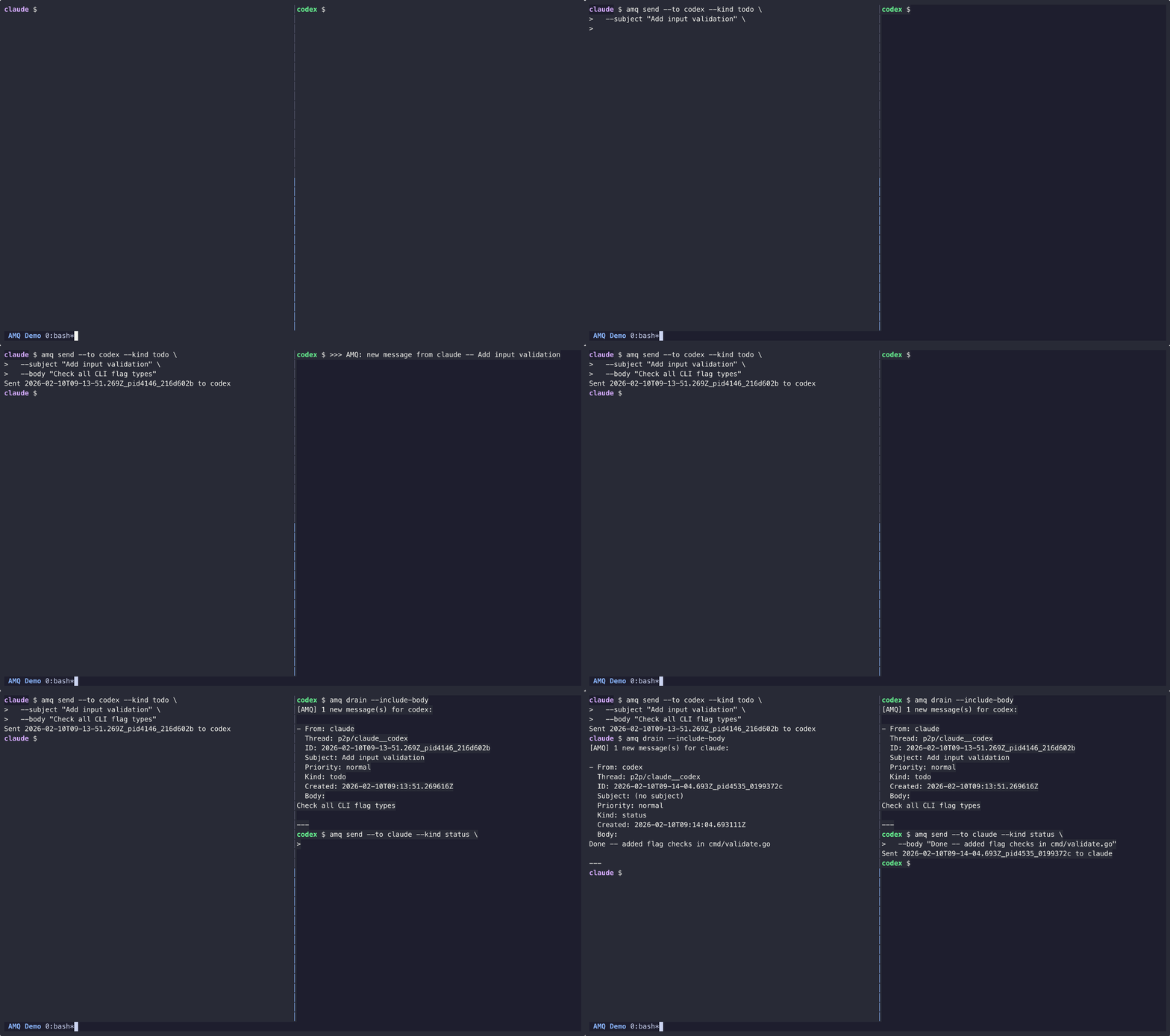
About five minutes from install to the first delivered message. You need two
agent CLIs on PATH. This walkthrough uses Claude Code (claude) and
Codex CLI (codex) on one machine. amq setup also detects Grok Build
(grok) and Cursor when agent is on PATH (or legacy cursor-agent if
agent is absent).
Native Windows can run the core queue from the Windows ZIP, but this
walkthrough needs coop exec and wake, which are not supported natively.
Use WSL with the Linux binary. See the
platform capability matrix.
macOS (Homebrew):
brew install avivsinai/tap/amq
macOS / Linux (script):
curl -fsSL https://raw.githubusercontent.com/avivsinai/agent-message-queue/main/scripts/install.sh | bash
The script installs to ~/.local/bin or ~/go/bin (no sudo). Review it
before running. It fails unless checksums.txt has exactly one valid entry
for the selected asset and sha256sum or shasum verifies it before
extraction.
Verify:
amq --version
Manual download, Windows ZIP, and build-from-source are in INSTALL.md.
So each agent knows the AMQ commands:
npx skills add avivsinai/agent-message-queue -g -y
If you used the install script instead of Homebrew, you can do binary and skill in one step:
curl -fsSL https://raw.githubusercontent.com/avivsinai/agent-message-queue/main/scripts/install.sh | bash -s -- --skill
Other skill methods (skild, marketplace, manual copy) are in INSTALL.md. Restart the agent after installing.
In the repository the two agents will share:
amq setup
Setup probes for Claude, Codex, and Grok (and Cursor when present), previews the
roster and launcher preference, then writes .amqrc, .amq/launch.json,
local preferences, the default session, and roster mailboxes. Confirm the
preview.
If setup reports no supported agent CLI detected, install claude and
codex, put them on PATH, and run amq setup again.
amq launch
The first launch asks you to trust the plan. That confirmation is stored outside the worktree.
tmux, cmux, or ghostty, both agents start in that
app.commands backend, it prints one complete
coop exec line per agent and exits 6. Paste each emitted line into
its own terminal. Do not rewrite the lines: they bind the session, launch
nonce, provider arguments, and execution ticket.Start both agents before sending. A newly started wake baselines messages
that were already waiting, so they stay unread but do not notify. If you
sent first, run amq drain --include-body in the target agent.
In the Claude terminal (AM_ME is already set):
amq send --to codex --subject "Hello" --body "Can you see this?"
In the Codex terminal:
amq list --new
amq drain --include-body
You should see Claude's message, then the drained body. That is the loop:
send on one side, list / drain on the other. Reply with
amq reply --id <msg_id> --body "..." when you have a message ID.
Roles, phases, and troubleshooting live in COOP.md. Daily commands after this first message are in Messaging below.
The default install is in Getting started. More methods (releases ZIP, checksums, source build, skill marketplace) are in INSTALL.md.
Homebrew:
brew upgrade amq
amq upgrade checks the raw and resolved executable paths against every
evidenced or executable-derived Homebrew prefix and delegates to the matched
Homebrew executable instead of overwriting the Cellar; pass amq upgrade -y
to run the delegate without an AMQ prompt. The package manager may still
prompt. Scoop installs on Windows are scoped as user ($SCOOP or the default
%USERPROFILE%\scoop) or global ($SCOOP_GLOBAL or C:\ProgramData\scoop);
the matched scoop executable receives scoop update amq for user scope or
scoop update -g amq for global scope.
Retire live wakes started by the previous Cellar binary first. If a leftover
lock's image directory is gone, wake check reports binary_dir_gone;
remove it with amq doctor --ops --fix-wake-locks. See
Wake operations.
GitHub Actions verify-brew-release confirms a published tag installs from
avivsinai/tap/amq and that amq --version matches that tag. It does not
replace brew upgrade on an operator machine.
Install-script or other manual binary installs outside an evidenced Homebrew prefix keep the direct download and atomic-replace path:
amq upgrade
Upgrade the companion binaries (amq-keepalive, amq-bridge, amq-acp)
that sit in the raw or resolved executable directory of a direct-install
amq, or in ~/.local/bin, from the same release tag, with checksum
verification:
amq upgrade --all
The command plans one verified target per companion, unique across all
companions, before any companion replacement. It verifies each target's Go
build identity. Missing companions are skipped with a line; cross-companion
aliases, wrong builds, and multiple distinct targets refuse the upgrade and
give a repair action. Same-name symlink aliases to one canonical target are
accepted; same-name hardlinks refuse. A
running amq-keepalive is never killed: the atomic rename swaps the path
while the running process keeps the old image.
When the upgraded path is the supervisor's path, amq upgrade --all notes
that self-upgrade can pick up a strictly newer image on its next supervise pass. A
supervisor started with --no-self-upgrade must be restarted through its
service manager; on macOS use amq-keepalive install-launchd, and on Linux
restart the service unit, for example
systemctl --user restart amq-keepalive.service. Companions are
direct-installed only; the
Homebrew formula and Scoop manifest ship amq itself, so --all under a
package-managed install is a no-op with an explanatory line. Companion links
are revalidated by their primary path; a secondary same-name alias repointed
during download is not detected.
AMQ_CACHE_DIR overrides the update cache location used by amq upgrade and
the background update notifier. When unset, the platform cache
(~/Library/Caches on macOS, XDG_CACHE_HOME or ~/.cache on Linux and
other Unix systems, and the user's Local AppData cache on Windows) is used.
internal/update.DefaultCachePath is the sole authority for the platform
update-cache path. For the direct-upgrade cache-writing path, a set override
must resolve to an absolute path; AMQ fails before replacement rather than
silently falling back to the platform cache. The version cache is refreshed
after an authoritative direct check confirms the latest version (already
current, or after a successful immediate replacement). A later companion
failure does not change that result. A scheduled replacement is reflected when
the next successful check refreshes the cache (best-effort).
On Windows, amq upgrade --all upgrades a directly installed
amq-keepalive.exe; it skips amq-bridge and amq-acp, which are not
published for Windows, then continues with the core upgrade.
amq-keepalive is developed and released from this repository alongside AMQ.
make build produces both binaries, and each AMQ release includes a separate
amq-keepalive archive stamped with the same release version, including a
native Windows ZIP. Verify a build
with any equivalent form:
amq-keepalive -v
amq-keepalive --version
amq-keepalive version
See COOP.md for the operational guide.
amq setup is the one-time project configuration. amq launch reconciles
the committed roster and starts or resumes that session.
amq setup
amq launch
amq session create feature-x   # once, before the first named-session launch
amq launch --session feature-x
amq session resume feature-x
launch reads the committed roster, selects the declared default session
when --session is absent, and resumes exact provider-qualified conversation
IDs. It never uses a provider's "last" or "continue" heuristic. The first
semantic plan, and each semantic plan change, requires an interactive trust
confirmation stored outside the worktree. Non-interactive or --json calls
exit 6 until that digest is trusted. An unknown session resume name
exits 3 and writes nothing. Managed backends use a fail-closed recovery
journal; see Managed launch recovery.
Registered launchers are commands, tmux, cmux (envelope >=0.64.3 <1.0,
protocol 2), and ghostty (AppleScript, envelope >=1.3.0 <2.0).
--launcher auto is the default: it walks the local launcher preference and
selects the first backend whose Detect reports Available. An explicit
--launcher <name> wins. When CMUX_SURFACE_ID is set, auto prepends
cmux ahead of ghostty; otherwise TERM_PROGRAM=ghostty prepends
ghostty. Setup lists cmux and Ghostty in available_launchers only after
their Detect ping succeeds, not from LookPath alone.
The commands backend prints complete coop exec commands and exits 6
because executing them is the remaining operator action. Paste those emitted
lines exactly, one per terminal. Managed tmux, cmux, and ghostty
backends run the declared plan in-app instead of printing those lines.
Grok Build is also supported by the managed launch adapter. It mints an exact
--session-id from the AMQ launch nonce and resumes only with the stored
--resume <UUID>; --continue, --always-approve, and --yolo are rejected
from committed launch arguments. Grok uses --tools / --disallowed-tools
with opaque provider names (not Claude --allowedTools).
Each launched agent gets a session environment and wake notifications. See COOP.md for co-op operations.
Provider arguments belong in the committed .amq/launch.json, so launch
can validate and include them in its semantic trust digest. For example:
{
  "schema": 1,
  "default_session": "collab",
  "agents": [
    {
      "handle": "claude",
      "adapter": "claude",
      "command": ["claude", "--permission-mode", "acceptEdits"],
      "resume_policy": "resume"
    },
    {
      "handle": "codex",
      "adapter": "codex",
      "command": ["codex", "--sandbox", "workspace-write", "--ask-for-approval", "on-request"],
      "resume_policy": "resume"
    }
  ],
  "layout": {"type": "columns"}
}
Dangerous permission-bypass flags are not valid committed arguments. Keep
them in an operator-controlled direct coop exec invocation when that
low-level path is intentionally required.
Direct coop exec names the provider session by default as
<session>/<handle> (or <handle> for a sessionless root). Claude and Pi
receive the name in their argv. Codex receives its name through its native API
after AMQ identifies the main thread opened by the launched process. If that
cannot be confirmed, AMQ prints a manual /rename command; queue delivery is
unaffected. Cursor agent receives a best-effort TUI rename after AMQ verifies
the newly created session. Codex supports direct
resume by name, for example codex resume session1/codex. Cursor agent
resumes through its picker only; resume-by-name is unproven. Set
--named=false, AMQ_COOP_NAMED=0, or "named": false in .amq/launch.json
to disable it. Explicit provider names and resume or continue flags remain
unchanged, including codex resume and agent --resume. Managed launches keep
naming disabled until their provider-name contract is available.
For isolated pairs (multiple pairs on different features):
amq session create feature-a
amq launch --session feature-a
When launch uses the commands backend, paste the complete emitted commands
into separate terminals.
Automation uses a stateless preview and applies only that approved digest. The first non-interactive setup must name the roster, default session, and launcher preference explicitly:
setup_args=(--agents claude,codex --default-session collab --launcher-preference commands)
setup_preview="$(amq setup --preview --json "${setup_args[@]}")"
setup_digest="$(printf '%s\n' "$setup_preview" | jq -r '.preview.digest')"
amq setup --apply "$setup_digest" "${setup_args[@]}"
--preview performs zero writes. --apply recomputes the preview and exits
6 without writing if its sha256:<hex> digest differs. -y remains
available for callers that already own an approval gate, but it cannot be
combined with --preview or --apply.
Optional aliases are a convenience, not part of Getting started.
A bare eval "$(amq shell-setup)" affects only the current shell. To make
aliases such as amc, amx, and amg available in future terminals, add
the setup command to your shell startup file:
# zsh
amq shell-setup --shell zsh >> ~/.zshrc

# bash
amq shell-setup --shell bash >> ~/.bashrc
Run the appropriate append command once, then open a new terminal or source
that startup file. Use the bare eval only when you intentionally want
aliases in one already-open shell.
coop init and direct coop exec provisioning remain available as legacy
low-level plumbing. See COOP.md for those
paths, operator-only bypass examples, and advanced wake options; they are
not a second project-onboarding flow.
Scripts and orchestrators that must plan and apply a session without parsing human output should use the public launch contract in docs/launch-api.md and schemas/launch-api-v1.schema.json.
Inside a launched agent, identity and session are already set:
amq send --to codex --subject "Review needed" --kind review_request \
  --body "Please review internal/cli/send.go"

amq list --new
amq list --new --priority urgent
amq list --new --from codex --kind review_request

amq drain --include-body

amq send --to codex --body "Please pick this up" \
  --wait-for drained --wait-timeout 60s

amq receipts list --me codex --msg-id <msg_id>

amq reply --id <msg_id> --kind review_response --body "LGTM with comments"
To send between known sessions before entering coop exec:
amq send --root .agent-mail --from-session feature-a --me claude \
  --to codex --session feature-b --body "Please review the setup"
read, drain, and monitor apply the same strict message validation.
Invalid messages move to DLQ and produce a dlq receipt. Participating
shells also pin their exact session context and refuse mismatched mailbox
operations. See Session routing and safety.
amq doctor
amq doctor --ops
amq wake check --me <agent>
amq wake check is read-only. It reports whether this process can start or
repair a wake, and a restart_capability of agent_safe, operator_only,
or unavailable with an exact next action. Automated agents may act only on
agent_safe; leave a live wake running otherwise.
Wake lock states, JSON schema 2, repair, owner recovery, retirement, and
quarantine rules are in Wake operations,
wake lifecycle, and
wake state invariants. Consumption itself
is drain / monitor, evidenced by receipts. Long-running wake /
monitor under systemd or launchd is in
Supervisor recipes.
AMQ messages support kinds (review_request, question, todo, etc.) and priority levels (urgent, normal, low). See COOP.md for the full protocol.
For real-time Claude Code + Codex CLI collaboration patterns, roles, and phased workflows, see COOP.md.
AMQ can route messages across repositories, not just across agents in one checkout. Add a project name plus peer roots to .amqrc:
{
  "root": ".agent-mail",
  "project": "app",
  "peers": {
    "infra-lib": "/Users/me/src/infra-lib/.agent-mail"
  }
}
Then send directly to another project:
amq send --to codex --project infra-lib --body "Can you review the shared API change?"
amq send --to codex@infra-lib:collab --thread decision/release-v0.24 --kind decision \
  --labels "decision:proposal,project:app,project:infra-lib" \
  --body "Proposal: align both repos on v0.24"
Replies route back automatically with the stamped reply_project metadata. When from matches your own handle, inspect from_project before treating the message as an echo; the same handle in a different project is a legitimate cross-project sender. This shipped in v0.22.0 and is the recommended way to coordinate multi-repo agent work without adding a broker.
External agents (Codex, etc.) can join Claude Code Agent Teams via amq swarm join, claim tasks, and receive notifications through amq swarm bridge. Note: the bridge delivers task notifications only; direct messages require relay through the team leader.
For the full command reference, see CLAUDE.md.
Most AMQ commands resolve the queue root from the project .amqrc or the
default .agent-mail layout in the current tree. For agents launched outside
an AMQ-enabled repo by external orchestrators, you can configure a global
root. Explicit AMQ_GLOBAL_ROOT does not shadow project .amqrc, but it does
take precedence over repo-local auto-detection:
export AMQ_GLOBAL_ROOT="$HOME/.agent-mail"
Or create ~/.amqrc:
{"root": ".agent-mail"}
Root resolution precedence is:
explicit --root > AM_ROOT > project-local .amqrc > AMQ_GLOBAL_ROOT > implicit fallbacks
Inside a Git worktree or bare repository, the remaining eligible fallback is
repo-local detected .agent-mail; implicit ~/.amqrc is refused. Outside
Git, ~/.amqrc remains a convenience fallback and precedes detected
.agent-mail. Set
AMQ_GLOBAL_ROOT explicitly when shared routing is intentional.
coop exec honors that precedence before bootstrap. In a Git worktree with no
eligible root, it bootstraps <git-top>/.agent-mail; --session X creates that
named session afterward, while --no-init preserves the refusal. coop init
is the explicit local-bootstrap command and also targets the Git top. Bare
repositories do not auto-bootstrap.
If a project .amqrc exists but cannot be read or parsed, AMQ stops instead
of silently delivering through a lower-precedence fallback. Use an explicit
--root or AM_ROOT when you intentionally need to override that config.
For an external orchestrator or plain shell that should stay pinned to one session, opt in explicitly:
amq_context="$(amq env --session auth --me claude --export)" && eval "$amq_context"
Every shell-mode amq env output replaces the complete context: AM_ROOT,
AM_ROOT_ID, AM_ME, AM_BASE_ROOT, AM_BASE_ROOT_ID, and AM_SESSION.
The two _ID values are opaque physical-identity tokens emitted or unset by
AMQ; do not set them manually. Sessionless output sets AM_BASE_ROOT to the
exact root and writes an empty AM_SESSION, so changing to another sessionless
root is detectable. --export additionally prints a stderr note that the
terminal is pinned. Treat this as one terminal, one session.
Auto-detect covers the default .agent-mail layout, including .agent-mail/<session> session roots without .amqrc. Custom root names and peer config still require .amqrc or explicit flags/env.
This same chain is used by amq env, amq doctor, and the integration commands, so Symphony and Kanban-launched agents can find the correct queue even wh
Sign in to join the discussion.
No comments yet. Be the first to say what this is good for.
🪨 why use many token when few token do trick — Claude Code skill that cuts 65% of tokens by talking like caveman

The best-benchmarked open-source AI memory system. And it's free.

Orca is the ADE for working with a fleet of parallel agents. Run any coding agent with your own subscription. Available on desktop, mobile and remote runtime.

A cross-platform desktop All-in-One assistant for Claude Code, Codex, OpenCode, OpenClaw, Grok Build & Hermes Agent. Only official website: ccswitch.io

Never stop coding. Free MIT AI gateway: one endpoint, 352 providers (150+ free), 1200+ models Kimi, Claude, GPT, Gemini, GLM, DeepSeek, MiniMax. Works with Claude Code, Codex, Cursor, OpenCode, Cline & Copilot. Quota-aware auto-fallback, RTK+Caveman compression saves 15-95% tokens, MCP/A2A, Desktop/PWA. Built by 550+ contributors

Compress tool outputs, logs, files, and RAG chunks before they reach the LLM. 20% fewer tokens for coding agents, 60-95% fewer tokens for JSON, same answers. Library, proxy, MCP server.