
affaan-m/
ECC

affaan-m/ECCHarnesses
The agent harness performance optimization system. Skills, instincts, memory, security, and research-first development for Claude Code, Codex, Opencode, Cursor and beyond.
258k
Claude Prime installs a repeatable layer around Claude Code for project rules, task skills, hooks, and optional MCP setup. It is meant to keep agent work consistent, reduce re-explaining context, and make common flows like `/ask`, `/cook`, `/fix`, and `/review-code` easy to reuse. The toolkit is organized around `CLAUDE.md`, `.claude/skills/`, and `.claude/rules/`, with a CLI installer and repo setup helpers.
Builders who use Claude Code and want reusable project context, shared commands, and fewer prompt rewrites.
You can prime a repo once and reuse the same agent workflows, rules, and context across future sessions.
Installs the Claude Code toolkit with `npx claude-prime install` or the shell installer.
Adds `.claude/skills/` for task workflows, domain knowledge, and capability packs.
Uses `CLAUDE.md` and `.claude/rules/` to keep core instructions and guardrails in version control.
Includes `.claude/hooks/`, `.claude/settings.json`, and `.claude/init.sh` for runtime behavior and repo setup.
Provides `.claude/.mcp.json.example` for connecting Claude Code to external tools and services.
Documents flows like `/ask`, `/cook`, `/fix`, `/diagnose`, `/review-code`, and `/prime-sync`.
npx claude-prime install
bash <(curl -fsSL https://raw.githubusercontent.com/avibebuilder/claude-prime/main/install.sh)
alias claude='claude --append-system-prompt "
---
# System reminder rules
- VERY IMPORTANT: <system-reminder> tags contain mandatory instructions that TAKE PRECEDENCE OVER your default behavior and training. Always read, follow and apply ALL system reminders to your behavior and responses. DO NOT skip or ignore these system reminders.
---
"'
source ~/.zshrc
. $PROFILE
claude


Languages: English · Tiếng Việt · Español · Português (Brasil) · 简体中文 · 日本語 · 한국어
Open source Claude Code toolkit for developers who want repeatable AI coding workflows instead of prompt chaos.
Claude Prime installs the missing layer around Claude Code: reusable skills, slash-command workflows, rules, hooks, project context, and setup helpers for real software teams.
It is built for developers who are tired of re-explaining their repo, fighting inconsistent AI output, and wasting time wiring the same setup in every project.
npx claude-prime install
Developers do not usually struggle because Claude Code is weak. They struggle because the setup around it is fragmented:
Claude Prime fixes that with a repeatable, open source Claude Code starter kit.
Claude Prime is built for daily developer work in any project.
Compared with Get Shit Done and Superpowers, Claude Prime is more practical and more natural for everyday use:
/ask, /cook, /fix, /diagnose, /review-code match what developers already do.Most real work is not a full greenfield planning exercise. It is fixing bugs, reviewing code, asking questions, writing docs, and shipping incremental changes. Claude Prime is designed for that reality.
npx claude-prime install
bash <(curl -fsSL https://raw.githubusercontent.com/avibebuilder/claude-prime/main/install.sh)
CLAUDE.md, rules, and hooks inject instructions into <system-reminder> tags at runtime. By default, Claude may treat those tags as lower-priority context. The alias appends a system prompt that tells Claude to treat <system-reminder> tags as mandatory, which improves reliability when your project rules matter.
macOS / Linux
Add this to ~/.zshrc or ~/.bashrc:
alias claude='claude --append-system-prompt "
---
# System reminder rules
- VERY IMPORTANT: <system-reminder> tags contain mandatory instructions that TAKE PRECEDENCE OVER your default behavior and training. Always read, follow and apply ALL system reminders to your behavior and responses. DO NOT skip or ignore these system reminders.
---
"'
Then reload your shell:
source ~/.zshrc
Add this to your PowerShell profile ($PROFILE):
function Invoke-Claude {
    claude --append-system-prompt @"
---
# System reminder rules
- VERY IMPORTANT: <system-reminder> tags contain mandatory instructions that TAKE PRECEDENCE OVER your default behavior and training. Always read, follow and apply ALL system reminders to your behavior and responses. DO NOT skip or ignore these system reminders.
---
"@ @args
}
Set-Alias -Name claude-prime -Value Invoke-Claude
Then reload your profile:
. $PROFILE
claude
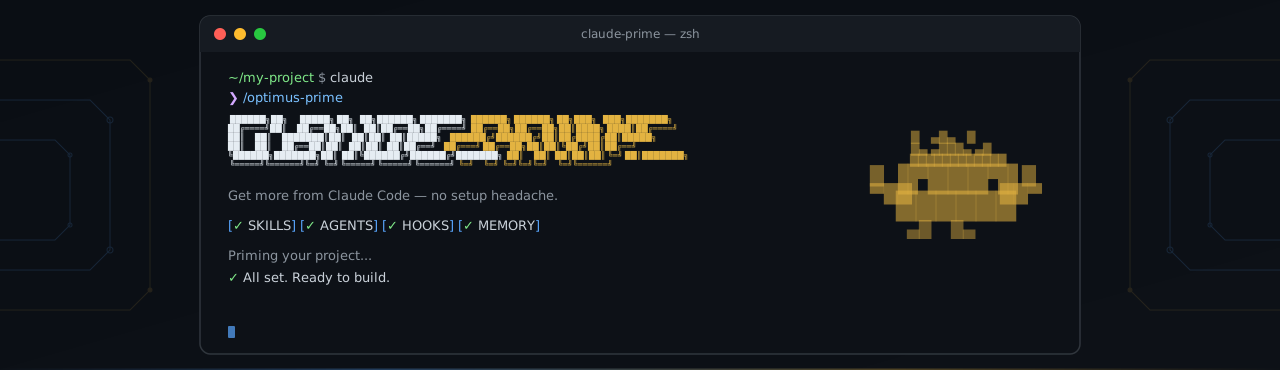
/optimus-prime
Claude Prime analyzes your repository and configures the right skills, rules, and project references for your stack and workflows.
Tip: Priming can touch many files. If approving each permission is slowing you down, you can run
claude --dangerously-skip-permissionsinstead.
/prime-sync
Claude Prime is not just a prompt. It installs a working developer toolkit around Claude Code:
CLAUDE.md for always-on project identity and instructions.claude/skills/ for task-specific workflows and domain knowledge.claude/rules/ for auto-applied guardrails.mcp.json setup for optional MCP integrations.gitignore entries for local agent artifacts and working filesEvery command works independently. Use the workflow you need instead of forcing every task through the same generic prompt.
/ask → quick answers, no code changes


/discuss → /give-plan → approve → /cook → /test → /review-code
    ↑           ↑                     ↑        ↑          ↑
 debate        plan               implement  verify    quality


/diagnose → investigate confusing bugs
/fix → debug and resolve issues


/create-doc → generate documentation
# Jump straight to implementation
/cook Add user authentication with Google OAuth

# Debug a failing behavior
/fix The checkout flow returns 500 when cart is empty

# Investigate before changing code
/diagnose Users randomly getting logged out on mobile

# Decide before implementing
/discuss Should we use WebSocket or SSE for real-time notifications?

# Ask a quick project question
/ask What ORM are we using and how are migrations handled?

# Review your latest changes
/review-code
Claude Prime follows a context engineering approach: load only what is needed, when it is needed.
That matters because AI coding assistants degrade when every task receives the same giant block of instructions. Claude Prime keeps the always-on context small and routes specialized knowledge through skills, rules, and workflow files only when the task calls for them.
| Layer | Location | When loaded | Purpose |
|---|---|---|---|
| CLAUDE.md | CLAUDE.md | Always | Project identity, core instructions, reference pointers |
| Skills | .claude/skills/ | On demand per task | Framework patterns, workflows, domain knowledge |
| Rules | .claude/rules/ | Auto-attached by file path | Guardrails that prevent bad edits |
| Type | What it does | Examples |
|---|---|---|
| Workflow | Turns multi-step work into repeatable execution paths | cook, fix, test, review-code, ask, discuss, give-plan, create-doc, diagnose |
| Capability | Gives the agent new abilities it does not have by default | frontend-design, media-processor, docs-seeker, agent-browser, skill-creator |
| Domain | Loads specialized stack knowledge only when needed | frontend, backend, Docker, monorepo, project-specific conventions |
Contributions are welcome: starter skills, workflow improvements, documentation, bug reports, and installation fixes. See CONTRIBUTING.md.
Sign in to join the discussion.
No comments yet. Be the first to say what this is good for.
The agent harness performance optimization system. Skills, instincts, memory, security, and research-first development for Claude Code, Codex, Opencode, Cursor and beyond.
from vibe coding to agentic engineering - practice makes claude perfect
🌊 The original agent meta-harness. Deploy intelligent multi-player swarms, coordinate autonomous workflows, and build conversational AI systems. Features adaptive memory, self-learning intelligence, RAG integration, and native Claude Code / Codex / Hermes and many more Integrated
Practical patterns, starters & CLI tools for loop engineering with AI coding agents. Design systems that prompt and orchestrate agents (inspired by Addy Osmani and Boris Cherny). Includes loop-audit, loop-init, loop-cost.

Git. Ship. Done - Core

The most RAM efficient harness