
JuliusBrussee/
caveman

🪨 why use many token when few token do trick — Claude Code skill that cuts 65% of tokens by talking like caveman
105k
1 add
This repo provides a standalone MCP client that talks to a server over HTTP streamable transport and renders the exchange in a browser-based chat UI. It can send user queries, receive streamed responses, and display tool usage and results while running as an Apify Actor.
Builders who want to test MCP servers and watch tool calls in a chat UI.
You can test an MCP server end to end without wiring up your own client.
Connects to MCP servers using the HTTP streamable transport.
Shows user messages, LLM output, tool calls, and tool results in a browser UI.
Connects to Apify's MCP Server for working with Apify Actors and tools.
Uses API keys and authorization headers for secure server connections.
Runs as an Apify Actor with pay-per-event pricing and logs that expose the chat UI link.
INFO Navigate to https://......runs.apify.net in your browser to interact with an MCP server.
Implementation of a model context protocol (MCP) client that connects to an MCP server using HTTP streamable (recommended) transport and displays the conversation in a chat-like UI. It is a standalone Actor server designed for testing MCP servers over HTTP streamable. It uses Pay-per-event pricing model.
For more information, see the Model Context Protocol website or blogpost What is MCP and why does it matter?.
Once you run the Actor, check the output or logs for a link to the chat UI interface to interact with the MCP server. The URL will look like this and will vary each run:
Navigate to https://...apify.net to interact with chat-ui interface.
When connected to Apify MCP Server the Tester MCP Client provides an interactive chat interface where you can:
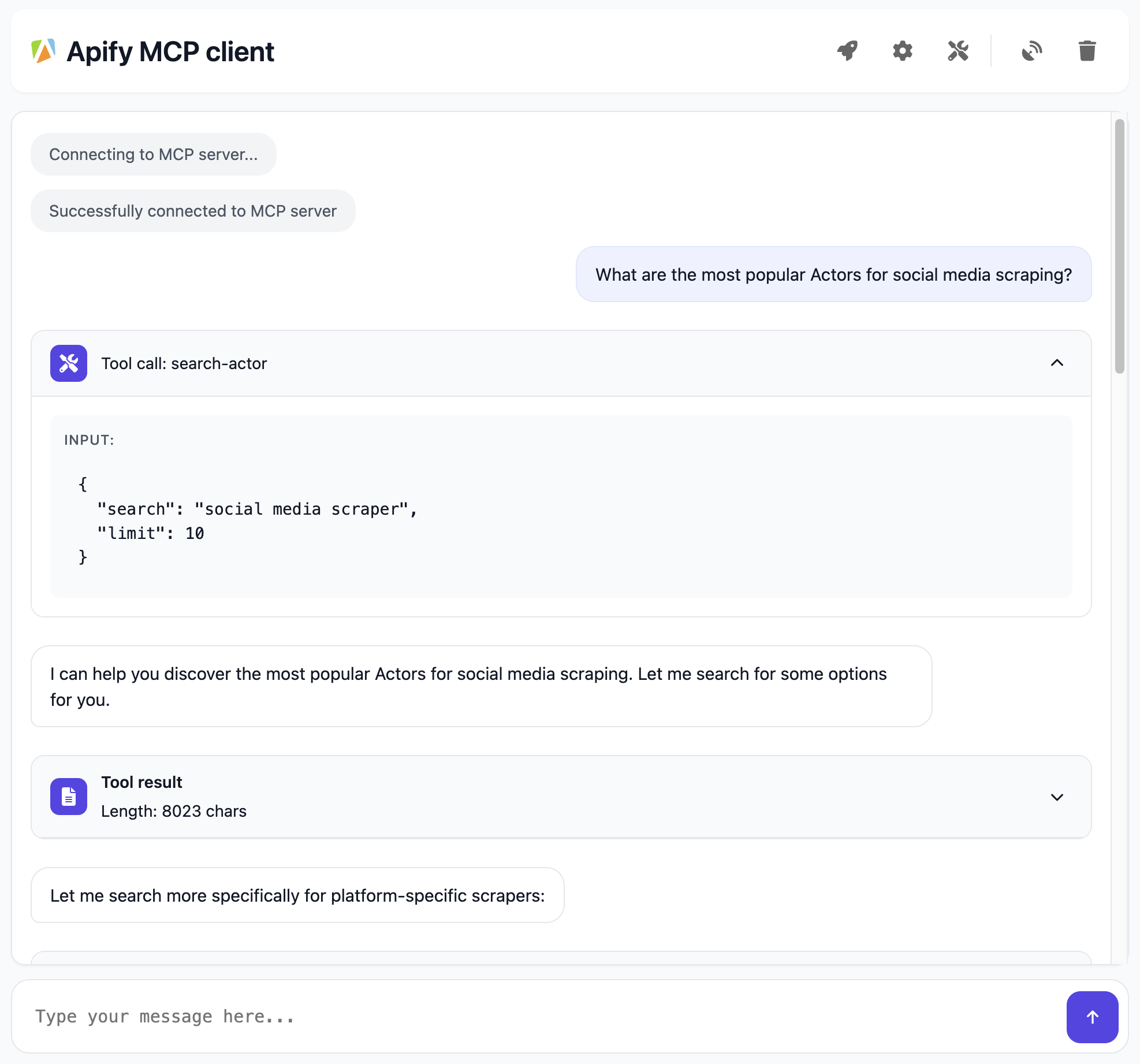
The Apify MCP Client connects to a running MCP server over HTTP streamable and it does the following:
Learn about the key features and capabilities in the Apify MCP Server Tutorial: Integrate 5,000+ Apify Actors and Agents Into Claude video
Apify MCP Server Tutorial: Integrate 5,000+ Apify Actors and Agents Into Claude
You can run the Tester MCP Client on Apify and connect it to any MCP server that supports HTTP streamable. Configuration can be done via the Apify UI or API by specifying parameters such as the MCP server URL, system prompt, and API key.
Once you run Actor, check the logs for a link to the Tester MCP Client UI, where you can interact with the MCP server: The URL will look like this and will be different from run to run:
INFO Navigate to https://......runs.apify.net in your browser to interact with an MCP server.
The Apify MCP client uses a modern and flexible approach for AI Agents monetization and pricing called Pay-per-event. You only need to have Apify account and you can use it, LLM provider API key is not required but you can supply it if you want to use your own LLM provider.
Current models:
claude-sonnet-4-5-20250929) - Default for Sonnetclaude-haiku-4-5-20251001) - Default model, faster and more cost-effectiveDeprecated models (still supported with automatic migration):
claude-sonnet-4-0) → migrates to Sonnet 4.5claude-3-7-sonnet-latest) → migrates to Sonnet 4.5claude-3-5-haiku-latest) → migrates to Haiku 4.5When you use your own LLM provider API key, running the MCP Client for 1 hour with 128 MB memory costs approximately $0.06. With the Apify Free tier (no credit card required 💳), you can run the MCP Client for 80 hours per month. Definitely enough to test your MCP server!
Browser ← (SSE) → Tester MCP Client ← (HTTP streamable) → MCP Server
We create this chain to keep any custom bridging logic inside the Tester MCP Client, while leaving the main MCP Server unchanged. The browser uses SSE to communicate with the Tester MCP Client, and the Tester MCP Client relies on HTTP streamable to talk to the MCP Server. This separates extra client-side logic from the core server, making it easier to maintain and debug.
https://tester-mcp-client.apify.actor?token=YOUR-API-TOKEN (or http://localhost:3000 if you are running it locally).index.html and client.js are served from the public/ directory.GET /sse.POST /message.sseEmit(role, content)The Tester MCP Client Actor is open source and available on GitHub, allowing you to modify and develop it as needed.
Download the source code:
git clone https://github.com/apify/tester-mcp-client.git
cd tester-mcp-client
Install the dependencies:
npm install
Create a .env file with the following content (refer to the .env.example file for guidance):
APIFY_TOKEN=YOUR_APIFY_TOKEN
LLM_PROVIDER_API_KEY=YOUR_API_KEY
Default values for settings such as mcpUrl, systemPrompt, and others are defined in the const.ts file. You can adjust these as needed for your development.
Run the client locally
npm start
Navigate to http://localhost:3000 in your browser to interact with the MCP server.
Happy chatting with Apify Actors!
The client does not support all MCP features, such as Prompts and Resource.
Sign in to join the discussion.
No comments yet. Be the first to say what this is good for.
🪨 why use many token when few token do trick — Claude Code skill that cuts 65% of tokens by talking like caveman

The best-benchmarked open-source AI memory system. And it's free.

Orca is the ADE for working with a fleet of parallel agents. Run any coding agent with your own subscription. Available on desktop, mobile and remote runtime.

A cross-platform desktop All-in-One assistant for Claude Code, Codex, OpenCode, OpenClaw, Grok Build & Hermes Agent. Only official website: ccswitch.io

Never stop coding. Free MIT AI gateway: one endpoint, 352 providers (150+ free), 1200+ models Kimi, Claude, GPT, Gemini, GLM, DeepSeek, MiniMax. Works with Claude Code, Codex, Cursor, OpenCode, Cline & Copilot. Quota-aware auto-fallback, RTK+Caveman compression saves 15-95% tokens, MCP/A2A, Desktop/PWA. Built by 550+ contributors

Compress tool outputs, logs, files, and RAG chunks before they reach the LLM. 20% fewer tokens for coding agents, 60-95% fewer tokens for JSON, same answers. Library, proxy, MCP server.